Android on folding screens
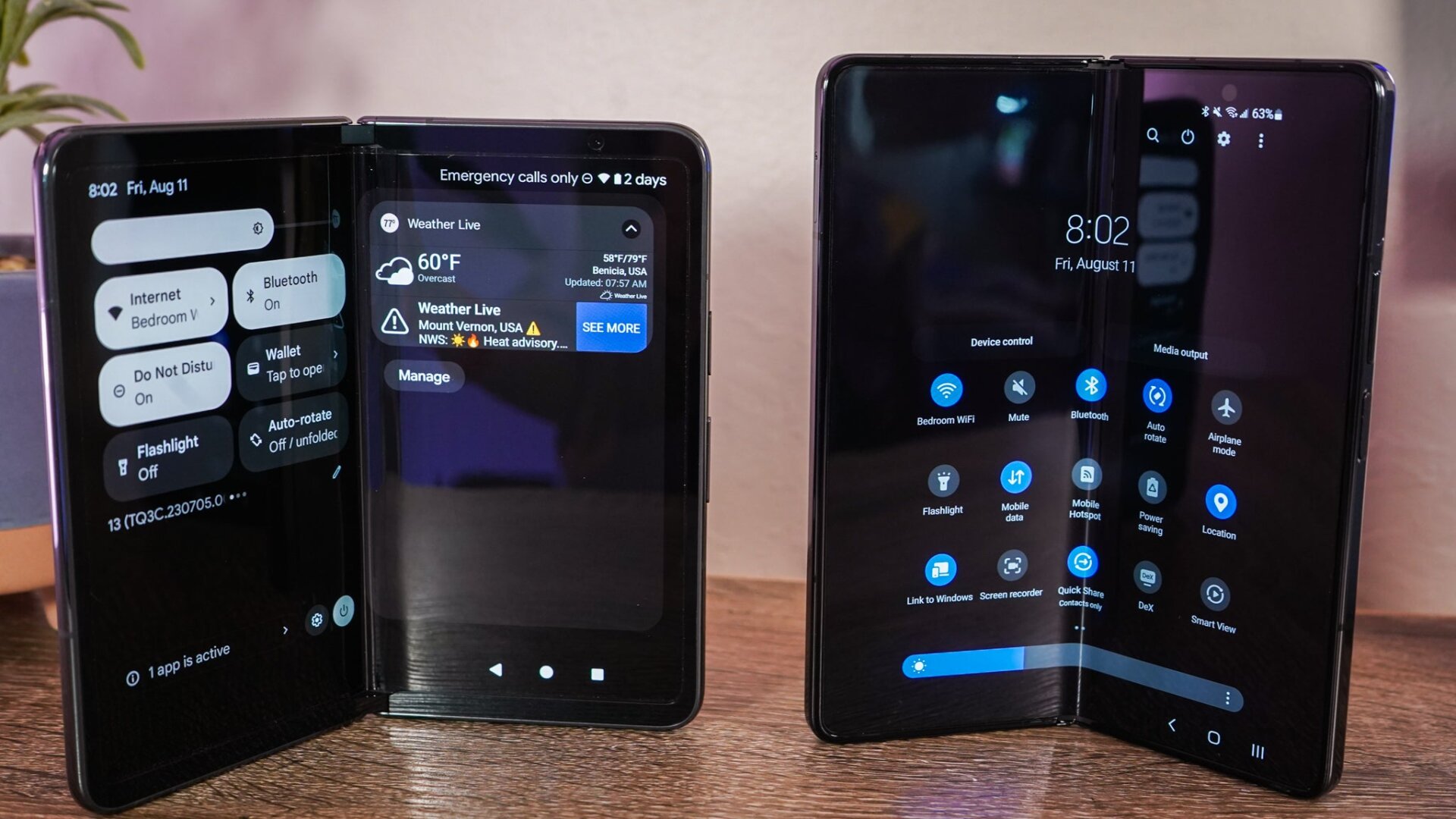
Although Google and Samsung’s respective folding devices run their version of Android 13, there are some noticeable differences between how the software looks and feels. It’s especially relevant as you’re using the inside screen on either device since that’s how you’ll use the foldables most of the time—they are mini tablets.
The Z Fold 5 and Pixel Fold both run on Android 13, so they have the same interface offerings when you open either device. The difference is that Samsung’s running its flavoring of the operating system, which it calls One UI. In its interpretation of the source code, Samsung offers icon space in the taskbar for the last-used apps, so you do not have to rely on the back button or the recent apps shortcut to find your way around.
I also like how Samsung’s version of Android handles the notification shade once pulled down. Whereas the Pixel Fold splits the quick settings shortcuts and notifications on either side of the screens, the Z Fold 5 has them all on the same rail in the middle. The Pixel Tablet is also limited to six quick settings a page, which is limiting. On the Z Fold 5, I get 15 quick setting icons once I fully expose the notification shade.