
Welcome to the most comprehensive pCloud review for 2026. pCloud heavily emphasizes security and privacy due to its Swiss roots, functionality, and top-tier speeds. But is pCloud safe, and is it as good as it claims to be? In short, it is. After extensive testing, more of a real-world use, pCloud impressed us.
While it’s not the oldest cloud storage company, it quickly climbed up the ladder and, since 2013, has made some significant improvements. Nowadays, it’s one of the safest providers with over 14 million users around the world. Though pCloud isn’t without its flaws. During testing, we found just a few.
Before you rush in to buy it, read our full, extensive pCloud review for 2026. We’ll discuss its pros, cons, and features, and see how well pCloud works in practice. In a hurry? Here’s a brief overview of our pCloud review for 2026.
pCloud
pCloud stands out as a top cloud storage option because of its strong security, fast transfer speeds, user-friendly design, and client-side encryption. Apart from its average customer support, it delivers on its promises of being safe, fast, and reliable.
Pros
- Secure data centers in EU & USA
- Strong encryption
- Up to 10 TB of storage
- 30-day file history
- Cloud backups
- The fastest transfer speeds
- Lifetime storage plans
Cons
- Zero-knowledge encryption is paid extra
- No Office tools/third-party apps
- Subpar customer support
What is pCloud? More About the Company
pCloud is an online storage service established in 2013 in Bulgaria, with the legal entity in Baar, Switzerland. After a few years on the market, pCloud has perfected its formula, cementing its name among the safest and most reliable cloud storage solutions. pCloud counts millions of users (over 14M).
pCloud is famous for its versatile and highly flexible plans. It offers encrypted cloud storage and even business solutions. However, it’s also great for individuals looking to store their files in a secure, cloud-based environment. Today’s pCloud review updated for 2026 will tell you all you want to know about it.
Ease of Use & Compatibility
We’ll start this in-depth review of pCloud with ease of use. It’s a strong point for this cloud storage, as it works on every device and has nice-looking apps. We prefer its web app because it’s simple and easy to access on desktops and laptops. The left side houses the Shared Folder, Trash, Backups, Audio, and so on.

The rest is occupied with the files that you can share, preview, and manage in other ways. pCloud’s desktop app works similarly – you get your pCloud drive. It’s accessible like any other folder on your computer. If you copy and paste the file into that folder, it’s immediately synced with the cloud.

In our pCloud test, we liked the Linux app that works well on multiple distros like Ubuntu and Mint. pCloud also works on Windows, macOS, Android, and iOS. Its mobile apps are practical and allow for auto-uploads, handy when you’re taking photos and videos and want them backed up to the cloud.
pCloud Features Review
This cloud storage provider’s features are numerous, making it a favorite of millions of people around the world. Having tested pCloud for years now, we’ll discuss our experience with all of its features in this review.
🔁 File Sharing
Apart from storing your files, this cloud storage can be used to share them effortlessly. It’s an amazing choice for sharing documents, photos, videos, audio, and other files. Once you click on Share, you have four options. The first isn’t our recommendation since it lets anyone with the link download the file.
You then have password protection, which means the recipient would need to enter the password before accessing the file. A handy feature is the expiration date. It’s an additional security measure if you want your file to be accessible for a brief period. When the link expires, it’s lost to oblivion.

Businesses can take advantage of Branding, or, simply put, link personalization. Each link can come with a bespoke logo, message, and cover. In this pCloud review, we discovered that you can apply multiple settings to your link. For example, you can add an expiration date and password protection for maximum control.
Moreover, you can useshorter links for easier sharing. More importantly, you can track shared link stats by discovering the number of downloads and total traffic in a week or a month. This, again, gives you full control over your shared links and files.
📥 Syncing & Backups
Syncing is one of the most vital features we’ll discuss in this pCloud review. After trying it out, we were impressed at how simple it is. We used this cloud storage primarily on our Windows PC, where it’s also the simplest.
You click on Sync, select Add Folder, and choose either the folder from your PC or pCloud. Once the folder is selected, it’ll be synced across your computer and pCloud. The same goes for your phone, which can be fully synced as well. We love how fast pCloud is for syncing, easily the fastest online storage we tested.
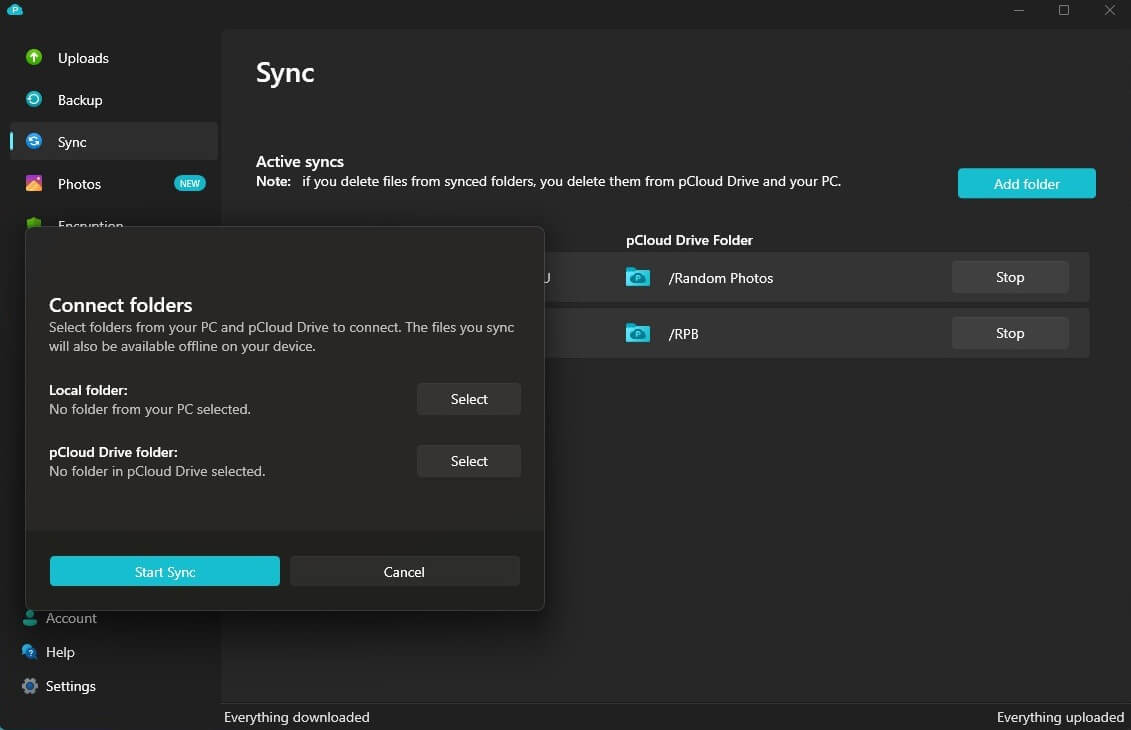
This means you can access all synced files on any device. For example, if you’re traveling and need a specific document from your PC, go to your cloud storage and download it. While not a backup service, pCloud’s backup capabilities are stellar.
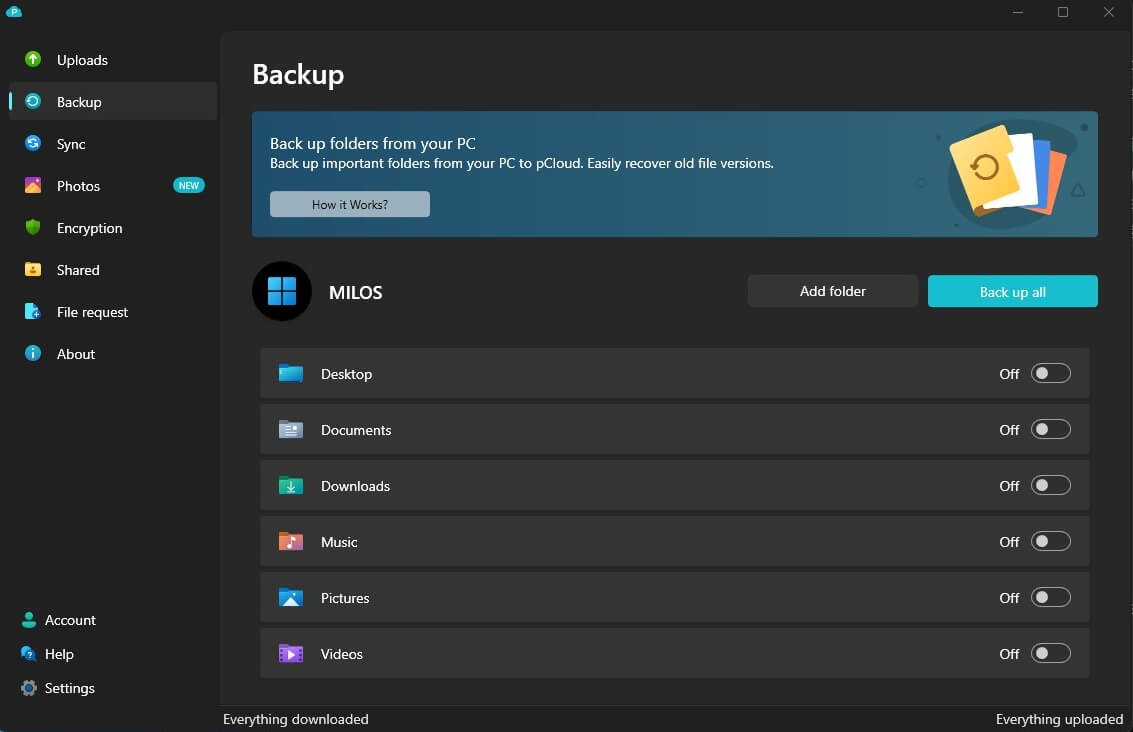
Using the Backup menu, you can select a folder or drives to back up to the cloud and recover old file versions for up to a year. We also like the option to back up the entire drive. That is, if you have enough space on your online storage – it offers 500 GB to 10 TB – more about that a bit in the pCloud review.

Backup speed is also pretty fast, so you’ll have your drives and/or folders on the cloud in no time. One more thing we haven’t mentioned in this review. pCloud is friendly to third-party cloud services and supports backups from them. That means you can back up files from Dropbox, OneDrive, Google Drive, and others.
♾️ Unlimited Transfers
pCloud’s speed comes in handy when you have unlimited transfers. Did you know that it offers unlimited file sizes? By this, we mean transferring even the largest files and folders with ease. Of course, the only limit is your free storage. pCloud also lets you throttle your transfer speeds, but by default, they’re unlimited.
While they depend on your ISP, pCloud does not influence how fast everything will go. Even if you select its complimentary cloud storage plan with 10 GB of space, speeds and transfers remain the same – unlimited.
📂 File Versioning
It’s easy to recommend this cloud storage because of this feature. File edits are kept on your cloud storage, and you can restore previous versions not older than 30 days, or 15 for free users. We liked how simple it was during our pCloud analysis.
We used the Revisions menu to see all past versions of the file, and from there, we could pick the one we wanted. Apart from file versioning, it comes with the Rewind tool. It’s handy if you want to revert the entire account to one of its previous states.
You can choose a specific date and time not older than 30 days (premium) or 15 days (free). pCloud’s EFH, or Extended File History, can also be purchased additionally. It allows for up to 365 days of file history/versioning, which is 12 times more.
🌐 Social Media Integrations
Compared to Dropbox or even Google Drive, pCloud isn’t a productivity champ. It’s one of its weaknesses. However, it still lets you back up your photos and videos from Instagram or Facebook. Bear in mind, it doesn’t include any productivity tools.
⚙️ File Management & Other Conveniences
Since we mentioned it, let’s discuss file management a bit. pCloud is intuitive enough, allowing you to use a search bar to find specific files. Additionally, deleted files are stored in the trash for up to 30 days. Unlike Sync.com, whose web app is a bit dull, pCloud allows previewing files and documents.

In pCloud’s app, we can open photos, watch videos, and even listen to music. We often used its Audio folder, where we stored songs and downloaded podcasts. The option to create a playlist and listen to music is handy when you’re on the fly. pCloud also separates your music based on its artist and album.

Document editing isn’t allowed, and you can only preview PDF and Word files. However, you can also share them directly and print them, which adds a bit of functionality. While it’s great cloud storage for photos, music, and videos, document management capabilities could be improved.
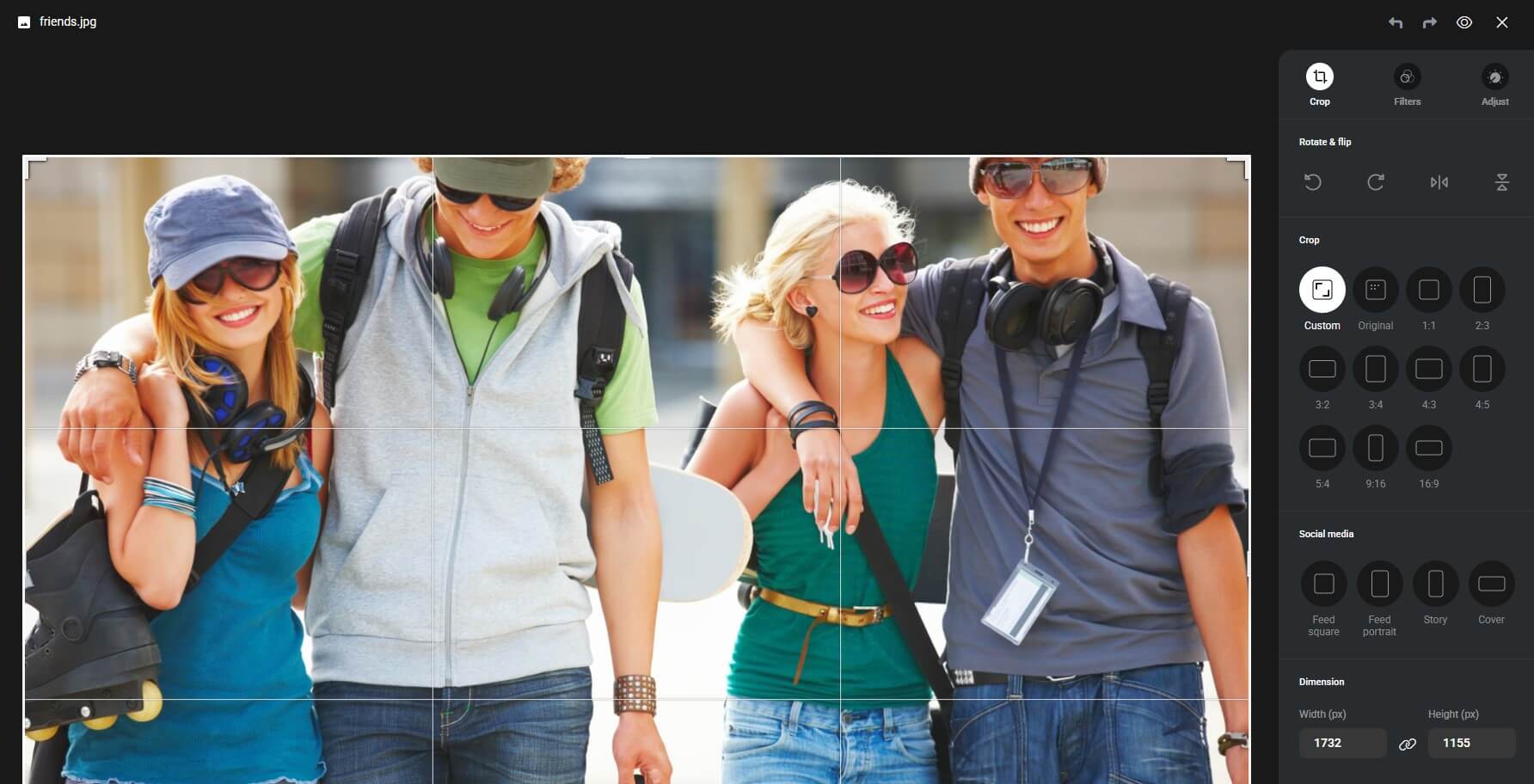
On the flip side, it added the option to extract RAR files to the cloud storage. This means you don’t have to download the archive to your computer anymore. Finally, there’s Photos, an addon that previews your photos in an interactive, timeline gallery, and also lets you edit them, similarly to Google Photos.
🔐 Crypto Folder
Before discussing its security and privacy, let’s mention the Crypto Folder in this pCloud review. This is your client-side encryption for full-on file protection. It uses zero-knowledge privacy to amplify file protection and provide access to your files only to you. Even the company itself can’t access them.
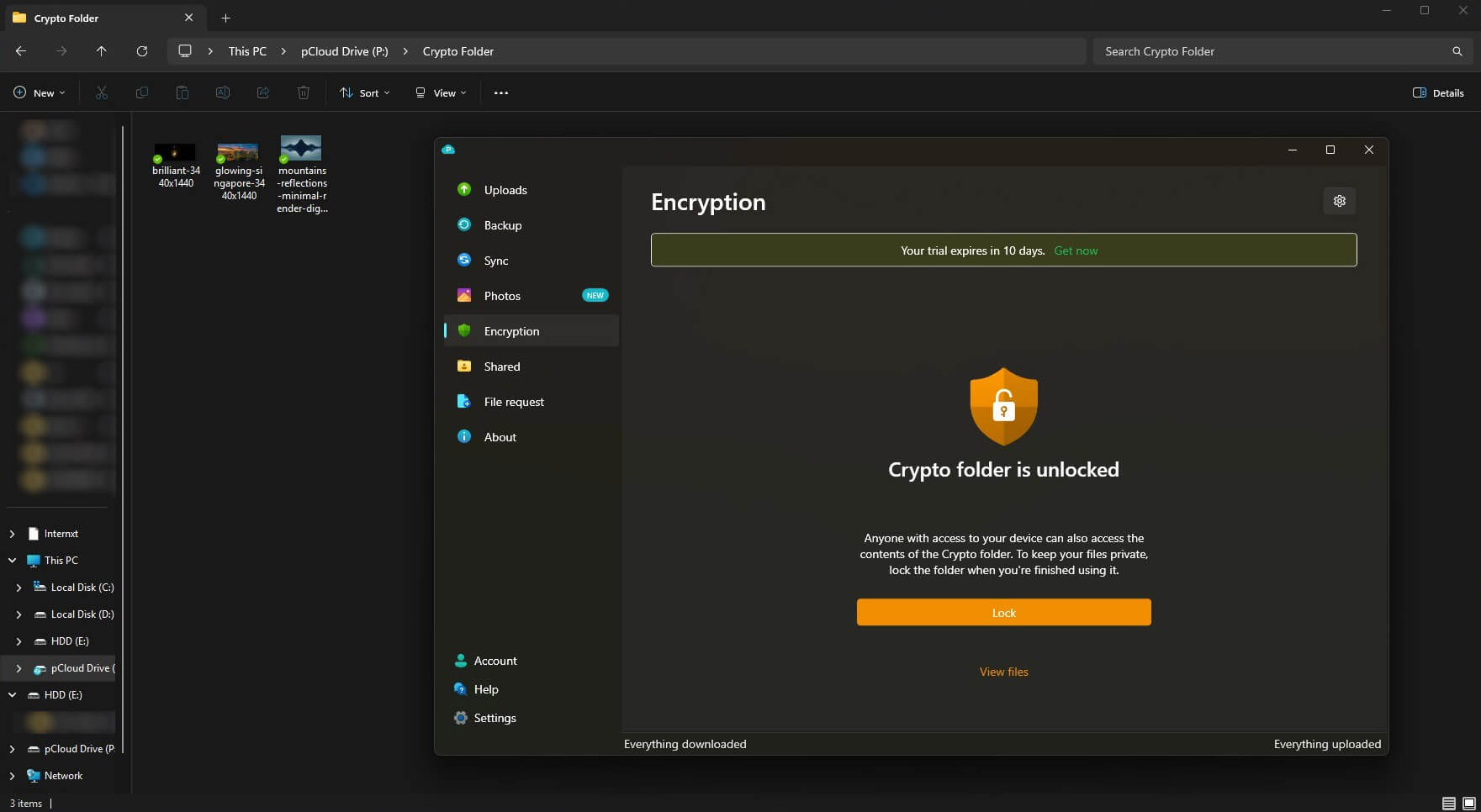
The bad thing about it is that it’s a bonus, so it’s paid additionally on top of your plan. NordLocker is a zero-knowledge cloud storage option, even in the free plan. Simultaneously, it’s inferior to this service in performance, speed, and storage size. More about the price of zero-knowledge encryption soon.
Is pCloud Fast for Transfers? Speed Test Results
For now, we want to quickly review pCloud and its transfer speeds. Frankly, there’s not much to talk about. For this pCloud speed test, we used a 1 GB RAR file packed with photos, documents, and some smaller videos. We then tested it by uploading the file to the cloud and then downloading it.
For this test, we used its web app, also the most intuitive and functional. Before we show you our pCloud speed test results, let’s glance at our internet speed.

With these results, here’s how long it took for it to upload our 1 GB file:

As you can see, the upload time is around 7 minutes. If we do the math, it’s around 143.5 Megabytes per minute, which is roughly 19.2 Megabits per second, our upload speed. Simply put, pCloud took full advantage of our internet connection.

Downloading the same file took much faster, roughly around 35 seconds. The download was just starting to pick up the pace, but it downloaded so swiftly that the speed couldn’t reach its apex. Either way, the entire experience was blazing fast.
Our pCloud speed test results were the same for syncing and backups. Besides, these are also uploads that performed equally well across all our tests.
Get the Best Speeds With pCloud
Is pCloud Safe? Full Security Review
Storage aside, security and privacy are some of the most important aspects that define cloud storage. Luckily, this provider shines in this regard, being better than more popular rivals like OneDrive, Google Drive, Dropbox, and other, essentially non-secure options in comparison. Let’s see precisely why.
💾 Data Centers
First of all, pCloud is based in Switzerland. We know this country has the most stringent privacy laws that prevent data retention and privacy violations. Switzerland’s data protection legislation is among the best in the world, ensuring pCloud is in good hands. The provider offers data centers in two locations:
- Dallas, Texas (US)
- Luxembourg (Europe)
A great thing about these two is that you can choose any based on your preferences. We were in Europe, so we used the center in Luxembourg. If you’re from the USA, using a Texas data center is smarter. These data centers have multiple protection layers. For example, they have security measures like:
- VESDA (fire and very early smoke detection)
- Dark fiber connectivity
- Water leakage detection
- Electromagnetic protection
- Nitrogen fire suppression system
- Intrusion detection
All servers are monitored 24/7/365 to ensure proper operation. This prevents data loss and breaches that would compromise pCloud and its users. pCloud’s data centers possess SSAE certifications as well, making them some of the best in the world. Not to mention its very important file redundancy.
pCloud stores 5 (or more) copies of your files in different locations. If one copy is lost, the other 4 or more are available at any moment. This essentially means you’ll always have files at your fingertips, no matter what happens under the hood.
🛡️ Types of Encryption
We haven’t discussed encryption in this pCloud review for 2026. This provider uses 256-bit AES encryption for per-folder and per-file keys. Users’ private keys are protected by 4096-bit RSA encryption. What if you want to use the Crypto Folder we mentioned in the review? You’ll have zero-knowledge encryption in that case.
It lets you encrypt all your files and protect more important data with it. Zero-knowledge privacy is different because you’re holding your encryption keys – not pCloud or anyone else. This has a benefit and a downside. The former is that you’re the only one who can access your files.
The latter is that if you lose your encryption keys, they can’t be recovered, and your files are lost forever. Without these keys, you can’t decrypt these files, and they stay locked within the Crypto Folder indefinitely.
pCloud Pricing Plans: How Much Does pCloud Cost?
pCloud has flexible subscription plans so that you can find something for yourself. If you’re less demanding and need only up to 10 GB of storage, you can opt for its free version. Simply sign up, download pCloud, and enjoy a limited experience.
Individual Plans
If not, you’ll likely prefer its premium offers. To make it clear in this pCloud review, we’re not talking about the cheapest cloud storage service. However, the service isn’t too expensive either, especially if you select one of its many Lifetime plans. Our sweet spot is the 2 TB plan at around $399 (one-time payment).

However, if your storage demands are sky-high, there’s a 10 TB Lifetime plan at $1,190. The 500 GB plan at $199 is also interesting. pCloud’s Individual plans can be paid annually. In that case, you’ll sspend $49.99, $99.99, and $199.99 per year for 500 GB, 2 TB, and 10 TB of space. All plans have a 14-day refund policy.

Business Plans
If you’re a business user, you can choose from the Business and Business Pro tiers. If you pay annually, which we recommend, you’ll spend $287.64 or $431.28, approximately $7.99 and $11.98 per user. These plans allow for up to 2 TB of storage per user and are built for at least three users per plan.
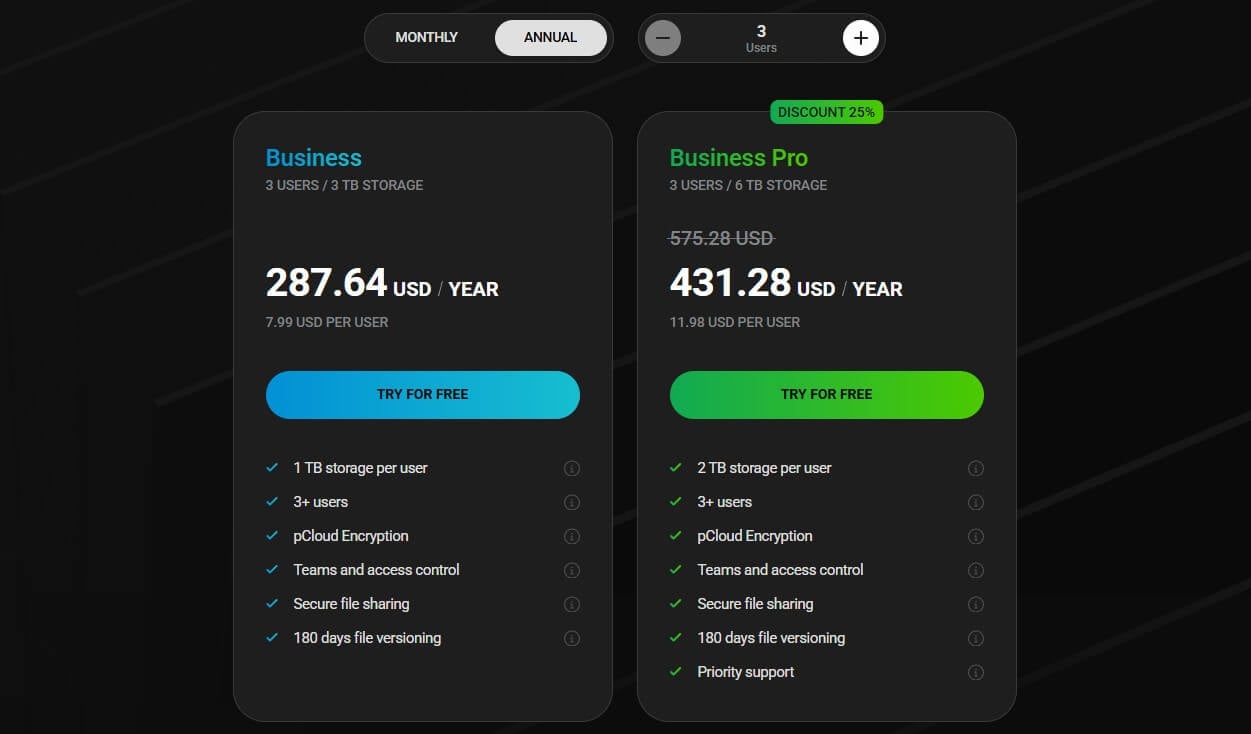
Interestingly, the provider includes client-side encryption here and provides you with a full control panel for teams, where you can set storage limits and permissions. The Business Pro plan adds priority support on top, while both have 180 days of file versioning. Finally, they have a 30-day free trial for testing.
Family Plans
pCloud has excellent Family plans with either 2 TB or 10 TB for up to 5 users. That means all of you will have, in the best case, 400 GB or 2 TB of space. However, the provider goes a step further, allowing you to share the storage as you like, allocating more space to members who need it, for example.
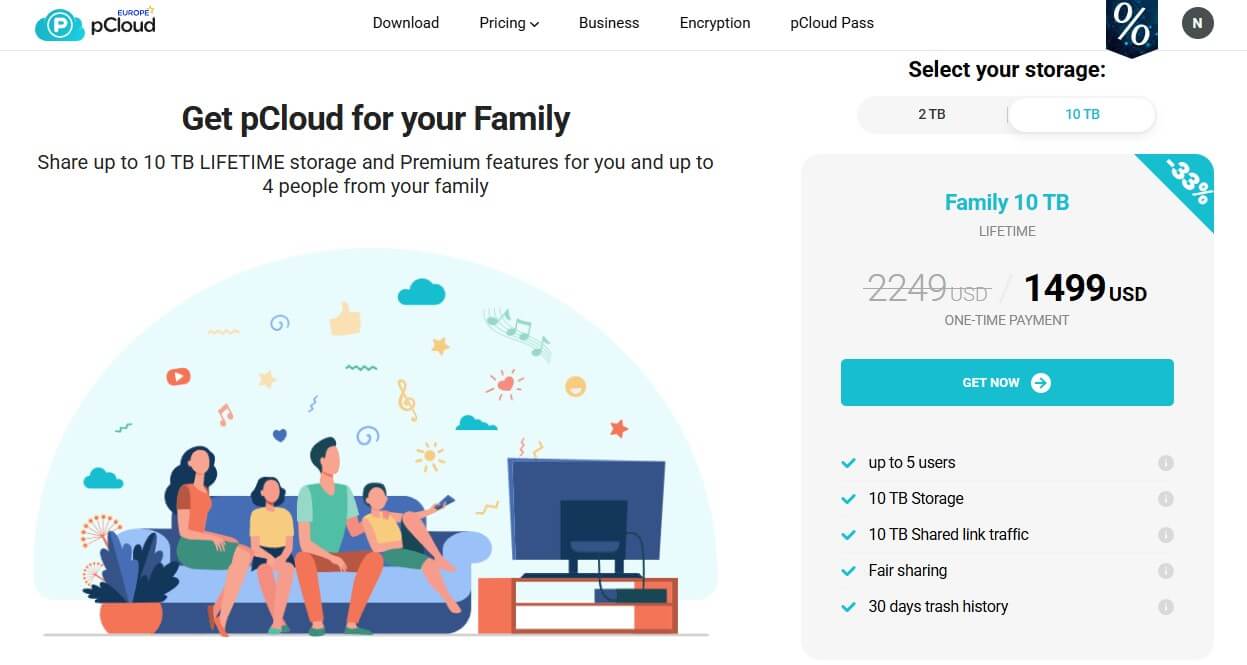
Family plans also have a 30-day file history and other essentials. They’re pretty affordable, too, but they’re available only in Lifetime variants. 2 TB of storage is $595, while 10 TB is $1,499. Split into five (if every family member pays), that’s nothing.
Customer Support
pCloud’s customer support isn’t extraordinary, especially if you’re a free user or you’ve bought a low-tier plan. Unless you have priority support, you’ll be relying on email to get in touch with pCloud. Response times vary, but they’re around a few hours – sometimes more. Priority support for Business users is faster.

However, we discovered that its customer support team is helpful. Despite being slower, pCloud will answer your questions and requests until you’re satisfied. Its Help Center is full of helpful guides and FAQs to help you navigate pCloud’s apps and website. Recently, the company introduced its pCloud Assistant.
That’s a small icon in the bottom-right part of the screen. It looks like a live chat widget. When you press it, you’re greeted with pCloud’s AI Chatbot, which isn’t very smart, after all. Thus, we found its email support far more useful most of the time.
pCloud Review: Final Verdict
With our in-depth pCloud review for 2026 near its end, let’s answer the most vital question. Should you buy and use it? Our experience with pCloud was nothing short of excellent, especially in terms of accessibility, speed, and security.
It excels in sheer performance, lots of secure storage, apps for all devices, and protected data centers in Luxembourg and Dallas. It certainly lacks productivity apps that would enhance the experience further, such as document editing, for example. We also found pCloud’s customer support response times to be average.
These were slight inconveniences during our test of pCloud. But overall, it surpasses its many rivals, including Google Drive, Internxt, Dropbox, and OneDrive. To answer your question, you should buy and use pCloud, and we advise Lifetime plans to save the most money. Try it risk-free and get the plan you like.
Frequently Asked Questions
Is pCloud safe?
Yes, it's 100% safe and legit. It relies on powerful encryption, with the option to upgrade to zero-knowledge encryption for better security. Plus, it has secure data centers in the EU and the US, with open-source apps to fully emphasize transparency.
Is pCloud free storage good?
Yes, it's good. pCloud is better than Dropbox and other major players since it offers 10 GB of free cloud storage and nearly the same level of security, speed, and compatibility as its paid plan. Meanwhile, its rivals severely cripple their free versions.
What is pCloud Encryption?
pCloud Encryption is zero-knowledge, client-side encryption used for better protection of your files. It's a Crypto folder where you move your files to have them encrypted. You can only access them with the decryption key you created.
What is the pCloud file size limit?
There's no pCloud file size limit. You can upload extremely large files, even reaching several terrabytes, if your chosen storage size allows it.
What are pCloud alternatives?
There are many alternatives, but very few are exceptional. Read this Internxt vs pCloud comparison because Internxt is a solid replacement if you don't like pCloud. Also consider NordLocker if you want end-to-end encryption. While they're worthy alternatives, they're not better than pCloud, so keep this in mind.