Skip to content

Internxt Review: Surprisingly Good Cloud Storage!

By Florian Gray
Internxt Review
© Gizmodo.com

Individuals seeking affordable, spacious, and secure cloud storage options can consider Internxt. This Internxt review is for those willing to give up on expensive providers like Dropbox and Google Drive that lack the necessary privacy and security features, such as end-to-end zero-knowledge encryption.

Internxt is an exciting pick right now. It offers robust encryption (end-to-end), fast transfers, plentiful storage options, and a clean-looking interface. On paper, it has everything you need to safely tuck in your photos, videos, and other files and access them on any device.

In our recent pCloud review, we highlighted this cloud storage service as one of the best available. However, our Internxt evaluation led us to conclude that this service might be competitive enough to stand next to it. Let’s see what it offers and if it’s worth investing in as a long-term solution for file storage.


4.5

Internxt

Internxt is still quite young in the cloud storage landscape. Nevertheless, the service is pleasant to use and offers an excellent value for money. The only downside is that it is not at all generous with its free offering.

Pros

  • Incredibly affordable cloud storage
  • Zero-knowledge encryption in all plans
  • Top-tier performance and transfer speeds
  • Distributed data center network for added file safety
  • Very easy to set up and use on all devices
  • Flexible storage (from 1 TB to 5 TB)

Cons

  • Underwhelming 1 GB free plan
  • Poor multimedia features
  • File versioning is missing

Ease of Use & Compatibility

As soon as we got our hands on Internxt, we were blown away at how simple and approachable it was.

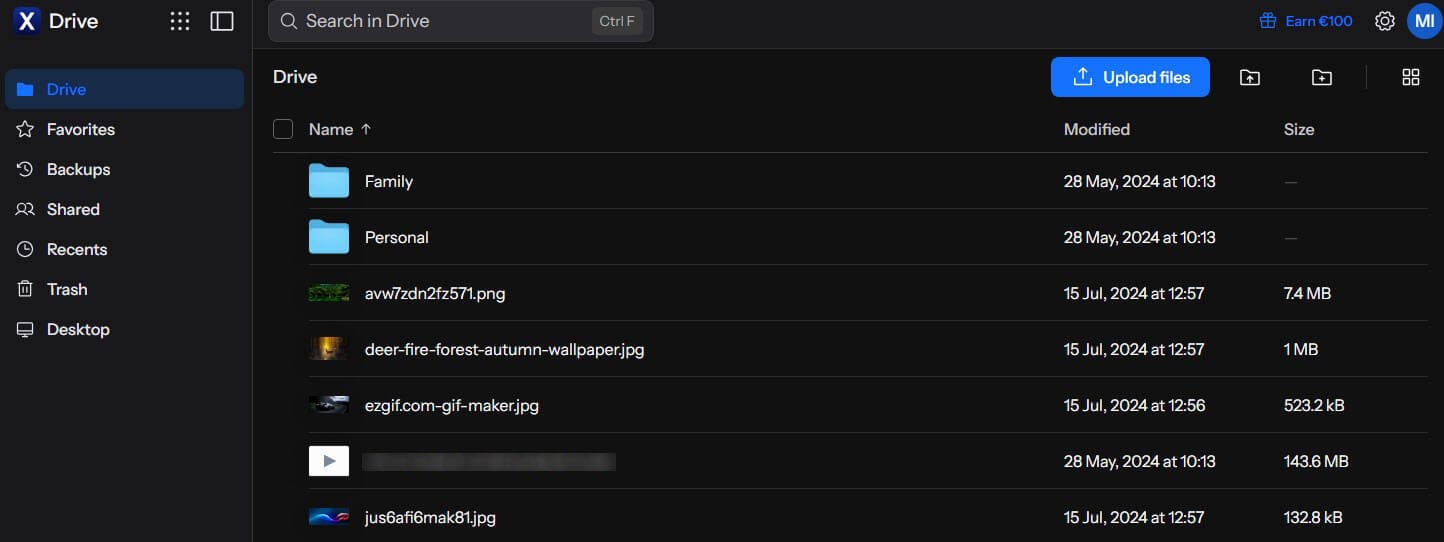
This cloud storage has a web-based app that looks excellent and adapts to the theme of your system – dark or white. Everything is so smooth, and file transfers begin the moment you drag and drop the files onto the cloud storage.

Internxt Web Interface
© Internxt

We also examined its desktop app titled Drive. It functions pretty familiarly. You get a virtual drive on your computer used for storing and syncing files. Drag them to the drive and they’ll appear on Internxt as soon as the syncing process completes.

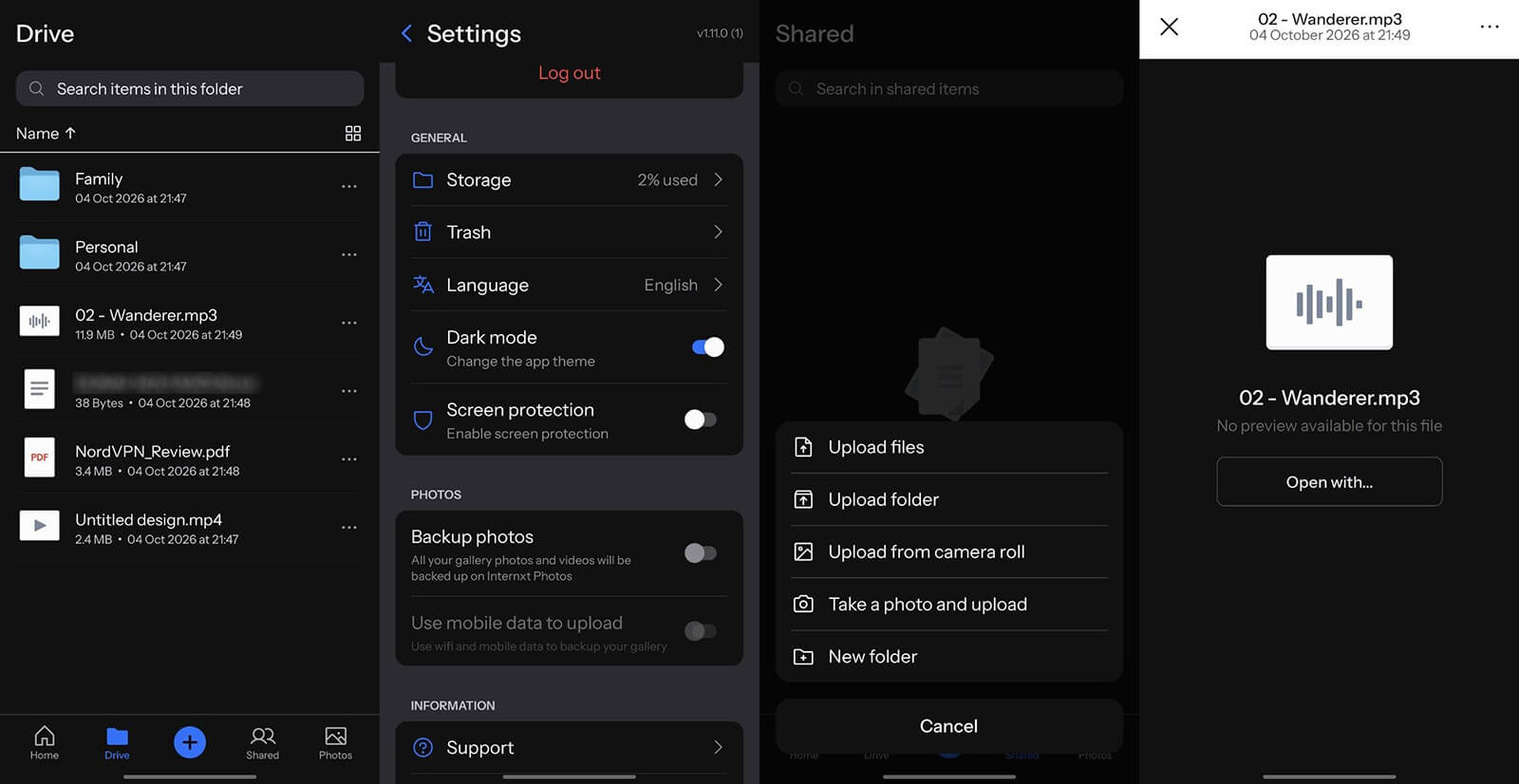
One thing we must praise is its mobile support. Internxt works on iOS and Android, offering apps identical to the web version. After logging in, you can immediately access our files or upload the new ones with a tap on the screen. Other basic functions are there too.

Internxt Mobile App
© Internxt

You can create new folders, rename them, and fill them with your files. There’s the Trash folder that keeps deleted files for up to 30 days. You’ll also find the Recents folder, where you can access the files you used recently. Moving on, we have the Shared folder.

This folder displays files shared with you, while the Backups folder shows your backed-up devices. It’s worth noting that, like pCloud, Internxt has Linux and WebDAV support. This means you’re not limited to Windows, macOS, iOS, and Android only. That’s not too shabby!

Internxt Features Review

Our experience with Internxt was generally positive. After trying out and using its apps for quite a while now, we enjoyed its simplicity and responsiveness. Let’s see in this review what Internxt offers and, well… what it doesn’t.

File Sharing

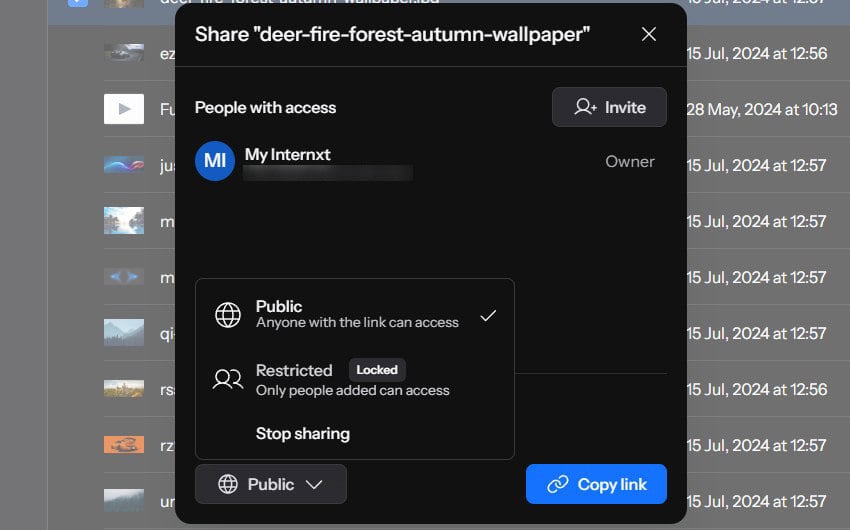
The service functions similarly to NordLocker, so it doesn’t offer many advanced features – at least not to the extent of pCloud. When it comes to file sharing, you can indeed utilize password-protected links to bolster the file’s security. However, there are a few other things.

Internxt Password Sharing
© Internxt

For instance, users can invite other users and grant access to files. From there, they can assign different privileges – editorial or viewing. This depends on your needs and if you want someone to edit or not touch the document, video, photo, or another file type.

Syncing & Backups

Syncing your files is pretty simple, and this was one of the better features during our Internxt test. Unfortunately, it doesn’t support block-level syncing, which would mean that it could sync only edited parts of the files. Instead, each time you sync, the entire file is uploaded.

On the bright side, syncing works by pressing the Play button when the process immediately starts. You’ll now find the files on the cloud. One thing we found annoying is the inability to upload folders, which crippled the experience for us.

Try Internxt Now

We tried to upload an entire music album packed in a folder. When trying to transfer the folder, we saw that the service supports only file transfers. We then had to make a new folder on the Internxt Drive and then put these files there. A big inconvenience.

Internxt Backups
© Internxt

Syncing, on the other hand, isn’t selective. This means Internxt will sync the entire drive and sort of back it up on the cloud storage. For us, this is another inconvenience that can be solved by using pCloud instead, which lets you sync and back up only the folders you want.

Backups are currently available only on macOS, Windows, and Linux. You’ll need a computer and a desktop app. They’re more functional, as you can choose which folders you want before starting the backup process. In our Internxt review, backups were quick and efficient thanks to the service’s excellent performance.

File Upload Limit

One thing we must address in this review is the upload file size limit. Each plan, no matter its tier, allows for 20 GB file uploads. This is a generous limit, but still a limit, and we think you won’t be too bothered by it. It’s only inconvenient if you have a large RAR archive.

But when thinking about it, 20 GB isn’t much if you have plenty of RAW photos or FLAC audio files you want to transfer, packed in a RAR archive. If you want unlimited uploads and no file size limits, we think pCloud is slightly better, and NordLocker is also more generous.

Multimedia Features

Internxt offers fast cloud storage but lacks a few functions we’d like to see in the future. We know this firm started in 2020, so it’s new compared to pCloud or Dropbox. Its multimedia features aren’t the best, especially if you’re trying to preview files directly on the cloud.

During our Internxt test, we discovered it couldn’t preview larger videos. It says “No file preview available”. On the flip side, you can preview photos, which, after all, is a basic function. Internxt can play music, but not much more than that. It lacks the option to create a playlist, which we love about pCloud.

Internxt Video Playback
© Internxt

Documents can be previewed, at least, but don’t expect any editing capabilities. It’s clear that Internxt designed its cloud storage with ease of use, storage, and security in mind. The provider is far from being great for collaboration and teamwork, which isn’t necessarily bad.

Internxt Document Preview
© Internxt

If you need such storage, Internxt is awesome. If you want more, pCloud is more awesome because it’s a bit safer and faster. Don’t forget that Internxt doesn’t support file versioning either, whereas pCloud’s file versioning goes up to a year (EFH – Extended File History).

Those who prioritize collaboration over everything else should likely pick Dropbox and Google Drive at the cost of weaker security.

Additional Security Features

During our Internxt review, we had the chance to test its extra features included in plans. One is the VPN, which includes five locations and is great for encrypting traffic and keeping you safe and sound. It’s not the best VPN you can buy, and unfortunately, it doesn’t include US VPN servers, in case you need them.

Internxt Vpn
© Internxt

However, we tested it for IP and DNS leaks and found no problems. Bear in mind that this VPN is a browser extension, and not a full-fledged app. You can use the VPN with Chrome, Brave, Firefox, and other VPN-supported browsers.

Another feature we liked was Antivirus. It’s, again, basic, but more than sufficient for removing online nasties from your computer. You can perform a quick or a complete scan, but there are no advanced behavioral options we’ve seen in antivirus software from Nortin, Avira, Kaspersky, and more.

Internxt Antivirus
© Internxt

Internxt includes the Cleaner tool, which helps clean junk files and optimize your PC. It’s a nifty little tool that you can use to get rid of duplicate files and optimize your hard drives, ensuring optimal function and smooth operation. Internxt includes these in all plans, at no extra cost, making it great value for money.

Internxt Send

The Send tool found on Internxt’s website isn’t cloud-storage-related. However, we included it in our Internxt analysis because it’s closely related. Namely, the provider uses its strong encryption to encrypt and send your files securely and privately.

It’s free and works by uploading the file, receiving a link to it, and sending it to another person. Alternatively, you can send files to an email or multiple emails and let other users download and use them. The key factor here is encryption, which Internxt brags about.

Later in this in-depth test, we’ll review its end-to-end encryption and see why it’s so important for a safe cloud storage service.

Visit Internxt website

Internxt Transfer Speed Tests

Transfer speeds are incredibly important for many, including us. If you often sync and back up your devices, it’s great to have your files ready on the cloud promptly.

So, how fast is Internxt?

Before we discuss our speed test results, here are our Internet speeds:

Native Internet Speed
© Speedtest.net

After all, your internet connection drastically influences how fast the cloud storage service will be. In this Internxt review, we used our standard 1 GB RAR file with random music, photos, and other fluff. We tested Internxt by uploading the file, measuring the time it took, and then downloading the same file while measuring the respective time.

Another thing to mention is that all tests were performed on our Windows 11 computer using Internxt’s web application because it’s more convenient. The results we achieved were great, just a notch below pCloud which remains the fastest option.

  • File upload took roughly 8 minutes using the web app.
  • File download took roughly a minute when downloading the file through the web app.

Let’s now do the math. Our speed converted to Mbps is roughly 40.84 Mbps for downloads and 2.4 Mbps for uploads. With this speed, the file should be uploaded in roughly 6.9 minutes and downloaded in about 25 to 30 seconds.

Internxt uploaded the file in 8 minutes, which means it almost fully utilized our download speed. Conversely, the download time of about a minute is slightly longer than expected, as pCloud completed the same download in 30 to 35 seconds on average.

In a recent guide about the top-rated cloud storage providers, we saw that Internxt is faster for uploads and downloads than NordLocker and Sync. The only faster options were pCloud and Dropbox, putting Internxt almost at the very top performance-wise.

Security & Privacy

A few minutes ago in this Internxt test, we mentioned its encryption. Internxt uses zero-knowledge end-to-end encryption to secure your files, which can be seen by the few-second decryption process every time you open the web app. Best of all, this encryption comes as standard in all plans, unlike pCloud which charges you for that additionally.

Files in transit are protected by TLS, post-quantum encryption so the entire process, from transit to arrival, isn’t lacking protection. Internxt’s servers are in Spain (Valencia) and unlike some cheaper cloud storage options, it doesn’t use a single data center, instead opting for a distributed network. What does this mean for the user safety-wise?

Internxt Security
© Internxt

Well, if one data center malfunctions, there’s always another one that has your files. Some call this file redundancy. Another thing Internxt does is break your files into smaller packets that are then distributed across data centers. In the case of a compromise, the hacker can’t steal all your files, getting only a fraction of them, which is meaningless.

If you go to your account and open the Security tab, you’ll see a few more features. There’s the option to enable 2FA for added security and unauthorized access prevention. However, users can also opt for a unique backup key for account recovery if the password is forgotten.

The company’s privacy policy is easily understandable, and while the service stores minimal information to function properly, none of it is personal. Before you ask, Internxt doesn’t sell your data to third parties. It already earns enough money through subscriptions.

Internxt Pricing Plans: How Much Does it Cost?

As we’re approaching the end of our Internxt Drive review for 2026, it’s time to look at its prices. Before we do that, we must mention that Internxt offers a free plan as well. However, it’s extremely limited to only 1 GB of storage. That’s barely enough… well, for anything.

The free plan doesn’t skimp on any features, so you still get zero-knowledge encryption, fast transfer speeds, and impeccable security. Okay, so what about paid plans?

Annual Plans

Let’s start with Internxt’s annual plans, which offer some hefty discounts and are highly affordable. The range starts at 1 TB of encrypted cloud storage and ends at 5 TB, which is impressive.

Get Internxt Now

Internxt Price Annual
© Internxt

If you decide to pay annually, 1 TB will cost you €18, which translates to $18 for an entire year if you’re in the US. However, the best deal here is the one on the far right, with 5 TB of high-speed storage at just €54 a year through our website. This is a terrific deal if you ask us!

Lifetime Plans

Akin to pCloud, Internxt offers a handful of lifetime plans to pique your interest. In particular, we’re looking at large storage options, such as 1 TB, 3 TB, and 5 TB sizes. The last one now costs €495, but bear in mind this is a one-time payment and you can use it for life.

A pretty good deal is the 3 TB option that will suffice for like 90% of the users. At €345, paid once, you’re getting a fair deal. 1 TB is for those who don’t store thousands of RAW files or 4K videos and is priced at €195. Compared to pCloud’s equivalents, Internxt is WAY cheaper.

Internxt Price Lifetime
© Internxt

Try Internxt’s Lifetime Plans Risk-Free

It also offers a 30-day money-back guarantee, letting you obtain a refund if you find the service lacking. Coupled with these wallet-friendly prices, Internxt went out of its way to ensure it’s affordable to everyone and inclined to users’ satisfaction.

Business Plans

In addition to the already rich roster of plans and storage sizes, Internxt introduces business cloud storage solutions. With two plans on offer, Internxt may not be the most flexible, but we assure you that they have everything you need. Let’s examine them together:

Internxt Business Price
© Internxt

Internxt relies on two excellent plans. The Standard plan starts at €12 per user and is paid annually. The plan offers 1 TB of storage per user, along with all other features we discussed and tested in this Internxt review. The plan also has organization management, WebDAV support, and collaboration features.

At €15 per user annually, the Pro plan includes 2 TB of storage per user. This plan is great for demanding users who frequently store large files, documents, videos, and more. The Pro plan also includes Cleaner and Meet, where the former is Internxt’s service used for making video calls and collaborating.

File versioning and Mail are coming soon, and we’re excited for the two helpful additions that will make Internxt a lot better.

Customer Support

Cloud storage providers usually lack live chat support. They rely on email support, which, in all honesty, isn’t the fastest method. Well, Internxt begs to differ and includes full-on live chat support in all premium plans. We’re very satisfied with every aspect. From response times that are blazing-quick to helpfulness that’s undeniable.

Internxt Support
© Internxt

All you have to do is open the live chat widget, provide your email, and type your message. From this moment, the agent will pick you up, and you can ask questions or seek help if needed. The live chat widget also contains self-help things like FAQs and guides that you can sift through until you’re picked up by the agent.

Our experience with Internxt was positive, and we faced no issues, so we haven’t had to contact its support that often. At all, actually.

Internxt Review: Final Verdict

In our experience, Internxt is a pleasant surprise that will catch many users off guard. With our Internxt test at its end, we can sing praises about its excellent performance, lots of storage options (up to 5 TB), incredible security, ease of use, amazing value for the money, and top-of-the-line customer support that you’ll surely enjoy.

Internxt has everything you need to safely store your photos, videos, and other files, sync them across devices, and back them up promptly. Now, this provider has a few issues that might bother you. A nasty surprise is the lack of file versioning, which you’ll find in pCloud.

Then, the service lacks a bit of flexibility in terms of multimedia because you can’t edit documents, reproduce videos, or open RAR archives. Finally, Internxt’s free plan is the worst we’ve seen storage-wise, with a silly 1 GB of space that you’ll find insufficient.

Now that we’ve got everything sorted out and compared Internxt’s advantages and shortcomings, let’s answer the question. Should you buy it?

We think pCloud is better. However, we’re hard-pressed to find a better and cheaper option than Internxt. Let us remind you of its incredible 5 TB plan at just €54 annually. Sounds ridiculously good!

Visit Internxt