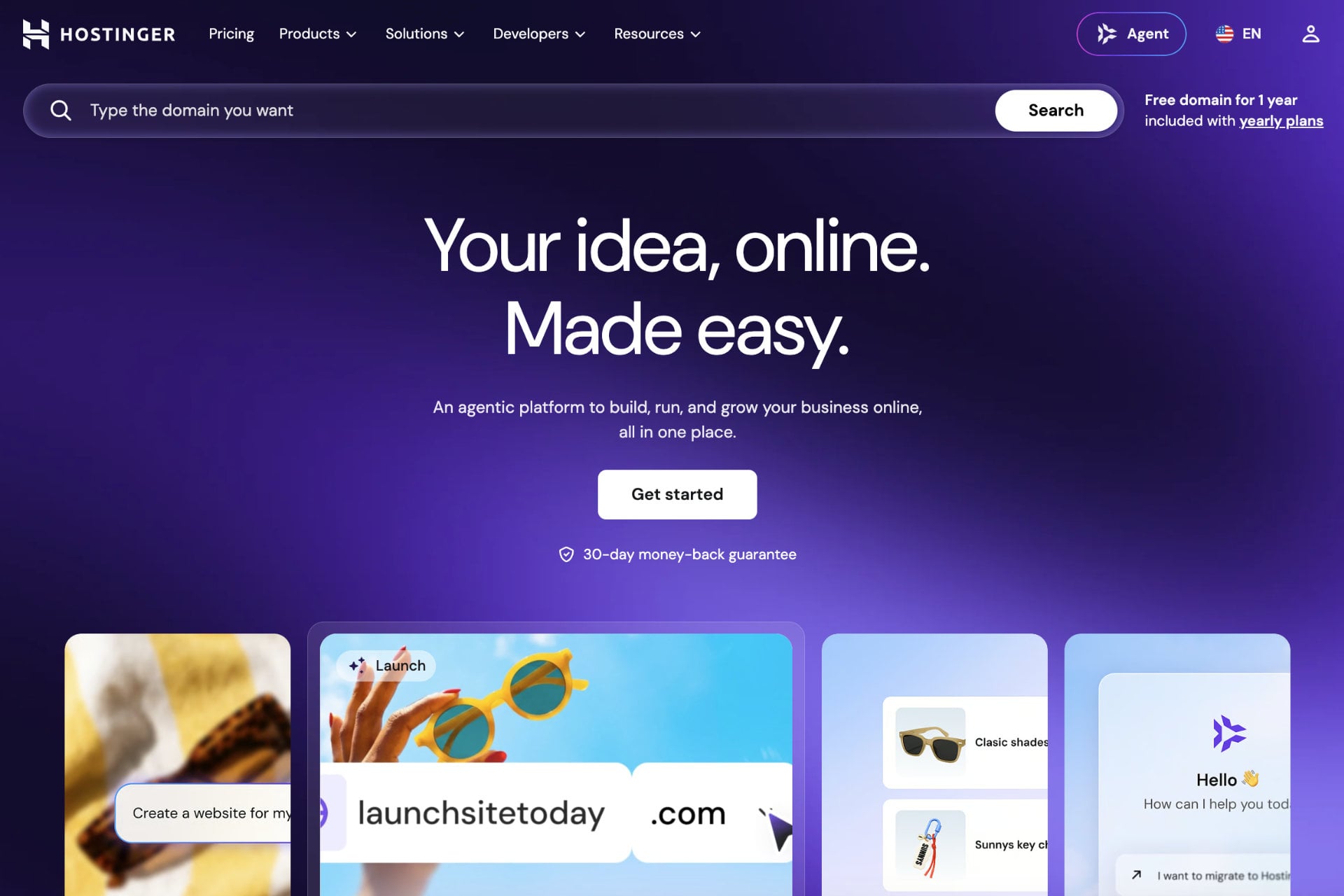
Hostinger is the best web host overall in 2026: plans start at $2.99 a month on a 48-month term ($2.69 with code GIZMODO) and come with a 30-day money-back guarantee. Trustpilot lists 72,699 reviews with a 4.7 out of 5 TrustScore, the company serves more than 5 million customers, and WordPress.org recommends it.
Most of what has changed since our last Hostinger review is AI. Hostinger merged Horizons and its classic Website Builder into one product called AI Builder, and it put an assistant named Hostinger Agent in the top bar of hPanel. It also sells ready-to-run AI agents (OpenClaw, Hermes, n8n and Paperclip) as a plan of their own. The basics still decide whether a site stays online and loads fast, so we also checked storage, backups, renewal prices and support.
We bought an Unlimited plan, built a test site with AI Builder, started a second site on WordPress and went through the import and migration screens. Our speed tests, run on a WordPress site, are further down. This Hostinger review shows what each screen looks like, what each plan costs and where Hostinger falls short. A few products, mainly the VPS plans and the AI agent apps, we haven’t used ourselves, and each of those sections says so.
Exclusive offer: enter code GIZMODO at checkout for an extra 10% off any Hostinger product. The first year of a domain is free on plans of a year or longer, and moving your site from another host costs nothing.
Hostinger
Hostinger is a beginner-friendly host with plans from $2.69 a month on a 48-month term. hPanel puts WordPress, an AI site builder and AI agents in one menu, and support runs 24/7 by chat.
Pros
- Free website migration
- Free domain for the first year
- Unlimited bandwidth
- Data centers in North America, Europe and Asia
- 24/7 live chat with Hostinger Agent
- Custom hPanel control panel
- 99.9% uptime guarantee
- AI Builder, AI agents and AI tools for WordPress
- LiteSpeed web server technology
Cons
- No phone support
- No dedicated server hosting
- Renewal prices
- The lowest prices require paying 12 to 48 months upfront
Hostinger features
A host earns its price on a short list of things: storage, uptime, speed, security and someone who answers when a site breaks. Here is how Hostinger handles each one.
Free website migration
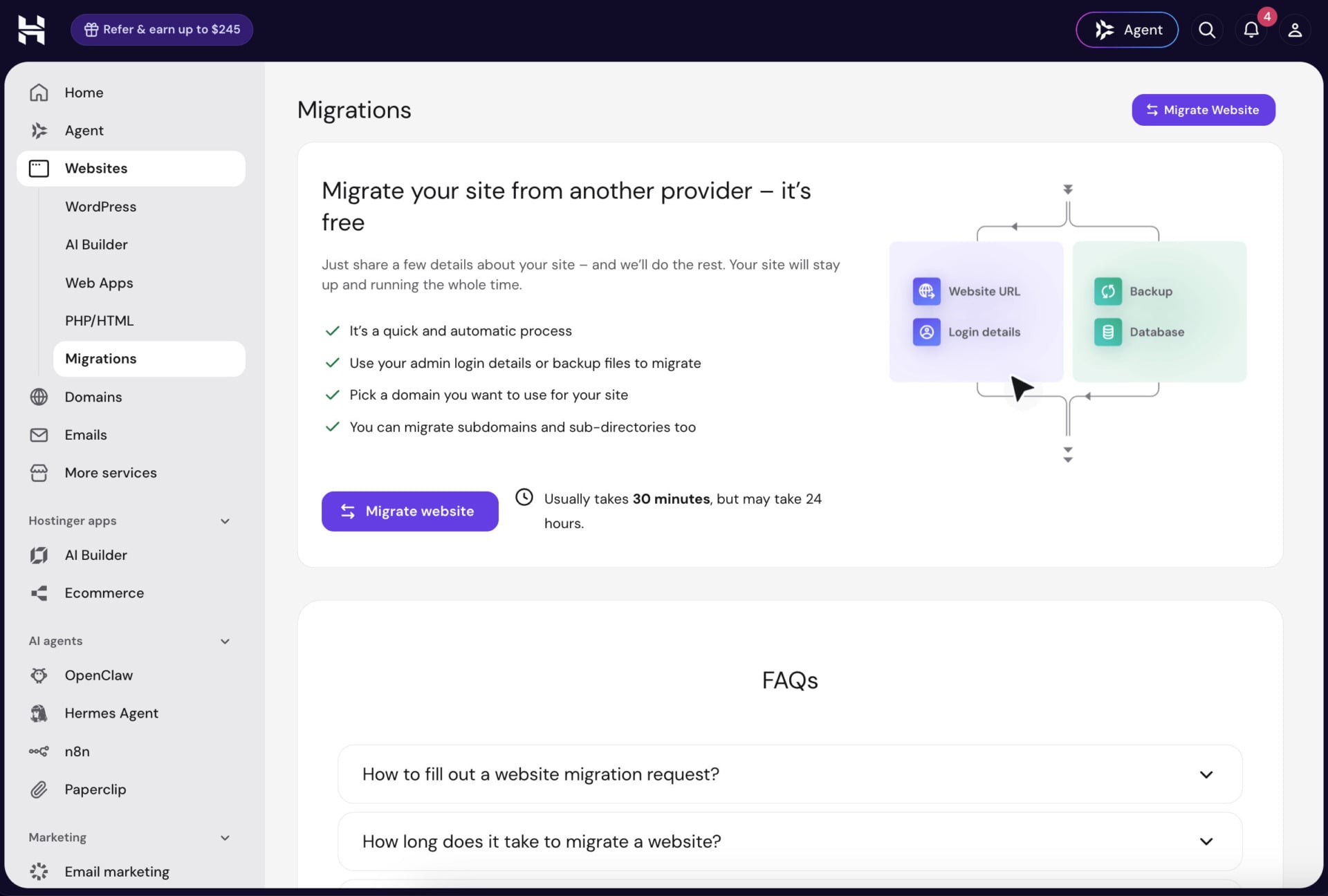
If your current host is slow, expensive or hard to reach, you can move your website to another host without paying for the move. Hostinger’s migration tool is free and sits in hPanel under Websites, then Migrations. The page says a migration usually takes 30 minutes and may take up to 24 hours. Your site keeps running on the old host until the move is done. Those timings are Hostinger’s: we opened the migration and import screens but didn’t move a live site.
The tool works from a WordPress admin login or a cPanel login, and it can also start from backup files. You pick the domain the site will use, and subdomains and sub-directories can come along too. If you still have your old WordPress admin or cPanel login, that route looks like the least work, because there are no files to download and upload again. The Import website button on the Websites page opens a screen with three routes: migrate from another host, upload your website files, or deploy from GitHub.
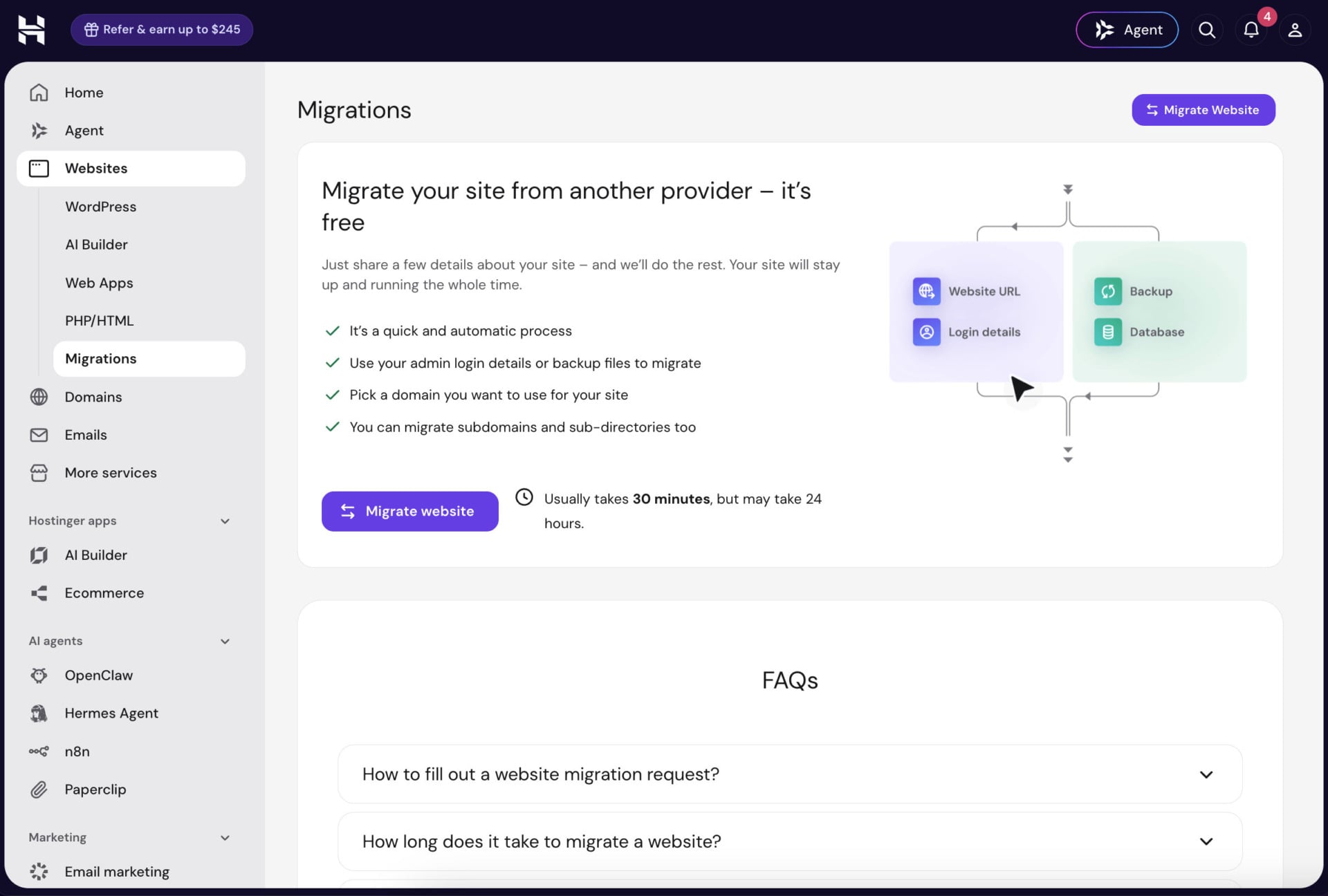
The upload route accepts static sites (HTML and CSS), WordPress and PHP sites, and Node.js apps. It is the one to use when a developer hands you a finished project as a zip file. The GitHub route takes the same project types and redeploys automatically each time you push to the repository.
How to migrate your website to Hostinger
- Buy a hosting plan and open hPanel.
- Go to Websites, then Migrations, and click Migrate website.
- Choose Migrate from another host and enter your WordPress admin login or your cPanel login. If you only have a backup, use the upload route instead.
- Pick the domain you want the site to use, and add any subdomains or sub-directories you want moved.
- Wait for the migration to finish. Your old site stays online in the meantime.
- Point your domain to Hostinger’s servers once the migration is done.
Free domain
Not every host includes a domain, and a .com costs money every year, so it is worth checking. Hostinger gives you one free top-level domain for the first year when you buy a plan of twelve months or longer (monthly plans don’t get it). On the shared plans the pricing page lists it as “Domain: free for 1 year”, and the VPS plans carry the same line.
You don’t need a domain on day one, either. Every site we created started on a temporary hostingersite.com address. hPanel shows a “Connect domain” link next to it until you attach your own, and the editor has the same button beside Publish. That let us build the test site first and think about a name later, which is handy when you are still deciding on a brand.
Security
Every public website gets probed by automated bots, so the protection that comes with the plan matters. Hostinger includes unlimited free SSL certificates, a web application firewall and a malware scanner for WordPress sites. It also has real-time DDoS protection built on a tool called Wanguard. Accounts run in isolated LVE containers, so a compromised neighbor on the same server can’t reach your files. We didn’t attack our test site or run the scanner against an infected one, so this list comes from Hostinger’s specs. On paper it covers what a WordPress site needs.
Backups are where the plans really differ. Premium has weekly backups, so a bad plugin update on the wrong day can cost you almost a week of edits. Unlimited lists daily backups with an easy data restore, and Cloud Startup lists daily and on-demand backups. We haven’t restored a backup on any of them. Still, that gap is the main reason we wouldn’t put a site that changes often on Premium.
Hostinger guarantees 99.9% uptime. We monitored our test site for several months, and its uptime matched that figure.
Website speed
Page speed starts at the server. Hostinger runs LiteSpeed web servers, and LiteSpeed Cache is already installed in the sidebar of a new WordPress site. Caching therefore works from the first page load, without hunting for a plugin. Storage is NVMe from Unlimited upward, while Premium has 20 GB of SSD, and Unlimited and Cloud Startup add a CDN. Hostinger says its Object Cache for WordPress cuts server response times by up to three times, a claim we didn’t measure separately. HTTP/2, HTTP/3 and IPv6 are supported.
Our own numbers come later in this review. A first test on a bare WordPress install gave a TTFB of 576 ms, and a second test after switching on cache and CDN brought it down to 291 ms.
Data centers
Distance adds latency: a site hosted in Europe answers a visitor in Texas more slowly than the same site hosted in the United States, because the data has to travel farther. Hostinger lets you choose the location when you create a site.
The list covers North America, South America, Europe and Asia, and the map has pins in the United States, Brazil, India and Southeast Asia. In Europe alone we saw Germany (Frankfurt and Dusseldorf), France, the Netherlands, the United Kingdom and Lithuania. Next to each entry, hPanel prints a latency reading. The screen also says backups are stored in France and that you can change the location later.
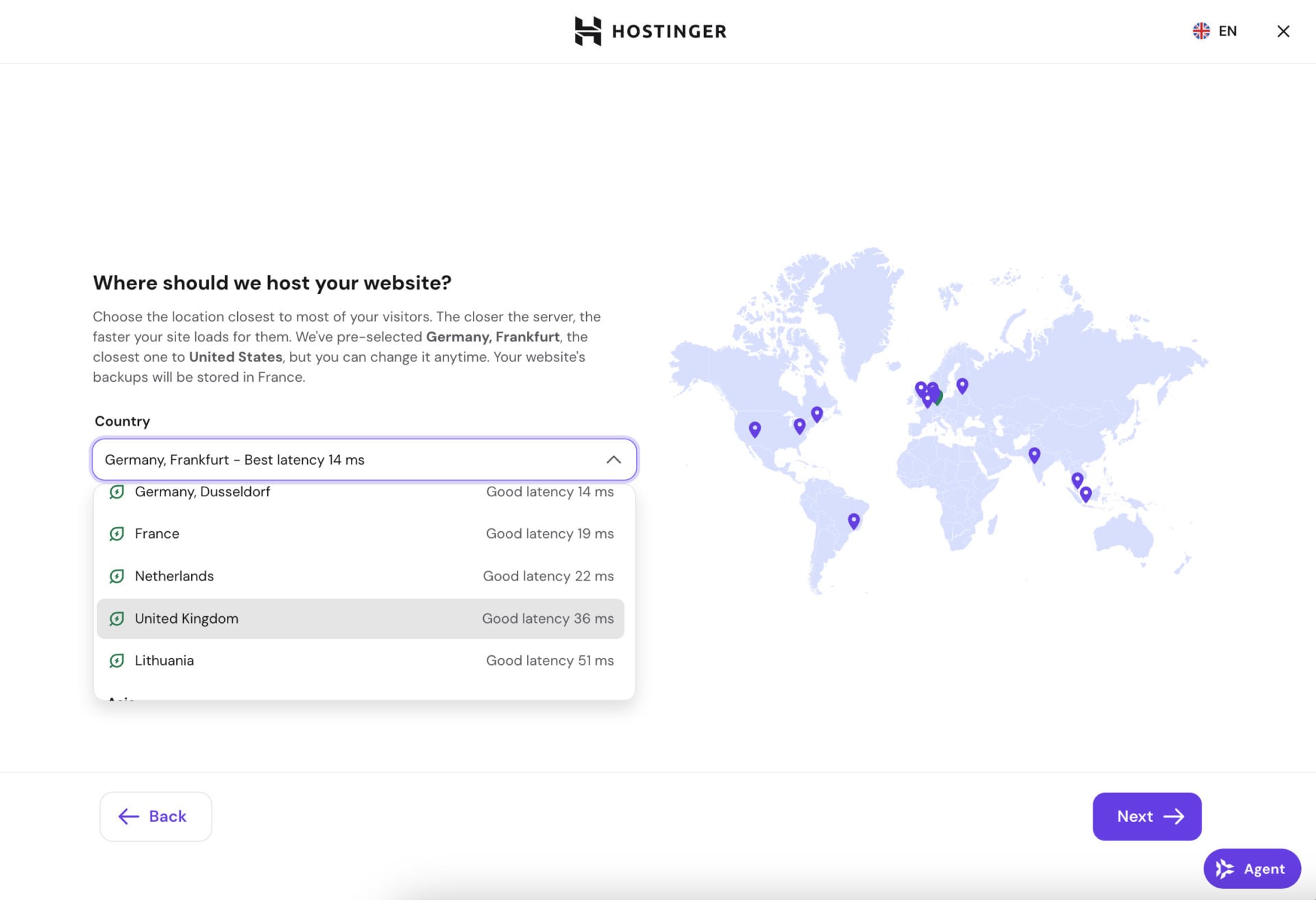
Those readings depend on where you are. We ran the setup from Switzerland, and hPanel showed 14 ms for Frankfurt and Dusseldorf, 19 ms for France, 22 ms for the Netherlands, 36 ms for the United Kingdom and 51 ms for Lithuania. Your numbers will differ depending on where you connect from.
The screen tells you to pick the location closest to most of your visitors, yet it pre-selects the one with the best latency for you. It is easy to accept the wrong location without noticing. If most of your visitors are in the US, open the list and pick a US location.
Customer support
Support is where cheap hosts usually cut costs. Hostinger has no phone line, so help comes through live chat around the clock. Since Kodee and Hostinger’s AI agents were merged, the front door is an assistant called Hostinger Agent. An Agent button sits in the top bar of hPanel, in the AI Builder editor and in the WordPress dashboard, so it is one click away wherever you are working.
When we tested the live chat earlier, a bot answered first by searching existing help pages. After we asked for a person, a human agent joined after 15 minutes. Hostinger now advertises a hand-off to a human agent in under five minutes, which we haven’t timed since the Agent replaced the old chat. A 15-minute wait is bearable when a site is simply misbehaving. It would feel long with a shop down on a busy day, which is the situation Unlimited’s priority support is meant for.
Hostinger’s AI tools
Hostinger’s AI products now reach almost every part of the service (site building, WordPress, support, automation and developer workflows), and each one gets a short section below.
AI Builder
AI Builder is what Horizons and the classic Website Builder became when Hostinger merged them. It builds websites and small web apps, and Hostinger says close to one project in five is now a SaaS product, an internal tool or a platform rather than a brochure site. Two modes share one interface. Manual mode is drag and drop for text, images and sections, while in agentic mode you describe changes in a chat and the AI writes the design and the code. You can switch between them at any time, and agentic mode is the one that spends AI credits.
Credits come with the hosting plan: 5 on Premium and 15 on Unlimited and Cloud Startup, according to the pricing page. Hostinger also sells AI Builder as a separate subscription with larger credit allowances. We built our test site in manual mode, so we can’t say how fast agentic mode uses credits. The pricing page doesn’t say how many credits a prompt costs either, which makes the gap between 5 and 15 hard to judge. If you plan to build mostly by chatting with the AI, treat the included credits as a trial and see how quickly they drain in your first session.
New AI Builder sites are rendered on the server, so pages reach the browser as finished HTML. The builder writes page titles and descriptions, a robots.txt file and a sitemap, product and blog pages included. It also has a Website Cloner that rebuilds a site from a pasted URL, Stripe for payments, Supabase for the database and user login, and about 300 templates in manual mode. We didn’t try the cloner, Stripe or Supabase. Still, for a small business that wants online payments or customer logins without hiring a developer, those two integrations are what set AI Builder apart from a plain page builder.
Hostinger Agent
Hostinger Agent is the merged successor of Kodee and Hostinger’s AI agents. It is connected to your Hostinger account and can work with outside tools such as Gmail, Notion and Slack. It also keeps your business context from one conversation to the next. Hostinger built guided tasks around it, such as writing a blog article after keyword research, running an SEO audit or drafting a privacy policy. The Agent answers on WhatsApp too, voice messages included, and it can open a temporary sandbox computer where it runs code and hands back downloadable files such as presentations and spreadsheets. We didn’t run any of those tasks, so we are describing them as Hostinger does.
AI agents and automation apps
Hostinger sells four self-hosted AI apps under one plan: OpenClaw, Hermes Agent, n8n and Paperclip. hPanel lists them in an “AI agents” block in the left menu, and the plan lets you switch between them. The price is $5.99 a month on a 24-month term (73% off the $21.99 list price), $7.99 a month on 12 months and $10.99 month to month. It renews at $11.99 a month. With code GIZMODO the 24-month price drops to $5.39.
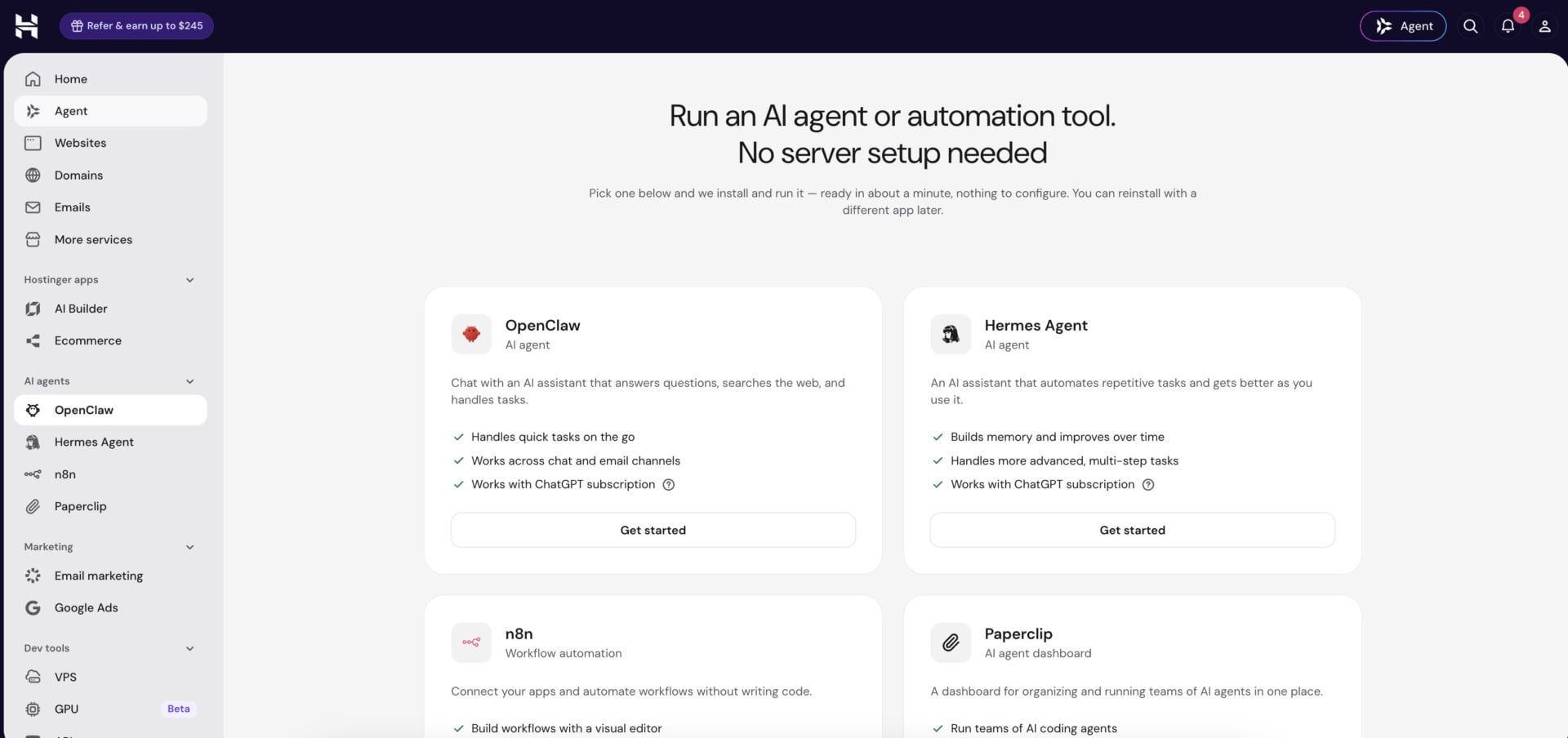
The plan page promises apps that launch without technical setup, long-term memory, a visual interface plus command-line access, Telegram and WhatsApp integration, and compatibility with ChatGPT Plus and Pro subscriptions. It also says AI credits come pre-configured and security is managed for you. We haven’t tested any of the four apps, so all of that is Hostinger’s description. On paper the plan is aimed at people who want to try a self-hosted agent or an n8n workflow without setting up a server themselves. The renewal at $11.99 is about double the 24-month price, a milder jump than on the shared plans. Even so, paying $143.76 upfront for two years for something we haven’t run is a lot. The month-to-month option at $10.99 is the cheaper way to find out whether an agent earns a place in your routine.
| App | What it does | Connects to |
|---|---|---|
| OpenClaw | Personal AI agent that runs on your own server. Hostinger says it is up in about 60 seconds and reports more than 100,000 agents deployed. | WhatsApp, Telegram, Hostinger Email |
| Hermes Agent | Agent built by Nous Research, with memory that survives restarts, a task scheduler and support for more than 200 models through OpenRouter. | Telegram, Discord, Slack, WhatsApp, Signal, email |
| n8n | Workflow automation with more than 500 integrations and an MCP trigger. On your own server there is no per-run fee. | Slack, Google Sheets, OpenAI and other apps |
| Paperclip | Agent dashboard inside hPanel. You bring your own API keys or a ChatGPT account as the AI provider. | hPanel |
AI in WordPress
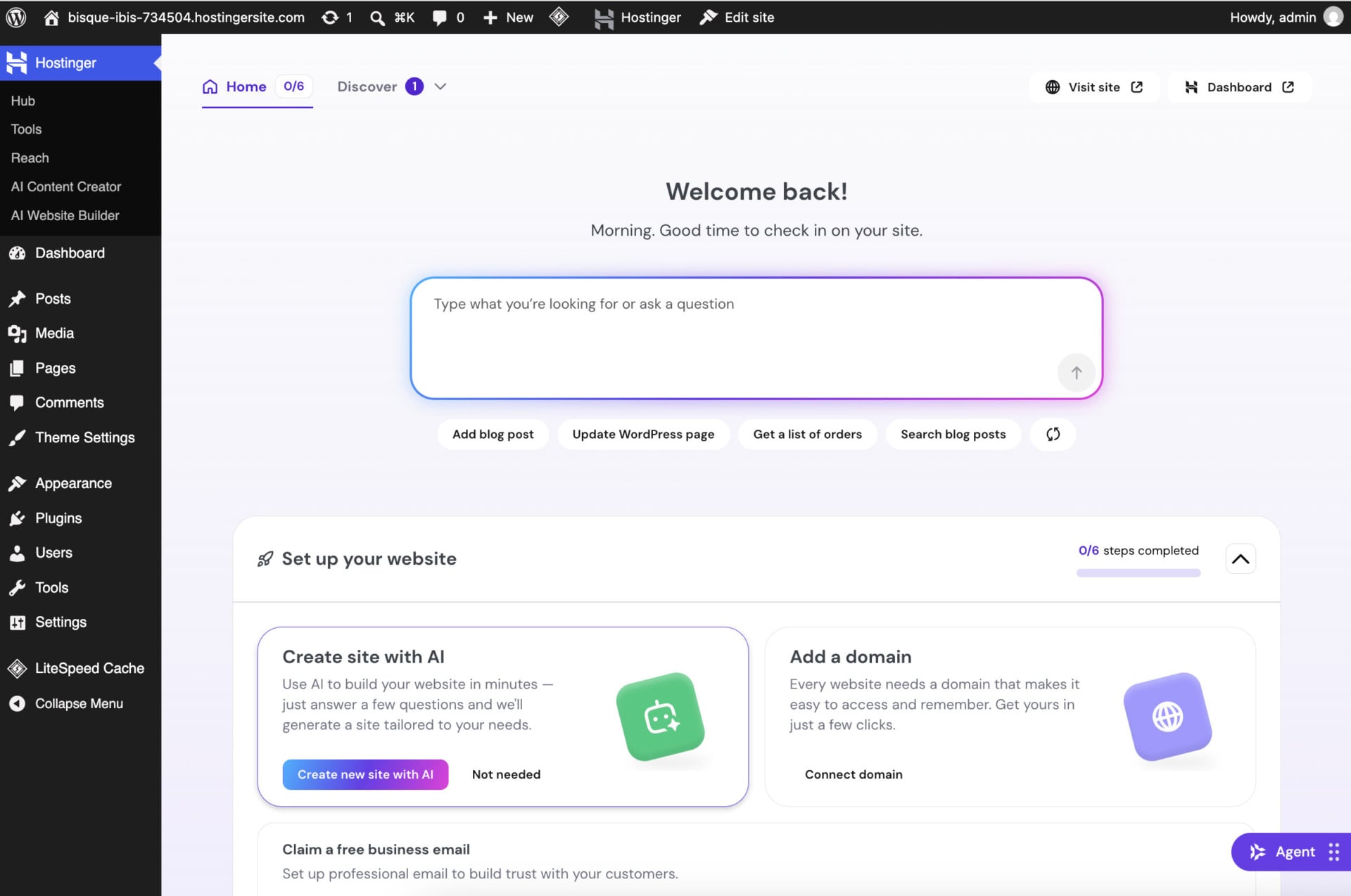
WordPress sites on Hostinger get a “Hostinger” menu in the admin sidebar with Hub, Tools, Reach, AI Content Creator and AI Website Builder. The Hub home is a prompt box that says “Type what you’re looking for or ask a question”. Four sample requests sit underneath (Add blog post, Update WordPress page, Get a list of orders and Search blog posts), and the greeting above changes with the time of day.
Tools for developers
Hostinger Connector is a free MCP link between your hosting account and coding tools such as Claude Code, Cursor and VS Code. The “Push your code, we host it” option in hPanel deploys from GitHub or GitLab. VPS plans include an AI web terminal and an MCP-driven assistant that can manage Docker, monitoring and the firewall in plain language. AI Router adds a single API for several language models, though we haven’t used any of these tools. For a developer who already works inside Cursor or Claude Code, reaching the hosting account from the same tool is the obvious appeal. The thing to weigh before switching it on is how much access you are comfortable giving an AI tool on a production server.
Hostinger plans and pricing
Hostinger sells shared, cloud and VPS hosting plus separate products for stores, email and AI agents, but it doesn’t sell dedicated servers. The prices in this Hostinger review come from Hostinger’s own pricing pages and use the longest term, which carries the biggest discount. Code GIZMODO takes another 10% off any of them at checkout.
Shared web hosting on Hostinger
Shared hosting puts many websites on one server, which keeps it cheap but means a busy neighbor can slow yours down. It fits small and medium sites and first-time site owners better than anything expecting heavy traffic.
| Included | Premium | Unlimited | Cloud Startup |
|---|---|---|---|
| Backups | Weekly | Daily, easy restore | Daily and on demand |
| CDN | No | Yes | Yes |
| AI tools | No | Yes | Yes |
| Priority 24/7 support | No | Yes | Yes |
| AI Builder credits | 5 | 15 | 15 |
| Node.js apps | No | Yes | Yes |
| Free mailboxes for 1 year | 2 per website | Unlimited per website | Unlimited per website |
| AI email marketing free for 1 year | No | Yes | Yes |
| Free domain for 1 year | Yes | Yes | Yes |
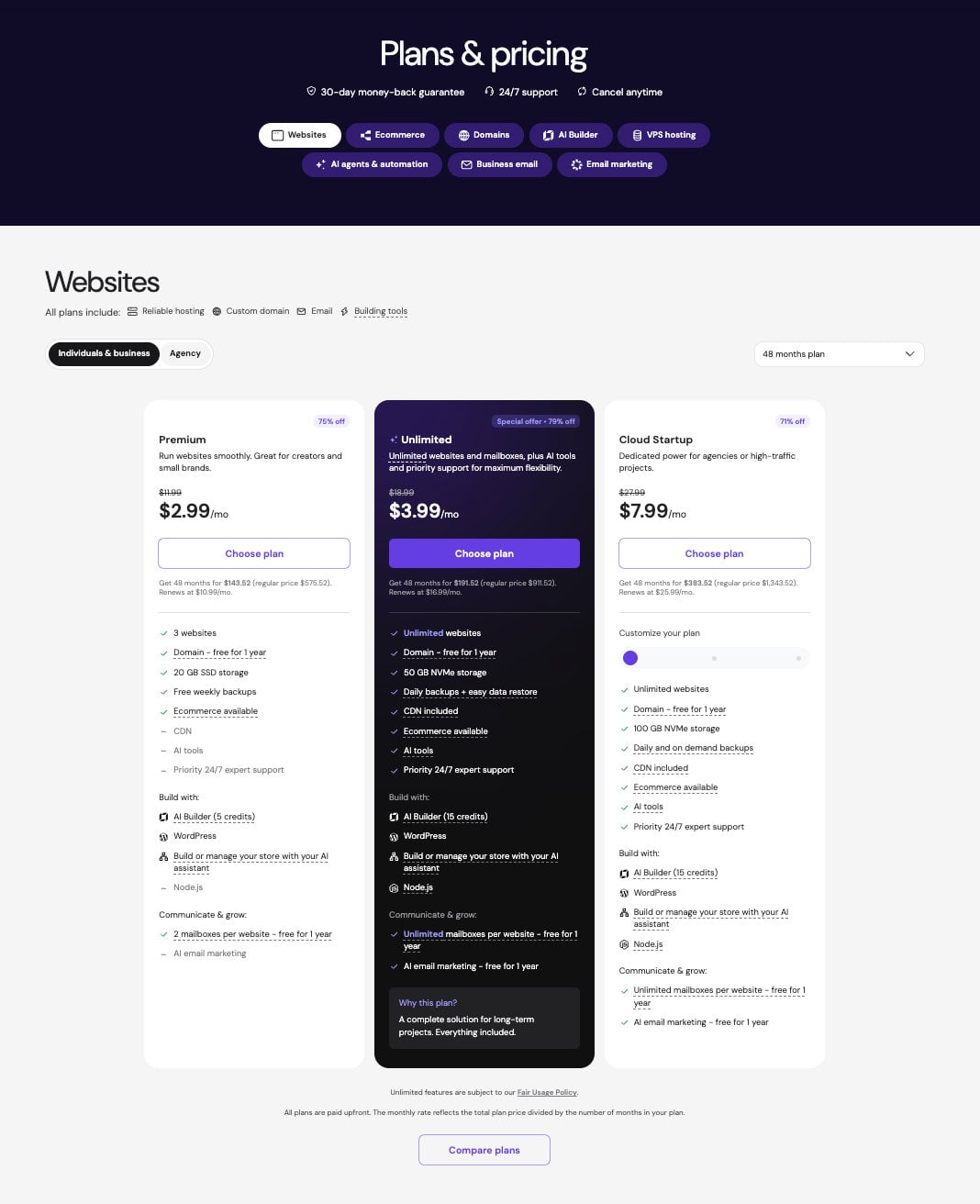
On the 48-month term, Premium costs $2.99 a month, Unlimited $3.99 and Cloud Startup $7.99. We bought Unlimited, and the table shows why: for $1 more a month than Premium, it adds daily backups, a CDN, Node.js support, priority 24/7 support and ten more AI Builder credits. It also lifts the limit from three websites to unlimited, subject to the Fair Usage Policy. Premium (three websites, 20 GB of SSD storage, weekly backups, two free mailboxes per website) is enough for a personal blog or a portfolio that rarely changes. But the pricing page shows no CDN, no AI tools and no Node.js on it. Cloud Startup, which we haven’t tested, adds 100 GB of NVMe storage, a dedicated IP, four CPU cores, 4 GB of RAM and a slider for customizing resources. It makes sense for an agency hosting several client sites or a site with steady traffic.
The part to read carefully is renewal. Premium renews at $10.99 a month, Unlimited at $16.99 and Cloud Startup at $25.99, which is 3.7, 4.3 and 3.3 times the first-term price. Over 48 months you pay $143.52, $191.52 and $383.52, against regular prices of $575.52, $911.52 and $1,343.52 for the same period. Prepaying $191.52 for Unlimited is a real commitment if you aren’t sure the site will still be around in four years. The 30-day money-back guarantee is your way out if the plan isn’t right.
Note: the discounted price applies to the first term only. After that, the plan renews at the regular monthly rate listed above.
The short version: Unlimited is the better buy for most sites, because the extra $1 a month pays for the backups and the CDN. A long term only pays off if you are sure the site will stay.
Cloud hosting on Hostinger
Cloud Startup is the only cloud plan on Hostinger’s pricing page, and it sits in the same list as the shared plans. It is the step up when Unlimited starts to feel tight, for example with a WooCommerce shop that has steady traffic, or an agency hosting several client sites. Cloud hosting suits larger projects, and the dedicated IP and four cores are the reasons to pick it over Unlimited. We haven’t tested it. Since it renews at $25.99 a month, watch your traffic and resource use on Unlimited before paying for the step up.
VPS hosting on Hostinger
A VPS is for people who want to install their own software rather than just publish a website. It splits one physical server into several virtual machines that don’t share resources, so a noisy neighbor can’t slow yours down the way it can on shared hosting. Hostinger’s VPS plans use KVM virtualization, AMD EPYC processors and NVMe storage. You can install any software you like, on a range of operating systems and control panels. We haven’t run a VPS for this review, so what follows is our reading of the specs.
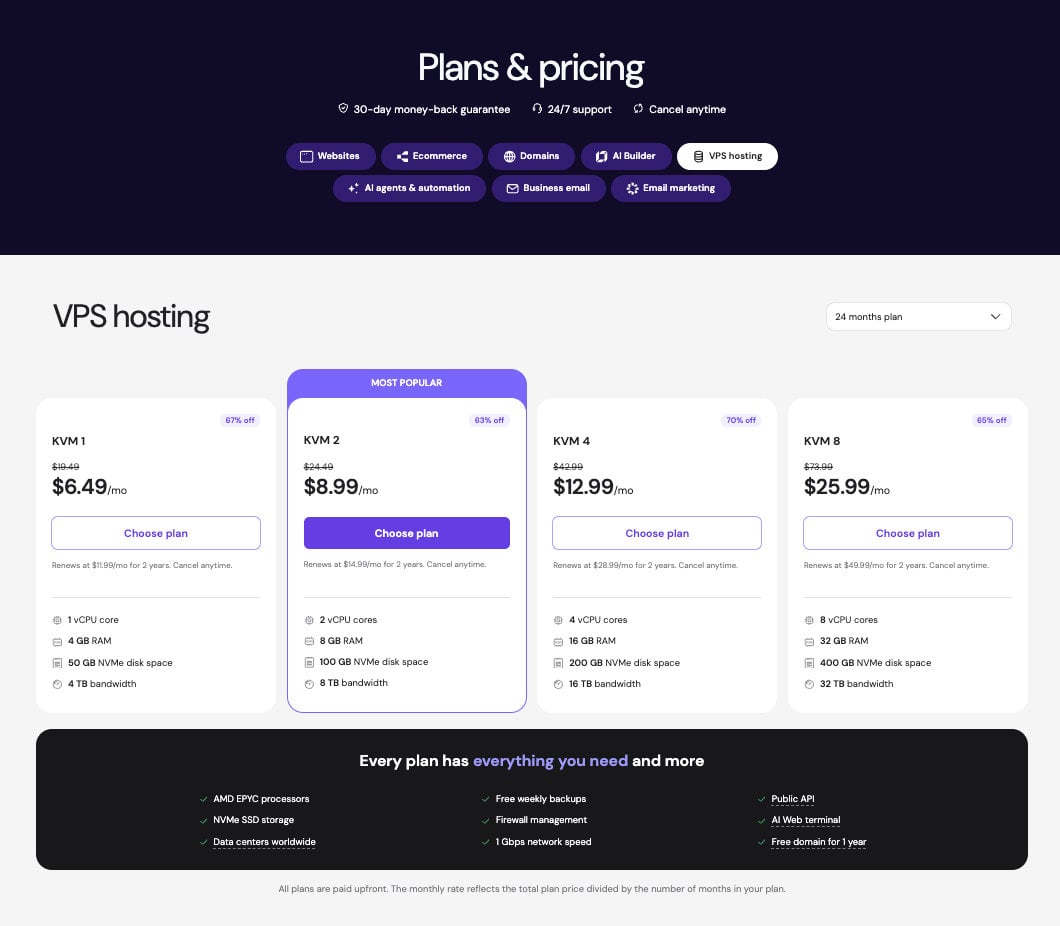
| Plan | vCPU | RAM | NVMe storage | Bandwidth | Price per month (24-month term) | With code GIZMODO | Renews at |
|---|---|---|---|---|---|---|---|
| KVM 1 | 1 | 4 GB | 50 GB | 4 TB | $6.49 | $5.84 | $11.99/mo |
| KVM 2 | 2 | 8 GB | 100 GB | 8 TB | $8.99 | $8.09 | $14.99/mo |
| KVM 4 | 4 | 16 GB | 200 GB | 16 TB | $12.99 | $11.69 | $28.99/mo |
| KVM 8 | 8 | 32 GB | 400 GB | 32 TB | $25.99 | $23.39 | $49.99/mo |
KVM 1, with one vCPU and 4 GB of RAM, is enough for a single small app such as a Discord bot or a personal tool. KVM 2 has two vCPUs and 8 GB of RAM for $8.99 a month, and it is where we would start. It leaves room for a WordPress site with its database plus a second service such as an n8n instance. KVM 4 and KVM 8 are for a busy database or several projects on one machine. The renewal jump is steeper there, from $12.99 to $28.99 on KVM 4 and from $25.99 to $49.99 on KVM 8, so compare those renewal prices with other hosts before you commit. The one-click templates (WordPress, Docker, n8n, Grafana, OpenClaw, Hermes and Paperclip) show who Hostinger has in mind: people who want to self-host tools as well as websites.
The AI web terminal and the MCP assistant are aimed at readers who are comfortable in a browser but not in a Linux shell. Every plan also includes weekly backups, firewall management, a 1 Gbps network, a public API and a free domain for a year. The renewal prices apply for two years at the rates in the table.
WordPress and WooCommerce hosting on Hostinger
Hostinger sits on WordPress.org’s list of recommended hosts, and its tools are built around WordPress. Managed WordPress hosting on Hostinger installs WordPress in one click and updates the core, themes and plugins automatically. Unlimited and Cloud Startup add a staging tool and a CDN. In our speed tests, the built-in CDN improved the site’s speed by up to 40%, which helped its Core Web Vitals. We haven’t used the staging tool or the automatic updates ourselves. Staging matters most when you edit a live site and want to try a plugin update on a copy first, which is a good reason to be on Unlimited rather than Premium.
The hosting built for WordPress also comes with:
- A free domain for the first year
- WooCommerce installed in one click
- Automatic backups
- Free SSL certificates for your customers’ data
- IPv6 and HTTP/3 for lower latency
For a store, Hostinger also sells managed WooCommerce plans for both small shops and large catalogs. We didn’t build a WooCommerce shop for this review. For a small shop, Unlimited should be enough at the start. Traffic is what pushes a store toward Cloud Startup, so pick the plan by the number of visits you expect.
Minecraft server hosting on Hostinger
Hostinger’s Minecraft hosting is built on its VPS technology. It fits players who want their own server for friends, with full root access to install mods and plugins. The servers come pre-configured and go live in about five minutes.
When we tested them earlier, the servers stayed lag-free, and there were server locations in several regions to keep latency low for players. One-click installers cover plugins and mods, and backups let you restore a world after a bad mod. NVMe storage and AMD EPYC processors sit underneath, which is why the service ranks at the top of our list of the best hosting providers for Minecraft servers. The entry plan handled up to ten players, which covers a group of friends. A community server with 50 players or more needs one of the larger plans.
Getting started: how to host your website on Hostinger
This part of our Hostinger review follows what we did from checkout to a live site, screen by screen. Your own path may differ a little, but these are the screens we saw.
Buying a plan
We started on Hostinger’s pricing page and clicked Choose plan under Unlimited. The next screen asked us to pick a term. The longer the term, the lower the monthly rate, and the 48-month option is what produces the $2.99 and $3.99 prices earlier in this review. The coupon field sits on the same screen, and typing GIZMODO takes 10% off the cart.
Checkout then asks for an account (an email address, or Google) and a payment method. You finish by clicking Submit secure payment. Once the payment went through, the plan showed up in hPanel with its expiry date and three buttons: Import website, Create website and Get websites plan, which adds a second plan.
Choosing how to build
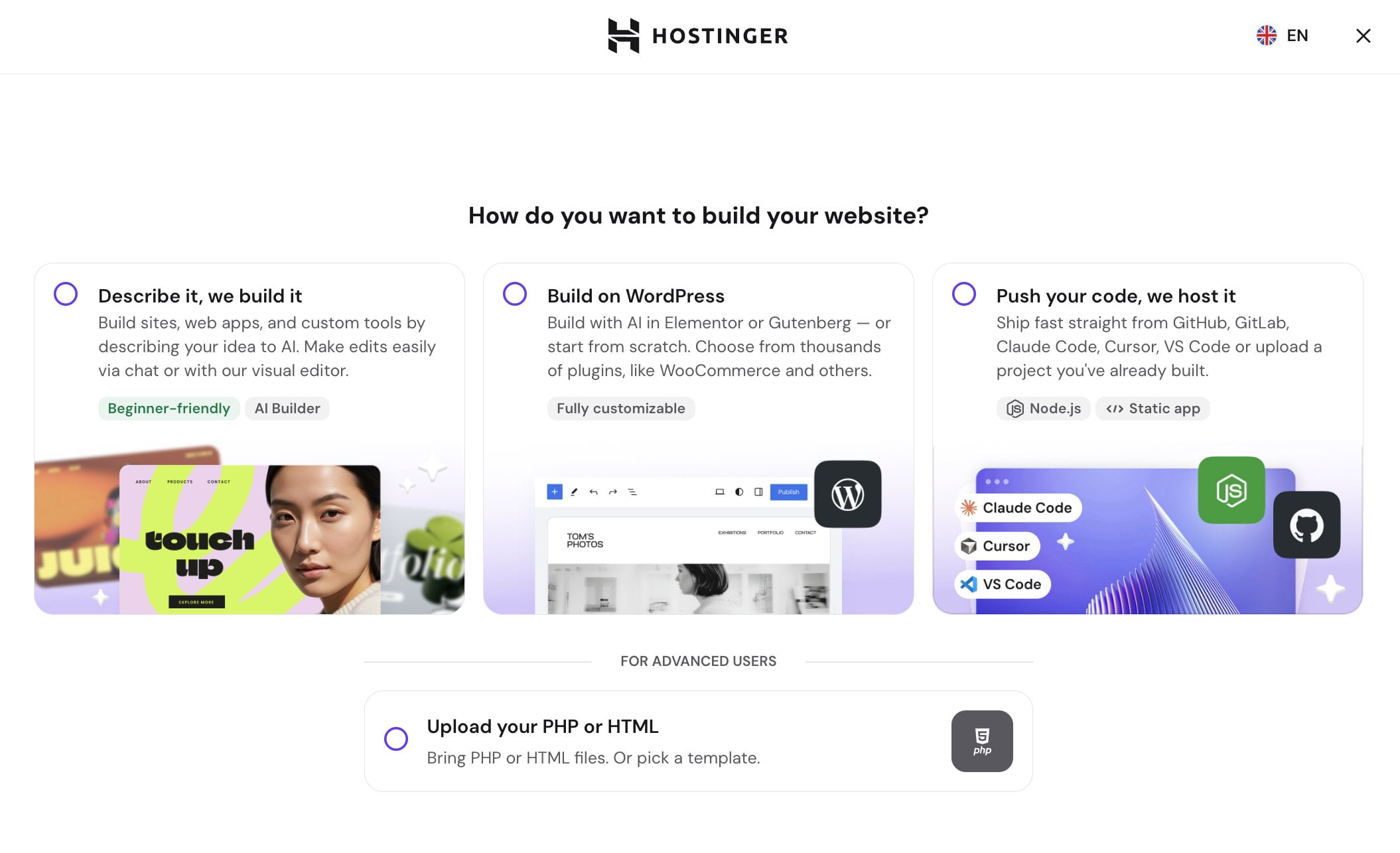
Clicking Create website opened a single question: how do you want to build your website? We had four answers to choose from. “Describe it, we build it” is the AI Builder route and carries a “Beginner-friendly” tag. “Build on WordPress” is tagged “Fully customizable” and mentions Elementor, Gutenberg and thousands of plugins such as WooCommerce. “Push your code, we host it” takes projects from GitHub, GitLab, Claude Code, Cursor or VS Code and covers Node.js and static apps. A fourth choice, “Upload your PHP or HTML”, sits apart under a “For advanced users” label. We built one site on the AI route and started a second on WordPress to compare them. The tags are a fair guide: the AI route is meant for people who have never built a site, and the WordPress route for people who already know an editor such as Elementor or Gutenberg.
Building a site with AI Builder
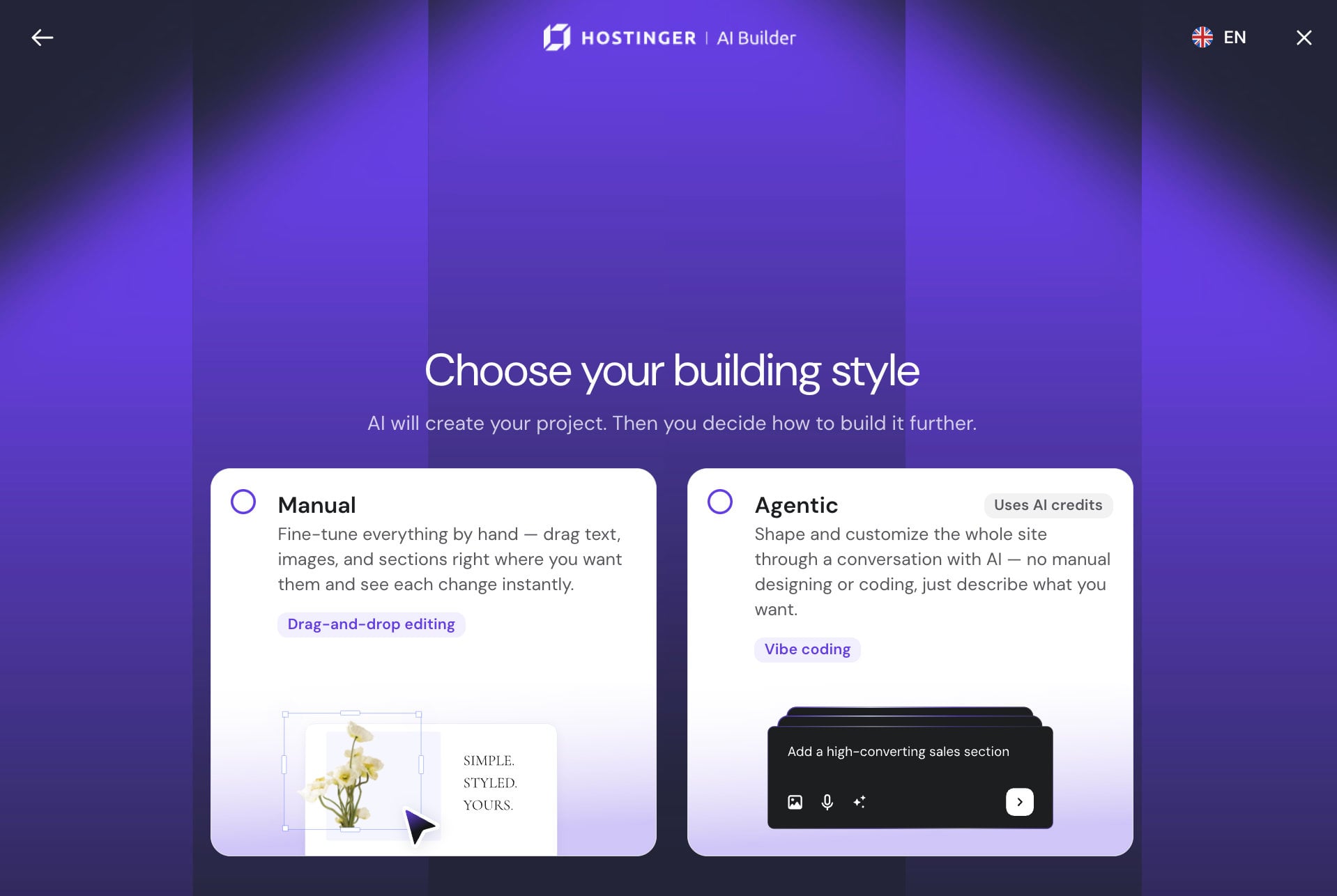
We took the AI route first. Before anything was generated, a second screen asked for a building style. Manual is drag-and-drop editing where every change shows instantly. Agentic is labelled “Uses AI credits” and lets you shape the whole site through a conversation with the AI, with no manual designing or coding. Only the agentic card carries the credit label, so you know which mode spends credits before you click. We picked manual, and hPanel tags the site as “Manual mode” in the site list.
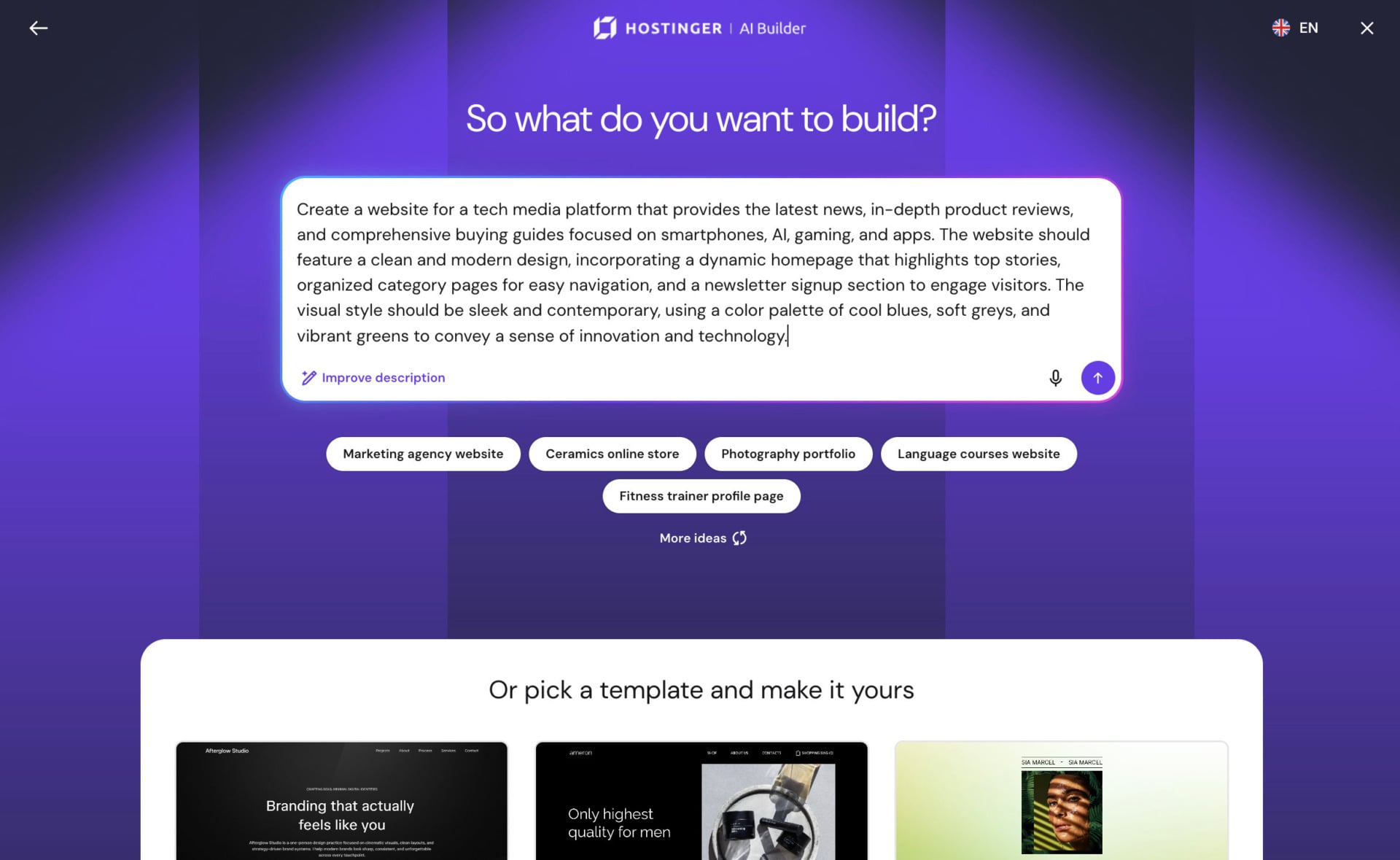
The prompt screen asks “So what do you want to build?” We pasted a full paragraph describing a tech media platform with news, product reviews and buying guides on smartphones, AI, gaming and apps. It also asked for a clean modern design, category pages, a newsletter signup and a palette of blues, greys and greens. An Improve description link and a microphone button sit under the text box. Below it are sample ideas (a marketing agency site, a ceramics online store, a photography portfolio, language courses, a fitness trainer profile) and a row of templates under “Or pick a template and make it yours”.
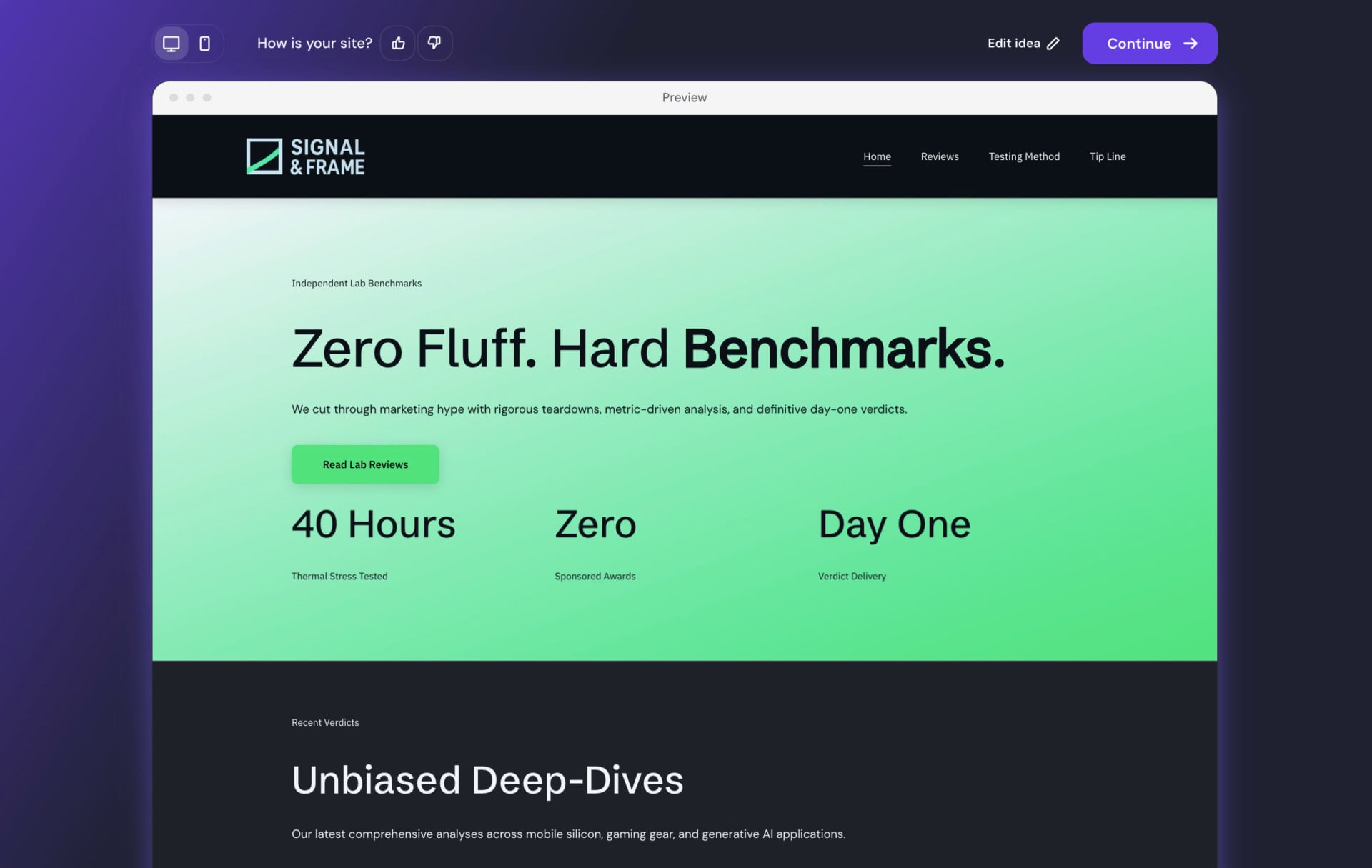
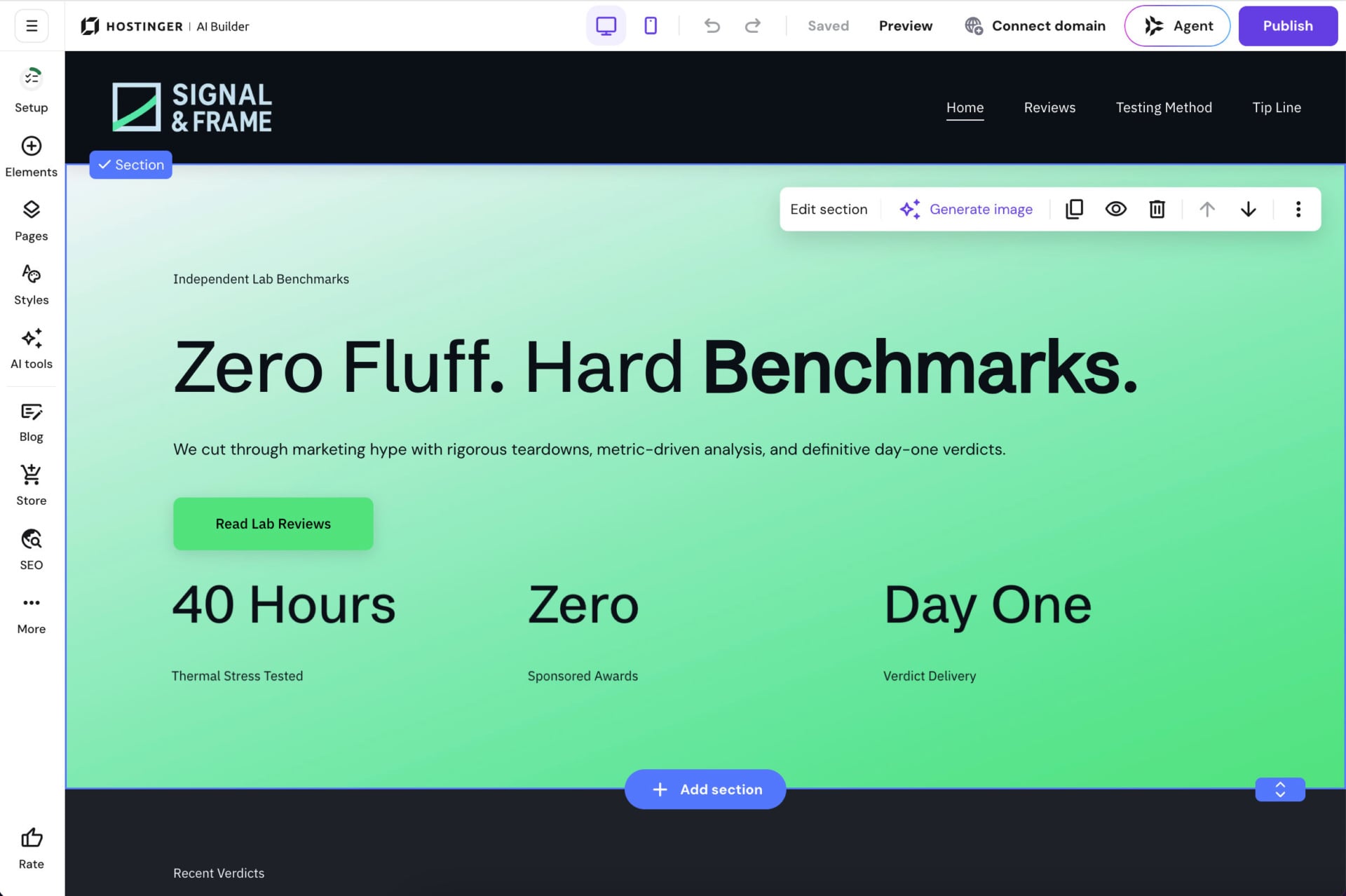
The preview came back with an invented brand, Signal & Frame. It had a logo, a menu of four pages (Home, Reviews, Testing Method and Tip Line), a hero section and a “Recent Verdicts” block. The structure matched our prompt: a review site with a benchmark angle, built around lab testing. The preview has desktop and mobile toggles, a thumbs up or down under “How is your site?”, an Edit idea link to rewrite the prompt and a Continue button. Read the copy before you publish. The hero claims “40 Hours Thermal Stress Tested” and “Zero Sponsored Awards”, but our prompt never mentioned either, so the AI made those figures up.
Continue dropped us into the editor. The left rail has Setup, Elements, Pages, Styles, AI tools, Blog, Store and SEO, plus a More menu and a Rate button. The top bar has a Saved indicator, desktop and mobile toggles, undo and redo, Preview, Connect domain, the Agent button and a purple Publish button. Each section has a floating toolbar (Edit section, Generate image, duplicate, visibility, delete, move arrows), and an Add section button sits on the bottom edge. Nothing needed a domain at this point, since the site lived on a temporary hostingersite.com address until we clicked Connect domain.
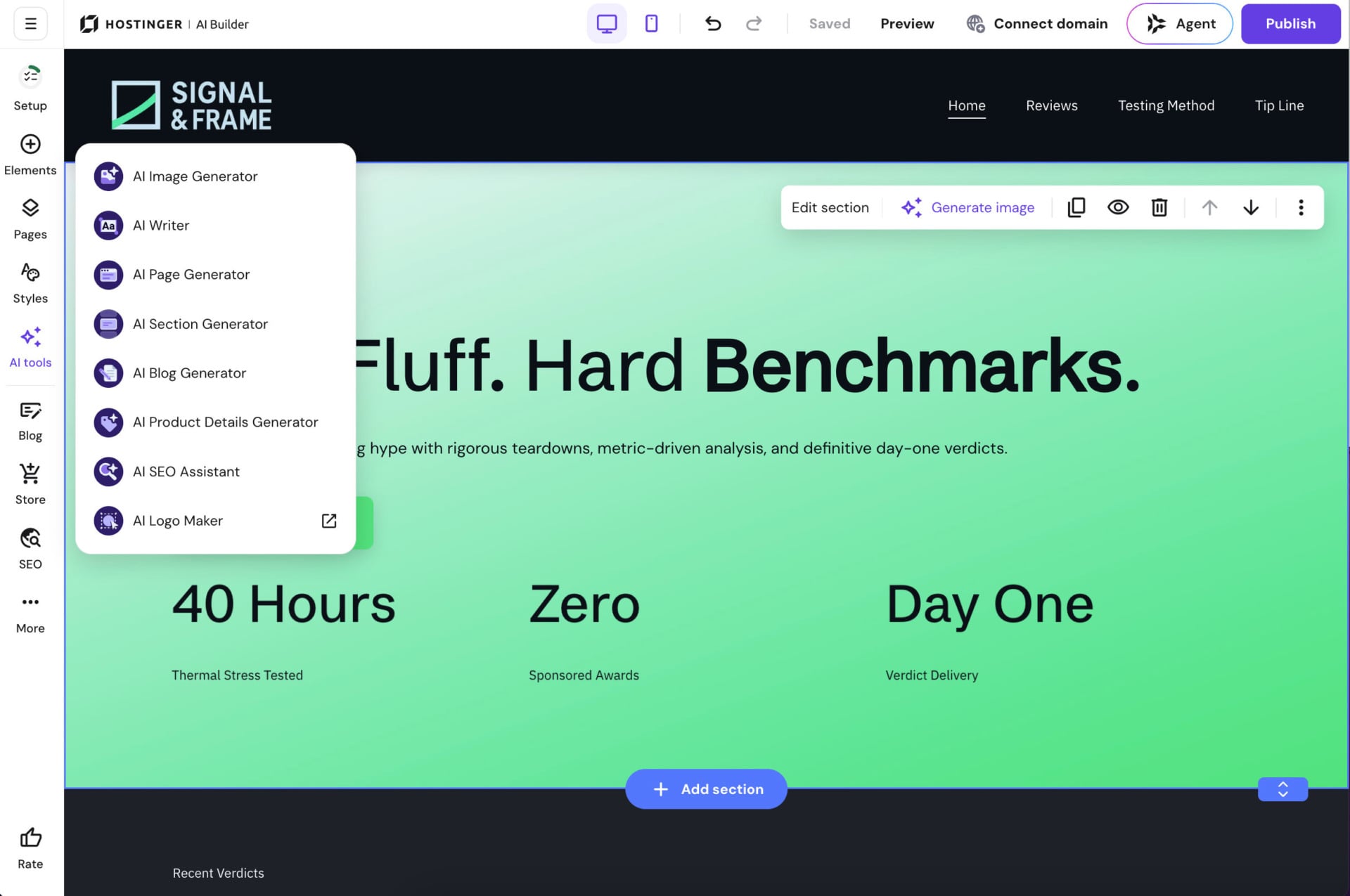
The AI tools menu lists eight generators: image, writer, page, section, blog, product details, SEO assistant and logo maker. The logo maker opens in a separate window, marked with an external-link icon.
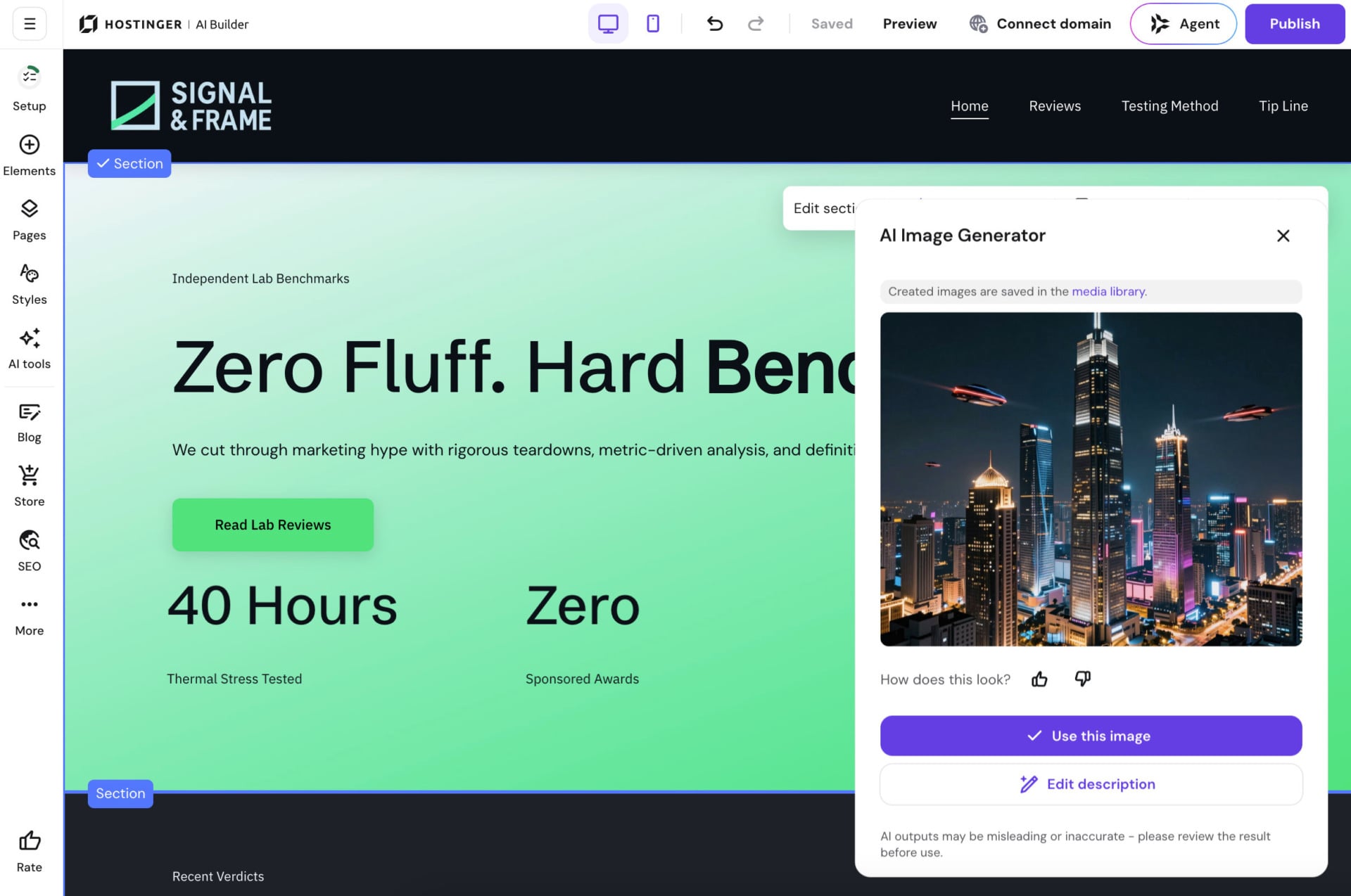
We tried the image generator on the hero section. It returned a night skyline with neon towers and flying vehicles, more science fiction than benchmark lab. Two buttons sit under the picture, Use this image and Edit description. Generated images are saved to the media library, and a line at the bottom warns that AI outputs may be misleading or inaccurate and should be reviewed before use. The first result isn’t always the right one, and rewriting the description is one click away.
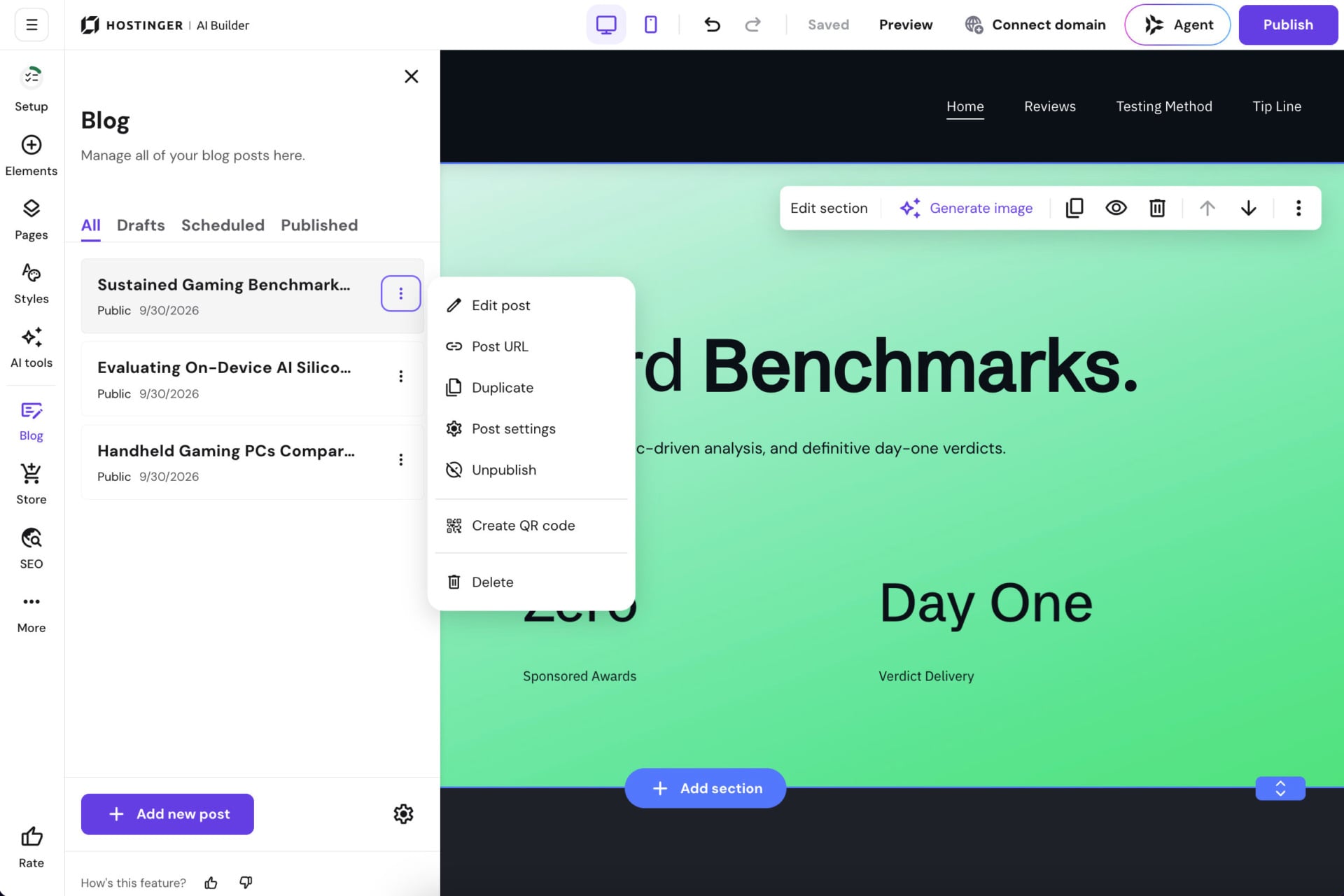
The Blog panel has All, Drafts, Scheduled and Published tabs and an Add new post button. Each post has a three-dot menu with Edit post, Post URL, Duplicate, Post settings, Unpublish, Create QR code and Delete. Our site listed three posts.
Building on WordPress
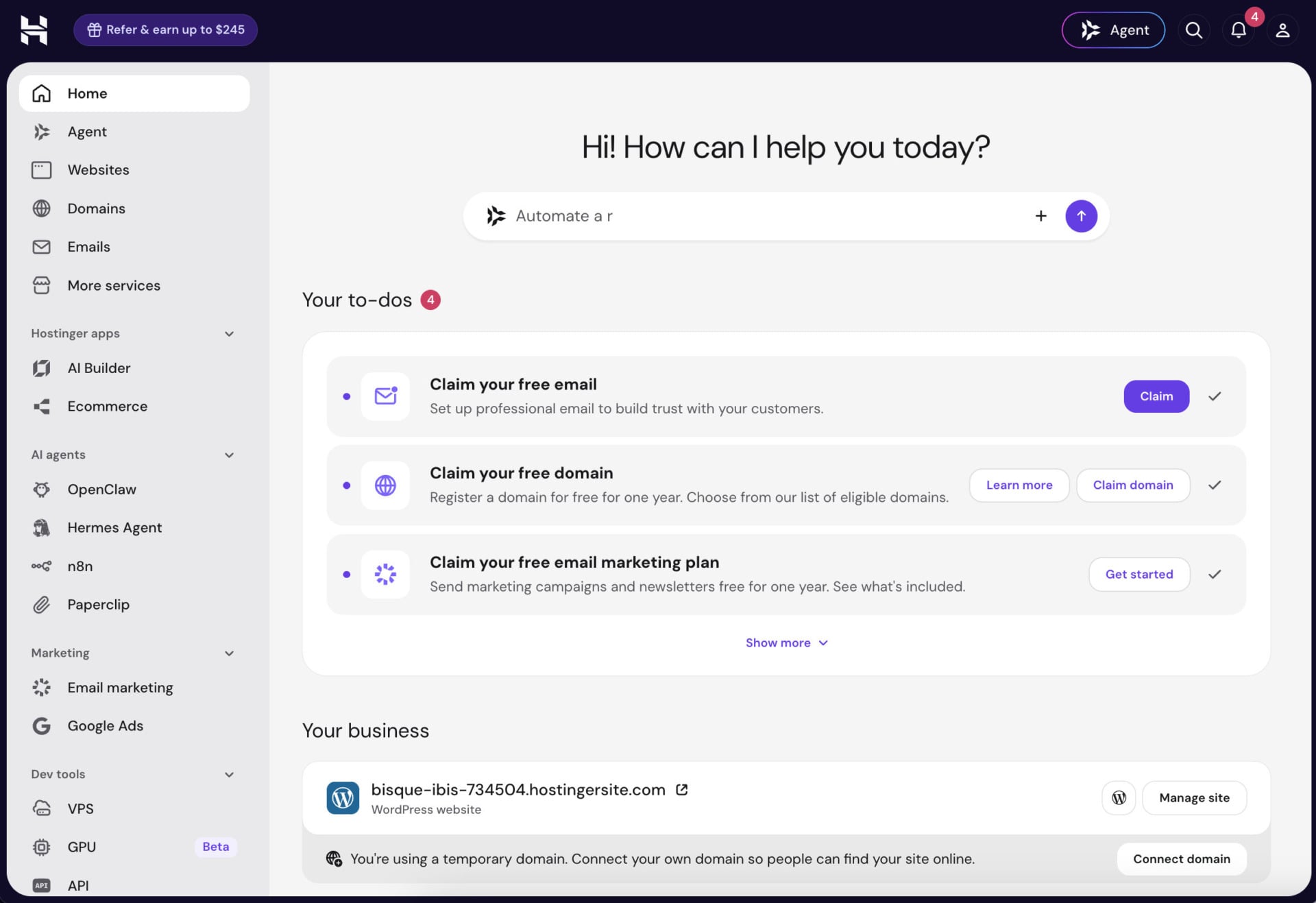
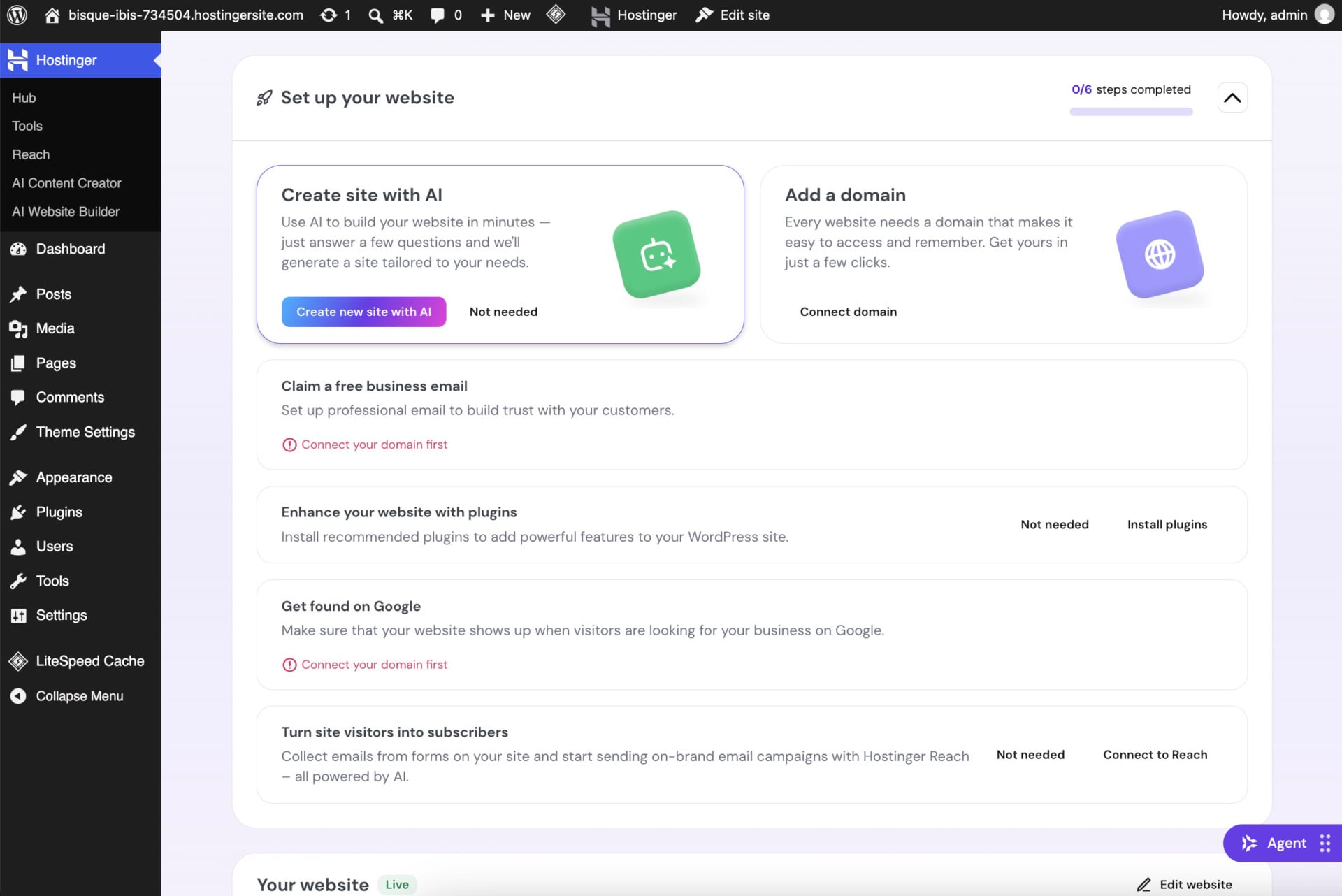
We then started a second site on the WordPress route. It asked where to host the site (the data center screen described above) and installed WordPress. The admin dashboard opened on a Hostinger home page with a prompt box for the Agent and a “Set up your website” checklist. The checklist has six steps and a counter that starts at 0/6.
The steps are creating a site with AI, adding a domain, claiming a free business email, installing recommended plugins, getting found on Google, and turning visitors into subscribers with Hostinger Reach. Two of them, the business email and the Google step, were greyed out with a red “Connect your domain first” message, which explains the order. Every step has a “Not needed” button, so you can skip what you don’t want. The site itself started on a temporary hostingersite.com address.
Importing an existing site
To bring a finished site to Hostinger, click Import website in the Websites list and choose one of the three routes covered in the migration section above. Upload accepts static HTML and CSS, WordPress and PHP sites and Node.js apps, and the GitHub route redeploys on every push.
The hPanel dashboard
hPanel is Hostinger’s own control panel and it replaces cPanel, with everything hanging off one left-hand menu. The top block holds Home, Agent, Websites (with WordPress, AI Builder, Web Apps, PHP/HTML and Migrations underneath), Domains, Emails and More services. Below it come three groups: Hostinger apps (AI Builder and Ecommerce), AI agents (OpenClaw, Hermes Agent, n8n and Paperclip) and Marketing (Email marketing). The top bar has a “Refer & earn up to $245” button, the Agent, a search box and notifications. On our brand-new account, the bell already showed four.
The Websites list is the page you will use most. Each plan is a block with its name (ours reads Unlimited) and an expiry date, and each block has Import website and Create website buttons. Every site is a row with its address, a badge for its mode, and two buttons, Edit website and Dashboard. A search field accepts a domain, an email or a name, with tag and star icons beside it. Sites on a temporary domain carry a “Current domain is temporary” line with a Connect domain link.
[SCREENSHOT 10_55_58 : hPanel Websites list showing the Unlimited plan and the test site]
Speed and performance tests for Hostinger
The speed tests in our Hostinger review ran on a WordPress test site hosted on the Unlimited plan. Two tools did the measuring: GTmetrix and Google’s PageSpeed Insights.
Hostinger GTmetrix test
GTmetrix loads a page through Google’s Lighthouse and measures how fast it renders. Its performance score combines five metrics with fixed weights: First Contentful Paint 10%, Speed Index 10%, Largest Contentful Paint 25%, Total Blocking Time 30% and Cumulative Layout Shift 25%. The structure score checks how well the page’s HTML and CSS follow good practice, which affects both SEO and user experience. These are the thresholds Google treats as good:
| Metric | What it measures | Good score |
|---|---|---|
| Time to First Byte (TTFB) | How fast the server answers the browser’s first request | 0.8 seconds or less |
| First Contentful Paint (FCP) | When the first text or image appears | 1.8 seconds or less |
| Largest Contentful Paint (LCP) | When the biggest element (hero image, banner, large button) appears | 2.5 seconds or less |
| Interaction to Next Paint (INP) | How quickly the page reacts to a click or a tap. It replaced First Input Delay as a Core Web Vital in 2024. | 200 milliseconds or less |
| Cumulative Layout Shift (CLS) | How much the layout jumps while the page loads | 0.1 or less |
First GTmetrix test result
We started with a fresh WordPress install and the Twenty Twenty-Four theme active.
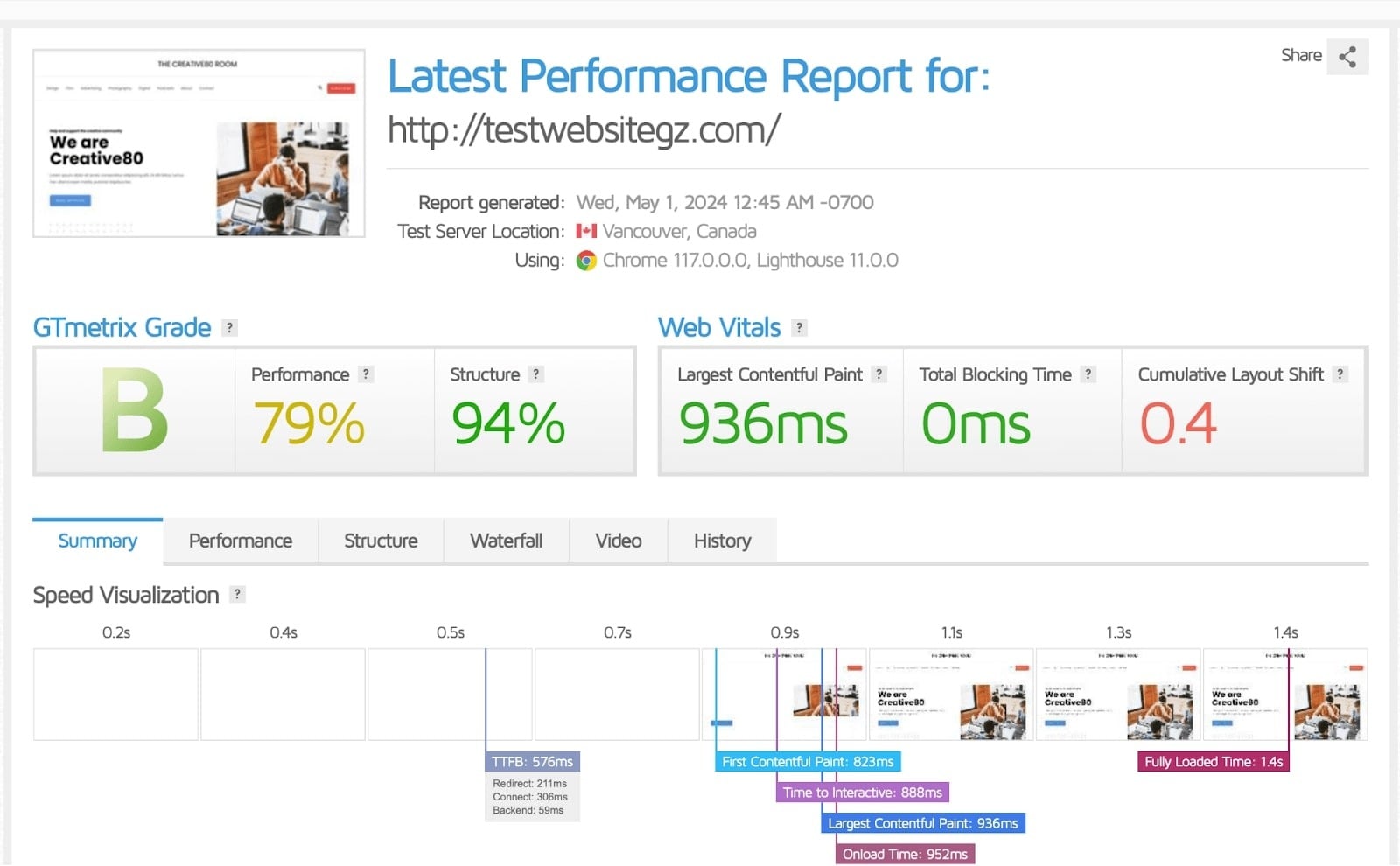
The TTFB was 576 ms, well under the 0.8-second limit, so the server answers quickly. FCP came in at 823 ms and LCP at 936 ms. The CLS was 0.4, above the 0.1 limit. We traced that to an unoptimized image and to content shifting existing elements around as the page loaded.
The page took 1.4 seconds to load fully, which is reasonable, since a good load time falls between 0 and 2 seconds. The performance and structure scores were 79% and 84%, for a GTmetrix grade of B. We didn’t reach an A, and the report’s own recommendations show where the time went.
Summary of the first GTmetrix test:
- Time to First Byte (TTFB): 576ms
- Largest Contentful Paint (LCP): 936ms
- Cumulative Layout Shift (CLS): 0.4
- Fully Loaded Time (FLT): 1.4s
Second GTmetrix test result
For the second run we followed the SEO checklist from Hostinger’s website builder, installed SSL, switched the theme to Twenty Twenty-Two and turned on LiteSpeed Cache and the CDN.
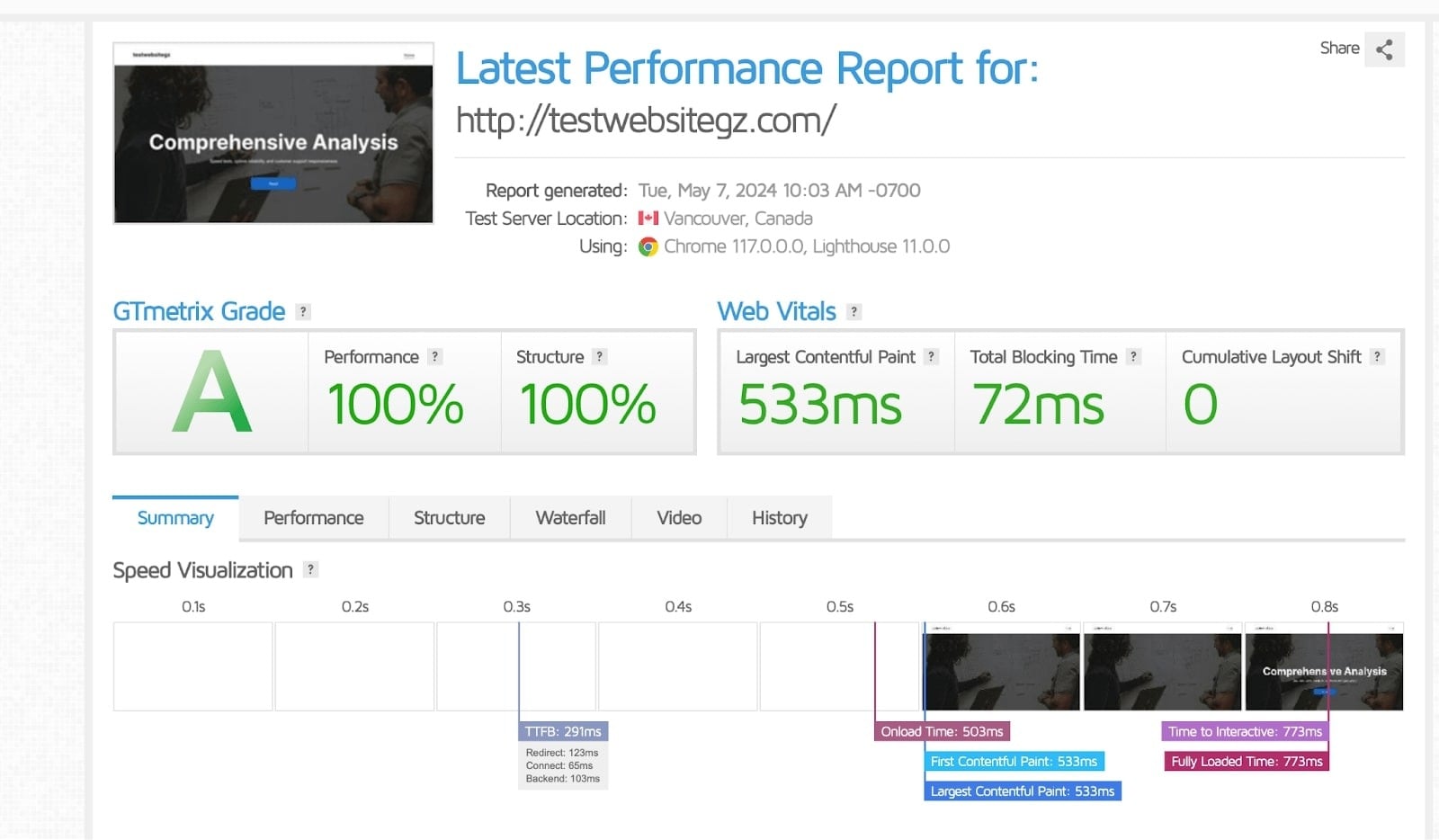
The TTFB dropped to 291 ms, 285 ms faster than the first run. FCP and LCP were both 533 ms, and the fully loaded time was 733 ms, close to half of the earlier 1.4 seconds. CLS fell to 0, and both the performance and structure scores reached 100%, for a GTmetrix grade of A. The test site was still a lightly built page, so a real site with plugins and large images will score lower.
Summary of the second GTmetrix test:
- Time to First Byte (TTFB): 291ms
- Largest Contentful Paint (LCP): 533ms
- Cumulative Layout Shift (CLS): 0
- Fully Loaded Time (FLT): 733ms
Hostinger PageSpeed Insights tests
PageSpeed Insights is Google’s own tool for testing page performance, and it lists what to fix. We ran it on the same test page for both mobile and desktop.
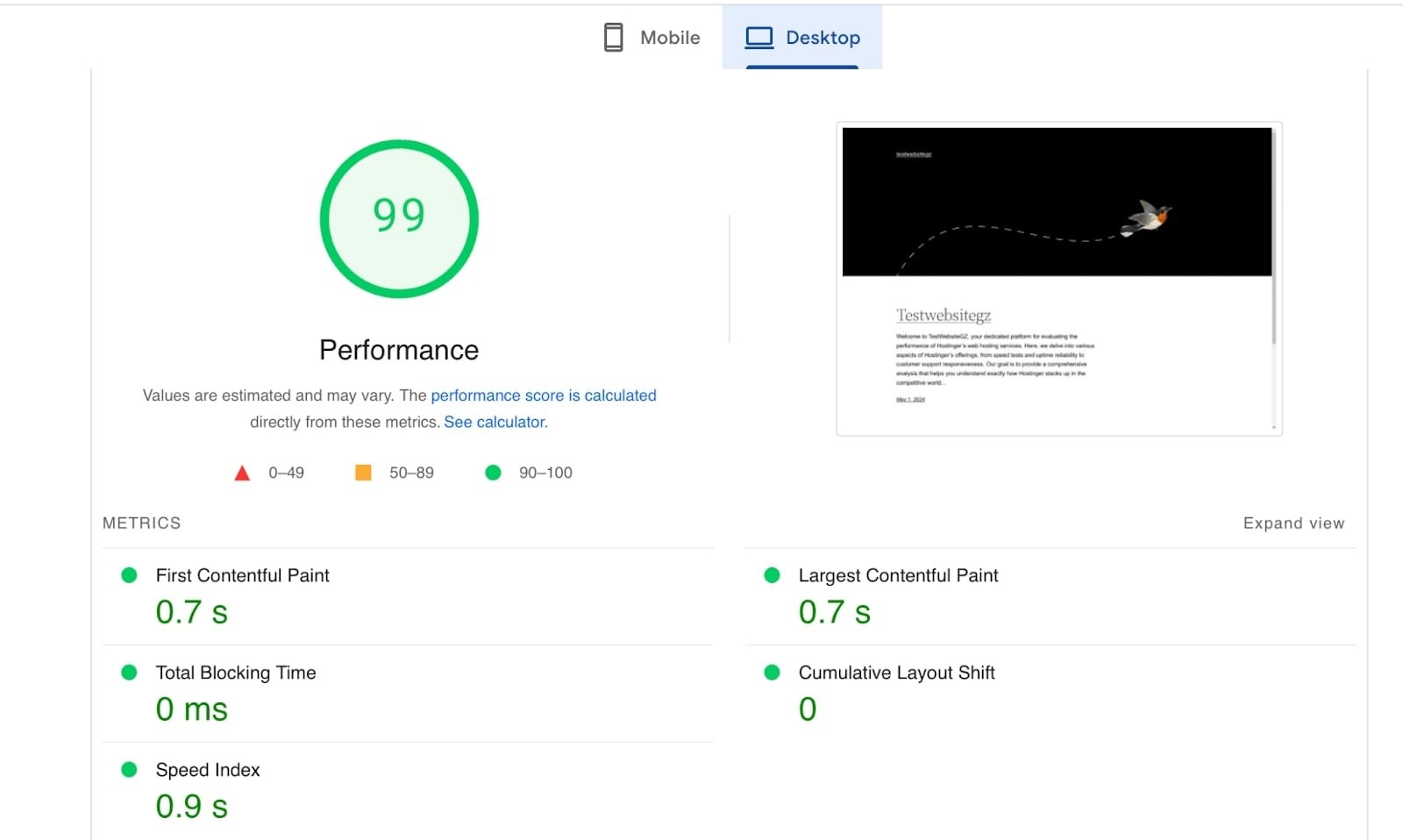
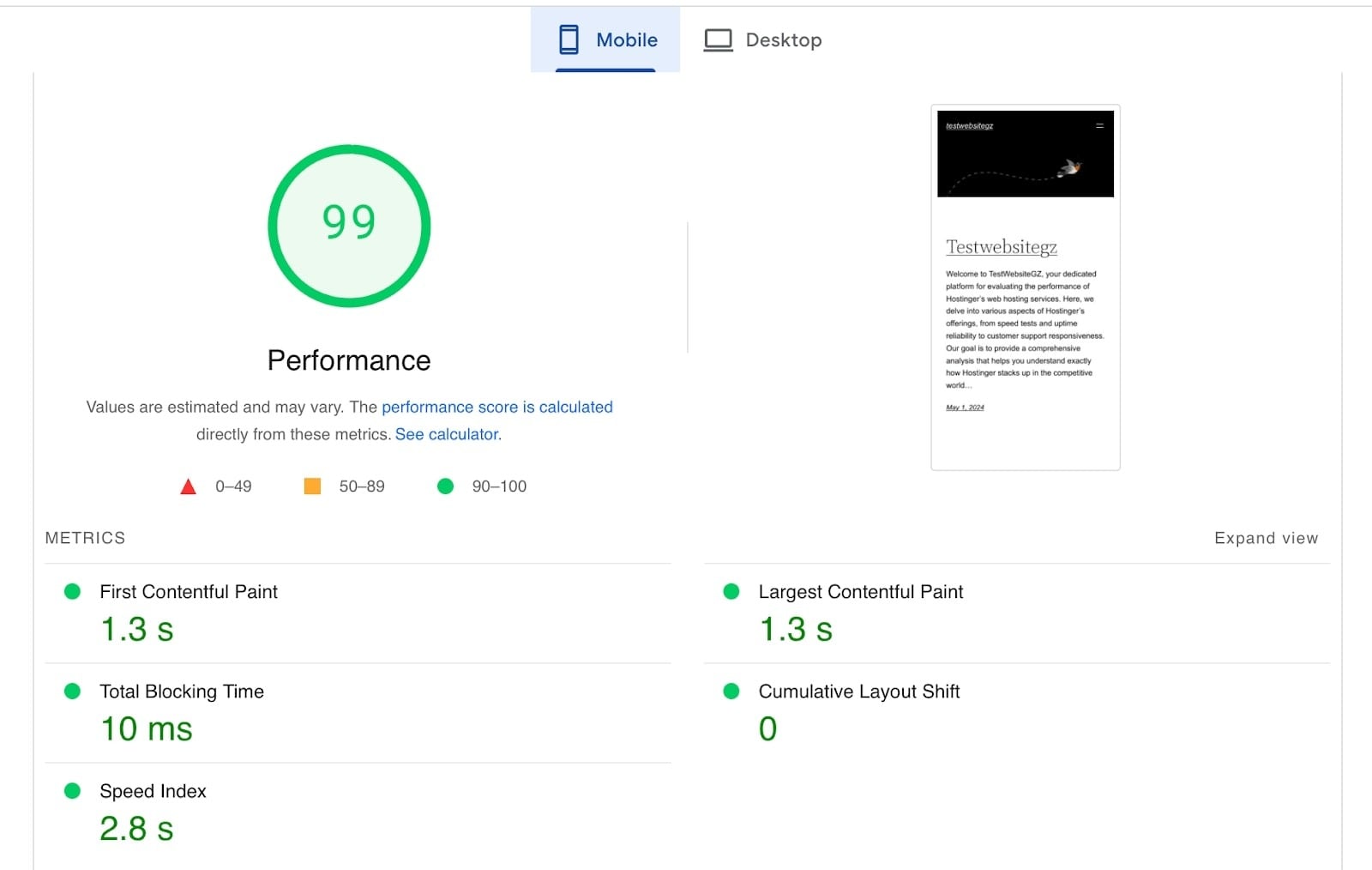
Both tests returned a performance score of 99. The details:
Mobile
- 99 performance score
- FCP: 1.3 s
- LCP: 1.3 s
- CLS: 0
Desktop
- 99 performance score
- FCP: 0.7 s
- LCP: 0.7 s
- CLS: 0
Phones have slower processors, less memory and weaker connections than desktops, so mobile scores usually come in lower. This one still logged a 1.3-second LCP, a CLS of zero and a score of 99. The desktop run had the same 99 score with an FCP and LCP of 0.7 seconds and a CLS of zero.
Is Hostinger the right choice?
Yes, for most people building a first site or a handful of small ones, and that is the short answer of this Hostinger review. The shared plans are cheap, hPanel is easy to find your way around, and the AI tools can produce a working draft of a site without a line of code. Our WordPress test site scored 100% on GTmetrix after we turned on caching and the CDN, and PageSpeed Insights gave it 99 on both mobile and desktop.
Three things can change the answer. The first is renewal: the shared plans renew at 3.3 to 4.3 times the first-term price, so decide before you sign if you will stay or move. The second is support, which is chat only, with no phone line. The third is Premium. It saves $1 a month over Unlimited but drops the CDN, daily backups, Node.js and priority support, which makes Unlimited the better buy for most sites. Anyone who needs a dedicated server should look elsewhere, because Hostinger’s VPS range stops at 8 vCPUs and 32 GB of RAM.
We haven’t tested the VPS plans, the AI agent apps or AI Builder’s agentic mode, so what we say about them comes from Hostinger’s specs rather than our own use. AI Builder in manual mode is the part worth trying first. It is included in the shared plans and starts on a temporary domain, and the site it generates needs editing but gives you something concrete to react to. If you already have a site elsewhere, Hostinger says the free migration tool takes about half an hour.
FAQ
What is Hostinger, and why is it so cheap?
Hostinger is a web hosting provider founded in Lithuania in 2004. It runs shared, cloud and VPS hosting, plus an AI website builder. The low advertised prices come from long prepaid terms: you pay for 12 to 48 months upfront, and the plan then renews at a higher regular rate.
Is Hostinger good web hosting?
Yes, for most small and medium websites. WordPress.org recommends it, the servers run LiteSpeed, and support is available around the clock by chat. It has no phone support and no dedicated servers.
Why should I choose Hostinger?
It suits first-time site owners. hPanel puts websites, domains, email and AI tools in one menu, and AI Builder can turn a written description into a working site with pages, a logo and blog posts.
Do you get a free domain with Hostinger?
Yes, for the first year on plans of a year or longer. Monthly plans don’t include it.
How many websites can I host on Hostinger?
The Premium plan allows 3 websites. Unlimited and Cloud Startup allow unlimited websites, subject to Hostinger’s Fair Usage Policy.
Does the price go up when I renew?
Yes. The promotional rate applies to the first term only. After that the plan renews at the regular price, which is about 3.3 to 4.3 times higher on the shared plans. Hostinger’s pricing page says you can cancel anytime.
How do AI credits work on Hostinger?
AI Builder’s agentic mode, where you shape the site by chatting with the AI, uses AI credits. Premium includes 5 and Unlimited and Cloud Startup include 15. Manual drag-and-drop editing doesn’t list a credit cost.
Does Hostinger have phone support?
No. Support runs through live chat and the Hostinger Agent assistant, available 24/7, with human agents behind it.
Can I move my existing website to Hostinger for free?
Yes. The migration tool in hPanel works from your current host’s login details or from backup files. Hostinger says it usually takes about 30 minutes and can take up to 24 hours.
Is there a money-back guarantee?
Yes. Hostinger’s plans come with a 30-day money-back guarantee.