
Bluehost is one of the best-known web hosting companies, and WordPress.org has listed it among its recommended hosts since 2005. It is a convenient way to build a WordPress website, and in 2026 it also sells WooCommerce hosting, managed cloud hosting, VPS plans, dedicated servers and AI-focused products that most hosts do not have. If you are new to Bluehost, this review explains what each product does and who should buy it.
We tested Bluehost’s shared hosting for performance, uptime and support. For the newer products, which are WooCommerce hosting, Cloud, VPS, AI agent hosting and the AI all-access pack, our assessment rests on the plan specs, the prices and the terms that Bluehost publishes, and we say so in each section.
Bluehost
Bluehost is a beginner-friendly WordPress host, recommended by WordPress.org since 2005, with a wider range of products than most rivals: WooCommerce, cloud, VPS and AI hosting.
Pros
- Recommended by WordPress.org since 2005
- WordPress plans from $3.99/mo
- Self-managed VPS from $4.69/mo
- One-click OpenClaw, Hermes Agent, n8n and Claude Code on VPS
- Free domain for the first year
- 24/7 chat and phone support
Cons
- Renewal prices are higher
- WordPress hosting runs on US data centers
- Self-managed VPS has no cPanel
- Managed VPS costs 5x the self-managed price
Bluehost Plans and Pricing
Bluehost pricing varies a lot from one product to another, and the company sells more product types than most hosts, so it helps to see them side by side first. The table shows the entry plan of each product, the launch price with its term and the price after that term, using the figures on Bluehost’s plan pages at the time of writing.
| Product | Entry plan | Launch price | Renews at |
|---|---|---|---|
| Managed WordPress hosting | Starter | From $3.99/mo | Varies by plan |
| WooCommerce hosting | eCommerce Essentials | $14.99/mo on 36 months | $21.99/mo |
| Cloud hosting | Cloud 10 | $65/mo on 36 months | Varies by plan |
| Self-managed VPS | NVMe 2 | $4.69/mo on 24 months | $5.69/mo |
| Managed VPS | Standard NVMe 4 | $49.99/mo on 36 months | $68.99/mo |
| AI Agent Hosting | Claude Code, n8n or OpenClaw | $9.49/mo on 24 months | $11.99/mo |
| AI All-Access Pack | AI All-Access Pack | $20/mo billed monthly | Monthly plan |
If you want to start a hosting business, our reseller hosting guide covers providers that sell reseller plans. Most Bluehost deals depend on a long commitment, usually 24 or 36 months paid upfront, so the monthly price on the plan page is not the amount that leaves your account on day one. A 30-day money-back guarantee applies, with conditions that we explain in the support section.
See Bluehost’s WordPress Plans
Bluehost WordPress Hosting
WordPress is where Bluehost is strongest, and it is the product most readers should look at first. Managed WordPress plans start at $3.99/mo and come in two groups. The Standard group has Starter, Business and eCommerce Essentials, and the High-Performance group has Pro, Premium, Enhanced and Elite.
WordPress Hosting Features
Every WordPress plan includes a free domain for the first year, free SSL, automatic WordPress updates, a free migration, a one-click staging tool and Yoast SEO pre-installed. Developers get WP-CLI, SSH, Git integration and PHP version control, which is more than you expect on a beginner plan. The High-Performance plans add more resources and on-demand backups.
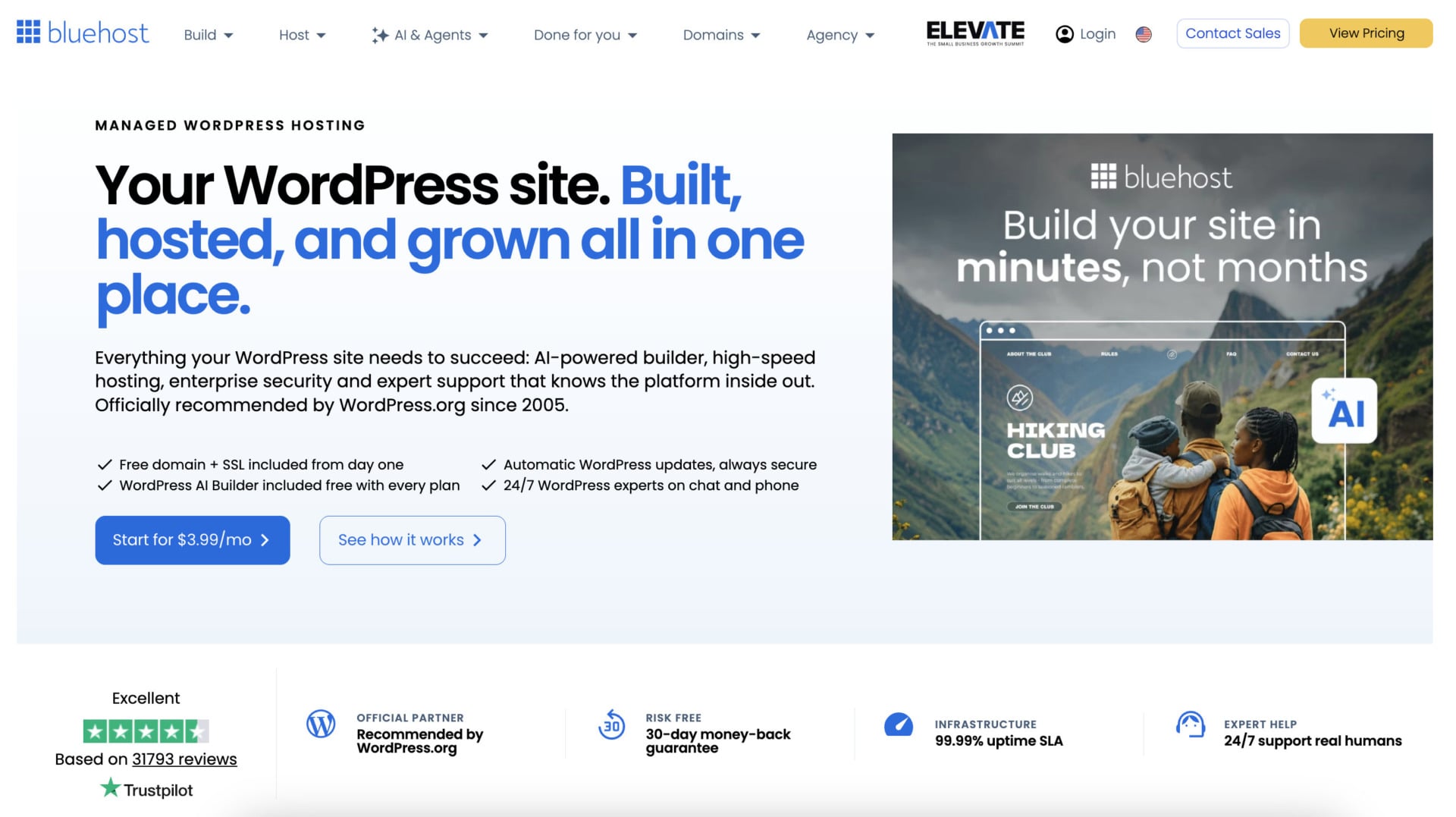
Bluehost builds the platform around WordPress: NVMe storage, a global CDN and server-level caching handle speed, and PHP 8 with HTTP/3 and object caching help dynamic pages. Bluehost says its sites load in 0.35 seconds on average in the US, citing a WPShout test from November 2025 where Kinsta, WP Engine, SiteGround, DreamHost and Hostinger were slower (that is a result Bluehost presents and our own test below shows a more modest picture on a shared plan).
Our View on Bluehost WordPress Hosting
For a beginner who wants WordPress with guidance, this is the best entry point Bluehost sells. The official recommendation from WordPress.org, the staging tool on every plan and the human support give you a safe start. The price is $3.99/mo for the entry plan, not the old $1.99 that older articles mention.
There are limits: WordPress hosting runs on US data centers, so visitors in Europe or Asia may see higher latency, and our Bluehost vs. Hostinger comparison shows where Hostinger is the better choice for a global audience. Bluehost’s own pages also disagree on backup frequency with “weekly” in one place and “daily” in another so confirm what your plan includes in the dashboard.
Start With Bluehost WordPress Hosting
Bluehost WordPress AI Builder
The WordPress AI Builder is included with every WordPress plan: You enter a site title, a category and a short description of what the site should do (see below) and Bluehost generates three site previews with matching colors, fonts and content. You choose one, then use a drag-and-drop builder to refine it and publish on WordPress.
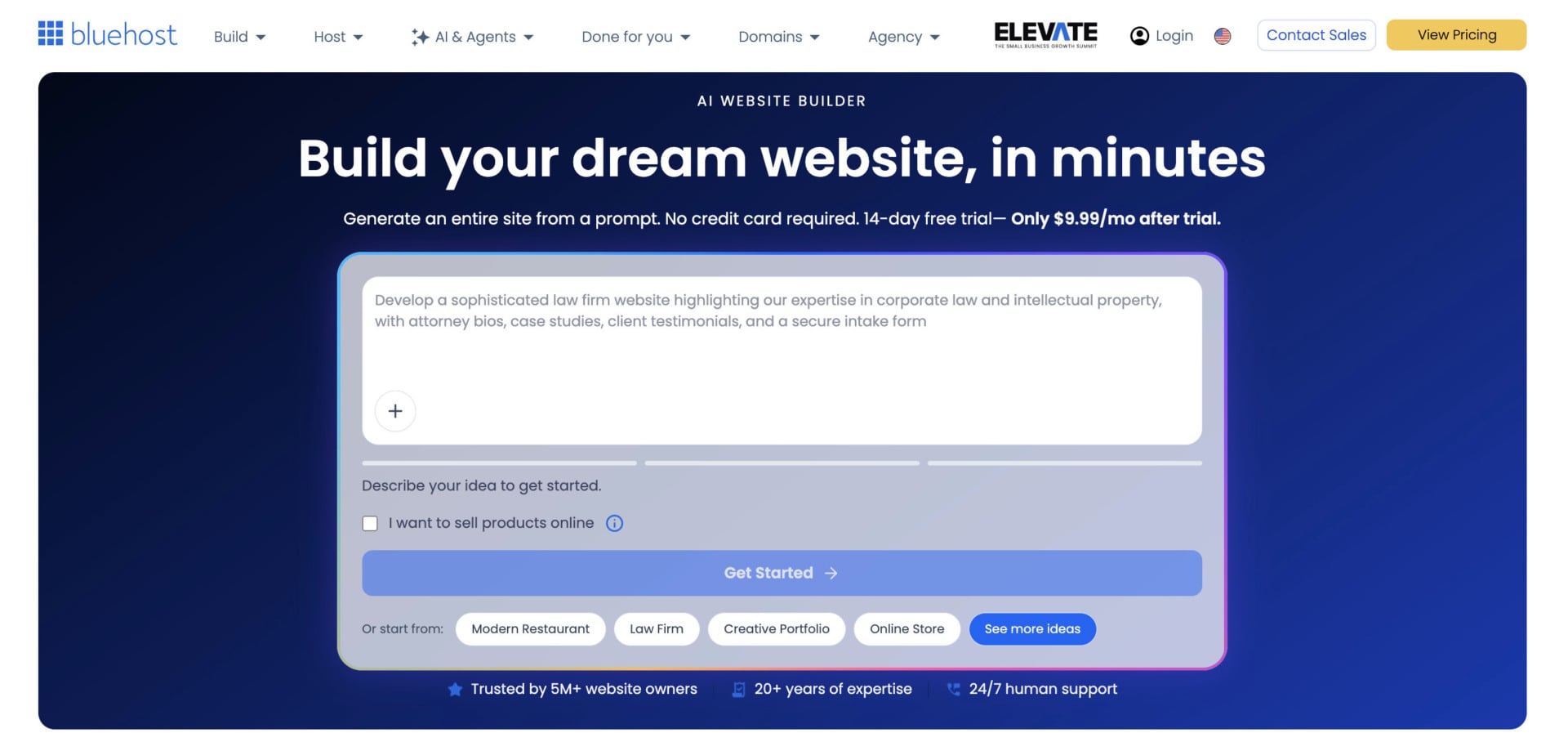
It is a useful shortcut for beginners, and the output is real WordPress, so you can switch to any theme or plugin later. Wix still has the stronger standalone builder, and our Wix review explains why, but Bluehost’s builder is better than most hosts’ tools because it ends in a normal WordPress site.
Bluehost WooCommerce Hosting
Bluehost sells a separate WooCommerce hosting product for people who want an online store on WordPress. The entry plan, eCommerce Essentials, costs $14.99/mo on a 36-month term and renews at $21.99/mo. eCommerce Premium costs $21.99/mo on 36 months and renews at $30.99/mo, and Custom Commerce is priced on request for complex stores.
What You Get With WooCommerce Hosting
WooCommerce comes pre-configured, with 16 premium WooCommerce plugins pre-installed, Yoast SEO, an AI store builder and a free domain and SSL. Essentials covers subscriptions, memberships, paid courses and digital downloads, email marketing, social login, an affiliate program and secure checkout. Premium adds gift cards, bookings, product add-ons, points and rewards, wishlists, advanced reviews, one-click checkout and automated shipping and fulfillment.
Bluehost adds a free store migration tool based on InstaWP, 24/7 support from agents trained on WooCommerce, and a 30-day money-back guarantee. It says there are no transaction fees from Bluehost, so you only pay your payment processor’s rates. WooCommerce itself supports more than 100 payment gateways, including Stripe, PayPal and Square.
Our View on Bluehost WooCommerce Hosting
This is a good product if you want to own your store and already like WordPress. The 16 pre-installed plugins are the real value, because subscriptions, memberships and reviews would otherwise mean separate licenses, and on Shopify they are paid apps. Bluehost’s plans save you hours of setup before the first sale.
The trade-offs are the 36-month commitment and the renewal, which is 47% higher on Essentials. The $14.99 starting price also costs about four times the WordPress entry plan, so choose it only if you need the store tools. Our WooCommerce hosting guide compares other options.
Bluehost Cloud Hosting
Bluehost Cloud is a managed cloud platform for WordPress, aimed at agencies, e-commerce stores and high-traffic sites. It runs WordPress on a distributed, multi-regional cloud with load balancing, a global CDN and automatic failover, and it has a 100% uptime SLA, which we explain below.
Bluehost Cloud Plans
There are three plans and a custom option, all on a 36-month term. Cloud 10 costs $65/mo for up to 10 websites, 125 GB of NVMe storage and 20 vCPU threads, and Bluehost rates it for about 300,000 visits a month. Cloud 25 costs $140/mo for 25 websites, 175 GB of storage and 75 vCPU threads, and Cloud 50 costs $230/mo for 50 websites, 225 GB and 150 vCPU threads, rated for about 11 million and 23 million visits a month.

Every plan includes one-click staging, Yoast SEO Premium, unrestricted bandwidth, global edge caching, global data centers and 24/7 priority support. Bluehost lists a premium web application firewall, malware scanning, DDoS protection above 2 Tbps and two-factor authentication on the security side, and automated daily backups of up to 10 GB through Jetpack. Chat response time is advertised as under 30 seconds, with WordPress experts and premium onboarding.
Here, a vCPU is not a virtual server core but a PHP worker, the process that handles requests. vCPUs are pooled at the account level, and each site can use up to 10 of them, so on a plan with 75 vCPUs you can give your busiest site more power and share the rest across other sites.
About the 100% Uptime SLA
The SLA promises that the data center network is available 100% of the time in a given month, excluding scheduled maintenance. If it fails, Bluehost credits your account, and the SLA text describes 5% of the monthly fee for every 30 minutes of network downtime, up to 100% of the monthly fee. The FAQ describes the credit as one day of hosting for every 30 minutes of unplanned downtime, so the two descriptions differ.
This is a network SLA with credits, not a promise that your website will never go down, so a plugin or database problem is not covered. It is still a stronger commitment than the 99.9% that most shared hosts promise.
Our View on Bluehost Cloud
Bluehost Cloud makes sense for an agency that hosts many WordPress sites and wants hands-off management. The pooled PHP workers, the staging tool, the priority support and the SLA credits fit that use well, and Cloud 10 covers up to 10 sites on one plan.
The price is the obstacle. Cloud 10 costs $65 a month, which is $2,340 over a 36-month term paid upfront, and Cloud 50 is $8,280. For a single site, a WordPress plan or a VPS costs much less, and Bluehost itself says smaller sites can start on shared hosting and move to Cloud as traffic grows. We would choose Cloud only for sites that earn money from traffic spikes.
Bluehost VPS Hosting
Bluehost sells two kinds of VPS, and they are very different products. The self-managed VPS gives you a server and the freedom to run it yourself. The managed VPS adds cPanel and a team that runs the server for you, at a much higher price.
Self-Managed VPS
Self-managed VPS plans use AMD EPYC processors, DDR5 memory and NVMe storage, with unmetered bandwidth, a dedicated IP address and DDoS protection. You get full root access and SSH, API access and a choice of one-click applications. Claude Code comes pre-installed on every plan and Bluehost’s FAQ says the servers run AlmaLinux 9.

On a 24-month term, NVMe 2 costs $4.69/mo for 1 vCPU, 2 GB of RAM and 50 GB of storage, and NVMe 4 costs $9.49/mo for 2 vCPUs, 4 GB and 100 GB. NVMe 8 costs $12.99/mo for 4 vCPUs, 8 GB and 200 GB, and NVMe 16 costs $25.99/mo for 8 vCPUs, 16 GB and 450 GB.
Bluehost states clearly that cPanel and 24/7 priority support are not included with these plans. Premium support is available if you contact sales, and no price is shown. That makes the self-managed VPS a product for people who can administer a Linux server.
NVMe 4 is the sweet spot, and Bluehost marks it as recommended for Docker, AI agents and growing applications. At 4 GB of RAM, it is a good base for n8n or an AI agent. NVMe 8 looks cheap at launch but renews at $28.99, more than twice the launch price. At 8 GB, Hostinger’s KVM 2 costs $8.99/mo on a 24-month term and renews at $14.99, so it is the better value if you want the largest server for the money. Our VPS hosting guide compares them in detail.
Managed VPS
Managed VPS plans use the same kind of hardware, with AMD EPYC enterprise-grade processors, DDR5 memory and NVMe storage. They include a cPanel license with WHM access, two dedicated IPs, free SSL, unmetered bandwidth, free eligible migration and 24/7 expert support. Bluehost’s customer service team won three Silver Stevie Awards in 2026.
Standard NVMe 4 costs $49.99/mo on a 36-month term for 2 vCPUs, 4 GB of RAM and 100 GB of storage. Enhanced NVMe 8 costs $68.99/mo for 4 vCPUs, 8 GB and 200 GB, and Ultimate NVMe 16 costs $97.99/mo for 8 vCPUs, 16 GB and 450 GB. Renewals are $68.99, $98.99 and $143.99 per month, and you can pick one of nine data centers at checkout.
Our View on Bluehost VPS
We like the self-managed VPS and we find the managed VPS hard to justify. Standard NVMe 4 has the same specs as the self-managed NVMe 4 at about five times the price, and what you pay for is cPanel, the support and the maintenance. That can be worth it for a business that has no one to run a server, but not for most people.
If you do want a managed VPS, compare it with InMotion, whose managed plan with 4 vCPUs and 8 GB of RAM starts at $43.49/mo and renews at $56.49, against $68.99 and $98.99 for Bluehost’s Enhanced NVMe 8. Our InMotion review covers that plan. For most readers, we would pick the self-managed NVMe 4.
Bluehost AI Agent Hosting
AI agent hosting is Bluehost’s newest hosting product: It is a self-managed VPS built for always-on AI applications, and you pick the application during setup. Bluehost lists OpenClaw, Hermes Agent, n8n and Claude Code as the main choices, with root access, SSH and NVMe storage.
What Is Included
The plans for Claude Code, n8n and OpenClaw cost $9.49/mo on a 24-month term and renew at $11.99/mo, although the n8n plan lists $9.35. They share the same specs: 2 vCPUs, 4 GB of DDR5 memory, 100 GB of NVMe storage and unmetered bandwidth. Bluehost advertises a 99.99% uptime SLA, free SSL, a dedicated IP per instance and free migration of existing agents, and the hero says the starting price is $4.69/mo.
The one-click library goes further than the three main plans: It includes Hermes Agent, Hermes Agent with Open WebUI, Open WebUI, DeepSeek, Dify, Langflow, Coolify, Chatwoot and Ghost, among others, and it supports Node, Python, Go and Docker. You choose one of nine data centers at checkout – and keep in mind that the choice cannot change afterward.

Remember that these plans are the self-managed NVMe 4 VPS with a different application pre-installed, and that support is not included. Bluehost’s hero says “24/7 developer support”, while the VPS page says priority support is not included, so confirm what you get before you buy. At 4 GB of RAM for $9.49/mo, Hostinger gives you 8 GB for $8.99/mo, so compare both. We cover the same use cases in our n8n hosting guide and our OpenClaw hosting guide.
Deploy an AI Agent on Bluehost
Bluehost AI All-Access Pack
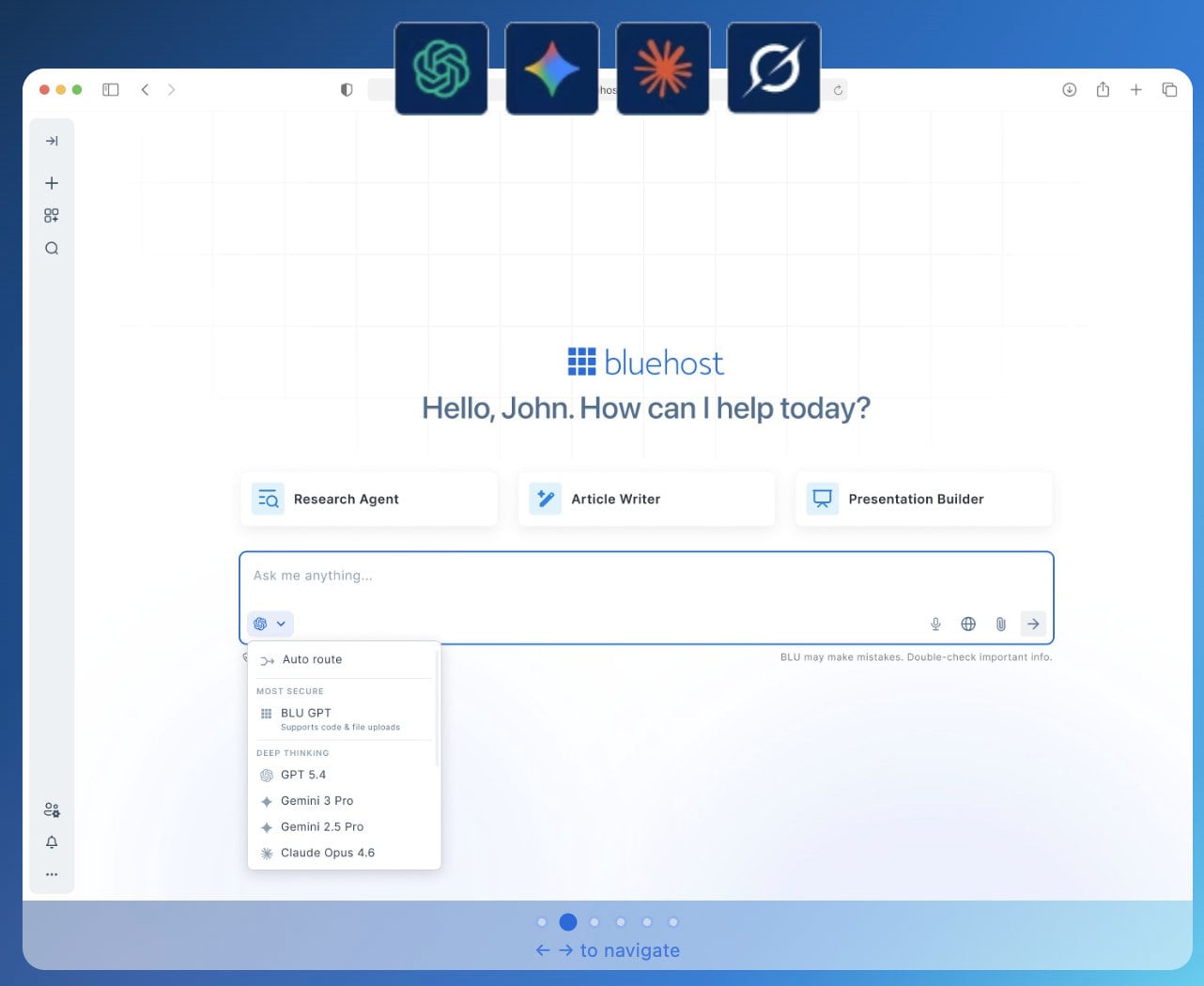
The AI All-Access Pack is the most original product Bluehost sells and to our knowledge few web hosts sell anything like it: It gives you ChatGPT, Gemini, Claude and Grok in one dashboard for $20/mo, billed monthly, and you do not need a Bluehost hosting plan to buy it.
The main advantage is convenience: You can switch between models depending on the task (see screenshot below), compare answers from several models before you pick one and use pre-built agents for research, article writing and presentations. The pack also has chat memory that carries across models, an import tool for memory from other assistants, multilingual speech-to-text and real-time insights from X through Grok.
Agencies get a management dashboard to assign seats, switch client access on or off, set permissions and track usage so you can resell AI access as a managed service from one account. The Privacy+ plan costs $25/mo and adds a sanitization layer for sensitive prompts, privately hosted LLM access, end-to-end encryption, a PIN for each user and an incognito mode.
Keep two reservations in mind. “Unlimited access” means that you always have access to a model, not unlimited use of premium models, and Bluehost does not publish usage numbers. The pricing is also described as per seat, so check the seat terms before you add a team.
Ease of Use and Hosting Management
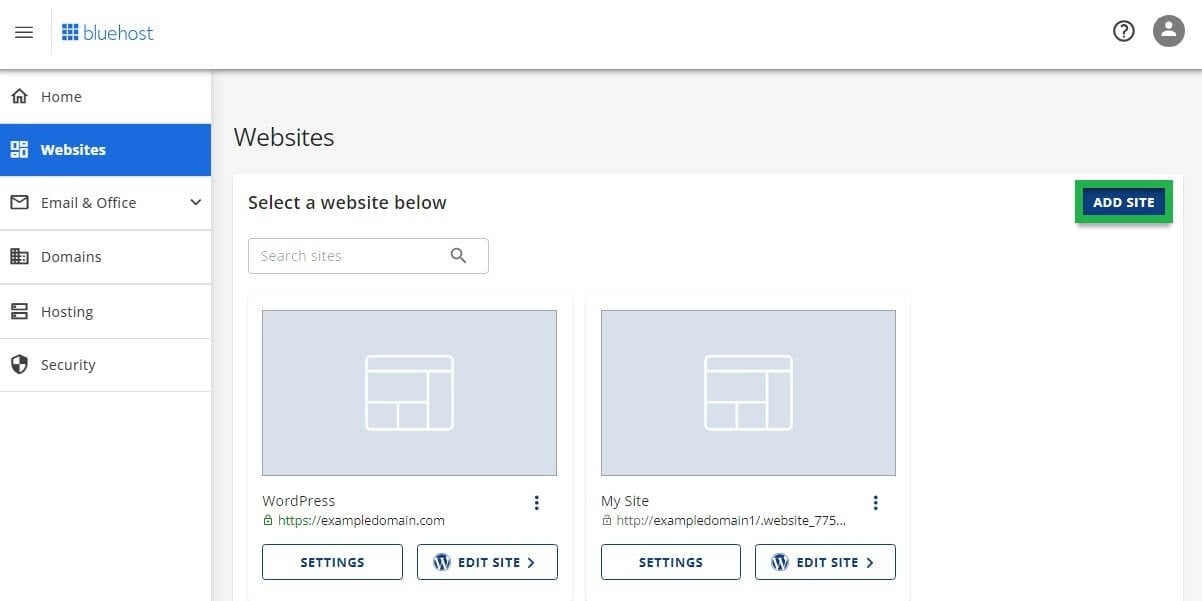
Bluehost is beginner-friendly, thanks to a clear dashboard and its integration of cPanel for people who want it. The setup is simple and quick. After you subscribe and create an account, the dashboard opens with all the tools in a menu on the left, and you add a website through the Hosting menu with the blue Add Site button.
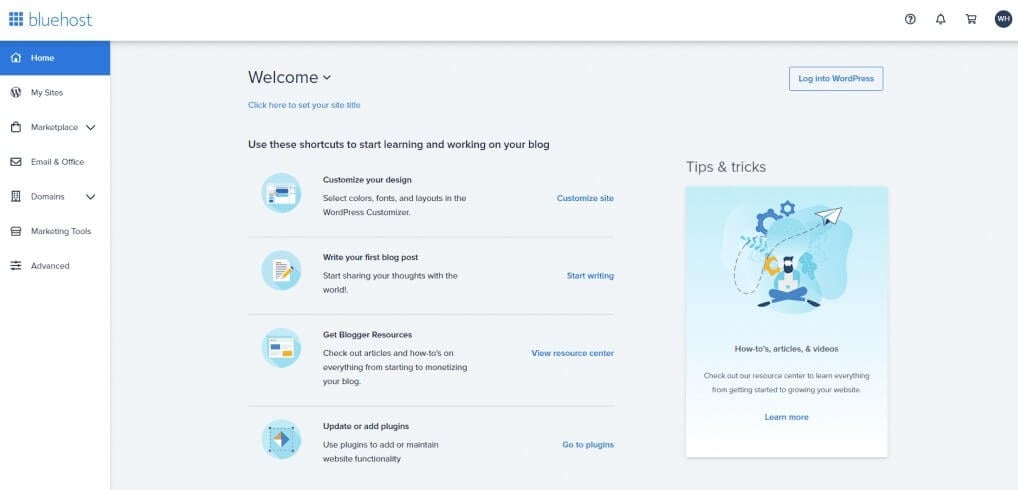
Bluehost lets you create a WordPress website or move an existing one, and it includes a free migration. You can also start with an empty environment and build a site with another CMS or over FTP, which professionals will like. After that, you create a domain name, which is free for the first year, and you are ready to go. In our test, we created a WordPress website, but you can choose a different route.
Bluehost’s builder uses AI to give you a first draft, and you finish it in a block-based editor where you drag and drop elements. In our test of the shared hosting builder, the menus and pages sat on the left and the layout controls on the right, where you edit titles, add buttons and change backgrounds to match your brand.
It is a simple builder adapted to WordPress, and we had no problem making our test site look good. If that does not suit you, Wix and Squarespace have stronger standalone builders.
Hosting Panel and cPanel Review
Managing websites on Bluehost is easy: The hosting panel puts a menu on the left, where you reach your email, websites, domains, hosting options and security tools. The My Sites section is where you open cPanel to manage a site.
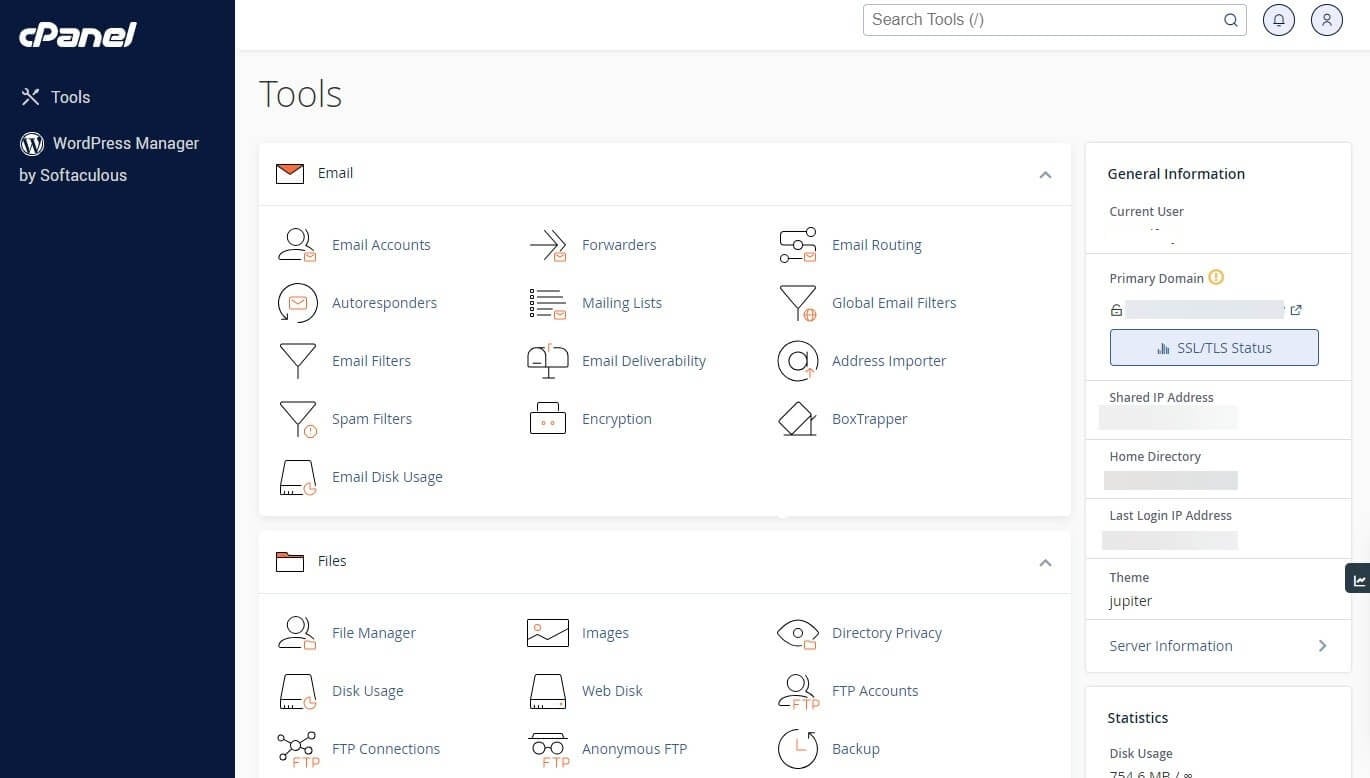
cPanel is popular because it is simple, and most web hosts use it, except Hostinger, SiteGround and a few others. Bluehost’s version has a search bar at the top for apps and tools and groups tools under headings such as Files and Email. It is intuitive, and you complete routine tasks quickly.
Can I Use Bluehost for WordPress Sites?
Yes. Bluehost is a widely used WordPress hosting provider, and its tools are built around that CMS. Bluehost adds a few plugins to a new site to cover security and functionality. To install WordPress on a new Bluehost site, follow these steps:
- Click on Websites.
- Select Add Site.
- Select Install WordPress.
- Connect a domain.
- Wait for WordPress to be installed, which usually takes a minute or two.
- Edit and adapt your website to your taste.
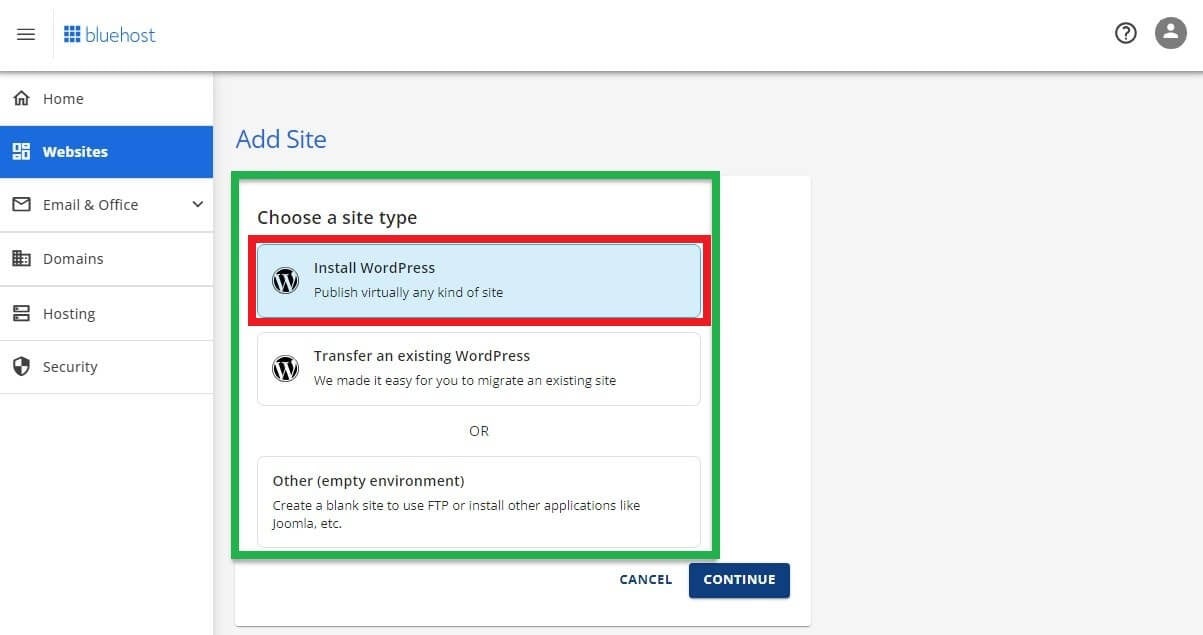
To migrate an existing site, choose the second option when you click Add Site, and follow the on-screen steps. Bluehost’s free migration tool handles WordPress sites, and its WooCommerce FAQ names the InstaWP migration tool for stores. Even for a total beginner, the process is hard to get wrong. If you want to compare managed WordPress options first, read our guide to managed WordPress hosting.
Host a WordPress Site With Bluehost
Bluehost Performance Test: Is It Fast Enough?
Our Bluehost review includes a speed test on shared hosting, since speed is one of the first things readers ask about. Bluehost is a fast provider, but there is a caveat. WordPress hosting runs on data centers in the US, so visitors in Europe get a slightly slower experience while those in the US get the best one.
GTmetrix Tests
We ran two GTmetrix tests, one from Vancouver, Canada and one from London, UK, to see whether location changed the result. The sites ran on Bluehost’s US infrastructure, and the cities are the places the tests came from.
| Metric | Vancouver, Canada | London, UK |
|---|---|---|
| TTFB | 463 ms | 550 ms |
| FCP | 1.1 s | 1.1 s |
| LCP | 1.2 s | 1.4 s |
| CLS | 0.03 | 0.03 |
| Fully loaded time | 2.3 s | 2.5 s |
Both tests came back with good results for shared hosting. A time to first byte of 450 to 550 ms is considered good, and a first contentful paint of about a second is solid. SiteGround was faster than Bluehost in our hands-on comparison, although the gap was only 200 to 300 ms.
Our fully loaded time of 2.3 to 2.5 seconds is good compared with website builders, since even Wix has an average fully loaded time of about 5 seconds. Bluehost’s own WPShout figure of 0.35 seconds comes from a different test and a different plan, and we have not repeated it, so treat the two numbers as separate measurements.
Response Time and Uptime Tests
We use Pingdom to check web hosts for outages over the past three months. In our Bluehost test, the 99.9% uptime promise held, with one minor outage of about a dozen minutes. A three-month period has about 2,190 hours, and the site was down for roughly 10 to 12 minutes of them.
The average response time was around 489 ms, which is a strong result, since shared hosting response times under 650 ms are considered good. The peak was about 700 ms and the low about 280 ms, so the performance was steady.
Customer Support of Bluehost
You will find mixed opinions online about Bluehost’s support, and in our experience we had no problems, although we mostly used the 24/7 live chat. An agent picked up within seconds and started on the issue, and the team felt professional and committed to solving the problem, which matters when you are paying for a service.
Bluehost’s pages promise different response times: under 2 minutes in one place and under 30 seconds in another. There is also a phone line and a ticket system, which works like email and suits non-urgent questions. A knowledge base with more than 1,000 WordPress guides covers starting a site, managing it, getting a refund and configuring email, and Bluehost encourages you to get in touch at each step.
Two support details matter: Self-managed VPS plans do not include 24/7 priority support, and premium support is available through sales. The 30-day money-back guarantee has conditions: it does not apply to monthly terms, domain registration fees or setup fees, and it applies only to credit card payments. Among Bluehost reviews on Trustpilot, the company holds a 4.5 out of 5 rating from more than 31,000 reviews.
The Final Verdict: Is Bluehost Worth It?
Bluehost is worth it for the right buyer: If you are a WordPress beginner in the US, it is one of the safest starting points, with an official WordPress.org recommendation, staging on every plan and human support. If you want to run a store on WordPress, WooCommerce hosting saves setup time with 16 plugins already installed.
The self-managed VPS, and NVMe 4 in particular, is a good value for developers and for people who run n8n or an AI agent. Bluehost Cloud suits agencies with many WordPress sites, and the AI all-access pack is an original add-on that few hosts have. We would skip the managed VPS unless you need cPanel and support because the same hardware costs about five times more.
Know the downsides before you buy: Renewal prices are higher, the best prices need a 24 or 36-month term paid upfront, WordPress hosting uses US data centers only, and some security features cost extra. If security value or a global audience matters most, consider Hostinger or SiteGround. You can also compare more providers in our guide to the best web hosting services.
FAQ
Is Bluehost Good for WordPress?
Yes. WordPress.org has recommended Bluehost for many years, and its WordPress plans include automatic updates, a one-click staging tool, Yoast SEO and support from WordPress specialists. The main limit is that WordPress hosting runs on US data centers, so a global audience may prefer another host.
Is Bluehost Worth It?
It is worth it if you are a WordPress beginner, a store owner on WooCommerce or a developer who wants a low-priced VPS. It is less attractive if you want the lowest renewal prices or the strongest security value without extras.
How Much Does Bluehost Cost After the First Term?
Renewal prices are higher than launch prices. Self-managed NVMe 4 renews at $11.99/mo after a $9.49/mo launch price, WooCommerce Essentials renews at $21.99/mo after $14.99/mo, and managed VPS Standard NVMe 4 renews at $68.99/mo after $49.99/mo. Check the renewal price before you pick a term.
Does Bluehost Have a Money-Back Guarantee?
Yes, a 30-day money-back guarantee applies to hosting plans. It does not cover monthly terms, domain registration fees or setup fees, and it applies only to credit card payments, so read the terms at checkout.
Is Bluehost Good for VPS Hosting?
The self-managed VPS is good value, especially NVMe 4 at $9.49/mo with 2 vCPUs, 4 GB of RAM and 100 GB of NVMe storage, but it includes no cPanel and no priority support. The managed VPS adds cPanel and support at about five times the price, so most people should choose the self-managed one.
Bluehost vs. Hostinger: Which Is Better?
Hostinger gives you more RAM per dollar on VPS plans and includes backups on all plans, while Bluehost has the WordPress.org recommendation, nine VPS data centers and more product types. Choose Bluehost for a guided WordPress start and Hostinger for value and a global audience, and read our Bluehost vs. Hostinger comparison for the details.