Change Your Boot Up Animation, Keyboards, and More
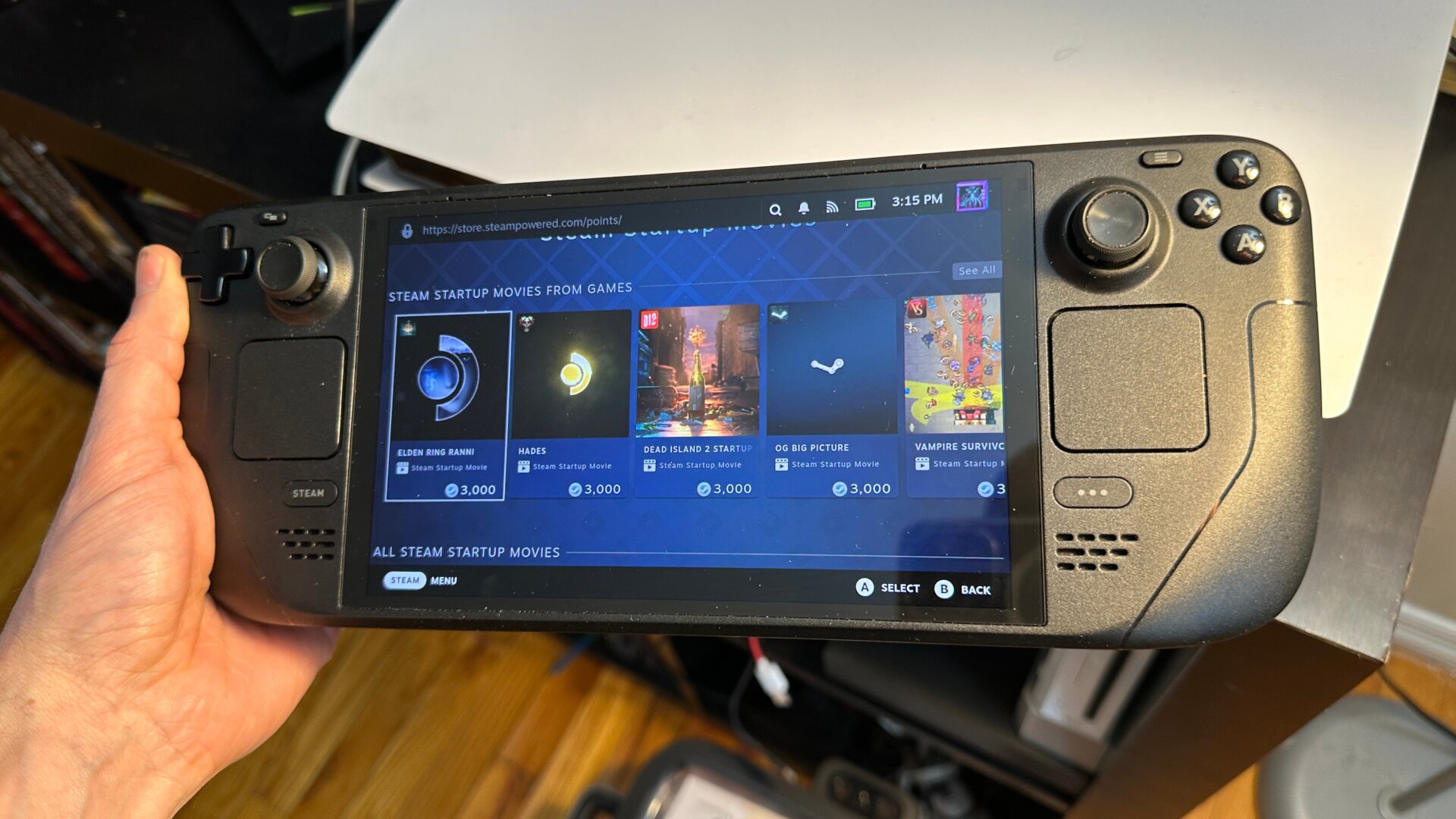
Ever wonder what the hell all those Steam Points are used for? No? Unfortunately, you can’t use them to buy games, but if you’re like me and haven’t used any in years, you’ll have enough to customize your Steam account with a host of unique avatars and backgrounds. But for Deck users in particular, there’s a special shop where you can download a host of custom startup animations.
You might not know about this because the Points Shop is strangely difficult to access. You first need to go up to your user icon in the top corner of the page, then go to View Profile and hit the button to Edit Profile. Scroll down on the left until you see the Points Shop. You can also find it from Settings, under Customization, and at the bottom where it says Find More Startup Movies. It’s also under Keyboard, where it says Find More Keyboard Themes.
From there, you can see a whole host of different items on sale that you can use to buy points. These include profiles, backgrounds, animated stickers, badges, and more. In particular, for Steam Deck, you’ll find special keyboard colors and custom animations you’ll see on startup. The Startup Movies section includes some cool gems inspired by games like Hades, Portal, or Dead Cells. There are more that are simply fun, like Deckfetti or Handmade.