Pixel 6 Action Pan
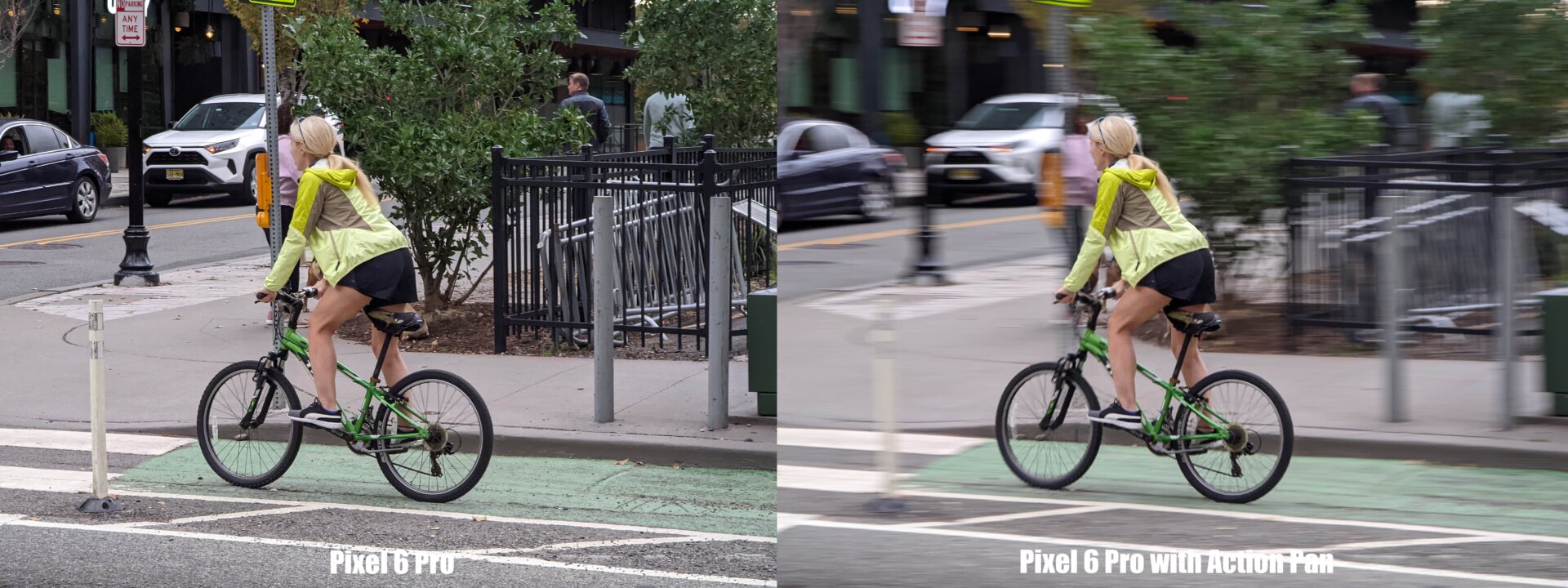
Finally, in order to add a little extra drama to your action shots, the Pixel 6’s Action Pan mode uses a special algorithm to add some creative blur to your shots. The Pixel 6 does the hard work of figuring out how fast the shutter needs to be to freeze the action, while the blur makes adds a sense of speed you wouldn’t get otherwise. You don’t even need to follow your subject the entire time like you would when performing a real action pan, you can just point and shoot, and Google’s software does the rest.
Action Pan also works equally well on people and vehicles like cars or boats, though it can get tripped up on subjects with fuzzier outlines like pets.
And if you have a child who just can’t sit still, Google added a feature called Face Unblur, which uses images captured by multiple cameras at once to make people appear just a bit sharper. Face Unblur is on by default, so it’s always running in the background to help things look as sharp as possible.