The FACEBOOK PHONE is here. As it turns out, it’s a lot like a non-Facebook phone—a small Android phone with an astoundingly excellent keyboard. It just happens to have a Facebook button! Does this matter? Not much, no.
Why It Matters
The notion of a “Facebook phone” is conceptually slippery. Is it a phone with a Facebook OS? Hardware designed by Zuck during a wistful walk in the woods? It’s hard to pinpoint exactly what we’d even expect from such a thing. Isn’t every smartphone a Facebook sorta? Windows Phone and WebOS directly integrate Facebook with your address book; iPhone and Android sync your Facebook contacts.
So maybe the HTC Status faces an impossible challenge of realizing an ideal that’s sort of half baked to begin with. Yet it tries. It’s a regular Android 2.3 phone, with its Facebook functionality pushed to the fore, literally, by a button. If you care deeply about Facebook, it says to you, this is the phone you’re going to want above all.
Specs: HTC Status
Display: 2.6-inch 480×320 resolution
Battery: 1250 mAh lithium-ion
Processor: MSM7227, 800 MHz
Memory: 512 MB RAM, 512 MB ROM
OS: Android 2.3 + HTC Sense
Cameras: 5 MP Rear camera; VGA Front-facing
Price: $50 with two-year contract
Using It
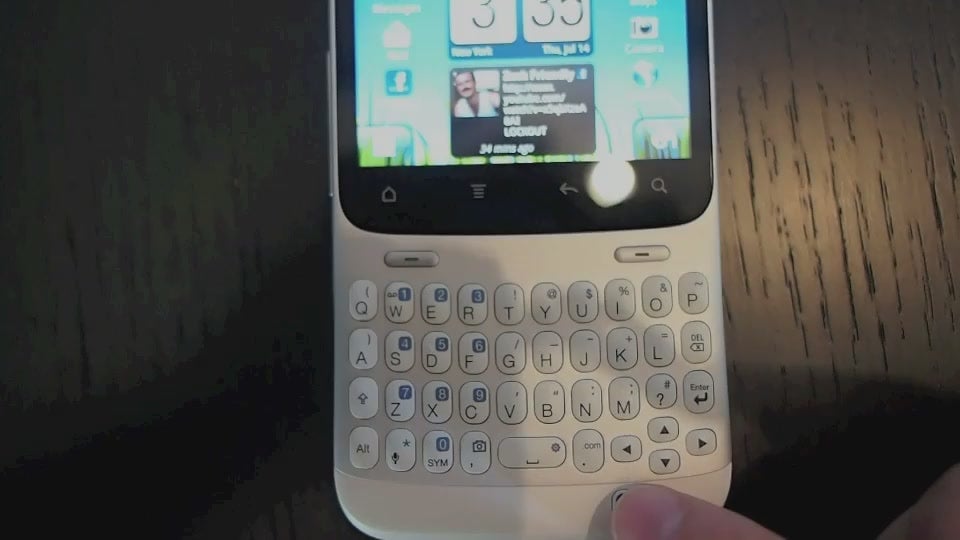
As a piece of hardware, the Status is shockingly, remarkably decent. The phone’s healthy-feeling plastic and metal body is subtly curved to hug your face. The QWERTY keyboard is snappy and not too small to belt out messages. Overall, it’s a lot like using a brand new Blackberry, if Blackberry OS weren’t a heap of fecal matter and glass shards. But that display. A mere 2.6-inch, 480 x 320 screen. It’s squinty.
The Facebook button. That’s the whole reason we’re here, right? Located at the Status’ bottom right quarter, as if HTC ran out of room and just bolted it there, it triggers a few context-sensitive sharing actions. Tap from the home screen and it’ll jump you straight into status updating or post writing. Hit it while on a webpage to share a story on your wall. Hold it down for location updates. And that’s about it.
Like
The Status is a stark, if not entirely un-handsome piece of equipment. I never thought I’d enjoy a phone not created in the iPhone’s black rectangular image, and yet here we are. Frankly, in an era of Mecha Godzilla displays, it’s almost refreshing to use something that isn’t trying to outdo all the other bulging, veiny IMAX phone screens out there. It’s… compact! Remember when that used to be a virtue? And the keyboard kills. Remember when we cared about those?
But what about the Facebook part of the Facebook phone? It’s a convenience—a shortcut. HTC also provides a dedicated Facebook Chat widget from the get go—a nice touch, given the service’s increasing ubiquity (RIP, AIM). The Status just makes all these things a little easier. If you’re an immensely compulsive over-sharer, you’ll like it—I found myself posting and updating and chatting more just because it was so easy to do so.
No Like
That screen. It’s pretty bad. I’m fine with the diminutive dimensions, but there’s no going back from Retina Display and its competitors—small size is one thing, but poor density is a real poke in the sockets. As it goes with other things in life, if it’s going to be small, at least let it be really good looking. Worse, so many apps have no idea what to do with the unorthodox-for-Android display—they’re literally unusable.
Swinging back to Facebookage. I was disappointed by the button’s shallowness. If you want to crank out a quick dispatch, it’s nifty. But the option to bring up a full-fledged Facebook command center with the touch of a button would have been killer. Instead, a few of the features available on any other phone have been chopped off and assigned to a blue square. Fine, but that’s hardly a quantum leap for either social networking or smartphones.
Should I Buy It?
Don’t think of this as a Facebook phone, and you’ve got a sturdy, serviceable Gingerbread phone for fifty bucks. My iPhone is a Facebook phone after all—I can share photos, write on my mom’s wall, and share annoying articles with my annoying friends. The Facebook Phone isn’t a Facebook Phone—it’s a cheap, decent Android phone with some good Facebook shortcuts.
You can keep up with Sam Biddle, the author of this post, on Twitter or Facebook.