Avast Free Antivirus is the best free antivirus software for 2026, tested across six programs on a single machine. Every option here costs nothing, which puts them in a different category from the best antivirus software you pay for. Each one still earns its keep somehow, and this page shows exactly how.
Best Free Antivirus Software 2026: The Shortlist
I shortlisted 11 free antivirus programs and narrowed them down to 6. Real-time protection that stays on permanently, a published lab score from 2026, and a free tier that works without a card decided it. Free antivirus is never charity. Each is funded by upsells, bundled software or data collection, and I documented which for all six. The best antivirus software free of charge still costs you something, and that column is where you find out what.
- Avast Free Antivirus: Best free antivirus software overall. The widest free feature set of any antivirus software free of charge.
- Bitdefender Antivirus Free: Best lightweight, no-frills protection. The quietest of the six, with almost nothing bolted on.
- AVG AntiVirus Free: Best free extras. Same engine as Avast, more tools, more selling.
- Microsoft Defender: Best built-in option for most Windows users. No download, no account, no upsell.
- Avira Free Security: Best free security bundle. A capped VPN, password manager, and cleaner besides the scanner.
- Malwarebytes Free: Best free scanner for an existing infection. On-demand cleanup, with no real-time cover after two weeks.
4 of the 6 place no cap on installs. Ads inside the app are rarer than the category’s reputation suggests, though upsell prompts are not. Free malware protection is the baseline all 6 share. What sits on top of it separates them.
The Best Free Antivirus Programs, Reviewed and Ranked
Four things built this ranking. Lab scores from AV-Comparatives and AV-TEST. My own measurements on one machine, reset between products. What each free tier withholds. And how hard each pushes you toward paying. The last decided most of the order, because on protection alone the top four are interchangeable.
1. Avast Free Antivirus: Best Free Antivirus Software Overall
Avast gives away more than anyone else here. Real-time malware blocking, a separate Ransomware Shield, and network scanning for weak Wi-Fi settings all in the free tier. So do a breach checker and an assistant that flags scam messages. Most competitors charge for at least half of that. It also has the strongest lab result of the six.
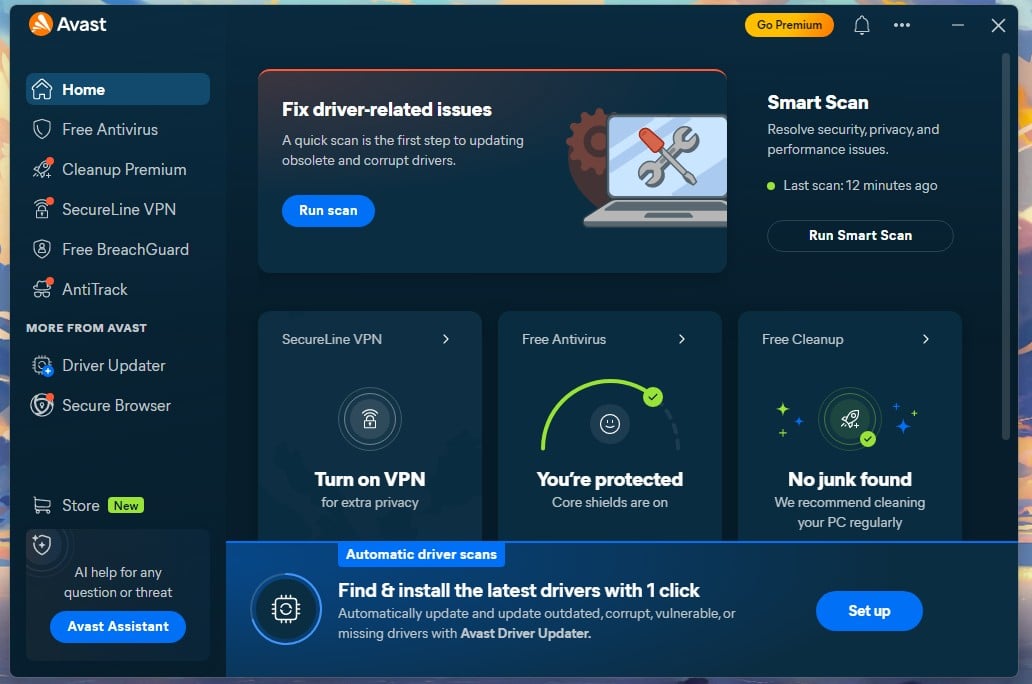
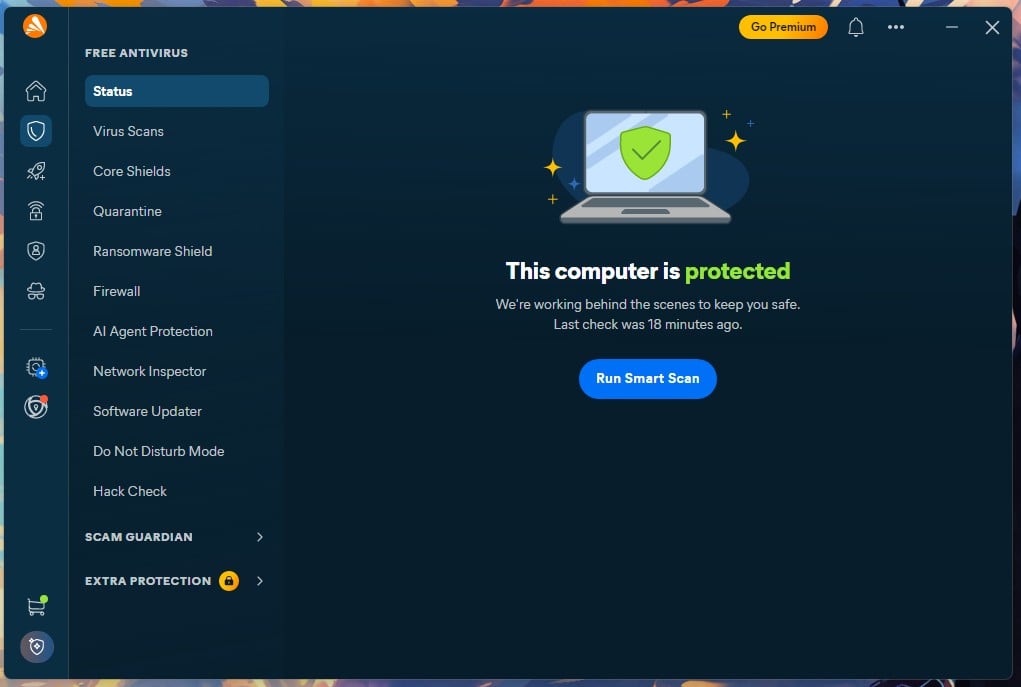
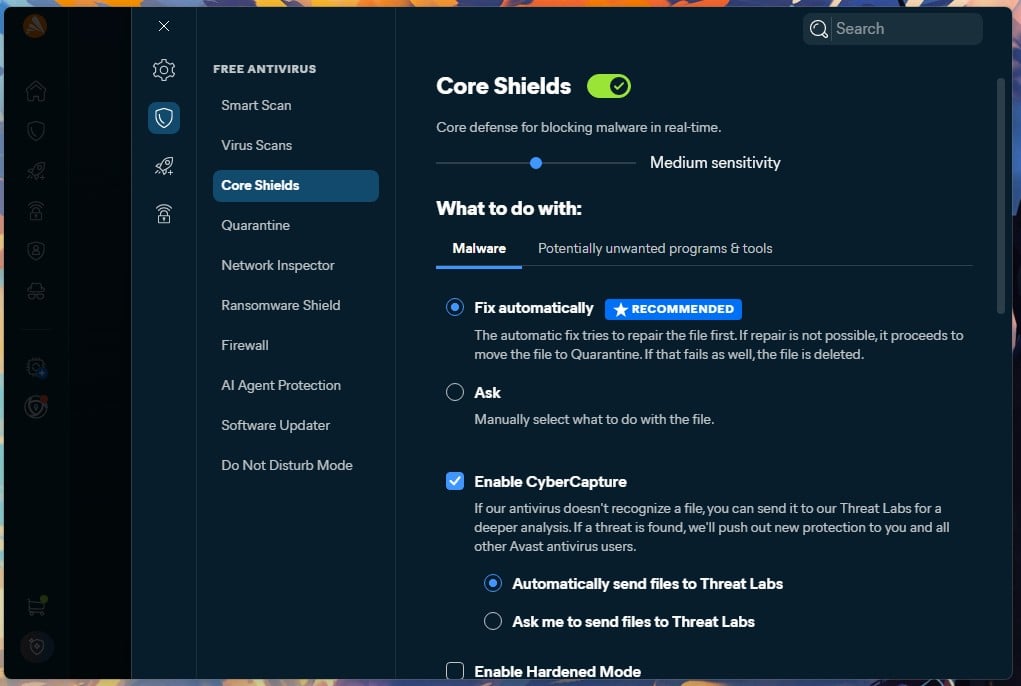
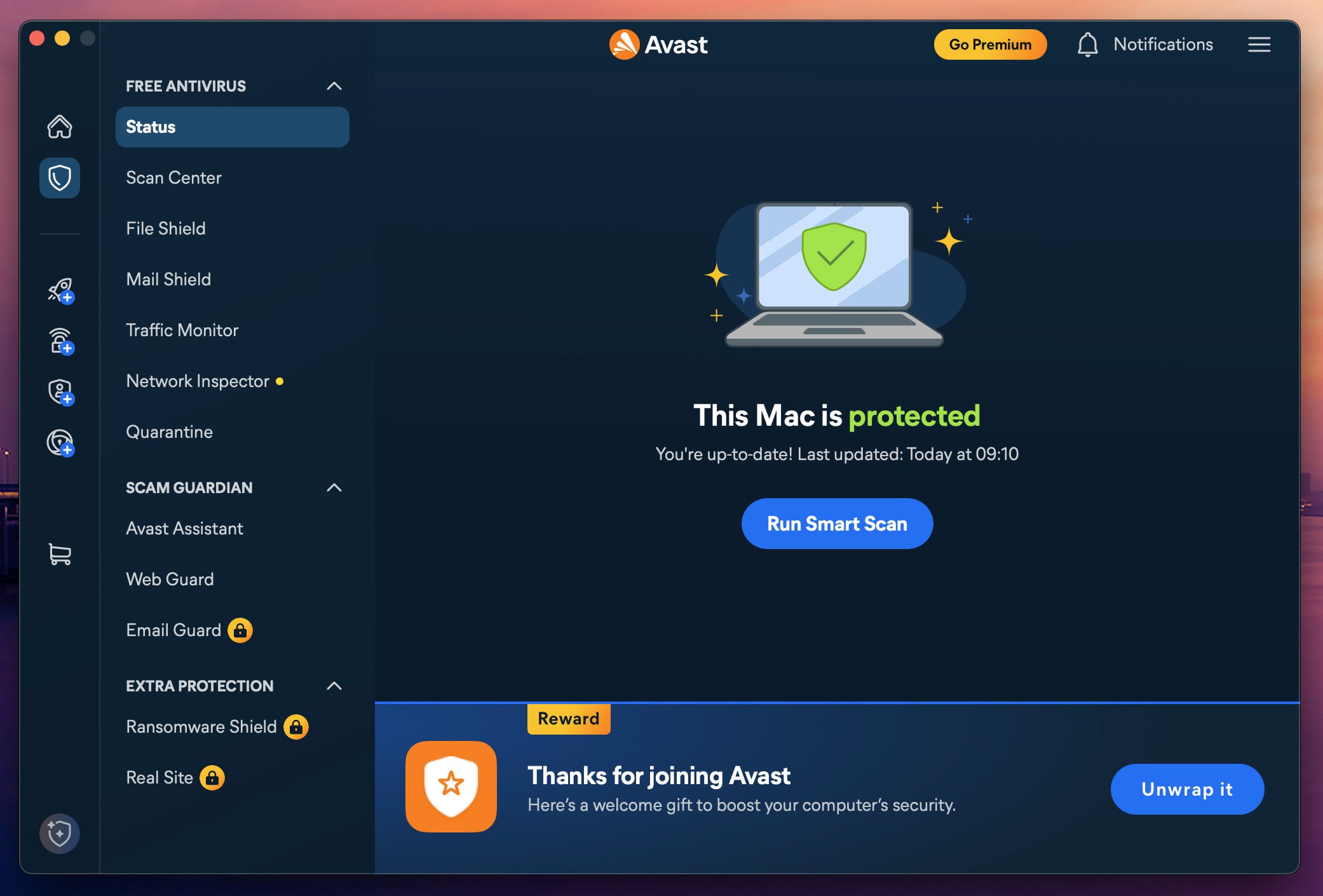
AV-TEST scored the free edition 6/6/6 in June 2026. That is the same 18 out of 18 that paid suites from Norton and Bitdefender earned in the same round. The app opens on a status panel with a Smart Scan button. The left column holds Virus Scans, Core Shields, Quarantine, Ransomware Shield, Network Inspector, Hack Check, Do Not Disturb Mode, and AI Agent Protection.
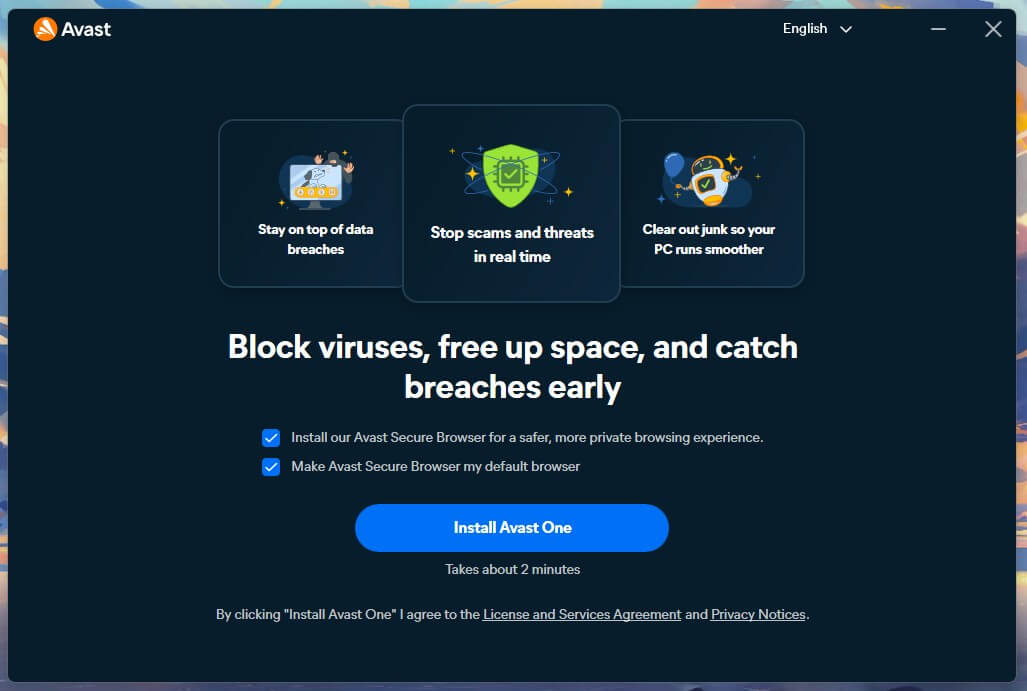
Firewall and Software Updater appear in that same list behind a padlock, since both belong to the paid tiers. Installation took 2 minutes 35 seconds, including the download, and it wanted a restart. That restart is where my first complaint starts, because the app opens itself every time Windows starts. Protection would be just as active with the window closed.
Pros
- Perfect 6/6/6 at AV-TEST, June 2026
- Ransomware Shield and Wi-Fi scanning included free
- Unlimited installs on all four platforms
- Only 12% CPU during a full scan
- No ads inside the app
Cons
- Driver Updater prompt never dismisses
- Installer pre-ticks Avast Secure Browser
- Slowest boot here, adding 9 seconds
- Opens itself on every boot
What You Get With Avast Free
Windows, Mac, Android and iOS, one device per installation with no cap on how many times you install it. Real-time protection: yes. Included free: malware and ransomware blocking, Wi-Fi network scanning, Avast Assistant scam detection, Hack Check breach lookup, Do Not Disturb Mode.
Locked behind Premium Security or Ultimate: firewall, sandbox, webcam protection, file shredder, automatic app updates, scam call and SMS blocking, deepfake detection and fake-shopping-site protection.
Avast Free Test Results: Protection and Speed
AV-TEST, June 2026: 6/6/6 across protection, performance and usability, awarded Top Product. AV-Comparatives Malware Protection Test, March 2026: 96.3% offline detection, 98.7% online detection, a 99.97% online protection rate and 9 false alarms. On my own machine, Avast blocked 99.78% of samples with 4 false alarms. Malicious URLs were caught at the browser before anything downloaded, with nothing flagged wrongly at that stage.
A quick scan finished in 1 minute 12 seconds. A full scan took 14 minutes 38 seconds, peaking at 12% CPU and around 200 MB of memory. Idle usage settled between 160 MB and 170 MB with one brief spike to 326 MB that lasted half a minute. Boot time went from 18 seconds on a clean install to 27 seconds with Avast present, a 50% increase and the largest of the six.
The Catch: How Avast Free Makes Money
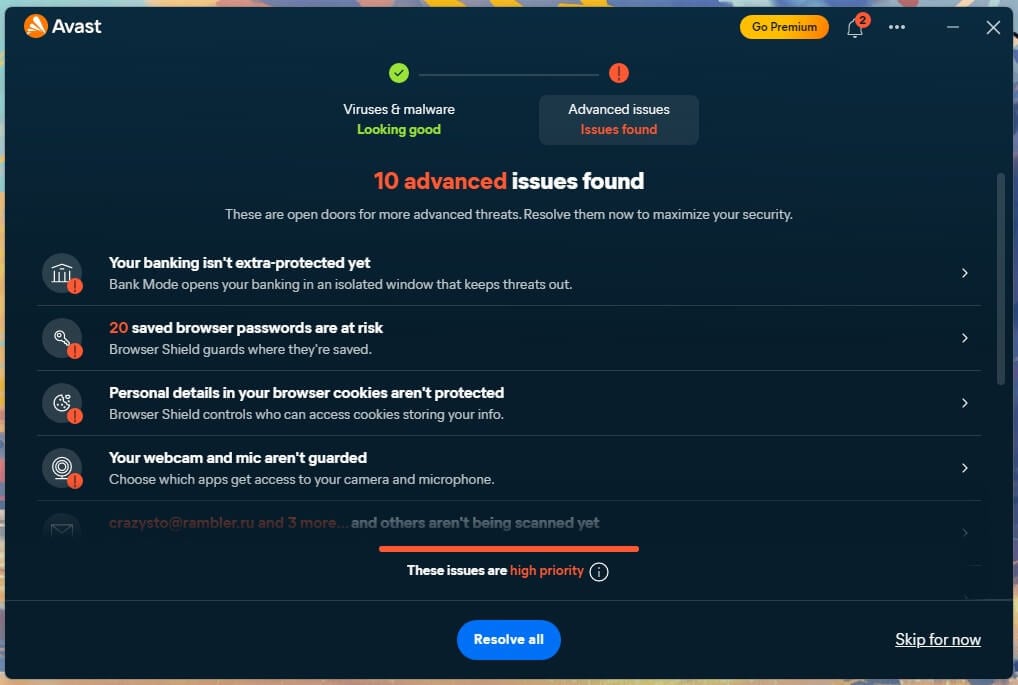
Three things, and one of them is irritating. The installer arrives with Avast Secure Browser pre-ticked. You can untick it, which is great. Inside the app, a Driver Updater panel sits on the home screen and will not go away. Dismissing it is not an option: it clears only if you buy Driver Updater at $43.99 a year or start its trial.
A permanent Go Premium button and a shopping cart icon complete the picture, and the padlocked items in the sidebar at least stay silent when clicked. Avast does not show ads inside the app. The larger question people ask is whether Avast Free antivirus is safe given the company’s record. In February 2024, the FTC fined Avast $16.5 million over its Jumpshot subsidiary.
Jumpshot sold granular browsing data to more than 100 clients between 2014 and 2020. Buyers included Google, Pepsi, and Home Depot. Jumpshot closed in 2020. The settlement bars Avast from selling browsing data for advertising and requires an annual compliance audit. Avast now belongs to Gen Digital, which also owns AVG, Avira, and Norton.
✅ Should You Use Avast Free?
Yes, for most people. It protects as well as software you would pay for, covers every platform, and asks for nothing except patience with one nagging panel. The Driver Updater prompt is the price of admission, and it is a fair trade for what sits behind it.
Rating: 4.6/5 ⭐ (Protection: 4.8 ⭐. Performance: 4.5 ⭐. Features: 4.7 ⭐. Transparency: 3.3 ⭐. Value: 5.0 ⭐). Buy If: You want a firewall and webcam protection on the same machine, which starts at $49.99 for the first year.
2. Bitdefender Antivirus Free: Best Lightweight, No-Frills Protection
Bitdefender takes the opposite approach. Its free edition has the same detection engine as Total Security. That makes it the lightweight antivirus of choice for an old laptop, or for anyone who wants security software that never speaks to them. The free product is still open to new users, which is worth confirming because its availability has changed more than once over the years.
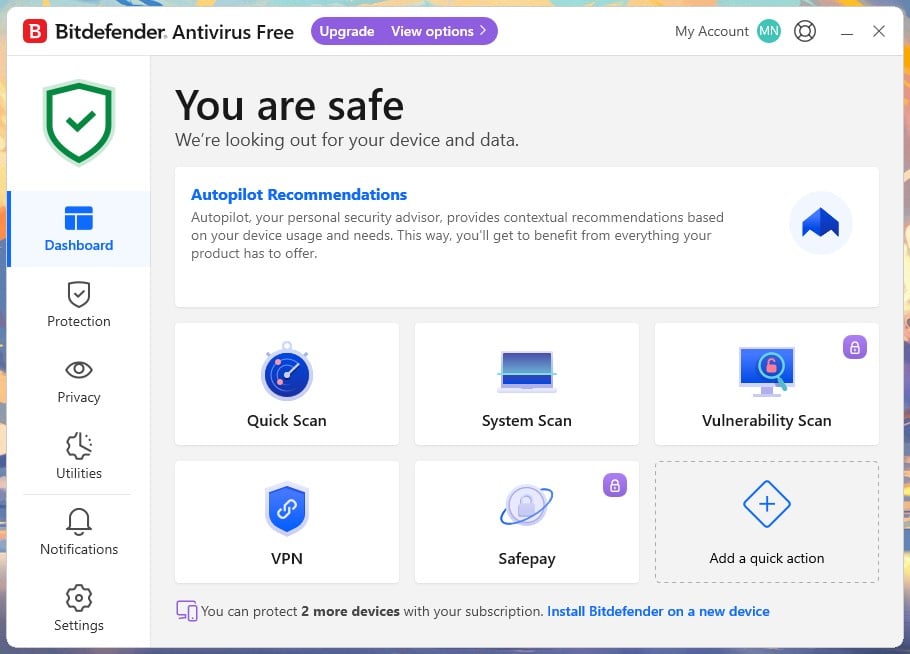
I installed it on a brand new account holding no subscriptions, and it worked as advertised. The dashboard offers Quick Scan, System Scan, and a VPN entry, with Vulnerability Scan and Safepay padlocked. Full-drive scanning is present in the free edition, which surprised me given how much else has been stripped out.
Pros
- Lightest scan load: 11% CPU, 183 MB
- Just 4 false alarms at AV-Comparatives
- Telemetry arrives switched off
- One upgrade prompt, then silence
- Full system scanning included
Cons
- Windows only, no Mac or mobile
- Capped at 3 devices
- Requires a Bitdefender account
- No firewall or banking protection
What You Get With Bitdefender Free
Windows only, up to 3 devices, and a Bitdefender Central account is required. Real-time protection: yes. Included free: real-time data protection, quick and full system scanning, quarantine, and a capped VPN entry on the dashboard.
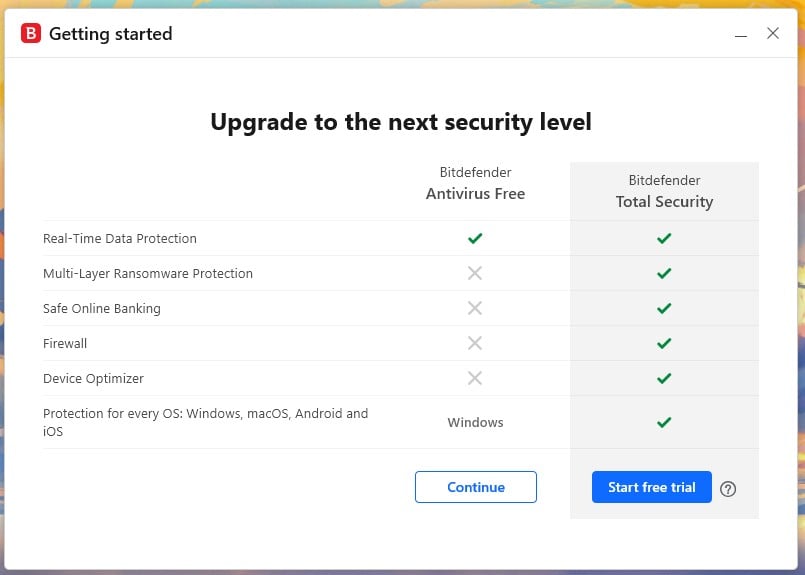
Locked behind Total Security: multi-layer ransomware protection, Safepay for online banking, firewall, device optimizer, vulnerability scanning, and coverage for macOS, Android, and iOS phones and tablets.
Bitdefender Free Test Results: Protection and Speed
AV-Comparatives Malware Protection Test, March 2026: 97.6% offline detection, 97.6% online detection, a 99.94% online protection rate, and 4 false alarms, the second-lowest false alarm count in a 20-product table. My testing put detection at 99.8% with 5 false alarms, the highest of the four products where I measured both.
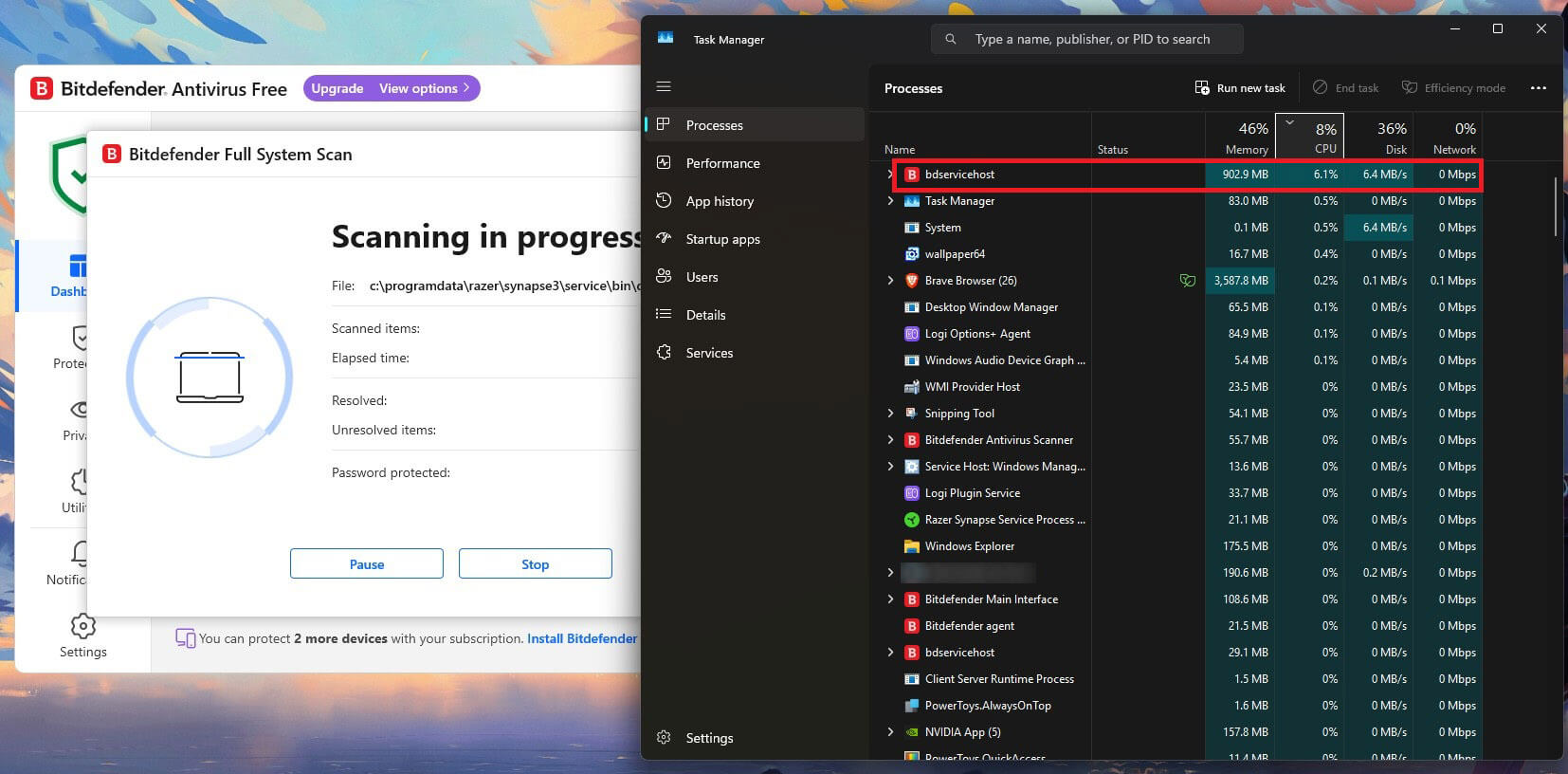
Quick Scan finished in 1 minute 4 seconds, the fastest of any traditional quick scan I timed. A full System Scan took 14 minutes 3 seconds, peaking at 11% CPU and 183 MB of memory, both the lowest figures here. Idle usage sat at 190 MB on all Bitdefender processes, and boot time went from 18 to 26 seconds, an increase of 44%.
The Catch: How Bitdefender Free Makes Money
Barely at all, and that is the finding. The installer is an 843.3 MB web download that took 3 minutes 58 seconds. It pre-ticks two boxes: the subscription agreement and a browser. The browser is easy to untick. Telemetry, listed as Send product reports, arrives switched off. Setup itself offers nothing.
The single upgrade attempt comes when you sign in, as a dialog headed Upgrade to the next security level, comparing Antivirus Free against Total Security. Clicking Continue dismisses it, the app configures itself for about a minute, and then it stops asking. Over the whole test period, nothing else appeared beyond an Upgrade pill in the title bar.
✅ Should You Use Bitdefender Free?
Yes, if you are on Windows and want protection you can forget about. It’s the least intrusive free antivirus program I tested and the lightest under load. The cost is everything it leaves out, and being Windows-only rules it out for mobile users.
Rating: 4.5/5 ⭐ (Protection 4.8 ⭐. Performance 4.9 ⭐. Features 3.5 ⭐. Transparency 4.9 ⭐. Value 4.4 ⭐). Buy If: you need the same protection on a Mac or a phone, since the free edition will never reach them.
3. AVG AntiVirus Free: Best Free Extras
AVG and Avast are owned by the same company and use an identical detection engine. At AV-Comparatives in March 2026, they posted identical figures. On my machine, they finished within one hundredth of a percent of each other, with the same false alarm count. Treat AVG Free and Avast as two builds of one product, not as independent alternatives.
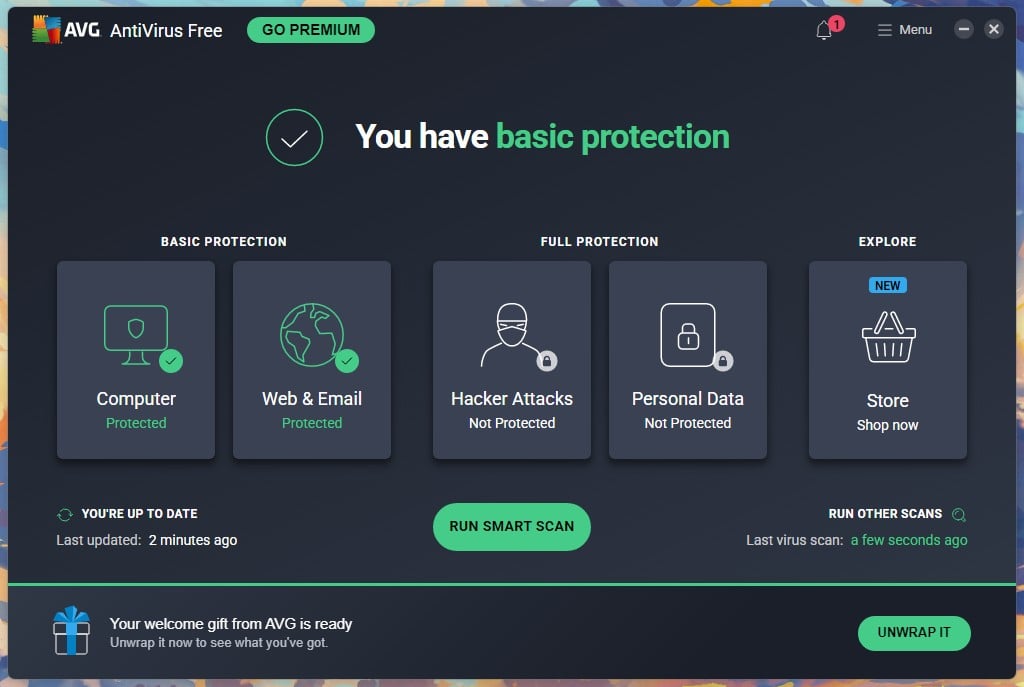
What AVG offers instead is a broader set of maintenance tools around the same core, wrapped in a Smart Scan that checks performance and system settings alongside malware. The AVG free download is also the only one here that still supports Windows 7, which I found surprising.
Pros
- Detection identical to Avast, lab-confirmed
- Fastest quick scan, 57 seconds
- Adds only 5 seconds to boot
- Supports Windows 7 through 11
- Unlimited installs across every platform
Cons
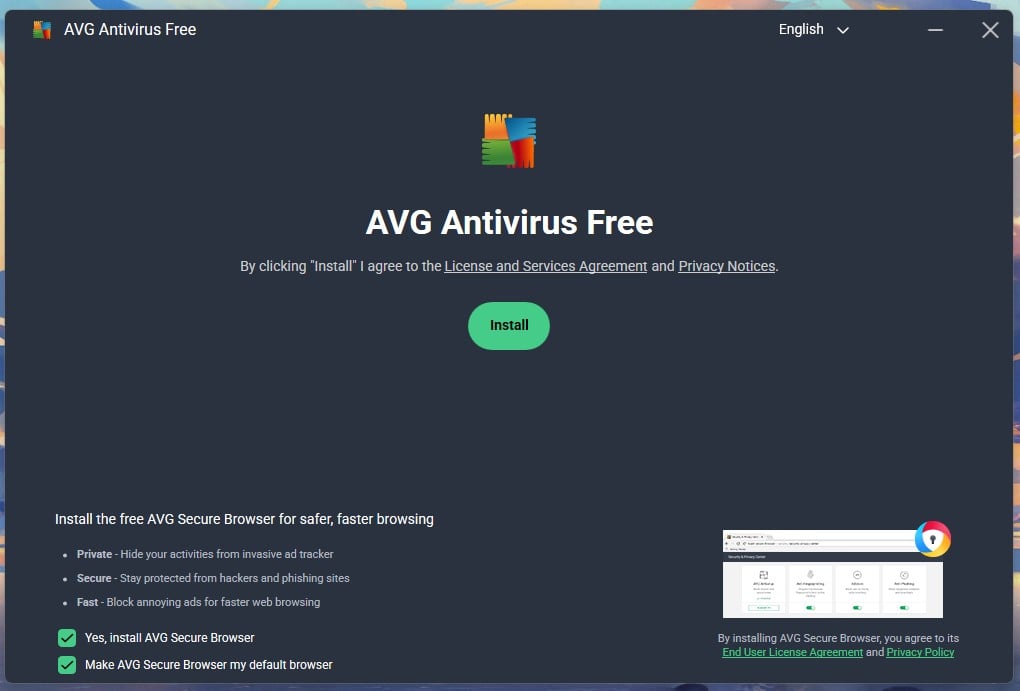
- Pre-ticks browser installation
- Labels non-malware findings critical, then sells
- Slowest full scan of the top 4
- At least 4 upsell surfaces in-app
What You Get With AVG Free
Windows 7 through 11, macOS 10.13 or later, Android 5.0 or later, and iOS 10 or later. One device per installation, with no cap on installs. Real-time protection: yes. Included free: malware and ransomware blocking, Smart Scan covering performance and system checks, and web protection.
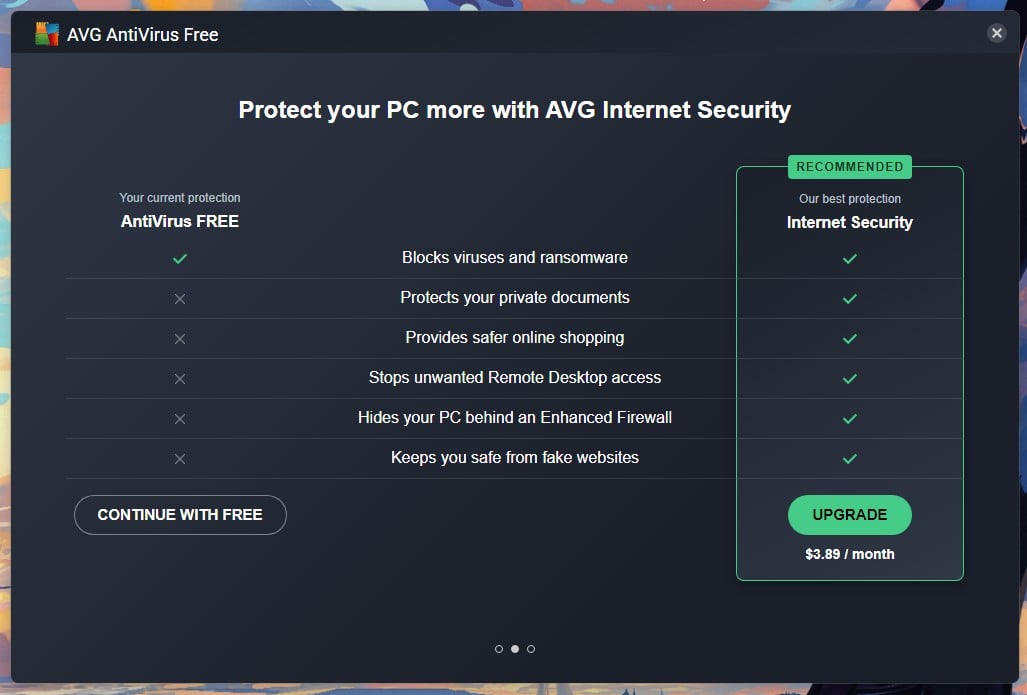
Locked behind Internet Security at $3.89 a month: private document protection, safer online shopping, Remote Desktop blocking, enhanced firewall, fake website protection, webcam protection, and automatic app updates.
AVG Free Test Results: Protection and Speed
AV-Comparatives, March 2026: 96.3% offline, 98.7% online, a 99.97% online protection rate, and 9 false alarms. AV-TEST, June 2026: 6/6/6 with Top Product status for the free edition specifically. My measurements gave 99.77% detection with 4 false alarms. Smart Scan, which doubles as AVG’s quick scan, completed in 57 seconds, is the fastest of any product I tested here.
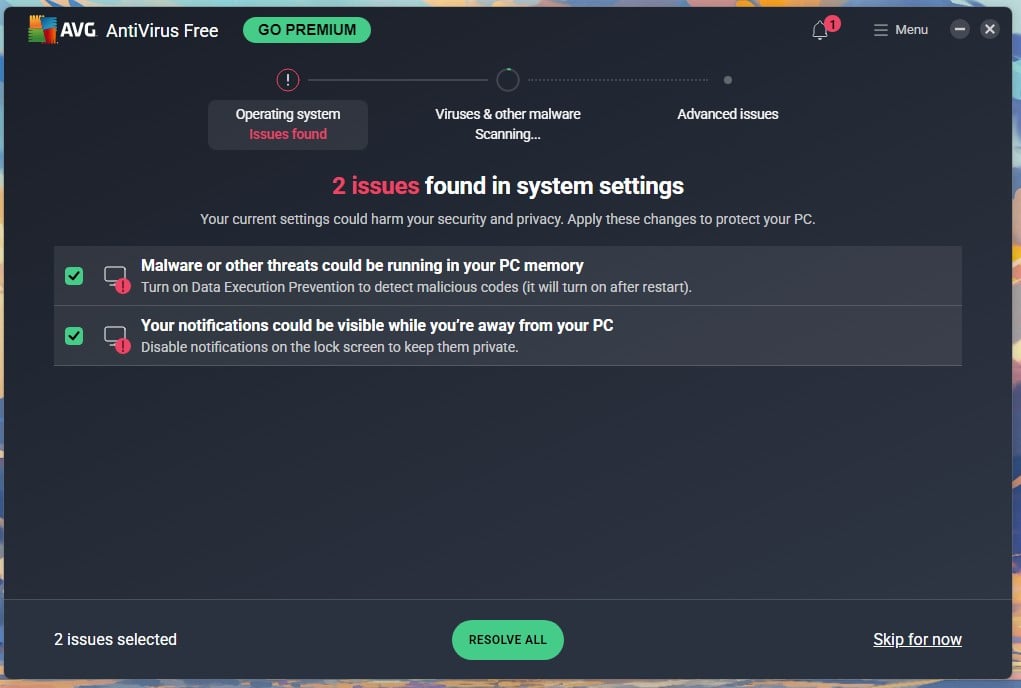
A full scan took 15 minutes 13 seconds and peaked at 15% CPU with 220 MB of memory. Idle usage was 161 MB with no measurable CPU. Boot went from 18 to 23 seconds, an increase of 28%, which makes AVG lighter at startup than Avast despite basically sharing its detection engine.
The Catch: How AVG Free Makes Money
More aggressively than anything else on this page. The installer pre-ticks two boxes: install AVG Secure Browser, and make it your default browser. Both are easy to clear, and both are ticked when you arrive. Installation took 1 minute 12 seconds and opened into a three-slide carousel comparing AntiVirus Free against Internet Security. Continue With Free got me to the dashboard.
Waiting there: a permanent GO PREMIUM button, a badge showing unread items, a Store tile marked NEW, and a welcome gift banner. The gift is a discount, headed “Claim your welcome gift of 61% off“, bringing Internet Security to $3.29. On the same screen, it flagged 7 advanced issues and marked them in red. A modal interrupted, offering a fix with a free 60-day Internet Security trial.
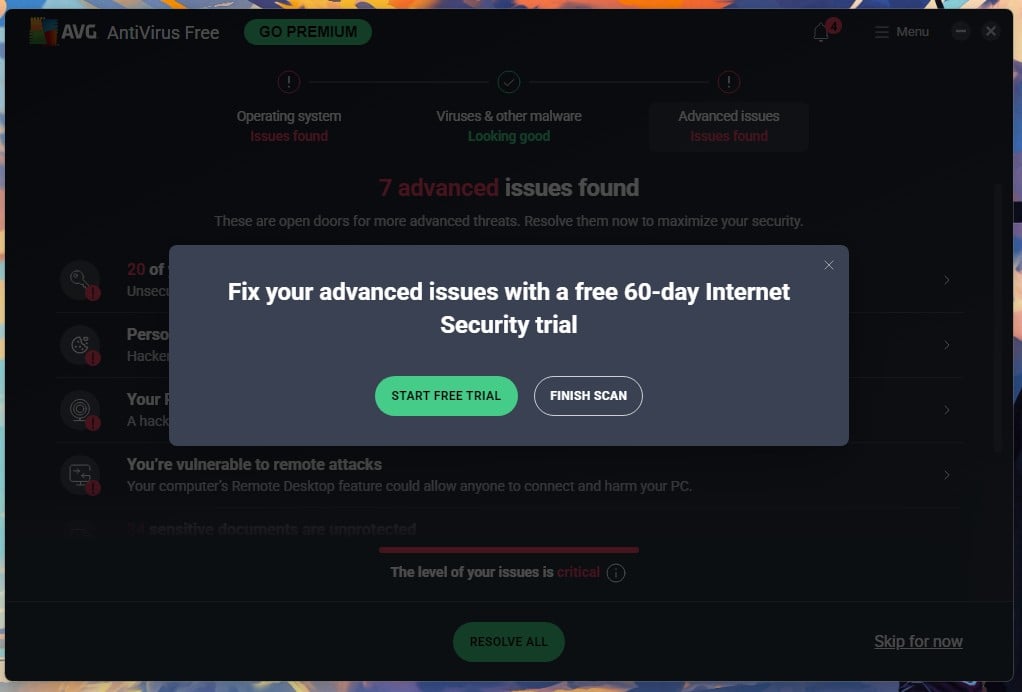
Every item AVG flagged is an attack surface. None of them is malware, none is fixable in the free tier, and the word critical is doing a lot of work on a system with nothing wrong with it. The Jumpshot settlement covered in the Avast section applies to AVG too, since both sit under Gen Digital.
✅ Should You Use AVG Free?
Only if you prefer its tools to Avast’s. Protection is identical, so the choice comes down to which interface you can tolerate, and AVG asks for money more often and more loudly. It boots faster, which is a point in its favor on an older laptop.
Rating: 4.4/5 ⭐ (Protection 4.8 ⭐. Performance 4.6 ⭐. Features 4.0 ⭐. Transparency 2.9 ⭐. Value 4.6 ⭐). Buy If: the advanced issues AVG keeps flagging actually concern you, since fixing them is what Internet Security sells.
4. Microsoft Defender: Best Built-In Option for Most Windows Users
For a large share of readers, this is the correct answer. Defender is already installed, already switched on, and costs nothing in money, attention, or disk space. It has no upsell because Microsoft has nothing to sell you. Its lab scores now sit close to the top tier. AV-TEST gave it 6/5.5/6 in June 2026 with Top Product status, and the half point it dropped came on performance.
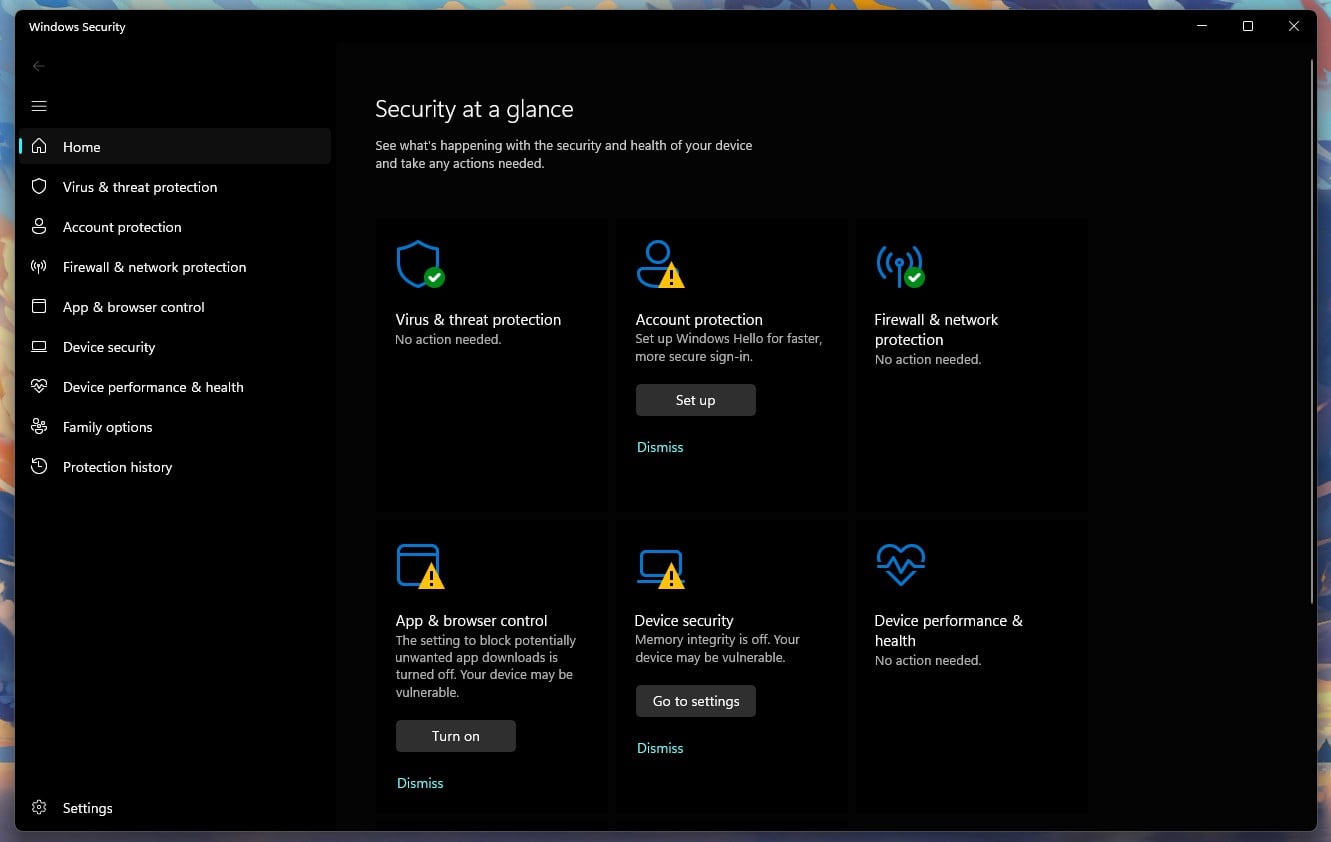
Where it falls behind is offline: when the machine can’t reach Microsoft’s cloud, detection drops further than any paid product I have measured.
Pros
- Already installed and already on
- Just 3 false alarms at AV-Comparatives
- Fastest full scan here, 12:24
- Adds just 4 seconds to boot
- No upsells, bundles or ads
Cons
- Weakest offline detection here at 89.2%
- 31% CPU during a full scan
- Windows only, no Mac or mobile app
- Not the most privacy-friendly option
What You Get With Microsoft Defender
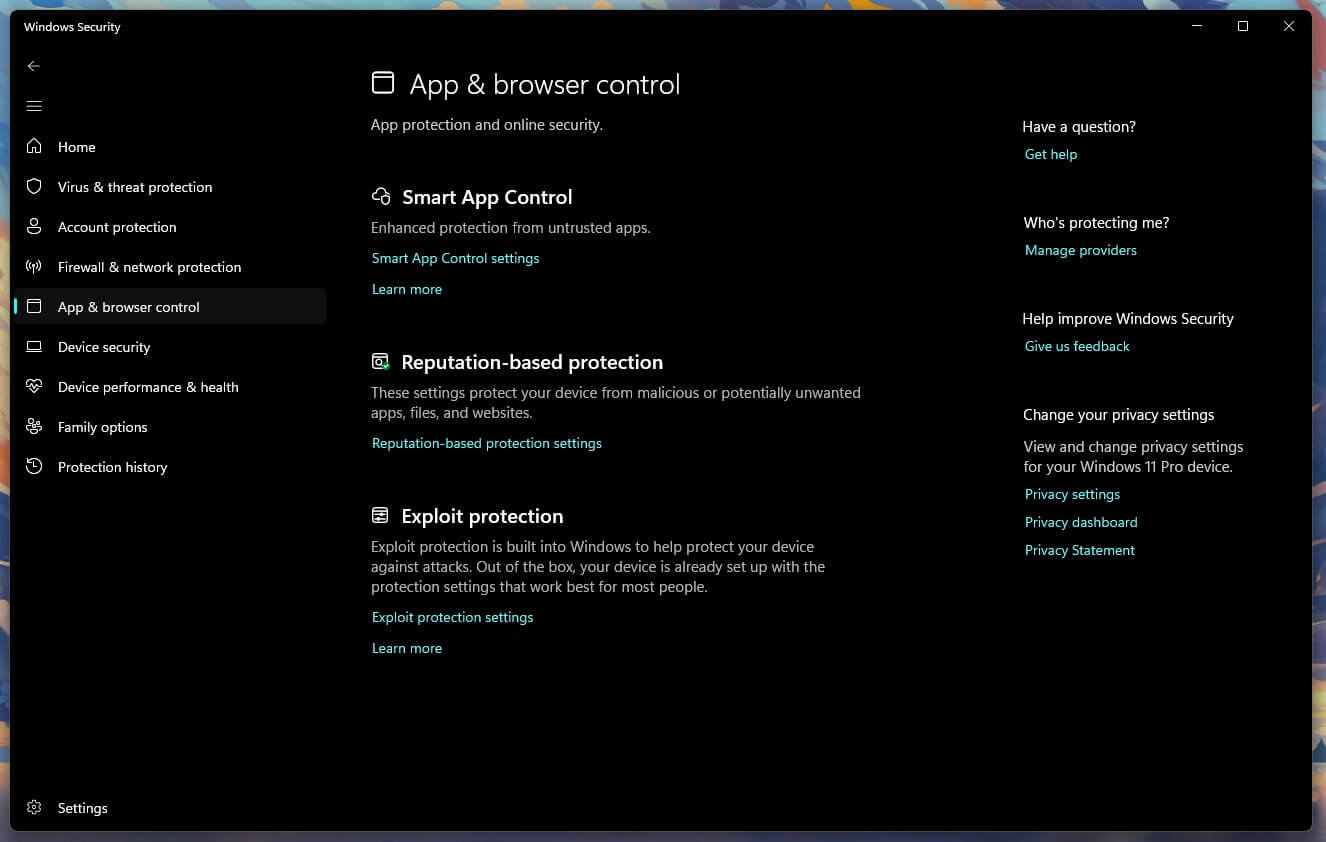
Windows only, on every Windows device you own, with nothing to install and no account needed. Real-time protection: yes. Included free: real-time and cloud-delivered protection, controlled folder access, Smart App Control, SmartScreen filtering in Edge, and periodic scanning that works alongside a second antivirus.
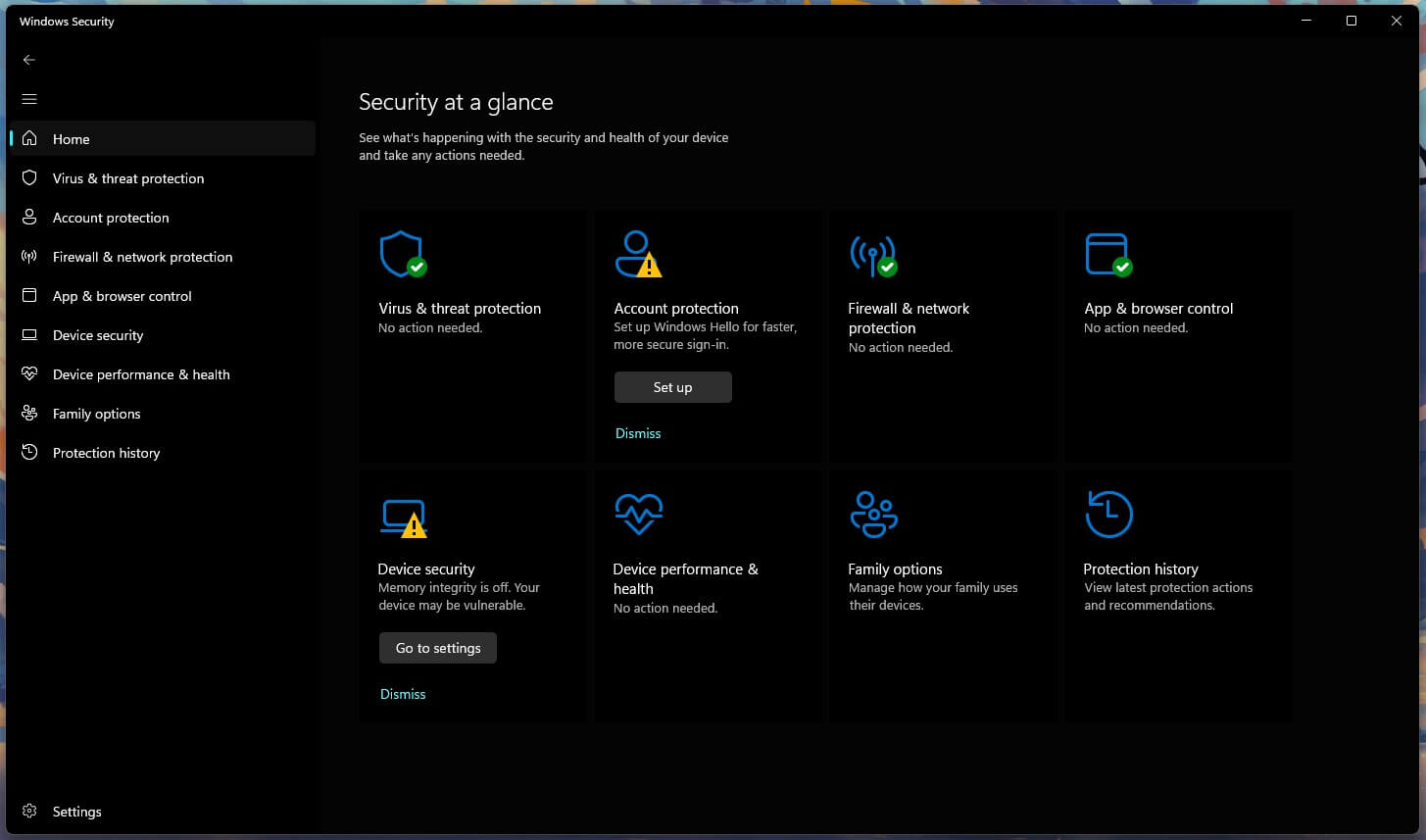
Not available at any price: identity monitoring and the deeper ransomware rollback that paid suites offer. No apps for other systems, either.
Microsoft Defender Test Results: Protection and Speed
AV-Comparatives, March 2026: 89.2% offline detection, 98.1% online, a 99.93% online protection rate, and 3 false alarms. Those 3 false alarms are the second-lowest figure in the entire table, so Defender is unusually careful about what it flags. The 89.2% offline result is the weakest here, and it is the number that matters if you use a laptop that spends time off the network.
A quick scan took 1 minute 9 seconds and a full scan 12 minutes 24 seconds, the fastest full scan of the six. Some of that is because Defender scans continuously in the background, so a scheduled pass has less new ground to cover. The cost shows in CPU. It peaked at 31% during that scan, second only to McAfee.
On an older laptop, that is noticeable. Idle memory was 158 MB, and boot time went from 18 to 22 seconds, an increase of 22%.
The Catch: How Microsoft Defender Makes Money
It does not. There is no paid tier, no upgrade prompt, no bundled software, and no advertising inside Windows Security. The trade sits somewhere else. Defender is a Windows component, and Windows collects data. Microsoft’s privacy statement is specific about this. Collected data secures its products, improves them “including to develop and train our AI models“, and is used to “advertise and market to you, which includes sending promotional communications, personalized advertising, and presenting relevant offers“.
The Windows section adds that Microsoft gathers data about you, your device, and how you use it. None of that means your scan results feed advertising, and I have seen nothing to suggest they do. The price of Defender is a share of Windows telemetry. Diagnostic settings sit under Privacy and security in Windows Settings. One setting is worth changing immediately. Install another antivirus and Windows hands over, with Defender stepping back.
The Periodic scanning toggle that lets it keep checking in the background arrives switched off. Turning it on gives you a second opinion for nothing.
✅ Should You Use Microsoft Defender?
Stay on Defender if you use one Windows machine, keep it online, and want zero maintenance. Add something else if you own a Mac or a phone you also want covered. Add it if the laptop spends real time offline, or if you want stronger phishing protection outside Edge.
Rating: 4.3/5 ⭐ (Protection 4.2 ⭐. Performance 4.5 ⭐. Features 3.5 ⭐. Transparency 4.7 ⭐. Value 5.0 ⭐). Buy If: You have more than one kind of device, since Defender will never cover anything but Windows.
5. Avira Free Security: Best Free Security Bundle
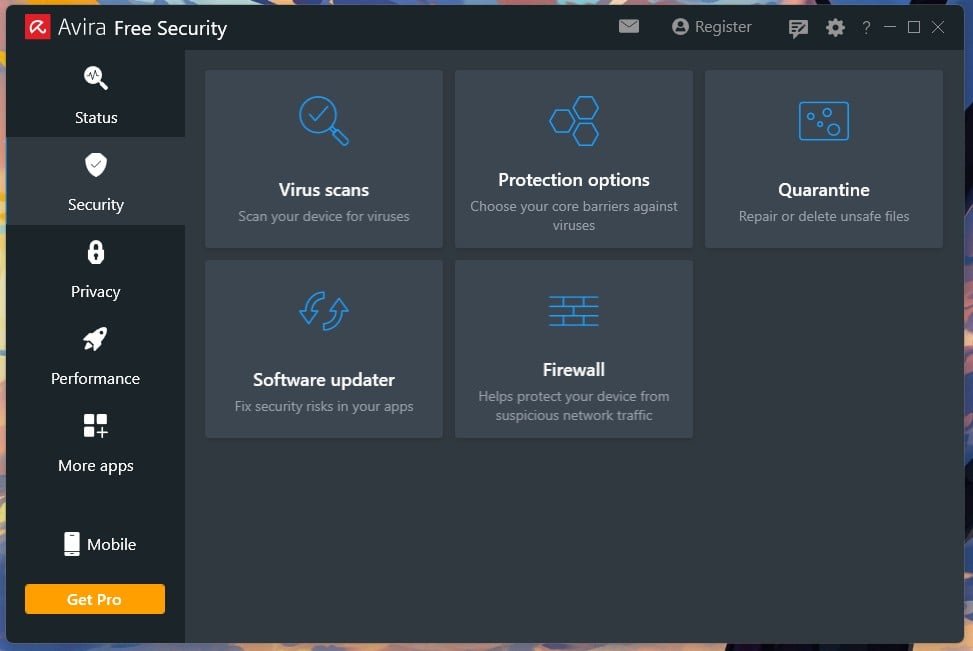
Avira gives you more separate tools than anything else. Alongside the antivirus sit a VPN, a password manager, a software updater, and a disk cleaner, all at no cost. None of them is the best version of that tool you can get. Together they still cover a lot of ground for a free security software package.
Avira and Avast belong to the same parent company, Gen Digital, as do AVG and Norton. Their detection results differ, so this is not the engine-sharing situation you get with Avast and AVG, but the ownership is worth knowing.
Pros
- Lightest idle footprint, 65.9 MB
- Cleanest installer: zero pre-ticked boxes
- Highest detection I measured, 99.96%
- VPN, password manager and cleaner included
- No account required at all
Cons
- 12 false alarms on my bench
- Full scan took 18:14, second slowest
- AV-TEST certified only, not Top Product
- VPN capped at 500 MB monthly
What You Get With Avira Free
Platforms: Windows 7 SP1 through 11 and macOS 10.15 through 14 for the desktop app, with separate free Android and iOS apps. Devices: one per install, no cap, no account. Real-time protection: yes. Included: real-time scanning, manual scans, Phantom VPN capped at 500 MB a month (1 GB if you register), a basic password manager, a software updater, and a system cleaner.
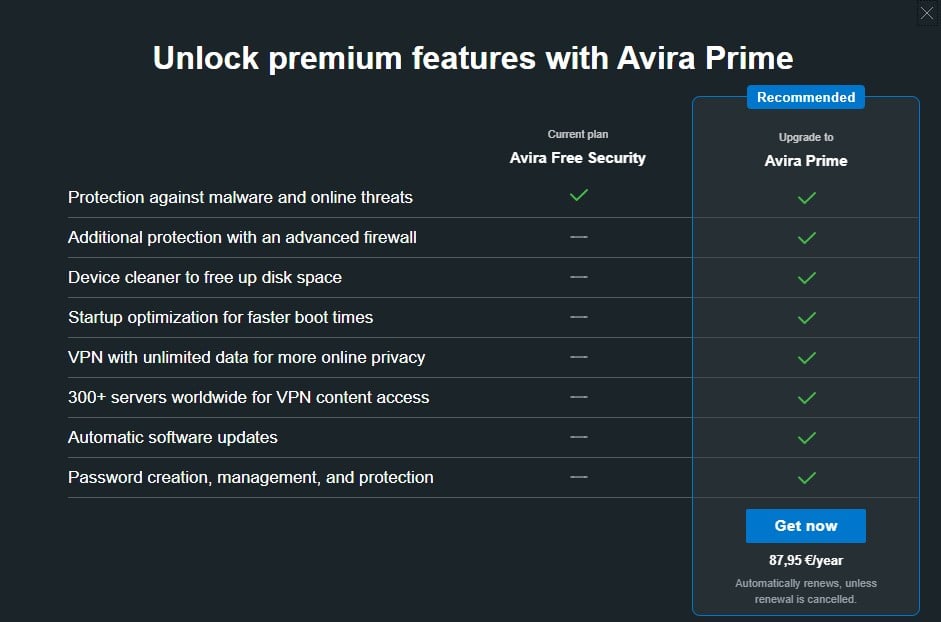
Locked behind Prime at $59.99 for the first year: firewall, unlimited VPN across 300+ servers, automatic software updating, the full password manager, and the tune-up suite.
Avira Free Test Results: Protection and Speed
Avira does not appear in the AV-Comparatives March 2026 malware protection test. Its only current lab figure comes from AV-TEST, which certified it in June 2026 at 6 for protection, 4.5 for performance, and 6 for usability. That 4.5 is the only sub-6 performance mark among the products here.
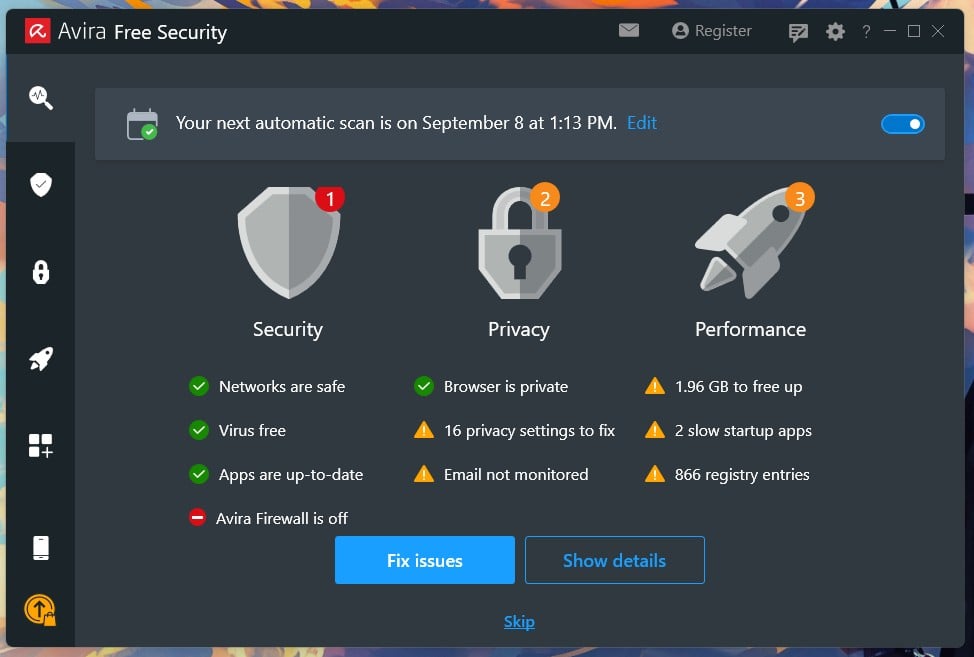
My bench tells a split story. Detection was 99.96%, the highest figure I recorded, but it came with 12 false alarms, the second-worst of the six. That combination points to aggressive heuristics: Avira catches more and flags more. Idle use was 65.9 MB, less than half of anything else. Boot went from 18 seconds to 25, a 39% increase.
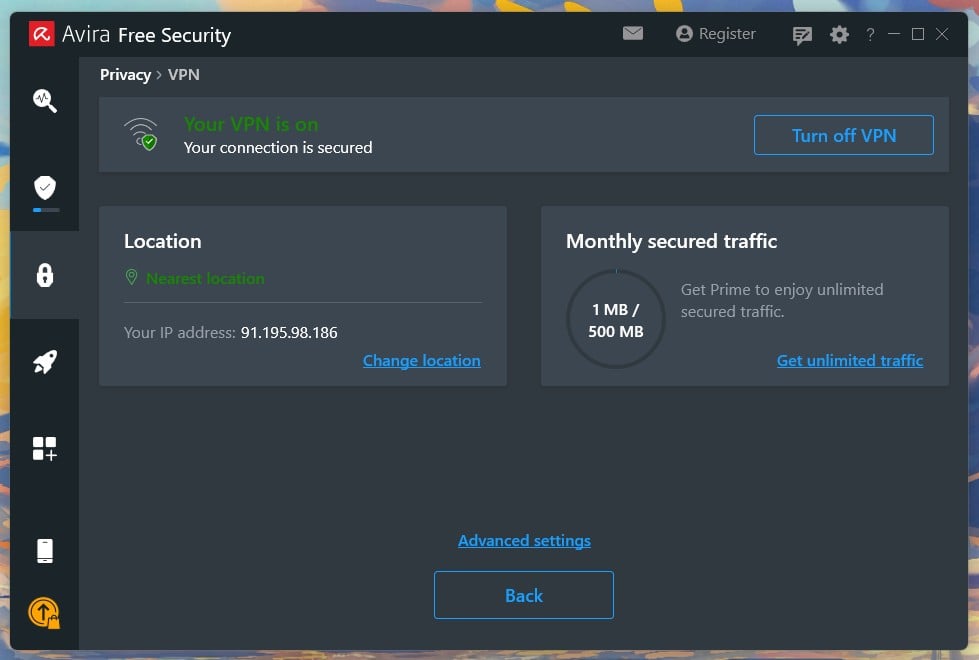
A smart scan took 30 seconds. A full scan took 18 minutes 14 seconds, peaking at 16.6% CPU and 230 MB. The lab and my bench agree once you look at what each measured. Avira sits lighter than anything else when idle. It also works longer than almost anything else when scanning.
The Catch: How Avira Free Makes Money
Easily the cleanest installer here. The welcome screen is a single Agree and Install button with no checkboxes: no bundled browser, no default search change, no telemetry tick. It cites GDPR Articles 13 and 14 and links to its privacy policy on that same screen. Selling happens inside the app, and gently. Opening the VPN for the first time produced one upgrade offer, and that was the only prompt.
Prime costs $59.99 for the first year and renews at $109.99 for 5 devices. Avira’s upgrade screen puts a dash beside the free tier for automatic software updates and for password creation and management. Avira’s own support pages say the free product includes a software updater and a password manager.
Both are true: Prime adds automatic updating and a fuller manager, while the free tiers do less. The upgrade screen presents that limitation as absence.
✅ Should You Use Avira Free?
Yes, if you want several tools without paying, and if a 500 MB VPN allowance helps more than it frustrates. It asks very little of you at install and barely sells to you afterward. The 12 false alarms are the reason it sits fifth instead of higher.
Rating: 4.3/5 ⭐ (Protection 4.2 ⭐. Performance 4.0 ⭐. Features 4.4 ⭐. Transparency 4.4 ⭐. Value 4.6 ⭐). Buy If: The VPN cap starts to become annoying, since 500 MB covers occasional use.
6. Malwarebytes Free: Best Free Scanner for an Existing Infection
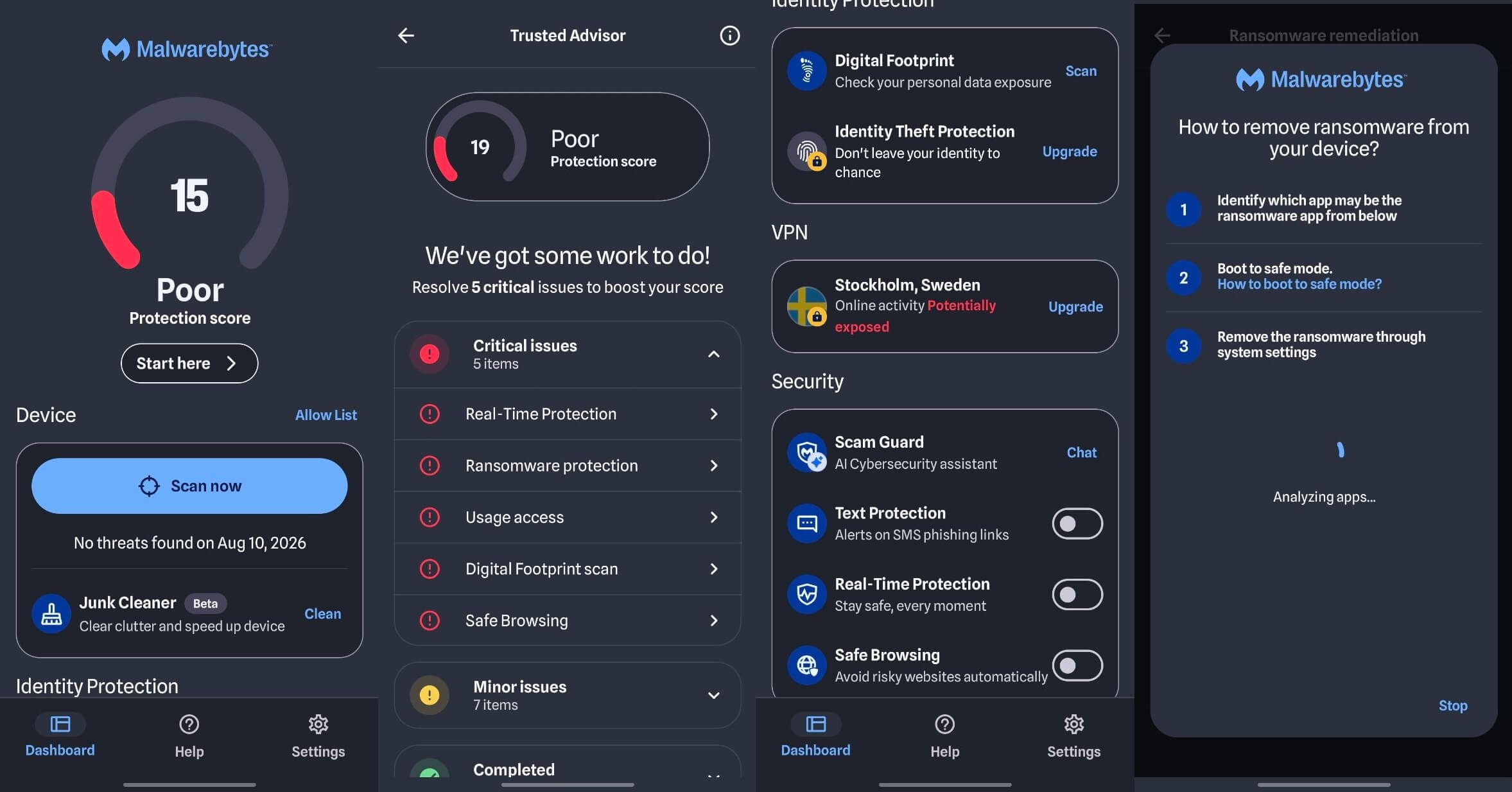
Malwarebytes does a different job from the five above, and the confusion around that costs people protection. Install it, and you get 14 days of Premium, including real-time blocking. On day 15, the real-time layer stops and what remains is a manual scanner. The app tells you when this happens and asks you to upgrade, which is fair, but plenty of people never register the change.
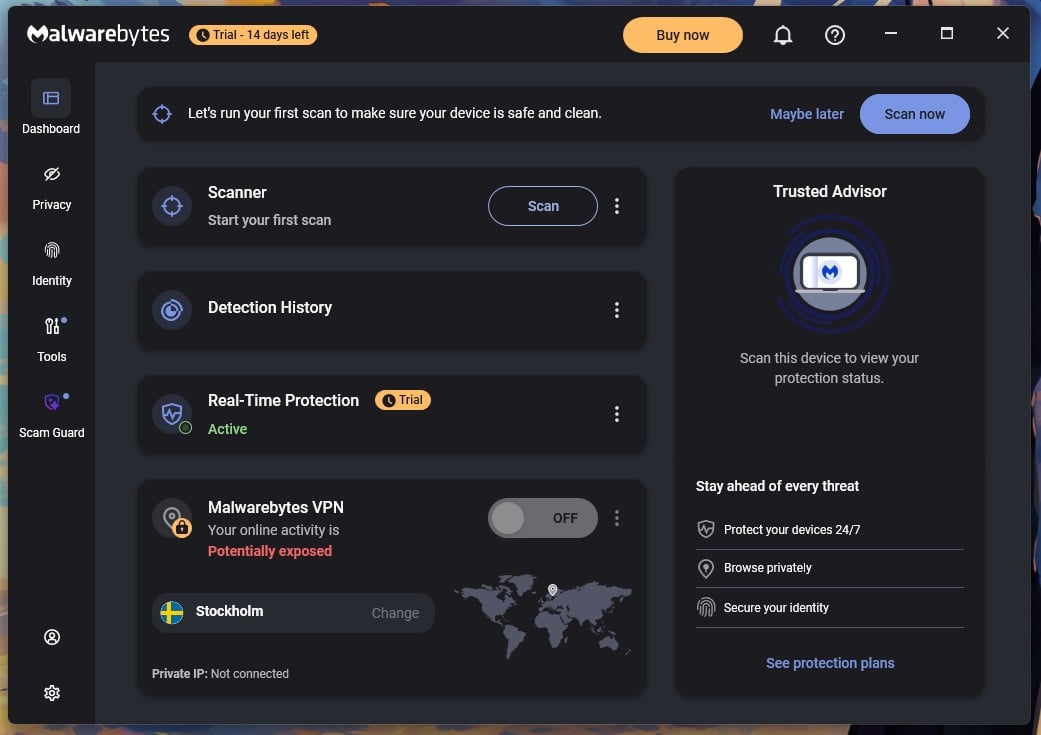
As a free virus cleaner run alongside a resident antivirus, it earns its place. As your only protection, it leaves you exposed between scans.
Pros
- Unlimited devices on all four platforms
- Installs in 38 seconds, nothing pre-ticked
- Announces plainly when the trial ends
- Excellent at cleaning an existing infection
Cons
- No real-time protection after 14 days
- Deep Scan took 28:43 and 645 MB
- 23 lab false alarms, 14 on my bench
- Lowest protection rate: 99.59%
What You Get With Malwarebytes Free
Platforms: Windows, macOS, Android, iOS. Devices: unlimited. Real-time protection: 14 days only, then manual scanning. Included after the trial: Threat Scan, Deep Scan, detection history, quarantine, and a scan scheduler.
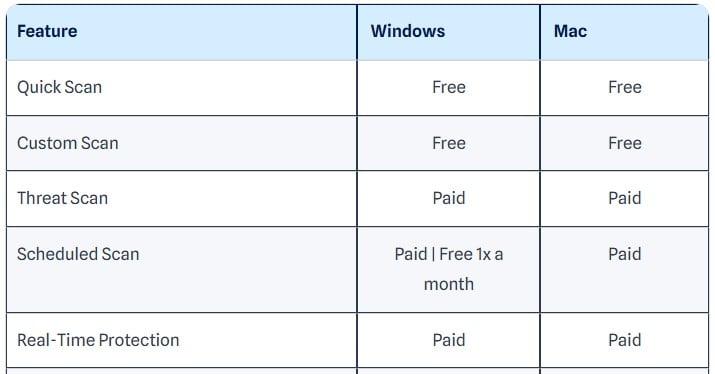
Locked behind Standard at $59.99 a year for 3 devices, or $44.99 for one: permanent real-time protection, web protection with scam and ad blocking, and the Browser Guard integration. Plus adds a VPN at $79.98, and Total adds identity cover with $1M insurance at $89.99.
Malwarebytes Free Test Results: Protection and Speed
AV-Comparatives measured 92.4% offline and 99.59% online protection in March 2026, with 23 false alarms. Read that figure with one caveat: the lab tests with real-time protection active, which free users lose after two weeks. My own results tracked the lab. Detection came to 99.57% against the lab’s 99.59%, and 91.3% offline against its 92.4%. False alarms came to 14, the worst of the six.
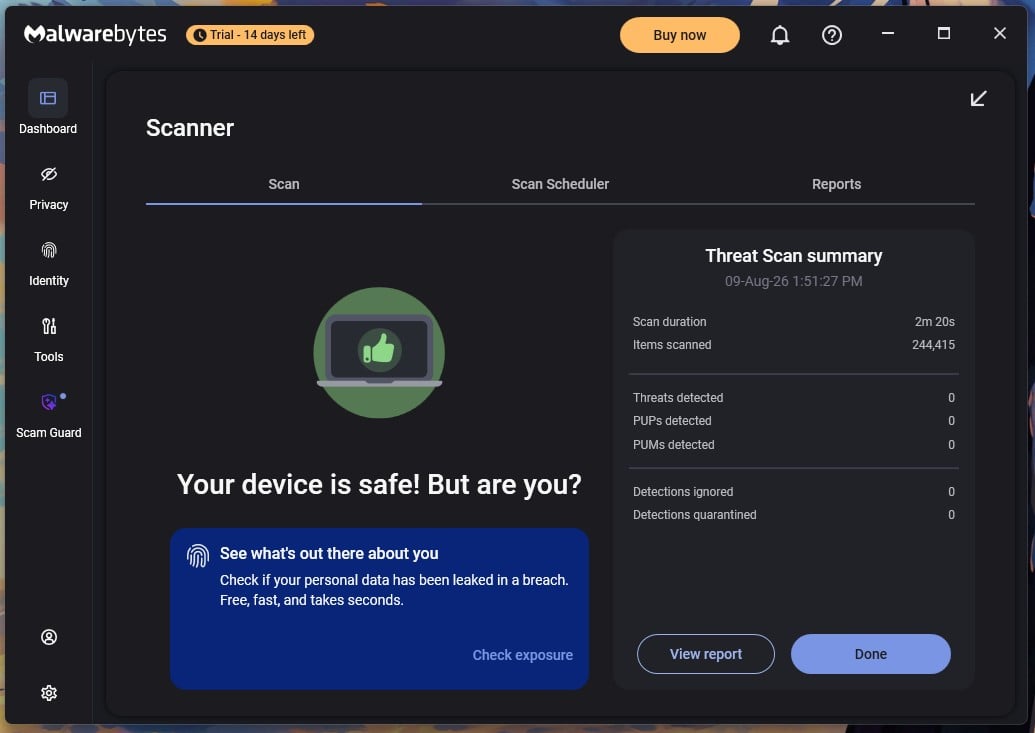
Speed is where it struggles. A Threat Scan took 2 minutes 20 seconds. A Deep Scan took 28 minutes 43 seconds, more than twice Defender’s full scan, and peaked at 645 MB of RAM. That is roughly three times what any other product here used. Idle was reasonable at 147.3 MB, and boot rose from 18 seconds to 26.
The Catch: How Malwarebytes Free Makes Money
The 14-day Premium trial is the business model. Setup finished in 38 seconds, with no pre-ticked boxes. Browser Guard is offered as its own step, unticked. The first-run screen asks for an email before it will start a scan. You can click “I’ll scan later,” and the dashboard opens at once.
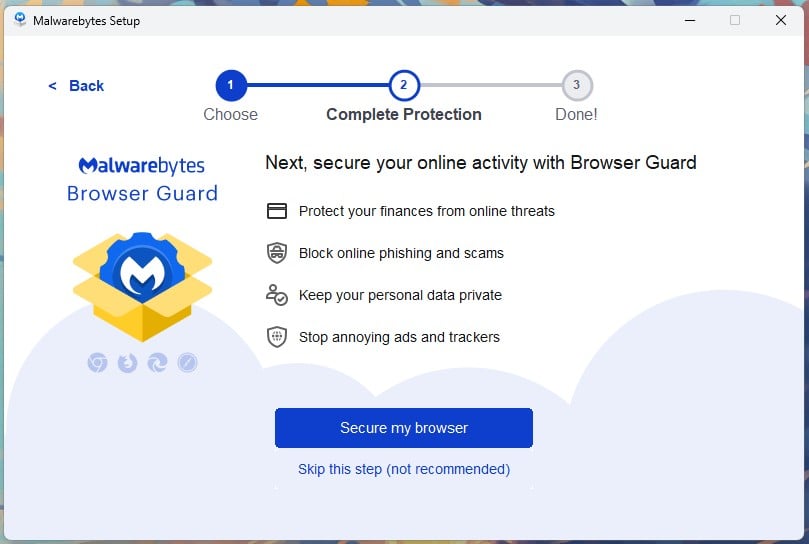
Scanning works there with no email at all. After that, the selling is constant but quiet. A Buy now button sits in the title bar with a trial countdown beside it. Notification dots mark four sidebar items. A VPN card describes your connection as “potentially exposed” while switched off.
✅ Should You Use Malwarebytes Free?
Yes, as a second opinion. Keep it installed, run a scan when something feels wrong, and let another product handle the constant watching. As a primary antivirus after days, it’s the wrong tool, and its false alarm rate means it will occasionally flag files that are fine.
Rating: 3.7/5 ⭐ (Protection 3.7 ⭐. Performance 3.5 ⭐. Features 3.2 ⭐. Transparency 4.2 ⭐. Value 4.0 ⭐). Buy If: You want it watching constantly, because free Malwarebytes stops doing that on day 15.
Free Antivirus Compared: Protection, Features and More
Every figure below came from the same Windows 11 machine, reset between products, in November 2026. The last column is the one worth reading twice, because it is the difference you will actually live with.
| Best for | Real-time | Lab protection | System impact | Platforms | Devices | How it makes money | Rating | |
| Avast Free Antivirus | Overall | Yes | 99.97% online, 9 FA | +50% boot, 12% CPU | Win, Mac, Android, iOS | Unlimited | Pre-ticked browser, permanent Driver Updater prompt | 4.6⭐ |
| Bitdefender Antivirus Free | Light, quiet protection | Yes | 99.94% online, 4 FA | +44% boot, 11% CPU | Windows | 3 | One sign-in dialog, then nothing | 4.5⭐ |
| AVG AntiVirus Free | Free extras | Yes | 99.97% online, 9 FA | +28% boot, 15% CPU | Win, Mac, Android, iOS | Unlimited | Two pre-ticked boxes, scan alarms, discount popups | 4.4⭐ |
| Microsoft Defender | Most Windows users | Yes | 99.93% online, 3 FA | +22% boot, 31% CPU | Windows | Built in | Nothing directly, Windows telemetry instead | 4.3⭐ |
| Avira Free Security | Tool bundle | Yes | AV-TEST 6/4.5/6 | +39% boot, 16.6% CPU | Win, Mac, plus mobile apps | Unlimited | One in-app VPN upsell | 4.3⭐ |
| Malwarebytes Free | Cleaning an infection | 14 days only | 99.59% online, 23 FA | +44% boot, 18.2% CPU | Win, Mac, Android, iOS | Unlimited | 14-day trial, then constant upgrade prompts | 3.7⭐ |
Protection is close enough across the top four that it should not decide your choice. System impact varies more, and Defender’s 31% CPU peak is the figure to watch on an old laptop. The money column separates them, from Bitdefender asking once to AVG asking constantly.
Free Trials of Paid Antivirus: Full Protection Without Paying
These are trials, not free products. Every one ends, and most end with a charge unless you act. Trial lengths across the major paid suites go from 7 days to 30. Some take card details up front and bill automatically at expiry. Others let you install with nothing. Where a card is required, check the cancellation window before you sign up. Cancelling means signing into the vendor’s portal, finding the subscription and switching off automatic renewal.
Doing that during the trial usually keeps access to the end of the period. A money-back guarantee is not an antivirus free trial. It means paying first and asking for a refund later. For a free trial antivirus experience with no money leaving your account, look for the phrase no credit card required.
🆓 Norton Free Trial
Norton’s trial is 7 days, which is the shortest of the major suites and considerably less than the 30 days people often expect. That is enough to check whether the software behaves on your hardware, and not enough to see how it handles a real threat.
Norton also offers two permanently free tools outside the trial. Power Eraser handles stubborn infections, and Safe Web checks links before you click them. Those stay free with no expiry. Our Norton review covers the paid tiers.
🆓 Bitdefender Free Trial
Bitdefender offers 30 days of Total Security, and it is the natural next step from the free edition reviewed above. The trial adds what the free version deliberately omits. That means multi-layer ransomware protection, the Safepay browser for banking, a firewall, the device optimizer and vulnerability scanning.
It also covers macOS, Android and iOS. Total Security costs $59.99 for the first year and renews at $109.99. Full details are in our Bitdefender review.
🆓 McAfee Free Trial and Free Tools
McAfee offers a 30-day trial across its consumer tiers. There is no permanent free McAfee antivirus tier. A McAfee antivirus free download leads to either the trial or one of the standalone utilities. Those utilities cost nothing.
Security Scan Plus checks whether your protection is current, and WebAdvisor warns you about dangerous sites and downloads. Neither replaces an antivirus program. Not even remotely close.
🆓 NordVPN Threat Protection Pro: 30-Day Money-Back Window
This one is a refund window. NordVPN’s Threat Protection Pro blocks malware, trackers, and phishing pages at the network layer. It requires the Complete plan or above. So you pay first and claim a refund within 30 days if it does not suit you.
It is a reasonable fit if you want malware and scam blocking bundled with a VPN and you accept paying to find out. It is not free virus protection, and I would not describe it as such. Our NordVPN review has the tier breakdown.
Try Threat Protection Pro Risk-Free
Free Virus Scan and Removal: What to Use If You’re Already Infected
If something is wrong with your PC right now, skip the rankings. What follows is a free virus scan and removal process in the right order, using tools that will not fight each other. It assumes something is already on the machine and your protection missed it.
Signs Your Device Is Already Infected
The usual signs are a sudden slowdown, pop-ups outside the browser, and a homepage that changed without permission. Look for unfamiliar startup programs, security software that will not open, and network activity while you sit idle. Any two together justify a full virus scan free of charge with a second tool, and an anti virus scan from another vendor takes under half an hour.
Free On-Demand Scanners for a Second Opinion
A second-opinion scanner is one you launch by hand alongside your existing antivirus. Your main product already saw the file and judged it safe, so the best free virus scanner here is whichever one you do not have. Malwarebytes Free is built for it, and as a virus scanner for PC cleanup it has few equals. Its manual scanner stays available forever once the trial ends.
Microsoft Defender works here too: Windows Security offers a Periodic scanning toggle that arrives switched off, and turning it on gives you a free malware scanner you own. The best free malware scanner is the one your resident product is not. Keep one resident scanner and add as many on-demand tools as you like.
Two intercepting files at once will conflict and sometimes quarantine each other. A virus scanner free of real-time duties stacks safely.
Free Online Virus Scan Tools and Their Limits
Browser-based scanners check files or URLs you submit against multiple engines, which settles whether one download is safe. Examining your system is beyond them, because browsers are sandboxed and cannot read your file system, memory, or startup entries. So a free online virus scanner answers “is this file dangerous” and never “is my computer infected”.
No free antivirus scan delivered through a browser tab will, and fake pages promising a full system check trade on that confusion.
Rescue Media for Machines That Won’t Start Clean
Some infections load before Windows does, leaving any scanner inside Windows at a disadvantage. Rescue media boots from a separate environment and scans the drive while the infection sits inactive. Bitdefender includes a Rescue Environment, and Microsoft Defender has an Offline scan that restarts the PC into a minimal environment for about 15 minutes.
Both are free, and both are the best free virus removal route when normal scans keep finding the same thing. No virus removal software loading inside Windows matches them there.
What to Do After the Scan Comes Back Clean
Removing malware is not the end of it. The best malware removal free tools strip every file and still leave you exposed, because a virus cleaner free of charge cannot undo what was taken. This is where the best free malware software stops helping. Change passwords for email and banking, from another device if you can.
Sign out of all active sessions, since a stolen session token survives a password change. Audit your browser extensions, because hijackers live there more often than in program files. Then confirm your antivirus, firewall, and Windows Update are still switched on. If the same detection keeps returning, stop cleaning and reinstall Windows. It is faster, and it is the only certain approach.
How to Download Free Antivirus Safely
Searching for a free antivirus download is one of the riskier things you can do. Those results are where attackers expect you to be. The rule is short: download antivirus only from the vendor’s own website or an official app store. Fake antivirus free download pages copy real branding, buy ads above the organic result, and serve an installer carrying something extra.
Cracked installers promising a paid product at no cost are the same trap with a different hook. No version of that transaction ends well for you. Four checks before clicking anything on the internet:
- Read the domain character by character. Typosquatted addresses swap letters, add hyphens, or change the extension.
- Scroll past the ads. Sponsored results for an anti virus download are bought, not verified. The organic result below is usually the real one.
- Check the publisher signature. When Windows asks permission to install, the publisher name should match the company. An unknown or blank publisher is a stop signal.
- Untick the extras. Four of the six pre-tick a browser install, and one tries to make it your default. Read that screen.
To download antivirus free of any bundled surprises, go to avast.com, bitdefender.com, avg.com, avira.com and malwarebytes.com. Those five addresses cover every anti virus downloads question. Microsoft Defender needs no download, since it is already in Windows. On phones, use Google Play and the App Store.
Best Free Antivirus for Windows 11
My pick for free antivirus for Windows 11 is Avast Free Antivirus. Coverage is the reason, not always detection. Here’s my reasoning.
What Windows 11 Already Handles
Windows 11 defends itself well, so free anti virus software is a supplement. SmartScreen checks downloads and sites against Microsoft’s reputation data. Smart App Control blocks untrusted applications outright on clean installs. TPM 2.0 and core isolation protect credentials and kernel memory, and the driver blocklist stops known-vulnerable drivers from loading. With Defender, it’s a good baseline.
It is why Defender sits fourth and not last. What it misses is the gap Avast fills. Defender’s phishing protection is strongest inside Edge and weaker elsewhere. Its offline detection dropped to 89.2% in AV-Comparatives testing. It covers no other platform, so a household with a Mac or an Android needs something else. Scam-specific protections, where most losses happen, are thin.
Which Free Antivirus to Pick for Windows 11
Avast is my free antivirus for PC pick, and the strongest free virus protection for PC owners. It adds scam detection, a ransomware shield, network scanning, and breach checking. No free antivirus software for PC use covers that much ground. No free antivirus software at any price does it across four platforms. Bitdefender Antivirus Free is the better free antivirus software for Windows if footprint matters more.
It used the least CPU of anything I measured and interrupts you once. Older or slower hardware changes the answer again. On a machine with 4 GB of memory, idle usage is what you feel all day. Avira’s 65.9 MB is less than half of what the others use. That makes it the lightweight antivirus pick for free antivirus for laptop duty on aging hardware if you accept its false alarm rate.
For free virus protection for laptop hardware from 2015 or earlier, start there. Any of the four works as free computer protection on a modern desktop, and all four count as free computer virus protection.
Free Antivirus for Windows 10 After End of Support
Windows 10 left mainstream support in October 2025, and that changes the calculation. An unsupported operating system stops receiving the security patches that close new holes, so third-party cover becomes more necessary. No security product patches an operating system vulnerability. It blocks malware trying to exploit one, which helps, but the hole stays open.
If your hardware supports Windows 11, upgrading is better, and no free antivirus for Windows 10 substitutes for it. For machines that cannot make the jump, my pick for best free antivirus for Windows 10 is AVG AntiVirus Free. It supports Windows 7 with Service Pack 1 upward, so it covers hardware other vendors have moved past. It carries the same detection engine as Avast.
And it added only 5 seconds to boot time on my bench, the second lightest result I recorded. Avira also supports Windows 7 SP1 and later if you want the smaller memory footprint instead.
Best Free Antivirus for Mac
macOS defends itself more than most people realize. XProtect scans for known malware signatures in the background. Gatekeeper blocks unsigned applications, and notarization checks apps against Apple’s own malware scan first. None of it needs a third-party scanner the way Windows does.
The gaps are narrow. Adware and browser hijackers slip past Gatekeeper regularly, because users install them after being tricked. Phishing pages do not care which OS you use. A Mac can also carry Windows malware without harm and pass it on via a shared drive. My free antivirus for Mac pick is Avast Free Antivirus, which uses the same engine as its Windows build on macOS.
Avira also offers a free Mac app for macOS 10.15 and later. There is a fair case against installing anything. Download only from the App Store or known developers, keep macOS updated, and treat unexpected password prompts with suspicion. Do that, and you probably need no free Mac antivirus.
Free Antivirus Apps for Android and iPhone
These two platforms need completely different answers, and the iPhone one is the more surprising. Here’s why.
Android
Google Play Protect scans apps on every Android device, so a third-party antivirus app is an addition. A good free security app scans sideloaded APKs, where most Android malware arrives, and blocks malicious pages outside the browser’s own checks. It filters scam calls and messages and audits which apps hold which permissions. It adds little if you only install from Google Play.
If you sideload, or if older relatives are getting scam texts, the value exists. Avast, AVG, Avira and Malwarebytes all offer 100% free antivirus for Android with no trial attached. Free security apps on this platform are plentiful. Expect ads in most of them, since that is how free mobile security apps are funded, and expect a persistent notification you cannot dismiss.
iPhone
There is no antivirus for iPhone. iOS sandboxing prevents any app from reading another app’s data or scanning the file system, the mechanism an antivirus depends on. Every product in the App Store marketed as the best free antivirus for iPhone is doing something else and calling it that. What those apps do is useful.
They filter phishing and scam links, check Wi-Fi networks for weak configuration, monitor your email address against breaches, and provide a VPN. None of it is virus scanning. If you want the strongest protection available on an iPhone, it is already built in. Keep iOS updated, since Apple patches exploited flaws quickly. Enable Lockdown Mode if you are a plausible target for a sophisticated attack.
It restricts message attachments, web technologies, and connections. That outperforms any app claiming to be the best antivirus for iPhone free of charge.
Do Chromebooks Need Free Antivirus?
Mostly no. ChromeOS isolates every web page and app in its own sandbox. It verifies the OS on every boot and repairs itself if that check fails. Updates arrive automatically. File-scanning antivirus has little to do there, and free antivirus for Chromebook products mostly solves a problem the platform already handled.
The Chromebook risks sit elsewhere. Malicious browser extensions are the main one, since they operate with permissions you granted and can read what you type. Phishing works identically on ChromeOS as anywhere else. And Android apps installed from outside the Play Store bypass some of the checks that make the platform safe. Four things actually help.
Audit your extensions and remove anything you did not deliberately install. Keep Android apps to the Play Store. Enable Enhanced Safe Browsing in Chrome. Use Powerwash to reset the device if it feels wrong. That covers more ground than any Chromebook antivirus free download would.
Is Free Antivirus Actually Safe to Use?
Yes, when it comes from the vendor directly. Every product here is made by an established security company, has current lab certification, and does the job it claims. The risks are there, but not the ones people usually worry about.
Data Collection
Security software sees everything on your computer by design, and what happens to that information varies. Bitdefender’s installer arrives with its telemetry checkbox switched off, which no other product here matches. Microsoft’s arrangement is Windows-wide telemetry instead of a direct charge.
Avast carries a documented history, and the question “is Avast free antivirus safe” comes up constantly because of it. The FTC fined the company $16.5 million in 2024 over browsing data its Jumpshot subsidiary sold, and the resulting order now restricts that practice. So yes, it is very safe.
Bundled Software and Browser Changes
Four of the six pre-tick something during setup, and AVG also offers to make its browser your default. None of it is malicious. All of it counts on you clicking through the screen without reading it.
Fake Products Impersonating Real Brands
This is the danger. Counterfeit installers using real vendor branding are a common malware route. They target exactly the search terms this page is about.
What to Check Before You Install
Three checks work on any free antivirus privacy policy. First, look for what the company says it does not collect. Specific denials mean more than broad assurances. Look for stated retention periods, because a policy without numbers is a policy without limits. And look for whether data is shared with third parties.
After installing any of these, open the settings once and do three things. Turn off telemetry or product reports if they arrived enabled. Remove the browser extension if you did not want it. And check that any protection which arrived disabled has been switched on, since several products here leave useful features off by default.
Free vs Paid Antivirus: What You Actually Give Up
Free and paid versions from the same vendor share one detection engine. Bitdefender Antivirus Free and Bitdefender Total Security identify malware identically. So does Avast against Avast Premium Security. Paying more buys no better detection from the same company, and my testing found nothing to contradict that.
Paying buys the layer above detection. Free security software gives you the scanner. Paid adds the rest. That is the whole difference between free internet security and the paid kind. Judge anti virus free against a subscription on that layer.
- Firewall. Windows includes one, so this matters less than vendors imply.
- Ransomware rollback. Restoring encrypted files, not just blocking the attack.
- Banking protection. A hardened browser session for financial sites.
- VPN without a cap. Free tiers offer 500 MB a month at best.
- Parental controls and identity monitoring. Absent from every free tier here.
- Human support. Free users get a knowledge base and a forum.
- Cross-platform coverage from one subscription.
When Paying Is Actually Worth It
Most people should stay on free antivirus protection. A single adult on one Windows machine, downloading from normal places, gets essentially the same malware protection free that they would get paying $60 a year. No free virus software here left a gap I could measure.
Five situations change that answer:
- Children in the house. Parental controls and content filtering do real work.
- Banking or invoicing on that machine. A compromise costs money directly.
- A previous infection. Being hit once suggests exposure the free tier is not covering.
- More than 3 devices across different systems. Per-device cost turns in favor of a subscription.
- An unsupported operating system. Ransomware rollback starts to earn its price.
If any of those describe you, our best antivirus software guide covers the paid options in detail, including their free trials.
How the Free Antivirus Tools Were Tested
Everything here came from one machine in August 2026. It is a Ryzen 7 5800X with 32 GB DDR4-2666 memory, running Windows 11 Pro. Two M.2 SSDs hold roughly 530 GB of data between them. Each product went onto a clean image, was tested, then removed before the image was restored for the next one.
Boot times run to a usable desktop, against an 18-second baseline taken with no antivirus installed and Defender disabled. One limitation: this is a fast PC, and many people reading a page about free antivirus are not using one. Weigh the idle memory figures if your hardware is older, since that cost applies all day.
Detection Testing
The EICAR test file was used only to confirm each scanner was awake and responding. It proves nothing about capability, because every vendor whitelists it deliberately, and a product that fails EICAR is broken.
Real figures came from a set of live malware samples through browser downloads, plus malicious URLs tested at the point of access. Percentages are given without a sample count, in line with how the labs themselves report.
Performance Benchmarks
Scan durations were timed from start to completion on the same data set. CPU and memory peaks were captured during full scans. Idle figures were taken after 30 minutes with no user activity. Boot deltas came from three restarts averaged.
The Upsell and Bundling Audit
Every installer was stepped through screen by screen with each checkbox photographed before any of them were changed. Inside the app, I logged each distinct place the product asked for money: title bar buttons, dashboard cards, modal dialogs, notification badges, and locked features. This is reported as surfaces, not a count of prompts per day.
Cross-Referencing and Independence
Lab figures come from AV-Comparatives’ Malware Protection Test of March 2026 and AV-TEST’s Windows 11 home user results from June 2026. Where my results disagreed with theirs, both appear on this page.
Nobody here paid for a review, and no vendor saw this page before publication. It gets revisited when either lab publishes a new round.
The Verdict: The Best Free Antivirus 2026 Has to Offer
Avast Free Antivirus is the best free antivirus software you can install. It protects more thoroughly than any other free tier, matches paid suites at AV-TEST, and works across every platform in a normal household. All it asks is that you tolerate a prompt you cannot close. That makes it the best free anti virus pick of the year. Bitdefender Antivirus Free is the pick if you want the best antivirus free of noise, since it interrupts once and never again.
AVG AntiVirus Free has the same engine as Avast with more tools and considerably more selling. Microsoft Defender is already installed and is the correct answer for people on Windows. Avira Free Security bundles the most separate tools. Malwarebytes Free is the one to keep alongside the others for when something has already gone wrong.
All six are genuine free antivirus programs, and any of the top free antivirus options here will protect a home PC. None is charity. Now you know what each one takes in return, and you can decide more easily.
Common Questions About Free Antivirus Software
🥇 What Is the Best Free Antivirus You Can Get?
Avast Free Antivirus, on the strength of a perfect 18/18 at AV-TEST in June 2026 and the widest feature set offered at no cost. Installing nothing is also a defensible choice, since Microsoft Defender is already in Windows and scored 6/5.5/6 in the same round.
💯 Is There a 100% Free Antivirus With No Catch?
No. The free tiers here are genuine and permanent, but each is funded somehow: pre-ticked browser installs, upgrade prompts, trial countdowns, or platform-level data collection. Free means no payment, not no cost.
💻 Is Free Antivirus Good Enough for a Home PC?
Yes, for most households. The engine in a free tier is the one its paid sibling uses, so a threat blocked by one is blocked by both. What free tiers lack is recovery and containment: no ransomware rollback, no hardened banking browser, no parental controls. Those gaps start to matter once a compromise would cost money.
🛡️ Is Microsoft Defender Enough on Its Own?
Yes, for a single Windows PC that stays online. Its weak point is the offline case, where detection fell to 89.2% at AV-Comparatives in March 2026, one of the lowest figures. A laptop that spends days away from a connection is the clearest reason to add a second layer. Owning a Mac or a phone is the other, since Defender reaches neither.
🔰 Is Free Antivirus Safe to Download and Install?
Yes, from the vendor's own site or an official app store. The danger is found in counterfeit download pages that copy real branding and serve modified installers, and in cracked versions of paid products. Checking the domain spelling and the publisher signature on the installer eliminates almost all of that risk.
🏆 What Is the Best Free Antivirus for Windows 11?
Avast Free Antivirus. Windows 11 handles known malware competently by itself, so a third-party tool earns its place through scam detection, breach checking and network scanning, which is where Avast is strongest. Bitdefender Antivirus Free is the alternative when a small footprint outranks features.
🍏 Do Macs Need Free Antivirus Software?
No, not usually. Apple's built-in defenses deal with known malware and unsigned software without help. A scanner earns its place mainly against adware and hijackers, which get installed because someone was tricked, and against Windows malware a Mac can pass along untouched.
🆓 Is There a Real Free Antivirus for iPhone?
No. Apple isolates every app so thoroughly that no App Store product can inspect another one or read the file system, which makes scanning technically impossible. What these apps actually sell is phishing filtering, breach alerts, Wi-Fi checks, and VPN access. Installing iOS updates promptly does more than any of them.
🔎 What Is the Best Free Virus Scan and Removal Tool?
Malwarebytes Free. Its manual scanner stays available permanently after the 14-day trial and coexists with another antivirus without conflict. For infections that survive a normal scan, bootable rescue media from Bitdefender or Microsoft Defender Offline works where in-Windows scanning fails.
🚨 Does Free Antivirus Slow Down Your Computer?
Yes, but typically not by much. Boot time rose between 4 and 9 seconds across the six products tested, against an 18-second baseline. Avira used 65.9 MB at idle and Bitdefender 190 MB, and that continuous figure matters more on older hardware than any scan duration does.
✌️ Can You Run Two Antivirus Programs at Once?
No, not two that both watch files as they open. Resident scanners intercept the same operations and end up competing for them, which slows the system and can land one in the other's quarantine. Manual scanners stack safely, because nothing happens until a scan starts.
📢 Which Free Antivirus Has the Fewest Ads and Pop-Ups?
Bitdefender Antivirus Free, with a single prompt across the whole test period. Avira is close behind and asks once, the first time its VPN opens. AVG is the opposite, at seven separate places pushing an upgrade.