Figuring out how to use TikTok in India comes down to one thing: getting past the ban that’s been in place since 2020. The good news is you can still access the app, and a VPN is the way to do it (recommended: NordVPN). It’s straightforward once you know which one to use. This guide covers why India banned TikTok, how to set up a VPN to get around the block, and which VPN we’d recommend. But first, a look at why the ban happened in the first place.
How to Use TikTok in India: Download TikTok Freely in October 2026
- Get a VPN. We suggest NordVPN at 73% off.
- Set up the VPN on your PC or phone.
- Open the VPN and sign in with your credentials.
- Connect to a server outside India. Pick a VPN location in a country where TikTok works without restrictions (US, UK, Canada, etc.)
- Use TikTok in India unrestricted. You can even download the app from Google Play or the App Store and use it on your phone.
Is TikTok Banned in India? Situation in 2026
Tensions between China and India have long been strained when it comes to technology and data security. In mid-2020, these concerns escalated after a series of border clashes between the two countries. In June that year, the Indian government banned TikTok along with 58 other Chinese apps under the Information Technology Act. The official justification cited national security, data privacy risks, and the need to protect India’s “sovereignty and integrity.”
According to the authorities, TikTok lacked adequate safeguards to protect user data. The decision effectively left more than 200 million Indian TikTok users without access. Since then, some have migrated to local alternatives like MX TakaTak (now Moj), while many others continue searching for safe and effective workarounds to download TikTok in India even in 2026.
How to Use TikTok in India: Updated October 2026
We’ll start with the most reliable solution: NordVPN. We picked it for its unblocking abilities, obfuscated servers that work well in India, and a vast server network with fast speeds. Start with NordVPN by clicking below, where you can claim a 73% discount on all 2-year plans and get 3 free months. NordVPN is also risk-free, thanks to a 30-day money-back guarantee on all plans.
Now download and install NordVPN on your device. After that, open the app and sign in with your email and password created previously.
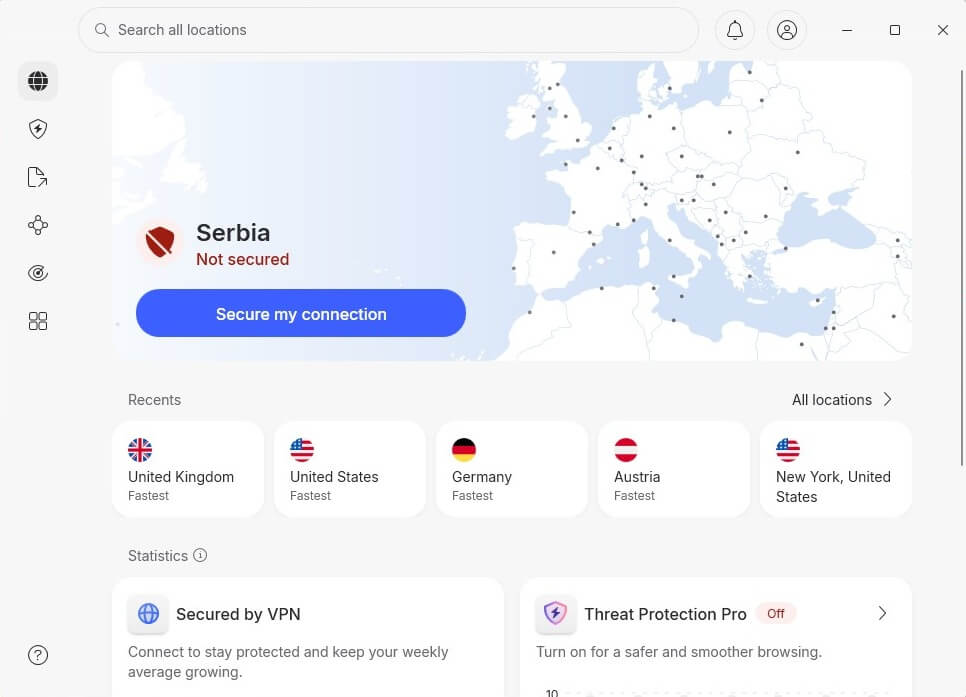
To download TikTok in India and unblock it entirely, connect to a VPN server outside India. Pick any country where TikTok actually works without restrictions. We clicked All Locations and selected the fastest server in the USA. When we then went to TikTok, the site worked as it should.
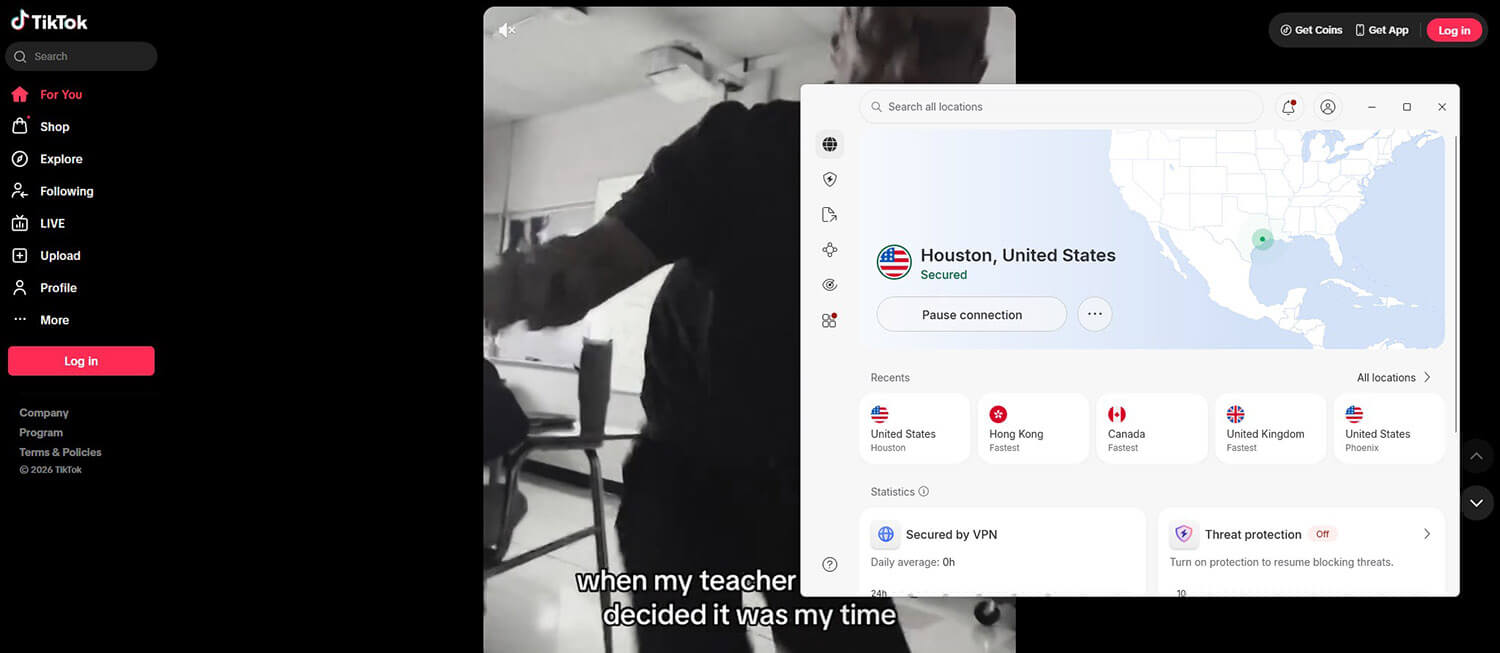
With this trick, you can use TikTok in India on your PC, as we did, but if you go to the App Store or Google Play, you’ll also notice the TikTok app is unblocked in India; it was blocked before. So, with NordVPN, you can download TikTok in India, on any device, and use it as you’d do in other locations.
Other Ways to Use TikTok in India in 2026
While a VPN for TikTok works the best, there are other ways to access this app or its website in India. I explore three options I personally tested, though with mixed results and with more hassle compared to a VPN.
1️⃣ Use a Foreign SIM
Many internet users traveling to India from abroad report that leaving their foreign SIM cards inserted in their phones allowed them to use TikTok in India. To do this, they enable Airplane Mode and connect to Wi-Fi. Indian internet carriers are mandated to block TikTok, so a foreign SIM that is not subject to these restrictions can potentially bypass the ban. Secondly, these visitors already have TikTok downloaded abroad.
It’s important because mobile app stores in India have adhered to the ban, and Indian residents no longer have official access to the app. The effectiveness of this method depends on various factors, including the foreign SIM carrier and network conditions. Apparently, you can no longer access TikTok as soon as you switch to an Indian SIM.
Besides, it’s not guaranteed to work. Some travelers have reported that they could not use TikTok in India, even with international SIM cards.
2️⃣ Use a Proxy Server
Another method to access TikTok in India is to use a proxy server. A proxy server acts as a middleman between your device and the internet. When you connect to one, it reroutes your internet traffic through the proxy server, which then accesses the web on your behalf. This helps you bypass network and regional restrictions when using the web. Notice how that appears to mirror what a VPN does?
However, the similarities don’t go beyond being intermediaries. While a VPN encrypts your network to prevent snoops from intercepting your data, a proxy doesn’t do any encrypting, so your online activities are more vulnerable to interception.
3️⃣ Use a Modded App
Another potentially effective (but risky) method involves using a modded (or mod) TikTok app. Since the TikTok ban in India took effect, reworked versions of the app have surfaced. A mod is a modified copy of an application with custom designs or specifications. Modded TikTok apps claim to provide the full TikTok experience with other improvements, without the roadblock. Because these apps are created by third-party developers and aren’t official, they are not available to download on Google Play or iOS app stores.
Can You Unblock TikTok in India With a Free VPN?
Using a free VPN to access TikTok in India is a bad idea for several reasons, as many Indians have discovered. To begin with, they are usually not powerful enough to bypass network blocks like those on TikTok in India. Free VPNs typically only offer a handful of servers. Not only does this mean you’re severely limited in your options for unblocking TikTok, but the servers will typically be congested, resulting in slower speeds and unstable connections.
Most free VPNs have data limits, such as 2 GB from TunnelBear or 10 GB from Windscribe (both are still very popular). Free VPNs are also notorious for their poor security standards. Many will log your browsing sessions and sell the data to third-party companies for profit. Some even inject malware and ads into their apps. To be completely honest, while there are some great free VPNs we sometimes use, we generally don’t recommend them.
A premium VPN is, without a doubt, the better option for accessing TikTok in India. You can choose an affordable option like PIA if pricing is a concern.
Using TikTok in India: Final Recommendations
So that’s the whole trick: with the right VPN running, TikTok in India works just like it does elsewhere. Pick a server in a country where the app is available, log in, and scroll. Nothing complicated about it. If I were setting this up for a friend, I’d hand them NordVPN and leave it there. It connects fast, doesn’t choke on video, and keeps things private while you’re on it. Get it running once, and the ban basically stops existing for you, even six years after the ban.
Worth saying plainly, though: India banned TikTok by government order, so using a VPN to get around that is a legal gray area there. The setup is easy. Just go in knowing that part and use TikTok in India responsibly.
Unblock TikTok in India with NordVPN
Frequently Asked Questions
📥 How to download TikTok in India?
You can download the app in India only if you use a VPN for TikTok. Since it's blocked, you must change your online location, which will unlock it on Google Play and the App Store. You can then download and use it freely, despite the ban. Just keep the VPN ON all the time, and it'll work.
❌ Is TikTok available in India?
No, it's not available. The app was banned in 2020, and even years later, there's no way to download it. The government banned TikTok, and while a VPN works, it's still in the gray area. It's not illegal, as if in getting fined or arrested, but given the ban from the government, it's also not 100% legal.
🛑 Does TikTok block VPN services?
No, it doesn't, and pretty much any VPN can unblock it. That still means you should rely on a good VPN, especially because of privacy, fast speeds, and unlimited data. While free VPNs can work with TikTok, their restrictions and cut-down features often make them inferior to a paid alternative.