
A nice suite of SEO tools is a must if you want to improve your online presence. Yet, you’re caught between a crossroad called Semrush vs Moz and don’t know where to go. We comprehend your struggle because both tools fulfill most people’s needs.
They’re all-arounders, which means they can tackle keyword research, backlink analysis, rank-tracking, and more. On top of that, both tools are priced competitively based on their quality. The price aspect undoubtedly makes the choice exponentially harder.
Should choose Moz Pro or Semrush? Another question is WHY choose one over the other? We know you’re getting dizzy but it’s time for epiphany. Today, we’ll compare Semrush vs Moz and discuss our findings after testing both for years; stay along for the ride.
Keyword Research: Moz vs Semrush
Most of the time, people are interested in keyword research regarding Moz Pro and Semrush. That’s not strange considering the importance of keywords for overall SEO.
Moz
Let’s start with Moz. Moz Pro offers Keyword Research, which offers lots of insights based on the given keyword or website. If you type in the keyword and choose the location, you’ll see parameters such as:
- Monthly volume
- Organic CTR
- Difficulty
- Minimum DA
- Primary Search Intent
- Suggestions, and more.
We found the Minimum Domain Authority parameter interesting, for example. It shows the minimum domain authority scores for sites ranking in the top 10 for the given keyword. Moz’s recent upgrade also introduced search intent, which we see in Semrush as well.
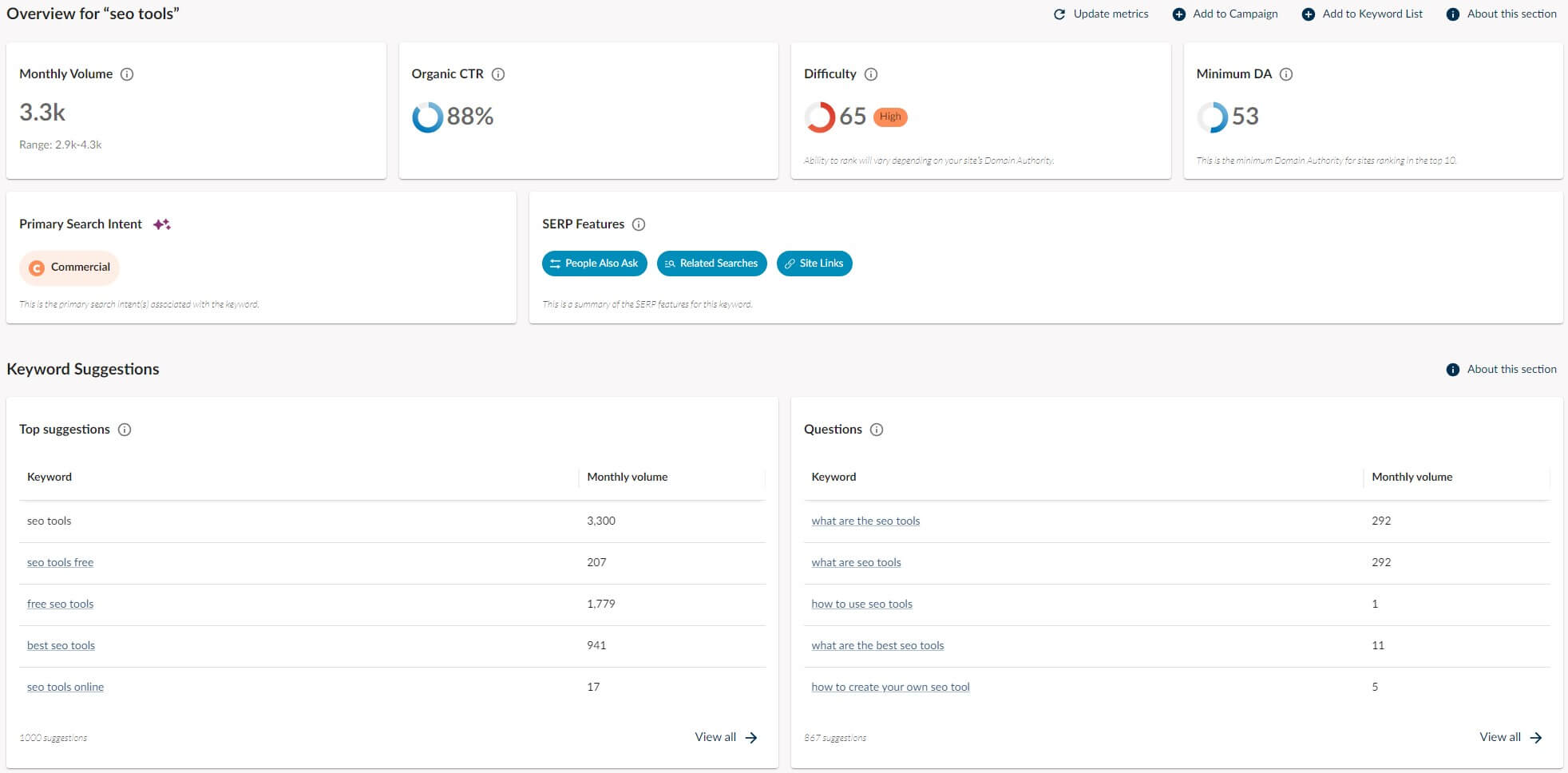
Apart from basic info, Moz Pro comes with crafty keyword suggestions and questions, helping you tackle the subject more proficiently. If you explore keywords by using the domain address, you’ll see its ranking keywords and ranking distribution.
It’s worth noting that Moz lets you add three more competitors to discover keyword gaps in the Keyword Gap tool. However, we found this tool a tad underwhelming because it displays only keywords to improve and doesn’t let you find new or lost keywords.
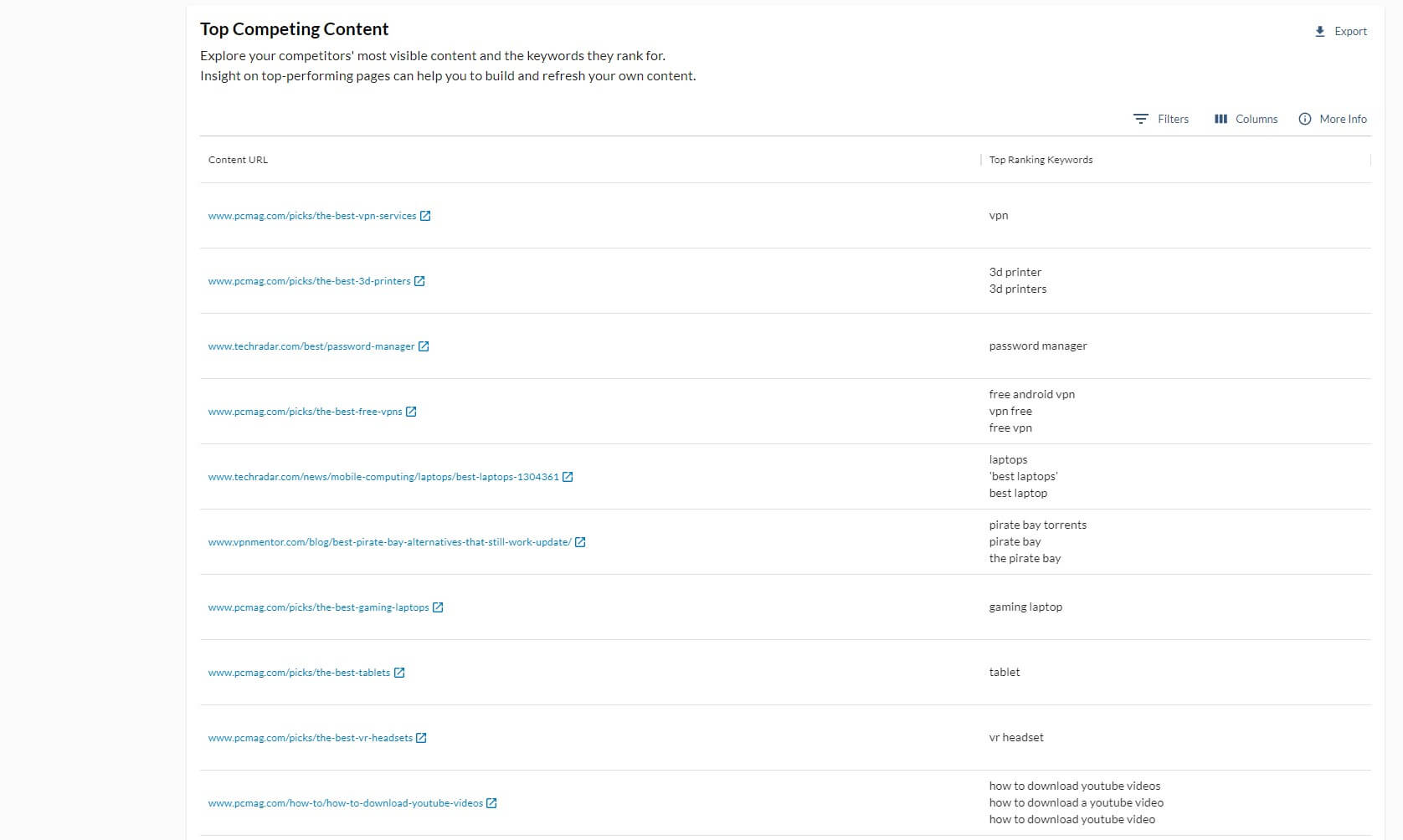
We criticized this in our Moz Pro review in detail, so be sure to check it out. Also, we should mention that Moz’s keyword suggestions aren’t as customizable as Semrush’s equivalent, so finding long-tail keywords is a bit harder
Semrush
Semrush’s Keyword Magic Tool remedies this issue. It offers numerous filters that let you select the length of the keyword, and thus, adapt the search to your needs. Longer keywords are sometimes easier to rank on because they’re more specific. Semrush knows this.
We love Semrush’s Keyword Overview tool, which bundles plenty of information about each key phrase. The difficulty score is often more “brutal” compared to Moz; it’s more accurate, so to say. Moz often displayed the difficulty score that made every keyword look easy.

However, we knew that wasn’t the truth because we also compared the score to Ahrefs which was much closer to Semrush. In general, Semrush and Moz offer the same basic data but the former offers a superior Keyword Gap tool with 4, instead of 3 competitors you can use for competitive analysis.
There’s also more information about CPC and competitive density. Plus, Semrush has the PLA Research tool, which analyzes Google’s Product Listing ads; great for advertisers. Finally, Semrush offers the Keyword Strategy Builder, which our team frequently uses.

It develops a keyword strategy based on up to 5 seed keywords, giving you pillar page ideas from which you can craft other pages and subpages. You can use it to essentially structure your site and interlink your pages to drive more traffic and improve SEO.
Who Wins?
The first round goes to Semrush. While Moz’s keyword analysis is pretty good, Semrush is above average, with the Keyword Magic Tool, Keyword Strategy Builder, and Keyword Gap tool, which highlights new, lost, and unique keywords of your competitors.
It’s just a more informative tool in this regard (especially for PPC research) and information is KEY in SEO. That said, Semrush wins the first battle.
Explore Keyword Opportunities With Semrush
Backlink Analysis & Link Building
Keyword optimization and backlinks are neck-and-neck in terms of importance for overall ranking. This Semrush vs Moz comparison for 2026 will explore their link-building and backlink analysis capabilities to explain which tool offers more.
Before we move on, we’ll briefly mention their backlink databases. Semrush “holds” 43 trillion, while Moz has 40 trillion backlinks.
On paper, they’re very similar but let’s see if the backlink database size impacts the entire experience in any way.
Moz
Moz Link Research offers a plethora of information to play around with. There’s domain authority, linking domains, inbound links, types of links (Follow/NoFollow), top pages, top anchors, etc. We noticed an interesting thing regarding domain authority.
We analyzed our website and Moz gave us a score of 93. Semrush’s score was 65, which is still great; we’re not bragging. Moz’s authority score is the website’s likelihood of ranking above its competitors.
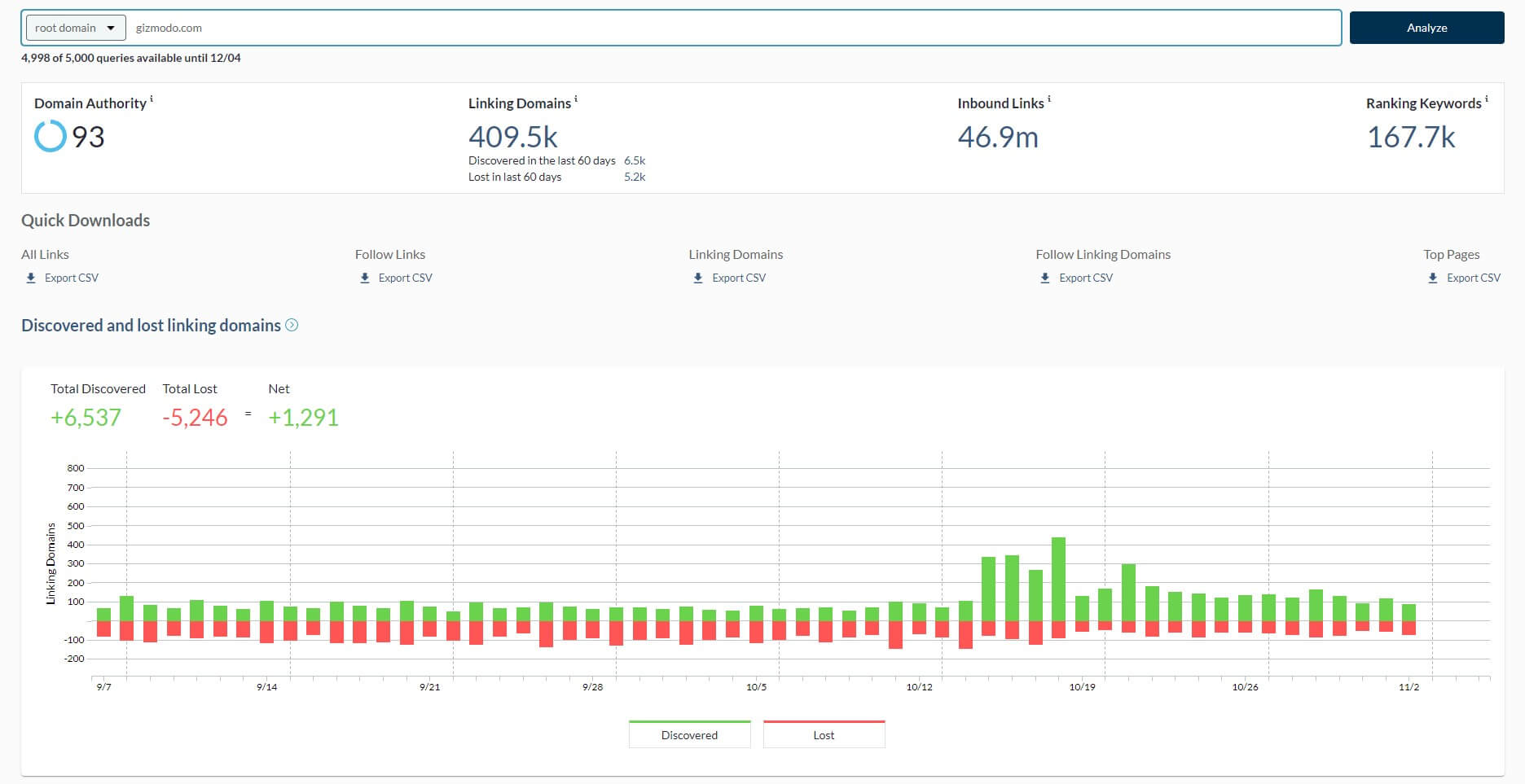
Semrush’s authority score measures the website’s reputation based on the number of quality backlinks, organic search traffic, and the website’s profile authenticity. That said, it’s far more accurate.
Moz’s Link Research tool is… basic at best. It’s surely not the most capable backlink-building tool. On the other hand, Moz isn’t completely useless. You still get the Link Intersect tool, which provides you with the websites that link to your competitors but not you.
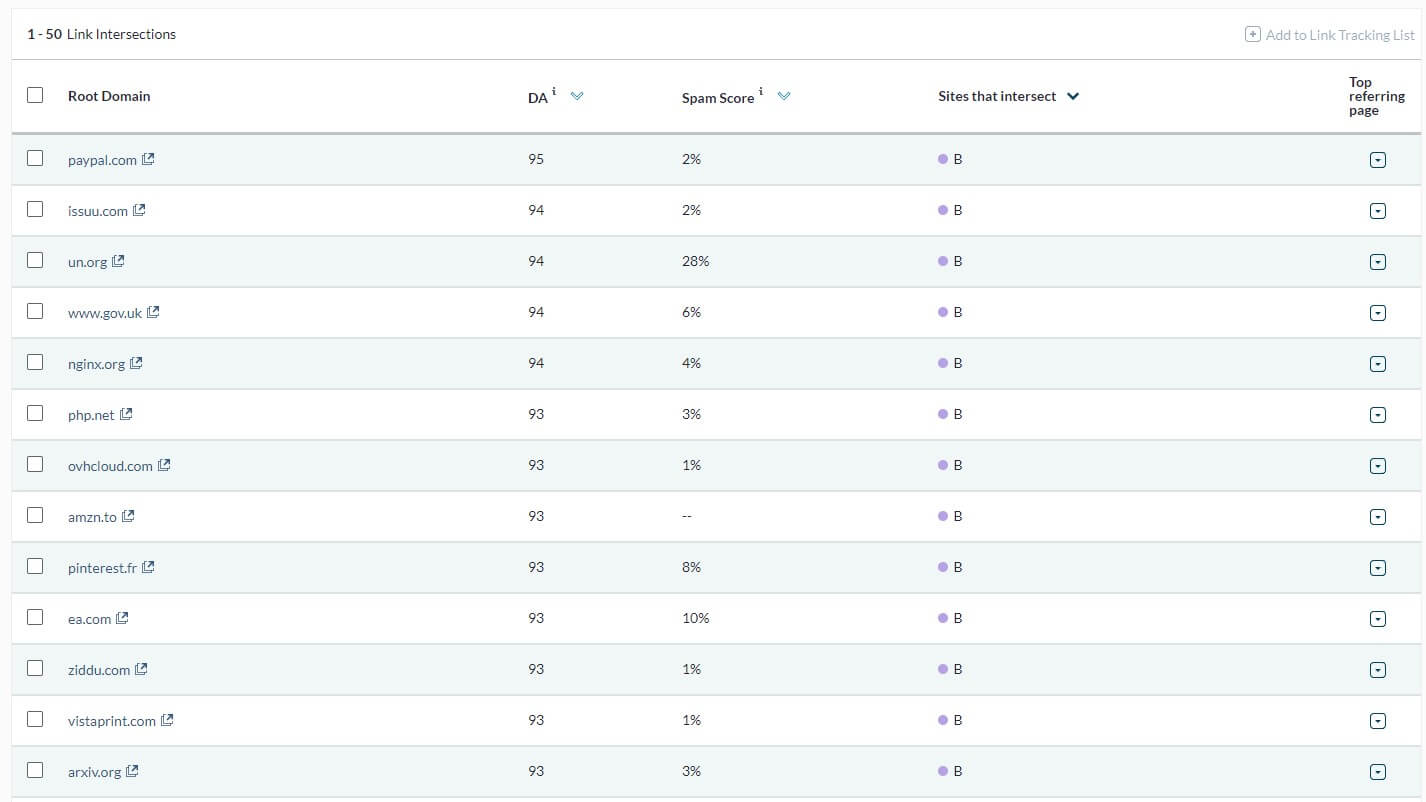
However, the Link Intersect tool is, again, basic, and doesn’t offer tons of information about these websites and specific pages that link to your competitors. Not to mention that Moz doesn’t have a link-building tool, so this process will be much harder.
Semrush
Semrush’s backlink prowess is unmatched in our opinion; only Ahrefs can come close. When you analyze the domain, you will see:
- Referring domains
- Total number of backlinks
- Outbound domains
- Organic traffic
- Monthly visits
- Authority score (with trends)
- New/lost backlinks, and more.
If you scroll down a bit, Semrush will show you categories of referring domains. Link attributes are also there joined by backlink types, which range from text and image to form and frame. Semrush also displays websites with similar backlink profiles.

Better yet, you can see their competition level where you can discover common referring domains and their number of backlinks. If you select Anchors, you’ll see the most used anchors to link to your website.
But what about link-building?
You get that as well! The Link-Building tool is your CRM for finding prospects. Prospects are websites that Semrush “thinks” you should get a backlink from. You can interact with each prospect and request a backlink, product review, guest post, or even a mention link.

The outreach function is really one of our favorite features of Semrush. We haven’t mentioned backlink audits but that belongs to technical SEO, which will be discussed later in our Moz vs Semrush duel.
Who Wins?
Things are clearer than the summer sky. Moz’s sky is a bit cloudy but Semrush enjoys the blue skies and waves the flag of victory. Its link-building tool paired with unbeatable backlink data crushes Moz, despite the small backlink database difference.
We’d venture to say that Moz’s backlink tools are underwhelming for the price and this word is never used to describe Semrush.
Improve Your Backlink Profile With Semrush
Rank Tracking: Moz Pro or Semrush?
You’ve realized the importance of rank-tracking and keeping a watchful eye on your progress. But which tool should you pick for this purpose; Moz or Semrush?
We’d say Semrush.
Moz offers the Rank Checker tool but it’s overly basic as before. You enter a phrase, paste the URL, choose the search engine, and pick the country. After that, the Rank Checker displays the keyword’s rank, volume, and difficulty. That’s all.

The Rank Checker provides daily updates, which is great but the lack of additional information is painful. Worse yet, there should be the ranking history parameter, which, for us at least, didn’t appear for most keywords. Semrush sings another song.
The Position Tracking tool comes into play here. Once you set it up by providing a domain address and other variables, you’ll be showered with information. There’s visibility, estimated traffic, average position, and the summary, which we found particularly useful.

Here, Semrush summarizes the entire “situation” with the given keyword and informs you of changes in visibility, position, and competition. Cannibalization reports are there too; albeit in the Guru and Professional plan.
They warn you if multiple pages rank on the same keyword.
Semrush also includes your top keywords but also those with negative or positive impacts. Position Tracking can show you the keywords with featured snippets on SERP, as well as opportunities that you can capitalize on to appear in a featured snippet.
Who Wins?
Semrush undoubtedly wins in rank-tracking. Both provide daily ranking updates but Semrush stomps Moz by offering more data, cannibalization reports, and the ability to track your visibility in specific locations and on specific devices (mobile/desktop).
Some of these features are unique to the Guru plan. See how Guru and Pro plans compare here and decide which one is better for you.
Enjoy Multi-Device Rank-Tracking With Semrush
Site Audits (Technical SEO)
Finding issues within your website can be done by auditing it. This is also referred to as page crawling, where an SEO tool inspects several pages and determines if you have critical issues. Moz and Semrush can do the same.
Better yet, both are very fast website crawlers.
You’ll detect 4xx errors or too-long URLs in minutes. Semrush and Moz can detect broken internal links, inappropriate H1 titles, and so on. The former takes the lead here, as it offers the ability to compare crawls and track the changes over time.

Performing a site audit is more thorough with Semrush because of its thematic reports. For example, it offers the Core Web Vitals parameter, which tells you more about your site’s responsiveness. You can find this parameter in Google Search Console, too.
On top of that, there’s the internal linking score, which is based on the internal linking quality and errors; or lack thereof. Semrush detects malformed and broken internal links, letting you repair them and prevent bigger problems. Now, to the Backlink Audit tool.

Moz lacks it but Semrush’s one is phenomenal. Once completed, the report will display your toxicity score and point you toward toxic links for removal. The Disavow tool allows for the swift removal of such links and tells Google to ignore them to preserve your ranking.
Both tools offer on-page auditing, which is great for improving a specific page. Semrush’s On-Page SEO Checker is better because of various optimization advice. Moz is a bit “shallow” here, with minuscule information on “page factors” that harm it and ways to get rid of them.
Who Wins?
We choose Semrush again for its unbeatable Site Audit and Backlink Audit tools, which are far more efficient than Moz’s On-Demand Crawl. However, Moz offers more generous crawling limits, allowing up to 5 million monthly pages compared to Semrush’s limit of 1 million.
Repair Website Issues With Semrush
Content Marketing Tools & Features
You can’t find anything that resembles content marketing in Moz. Sure, there’s Moz Local but this package aids local SEO improvements and has nothing to do with content. Semrush’s Guru plan includes content marketing; Pro doesn’t, so be aware of that.
Content marketing in Semrush is one of the best we’ve used.
For the start, you have Topic Research. This feature provides content ideas based on the seed keyword. These ideas can be expanded, where you’ll see eye-catching headlines and questions that you’ll need to answer to properly cover the topic.
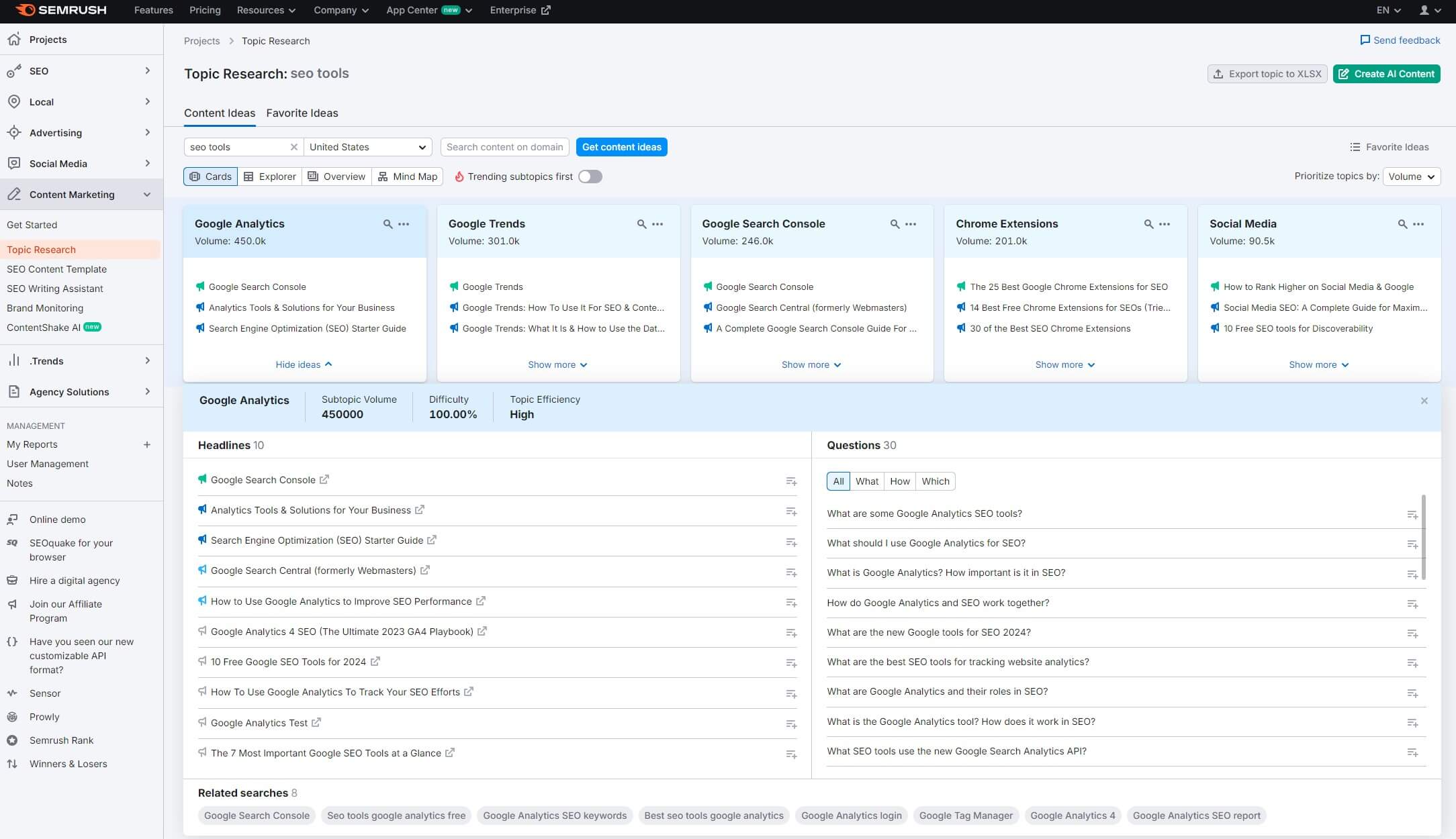
That’s how you gain topical authority.
Moving on, content marketing in Semrush includes SEO Content Template; our favorite. It develops content templates based on the given keywords. You’ll then get LSI keywords, backlinks you should try to acquire, and the text length for your content.

Do you want some help from the AI? The SEO Writing Assistant is there to write pretty much entire articles for you. Best of all, it includes plagiarism checks and grades your content similarly to Grammarly, based on its readability, keyword optimization, originality, etc.
An optional add-on is ContentShake AI which generates 25 content ideas weekly and rewrites articles to make them look better.
No doubt, Semrush won this round natively because Moz doesn’t have an equivalent feature to compete.
Make Content Improvements With Semrush
Semrush vs Moz Pro Price Comparison
Both tools are frequently used as alternatives to Ahrefs because they’re cheaper. We don’t think Moz is better, though. Either way, let’s see how the two compare price-wise and analyze their plans and limitations.
Moz Pro Price
If you opt for Moz, you can start at $39/mo for the annual plan. This Moz vs Semrush price comparison will cover their annual plans because they’re much more affordable. Going back to Moz, the service offers very competitive plans, especially the Standard one at $79/mo.

In our experience, things are starting to get serious in the Medium plan. However, it’s pretty expensive at $143/mo. Finally, the Large plan at $239/mo includes 3 user seats, 3,000 trackable keywords, and 5M pages crawled each month.
The issue with Moz is that the first two plans on the left are bare-bones. Yes, they’re cheap but the Starter plan tracks only 50 keywords and crawls 20K pages monthly. It also excludes many of the tools, such as Rank Checker, which is shocking because it’s free in Semrush.
Despite its “flexible” pricing, only the two plans on the right are somewhat great but their prices aren’t the most exciting. At least, Moz has a huge 30-day free trial that lets you play around with it for a month before paying. It’s a nice free SEO tool to experiment with.
Semrush Price
Semrush’s prices aren’t the most wallet-friendly. However, the key thing is that the tool IS worth the asking price! It has three plans; the Pro plan at $117.3/mo is the least expensive. These are the annual plans, by the way, and they’re 17% cheaper with our Semrush coupon.
The Pro plan also comes with a 14-day free trial in case you want to test it.

Try Semrush Risk-Free for 14 Days
This plan includes rank-tracking, website audits, and almost all other important features. It lacks content marketing, multi-location and multi-device tracking, historical data, and cannibalization reports. You can get all of these in the Guru plan – a better proposition.
Guru is cheaper than Large in Moz. On paper, it’s less generous because it tracks 1,500 keywords and allows for 15 projects. Large allows for 25 projects and 3,000 keywords. However, Moz lacks all the Guru-specific features, so it’s by no means better.
Having tested Semrush vs Moz, we can say that:
- Moz Standard is similar to Semrush Pro,
- Moz Medium is similar to Semrush Guru,
- and Moz Large is similar to Semrush Business
If we gauge them side-by-side, Moz has more generous crawling limits and trackable keywords while costing less and lacking Semrush’s features from above.
Who Wins?
This makes the decision of the winner quite difficult. Semrush is more expensive but a better value. Moz is more affordable but only its Medium and Large plans can match Semrush’s overall quality. We’ll have to say that Moz wins this round, after all.
In the end, affordability is what wins the pricing round. As Semrush’s starting price is $117.3/mo and Moz’s is $39/mo, the latter will be more budget-friendly and suitable for beginners to get a grip on basic SEO tools.
Customer Support
Complaining about customer support isn’t really our thing. This rings true if it’s to our liking, of course. Luckily for both, customer support is on par and we had no problems getting answers to our persistent questions. Live chat and email support is offered by both.
However, if you’re too shy to talk, there’s plenty of help on both sites. In particular, you’ll find SEO tools explanations, how-to guides, blog posts, and much more. Semrush, for example, hosts webinars where you can learn more about SEO, marketing, and other subjects.
Moz has its Academy where you can not only learn more but also obtain SEO certifications that can benefit you if you’re planning to work in this field. Overall, a nice experience on both sides; no clear winner in this category.
Conclusion: Semrush Wins Against Moz
Our side-by-side Moz vs Semrush comparison is done, so it’s time for a quick recap. Based on the score so far, Semrush is a clear winner, beating Moz in all SEO aspects. Moz has the advantage of a lower entry cost of only $39/mo, as opposed to $117.3 in its rival.
However, the Starter plan gives you very little, so you’re better off with SE Ranking at $52/mo. We recommend picking Semrush Pro if you can afford it. It’ll be superior to Moz and offer way more SEO data and tools to work with. Guru is our #1 recommendation, though.
This Semrush’s plan is way ahead of Moz’s Medium or Large plan and is the ultimate SEO software that you can use to drive more traffic to your website or multiple websites in the long run. There you go; our experts recommend Semrush instead of Moz.
Now go ahead and give it a go – it’s free for 14 days and discounted by 17% for annual plans.