
Moz Pro is often deemed one of the key players in the SEO tool marketplace. Battling it out with Semrush and Ahrefs, Moz Pro has always been many people’s top choice for rank-tracking, keyword research, and competitive analysis. Despite its pristine reputation, our team has ventured into this Moz Pro review without prejudice.
Having used Moz, as well as its numerous competitors, we feel confident to make parallels. This means we’ll gauge not only this SEO tool. We’ll also gauge how it compares to its rivals and where it fits within the whole picture. One is certain; Moz Pro offers plenty.
But is this “plenty” enough for you? Should you consider this tool if you’re serious about your Search Engine Optimization? Our comprehensive, head-to-toe Moz Pro review for 2026 will address all your burning questions.
Moz Pro
Moz Pro is a solid, albeit not extraordinary, SEO tool. It's flexible, capable of in-depth keyword research, and suitable for comprehensive page crawling. However, it's inferior to services like Semrush and SE Ranking in areas like rank tracking, content marketing, and interface design, while also costing more, making the latter two more sensible choices.
Pros
- Starts at only $39/mo
- Up to 5M monthly crawled pages
- Daily rank-tracking updates
- Generous 30-day free trial
- On-Page Grader finds individual page errors
Cons
- Weak competitive analysis features
- Starter & Standard plans are underwhelming
- Dated interface lacks polish
Moz Pro Pricing & Plans
We’ll begin our Moz Pro review by discussing its pricing and plans. There have been some changes from before and the tool is now more affordable thanks to the inclusion of the new Starter plan at $39/mo for the annual variant. This wasn’t the case a few years ago.
The Standard plan was the lowest-tier one, at $79/mo or $950 annually.
However, the Starter plan doesn’t give you much. You can track only 1 site and 50 keywords monthly. The Standard plan gets serious by including 300 tracked keywords and 3 websites.

As before, the best deal is the Medium one. At $143/mo, it includes 2 user seats, 10 tracked sites, and over 1,500 tracked monthly keywords. Finally, the Large plan at $239/mo tracks 25 sites and 3,000 keywords, offering 3 user seats. Monthly plans are 20% more expensive.
Moz Pro offers the best value within its Standard and Medium plans. If you look closely, the Starter plan lacks Rank Checker, which means you can’t perform rank tracking. There also aren’t scheduled reports, which the Standard plan has.
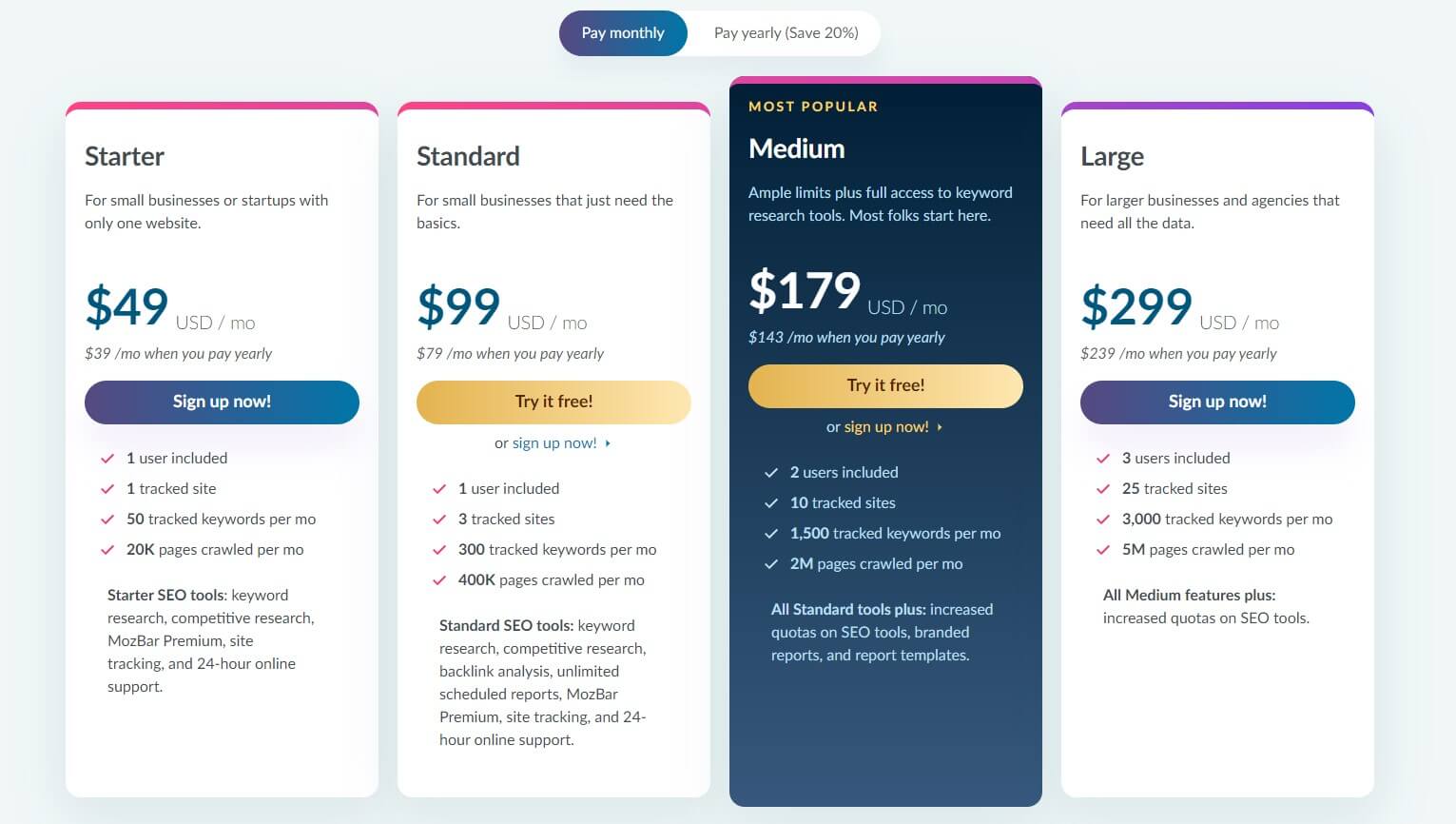
Unfortunately, unless you go for the Medium plan, Moz will feel a bit half-baked, which we also said about Mangools. We found the Medium plan pretty good, alas, at a whopping $143/mo in the annual plan. For this money, and less, you can buy Semrush Guru instead.
It tracks 3,000 keywords as opposed to 1,500 in Moz. While it crawls only 300,000 pages monthly compared to Moz’s 2M in the Medium plan, Semrush’s crawls are deeper and offer more information. You’ll realize that further in our Moz Pro analysis.
Moz Pro Review of Features & SEO Tools
Having examined Moz Pro’s flexible plans in this review, we’ll right away target its features. As we’re analyzing its premium, and therefore flagship version, we have a lot of ground to cover. Our hands-on experience with this tool is described below, so pay close attention.
Domain Overview
Let’s start with the Domain Overview tool, which spells out the most important information about the domain. Once you provide the domain address and decide on the preferred market, click Analyze, and watch the magic happen. What will you get, though?
Well, information like domain authority, brand authority, and page authority are first. The Brand Authority metric is especially valuable, as it tells you more about your brand’s strength. It’s a proprietary metric developed by Moz that comes with a score from 0 to 100.
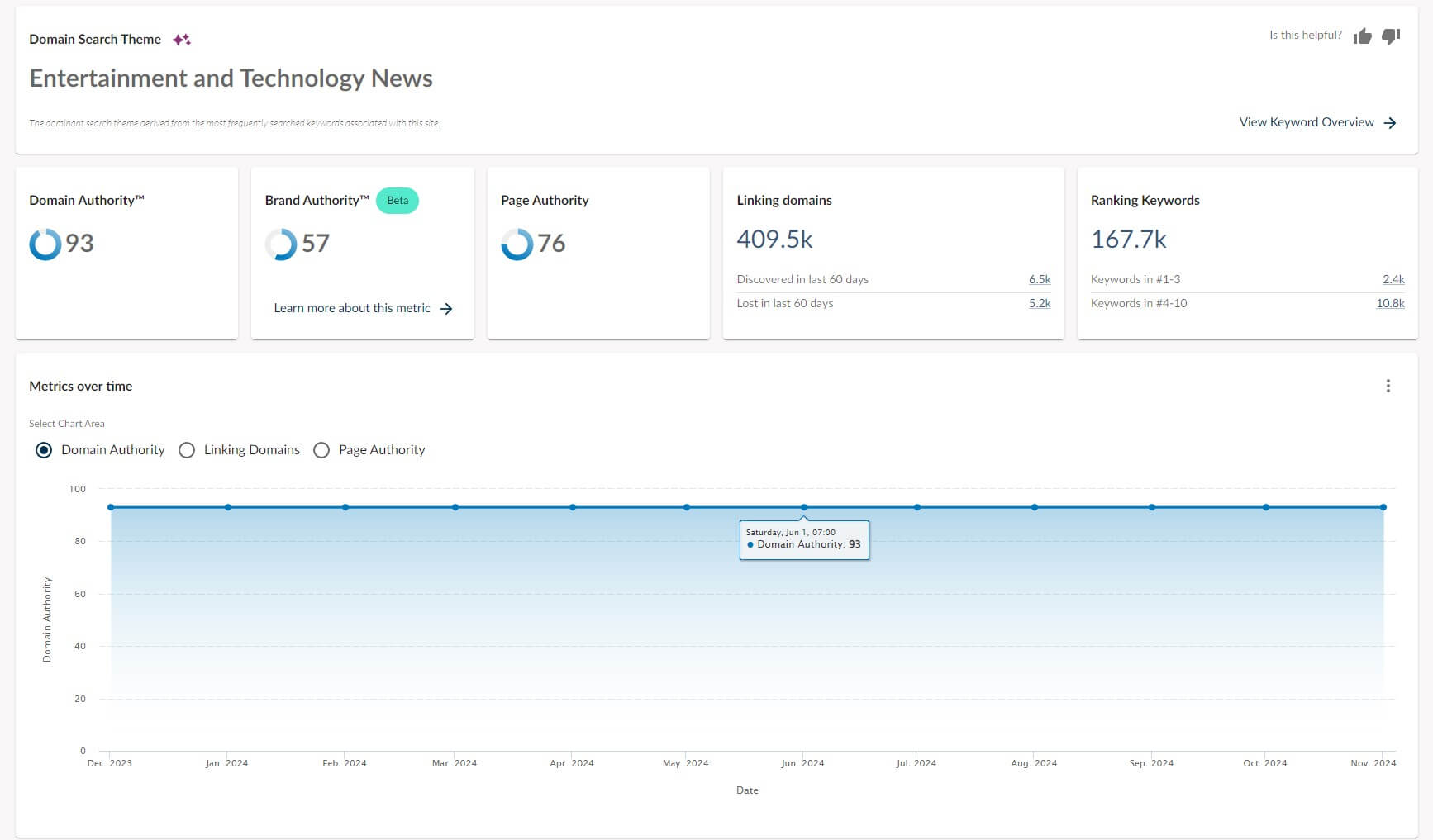
The Domain Overview tool also displays linking domains and ranking keywords, both of which can be explored further in other tools. This Moz Pro review brings us to its Metrics-Over-Time graph that displays changes in domain/page authority and linking domains.
Scrolling down a bit also divulges the top-ranking keywords, ranking distribution, and even a few competitors. This can be handy for competitive analysis necessary to avoid being overshadowed by other rivals. The tool houses a few more interesting sections.
For example, you can discover lost linking domains and linking domains by spam score. The latter will display the number of linking domains and the percentage of low, medium, and high spam score links. The last metric we’ll mention is Domain Keyword Topics.
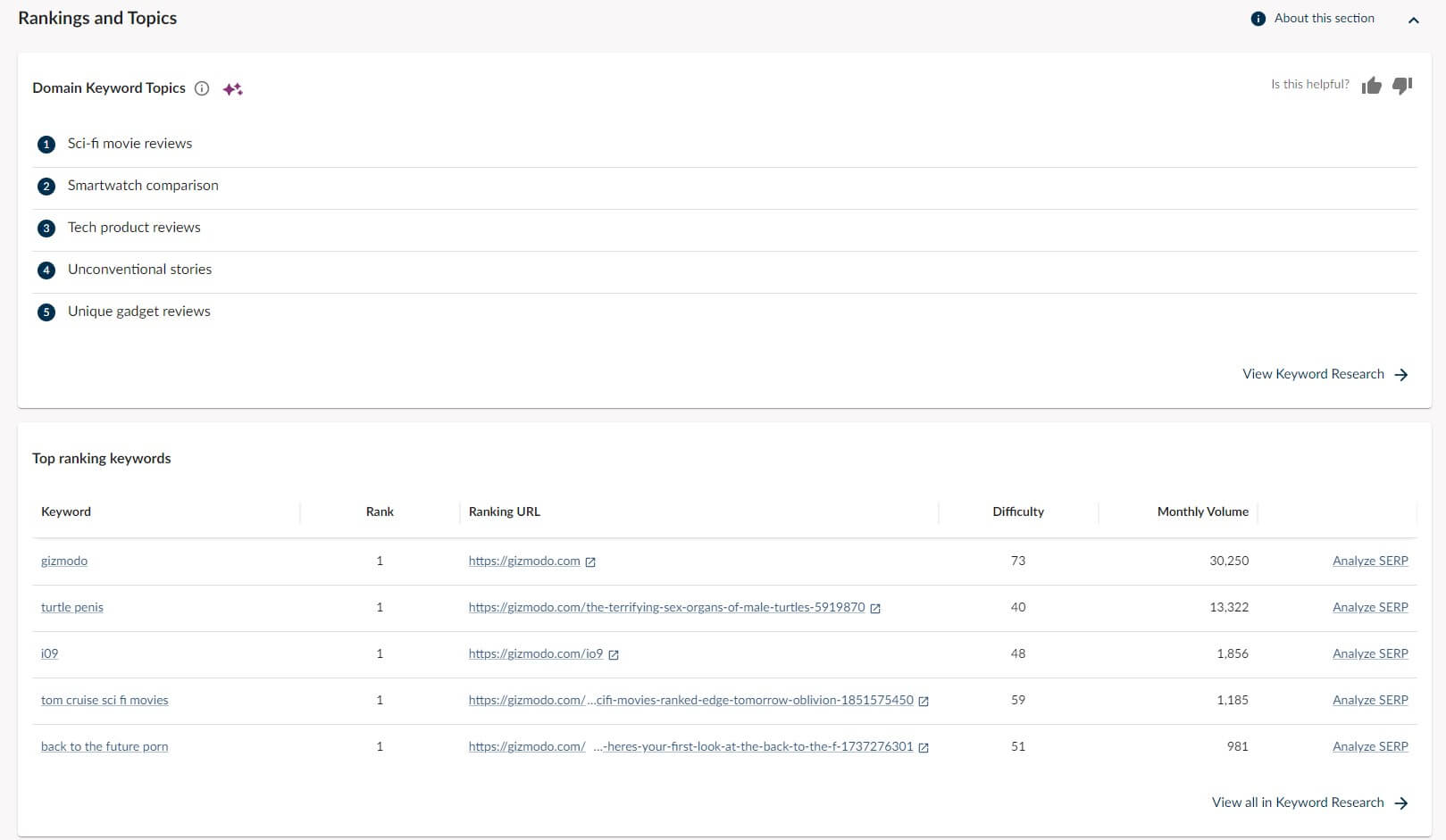
This one is phenomenal. It highlights the primary topic categories generated from ranking keywords. For our website, Moz Pro came up with tech product reviews, unique gadget reviews, sci-fi movie reviews, and smartwatch comparisons – pretty accurate!
Keyword Research
There are ample ways to do your keyword research; we explained a few in our keyword research tools guide. Moz Pro lets you search for keywords by site or specific keywords. Provide a site address and you’ll see its top-ranking keywords, ranking distribution, etc.

Interestingly, Moz Pro shows much fewer ranking keywords than Semrush. Analyzing Gizmodo, our domain, Semrush displayed over 175K ranking keywords, whereas, this tool displayed roughly 167K; that’s an 8K difference, which isn’t negligible.
If you want to explore certain keywords, you can simply type the one you want and get some keyword-related data. This data involves organic CTR, difficulty, monthly volume, and minimum domain authority of the top 10 ranking URLs for that keyword.
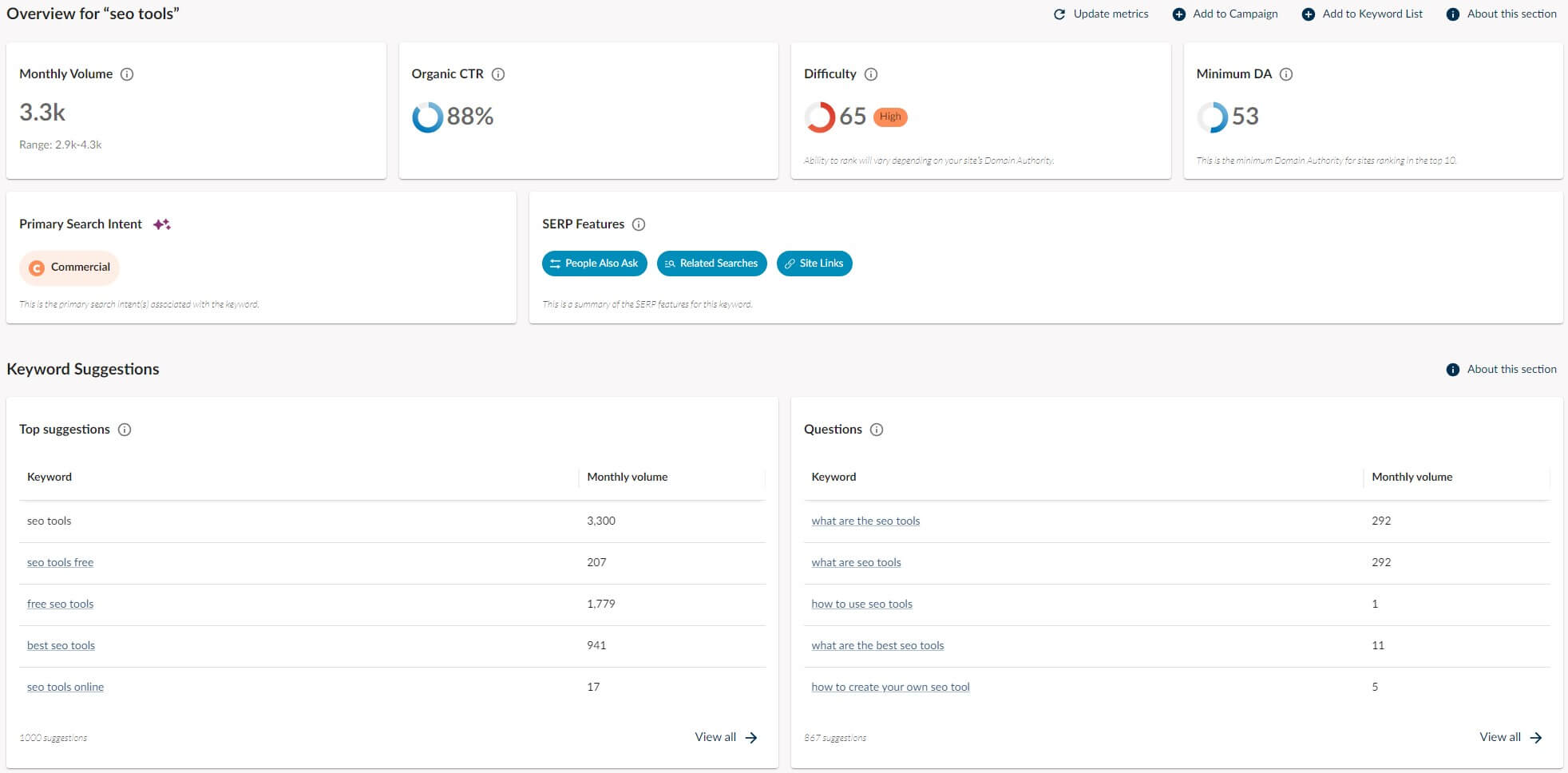
Moz Pro has updated its Keyword Research tool by including search intent, which we loved in Semrush too. For the “SEO Tools” keyword, the primary search intent is Commercial, instigating that most people usually compare brands and services when searching for it.
By the way, this information is generated by Moz AI, a newly implemented feature. Moving on, Keyword Research also comes up with keyword suggestions and questions.
They’re numerous but not more than what you’ll get with the Keyword Magic Tool by Semrush.
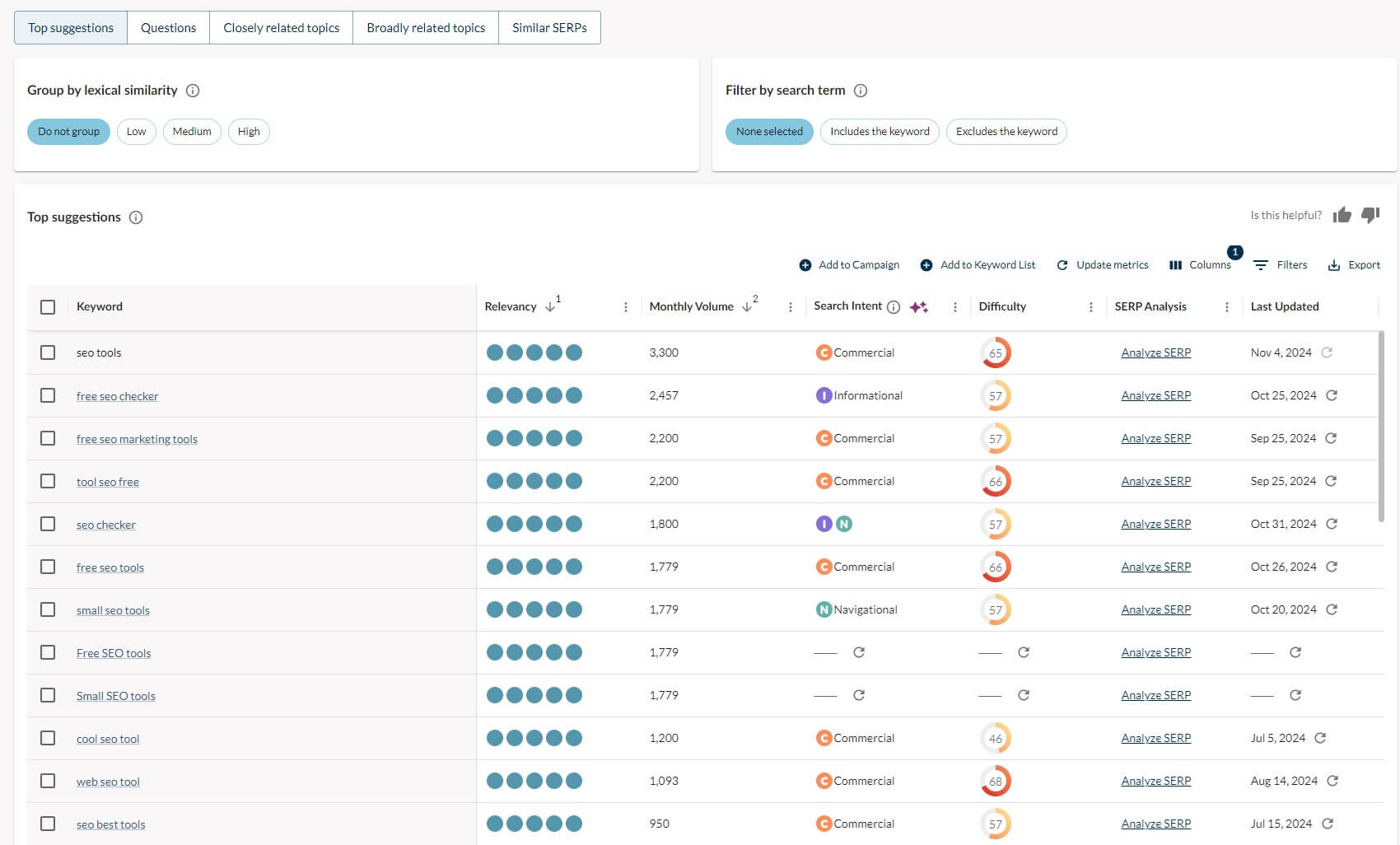
Still, keyword suggestions can be filtered, which we discovered right away. You can apply filters like broadly related topics or group suggestions by lexical similarity. Better yet, you can explore closely related topics and hone your keyword SEO strategy more precisely.
Competitive Research
Being a step or two ahead of your competition never hurts; although it can hurt your competition. There are three pillars of Moz Pro’s competitive research. The first is called True Competitor, which showcases your fiercest competitors “in descending order of Rivalry.”
While this tool seems crafty on paper, we don’t think it’s pinpoint accurate. After analyzing our domain, the top 5 competitors were Walmart, Reddit, Asus, Npr.org, and Quora. Moz was “smart” enough to include Apple’s support page here; what a poor joke!
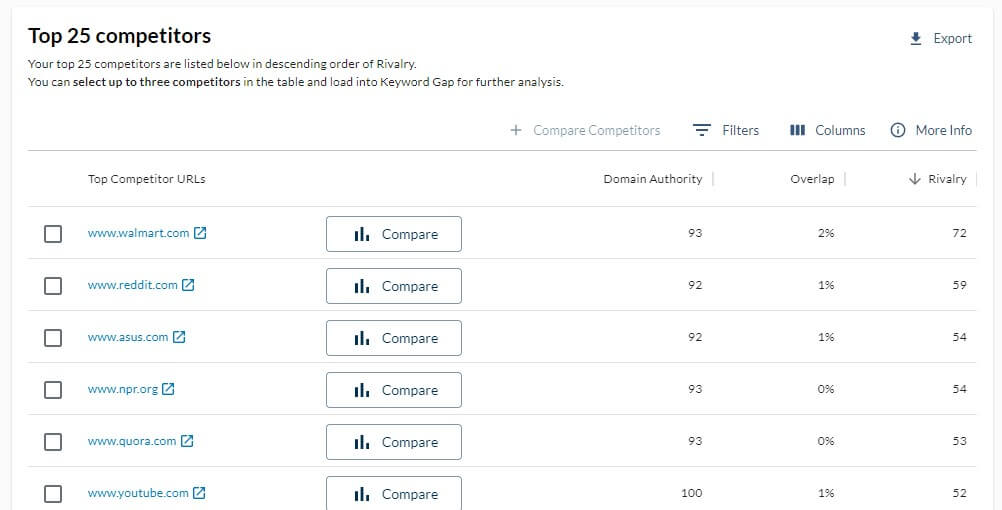
To make things worse, there’s the Overlap column in the table, and none of our “competitors” achieved a score better than 2%; so how exactly are we rivals? A more useful tool is the Keyword Gap, which we’ve used in SE Ranking and Semrush, for example.
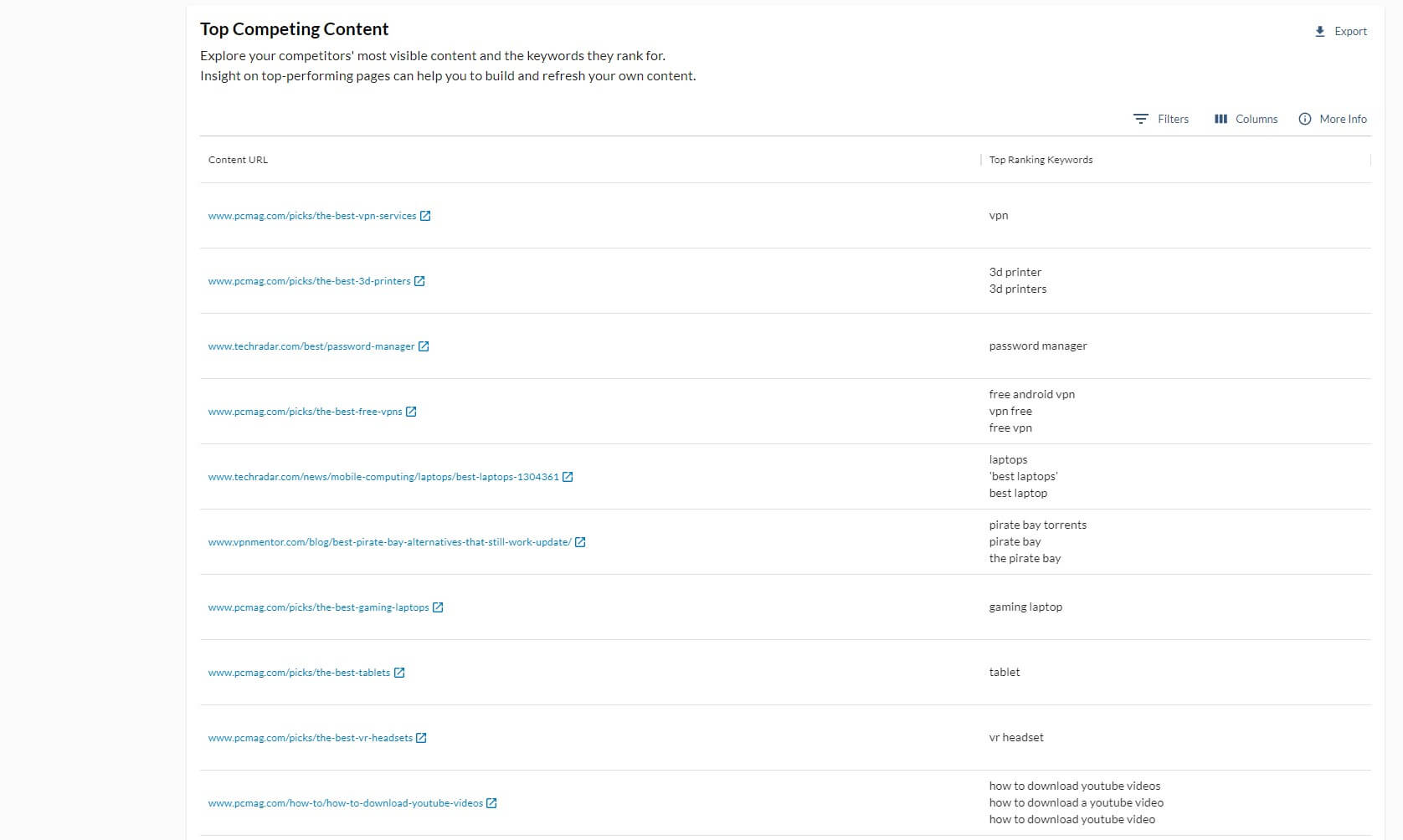
Moz Pro can compare your domain with up to 3 competitors and discover keyword opportunities. You’ll find the keywords your competitors rank for that you can capitalize on. We’re unimpressed with the tool because it’s not the most comprehensive.
Moz will identify the keywords you need to improve upon and the top competing content. The latter will display your competitors’ most visible page and their ranking keywords. That’s a far cry from Semrush’s PLA, paid, organic, missing, unique, untapped, and other keywords.
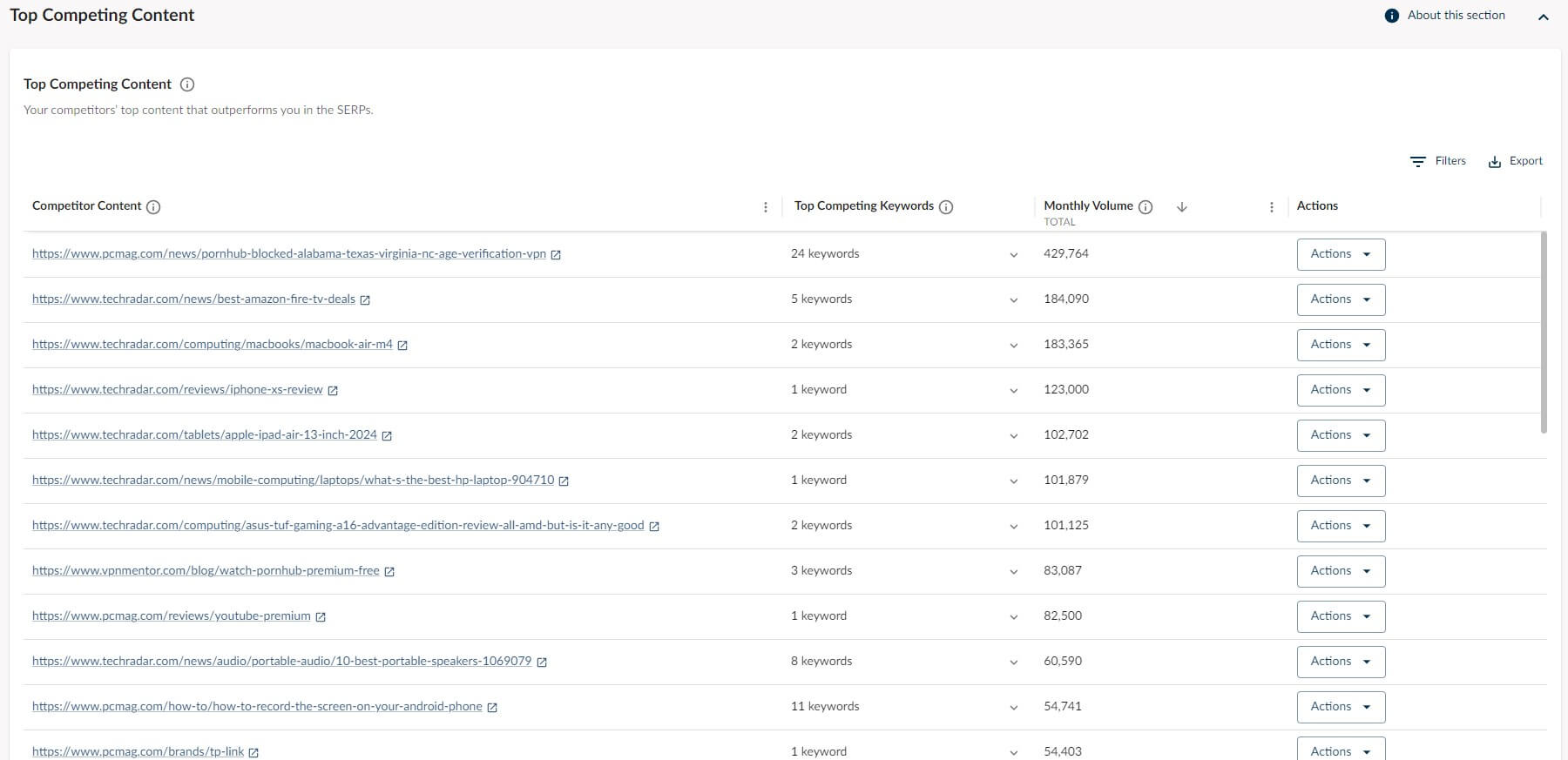
Semrush lets you explore and find way more for a deeper understanding of your competition. During our Moz Pro test and evaluation, we identified competitive research as Moz’s weakest link. While not bad by any means, it lacks intuitiveness and valuable data.
Link Research
The situation is a bit better when using the Link Research tool. As the name implies, this one is dedicated to backlink analysis and link building but more so towards the first. You have plenty to discover here, such as domain authority, linking domains, and inbound links.
Moz Pro also highlights discovered and lost linking domains over time, which is complemented by the Follow vs NoFollow comparison, where Moz gives you the percentage of both.
An interesting section is Anchor Text, which shows the most frequent anchors used to link to the given domain. For us, it’s Gizmodo, which is far from strange.
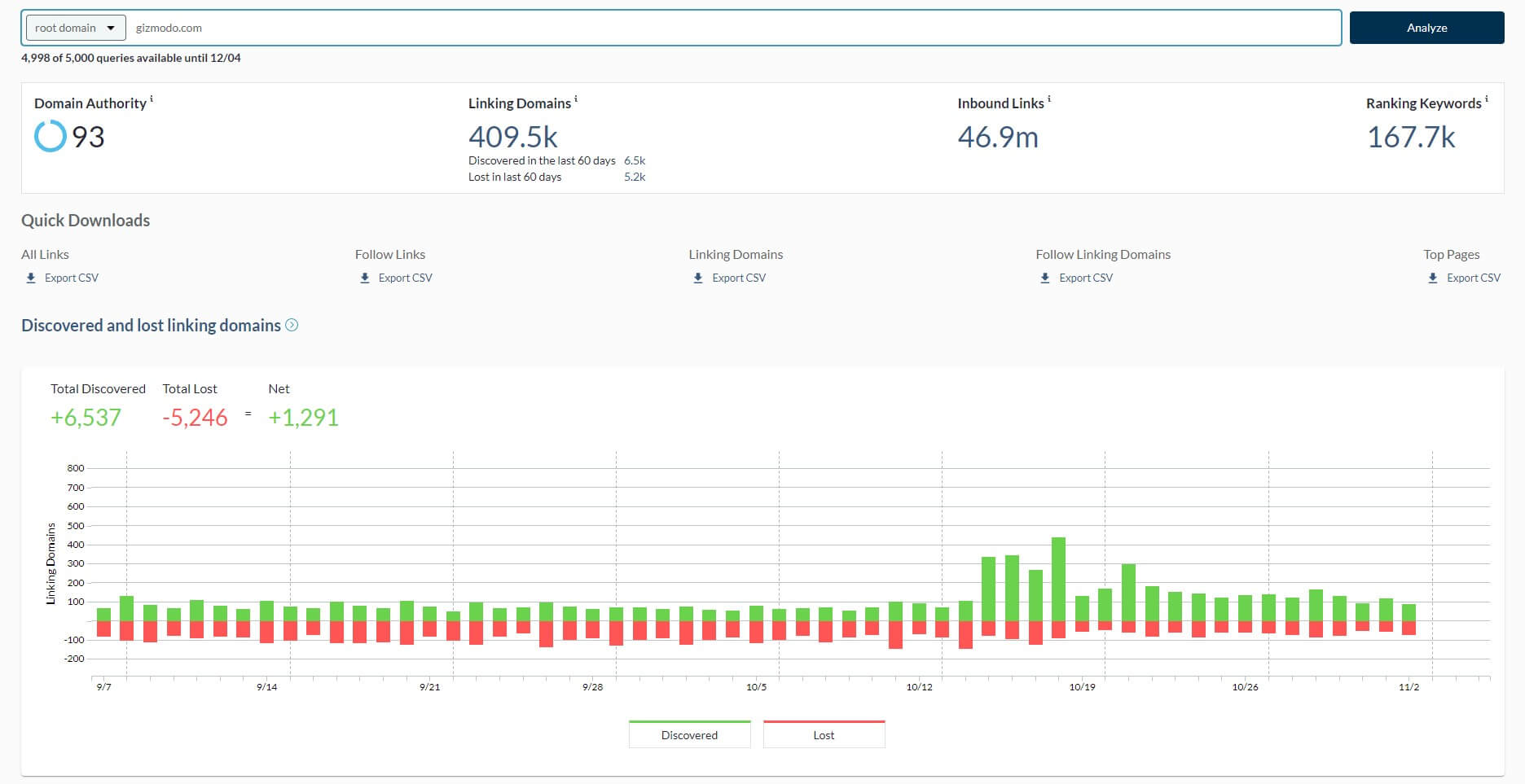
In our Moz Pro review, we loved the option to compare link profiles with up to 5 websites. This lets you see the aforementioned metrics – and more – for your and up to 5 other domains. Having a low spam score is vital and can be ensured with reliable backlink-building software.
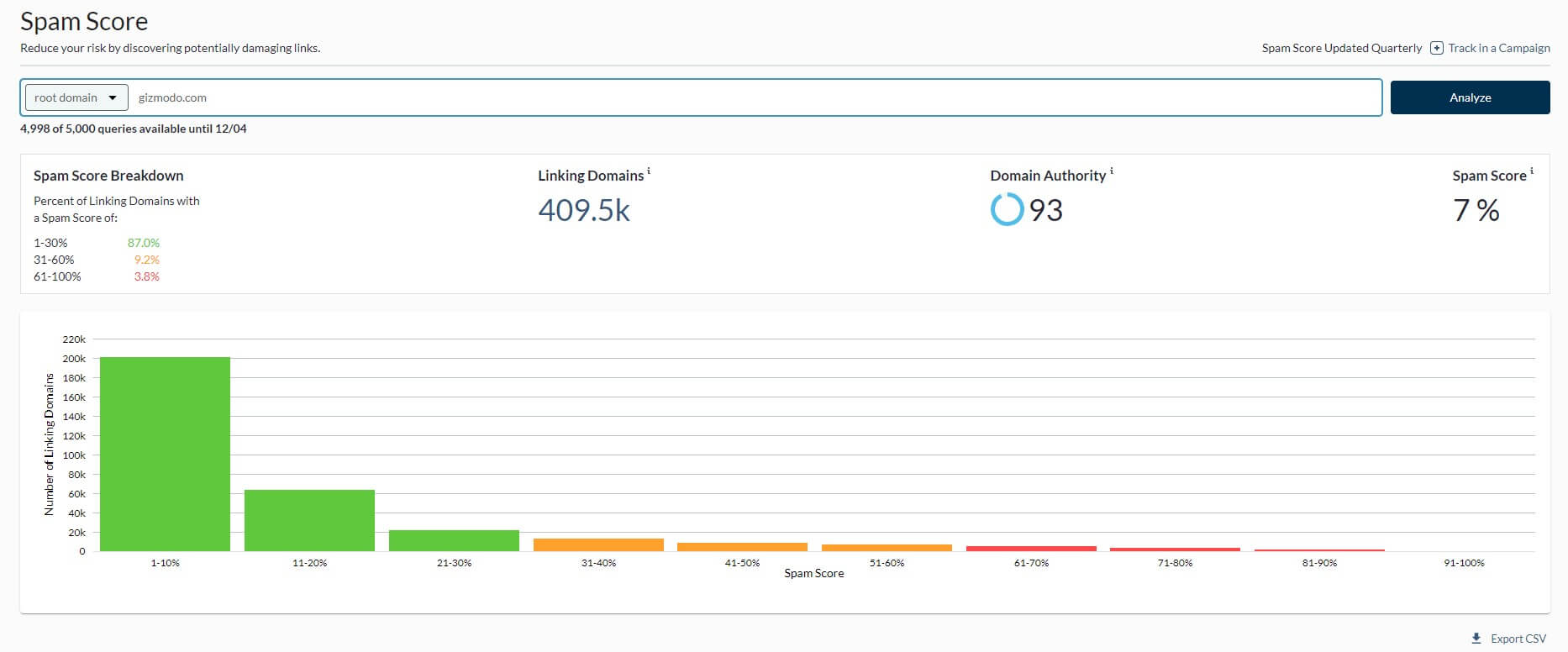
The Spam Score section shows you how many damaging and healthy links you have. The more severe the spam score is, the more likely it is to ruin your site health score. A great tool to mention is Link Intersect, which is now part of Link Research; this is the Backlink Gap tool.
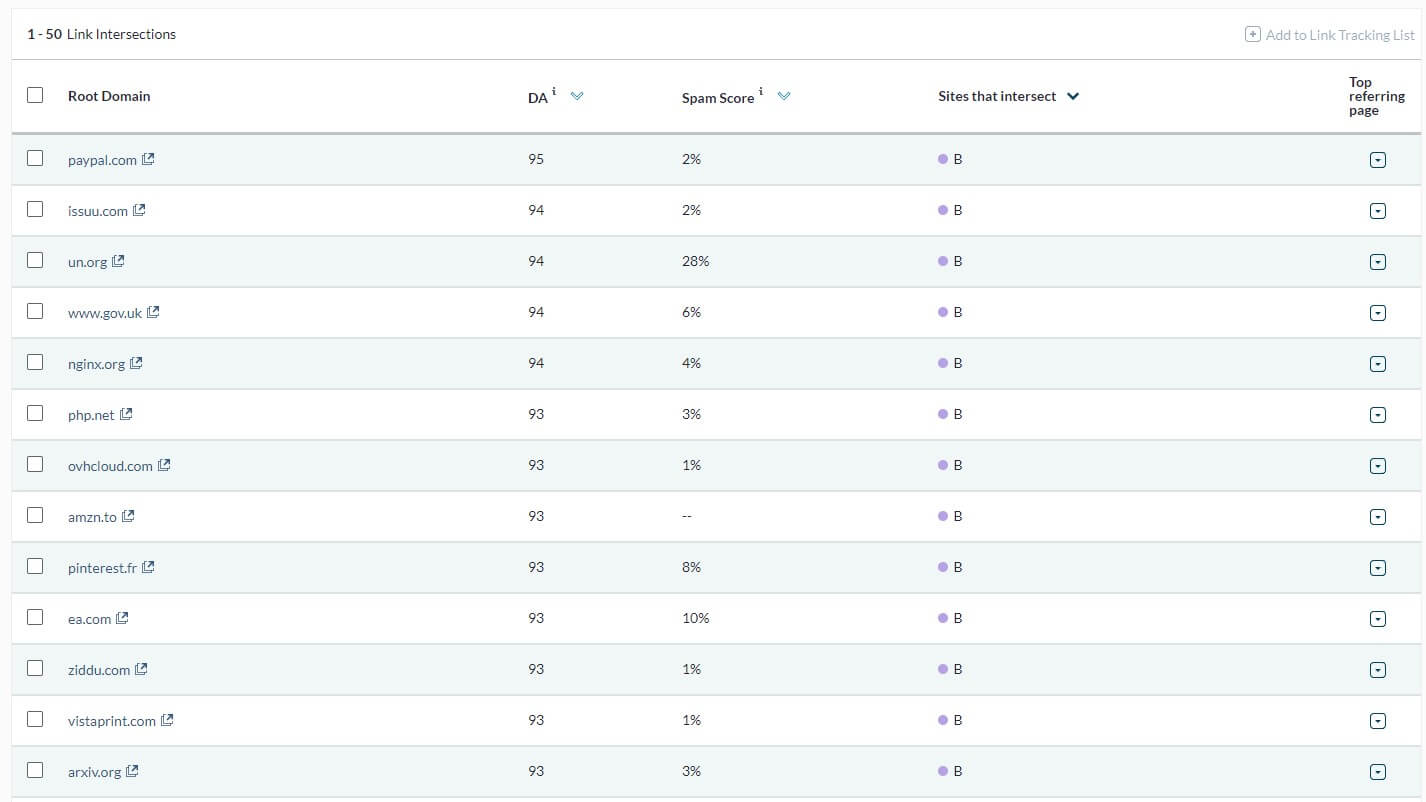
It works by analyzing your competitors and discovering their referring domains that aren’t linking to your domain. You can find backlink opportunities and try to have these domains link to your site. However, there’s no option to get in touch with these domains directly.
Semrush offers the Link-Building tool for that; not even Mangools and Ahrefs have this advantage. Finally, there’s the Link Tracking Lists that we haven’t used much. It’s sort of your to-do list for backlinking where you can track your progress. Nothing revolutionary.
Rank Checker
Our Moz Pro review for 2026 will also address the Rank Tracker in this SEO suite. We must admit it’s one of the most basic tools we’ve used. You type in the keyword and the website URL, after which, you select the search engine and the country. That’s all.
At least, you can use Google, Google Mobile, Bing, and Yahoo, so some variety is there. However, rank tracking in Moz Pro is extremely elementary. You’ll get the list of your keywords, with the ranking URL, rank (explained soon) difficulty, volume, and history.
Now, the Rank metric is perhaps the most critical. It displays the ranking position for the given keyword and URL within the top 50 search results. Some of our analyzed keywords were marked with #51+, which meant they weren’t in the top 50 results.

That’s basically all you get. Compare this to Semrush and you’ll be amazed at the difference. The latter offers cannibalization reports that tell you if two or more pages rank for the same keyword. Ranking distribution, visibility, and top keywords are also highlighted.
Semrush has two sections for keywords with positive and negative impacts, which you won’t find in Rank Checker by Moz. This tool is, as said, elementary, and won’t move mountains with its usefulness. Perhaps these rank trackers will serve you better instead.
Technical SEO & Page Crawling
In our Moz Pro test, we’ve crawled at least 50,000 pages in search of issues. One thing we discovered is that crawling speed was excellent and we were able to complete the task fairly quickly given the scope of the task. However, everything was a bit underwhelming.
The On-Demand Crawl divulges issues within your website, ranking them according to several categories:
- Critical, highlighted in red. In our case, they were mostly “4xx errors.”
- Warnings
- Redirect
- Metadata
- Content
All of these signify that your SEO is either poor or excellent. You can improve your SEO with our tips or follow Moz Pro’s discoveries and fix each error separately. Scrolling down a bit, we can see all these issues separately, along with the pages to which they belong.
For example, some of our pages had too short titles or missing descriptions; issues we fixed promptly. Moz Pro will explain the root cause of the problem and tell you how to remedy it. However, it’s still miles behind SE Ranking and Semrush which offer more data.

In these two, you can find Core Web Vitals – vital metrics of your website’s speed. Semrush also lets you compare crawls and detect issues with internal linking. Moreover, the On-Page SEO Checker in Semrush enables you to analyze individual pages and get SEO advice.
Although, the On-Page Grader is Moz’s on-page SEO audit. It’s great at detecting large and tiny issues plaguing your page and hurting its ranking. Again, it looks kind of basic, giving you a page score based on the level of SEO; nothing jaw-dropping or impressive.
Moz Local
As part of your SEO improvements, you might be interested in targeting a local audience. Well, there’s something called Moz Local, which we’ll explore in our Moz review for 2026. this is a completely separate tool, whose cost depends on the location you choose.
Now, there’s a catch. Moz Local lets you pick only the UK, the USA, and Canada. The latter two start at $14/mo for the Lite plan, while the UK option is $17/mo. We think the Lite plan is more than decent, as it offers listing management, Google/Facebook integration, and review monitoring.
The last one is handy for keeping in touch with all your reviews from a single dashboard. Opting for the so-called Preferred plan gives you Social Posting, which lets you post updates to multiple social media platforms, again, from one page.
The Elite plan includes data aggregators for more data, but only in the USA. In our Moz test, we were pleasantly surprised at how the Local pack performed. It’s quintessential if you aim to improve your local online presence and boost your business via several channels.
You can use listings and various listing management features to remove duplicates and present your business in the best light. Simultaneously, you’ll improve your Facebook and Google presence, along with your social media reputation thanks to Moz’s crafty features.
While the Lite plan should suffice, we still recommend the Preferred one because it lets you respond to customer feedback and reviews from a single page. This is key to tackling your customers’ needs and making them feel loved and respected.
Ease of Use & Interface
Compared to Ahrefs and Semrush, Moz was always lacking in this department. During our review of Moz Pro, we noticed a few improvements but they were incremental. The tool now places slightly more emphasis on graphs but only in certain tools; Keyword Research, let’s say.
Everything else looks more old-school and data delivery isn’t the clearest. A prime example of that is Competitive Analysis. Semrush shines with its list of missing keywords and graphs that display certain overlaps between you and your competitors. What about Moz?
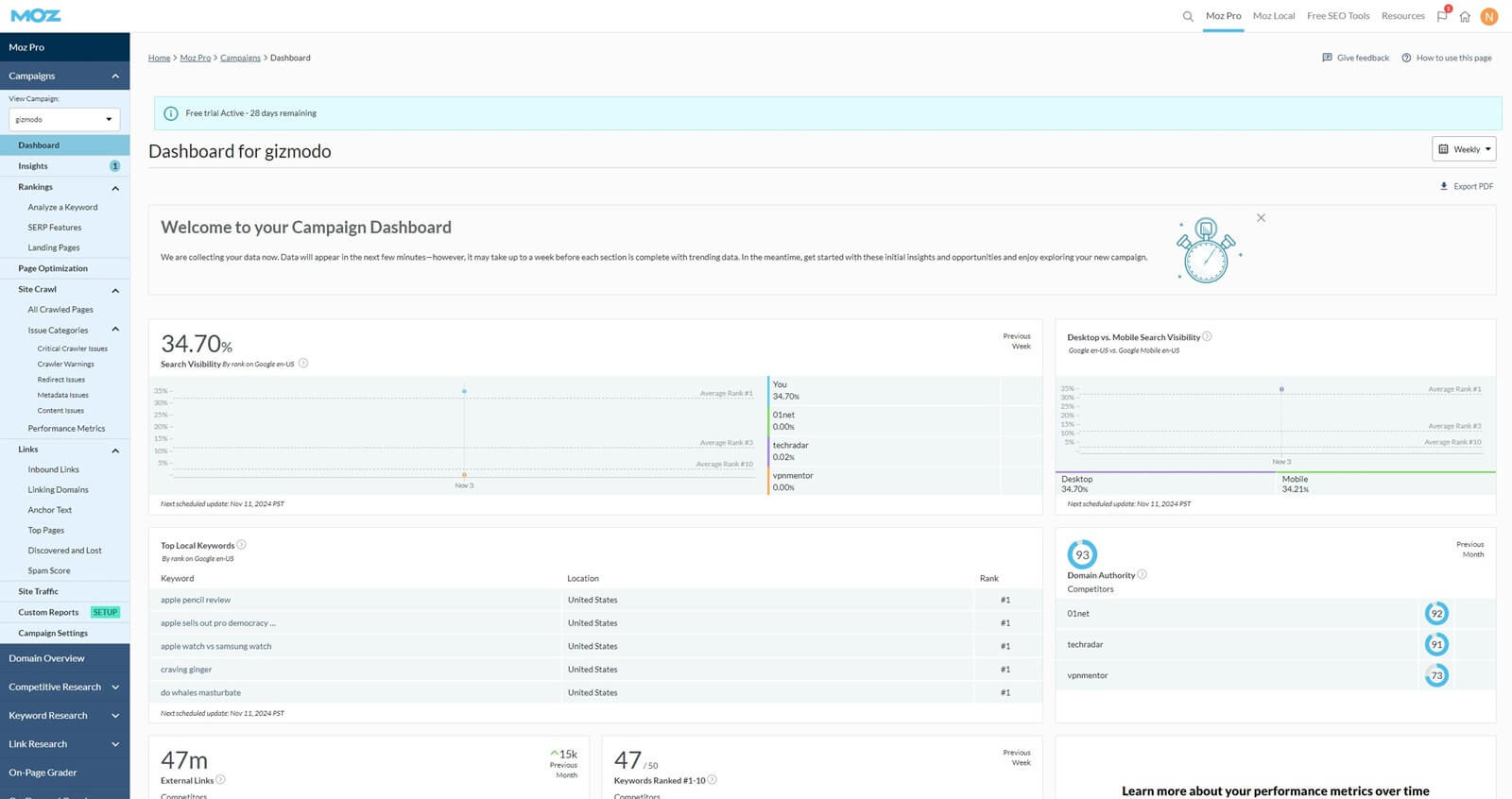
Well, it only lists the missing keywords and calls it a day. We can’t say the tool isn’t intuitive, though. You’ll get the list of all tools on the left and they’re easily accessible whenever you need them. However, we can’t shrug off the feeling of Moz’s lack of innovation.
Semrush, SE Ranking, Ahrefs, and even Mangools – all of them look way better and more modern. Since we’ve mentioned Semrush as its closest rival, we offer our Semrush review in case you want more information about it. We assure you it’s way better overall.
Moz Review (Free Plan Analysis)
One thing we loved in our Moz Pro test was its free offer. You can sign up, not pay a dollar, and still use tools like Domain Overview, Keyword Research, and Link Research for free. Of course, you won’t get as thorough information and as many keyword suggestions.
Also, Moz will exclude Rank Checker, On-Demand Crawl, and On-Page Grader. With only a few tools for free, you can still perform basic SEO tasks but not anything serious. As stated in our Moz Pro review for 2026, you can use the service for free for 30 days; a great trial.
We love that you can pick which plan you want to use for free and not pay anything at the start. While Moz requires a credit card, you can easily cancel your free trial before the month expires and not be charged. Overall, Moz is a decent free SEO tool that you’ll enjoy.
Just don’t expect it to blow you away; you have to pay for that.
Customer Support of Moz Pro
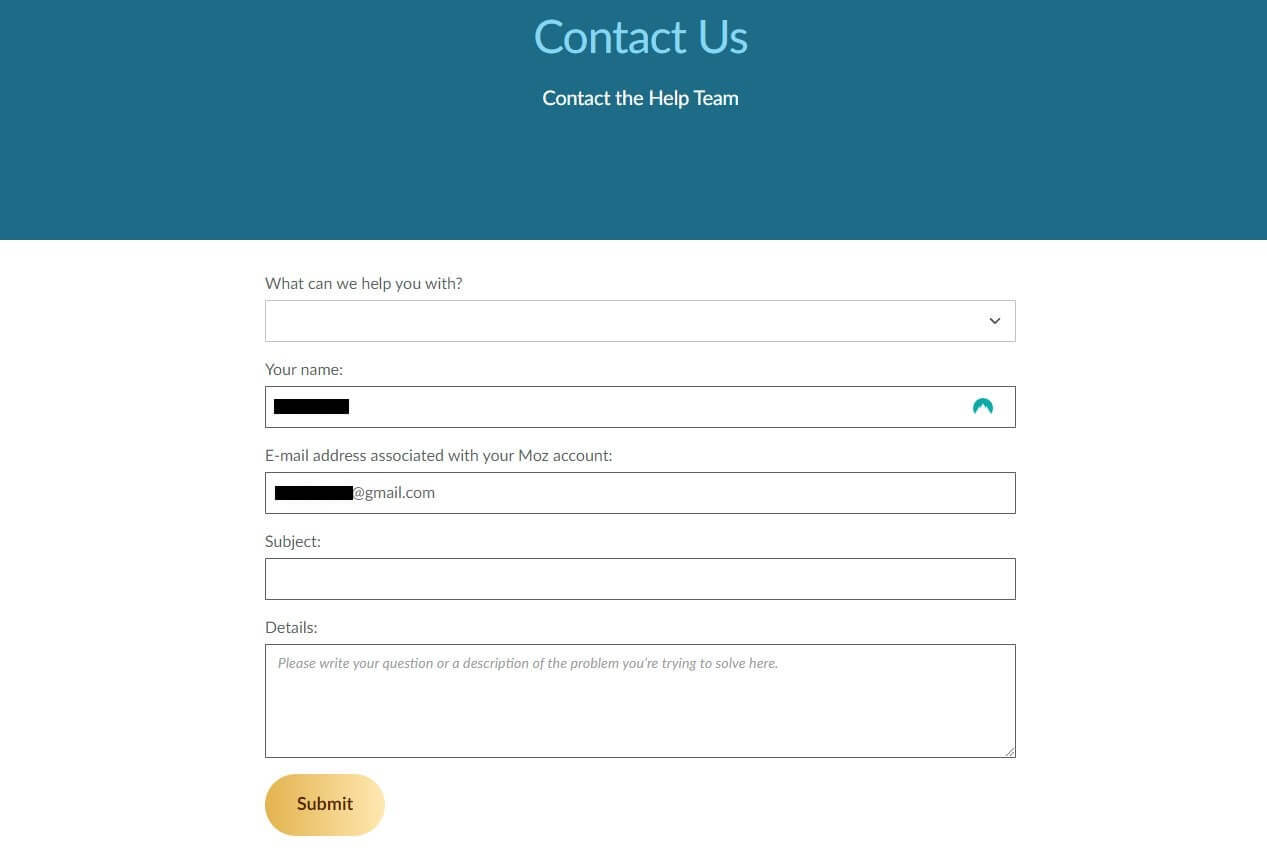
If you get stuck between a rock and a hard place, you can expect Moz’s round-the-clock team to swiftly unstuck you. Its customer support works 24/7, making sure you can get in touch swiftly via a support ticket. Type in your request, submit it and wait.
Our experience with Moz Pro was positive in this regard. We never had to wait for more than an hour or two, which, for this type of support, is respectable. Another thing to note is on-site support, which comes in the form of how-to guides and various blog posts.
We love Moz’s community forum, where you can find tons of answers to frequent and not-so-frequent questions. While not a customer support method, the company offers Moz Academy, where you can learn more about SEO and get certified at the end.
However, you don’t have to be an SEO expert to boost your Google ranking, perform backlink analysis, or learn more about keywords and backlinks. Our site houses numerous informative guides on that, so don’t be lazy; explore it!
Summary
So, in summary of this updated Moz review for 2026, we have nothing inherently bad to say about it. It’s a great SEO tool and what we call an all-arounder. Now is the right time to answer the question of Moz’s place in the entire SEO tool landscape – how good is it?
Well, it’s “okay” – that’s our word for it. We think Semrush is far superior, as it offers more features and some important metrics that Moz lacks. Semrush is also cheaper, which is strange, but its Semrush Guru plan beats Moz’s Medium while costing ~$18/mo less.
Then, we have SE Ranking, which is also better and has more generous keyword-tracking limits while offering content marketing and local SEO at less money. Moz Pro doesn’t have content marketing and AI writing functions! Let’s put Ahrefs in the same basket.
Ahrefs is the most expensive SEO tool, and in our book, a far better choice than Moz. So, if you’re serious about your SEO strategy, Moz Pro will do the job. However, if you’re dead serious and want as many insightful bits of data and more features, it won’t cut it.
Semrush and SE Ranking are superior, yet cheaper alternatives. Go get one of them instead.