
We know you’re a skilled photographer, but snapping photos isn’t enough. You need the best website builder for photographers to step in and save the day. It’s the easiest way to create a photography website and showcase your stunning work for greater exposure.
Photography requires both artistic skill and effective marketing. That’s why using a reliable photography website builder is vital—it helps you establish your platform and attract more customers. Today’s ranking features five outstanding choices.
Our experts, many of whom are part-time photographers, have done the extensive research for you. We’ve cherry-picked the top-rated photography website builders of 2026, featuring photography-specific tools, e-commerce capabilities, and other essential features to help you succeed.
Best Photography Website Builders of 2026
- Wix – the best photography website builder overall
- Squarespace – lots of photography-optimized templates
- Hostinger Website Builder – a cheap option for budget photographers
- Shopify – great for selling photos online
- SITE123 – free & paid plans to get you started quickly
Best Website Builders for Photographers – Detailed List
Building a portfolio of your finest work calls for an innovative and easy-to-use website builder, which allows for no-code website building. None of the five picks we listed are complicated, yet, they allow you to forge professional-looking photography sites.
Now that you know them, let’s see what makes them so special:
1. Wix
Wix is undoubtedly our favorite pick for many reasons that photographers around the world love it.
Plans & Prices
Besides, it includes a free domain for a year, collaborators in each plan, and affordable prices that start at only $10/mo for the Light plan. With the Core plan at $20/mo, you can start selling photos online and directly receive payments via one of 80+ payment vendors.

We recommend its Business plan at $29/mo, which allows for 10 collaborators, 100 GB of space, and plenty of marketing, SEO, and e-commerce tools. You’ll get gift cards, abandoned cart recovery, multi-channel selling, POS, and more, making Wix incredibly powerful.
You can also test its premium version for free for 14 days or use its free photography website builder, albeit, with limited bandwidth and storage, and Wix’s logo on your platform.
Templates
First, it offers over 900 free templates, and around 50 are suited to photographers. Not only that – you get sub-categories for different types of photography, which is nice.
You can find your footing in:
- Fashion
- Wedding
- Travel
- Food
- Photojournalism
- Drone photography
- Real estate
- Art
- Wildlife, and so much more.
Features
As the best photography website builder, Wix includes an easy-to-use editor, which makes website creation simpler. We appreciate its AI site-building tools, as well, which beginners can use to start their first website without hassle. Now, photography-wise, you have more.
One of the features we loved was Photo Studio, which can be found on Wix’s App Store.
Photo Studio is a built-in photo editor, which allows you to optimize and beautify the photo before selling it. Moreover, you can trademark your work by adding watermarks and disabling downloads, which ensures only people who actually buy your work can enjoy it.

We also appreciate its ability to add photo galleries on the site, which helps swiftly promote your work. For example, if you’re a wedding photographer, you can add a small album with some of the most memorable photos from different weddings as a stand-out.
Wix has handy SEO and marketing tools to help you boost your presence.
For instance, you can send 5,000 free emails and enjoy in-depth SEO functions like Google Analytics, Semrush integration, and more. Beware that Wix doesn’t let you change the template once the website is live but that’s compensated with its broad design freedom.
Pros
- Huge template selection
- Great for all photography sub-categories
- Comprehensive App Store
- Free email marketing (5,000 emails)
- Powerful SEO tools
- Multi-channel selling
Cons
- Underwhelming free version
- No e-commerce in the Light plan
2. Squarespace
Squarespace has cemented its place as one of the best website builders for photographers in 2026. It’s affordable, easy to use, and packed with famously fresh templates to help you get started. Like Wix, it gifts you a free domain for a year, eliminating further costs at the start.
Plans & Prices
Speaking of costs, Squarespace doesn’t have a free plan. Instead, you’ll have to spend at least $16/mo for the Personal plan after your initial 14-day trial ends. The Personal plan is beefier than expected, especially because of unlimited storage and collaborators.

The Business plan at $23/mo is your e-commerce website builder, with the option to receive payments, add unlimited collaborators, sell unlimited products, have customer accounts, etc. The rest of the plans are pricier and made for larger, full-time photographers with more sales, as they include 0% transaction fees.
However, the Business plan is an ideal price-to-performance plan in most cases.
Templates
Squarespace has around 180 templates and 27 are for photography. You can choose from several sub-categories to narrow your search, such as:
- Memberships
- Portfolio
- Courses
- Services
- Donations
- Blog
- Scheduling, etc…
Squarespace’s templates are some of the nicest-looking. Plus, its easy-to-use drag-and-drop editor allows you to maximize personalization and make the website stand out.
Features
When it comes to features, Squarespace lacks very little. As one of the top photography website builders, Squarespace is known to automatically optimize your photos. Simply drag and drop them without worrying about the size. Squarespace has a block-based editor.
This means you can add different elements, such as photo and video galleries. These can be used to highlight your most precious work right on the home page. We love the option to accentuate your photo’s specific parts by setting a specific focal point directly in the editor.

Plus, each photo can be opened in a new window, which looks like a lightbox. With a dimmed background, the focus shifts to the photo, where the visitor can eyeball the details. Squarespace allows you to connect your website to social media platforms, which is useful.
You can also use its Acuity Scheduling to book appointments and let your customers reach you more easily. As a result, Squarespace is excellent for selling photos and photography services, especially because of its in-house payment service with 70+ payment vendors.
Read more about it in our full Squarespace review.
Pros
- Easy-to-use website editor
- 27 photography templates
- Lightbox mode for viewing photos
- Automatic photo optimization
- 14-day free trial
- Social media integrations (Flickr, Instagram, etc)
Cons
- Acuity Scheduling isn’t free
- Not many site languages are supported
3. Hostinger Website Builder
Hostinger Website Builder might cost significantly less than the others. However, it’s nearly as capable, with stunning-looking templates, some of the fastest hosting speeds, and a free domain for 12 months to maximize its value for money. But how much it really is?
Plans & Prices
Glad you asked! Hostinger Website Builder includes two plans – Premium and Business.
The former is $2.99/mo and the latter is only $3.99/mo, with e-commerce tools added.
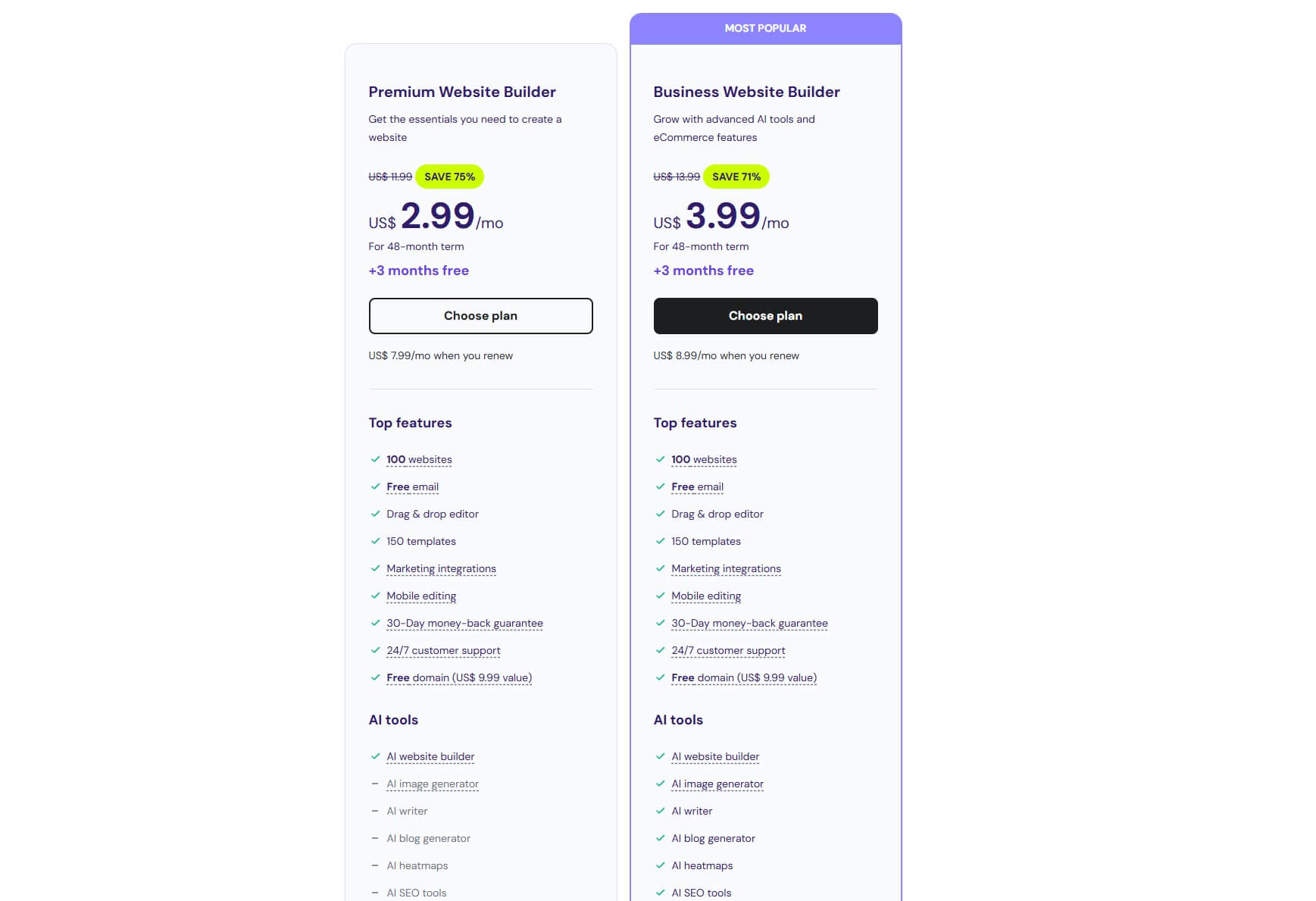
We recommend the Business Website Builder, as it also includes ample AI tools, plus, you get 0% transaction fees, 100+ payment methods, and schedule client appointments, which is great for selling photography services. The website builder also lets you host 100 websites!
Beware that it doesn’t include a free plan but there’s a 30-day money-back guarantee.
Visit Hostinger Website Builder
Templates
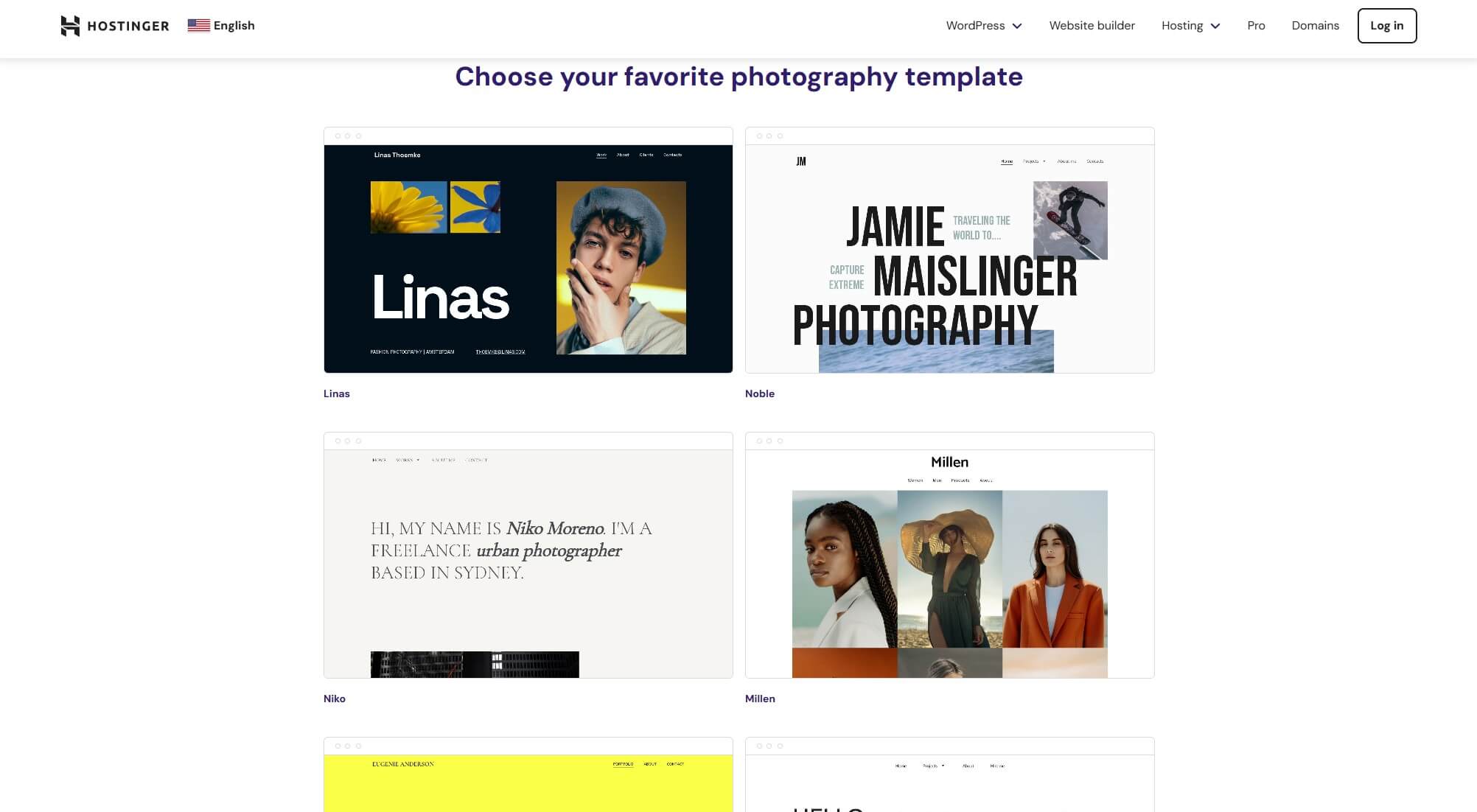
Template-wise, Hostinger has around 150 and if you select its photography website builder templates, you’ll find 16. There’s no deeper categorization and templates have unique names, such as Betty, Knapp, Frye, etc, so you can only pick by the design.
Nevertheless, they’re still optimized for different photography niches based on their look, including food, fashion, landscape, portrait, family, wedding, art, and more. All templates are free as well, so you just need to click on one and get started right away.
Features
As the most affordable website builder for photographers, Hostinger won’t beat Wix or Squarespace. However, it excels in AI functionalities, which consequently aid website creation and content generation, also touching on SEO with its Heatmap function inclusion.
Speaking of SEO, it’s Hostinger’s obvious strength. You can add password-protected pages, enjoy in-depth site analytics, and see how your visitors interact with the site. Hostinger Website Builder doubles down on AI with its AI Writer, which helps tremendously.
You can use it for photo and service descriptions, while the AI Blog Generator helps you forge optimized blog posts to complement your services. Like the others, Hostinger supports photo galleries but there’s also the Google Maps widget to help people locate you.
This is handy for offering photography services, for example.
Hostinger has the Photo Studio in the editor, helping you edit and optimize your photos further. Unlike Wix, it lets you switch the template after the publication, which is further improved by Hostinger’s drag-and-drop editor for vastly improved ease of use.
Unfortunately, Hostinger lacks email marketing, which begs for a third-party option that usually isn’t free.
Pros
- Very affordable
- Lots of AI tools
- Hostinger Photo Studio
- Drag-and-drop editor
- Free domain for 12 months
Cons
- No email marketing
- Not many advanced features
4. Shopify
Shopify is our recommended photography website builder for full-time photographers looking to make serious money. As an e-commerce platform first and foremost, Shopify has all you need to sell photos and photography services through a variety of payment vendors.
Plans & Prices
Shopify is rarely used by small businesses but its starting plan, which is Basic at $24/mo is excellent for photographers. It includes all the e-commerce tools, POS, unlimited items, customizable shipping, and some of the lowest fees we’ve seen. What about the rest?

Well, the Shopify plan at $69/mo is great if you need staff accounts and access to a few more useful features. Granted, the Basic plan is more than enough, and in this form, Shopify is still one of the best website builders for photographers. Let’s move to templates.
Templates
Shopify’s templates aren’t the most impressive and that’s the main gripe. You get about 230, where 200+ are paid and around 30 are free. The latter templates are rather basic, while the premium ones look fairly decent, albeit, their one-time fees can reach $300+ in most cases.
The good news is that Shopify’s site editor is straightforward and allows for a high degree of customization. Plus, you can switch the template once the website is live. Keep in mind that Shopify doesn’t offer a specific group of photography website builder templates.
You’ll have to seek them in categories like Services or even Arts and Crafts. You can, however, find templates by features, such as infinite scroll, color swatches, quick view, etc.
Features
Shopify mostly relies on its third-party apps for additional features, which we criticized in the Shopify review. To sell photos online, you’ll have to get the Digital Downloads app – this is a first-hand one. From here, you can add your photos and optimize them for more exposure.
For example, you can add keywords and features and have Shopify help you with suggestions that you can keep or discard. Once again, you’ll enjoy automatic image compression, which not only saves you space on the site but also makes it load quicker.

When it comes to selling services, Shopify offers plenty of apps for scheduling – Easy Appointment Booking is one of them. You can use it to schedule photoshoots and negotiate the price with your customers. Selling photos is very simple thanks to vast options.
Shopify offers a fair number of couriers, low shipping rates, and even POS, where you can sell photos in person. Rest assured, Shopify also has email marketing, and with its free version, you can send a whopping 10,000 free email promotions monthly!
Ultimately, Shopify is let down by its unimaginative templates that don’t result in a stylish website.
Pros
- Robust sales features
- Excellent email marketing
- Unlimited items
- Great for selling photos and services
Cons
- No photography-specific templates
- Reliant on third-party apps
5. SITE123
We have to mention SITE123 on our ranking of the 5 best photography website builders for 2026. It offers both free AND paid versions, on top of which, it’s very easy to use. Unlike Shopify, it has a selection of ready-made photography templates, all looking sleek and professional.
Plans & Prices
SITE123 offers a free plan limited to 250 MB of storage and bandwidth. This plan lacks e-commerce tools and limits you to a subdomain. It’s useful only for smaller photography sites but only with highly compressed photos because of the storage limit.

We also have the Premium plan at $7.80/mo, which bumps both storage and bandwidth to 3 GB and spices things up with a free domain for a year with e-commerce. 3 GB of storage/bandwidth isn’t much, so again, SITE123 is geared towards smaller businesses.
Templates
SITE123 has about 80 templates in total and 9 are displayed when you choose photography. These templates look nice and are usually based on sub-categories like wedding, art, nature, sport, etc. At least looking at their designs. Of course, this is prone to change at any moment.
You can use SITE123’s intuitive drag-and-drop interface to add new photos, elements, and blocks. On top of that, you get photography-specific tools like photo galleries, services, contact forms, and even a Google Maps widget for people to locate your business.
Features
SITE123 is surprisingly good for what it is; a simple-to-use photography website builder. Some of its templates are also “dynamic” and include looping videos, instead of photos on the home page. Our favorite was this Hospitality Goddess theme, while we’re at that.
This template is also useful for wedding websites, for instance.
SITE123 also allows you to sell online but to a limited extent. You can’t sell unlimited products but there’s email marketing and even scheduling tools to book appointments. SITE123 supports social media integration for added engagement and boosted sales.

Additionally, SITE123 is advantageous to Squarespace in website translation. You can fairly simply translate your website from English to a few different languages to attract people outside the domestic market. SITE123 lacks an App Store from Wix and Shopify.
Plus, its SEO tools aren’t as impressive as we expected, as you only get crumbs. SITE123 is more about functionality and publishing the website as quickly as possible. While it’s still one of the top photography website builders, Wix at ~$2.2/mo more is a superior pick.
Pros
- It offers a free version
- 9 responsive photography templates
- Website translation tools
- Domain privacy is included
Cons
- 250 MB of storage in the free version
- No App Store for added functions
- Limited bandwidth (3 GB)
Can I Make a Photography Website for Free?
Yes, you can. On our list, you’ll find that Wix and SITE123 offer free versions.
The rest of them have free trials and/or a money-back guarantee.
If you choose Wix and opt for its free version, you’ll be less satisfied because of limited bandwidth and storage. You’ll get 500 MB of storage with 1 GB of bandwidth, all “wrapped” in Wix’s logos on your websites and the lack of advanced SEO and marketing features.
500 MB of storage is hardly enough for a smaller photography website – maybe for selling services only. Yet, even in this case, “wix.com” next to your domain, paired with Wix’s logo across your site will make it look unprofessional, which can drive off customers.
SITE123 follows in similar footsteps, with two times less storage and four times less bandwidth – 250 MB in both cases. You’ll also get a “site123.com” extension on your domain and have your website drowned in its SITE123 floating tags. Not a great experience, huh?
We listed our recommended free website builders here and warned you about such inconveniences.
If you can’t afford one, something is better than nothing. However, to get the most out of your photography website builder, you’ll have to pay. Fortunately, our top picks are very affordable, starting at as little as $3.99/mo.
How to Choose a Photography Website Builder?
Choosing a preferred photography website builder is all about your priorities.
- Do you want to sell photos or photography services?
- Are you looking to build a portfolio?
- How experienced in website building are you?
- Do you want a photography blog?
- How much are you willing to invest?
Answer these questions and then figure out which website builder is best for you.
For example, if you’re dead-set on sales, Wix and Shopify are undoubtedly the best options. They have the most robust e-commerce tools and even store translations so that you can adapt the website to a wider audience. What about building a portfolio?
Here, you can opt for options like Wix or Squarespace with bespoke portfolio templates.
Are you inexperienced in website building?
In that case, you can take advantage of Hostinger’s AI Website Builder, which will craft the website for you based on your description. If you need a proper photography blog, Wix has some of the best blogging features to capture the essence of your philosophy.
Finally, if you’re willing to invest more, you won’t mind the price of making your website.
While Hostinger is only $3.99/mo, you’d perhaps be more willing to invest in Wix, whose e-commerce plans start at $20/mo, knowing you’ll be able to have more marketing, SEO, and sales tools to boost your earnings.
The Final Verdict
You’ll agree that having a photography site is paramount to keeping your business afloat.
Our top-rated photography website builders can help you achieve multiple goals. First of all, you can start a website, and second, optimize and customize it to match the highest SEO standards. Our options are suitable for small-time and professional photographers.
It all just depends on your preferences and priorities.
Wix is the best option overall but we’re sure you’ll enjoy Squarespace, Hostinger, Shopify, and SITE123 as well. Now go ahead and test them out. All have free trials and are risk-free. That’s one of the ways to ensure you’ve selected the right one.