
If your internet suddenly slows down mid-stream, you might be dealing with ISP throttling. And the legal landscape has shifted in your provider’s favor: a federal court struck down the FCC’s net neutrality rules in January 2025, so outside a handful of states, nothing stops your ISP from slowing you down deliberately.
Rebooting the router won’t help, because the problem isn’t your hardware. Not every slowdown is throttling, though. This guide covers how to tell the difference, why ISPs do it, and how to get around it.
How to Avoid ISP Throttling and Bypass ISP Speed Limit in 2026
- Run an internet speed test and screenshot the results.
- Subscribe to a fast VPN, like NordVPN or Proton VPN.
- Install the VPN on your device.
- Open the VPN and connect to the fastest server. If you don’t want to bypass geo-blocks, pick a server in your country.
- Recheck your speeds by running the same test. They should now be higher if the issue was ISP throttling.
What is ISP Throttling?
ISP throttling happens when your internet service provider deliberately slows down your connection. You’re not getting the speed you pay for because your ISP is limiting how much data you can transfer in a given timeframe. It’s also called bandwidth throttling. The keyword is deliberate. Slow speeds can be your ISP’s fault without being intentional, which is why detection matters (more on that below).
Why (and How) Do ISPs Throttle Connection Speeds?
Four main reasons:
- Congested Network Traffic. The most common one. Networks clog up during peak hours, usually evenings and weekends, and your ISP throttles connections to spread the load. It keeps the network standing, but your Netflix session pays the price.
- Data Caps. Exceed your monthly data allotment and your ISP may slow you down instead of cutting you off, a not-so-subtle push toward a pricier plan. Every download and email counts toward the cap, and the throttling terms are buried somewhere in your service agreement.
- Paid Prioritization. A content provider can pay your ISP for a “fast lane” during congestion. If Netflix pays and Prime Video doesn’t, one streams smoothly while the other buffers. Critics have argued for years that this splits the internet into companies that can pay and companies that can’t, and with federal rules gone, nothing prohibits it in most states.
- Bandwidth-Hungry Activities. Your ISP can also throttle activities it dislikes: heavy streaming, torrenting, even VPN use. Gamers get hit too, since some providers deprioritize gaming traffic during busy periods.
What is Net Neutrality?
It’s the principle that ISPs must treat all internet traffic equally, with no discrimination by content, platform, or application. In the US, it has spent a decade bouncing between administrations: adopted in 2015, repealed in 2017, restored by the FCC in April 2024. Then it ended, possibly for good.
On January 2, 2025, the Sixth Circuit Court of Appeals struck down the FCC’s rules, holding that the agency lacks the authority to regulate broadband as a telecommunications service. Without an act of Congress, there’s no path back. The practical result in 2026: there are no federal net neutrality protections.
Five states run their own laws banning blocking, throttling, and paid prioritization: California, Washington, Oregon, Colorado, and Vermont. Everywhere else, your ISP has a legally clear runway, and even in those states, throttling for congestion or data caps remains fair game.
How to Detect and Bypass ISP Throttling: Tutorial
Detecting throttling is tricky, and the most reliable method involves using a VPN. Here’s how to regain your full internet speeds, three ways:
1. Use a VPN Service
The most effective fix. A VPN encrypts your traffic, making it unreadable to your ISP, and routes it through a remote server that spoofs your actual location. Your ISP can’t throttle what it can’t identify. What about ISPs that throttle VPN use itself? The quality providers below disguise VPN traffic as regular HTTPS, so your ISP never knows the difference.
2. Upgrade Your Internet Plan
Straightforward if data caps are your problem: a higher-tier or unlimited plan removes the trigger. Just weigh the extra monthly cost, and read the new plan’s terms to make sure you’re not trading one throttling policy for another.
3. Change Your ISP
If yours throttles aggressively, switching is a fresh start. Research the new provider’s reputation first, since reviews and user complaints about throttling are easy to find, and compare plans so the move actually pays off.
Best Way to Stop ISP Throttling: Use a VPN
Of the three approaches, the VPN is the fastest to set up, and honestly, the most effective fix. With a trusted VPN like NordVPN, it looks like this:
- Choose a reliable VPN. You want speed, plenty of servers, and obfuscation. Sign up and pick a plan.
- Download the app on your device. The top providers cover Windows, macOS, Linux, Android, and iOS.
- Configure it. Enable the Kill Switch so traffic never leaks if the connection drops, and use a speed-first protocol like NordLynx.
- Connect to a server, ideally a nearby one for the best speeds.
- Browse without throttling. Your ISP now sees encrypted traffic.
Stop ISP Throttling with NordVPN
What About VPN Throttling?
Ironically, some VPNs throttle too, usually free ones with bandwidth limits that kick in once you hit a monthly cap. Server congestion on oversubscribed free tiers causes the same effect. The fix is simple: pick a provider with no data caps and a track record for consistent speeds (all 3 below qualify), connect to nearby servers, and skim the terms for any usage limits before subscribing.
Best VPN to Stop Internet Throttling in 2026
Things are pretty simple. To stop ISP throttling, you need a fast VPN that itself doesn’t do any of these things. NordVPN, Proton VPN, and ExpressVPN check these boxes, and I’ve tested them myself to confirm:



 9200 servers
 128 covered countries
 30 days money-back guarantee
 10 simultaneous connections
9.4 /10

20396 servers
148 covered countries
30 days money-back guarantee
10 simultaneous connections
9.2 /10

3000 servers
105 covered countries
30 days money-back guarantee
10 simultaneous connections
9.1 /10
1. NordVPN: Fastest VPN to Bypass ISP Speed Limit
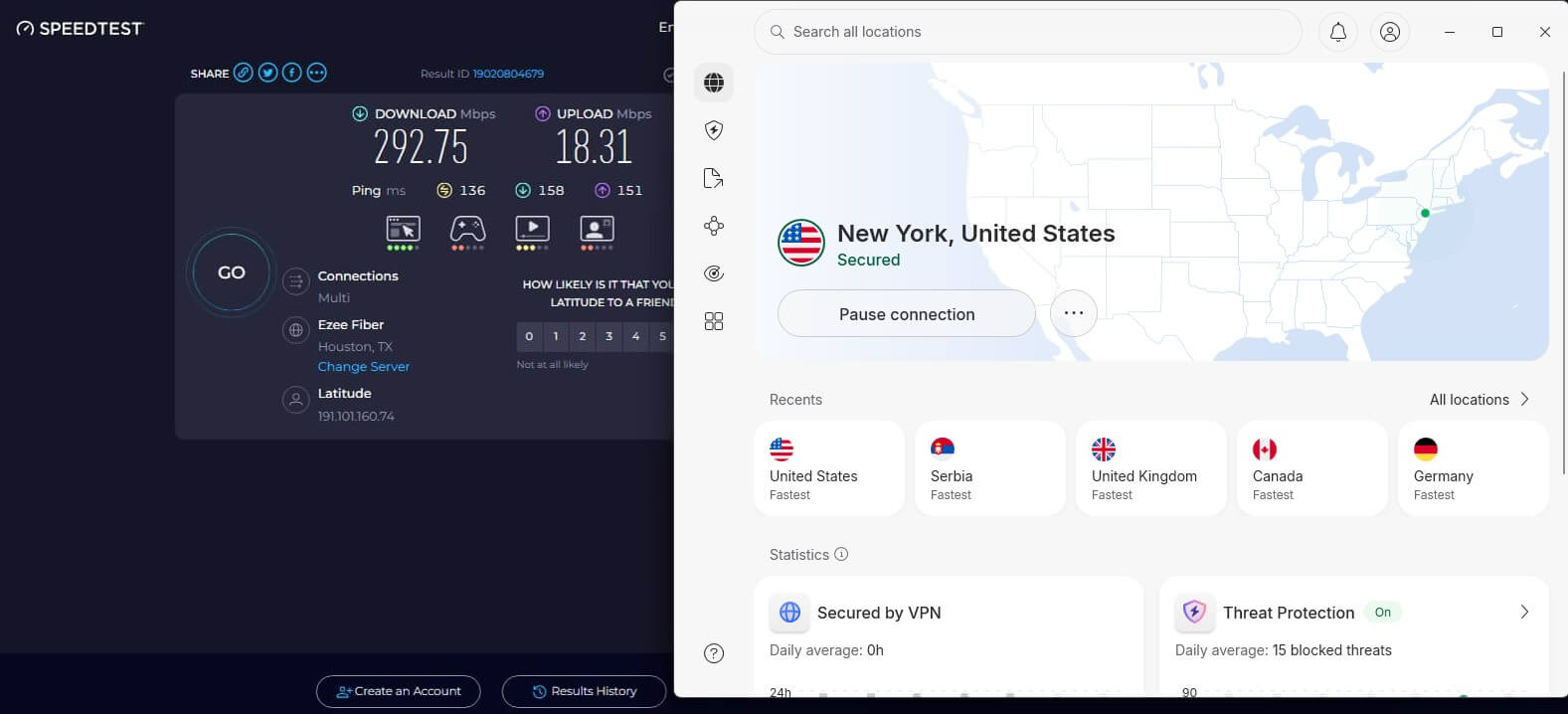
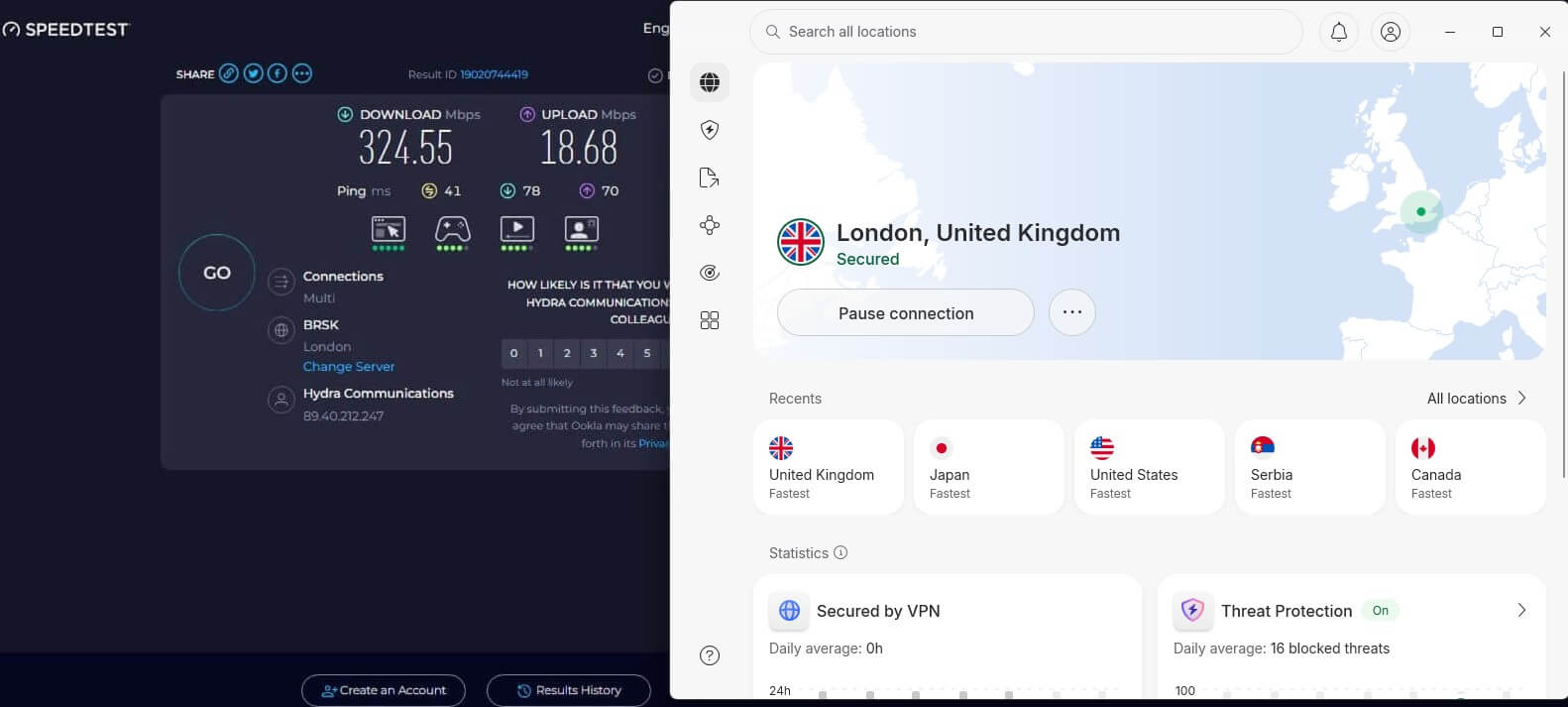
NordVPN is a super-secure VPN based in Panama, and in our tests, the best VPN to stop internet throttling. The Panama headquarters means no data retention, and the strict no-logs policy passed its 6th audit in February 2026. GCM-256 encryption scrambles your data so your ISP can’t make out what you’re doing, and specialized obfuscated servers hide the fact that you’re using a VPN.
This shuts down VPN-targeted throttling. Speed is the other half of the equation. Between the high-bandwidth network and the NordLynx protocol, the performance drop is small enough that you won’t notice it, and there are no data caps or bandwidth limits. Native apps cover Windows, macOS, Linux, Android, and iOS, with manual setups for routers and older Smart TVs.
One subscription covers 10 devices, prices start at $3.49/mo on the 2-year plan, and the 30-day money-back guarantee gives you time to verify it beats your ISP’s throttling. I’m very sure it does.
Pros
- Fastest VPN in our tests
- NordLynx protocol
- Unlimited data/bandwidth
- Servers in 149 countries
- Obfuscation technology
Con
- Higher price on renewal
2. Proton VPN: Bypass ISP Throttling Safely
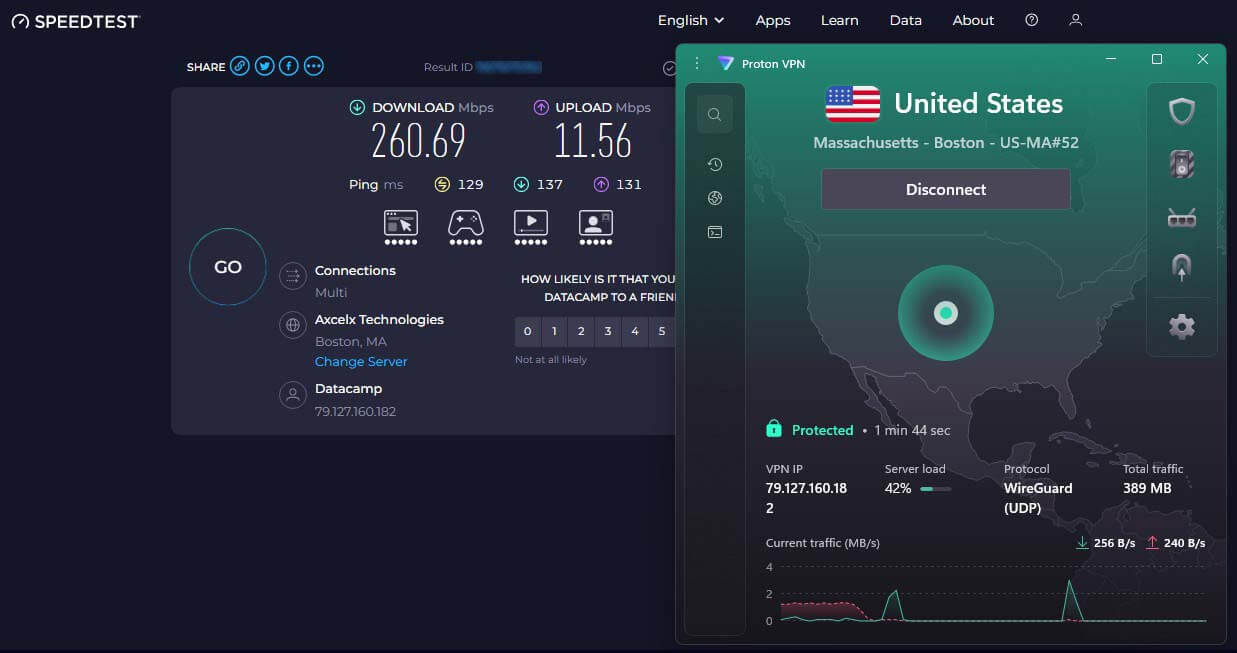
Proton VPN has a huge network: 20,00 servers in 149 countries, from Geneva, Switzerland, a jurisdiction with no data retention laws and no intelligence-sharing obligations. The apps are open source and independently audited, and the no-logs policy has been tested in court. For throttling specifically, two features stand out. The Stealth protocol disguises VPN traffic as ordinary HTTPS.
An ISP that throttles VPN connections never sees one. Secure Core routes your connection through two servers for an extra privacy layer, Proton’s take on double VPN. There are no bandwidth or data caps on any paid plan, and VPN Accelerator, Proton’s speed tech, claws back performance on distant connections. The free tier deserves a mention with unlimited data, though its speeds are reduced.
The Plus plan costs $2.99/mo on the 2-year deal, covers 10 devices, and includes a 30-day money-back guarantee for risk-free testing.
Pros
- VPN Accelerator tool
- Unlimited bandwidth
- Huge server network
- Stealth VPN protocol
Con
- Could be more user-friendly
3. ExpressVPN: Stable and Consistent Performance
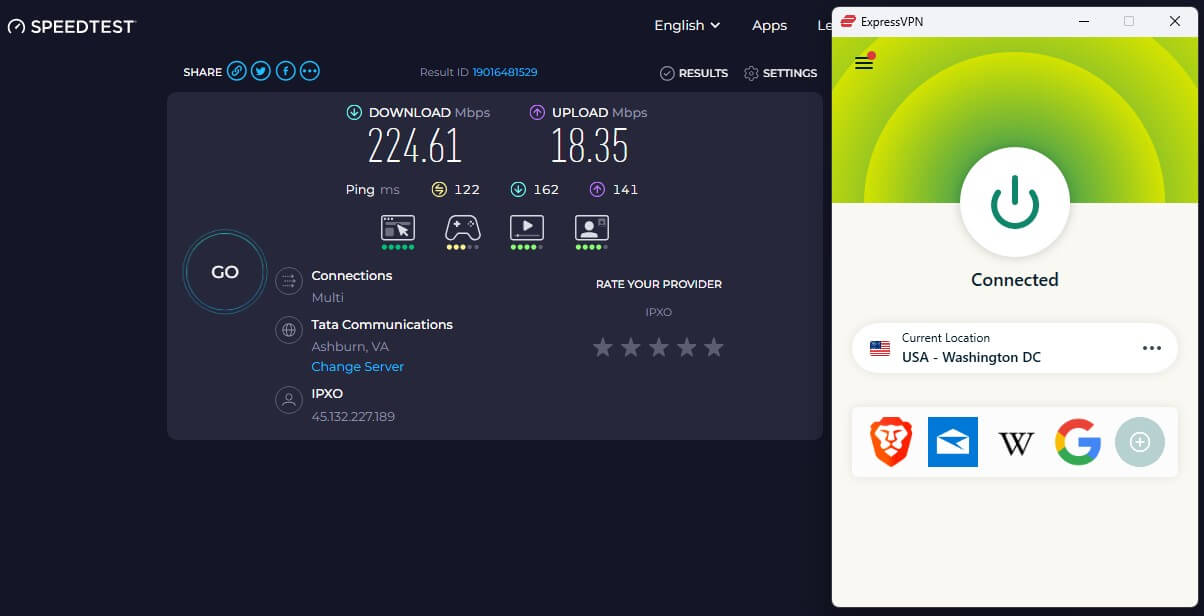
ExpressVPN wraps reliability and security in the most user-friendly package. It’s based in the British Virgin Islands, outside any intelligence-gathering jurisdiction, with a KPMG-audited no-logs policy. Its anti-throttling trick is built in: traffic is automatically disguised whenever you’re connected via the Lightway protocol, which is on by default. Your ISP can’t see your activities or that you’re using a VPN.
That means it has nothing to throttle. Following a July 2026 expansion, the network covers 214 locations across 113 countries. Performance holds up. Connections stay stable for gaming, downloads, and buffer-free streaming, and we consider it one of the fastest VPN services. Plans start at $2.49/mo on the 2-year Basic tier, covering 10 devices with a 30-day refund window.
Pros
- One-click application
- Fast Lightway protocol
- Over 214 VPN locations
- Cheap 2-year plan
Cons
- Not many features
- Renews at higher price
Conclusion
With federal net neutrality gone, throttling is a business decision for your ISP, not a legal risk. So take the ten minutes: run the speed test, run it again through a VPN, and see what your ISP has been doing to your connection. If the gap is real, we’d start with NordVPN, and its 30-day guarantee means the experiment costs nothing if your slowdowns turn out to be something else.
Frequently Asked Questions
⚡ How to avoid ISP throttling?
The most reliable method is a VPN, which encrypts traffic so the ISP can't identify or selectively slow down specific activities. Other options include upgrading to a plan with a higher or unlimited data cap, avoiding heavy downloads during peak hours, or switching to a provider with a better throttling track record. Only the VPN works immediately and without changing plans or contracts.
🚧 Can I bypass ISP speed limit?
Yes, but only if the speed is below your baseline and it's throttled. You can do this only with a VPN. However, if the ISP adheres to the speed limit and you have the highest speeds, no VPN can help you.
⚖️ Is ISP throttling legal?
In the US, mostly yes. The FCC's net neutrality rules were struck down in court in January 2025, so there's no federal ban on throttling. California, Washington, Oregon, Colorado, and Vermont have state laws against it, but even there, slowing you down for congestion or exceeded data caps is generally allowed. Elsewhere, it depends on local regulations.
🚀 Can a VPN slow down my connection speed?
Yes, a VPN adds extra steps to your connection, so some speed loss is normal. With the best providers, the drop is barely felt, and when ISP throttling is in play, a VPN can make your connection faster.