Scroll through the server list in a few VPN apps, and you’ll find a category that sends your connection through two countries instead of one. Depending on the app, it’s called Double VPN, MultiHop, or Secure Core, and it usually comes with a short promise of extra privacy.
What the app rarely explains is when that second server actually helps, or what it costs you. The short version is that double VPN guards against one specific risk: a single VPN server that’s watched, seized, or hacked.
Against most everyday problems, it changes nothing. Whether it belongs on your connection depends on who you need to stay hidden from.
Double VPN at a Glance
- What it is: your traffic passes through two VPN servers in different countries, and neither server sees both who you are and what you do.
- Who needs it: journalists, activists, and anyone who has reason to worry that a VPN server could be monitored.
- Who can skip it: most people who stream, play games, or browse at home.
- What it costs: a little speed, a longer wait to connect, and fewer countries to choose from.
What Is Double VPN (Multi-Hop)?
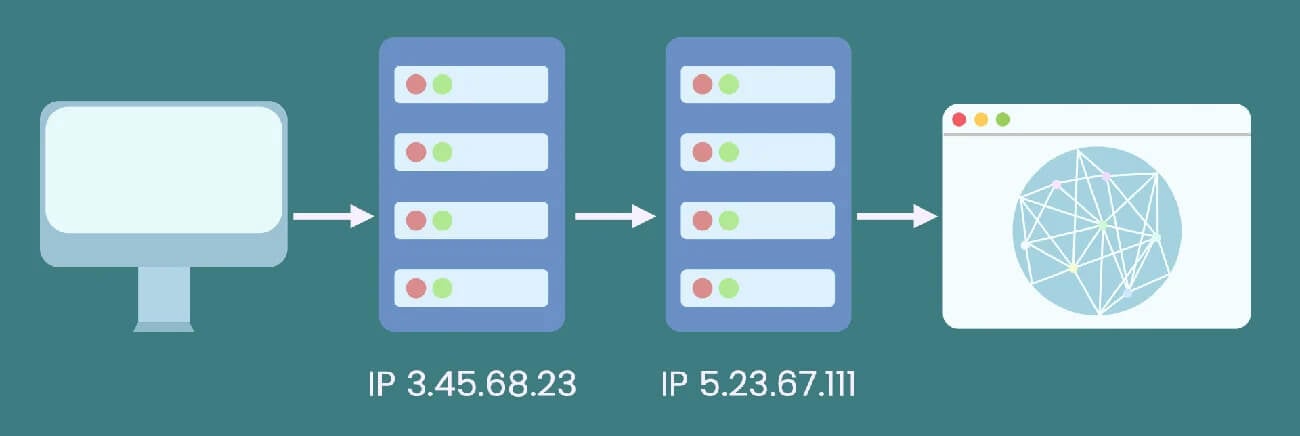
Double VPN is a VPN connection that passes through two servers before it connects to the internet. Your device connects to the first server, which forwards your traffic to a second server in another country. Websites only ever see the second one.
You’ll also see it called multi-hop, double-hop, or server chaining, and the idea is the same under every name. This setup limits what each server knows. The entry server sees your real IP address, but not the sites you open. The exit server sees where the traffic goes, but it only knows the traffic came from another VPN server.
As a result, nobody with access to just one server can link you to what you do online. On a regular VPN connection, one server sees both ends. That works well as long as the VPN keeps no logs and the server remains private, and for most people it does. Double VPN is for situations where you’d rather not depend on that single server.
How Does Double VPN Work?
On NordVPN and Surfshark, a double VPN connection follows four steps:
- The VPN app encrypts your traffic twice on your device and sends it to the entry server.
- The entry server removes the outer layer. It can see your IP address, but the data itself is still encrypted.
- The exit server removes the second layer and sends your request to the website from its own IP address.
- Replies travel back along the same path, so the website never learns where you are.
Not every multi-hop feature works exactly this way, however. Some VPNs encrypt once and move the traffic between their two servers over their own network.
Others use a proxy as the second step, which hides the first server’s IP address but doesn’t add a second layer of encryption. Both still keep your identity and your activity on separate servers, which is the main reason to use multi-hop.
Benefits of Double VPN
A second server doesn’t make your connection twice as safe in every sense. Instead, it adds protection in a few specific places:
- A compromised server reveals less: if someone monitors, seizes, or hacks one of the two servers, they get only half the picture. Your IP address and your browsing are never on the same server.
- Two countries to get through: the entry and exit servers are usually in different jurisdictions. Anyone trying to trace you would need cooperation from authorities in both.
- Harder traffic matching: an observer trying to match the traffic entering a VPN with the traffic leaving it has two separate points to watch instead of one.
- Your IP address changes twice: like any VPN, it changes your IP address, but here the sites you visit don’t see the first VPN server’s IP address either.
One thing it doesn’t do is hide the fact that you’re using a VPN. On networks that block VPNs, such as a school, an office, or a country with strict censorship, obfuscation is the feature that helps. It disguises VPN traffic as ordinary web traffic, and NordVPN, Proton VPN, and Surfshark each have their own version.
How Much Does Double VPN Slow You Down?
Less than you might expect, as long as the two servers are close together. The table compares each multi-hop connection in our tests with a direct connection to a single server:
| Feature | Servers | Speed loss | Ping added |
|---|---|---|---|
| NordVPN Double VPN | Ending in the UK | 2.9% | 4 ms |
| Surfshark MultiHop | Manchester and Frankfurt | 2.9% | 0 ms |
| Proton VPN Secure Core | Switzerland to the UK | 6.8% | 6 ms |
| Proton VPN Secure Core | Switzerland to the US | 12.1% | 84 ms |
On nearby pairs, the cost is small enough for browsing and streaming. Distance adds delay, as the US route shows. Streaming and video calls still work smoothly at 84 ms, but a competitive gamer would feel it. So choose an entry server near you and an exit server near the site you want to use.
Connecting also takes longer. Surfshark’s MultiHop took about 10 seconds, compared to four or five seconds on a single server, so start it before a call begins. For everyday speed, our ranking of the fastest VPNs covers single-server results.
When Should You Use Double VPN?
Most people will never need a second server. It earns its place when the risk isn’t an advertiser or a nosy network, but someone with the power to watch or seize a VPN server:
- Journalists: reporters working on sensitive stories, especially in countries that jail journalists, can protect themselves and their sources by keeping their identity and their research on separate servers.
- Activists and whistleblowers: people whose work puts them at odds with a government have the most to lose if a single VPN server is monitored.
- People in restrictive countries: where mass surveillance is routine, a second server adds a layer that ordinary residents may want too, alongside obfuscation to access blocked websites in the first place.
For these users, the extra wait and the shorter list of countries are a fair price.
When You Can Leave Double VPN Off
For almost everything else, a single server does the job, and double VPN only gets in the way:
- Streaming: double VPN offers a much shorter list of countries, so the library you want may not be available. The second server adds no benefit for watching a show either.
- Online gaming: every extra server adds ping, and on distant pairs it can turn into noticeable lag. A single nearby server from a VPN for gaming keeps ping low.
- Torrenting: large downloads gain nothing from the second server. A VPN for torrenting with a kill switch on one server covers what matters.
- Everyday browsing: email, shopping, and social media are already protected by a no-logs VPN on a single server.
Cost can also be a factor, since some VPNs keep multi-hop for paid plans and many don’t offer it.
Double VPN vs VPN Over VPN
Both send your traffic through two servers, but who operates them differs.
- Double VPN uses two servers from the same VPN company.
- VPN over VPN, also called VPN chaining, means running two different VPN services at once, so each company sees only half of your connection.
In theory, that’s even more private, since you no longer have to trust a single company. In practice, it’s awkward. You pay for two subscriptions, configure both, and deal with apps that don’t always work together. For example, Surfshark shows an error if another VPN app is open when you try to connect.
On the plus side, VPN over VPN offers every server location from both VPNs, while a built-in double VPN has a short list of country pairs. The speed costs are similar, since the traffic still makes two stops either way.
Double VPN vs Onion Over VPN
Onion over VPN, also called Tor over VPN, combines a VPN with the Tor network. Your traffic goes to the VPN server first, then through three Tor relays run by volunteers around the world. That makes it harder to trace than double VPN, where one company operates both servers. It’s also much slower, since every page passes through four stops.
The other difference is what you can reach. Tor is the way to open .onion sites, and in our tests, they loaded only in the Tor Browser, even on NordVPN’s Onion Over VPN servers and Proton VPN’s Tor servers. Double VPN works in any browser and app, but it can’t load .onion sites.
So use Tor for anonymity and the dark web, and double VPN for extra privacy on everyday apps.
VPNs That Offer Double VPN
Multi-hop isn’t a standard feature, and several well-known VPNs don’t offer it, including ExpressVPN. NordVPN, Proton VPN, and Surfshark do, and each takes a different approach.
1. NordVPN: Best Overall Double VPN
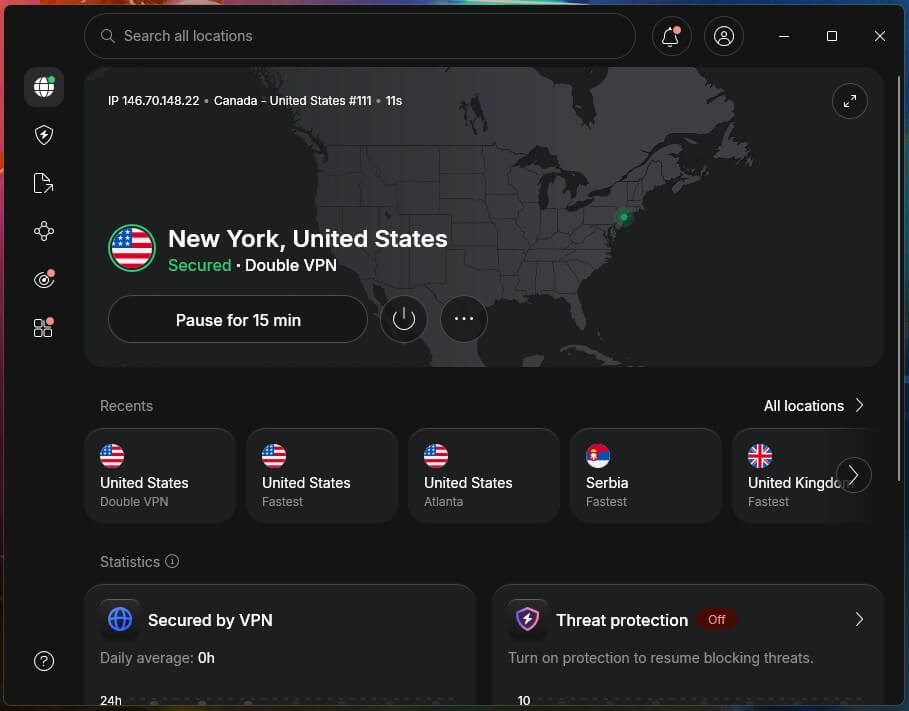
NordVPN lists Double VPN under its specialty servers. You can choose the country you want to appear in and let the app choose the entry server, or click Double VPN and connect to the fastest pair. The choice is limited to a small set of country pairs, but in our tests the second server cost almost no speed.
Beyond Double VPN, NordVPN adds post-quantum encryption, which protects today’s traffic against future computers that could break current encryption. Its no-logs policy has passed several independent audits. For networks that block VPNs, its obfuscated servers use NordWhisper, NordVPN’s own protocol for disguising VPN traffic.
2. Proton VPN: Best for Hardened Entry Servers
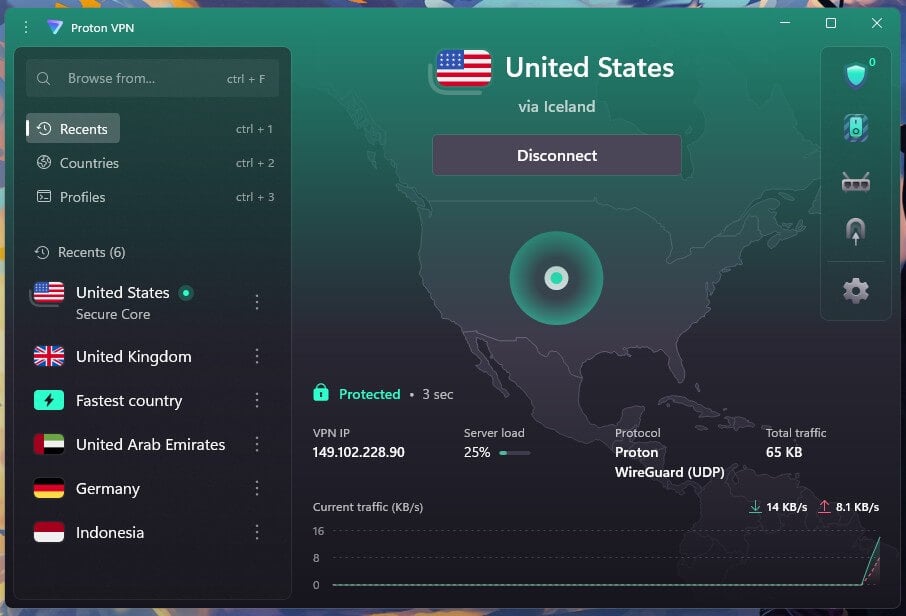
Proton VPN’s version is called Secure Core, and it works differently. Instead of pairing ordinary servers, it routes every connection through servers Proton VPN owns in Switzerland, Iceland, or Sweden, in high-security data centers.
From there, your traffic leaves through the country you choose, from 69 Secure Core countries. That design adds protection to the first server, since the entry servers are in countries with strict privacy laws. On a nearby route, the speed cost is small, but every connection makes a stop in one of those three countries.
So the further your chosen country is from Switzerland, Iceland, or Sweden, the more ping it adds. It’s available on paid plans only. Proton VPN is based in Switzerland, its apps are open source, and its no-logs policy is audited every year.
3. Surfshark: Best for Choosing Both Servers
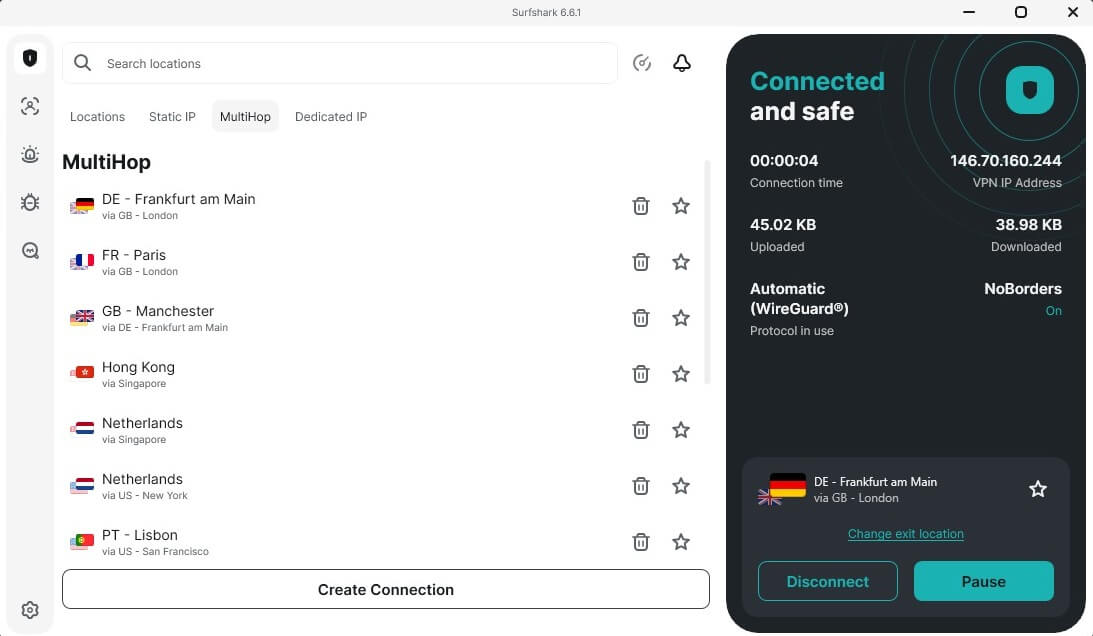
Surfshark offers two ways to use it. MultiHop has a list of preset server pairs, while Dynamic MultiHop lets you choose both the entry and the exit server yourself. That’s the most flexible setup of the three, and you can save your favorite pairs to connect in one click later. Both options come with every Surfshark plan.
Surfshark also adds post-quantum protection to WireGuard connections by default, and CleanWeb blocks ads and trackers. Where a network blocks VPNs, Camouflage Mode disguises the connection on OpenVPN. Our Surfshark review covers its other privacy tools.
How to Set Up Double VPN
The steps depend on your VPN, but none of them require manual configuration. Here’s how it works on NordVPN:
- Subscribe to NordVPN, then download and install the app.
- Sign in with your NordVPN account.
- Click All locations and find Double VPN under Specialty servers.
- Connect: click Double VPN for the fastest pair, or open the menu next to it to choose your country first.
If Double VPN doesn’t appear in the list, switch the protocol to OpenVPN in the app’s settings. On Proton VPN, enable Secure Core in the app and choose a country. On Surfshark, open the MultiHop tab in the locations list and choose a preset pair or build your own.
Final Thoughts
Double VPN solves a narrow problem well: no single server knows both who you are and what you do online. If someone could realistically watch, seize, or pressure a VPN server to find you, that split is worth a short wait to connect and a shorter list of countries.
Journalists protecting sources and people living under heavy surveillance fall into that group. For everyone else, one trustworthy server already covers what the second would add, with the full country list and the quickest connection. It’s also easy to use only when you need it: enable it for the sensitive task, then return to a single server.
FAQs
Is double VPN safer than a regular VPN?
Yes, in one specific way. No single server sees both the user's IP address and the sites visited, so a monitored or hacked server reveals less. Everyday protection is otherwise the same.
Does double VPN encrypt traffic twice?
Yes, in most cases. NordVPN and Surfshark add a second layer of encryption for the trip between servers, while some multi-hop setups encrypt once or use a proxy as the second step.
Is multi-hop the same as double VPN?
Yes. Multi-hop, double VPN, double-hop, and server chaining all describe a VPN connection that passes through two or more servers. VPN companies use their own names, such as MultiHop or Secure Core.
Can you use two VPNs at the same time?
Yes, but it's often unreliable. Two VPN apps running together can conflict, and some won't connect while another VPN is open. A built-in double VPN feature avoids those conflicts.
Does double VPN hide that you're using a VPN?
No. A network that blocks VPNs can still detect a double VPN connection. Obfuscation, which disguises VPN traffic as regular web traffic, is the feature designed to get past those blocks.
Do free VPNs offer double VPN?
No, not usually. Most free VPNs leave multi-hop out, and Proton VPN keeps Secure Core for paid plans. NordVPN and Surfshark include their multi-hop features on every paid plan.