
Desktop speed tests are a poor guide to the best VPN for Android. On a Galaxy S26 Ultra, the VPNs we ranked lost two to three times as much speed as on our Windows PC. So we took every speed and battery figure from the phone.
The best VPN for Android in our tests was NordVPN, with the smallest speed loss on the phone and two Android-only protections: Tapjacking Protection and scam call filtering. ExpressVPN’s battery drain was too small for Android’s meter to register, and for privacy, Proton VPN adds Secure Core and an audited no-log policy.
Best VPN for Android: 5 Best VPN Apps for Android
- NordVPN: Best Android VPN overall
- Proton VPN: Best Android VPN for privacy
- ExpressVPN: Lightest on battery
- Surfshark: Android VPN app with advanced features
- Private Internet Access: Best budget VPN for Android
Best VPN App for Android: The 5 Compared
Speed loss averages UK, US, and Japanese servers against a 54.7 Mbps phone connection. Battery is the drop over 20 minutes of 1440p video, where the same phone with no VPN used 3%.
| NordVPN | Proton VPN | ExpressVPN | Surfshark | PIA VPN | |
| Speed loss | 20.3% | 27.0% | 22.9% | 25.9% | 28.5% |
| Battery over 20 min | 5% | 4% | 3% | 5% | 5% |
| UK ping | 46 ms | 52 ms | 43 ms | 44 ms | 48 ms |
| Start price | $3.49/mo | $2.99/mo | $2.99/mo | $2.49/mo | $2.19/mo |
| Android free trial | 3 days | Free plan instead | 3 days | 7 days | 7 days |
| Devices | 10 | 10 | 10-14 | Unlimited | Unlimited |
| Countries | 152 | 149 | 113 | 100 | 91 |
| Streaming platforms | 9 of 9 | 7 of 9 | 9 of 9 | 8 of 9 | 6 of 9 |
Best Android VPN: Detailed Top 5 List
All five are paid subscriptions. Our free VPNs for Android guide covers the alternatives.
1. NordVPN: Best Android VPN App

Pros
- Fastest on Android
- Unblocked every platform
- Tapjacking protection
- Scam call filtering
- Widest country coverage
- Six independent audits
Cons
- Heavier on battery
- Steep renewal price
NordVPN lost the least speed on Android, a 20.3% average speed loss across our three server locations. British servers cost it only 8.4% of its speed, the best single figure on the phone, and its 46 ms UK ping was close behind ExpressVPN’s 43 ms. No streaming platform in our set of 9 blocked it. Battery is the trade-off. Twenty minutes of 1440p video drained 5% with NordVPN connected, compared to 3% without a VPN.
Connecting took 1 to 3 seconds, and the Android app connected faster than the desktop version. Two features exist only on Android. Tapjacking Protection warns you when an app tries to disguise what a tap will actually do, and scam call filtering screens incoming numbers. NordVPN’s next-gen antivirus blocks malware and trackers, Meshnet links your own devices, and the no-logging policy has passed six independent audits.
Coverage spans 152 countries, 10 devices connect at once, and its UK servers unblocked ITVX for watching ITV outside the UK. The Basic plan works out at $3.49 a month, and Android users can try it free for 3 days with a credit card.
2. Proton VPN: Best Android VPN for Privacy

Pros
- Second-lightest on battery
- Secure Core routing
- Open-source Android app
- NetShield ad filtering
- Large server network
- Free Android plan
Cons
- Slower on distant servers
- No post-quantum encryption
Proton VPN earns second place on battery. Our test video drained 4% with it connected, 1% more than the no-VPN result and better than every VPN except ExpressVPN. The difference compounds on a device that stays in your pocket all day. Speed is the weakness. It lost 27.0% of its speed on average, and on American servers it lost 28.1%, compared to 15.0% for NordVPN. Pluto TV and ITV blocked it, while it unblocked the other 7 streaming platforms. Pick it for privacy.
Swiss law falls outside the intelligence-sharing agreements, and the Android app is open source, so the code can be checked against the claims. Secure Core sends traffic through a second protected server before it leaves the network, and Securitum audits the no-logging policy. NetShield filters ads and trackers, and coverage spans 149 countries. There’s no Android trial.
However, the free plan offers unlimited data on one device with no expiry. The free version also has Guest Mode, which lets you use Proton VPN without signing in or creating an account. The paid plan costs $2.99 a month. Our NordVPN comparison sets the two side by side.
3. ExpressVPN: Lightest Android VPN on Battery
Pros
- Negligible battery cost
- Second-fastest on Android
- Lowest UK ping
- No streaming blocks
- Simple one-tap app
- Post-quantum encryption
Cons
- No Double VPN
- Steep renewal price
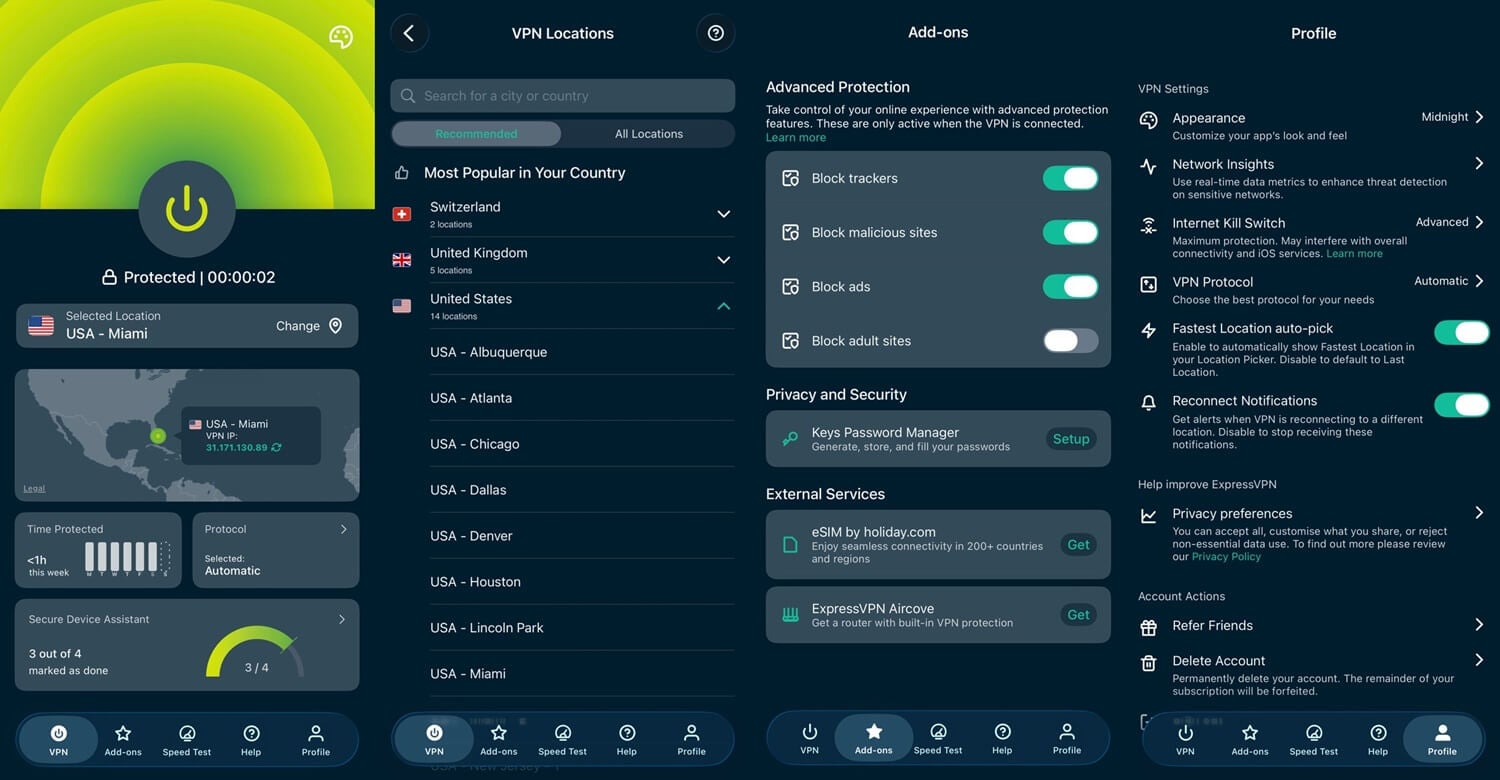
The headline result of this round belongs to ExpressVPN. Our 20-minute video drained 3% with it connected and 3% with no VPN active, so its cost stayed under the battery meter’s resolution. Every other VPN added 1% or 2%. Lightway is built to idle cheaply. It was second-fastest too, at a 22.9% average speed loss, and its 43 ms to London was the lowest ping we recorded. Nothing blocked it, and it connected as quickly as the others. The Android build mirrors the Windows app.
The app includes a kill switch, split tunneling, and Advanced Protection filtering ads, trackers, and malicious sites. KPMG has audited the no-logging claim, and Lightway uses post-quantum encryption, a defense against future code-breaking. There’s no Double VPN, and the settings screen is thinner than PIA’s. It covers 113 countries, with the device allowance set at 10 or 14. The Basic plan is $2.99 a month, and Android has a 3-day trial via Google Play.
4. Surfshark: Android VPN With Advanced Features

Pros
- No device limit
- GPS Override spoofing
- Second kill switch
- IP Rotator on mobile
- Antivirus in One plan
- Long Android trial
Cons
- Heavier on battery
- Slower than NordVPN
Surfshark’s Android app includes more mobile-specific tools than the others. GPS Override changes the location Android reports to apps as well as the IP address. Many apps read GPS instead of the connection, so an IP change alone leaves them unaffected. It adds a second kill switch alongside the standard one, covering apps excluded through split tunneling. IP Rotator changes your IP address every few minutes while the country stays fixed. Its results are mid-table.
It lost 25.9% of its speed on average, recorded 44 ms to London, and used 5% battery over the 1440p test video. ITV was the only streaming platform to block it. One subscription covers every device you own with no cap, whereas NordVPN, Proton VPN, and ExpressVPN stop at 10 or 14. CleanWeb filters ads and trackers, the One plan adds antivirus that works on the phone itself, and Deloitte audited the no-logging policy in 2023 and 2025. Coverage spans 100 countries at $2.49 a month, and Android has a 7-day trial.
5. Private Internet Access: Best Budget Android VPN
Pros
- Lowest entry price
- No device limit
- Automation rules
- Court-proven no-logging
- Week-long Android trial
Cons
- Slowest on Android
- Weakest streaming access
- Heavier on battery
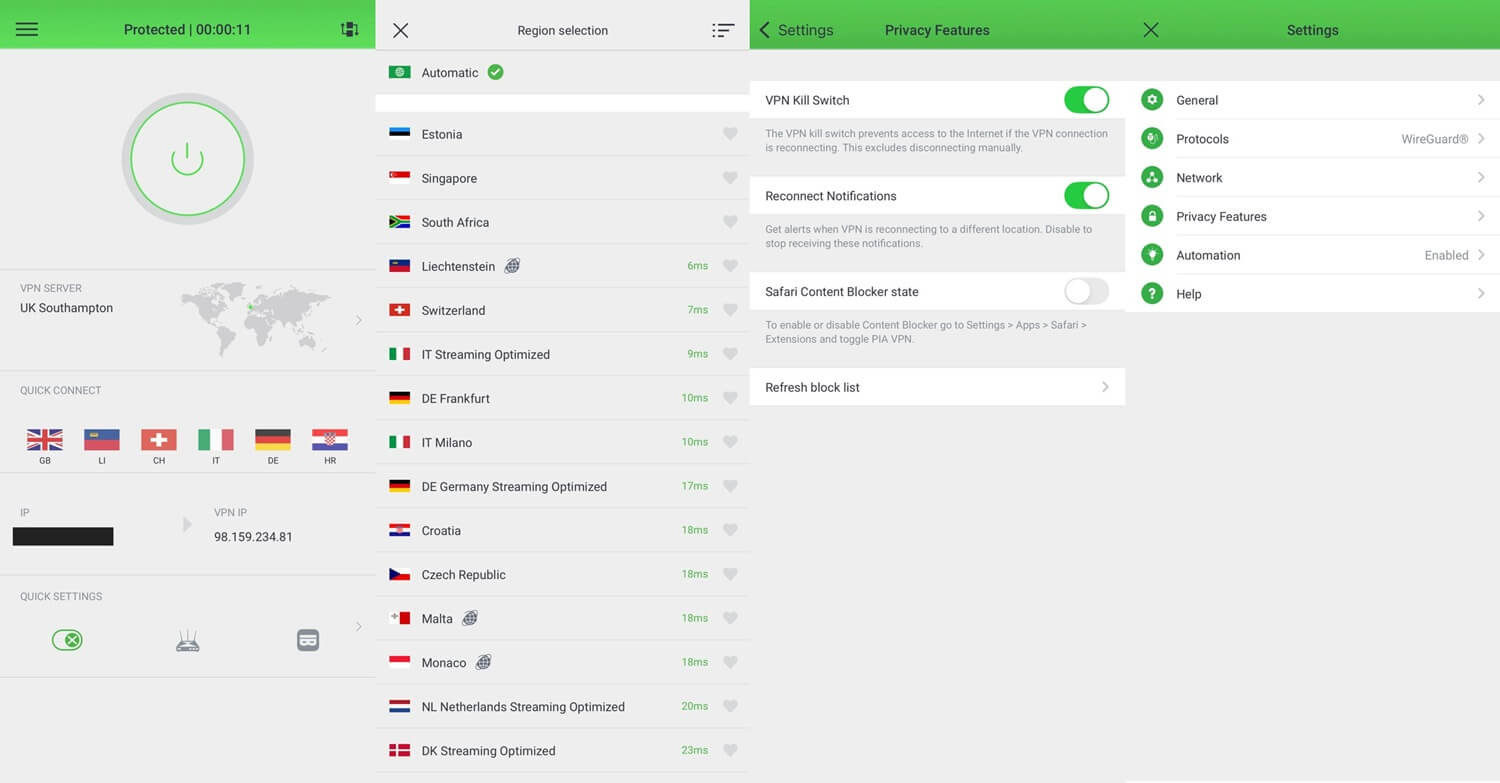
PIA costs the least and is the slowest. Its 28.5% average speed loss on WireGuard was the highest we recorded on the phone, and its Japanese server dropped to 29.1 Mbps. British servers cost it 14.4% of its speed, compared to 8.4% for NordVPN. It unblocked only 6 of the 9 streaming platforms, though Netflix US worked on every attempt. PIA does automation better than the other four. Rules let the app connect by itself on an untrusted network and stay off on home WiFi. Most phone users want that, and it’s rare.
MACE filters ads and trackers, and Shadowsocks obfuscation helps on networks that filter VPN traffic, though China is a harder case, which our China VPN guide covers. The court record makes the privacy case. US proceedings have demanded its logs and come away with nothing, and three Deloitte audits have followed. Connections have no cap, coverage spans 91 countries, and a dedicated IP address is available cheaply. At $2.19 a month, with 7 days free on Android, it undercuts NordVPN, Proton VPN, ExpressVPN, and Surfshark.
How We Tested These Android VPN Apps
Every figure in our October tests came off the phone itself.
- Device: Galaxy S26 Ultra on Android 16, over home WiFi
- Baseline: 54.7 Mbps down, 16.5 Mbps up, 37 ms ping with no VPN
- Servers: UK, US, and Japan, with every VPN on WireGuard, NordLynx, or Lightway
- Battery: a 1440p video played for 20 minutes at full brightness on a UK server, with advanced features disabled
- Streaming: the same 9 platforms used in our desktop testing
One limit applies to the battery figures. Android reports charge in whole percentage points, so a 20-minute test can’t separate a VPN that costs nothing from one that costs a fraction of a percent. ExpressVPN matching the no-VPN baseline means its drain stayed below what the meter can show. It isn’t free of cost.
Streaming results matched the desktop round exactly: the Android apps unblocked the same platforms as their desktop versions, so nothing is lost by watching on the phone.
Why Use a VPN on an Android Phone or Tablet?
- Public WiFi. Cafe and airport networks are open by design, and a phone joins them automatically. A VPN encrypts the connection before another device on the network can read it.
- App tracking. Android apps read far more than a browser does. Surfshark’s GPS Override addresses the location side, because an IP change alone doesn’t stop an app reading GPS.
- Streaming abroad. Catalogs differ by country, and changing Netflix region works the same on a phone as on a laptop. The five VPNs unblocked between 6 and 9 of the 9 streaming platforms we tried.
- Gaming and latency. Some ISPs slow down gaming traffic, and a VPN hides what the traffic is. ExpressVPN’s 43 ms to London was the lowest ping we recorded on the phone, low enough for mobile games such as PUBG Mobile.
Android VPN Apps to Avoid
Google Play lists far more VPN apps than the App Store, and the vetting is looser. Free VPNs there tend to fund themselves in ways that undo the purpose of installing one, such as logging and selling your data. A simple test: if the app has no paid tier, the funding comes from advertising or data.
- Turbo VPN. Heavy logging, slow speeds, tight data limits.
- Hola VPN. Its network borrows idle connections, meaning a stranger’s browsing can be traced back to your handset.
- Betternet. Logging, in-app adverts, and a daily data cap.
- Urban VPN. Slow, inconsistent, and no security features to speak of.
How to Set Up a VPN on Android
Three steps, using NordVPN as the example. The others work the same way.
Subscribe and Create an Account
Pick a plan on the VPN’s site and confirm your email. The 2-year plans come with the largest discount, and NordVPN’s Android trial includes 3 days through Google Play, though it requires a card.
Install the App From Google Play
Search Google Play for the VPN you subscribed to and install from there instead of downloading an APK. Sideloaded copies of VPN apps have been tampered with before, and Play at least verifies the publisher.
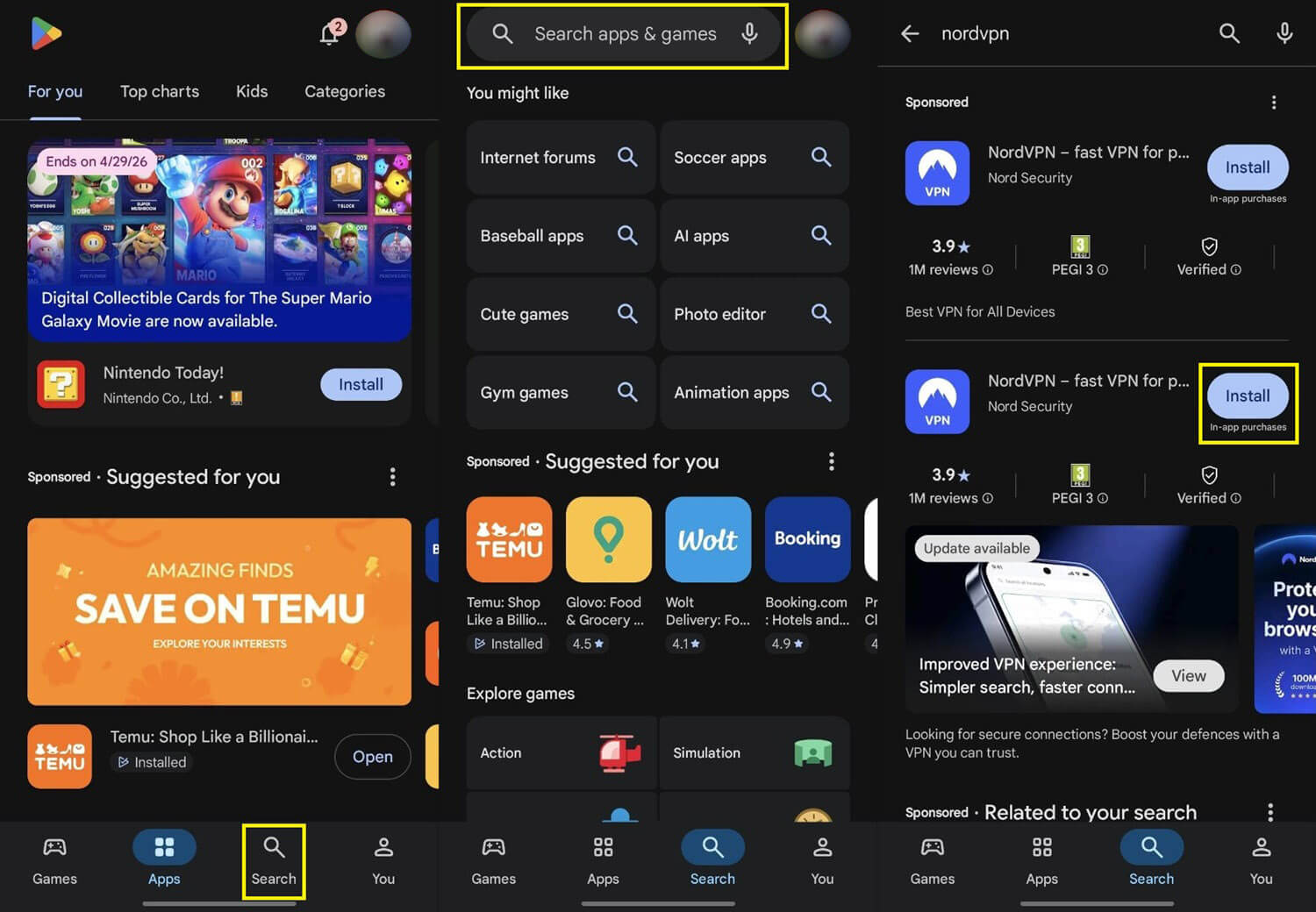
Open it, sign in with the account from step 1, and grant the VPN permission Android requires. That prompt is standard and appears once.
Connect to a Server
Tap a country or let the app choose. A US server covers American catalogs, and none of the five VPNs took longer than three seconds to connect.

Which Android VPN Should You Install
NordVPN for speed. It lost the least speed on the phone, unblocked every streaming platform we tried, and its Tapjacking Protection has no equivalent among the other four. ExpressVPN if the phone spends its day off the charger. It was the only VPN whose battery cost stayed below what the meter can show, and it was second-fastest as well.
Proton VPN for privacy, with Swiss law, an open-source app, and the second-lightest battery result. Surfshark places no cap on devices and does the most about tracking inside apps. It’s also a strong mobile VPN for an Android tablet sharing the same account. PIA costs the least at $2.19 a month, and its automation rules are the best reason to choose it beyond price.
Frequently Asked Questions
Which Android VPN app is the best?
NordVPN. Its Android app loses the least connection speed among major VPNs, unblocks the leading streaming services, and adds Tapjacking Protection against malicious screen overlays.
Does a VPN drain Android battery?
Yes, slightly. A connected VPN adds a small amount of drain during video playback, and lightweight protocols such as WireGuard, NordLynx, and Lightway use less power than OpenVPN.
Is a VPN slower on a phone than a laptop?
Yes, usually. A phone encrypts traffic with less processing power than a computer, so the same VPN subscription loses more speed on Android than its desktop app does.
Do Android VPN apps work on tablets as well?
Yes. NordVPN, Proton VPN, ExpressVPN, Surfshark, and Private Internet Access install on Android tablets from Google Play, and one subscription covers a phone and a tablet.
Is a VPN APK safe to install?
No, not from an unofficial source. Tampered VPN APKs circulate on download sites, while Google Play and the VPN company's own website provide verified copies.
How quickly do Android VPN apps connect?
Within a few seconds. Major Android VPN apps connect in one to three seconds, and NordVPN's Android app connects faster than its Windows version.
Do apps still see my actual location behind a VPN?
Yes, often. Android apps with location permission read the phone's GPS, which a VPN doesn't change. Surfshark's GPS Override changes that, reporting a location that matches the VPN server.