Surfshark is one of the cheapest VPNs from a well-known name, and its feature list is still long. It promises to unblock streaming services abroad, block ads, and cover every device you own on one subscription. That’s an easy offer to say yes to, so it’s fair to ask what the low price leaves out.
I used it the way most people would: streaming shows, browsing on public Wi-Fi, downloading files, and leaving it connected all day on several devices. Most of it went smoothly. Two things deserve a look before you subscribe, though: one in the settings and one in the privacy policy. You’ll find my verdict in the box right under this, with the full results after it.
Surfshark
Surfshark is one of the easiest VPNs to recommend on a budget. It was fast on nearby servers, worked with almost every streaming service I tried, blocks ads on every plan, and covers every device you own. The catches are specific: no port forwarding for torrent seeders, a brief IP record after each session, and no ITVX. Switch the kill switch to Strict mode too, since the default setting leaked when I restarted my PC.
Pros
- Fast on nearby servers
- Unblocks Netflix and BBC iPlayer
- Unlimited devices on every plan
- MultiHop costs little speed
- Low-cost antivirus upgrade
- Strict kill switch mode
- Deloitte-audited no-log policy
Cons
- Keeps IP addresses for 15 minutes
- Slow to connect
- No port forwarding
Surfshark Review: Quick Look
| Starting price | $2.49 per month, $67.23 for 27 months (Starter plan) |
| Renewal | $79 a year on the Starter plan, so $6.58 per month |
| Money-back guarantee | 30 days on every plan |
| Protocols | WireGuard, OpenVPN UDP and TCP, Dausos on macOS |
| No-log policy | Yes, with IP addresses kept for 15 minutes after a session |
| Countries | 100, counted in the app |
| Download speed loss | 9.6% averaged across my three server locations |
| Upload speed loss | 5.9% averaged |
| MultiHop | Yes, custom pairs, at a 2.9% speed cost |
| Streaming | 13 of the 14 streaming services I tried |
| Port forwarding | No |
| Ad and tracker blocking | CleanWeb, 79% on d3ward’s test |
| Simultaneous connections | Unlimited |
| Supported devices | Windows, macOS, Linux, iOS, Android, Fire TV, Apple TV, routers, browsers |
| Customer support | 24/7 live chat, email, help center |
Surfshark Speed Test Results
I tested Surfshark in October on a wired Windows 11 PC in Europe, with a 190.36 Mbps baseline speed. I used Speedtest at three times of day over three days for each server location, on WireGuard, the fastest of the connection methods (protocols) in Surfshark’s app.
| Server | Download | Upload | Ping | Download loss |
| No VPN | 190.36 Mbps | 19.37 Mbps | 10 ms | n/a |
| UK | 186.96 Mbps | 18.93 Mbps | 51 ms | 1.8% |
| US | 170.38 Mbps | 18.23 Mbps | 150 ms | 10.5% |
| Japan | 158.84 Mbps | 17.54 Mbps | 243 ms | 16.6% |
| Average | 172.06 Mbps | 18.23 Mbps | n/a | 9.6% |
The UK result is the best I’ve recorded from any VPN. At 186.96 Mbps, Surfshark lost only 1.8% of my speed, a drop you couldn’t notice while browsing or streaming. The US and Japanese servers lost 10.5% and 16.6%, which is normal for that distance, and even Japan’s 158.84 Mbps is plenty for 4K video.
Upload did better than download, losing 5.9% on average, so video calls and big uploads behave the same as without a VPN. The old reputation for weak Surfshark uploads isn’t something my results support.
WireGuard, OpenVPN and MultiHop Compared
I tested each protocol on the same British server in one session, with the app fully closed before each connection. WireGuard and OpenVPN UDP finished 1.4 Mbps apart, so either one is fine for everyday use. OpenVPN TCP is the outlier. At 87.51 Mbps, it was less than half as fast as the other two.
| Protocol | Download | Upload | Ping | Connection time |
| WireGuard | 186.96 Mbps | 18.93 Mbps | 51 ms | 4 to 5 seconds |
| OpenVPN UDP | 185.56 Mbps | 18.47 Mbps | 64 ms | 4 to 5 seconds |
| MultiHop | 181.59 Mbps | 18.60 Mbps | 58 ms | 10 seconds |
| OpenVPN TCP | 87.51 Mbps | 18.38 Mbps | 82 ms | 4 to 5 seconds |
TCP also increased ping under load, to 149 ms while downloading and 851 ms while uploading. That’s most likely Camouflage Mode, Surfshark’s obfuscation, which makes VPN traffic look like regular web traffic. The app uses it on every TCP connection. Save TCP for networks that block the other protocols.
MultiHop chains two Surfshark servers, which adds a second layer of encryption between you and the sites you visit. My Manchester and Frankfurt pair cost 2.9% of the download speed, a difference you wouldn’t notice.
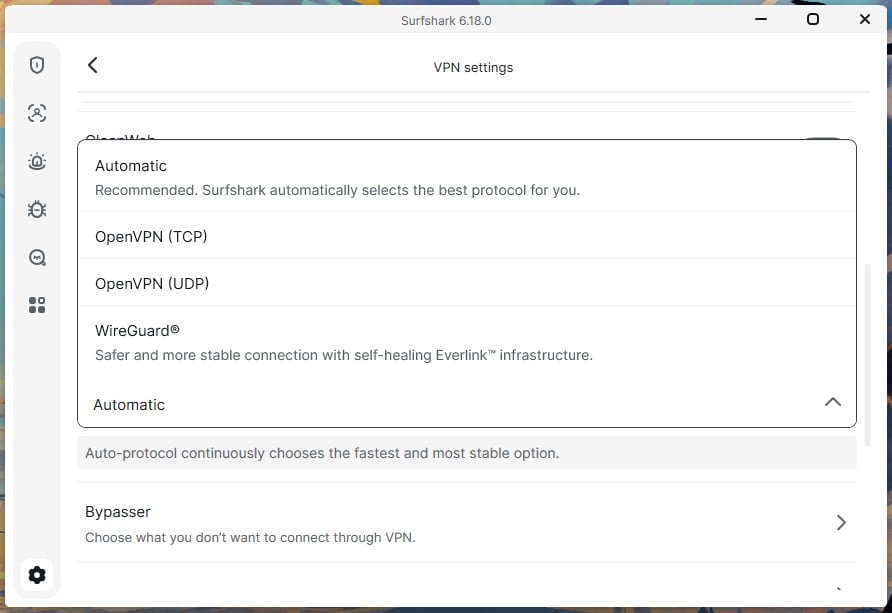
The catch is the wait: it took 10 seconds to connect, compared to four or five seconds on a single server, so connect before a call starts. You can build the pair from the full server list instead of picking a preset combination. NoBorders, which adjusts the connection on networks that restrict VPNs, is on by default, and disabling it made no difference to my speeds.
The same went for Rotating IP, which switches your IP address every so often without dropping the connection, so both can stay enabled.
Surfshark Price and Plans
Surfshark sells three plans, and every one includes the same VPN. The two-year terms come with three extra months, so the first term covers 27 months.
- The Starter plan: $2.49 a month, $67.23 for 27 months, then $79 a year. Covers unlimited devices and includes the VPN and Alternative ID.
- The One plan: $2.79 a month, $75.33 for 27 months, then $99 a year. Adds the antivirus, Alert Breach Monitoring, and Surfshark Search.
- The One+ plan: $4.49 a month, $121.23 for 27 months, then $119 a year. Adds Incogni data broker removal and identity theft coverage.
The step from the Starter plan to the One plan costs about 30 cents a month, and it’s the easiest upgrade to recommend. It adds the antivirus and breach alerts, which would cost far more as separate subscriptions. Annual plans cover 15 months at about $3.40 to $7.50 a month. Monthly plans cost about $16 to $22, so they make sense only for a short trial. A dedicated IP address, one that only you use, costs under $4 a month.
It helps if a bank or office network keeps asking you to verify your login. The full pricing breakdown covers each plan, and current Surfshark coupons lower the starting price through the year. A two-year plan renews for 12 months at a time, and the Starter plan’s $79 a year comes to about $6.60 a month. That’s 2.6 times the first term.
Surfshark’s terms also say it may test different renewal prices, so check the figure on your account page before the first term ends.
Refunds, the Free Trial and Payment
Every plan includes a 30-day money-back guarantee, and refunds cover crypto payments too, which some VPNs exclude. The Surfshark free trial lasts 7 days on iOS and Android, one of the longest on mobile. It requires a payment method, though, so cancel before the week is up if you decide against it. You can pay by card, PayPal, Apple Pay, or cryptocurrency through CoinGate.
Surfshark Security Review
Surfshark includes more security tools than most VPNs at this price. I tested them on the One plan, on app version 6.18.0.
The Kill Switch Works Best in Strict Mode
A kill switch stops your device from going online without the VPN, for example when the connection drops for a moment. Surfshark’s has failed under specific conditions in the past, so I tested it on Windows 11 in three ways, with a continuous ping going. First, I pulled the Ethernet cable mid-session.
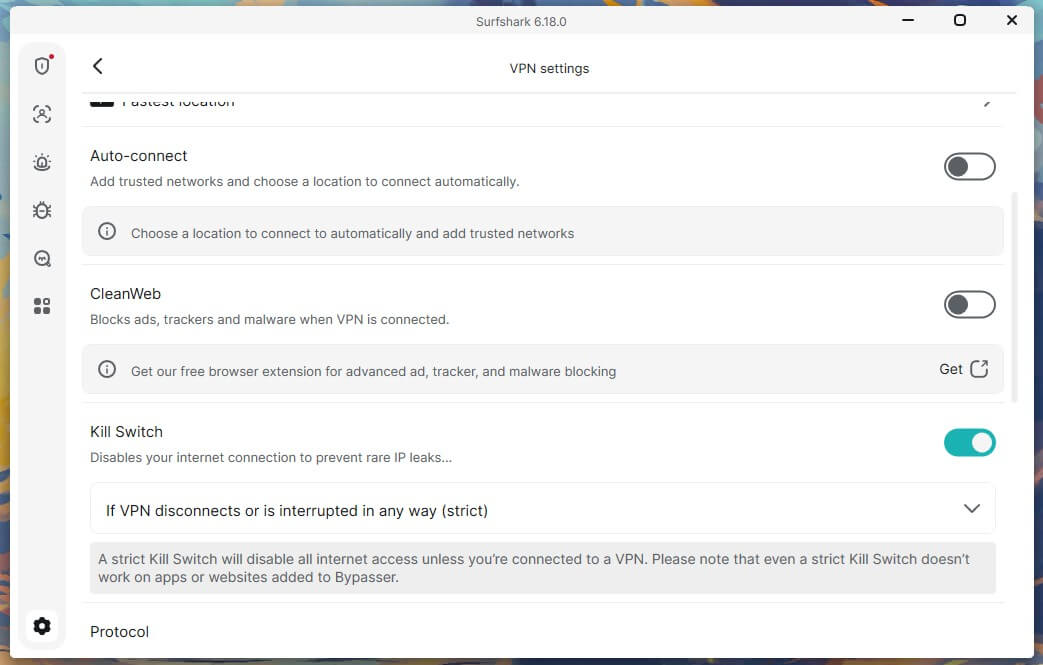
Next, I ended the app process in Task Manager. No packets escaped in either test, so the old weakness is fixed. Restarting the PC went differently. On the default setting, Soft mode, traffic left the computer during startup, before Surfshark connected. For those few seconds, a syncing cloud drive or a download manager could go online with your own IP address.
I’d rather Strict mode were the default, because it blocked the leak by keeping the PC offline until the VPN connected. Enable it in the kill switch settings before your first session.
CleanWeb Scored 79%
CleanWeb blocks ads, trackers, and malware domains through DNS, the system that matches website names to IP addresses. That way, it works across every app on your device instead of one browser. On d3ward’s blocklist test, it blocked 107 of 135 domains, or 79%. That’s a decent score, though mid-range among the VPN ad blockers I’ve tested, where the best scored 96%, so expect a few ads on busy news sites.
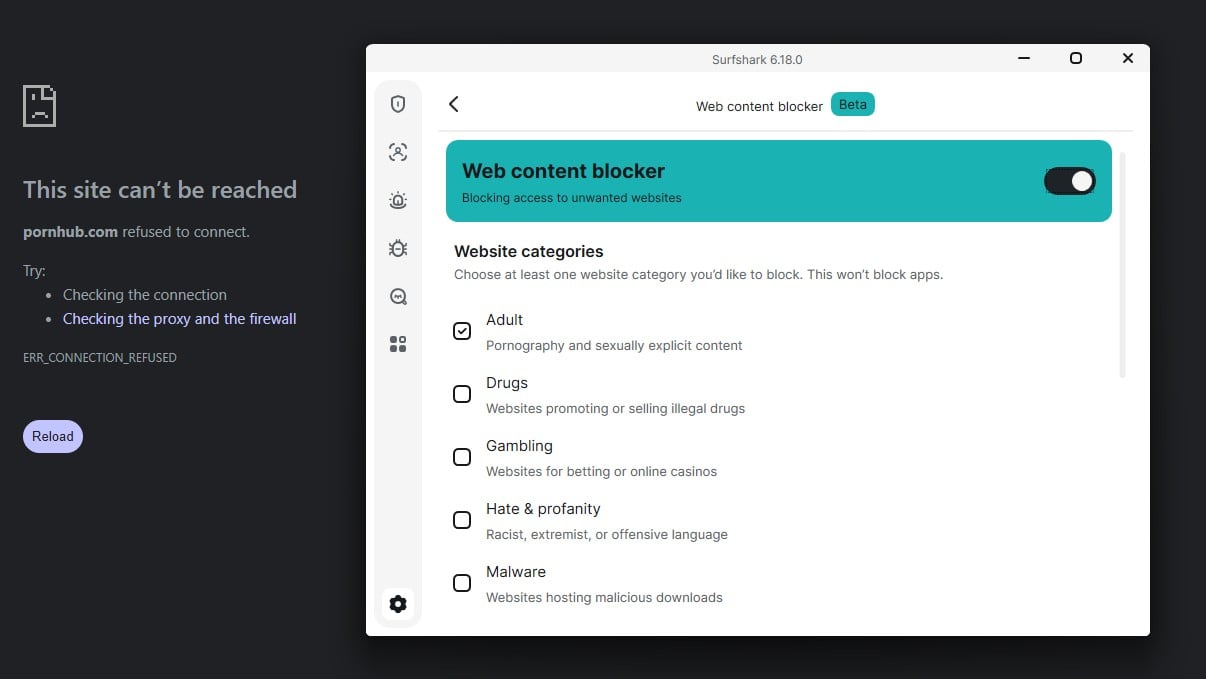
The Web Content Blocker, in the same settings panel, blocks whole categories of sites, including adult sites, gambling, weapons, and drugs. I tested the adult and gambling categories, and they were blocked on the first attempt, so it works as a basic parental control on a family computer without a second subscription.
CleanWeb has no counter, though, so nothing in the app shows what it blocked. If you want proof it’s working, open d3ward’s ad block test in your browser and check the score yourself.
Bypasser, Alternative ID and Alert
Bypasser is Surfshark’s split tunneling, so you can leave certain apps or websites outside the VPN. On Windows, it covers apps and individual websites, while macOS covers apps only. It’s handy when a banking site flags VPN logins but you want everything else protected. Alternative ID creates a full persona, with a name, date of birth, country, and a forwarding email address.
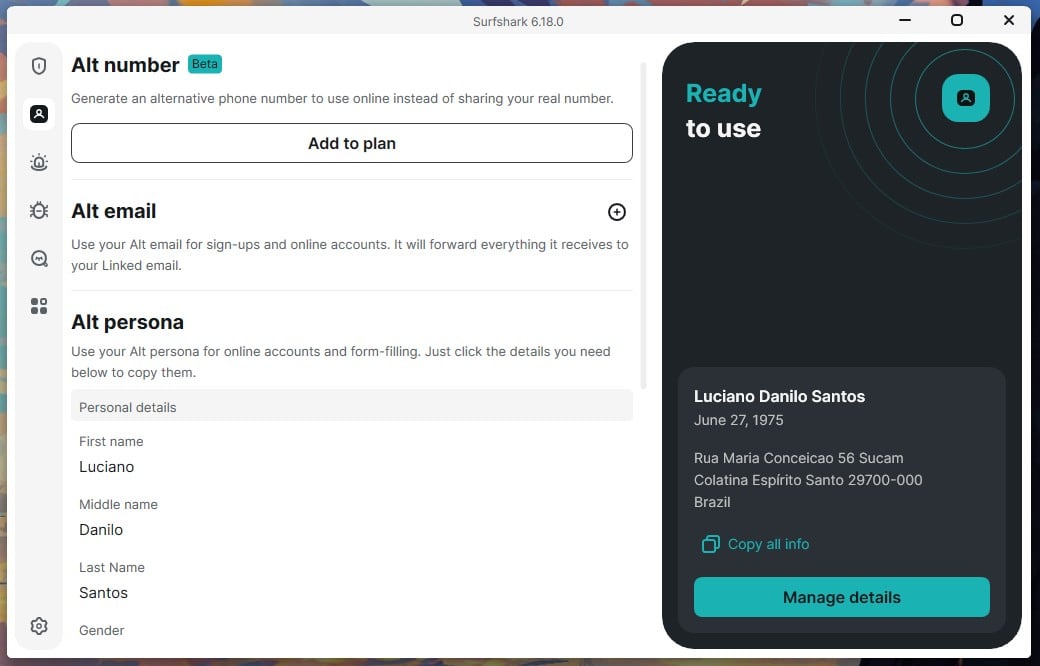
It’s meant for sites that require personal details you’d rather keep to yourself, like a store’s loyalty signup, and it comes with every plan, including the Starter plan. Keep in mind that the forwarding email puts Surfshark between you and every message sent to that alias. Use it for signups and newsletters, and keep important accounts on your own email.
Alert checks a registered email address against breach databases and reports what was exposed in each leak. It only reports, though, without changing passwords or requesting removals, so you’ll have to act on each alert yourself.
Antivirus and Scam Text Protection
The antivirus on the One and One+ plans is a real-time scanner with a threat database that updates throughout the day, plus web protection that blocks malicious downloads. It has no behavioral analysis for brand-new threats, so it’s a lighter tool than a dedicated antivirus.
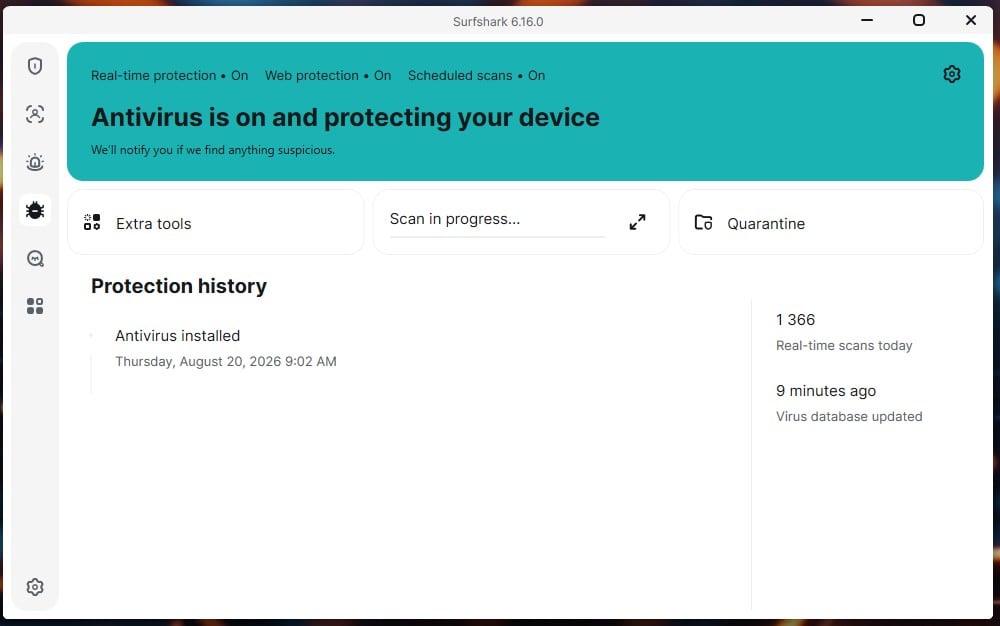
My Surfshark Antivirus review covers it in detail. Scam Text Protection on iOS and Android scans incoming messages and moves suspected scams to spam. It works, but it can be overcautious.
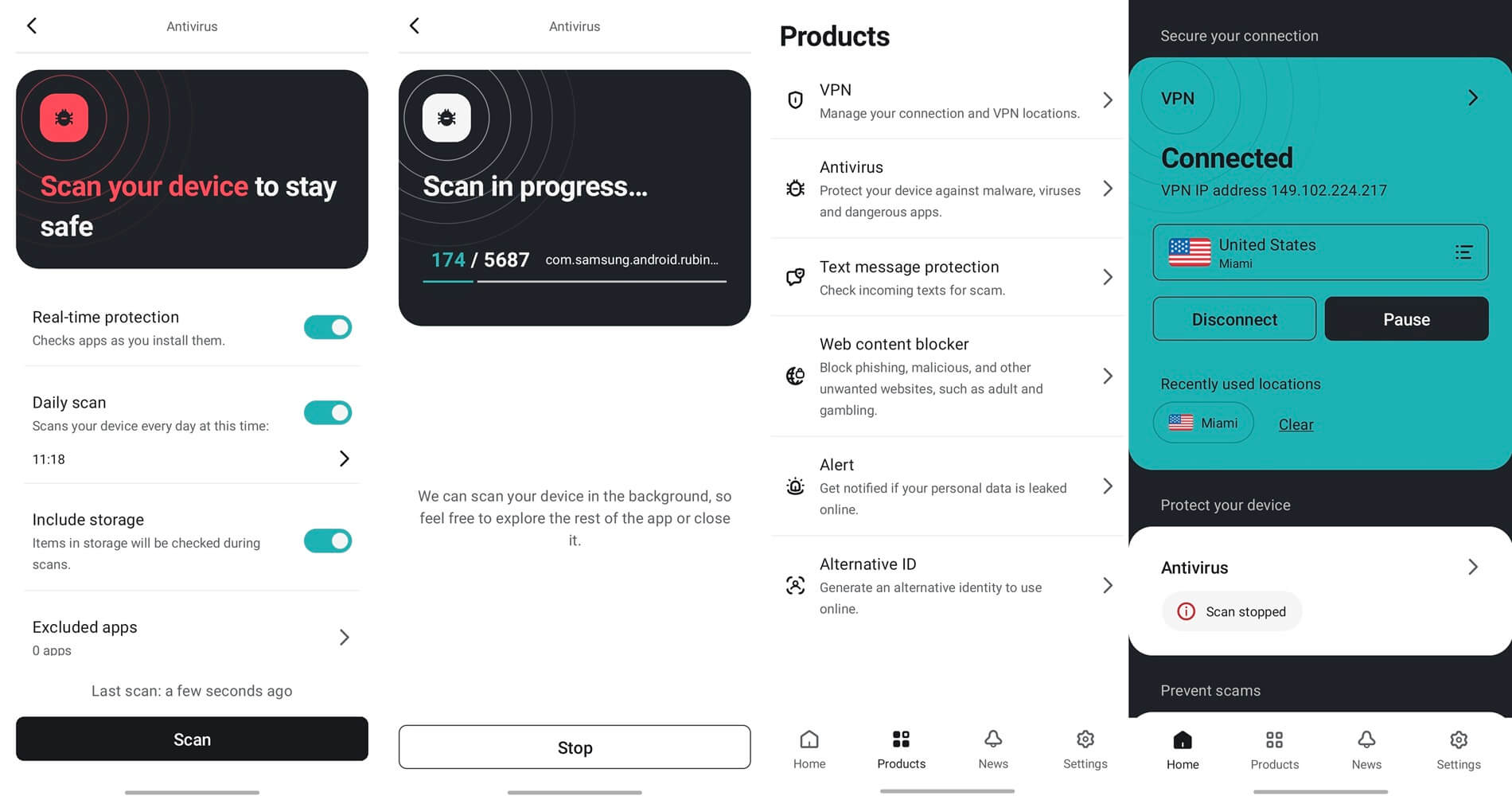
During testing, it flagged a bill reminder from a telecom operator as a scam, so check your spam folder for the first few weeks.
Surfshark Review: IP and DNS Leak Test Results
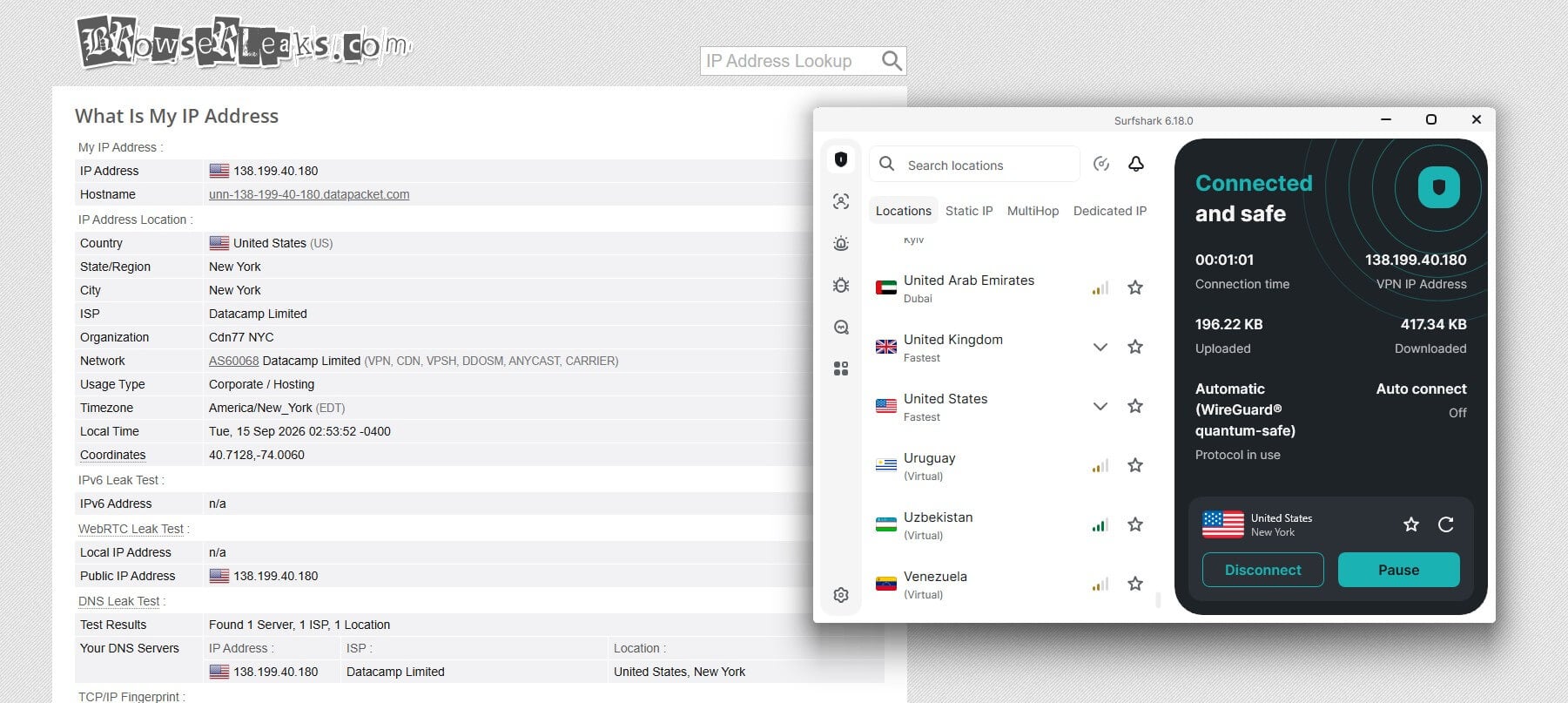
These checks look for your own IP address or DNS requests showing up outside the VPN. My leak checks used ipleak.net and browserleaks.com on the British, American, and Japanese servers, with the browser cache deleted between sessions. Neither my IP address nor my DNS requests leaked, and WebRTC exposed nothing. The IPv6 test came back clean as well.
The browser extension works differently. It’s a proxy, which protects traffic in that browser only, so a torrent client open next to it stays unprotected. Use the desktop app for downloads and other apps.
Surfshark Privacy Review: What It Keeps
Surfshark operates from the Netherlands, a member of the Nine Eyes intelligence-sharing alliance. That means a Dutch court can order the company to hand over what it stores. So the contents of the privacy policy deserve a close read. It says Surfshark keeps no browsing history, session information, bandwidth records, timestamps, or network traffic. It does keep your email address and payment details.
It also keeps your IP address for up to 15 minutes after a session ends, to prevent account abuse. That record has no timestamps or browsing data attached, so it can’t show what you did online. Deloitte’s 2025 audit verified the 15-minute deletion window, and Surfshark publishes a transparency report listing the legal requests it receives and what it hands over. For zero IP retention, look for a VPN with a stricter policy.
Audits and Verification
Surfshark’s audit record is long for a VPN this cheap. Cure53 examined the browser extensions in 2018 and the server network in 2021, and Deloitte audited the no-log policy in 2023 and 2025. SecuRing tested the servers in early 2026, and the mobile apps received a MASA certificate, an app security standard, in late 2023.
Deloitte’s audits are the strongest part of that record, because verifying a specific deletion window is harder than checking a general no-logging claim.
Surfshark Review: Streaming and Torrenting
Surfshark unblocked 13 of the 14 streaming services I tried. It couldn’t unblock ITVX on any of several British servers, though BBC iPlayer and Channel 4 worked, so only ITVX viewers should look elsewhere.
| Netflix US | BBC iPlayer | ITVX | Hulu | Prime Video |
| Unblocked | Unblocked | Blocked | Unblocked | Unblocked |
BBC iPlayer played in 1080p on the London server, and Netflix US, Canada, and Japan loaded on the first attempt. It also unblocked Netflix Ukraine, a library several other VPNs I tried couldn’t.
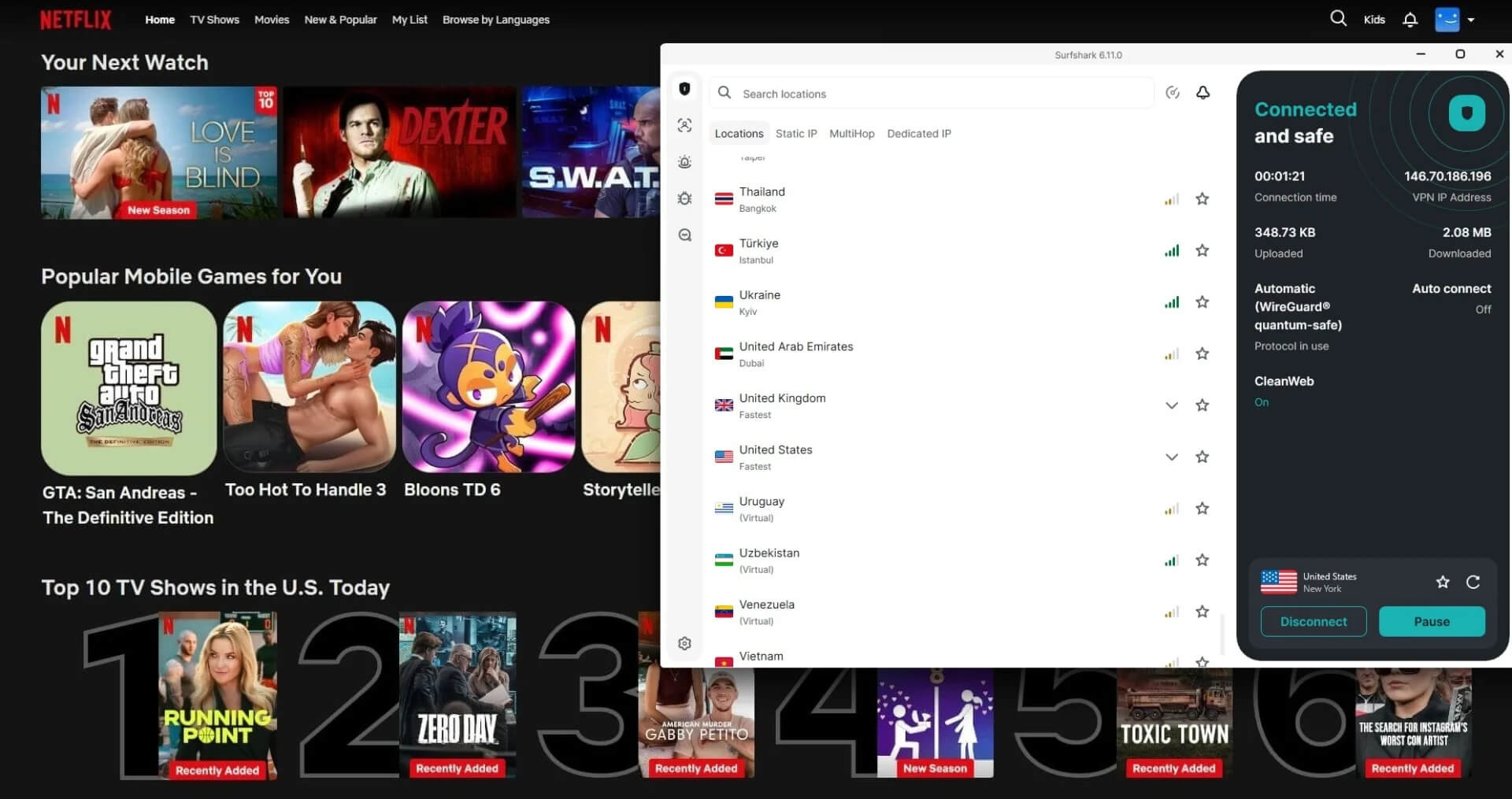
On my Fire TV Stick 4K Plus, Surfshark lost 5.8% of its speed, which won’t affect 4K streaming. There are no separate streaming servers to hunt for, because any server in a country unblocks that country’s services. Surfshark has no Smart DNS, though, a feature that changes the location a TV reports without a VPN app. A Samsung or LG TV without a VPN app requires a router setup or a connection shared from a computer.
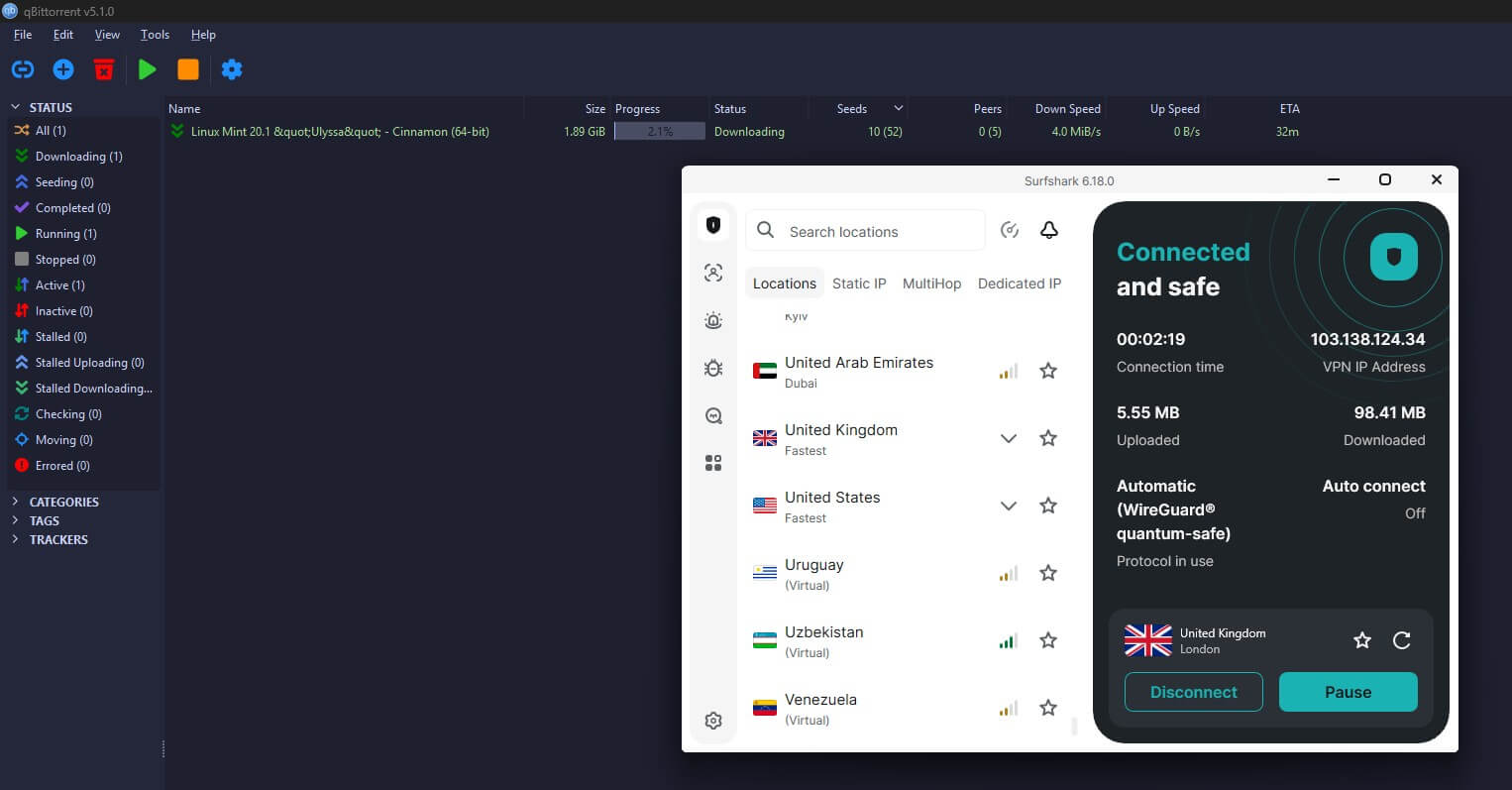
For torrenting, every server accepts P2P traffic, and speeds stayed high enough that the VPN won’t slow a download down. Port forwarding is missing, though. Private trackers, torrent sites you join by invitation, rank members by how much they share back, and the incoming connections port forwarding allows help with that. Proton VPN and PIA include it, if seeding is your priority.
Is Surfshark Good for Gaming?
Yes, on nearby servers. In Xbox Cloud Gaming on an Austrian server, the stream reported a 63 ms ping, the best result I’ve had in that test. I didn’t notice extra input delay either. Lower ping means quicker reactions in games and calls. The UK server’s 51 ms is comfortable for online matches on European servers, while Japan’s 243 ms from my PC in Europe is too high for competitive play. For online games, pick a server close to the game’s own servers.
Surfshark Review: Servers and Locations
The app lists 100 countries, and every server is RAM-only, so a restart wipes it. Coverage is strong in Europe, North America, and Asia Pacific, but thinner in Africa and the Middle East, so check that your country is listed before subscribing.
- Virtual locations: Some IP addresses belong to the listed country while the server is in a neighboring one. The app marks these locations.
- Everlink: When a server fails or goes down for maintenance, this feature moves your connection without dropping it. It works automatically on WireGuard, and I saw it reconnect twice, in under three seconds each time.
- Static IP addresses: Available in Germany, Singapore, the Netherlands, Switzerland, the UK, and the US. They stay the same between sessions but are shared with other subscribers, and a dedicated IP address is the paid alternative that only you use.
- 100 Gbps servers: Surfshark is testing them in Amsterdam, compared to the 10 Gbps standard on its other servers. It calls this a small test deployment, so you can’t connect to one yet.
Does Surfshark Work in Censored Countries?
I haven’t tested Surfshark in China. Its main tool is Camouflage Mode, which disguises VPN traffic as ordinary HTTPS on OpenVPN connections. NoBorders works alongside it, offering a curated server list when it detects a restricted network. My speed tests put that disguised TCP connection at 87.51 Mbps, enough for browsing and messaging.
The Surfshark in China guide covers what works there. On a filtered work connection and on hotel Wi-Fi, NoBorders unblocked every site I tried without a single setting change.
Surfshark App Review: Ease of Use
The apps look the same on every device, so what you learn on Windows applies to macOS, Android, and iOS. Connections took 4 to 5 seconds on WireGuard and OpenVPN, slower than the quickest VPNs I’ve used, and MultiHop’s 10 seconds was the longest wait of any setting. The sidebar also shows more icons than your plan uses.
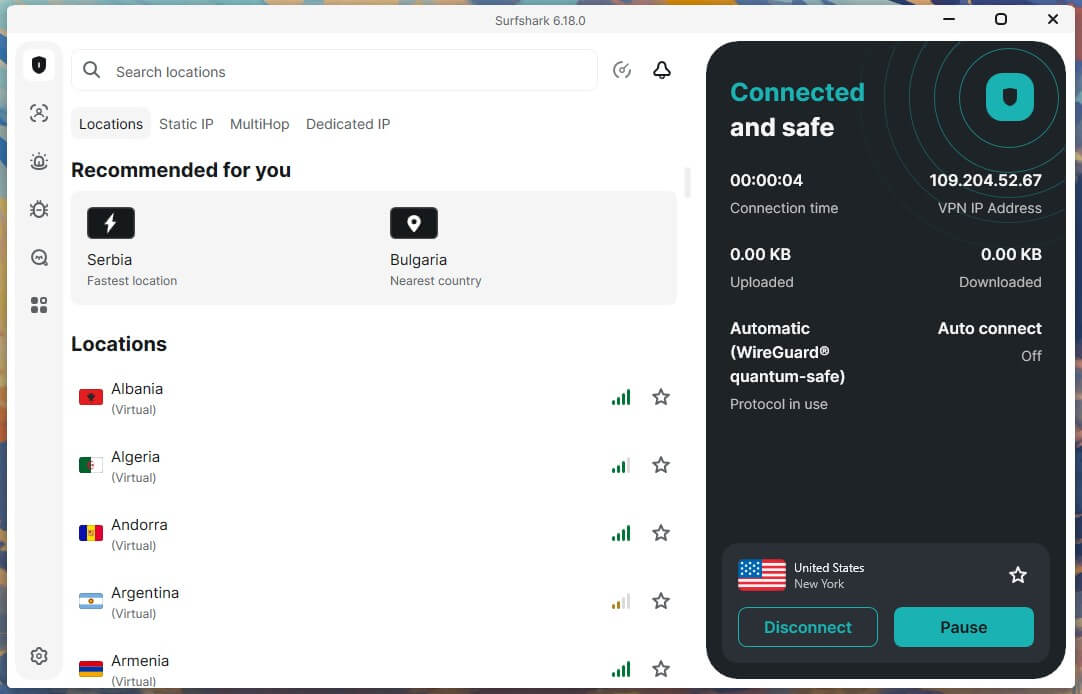
Several of those icons open upgrade prompts instead of features, so it takes a few minutes to learn which ones to ignore. With NordVPN and ExpressVPN installed and idle on the same PC, Surfshark detected them and showed a warning, then connected anyway on most attempts. If it doesn’t, quit the other VPN app and try again.
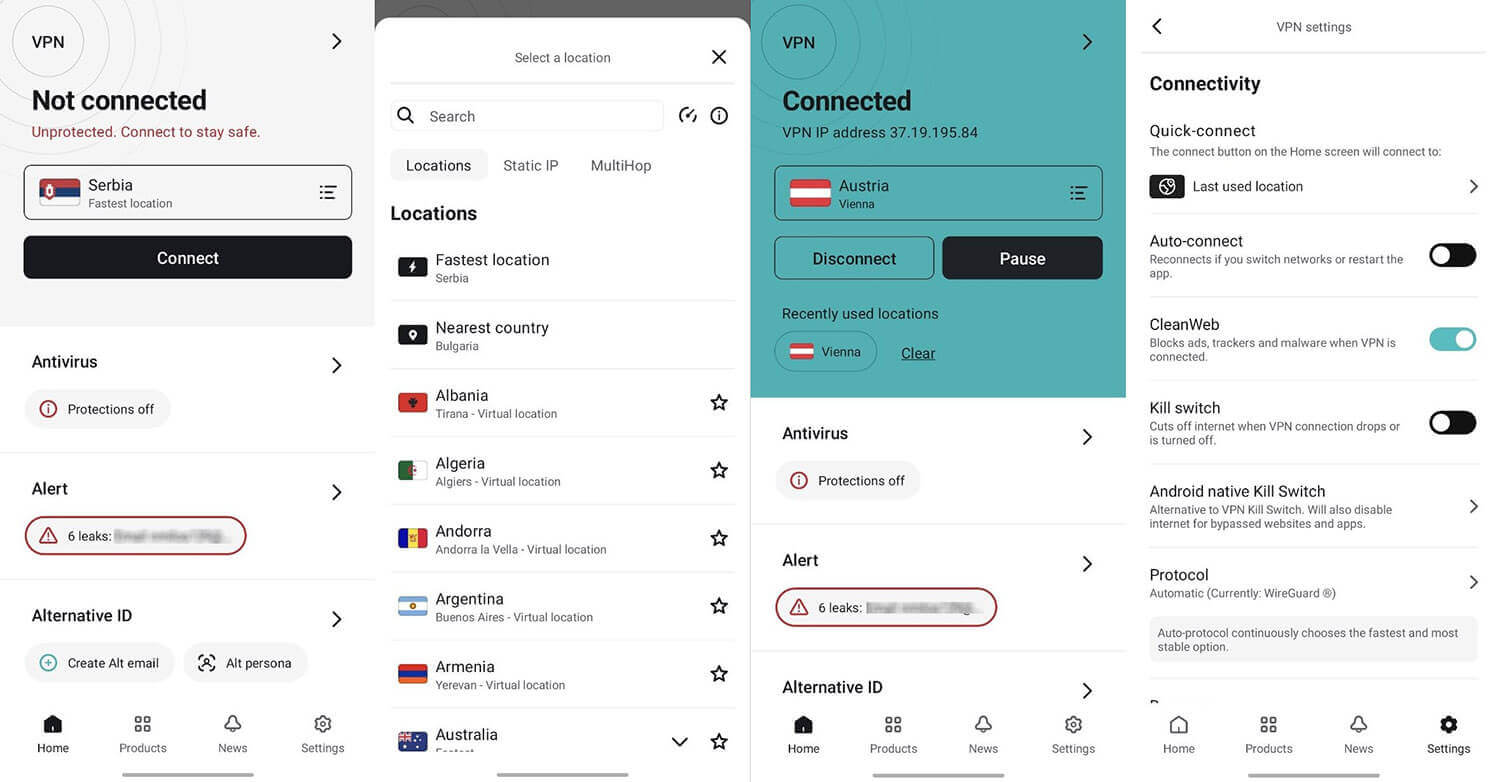
Unlimited simultaneous connections apply on every plan. I connected nine devices at once for 72 hours with no slowdowns and no dropped sessions, so it’s an easy choice for a full household. The Fire TV app covers TVs too, including the newer Vega OS sticks.
Compatibility
- Windows, macOS and Linux computers
- iOS and Android phones and tablets
- Fire TV, Apple TV, Android TV and Nvidia Shield
- Routers, game consoles and Raspberry Pi
- Chrome, Firefox, Edge and Brave extensions
Surfshark Customer Support Review
Live chat opens with a bot, and a human agent took over within seconds every time I asked. The agents answered product questions properly instead of reading from a script. The problem is finding the chat.
It’s at the bottom of the Help Center, so a new subscriber with a connection problem has to hunt for it. Bookmark that page after you sign up. The knowledge base itself is thorough, and searches returned the right article for three of my four questions.
Surfshark Review: Conclusion
So what does the low price leave out? For most people, very little. Surfshark was fast on nearby servers and worked with nearly every streaming service, including BBC iPlayer and Netflix in four countries. Its cheapest plan also blocks ads and trackers, with no limit on devices.
The missing pieces affect two groups: seeders on private trackers, who won’t have port forwarding, and privacy purists, who may object to the 15-minute IP record. Surfshark also couldn’t unblock ITVX, and the price more than doubles at renewal.
- Get Surfshark if you want strong streaming at a low price, ad blocking on every plan, or antivirus and breach alerts for about 30 cents more a month. Every device in a big household is covered too.
- Skip Surfshark if you seed on private trackers, want a VPN that keeps no IP records, or watch ITVX often.
The Surfshark alternatives guide covers the other candidates, and the VPN and antivirus bundles page compares security suites. If you do choose Surfshark, set the kill switch to Strict mode first, since it closes the only leak I found.
Frequently Asked Questions
Is Surfshark worth it?
Yes, especially for streamers on a budget. Surfshark unblocks Netflix, Hulu, and BBC iPlayer, blocks ads on every plan, and costs little, though it renews at a much higher price.
Is Surfshark safe?
Yes. Surfshark uses RAM-only servers, blocks IP and DNS leaks, and has a Strict kill switch mode that keeps a computer offline until the VPN connects. Deloitte has audited its no-log policy.
Does Surfshark keep logs?
No browsing logs. Surfshark stores only account details, such as an email address and payment information, plus the connecting IP address for a short time, a window Deloitte verified.
Does Surfshark work with Netflix?
Yes. Surfshark unblocks Netflix in the US, Canada, Japan, and Ukraine. Any server in those countries works, since Surfshark has no dedicated streaming category.
Is Surfshark good for gaming?
Yes, for most players. Nearby servers add little ping, and cloud gaming stays responsive. Still, distant servers such as Japan add too much delay for competitive play.
How many devices does Surfshark cover?
Unlimited, on every plan, including the Starter plan. One subscription covers phones, computers, smart TVs, and routers across a household, with no cap on simultaneous connections.
Is Surfshark good for torrenting?
Yes, for most users. Surfshark allows P2P on all its servers. However, it offers no port forwarding, which limits seeding on private trackers that reward a high upload ratio.
Does Surfshark have a free trial?
Yes, on mobile. The iOS and Android apps include a free trial that requires a payment method, and every plan comes with a money-back guarantee.