Surfshark’s main draw is its device policy: a subscription has no limit on phones, laptops, and TVs, so a whole household can share it. Still, paying for a year or two up front is a big decision. Most people would rather see it on their own Wi-Fi first.
There’s an official way to do that. It requires a plan choice and payment details before day one, and canceling works differently depending on where you sign up. Here’s how to start it and stop it without a charge.
Surfshark Free Trial: How to Start It in 2026
- Open Surfshark’s free-trial page and choose a 12- or 24-month plan.
- Sign up with your email, Google, or Apple, and add a payment method. Nothing is charged at sign-up.
- Install Surfshark and sign in on up to three devices.
- To end the trial, cancel renewal under Subscription in your Surfshark account before day seven.
Does Surfshark Have a Free Version?
No. Surfshark describes itself as a paid VPN service in its App Store listing, and every app, from the browser extension to the TV versions, requires an active subscription. A few Surfshark tools cost nothing, though.
The Data Leak Checker on its website shows whether your email address appeared in known breaches, with no account required. Subscribers can also earn free months through Refer and Earn, which adds time to your account and your friend’s when they sign up.
For the VPN itself, the free options are the 7-day trial and the refund window that follows it. Surfshark’s trial is one of several VPN free trials.
How the Surfshark Free Trial Works
Surfshark moved its trial to its own website in May 2025. Until then, only Android, iPhone, and Mac users could start one, through the app stores. Now new customers sign up on surfshark.com, and the trial works in every Surfshark app, from Windows and Linux to TVs and the browser extension.
The trial comes with a few conditions:
- Plans: it’s limited to 12- and 24-month subscriptions, on the Starter, One, or One+ plan. The monthly plan has no trial.
- Payment details: Surfshark takes a card, PayPal, or Apple Pay at sign-up to confirm you’re a first-time customer. The first charge comes when the seven days end.
- Devices: up to three during the trial. After the first payment, the allowance becomes unlimited, one reason Surfshark ranks among our VPNs for multiple devices.
- Account settings: Surfshark’s terms lock the account email and two-factor authentication settings until the trial ends.
The trial unlocks every VPN feature, so it behaves exactly like a paid account on those three devices.
Free Trial vs. 30-Day Money-Back Guarantee
Surfshark advertises the trial and its refund window together as 37 risk-free days. The 30-day guarantee begins with the first charge on day seven, and each option has its own rules:
| 7-day free trial | 30-day money-back guarantee | |
| Paid at sign-up | Nothing | The full plan price |
| Plans covered | 12 and 24 months | Every plan, including monthly |
| Devices | Up to 3 | Unlimited |
| Who qualifies | New customers only | Your first purchase only |
| How to stop paying | Cancel renewal before day 7 | Request a refund within 30 days |
For a quick look on a phone and a laptop, the trial is enough. The guarantee leaves more time and no device cap, but the money leaves your account first.
Surfshark Trial on Android, iPhone, and Mac
Google Play and the App Store still offer their own version. When we checked, Surfshark’s Android and iPhone apps both offered a seven-day trial, with the first charge going through your Google or Apple account when it ends. The App Store listing advertises the same trial for iPad and Mac.
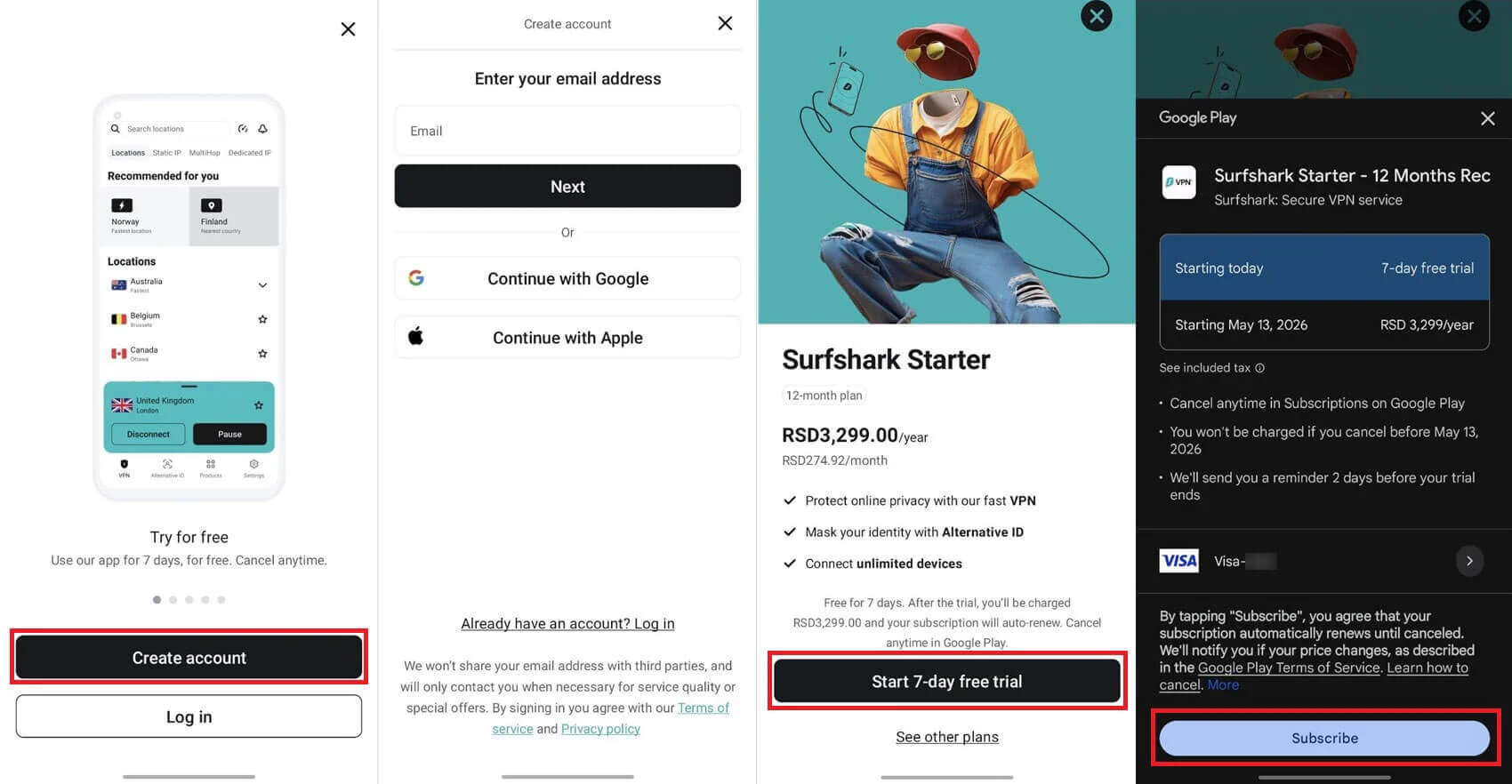
These store trials follow Apple’s and Google’s rules. You manage them in the store, and refunds for App Store purchases come from Apple. For Google Play purchases, Google processes refund requests made within 48 hours, and Surfshark’s support team deals with later ones.
A trial started in either store still works on your other devices, including Windows, once you sign in with the same Surfshark account. Several free VPNs for Android skip the trial and the payment details altogether.
How to Cancel the Surfshark Free Trial
Where you signed up decides where you cancel:
- Surfshark website: log in at surfshark.com, click your email address in the top-right corner, and open Subscription. On the Payments tab, click Cancel renewal and confirm.
- iPhone or iPad: open Settings, tap your name, go to Subscriptions, and choose Surfshark. Tap Cancel Subscription. On a Mac, the same option appears under your name in the App Store.
- Android: in the Play Store, open your profile menu and choose Payments & subscriptions. Under Subscriptions, pick Surfshark and use the Cancel subscription button.
Canceling early doesn’t cut you off. In our test, Surfshark kept working after the cancellation and the trial simply expired on day seven, so there’s no reason to wait until the last day. Deleting the app, on the other hand, doesn’t end the subscription.
Apple requires cancellation at least 24 hours before a trial ends, so day six is the safe deadline everywhere. Play Store trials also come with a reminder email from Google before the first charge.
Refunds After the Trial Ends
Past the cancellation deadline? The first payment remains refundable for 30 days under Surfshark’s money-back guarantee. Refunds go through Surfshark’s live chat. When I requested one, a support agent approved it right away, and the money arrived the same day.
A few purchases fall outside the guarantee:
- Renewals and any second refund, since the policy covers your first purchase only
- Add-ons such as a dedicated IP address or Alternative ID
- Prepaid cards and gift cards, which Surfshark doesn’t refund
- App Store purchases, which go through Apple’s refund page instead
Our guide to canceling Surfshark walks through the refund chat step by step.
Why Free Surfshark Premium Accounts Are a Bad Idea
Lists of free Surfshark logins and “premium account” generators appear in searches for a free version. Surfshark’s terms forbid selling or trading accounts, and the owner remains responsible for all activity on one.
Logins shared this way are often stolen through credential stuffing. Attackers try passwords from earlier data breaches against VPN accounts, and the owner can lock you out at any moment. Cracked Surfshark apps are riskier still.
Surfshark warns that modified installers can hide malware, and its servers won’t connect an account without an active subscription anyway. A reputable free VPN with a data cap is a safer choice than a borrowed login.
What to Test During the Seven Days
A week is enough to see whether Surfshark fits your routine, and we’d start with these checks:
- Streaming: in our tests, Surfshark’s apps worked with Hulu, Peacock, BBC iPlayer, and Prime Video without a browser extension.
- Speed: it barely slowed our connection on nearby UK servers. Compare a nearby server with one in the country whose services you watch.
- Connection times: Surfshark occasionally took longer to connect than other VPNs we use, so test it on the networks you rely on most.
- CleanWeb: its blocker removes ads, trackers, and malicious sites, and the browser extension adds cookie pop-up blocking.
- Split tunneling: banking apps or local websites can connect outside the VPN while other traffic remains protected.
- Dynamic MultiHop: you pick both countries for a two-server connection, Surfshark’s take on double VPN.
- NoBorders: on networks that restrict VPNs, it detects the problem and recommends servers that work, which helps in countries such as China.
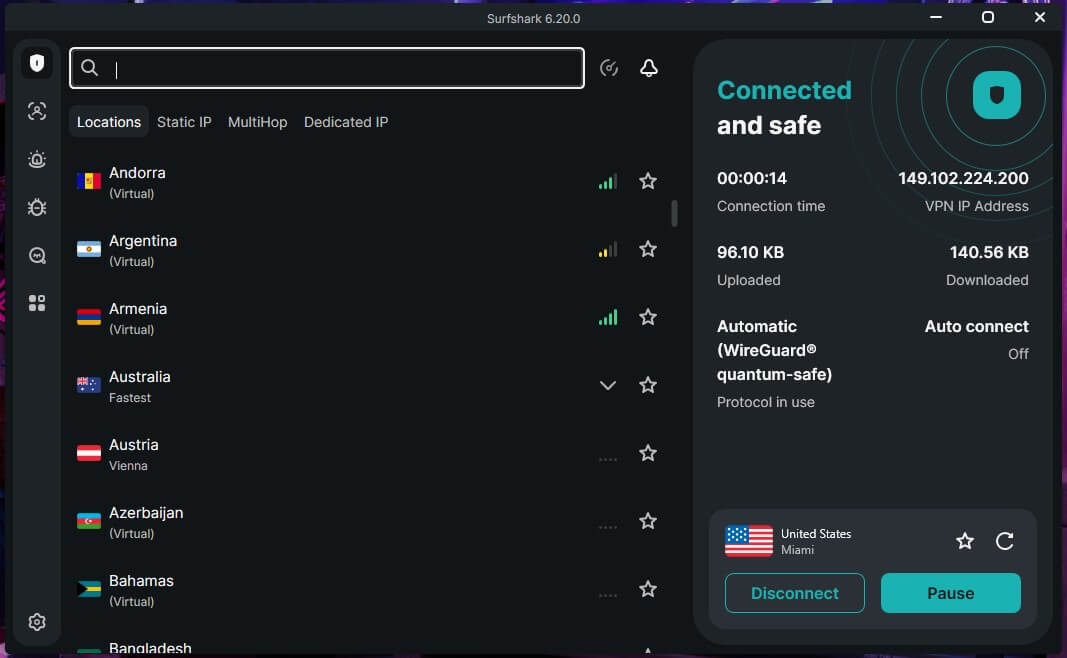
The trial includes Surfshark’s full network of more than 4,500 servers in 100 countries.
Verdict
Surfshark’s free trial is genuine, but it’s a paid subscription with a delayed first charge. You choose a long plan, add a payment method, and the trial converts on day seven unless you cancel. For a full month without a device cap, the 30-day money-back guarantee is the better fit, and Surfshark refunded us quickly through live chat.
If you’re unsure, cancel well before day seven, as Surfshark keeps working until the trial ends anyway. Website trials are canceled in your Surfshark account, and app store trials in Google Play or Apple’s settings.
If Surfshark isn’t the right fit, our list of Surfshark alternatives covers VPNs with trials or free tiers of their own.
Frequently Asked Questions
Does Surfshark offer a free trial in the United States?
Yes. New customers in the US can start Surfshark's 7-day trial on its website with a one- or two-year plan. The app stores offer their own trials too.
Is the Surfshark free trial 30 days?
No. Surfshark's free trial is seven days long. The 30-day figure comes from its money-back guarantee, a separate refund window that opens when the trial converts into a paid plan.
Does Surfshark have a free plan?
No. Surfshark sells only paid subscriptions. New customers can try it with a 7-day trial, and a few web tools, such as the Data Leak Checker, cost nothing.
Can the Surfshark free trial be used on Windows?
Yes. A trial bought on Surfshark's website works in the Windows app and in every other Surfshark app, although only three devices can share it before the first payment.
Does the Surfshark free trial require a credit card?
Yes, or PayPal or Apple Pay instead. Surfshark takes payment details to confirm a first-time customer but charges nothing until the seven days end.
Are free Surfshark premium accounts safe?
No. Shared Surfshark logins usually come from hacked accounts, break Surfshark's terms, and can stop working at any time. Cracked Surfshark apps can also contain malware.