Every device that goes online has an IP address, and websites read it as soon as you connect. It tells them roughly where you are and which internet provider you use. A show can disappear from your streaming app when you travel, for example, and a booking site can quote a different price in another country. Even a ban in an online game can follow you to a new account.
Changing your IP address is simple, and some methods are free. The right one depends on what you want the new IP address to do: appear in another country, change your home IP address, or fix a problem on your own network. The quick steps come first, then six methods and when each one makes sense.
Change Your IP Address in Four Steps
- Subscribe to NordVPN, or another VPN with servers where you want to appear.
- Install the app on your phone, computer, or TV, and sign in.
- Connect to a server in the country whose IP address you want.
- Check the result on an IP lookup site such as ipleak.net, which should show the server’s country.
Which Method Changes the IP Websites See?
| Method | Changes the IP websites see | Choose a country | Encrypts traffic | Cost |
| VPN | Yes, for every app | Yes, 100+ countries | Yes | Paid, with limited free plans |
| Proxy | In one browser or app | From a short list | No | Free or paid |
| Tor Browser | In Tor Browser only | No | Yes, in Tor Browser | Free |
| Airplane Mode or another network | Yes | No | No | Free |
| Router restart | Sometimes | No | No | Free |
| Manual IP settings | No, local IP only | No | No | Free |
1. Change Your IP Address With a VPN (Windows, macOS, Android, iOS, Linux, Fire TV, Apple TV)
Advantages
- Encrypts every app’s traffic
- Choose the country websites see
- Hides browsing from your ISP
- Works on phones, computers, and TVs
- Unblocks regional streaming catalogs
Shortcomings
- Full features require a subscription
- Free VPNs limit data or server choice
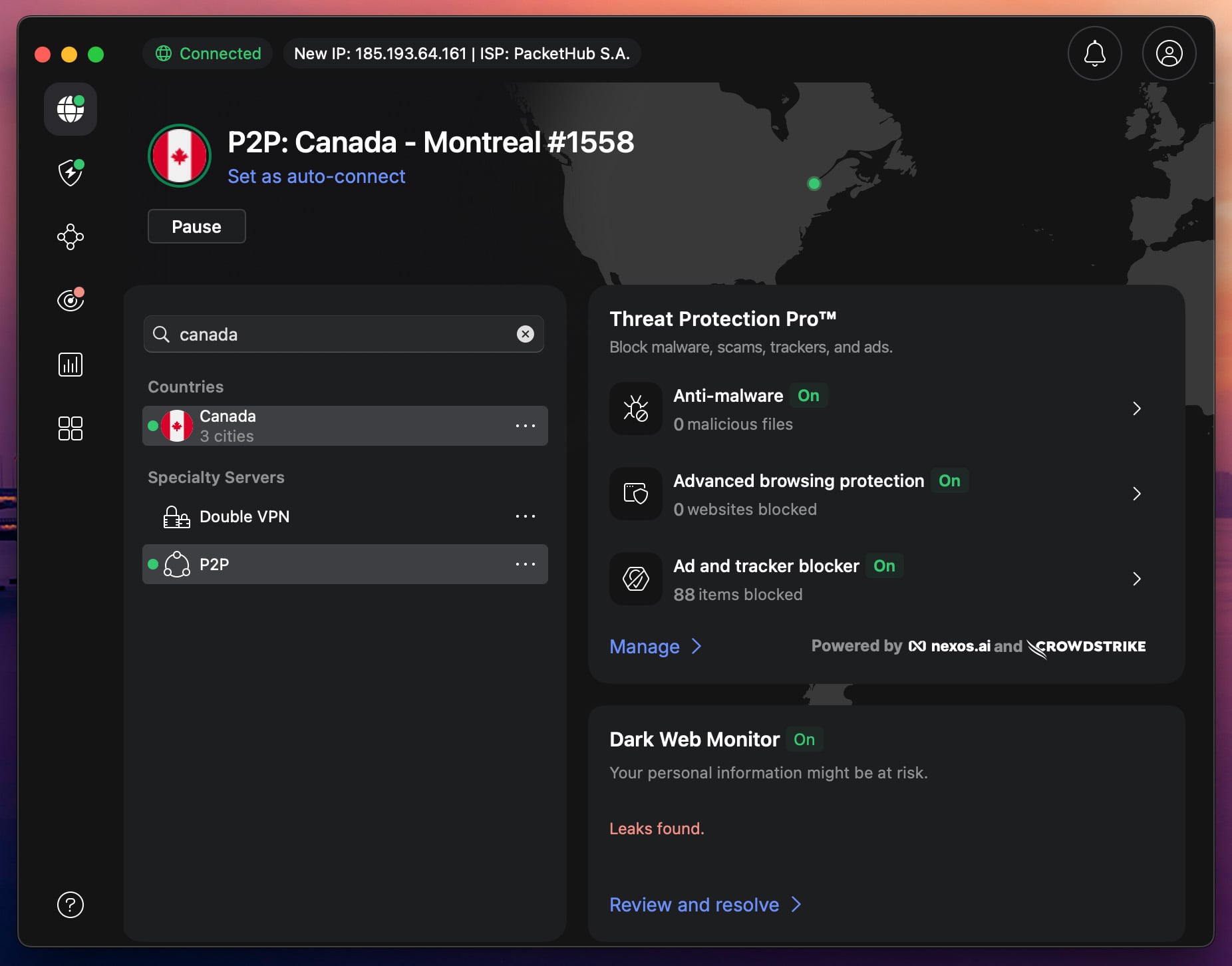
A VPN changes your public IP address, the one websites see, by sending your traffic through one of its servers. That server forwards it to websites under its own IP address. The connection is encrypted along the way, so your ISP and strangers on the same Wi-Fi can’t read it. The change covers every app on the device, from the browser to games and torrent clients, and switching to another country takes one click. For more VPNs, see our tested VPN rankings.
NordVPN connected in two seconds and offers servers in 152 countries. In our October tests, its US server kept 181.50 Mbps, 95% of our 190 Mbps connection, so pages and videos loaded practically as fast as without a VPN. The lookup site ipleak.net, which lists the IP address and DNS servers websites see, showed NordVPN’s IP address and nothing from our own connection, even in its torrent check. Its audited no-logs policy means the new IP address isn’t tied to records of your browsing.
Hide Your IP Address With NordVPN
Other VPNs That Change Your IP Address
- Proton VPN: Servers in 149 countries. Its free plan changes your IP address with no data cap, but you can’t pick the country.
- ExpressVPN: 113 countries in its app and the quickest connections we’ve timed, one to two seconds. Our ExpressVPN vs NordVPN comparison covers how the two differ.
- Surfshark: Servers in 100 countries and unlimited devices on one subscription, so every phone and computer in the house can use a different IP address.
- Private Internet Access: Servers in 91 countries and a dedicated IP add-on in 26 locations, for sites that block shared VPN IP addresses. Our Private Internet Access review covers the rest.
2. Use a Proxy
Advantages
- Free web proxies available
- Nothing to install for a web proxy
- Changes the IP for one site in seconds
Shortcomings
- Covers one browser tab or app
- Free proxies may log and sell data
- Breaks some sites and web apps
- Few server locations
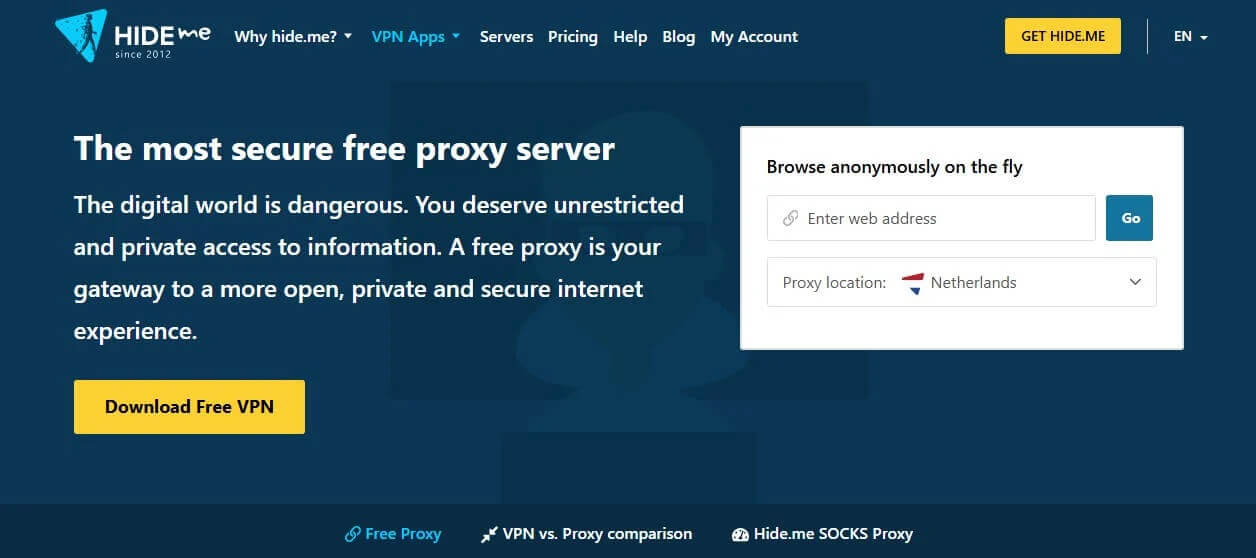
A proxy server forwards your requests for one website or app, so that site sees the proxy’s IP address. Everything else on the device keeps your home IP address. A web proxy such as Hide.me’s requires no setup: enter the site’s URL, choose a location, and select Go. It offers three locations, the Netherlands, Germany, and Finland.
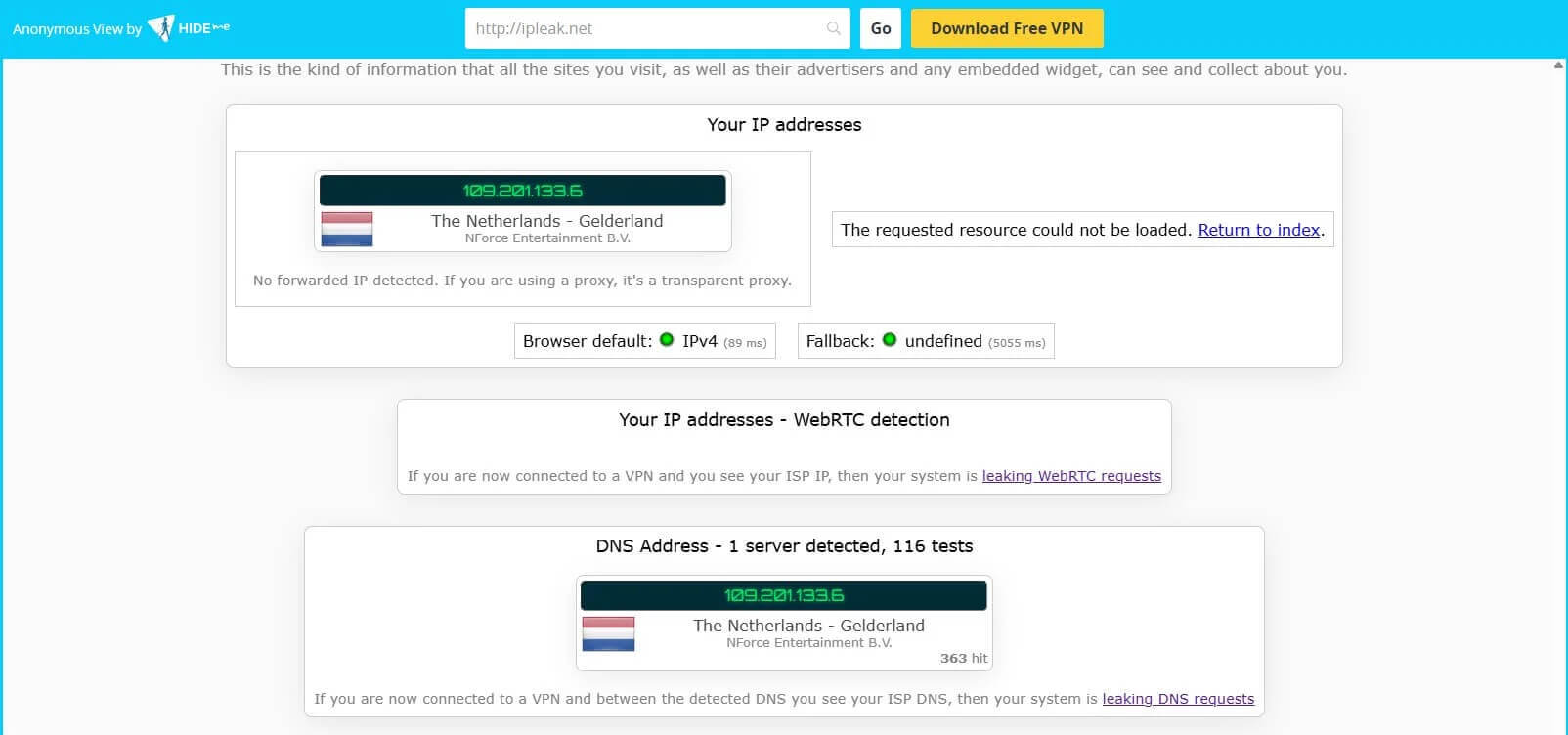
When I chose the Netherlands, Hide.me’s proxy changed my IP address to a Dutch one. Its speed couldn’t be tested, though: Speedtest showed an impossible download figure and no upload, because web proxies don’t pass its test traffic through properly. Paid proxies from Oxylabs, Bright Data, or NetNut are built for data scraping, which means collecting data from websites in bulk, and they cost far more than a VPN.
Hide.me’s proxy comes from an established VPN company, but many free proxies log and sell browsing data, and few unblock streaming services. If you use one, pick a proxy from a known VPN company. For torrents, a SOCKS5 proxy, which changes the IP address in one app without encrypting it, works in the torrent client itself. NordVPN includes one with a subscription.
3. Use the Tor Browser
Advantages
- Free to download
- New IP address with each new circuit
- Access to .onion sites
Shortcomings
- Slow page loads
- No country choice in the settings
- The last relay sees traffic on non-HTTPS sites
- Your ISP can see you’re using Tor
- No official Tor Browser for iPhone
Tor Browser sends your traffic through three relays, servers operated by volunteers, and each one adds a layer of encryption. The website sees the last relay’s IP address. Selecting New Tor circuit for this site from the menu switches that site to a different one. Tor Browser is free on Windows, macOS, Linux, and Android. On iPhone, the Tor Project recommends Onion Browser instead.
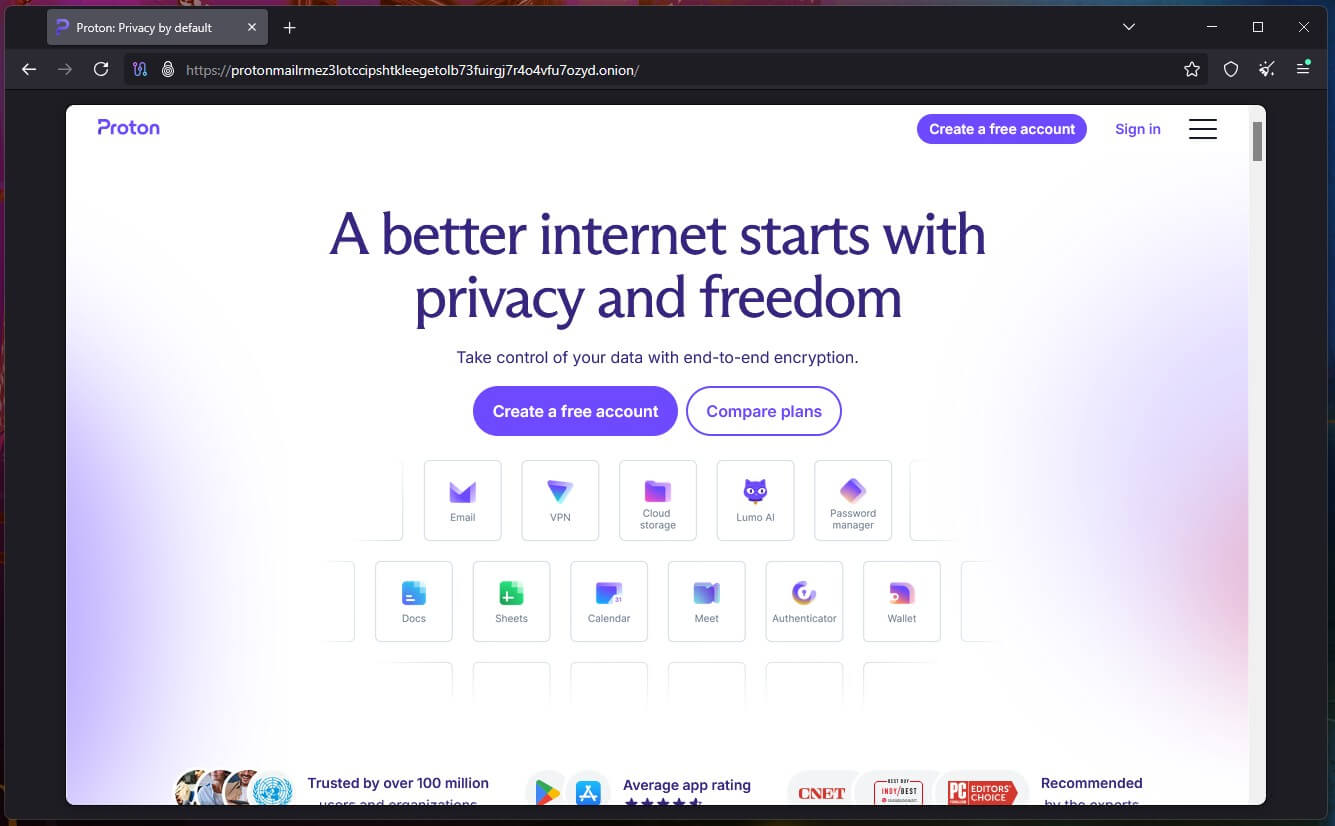
How to Use Tor to Change Your IP Address
Download Tor Browser from torproject.org, install it, and select Connect. Once it connects, every site you visit in Tor Browser sees a Tor IP address. Other apps on the device keep your home IP address.
Tor hides your IP address well, but it can’t put you in a chosen country, so it won’t unblock regional streaming catalogs. Pages also load slowly: in my tests, the CIA’s .onion site took 13 to 20 seconds to load. Your ISP can see that you’re connected to Tor, which draws attention in some countries. Where that’s a concern, connecting to a VPN before opening Tor Browser hides it. Tor Browser is also how people access the dark web.
4. Switch Networks or Toggle Airplane Mode
Advantages
- Free and done in seconds
- No settings to change
- Changes your public IP address
Shortcomings
- Airplane Mode trick works on mobile data only
- New IP address stays in your region
- No encryption
Your public IP address belongs to the network you’re on, so moving to another network changes it. Switching from Wi-Fi to mobile data, or joining a different Wi-Fi network, shows websites a new IP address. On mobile data, enable Airplane Mode for a few seconds and then disable it, and your carrier often assigns a new IP address. On my iPhone 17 Pro, it did.
iCloud Private Relay, part of an iCloud+ subscription, also changes the IP address Safari uses. In my test, though, it kept the IP address in my general region, so sites could still see roughly where I was. That helps with privacy, and it doesn’t help when you want an IP address from another country.
5. Restart Your Router
Advantages
- Free
- Can change your public IP address
Shortcomings
- A new IP address isn’t guaranteed
- No effect on a static IP address
- No country choice or encryption
Most home connections use a dynamic IP address, which your ISP leases to your router for a set time. Unplugging the router makes it request a new lease when it reconnects, and the ISP may assign a different IP address. Many ISPs hand back the same one, though. When I restarted my router, the public IP address didn’t change.
Leaving the router unplugged for longer, an hour or overnight, allows the old lease to expire. Some ISPs assign a new IP address only on request, so a call to yours is the last option. The new IP address still belongs to your ISP and shows the same location, and a static IP address doesn’t change this way. To appear in another country, an affordable VPN is the faster method.
6. Change Your Local IP Address Manually (Windows, macOS, Android, iOS)
Advantages
- Free
- Fixes IP conflicts on your home network
- Keeps a printer or console on a fixed local IP
Shortcomings
- Doesn’t change the IP websites see
- Wrong settings cut your connection
- Requires your router’s subnet and gateway details
Your device’s network settings let you choose its local IP address, the one your router assigns in your home network. Websites never see it. They see your router’s public IP address, which a manual change doesn’t affect. So this method won’t hide your location. It fixes IP conflicts, when two devices on your network share a local IP address and one loses its connection. It also lets a printer keep the same local IP.
If a game has banned your IP address, the ban targets your public IP address, and a gaming VPN changes that one. Before you start, note your current settings. Then pick an unused IP address in the same range, and keep the same subnet mask, gateway, and DNS servers.
For a new local IP address without typing one, enter ipconfig /release and then ipconfig /renew in Command Prompt on Windows. On a Mac, select Renew DHCP Lease in the TCP/IP settings.
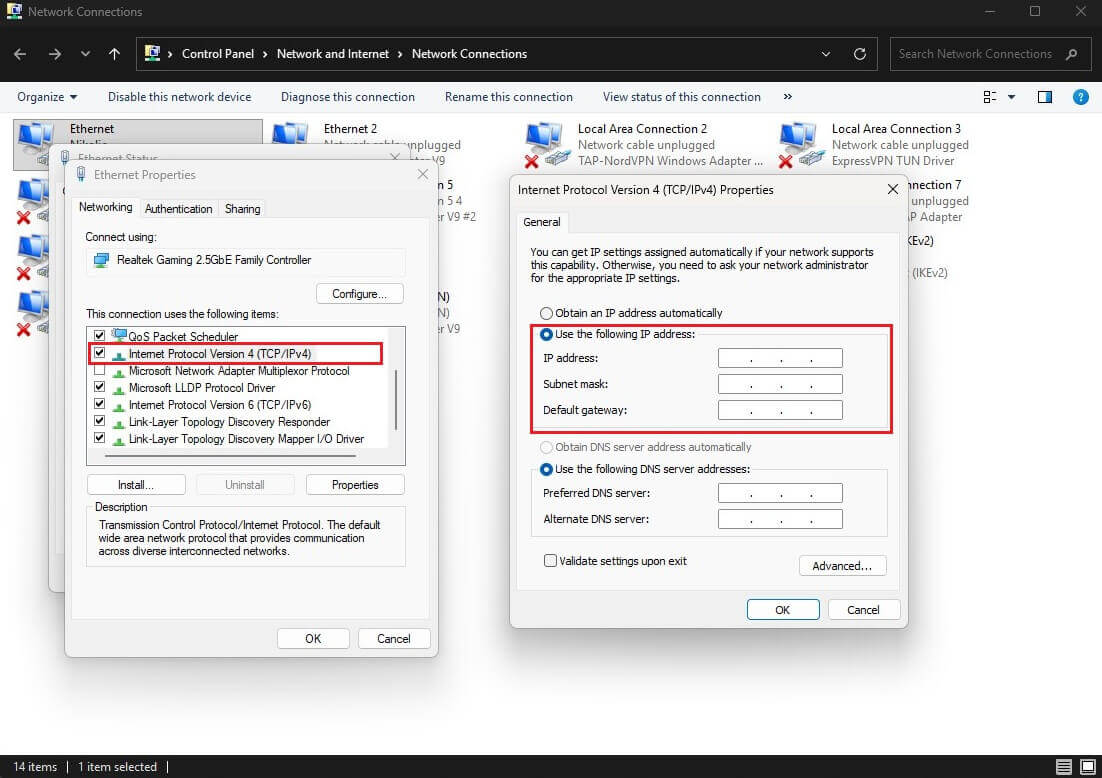
Windows 11 and 10
- Open Control Panel, select Network and Internet, then Network and Sharing Center.
- Select Change adapter settings, right-click your connection, and choose Properties.
- Select Internet Protocol Version 4 (TCP/IPv4) and click Properties.
- Choose Use the following IP address, enter the IP address, subnet mask, default gateway, and DNS servers, then click OK.
On Windows 11, the same fields are under Settings > Network & internet > your connection > IP assignment > Edit > Manual.
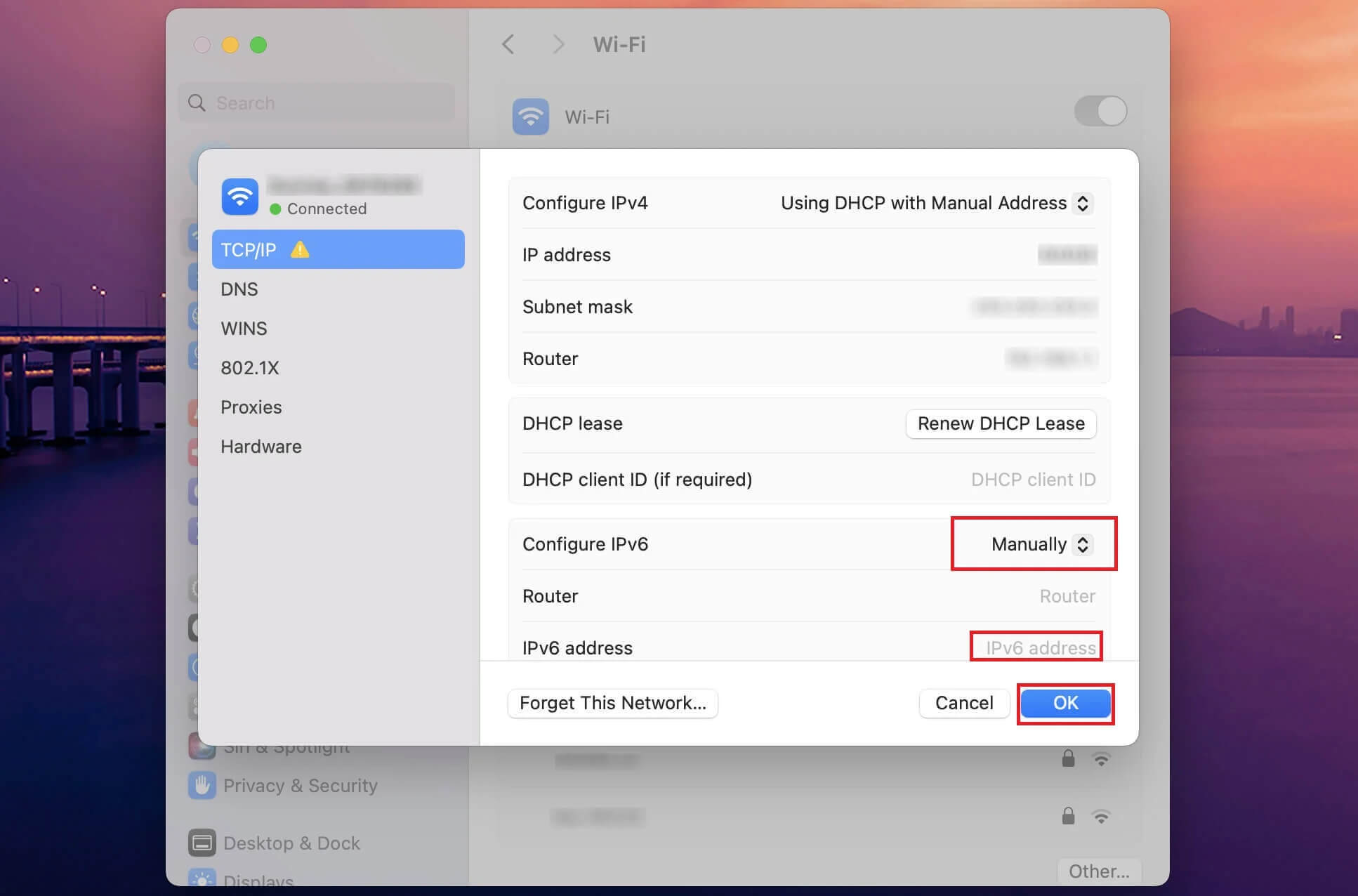
macOS
- Open System Settings and select Network.
- Click Wi-Fi or Ethernet, then Details, then TCP/IP.
- Set Configure IPv4 to Manually.
- Enter the IP address, subnet mask, and router, then click OK.
Android
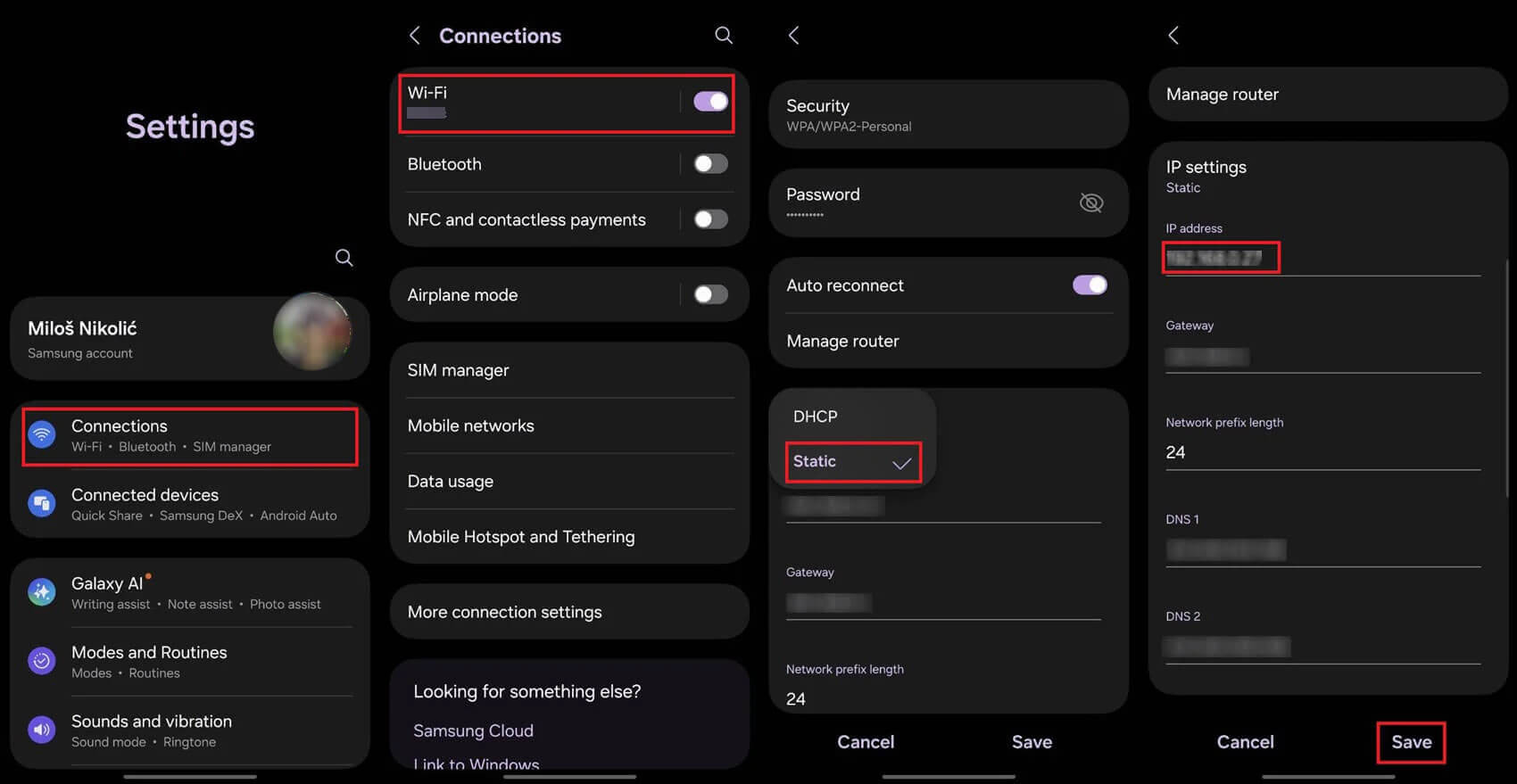
These steps are from a Samsung phone; other Android phones use similar menus.
- Open Settings and tap Connections, then Wi-Fi.
- Tap the gear icon next to your network, then View more.
- Under IP settings, choose Static instead of DHCP.
- Enter the IP address and gateway, then tap Save.
iPhone and iPad
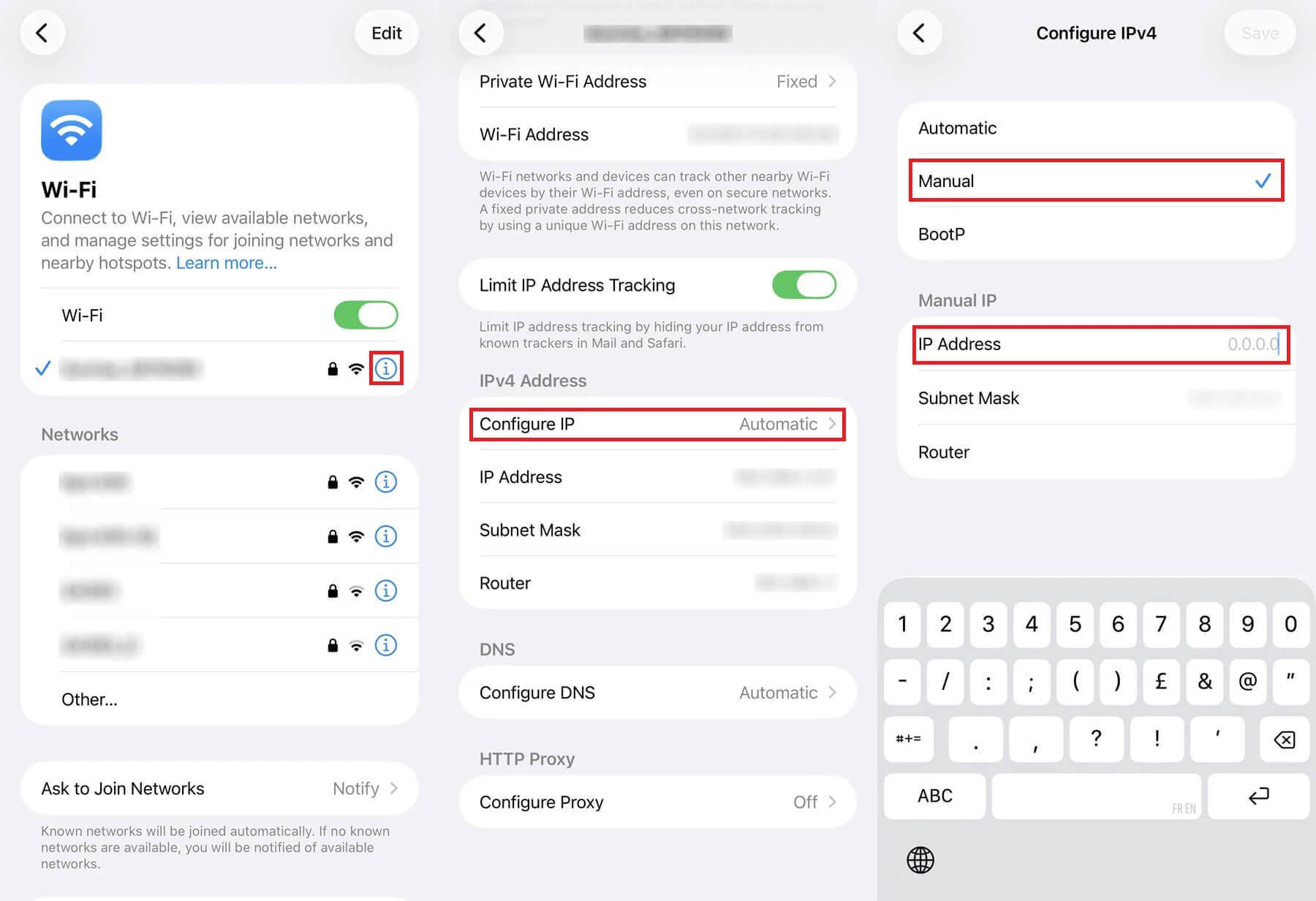
- Open Settings and tap Wi-Fi, then the info icon next to your network.
- Tap Configure IP and choose Manual.
- Enter the IP address, subnet mask, and router, then tap Save.
Why Change Your IP Address?
Privacy From Websites and Your ISP
Your IP address tells every site you visit your approximate location and ISP, and advertisers use it to link your visits together. A VPN replaces it and encrypts the connection, so your ISP sees only that you’re connected to a VPN server. A VPN kill switch blocks traffic if that connection drops, so your home IP address never appears, even for a moment.
The kill switches on NordVPN, ExpressVPN, and Proton VPN passed our tests when we pulled the network cable mid-session.
Unblocking Streaming Services
Streaming services license shows by country and check your IP address before deciding which catalog to show. In our tests, NordVPN unblocked BBC iPlayer, Channel 4, and ITVX on its UK servers. Our UK IP address guide covers that country step by step. A proxy, Tor, or a router restart can’t place you in a specific country, so a VPN is the method for this.
Torrenting
In a torrent swarm, other peers see your IP address, and copyright monitoring firms join swarms to log them. With a VPN connected, the swarm sees only the VPN server’s IP address. When I used ipleak.net’s torrent check on five VPNs, qBittorrent reported only the VPN’s IP address each time.
A VPN doesn’t make downloading copyrighted files legal, and our guide to VPNs for torrenting covers which ones allow P2P on every server.
Comparing Prices Across Countries
Some airlines, booking sites, and app stores show different prices depending on the country you appear to be in. Changing your IP address lets you compare them before you buy. Our guide to finding cheaper flights with a VPN explains how. Prices aren’t always lower, though, and some sites require a payment card from that country.
Censored Countries
In China, Iran, and other countries that block social media and messaging apps, a VPN connects you to a server abroad. Those services then work normally. Censors look for VPN traffic as well, so use obfuscation: NordVPN’s obfuscated servers and Proton VPN’s Stealth protocol disguise the connection as ordinary web traffic.
In our UK test, Stealth kept over 98% of the speed of a standard connection. Shadowsocks proxies were designed for the same purpose, while standard proxies and Tor are easier to block. Our VPN guide for China covers which VPNs connect there.
Types of IP Addresses
- Public IP address: Your ISP assigns it to your router, and every device on your home network shares it. Websites see this one, and a VPN, proxy, or Tor Browser replaces it.
- Private IP address: Your router assigns one to each device for use in your home network only. Websites never see it, and it’s the one manual network settings change.
- Dynamic IP address: Most home connections use one. It changes from time to time when your ISP renews the lease, and a router restart can speed that up.
- Static IP address: It stays the same until your ISP changes it. Businesses use static IP addresses for servers and remote access, and a router restart won’t replace one.
- Dedicated IP address: An IP address from a VPN that only you use. Banks and websites don’t flag it as a shared VPN IP address. Dedicated IP addresses are an extra-cost add-on with NordVPN, ExpressVPN, Surfshark, and Private Internet Access.
- IPv4 and IPv6: Two formats of IP address. IPv6 addresses are longer, and a VPN without IPv6 leak protection can expose yours while your IPv4 address stays hidden.
Is Changing Your IP Address Legal?
Yes, in most countries. Changing your IP address with a VPN, proxy, Tor Browser, or router restart is legal in the US, the UK, Canada, Australia, and the EU. A few countries, including China, Iran, and Belarus, restrict or ban VPNs, and some of them block Tor too. A new IP address doesn’t change the law that applies to what you do with it.
Copyright infringement, fraud, and harassment stay illegal. Some websites also prohibit VPN use in their terms and can suspend an account that breaks them. Our overview of VPN laws by country lists where the restrictions apply.
How to Change Your IP Address for Free
Switching networks, toggling Airplane Mode, restarting your router, Tor Browser, and a web proxy cost nothing. Only the proxy lets you pick a country, from a short list. Free VPNs offer more control. In our tests, Proton VPN’s free plan had no data cap but chose the country itself, from a pool of ten. Windscribe and PrivadoVPN let you choose from several countries on their free plans but cap data at up to 10 GB a month.
That’s enough for browsing, but not for regular streaming. Our ranking of free VPNs compares them. Free proxies and unknown free VPNs often make money from your data, so stick to VPN companies with a published, audited no-logs policy. A paid VPN can also cost nothing for a month: NordVPN and ExpressVPN refund the full price within 30 days if you cancel.
How to Check That Your IP Address Changed
Open an IP lookup site such as ipleak.net or whatismyipaddress.com before you make a change, and note the IP address and location. Check again afterward. With a VPN, the IP address and location should match the server you picked, and the DNS servers listed should belong to the VPN company.
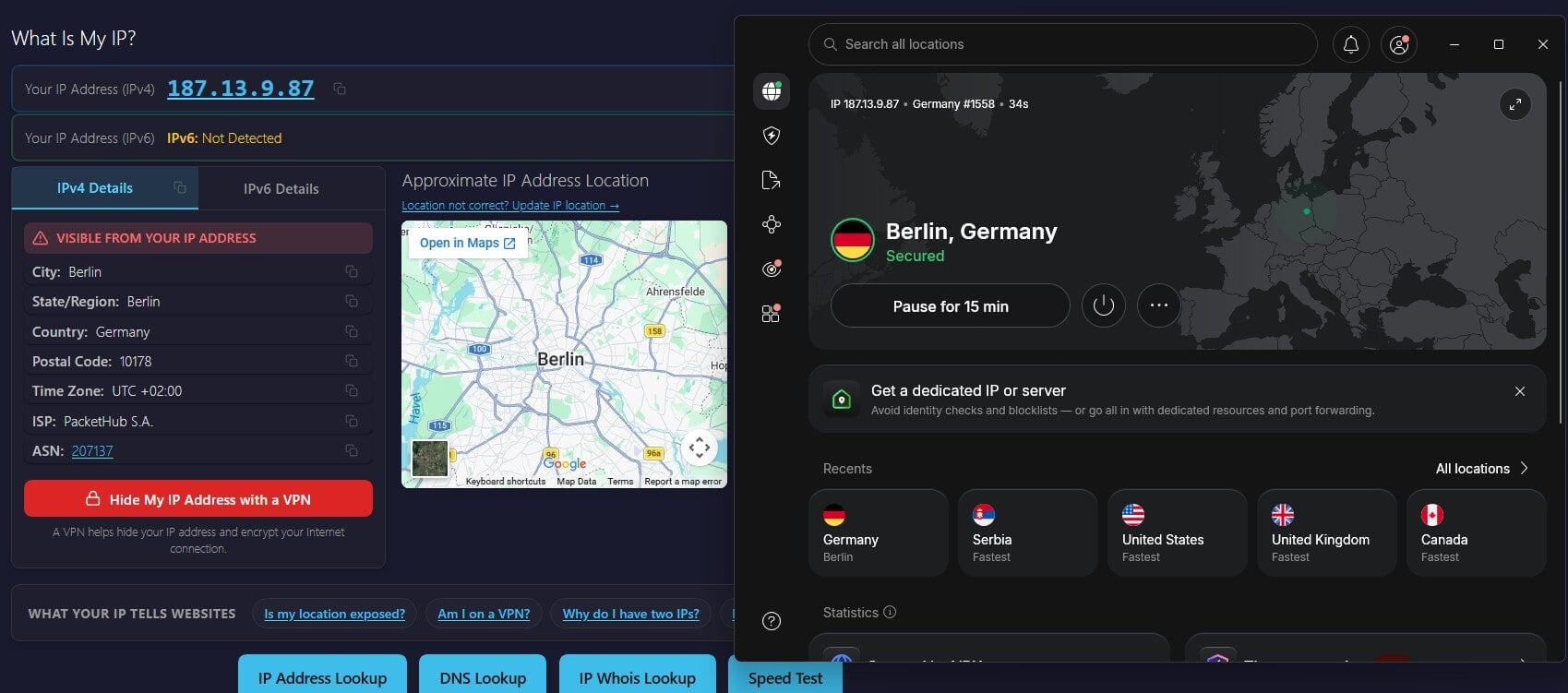
If your ISP’s name still appears under DNS, enable the VPN’s DNS leak protection or switch to another server, then check again.
Final Thoughts
The best method depends on what the new IP address is for:
- Appear in another country: a VPN, which also encrypts every app’s traffic.
- A fresh IP address on your phone: toggle Airplane Mode while on mobile data.
- A new home IP address: restart the router, and contact your ISP if that fails.
- Hide your IP address from one site: a web proxy or Tor Browser.
- Fix a conflict on your home network: set the local IP address in your device’s settings.
For most people, a VPN does the most. It changes the country, encrypts the connection, and works in every app. Only the local network fix is beyond it. NordVPN has servers in 152 countries, and Proton VPN changes your IP address for free with no data cap. Whichever method you use, confirm the new IP address on ipleak.net before you rely on it.
FAQ About IP Change
Can you change your IP address?
Yes. A VPN, proxy, Tor Browser, router restart, or switch to mobile data changes the public IP address. Only a VPN also encrypts the connection and lets the user pick any country.
How does a VPN change your IP address?
A VPN assigns the device an IP address on one of its servers for the session. Every request leaves from that server, so websites see its location in place of the user's.
How do you change your IP address without a VPN?
Restart the router, switch to mobile data, toggle Airplane Mode, use Tor Browser, or open a site through a web proxy. Results vary, and none encrypts every app's traffic.
How do you reset an IP address?
A router restart or a renewed DHCP lease resets it. The restart may bring a new public IP address from the ISP, while a renewed lease changes only the device's local IP address.
Can you change your IP address for free?
Yes. Router restarts, mobile data, Tor Browser, web proxies, and free VPNs cost nothing. Proton VPN's free plan has no data cap, and Windscribe's free plan lets the user choose the country.
Can you change your IP location to another country?
Yes, with a VPN. Connecting to a server in another country shows websites that country's IP address. Router restarts and mobile data change the IP address but keep it in the same region.
Does changing your IP address make you anonymous?
No. A new IP address hides location and network details, but signed-in accounts, cookies, and browser fingerprinting still identify the user to websites and advertisers.