
A VPN kill switch blocks your internet connection when the VPN drops, so no traffic leaves your device unencrypted. It’s useful on any connection where a leak would expose something, from a torrent client that keeps sharing files after a disconnect to a laptop on hotel Wi-Fi. A standard kill switch has one limit, though.
It turns off when the computer shuts down and works again only once the VPN reconnects, so a restart can let traffic out unprotected. Covering startup requires a stricter mode, which is usually disabled by default.
What a VPN Kill Switch Does
A kill switch stops every connection that tries to leave your device outside the VPN. While the VPN is connected, traffic passes through it as normal. When the connection fails, the kill switch blocks internet access until the VPN is back, so apps can’t fall back to your regular connection. A connection can drop for ordinary reasons.
Switching Wi-Fi networks, waking a laptop from sleep, an overloaded server, or a crashed VPN process can break it for a few seconds. Without a kill switch, apps such as a torrent client or cloud backup keep sending data during those seconds. Your ISP, the sites you use, and other torrent peers then see your actual IP address.
Most current kill switches work through firewall rules that allow traffic only through the VPN. Older designs watched the connection and reacted after a drop, which left a short window for data to leak.
Kill Switch Types and Settings
VPNs mix these types, and each company names them differently:
- Whole-device kill switch: cuts the device’s internet access if the VPN disconnects. NordVPN calls it the Internet Kill Switch, and ExpressVPN uses the same name for the feature it once called Network Lock.
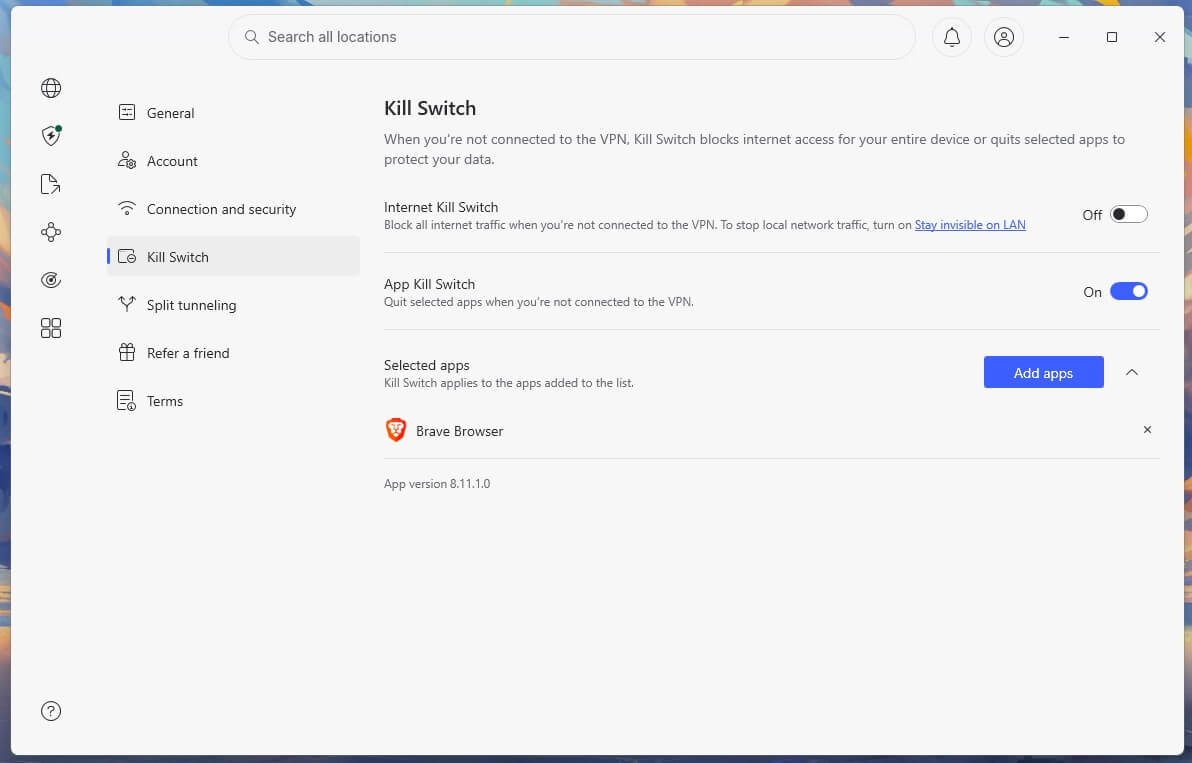
- App-level kill switch: closes only the apps you choose, a file-sharing app for example, and leaves the rest of the internet working. NordVPN’s App Kill Switch is one, and most rivals don’t offer this type.
- Standard mode: protects the connection while the VPN is on or reconnecting, and turns off when you disconnect on purpose or shut down the computer.
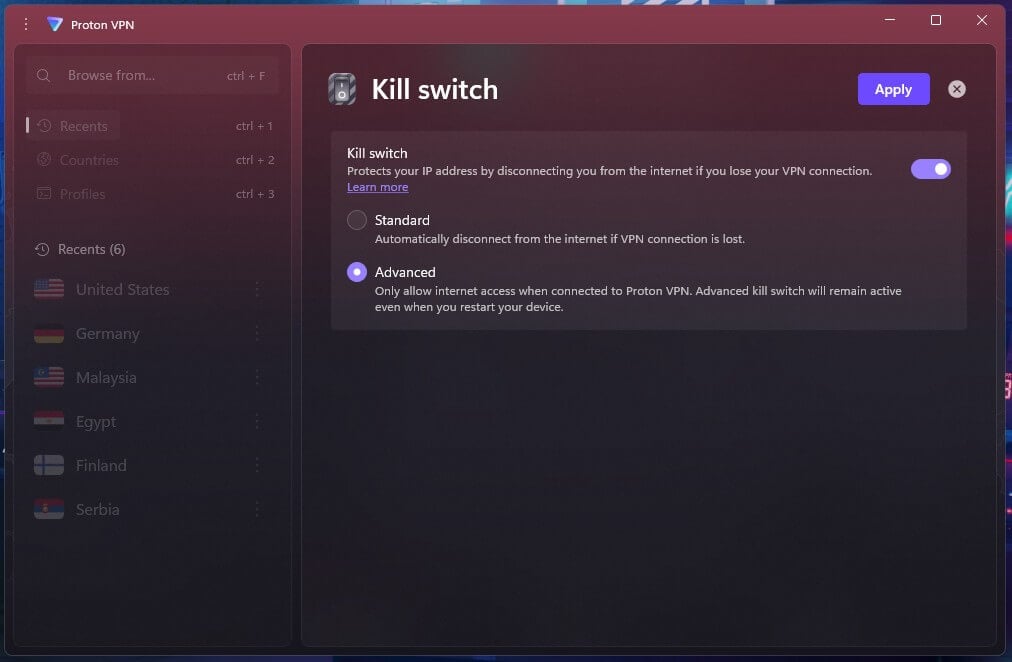
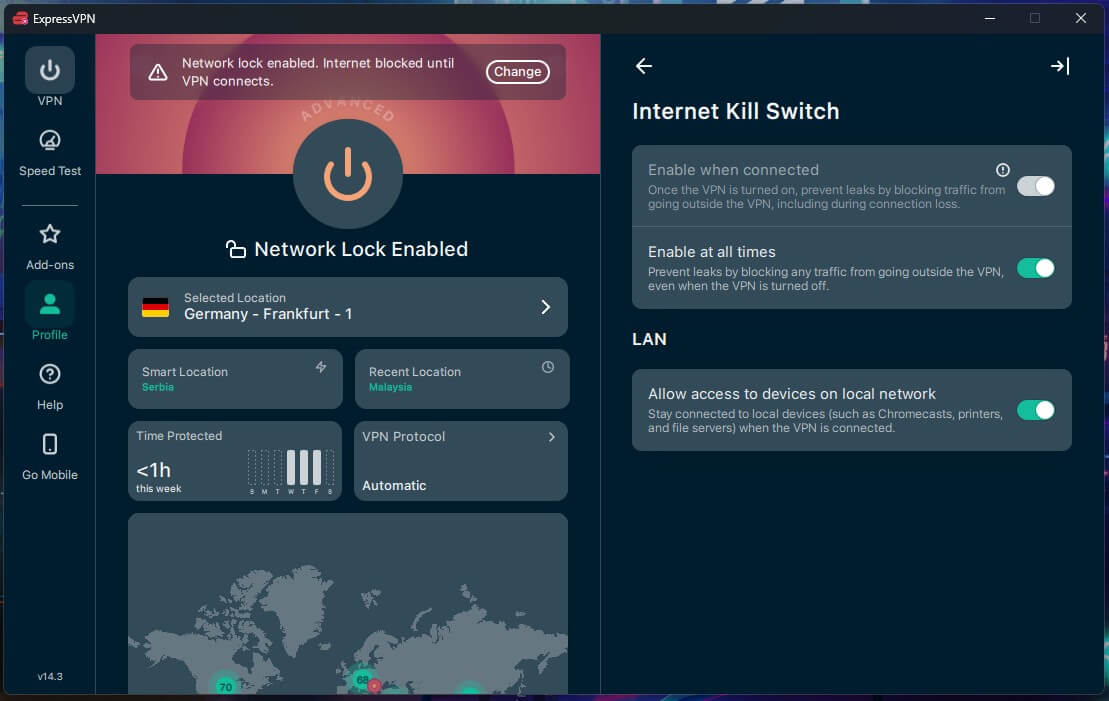
- Strict mode: blocks the internet unless the VPN is connected, including during startup. Proton VPN calls it the Advanced kill switch, ExpressVPN offers an “Enable at all times” setting, and the NordVPN Internet Kill Switch works this way once enabled.
Strict modes have a trade-off. The internet stays off until the VPN connects or the setting is disabled, which also blocks the sign-in page of hotel and airport Wi-Fi networks.
How the Kill Switches Did in Our Tests
Tested in October on a Windows 11 PC in Europe, with a continuous ping open to show whether any traffic escaped.
We put NordVPN, Proton VPN, ExpressVPN, and CyberGhost through three failures: pulling the Ethernet cable mid-session, ending the VPN’s process in Task Manager, and restarting the PC with the kill switch enabled. Each restart was tested on the default kill switch setting, then on any stricter setting the VPN offers.
| VPN | Cable pulled | VPN process ended | Restart, default setting | Restart, strictest setting |
|---|---|---|---|---|
| NordVPN | Passed | Passed | Passed | No separate setting |
| Proton VPN | Passed | Passed | Leaked | Passed (Advanced kill switch) |
| ExpressVPN | Passed | Passed | Leaked | Passed (Enable at all times) |
| CyberGhost | Passed | Passed | Leaked | No stricter setting |
No traffic escaped when the cable came out or the process ended, on any of them. The restart was harder. NordVPN’s Internet Kill Switch passed it with nothing changed, while the default settings of Proton VPN, ExpressVPN, and CyberGhost leaked, and traffic left the PC unencrypted before the VPN connected again. Switching Proton VPN to its Advanced kill switch and ExpressVPN to Enable at all times fixed it.
CyberGhost has only its Automatic Kill Switch, so its restart leak has no fix in the app. A Windows update that restarts the PC overnight can cause the same leak. In separate Linux tests on Ubuntu 24.04, the kill switches of NordVPN, Proton VPN, and ExpressVPN passed both a cable pull and a reboot.
How to Test Your VPN’s Kill Switch
The same checks work on any Windows PC, with nothing to install beyond the VPN:
- Connect to a VPN server and load an IP lookup page such as whatismyipaddress.com. Note the IP address it shows.
- Open Command Prompt and run ping -t google.com, then leave the window open.
- Pull the Ethernet cable or disable Wi-Fi for a few seconds, then reconnect. Replies that arrive before the VPN reconnects mean traffic is leaking.
- Force-close the VPN from Task Manager and watch the ping window. It should show only errors until you reopen the VPN and it connects.
- Restart the PC and load the IP lookup page before the VPN connects. If it shows your own IP address, the kill switch doesn’t cover startup.
Best VPNs With a Kill Switch
- NordVPN: Best for Protection Through Restarts, with an Internet Kill Switch that passed our restart test and an App Kill Switch for individual apps.
- Proton VPN: Best for Flexible Kill Switch Settings, with a standard mode and an Advanced kill switch on Windows and Linux.
- ExpressVPN: Best for Protection by Default, with its kill switch enabled from the first launch.
1. NordVPN: Best for Protection Through Restarts
Pros
- App Kill Switch for chosen apps
- Whole-device Internet Kill Switch
- Kill switch active from startup
- Leak protection on every major OS
- Double VPN servers
Cons
- Kill switch disabled by default on Windows
- Clashes with other installed VPNs on Windows
NordVPN blocked all traffic in the unplugged-cable and crashed-app tests, and its Internet Kill Switch also passed the restart. NordVPN now offers it as a single setting that keeps the internet off any time the VPN isn’t connected, so there’s no stricter mode to look for. With the kill switch enabled and the VPN disconnected, the PC has no internet access, and the app warns about this when you enable it.
As an alternative, the App Kill Switch quits the apps you select after a disconnect, a torrent client for instance, and leaves the browser online. That’s useful on a PC where only one or two apps handle sensitive traffic. NordVPN covers 152 countries, and its Basic plan is about $3.50 a month over the first 27 months, renewing at roughly $139 a year.
2. Proton VPN: Best for Flexible Kill Switch Settings
Pros
- Advanced kill switch blocks traffic at boot
- Two clearly labeled kill switch modes
- Same Advanced option on Linux
- Secure Core servers
- Independently audited no-log policy
Cons
- No post-quantum encryption
- Slower customer support
Proton VPN’s standard kill switch kept traffic in during the cable and process tests, then leaked after a restart. With the Advanced kill switch enabled, the internet stays blocked until the VPN connects, including while Windows starts, and the restart test passed.
Advanced mode also blocks captive sign-in pages on public Wi-Fi, so it fits a home PC better than a travel laptop. A two-year VPN Plus subscription is roughly $3 a month, and the renewal price is about $84 a year. Our roundup of cheap VPNs lists other renewal prices.
3. ExpressVPN: Best for Protection by Default
Pros
- Kill switch enabled by default
- Always-on blocking option
- Post-quantum encryption
- Automatic obfuscation
- Simple apps
Cons
- Higher renewal price
- No split tunneling with Lightway Turbo
ExpressVPN protects a fresh install with no visit to the settings, while NordVPN leaves its kill switch disabled. It also passed the unplugged-cable and force-closed-app tests. Its default setting leaked after a restart, but ticking Enable at all times solved it, and the PC stayed offline until ExpressVPN connected.
In the redesigned app, the setting is under Profile. ExpressVPN connected in 1 to 2 seconds, and its automatic obfuscation helps on networks that block websites or VPNs. ExpressVPN’s Basic plan is below $3 a month on a 28-month term, and each renewal year is about $100.
Kill Switches on Phones, Macs, and Browsers
- Android has a kill switch built in. In the phone’s VPN settings, Always-on VPN and Block connections without VPN together keep apps offline unless the VPN is connected. NordVPN and ExpressVPN point Android users to this setting for the strictest protection.
- iPhones and Macs handle it through the VPN configuration. NordVPN calls its version VPN bypass prevention, and ExpressVPN’s iOS app offers Standard and Advanced kill switch modes. Proton VPN notes that some Apple services can still connect outside the VPN on iOS and macOS, and says the limit affects every VPN service.
- Browser extensions have no kill switch. NordVPN’s and Proton VPN’s extensions are proxies that protect browser traffic alone, so the desktop or mobile app is the only way to block traffic across the device. Our tests covered Windows and Linux, so the phone and Mac behavior described here comes from each VPN’s own documentation.
How to Enable NordVPN’s Kill Switch
A new Windows install of NordVPN leaves the kill switch off. It’s enabled in a few clicks:
- Open Settings in the NordVPN app.
- Select Kill Switch from the settings menu.
- Enable Internet Kill Switch to protect the whole device, then select Continue on the warning that appears.
- Enable App Kill Switch instead to close specific apps, and choose them with Add apps.
With the Internet Kill Switch enabled, the PC stays offline until NordVPN connects, so disable it before signing in to hotel or airport Wi-Fi. Use the ping test to confirm the settings work, and repeat it after a major app update.
Conclusion
Any of these kill switches protects a dropped connection, and all four let nothing through when we unplugged the cable or ended the VPN process. Restarts are the weak point, and only NordVPN’s default setting passed one, so enable a strict mode on any PC that launches file-sharing or backup apps at startup.
NordVPN is our top recommendation: its Internet Kill Switch passed the restart with no extra setting, its App Kill Switch covers chosen apps, and it tops our best VPNs overall. Proton VPN is the clearest to configure, and its Advanced setting covers startup on Windows and Linux. For more on how these VPNs protect a connection, see our guide to the most secure VPNs and our breakdown of VPN pros and cons.
Kill Switch FAQ
What does a VPN kill switch do?
A kill switch cuts a device off from the internet when the VPN connection fails, so websites, torrent peers, and the internet provider can't see the actual IP address until the VPN reconnects.
Does NordVPN have a kill switch?
Yes, NordVPN offers two on Windows. The Internet Kill Switch blocks all internet access any time the VPN is off, and the App Kill Switch closes selected apps. Both are disabled by default.
Should a VPN kill switch stay on all the time?
Yes, for most users. A kill switch does nothing until the connection drops, so leaving it enabled has no cost. Strict modes go further and block traffic while the computer starts up.
Does a kill switch work after a computer restarts?
No, not in standard mode, which turns off at shutdown. Proton VPN's Advanced kill switch and NordVPN's Internet Kill Switch block traffic from startup until the VPN connects.
Does a kill switch slow down the internet?
No, a kill switch has no effect on speed while the VPN is connected. It only blocks traffic after a drop, which pauses browsing until the VPN reconnects.
Do VPN browser extensions have a kill switch?
No, the NordVPN and Proton VPN browser extensions are proxies that cover browser traffic alone. Blocking traffic across the whole device requires the desktop or mobile app.
Is there a VPN kill switch on Android and iPhone?
Yes. Android has a built-in Always-on VPN setting with an option to block connections without a VPN, and iPhone VPN apps use their own settings, such as NordVPN's VPN bypass prevention.