
You’re not selfish if you’re not fond of sharing. Some people prefer using a VPN that offers dedicated IP addresses for many reasons. For one, you’re the only person using the IP address, which helps prevent IP blacklisting and allows you to use online banking without suspicion. Shared IPs can be detected as spam by some platforms.
Another reason to use a VPN with dedicated or static IP addresses is to bypass CAPTCHA. On top of that, dedicated IP VPN providers offer the same benefits as regular ones. This means you still get bank-grade encryption and features like IP leak protection, a kill switch, and modern security protocols.
Sadly, very few providers offer dedicated or static IP addresses. We’ll explore those that do and discuss the very best options in 2026. Let’s start with the shortlist, and we’ll expand to our comprehensive look at each.
Best VPNs With Dedicated and Static IP Addresses in 2026
Let’s immediately cut to the chase. Our team has prepared five excellent dedicated IP VPNs, some of which even offer static IP addresses. The best picks in 2026 include:
- NordVPN
- ExpressVPN
- Private Internet Access
- Surfshark (Dedicated & Static IP Addresses)
- CyberGhost
Now, let’s discuss their dedicated IP offerings and see what they have in store.
1. NordVPN
NordVPN is our top choice for a VPN with dedicated IP addresses overall. It sports an array of security features, uncapped bandwidth, and over 8,300 servers globally. It also works for streaming and torrenting, all while not keeping any logs. You can say it’s the #1-rated VPN for privacy and security.
Pros
- Large global server network
- Unlimited traffic and speed
- Optimized for torrenting
- Audited no-logging policy
- Malware protection
Con
- Expensive dedicated IP
Dedicated IP Offer
What does this dedicated IP VPN offer if you don’t want to use a shared IP address? At the start, you get 28 countries, such as the UK, the USA, Hong Kong, Poland, Singapore, Australia, Canada, Denmark, and many more. The US, for example, has ten cities, while the UK has three.
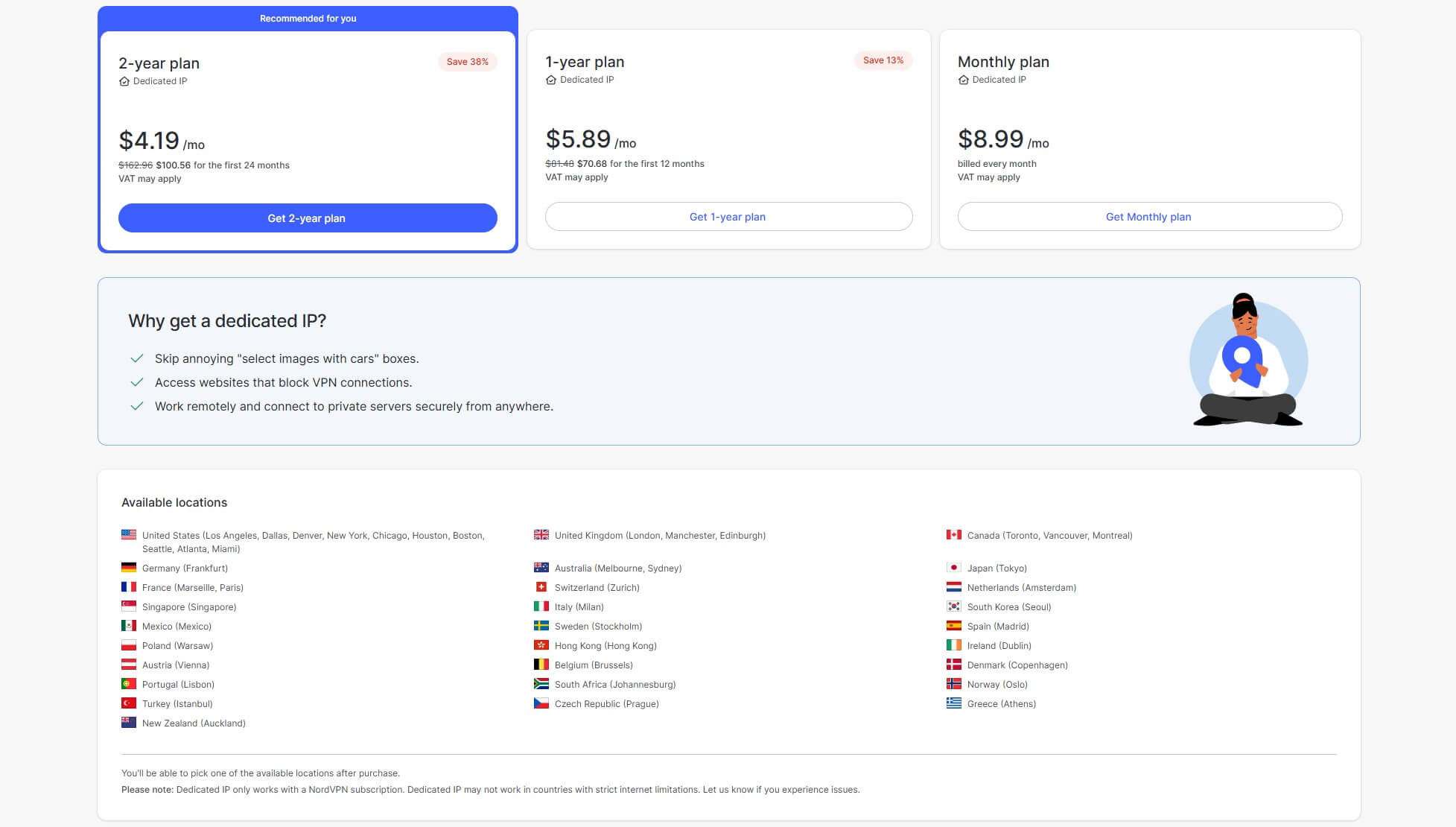
In terms of price, NordVPN won’t be the cheapest VPN with dedicated IP addresses. It depends on the subscription length. For example, if you pick the 2-year option, you’ll pay $4.19 a month, which is around $100 for the first two years. You also have the annual plan.
This one increases the price to $5.89 a month or $70 for the first year. The least cost-effective option is the monthly plan at $8.99. Bear in mind you’ll need an active NordVPN subscription to get these IP addresses. Also, the price is per IP address – if you need two, you’ll pay double.
Get NordVPN’s Dedicated IP Address
Other Features
As said, NordVPN is an all-around pick with no specific shortcomings. Its base subscription is pretty cheap as well in 2026, costing as low as $3.09 a month. NordVPN comes with AES-256 encryption to fully secure your traffic. It also uses DNS leak protection for added safety. We appreciate NordVPN’s dedicated servers.
Double VPN servers can encrypt your connection twice and ensure stronger encryption. Users also enjoy obfuscated servers that can be used in China. Another benefit is P2P optimization for torrenting. This is handy when you want to hide your IP address on torrent sites and download stuff without anyone noticing.
NordVPN has apps for all devices, so you can use this VPN with a dedicated IP on your phone, tablet, laptop, computer, or even a Smart TV. With 10 simultaneous connections, you should be more than satisfied with the 360-degree protection.
NordVPN has ample other features like malware protection, a dark web monitor, NordLynx, Meshnet, and dozens more. It’s really a state-of-the-art VPN. You can test it risk-free with a 7-day trial. Alternatively, there’s a 30-day money-back guarantee to get a refund if you’re not impressed.
2. ExpressVPN
ExpressVPN started offering dedicated IP VPN addresses recently. However, its offers are far from shallow. It still includes dozens of countries, and its dedicated IPs are inexpensive when compared to, let’s say, NordVPN. As you’ll see, ExpressVPN offers plenty of other features, rendering itself a complete VPN.
Pros
- Easy-to-use applications
- Lots of dedicated IP locations
- Ad and tracker protection
- Great for streaming
Con
- No multi-hop servers
Dedicated IP Offer
ExpressVPN’s dedicated IP addresses start at $3.99 monthly for two years. You can also pay annually, which increases the price to $4.99 monthly. Lastly, there’s the option to pay each month, which is $8.99, the same as NordVPN. ExpressVPN offers 29 locations, including the USA, the UK, Europe, Australia, and others.
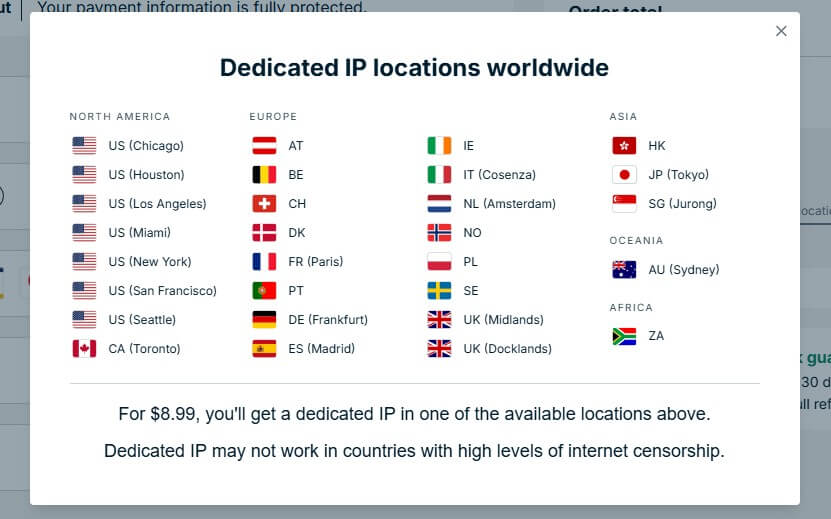
Out of those, seven are in the US, two in the UK, and the rest of the countries have a single city. For your convenience, we included a screenshot of ExpressVPN’s dedicated IP distribution. As you see, it’s pretty impressive.
Get ExpressVPN’s Dedicated IP Address
Other Features
Impressive are other ExpressVPN’s features, as well. The VPN spans over 105 countries and offers over 160 locations. Its standout feature is the speed, amplified by ExpressVPN’s Lightway Turbo protocol and its use of 10 Gbps server ports. ExpressVPN also offers unrestricted monthly bandwidth.
This makes it perfect for unblocking 9Now abroad, watching Netflix, and streaming a variety of sports. Another plus is torrenting, which ExpressVPN supports on all servers. Meanwhile, you get excellent security due to its Advanced Protection that blocks ads, and a Network Lock kill switch that keeps IP leaks away.
ExpressVPN is a trusted dedicated IP VPN service with a proven no-logging policy. It’s also compatible with all devices, with a caveat of not supporting dedicated IPs on macOS. Apart from that, it allows for up to 14 simultaneous connections and has a risk-free 30-day money-back guarantee for all plans.
We suggest its biennial plans for the best savings. While the Basic plan is the least expensive, our advice is to pick the more feature-rich Advanced plan at $4.49 monthly with four free months and a 68% discount.
3. Private Internet Access
If you want a cheaper dedicated IP VPN, consider Private Internet Access. It’s a great option for overall privacy, unlimited simultaneous connections, and advanced security. The VPN is also P2P and streaming-friendly, so it ticks all the right boxes.
Pros
- Affordable dedicated IP
- Unlimited concurrent connections
- Advanced security features
- WireGuard VPN protocol
Cons
- Occasionally slow speed
- Antivirus is paid additionally
Dedicated IP Offer
Speaking of ticking the boxes, we’re confident you’ll like its pool of IP addresses. PIA offers 26 locations in total, in countries like the USA, Sweden, Canada, Japan, Germany, Switzerland, Singapore, the UK, Belgium, and Australia. What’s more, there’s plenty in the USA.

Unlike ExpressVPN, with seven locations in America, PIA opts for twelve locations. This is why PIA is generally considered the best US VPN if you need an IP from this country. Price-wise, it’s also far more affordable. Instead of $3.99, you’ll be charged just $2.50 a month for the 2-year plan.
This is exactly $60 for 2 years. PIA lets you get its 6-month dedicated IP VPN plan, which is $4.25 a month or $25.50 every 6 months. The monthly plan is again the black sheep with the price of $5, which, again, isn’t too high compared to NordVPN and ExpressVPN. PIA also requires an active subscription to use its dedicated IPs.
Get PIA’s Dedicated IP Address
Other Features
Don’t be fooled by this provider’s affordability. PIA has everything you need and offers cutting-edge features like Multi-hop, obfuscation with Shadowsocks, and MACE for blocking ads. We love this VPN’s customization, which is reflected in its modern VPN protocols.
For example, you can select the transfer method from UDP or TCP. You can also use WireGuard to speed up your connection and get stable performance. Private Internet Access is an expert in security, thanks to an automatic kill switch amplified by IPv6 leak prevention and an automatic kill switch
Another option you’ll like is split tunneling, which tunnels specific apps through the VPN. On top of everything, PIA has a certified no-logging policy and uses RAM-only servers. This is paramount for not storing any logs and preventing privacy-infringing data leaks. Private Internet Access capitalizes on affordability and value.
Like NordVPN and ExpressVPN, it packs a 30-day money-back guarantee plus a seven-day free trial if you don’t want to pay upfront. Read our PIA VPN free trial tutorial to test it for free and see how you like it.
4. Surfshark
Surfshark is up next. This is another banger for the money, costing about $1.99 a month and packing unlimited simultaneous connections. This is a great VPN for a dedicated IP because it also offers static IPs included in every plan. We’ll explain those later, as we analyze Surfshark in more depth.
Pros
- Dynamic multi-hop
- Works with Netflix
- Unlimited simultaneous connections
Cons
- Not the cheapest dedicated IP
- The fewest dedicated IP locations
Dedicated IP Offer
For now, let’s focus on the thing you want the most. Getting your dedicated IP address with this VPN will cost $3.75 a month, so it’s a sweet spot between NordVPN and Private Internet Access. Arguably, it’s not very affordable, considering it also offers the fewest global locations.

Surfshark has 20 locations at the time of writing, including the UK, the USA, Australia, Hong Kong, Canada, Germany, France, the Netherlands, Japan, South Africa, and Singapore. Each location has one city, except for the US, with servers in Los Angeles, San Jose, Dallas, and a few other cities.
The great thing about these dedicated IPs is their fixed price. It’s $3.75 a month, no matter the plan you choose. It’s easy to add them to your existing plan too, pay upfront for the remaining plan’s duration, and enjoy. What about its static IPs? We said they’re included out of the box.
You can connect to any static IP and have a fixed address. Bear in mind that static IP addresses are also shared, so expect traffic from other users.
Get Surfshark’s Dedicated IP Address
Other Features
Surfshark works closely with NordVPN, offering similar features at a slightly lower price. You still get Multi-hop, which you can customize by choosing entry and exit VPN locations. Surfshark also has CleanWeb to block ads and uses WireGuard for the majority of the time to boost speeds.
We love Surfshark’s modern-looking apps on all devices. If you buy its One or One+ plan, you can get more amazing features, such as antivirus software, which works even on your phone. There’s also the Search browser, which makes you “incognito” and doesn’t track anything.
Surfshark offers exceptional streaming prowess, working with over thirty Netflix libraries. Like the rest, it’s torrent-optimized and supports Onion Over VPN. As the third-best VPN with dedicated and static IP addresses, Surfshark is fast for a cheap provider. This is great for gaming or other bandwidth-hungry activities.
With over 3,200 servers in 100 countries, it’s easy to find a fast one too. You can find out more about it in our Surfshark review. Don’t be afraid to test it because it’s cheap and can be free for 30 days with a money-back guarantee.
5. CyberGhost
At #5, we have CyberGhost, another budget-friendly option with dozens of dedicated IPs. CyberGhost is eerily similar to Private Internet Access. It costs the same, offers nearly identical dedicated IP locations, and is safe, secure, and reliable. That’s because they share the parent company, Kape Technologies.
Pros
- 45-day money-back guarantee
- Automatic WiFi protection
- Wide global server fleet
Cons
- Seven simultaneous connections
- It could be faster overall
Dedicated IP Offer
Starting with the dedicated IP offer, CyberGhost offers about 19 locations, with the majority in the United States and the UK. The provider has six US and two UK, and two Canadian locations. The rest of these are in Australia, Switzerland, Germany, Japan, France, Sweden, and a few other countries
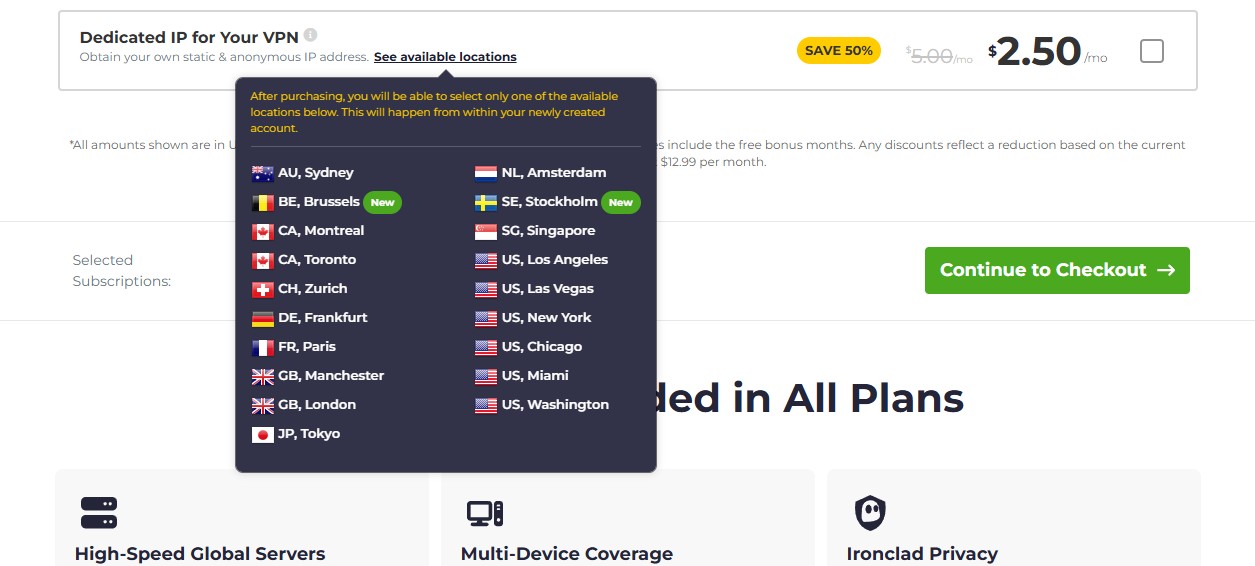
As you see above, the starting price is $2.50 monthly for two years. The six-month period is $4.00 monthly or $24 every six months. Finally, the monthly plan is $5.00, which translates to $60 every year. At this price, you’re better off paying upfront for two years, which will also cost you $60, but for a longer period.
Get CyberGhost’s Dedicated IP Address
Other Features
As far as other features go, CyberGhost doesn’t really reinvent the wheel. It offers about 12,000 global servers in roughly 100 countries. The VPN’s addition of dedicated streaming, torrenting, and gaming servers is neat, as it allows users to use servers tailored specifically to their current needs.
In our CyberGhost test, we expressed satisfaction with its security. The VPN uses WireGuard as its main protocol, relying on 256-bit encryption, an ad-blocker, and IPv6 leak protection. We also like its automatic WiFi protection, which turns on the VPN each time you’re on an untrustworthy network.
CyberGhost’s performance is admirable, as it also uses 10 Gbps server ports and offers unlimited traffic. Another benefit is privacy, which CyberGhost facilitates through its no-log policy and NoSpy servers, independently owned by this VPN giant. Sadly, CyberGhost supports only seven concurrent connections.
However, it compensates for its flaws with affordable prices and a 45-day money-back guarantee. The button below saves you over 80% on CyberGhost and drops the price to around $2.19 monthly if you’re interested.
Dedicated vs Static IP Address: What Are the Differences?
By default, every VPN uses shared IP addresses. Let’s say you connect to a server with one IP address. You’re not the only one because other users can connect and use the same address to go online. In the case of a dedicated IP address, you almost have the server for yourself.
Once you purchase one, the IP address is assigned to you, and only YOU can connect to it. We said you “almost” have the server for yourself, but that’s partially true. VPNs have servers that house hundreds, sometimes thousands, of shared IP addresses.

The difference is that you “reserve” one of these addresses for yourself, and only you can use it. However, the server is still shared by a myriad of users, so don’t be confused if your VPN with a dedicated IP address doesn’t speed up your connection compared to a shared one. Now, we have this static IP address.
As explained, a static IP stays the same. It’s one address used by many people. In essence, a dedicated IP is also static but can be used by one person. A static IP allows multiple people to use it, making it a so-called shared address. The thing with shared addresses is that they can sometimes be dynamic.
This means each time you connect, you can get a new IP. On the contrary, your dedicated IP address remains the same.
Dedicated IP Address Benefits Explained
Dedicated IP VPNs offer numerous benefits, but getting this type of address isn’t mandatory. In fact, you’ll do just fine with the typical shared addresses, as long as you don’t have special demands. Speaking of them, here’s why a dedicated IP address is beneficial:
- Avoiding CAPTCHA puzzles. These often appear when the website thinks you’re a robot – you’ve seen this. It happens on shared addresses because multiple requests are sent from the same IP. With a dedicated IP, you’re the only person using it, which minimizes CAPTCHA prompts and allows for a better experience.
- Bypassing blacklisting and bans. VPN-related IPs can be blocked by some sites and platforms, or even game servers. Thankfully, getting your own address can remedy the issue and allow for swift access to any site, game server, or app.
- Using online banking. Banks will likely prevent access to your account if they detect that the request comes from a different address. Using a single, fixed IP will prevent this and let you pay for stuff or withdraw money promptly.
- Website hosting. It’s great to have a reliable web hosting provider. However, it’s also handy to have a dedicated IP VPN to host your website more safely, as these IPs are less likely to be targeted by cyber attackers (hackers).
- Transferring files privately. Some people use this type of address to transfer files with increased privacy. Since you’re the only person using it, file sharing will be uninterrupted, faster, and safer.
How to Purchase a Dedicated IP Address: Tutorial
In this part, we’ll explain how to subscribe to a VPN with a dedicated IP and select the address you need. Here’s our step-by-step guide:
1. Subscribing to a VPN
We explained that you’ll need a basic VPN subscription beforehand. If you don’t have one, let us recommend NordVPN as the best overall option. Don’t like it? No problem, Private Internet Access and Surfshark are great too, and offer slightly cheaper prices.
You can use the buttons on this page to snag their cheapest deals and pay merely a few monthly dollars. Simply go to the VPN’s website, subscribe to it, and if needed, verify your account through email. You can now install the provider on your device.

From here, you can connect to any server to encrypt your connection and enjoy all the other benefits. However, if you want to specifically use a dedicated IP, you’ll need to buy it first.
2. Getting a Dedicated IP Address
Regardless of the VPN you choose, this is an optional add-on that you’ll pay for on top of your subscription. To get it:
- Go to your provider’s website and sign in to your account. We’ll use NordVPN as an example.
- Once your dashboard opens, click “Get Dedicated IP“, as displayed in the image below.
- You’ll now see the three plans from above. Select the plan you want and click on it.
- Pay for the subscription using the preferred payment method.
- Once you subscribe, you’ll be able to select the location you want.
3. Connecting to a Dedicated IP VPN Server
With everything done, you’ll need to find your address. To do so:
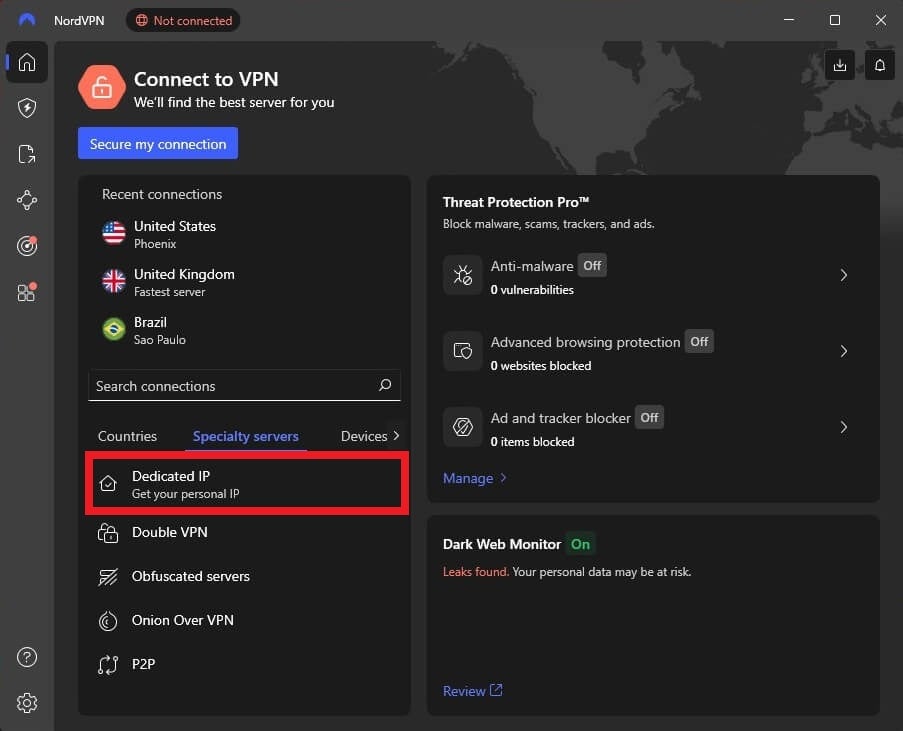
- Open the VPN app – again, we’re using NordVPN.
- Select “More Connection Options” to unwrap the server list.
- Press the “Specialty Servers” option.
- You’ll see a “Dedicated IP” choice there. Click on it to connect. You’ll see a green “Connected” message that tells you the connection is in place.
Can I Get a Free VPN With a Dedicated or Static IP Address?
No. We said that this is a premium feature and you won’t find any free provider that offers it. In the same fashion, you won’t find the feature free in premium VPNs. Free providers cut corners by offering not-so-great security and privacy. They also use typical shared IPs.
These IPs are also dynamic, so each time you connect, you’re assigned a different IP address. This is in line with most premium providers, which isn’t bad but likely not what you want. It’s good to know that some free choices have static IPs, but they’re shared as well. We’re also not fond of free VPN logging practices.
Some of them rely too much on logging and storing data to earn revenue. In addition, they lack certain security features, such as Multi-hop, ad-blocking, and RAM-only servers, making them severely inferior. Our team has tested many free VPNs, but very few were remotely good. We can think of Proton VPN and Hide.me.
However, none of them offer these IP addresses. They’re, however, safe and secure and have unlimited bandwidth, but without P2P and streaming abilities.
The Bottom Line
Are you struggling with blacklisting, website restrictions, CAPTCHA, and other annoyances? Perhaps you can resolve them with the best VPNs with dedicated IP addresses. It’s easy to get NordVPN, ExpressVPN, Private Internet Access, Surfshark, or CyberGhost and purchase a cheap dedicated IP.
A simple connection to your own address will make things far better. Apart from addressing the aforementioned issues, you’ll revel in unbreakable security, ironclad privacy, fast speed, streaming, torrenting, and much more while not breaking the bank. Click below to get NordVPN’s dedicated IP risk-free.
Alternatively, explore other options and pick the one that aligns with your budget and feature requirements.
Frequently Asked Questions
Are dedicated IP addresses faster?
They could be in theory, but not in practice. When you get this address, you’re not renting the entire server. The servers used to store these addresses are still utilized by multiple people who “drain” their resources. Will you get slower speeds in that case? No. VPN servers are designed for multiple concurrent users.
That said, the speed will be the same as with the shared address, but with the benefit of you being the only person who can use the address you bought.
What are the downsides of dedicated IPs?
There aren’t many. Some experts agree on the lack of anonymity while using them, but that’s negligible in our book. For example, it’s simpler for websites and data brokers to associate your online activities with the IP address and thus, track you more easily.
However, bear in mind that these addresses still offer encryption and all other privacy and security features, including a no-log policy. We all know how valuable a no-log policy in a VPN is.
Where can I get the cheapest dedicated IP address?
According to our analysis, you’ll get the cheapest one in PIA VPN. At just $2.50 a month, you’ll pay exactly $60 every 2 years. Best of all, this applies to any location you choose. Whether it’s the USA, Switzerland, or Canada, the price stays the same.
Combined with its 2-year plan with two or four free months at $57, you can enjoy the provider and its dedicated IP address for a little over $110 for the first 28 months, based on the actual deal. We should also mention CyberGhost VPN with the same offer, which might be worth checking out.