Free antivirus software in 2026: compare Avast, Bitdefender, AVG, and Malwarebytes. Discover what free protection includes , and where its limits begin.
Free Antivirus in 2026: Real Protection or Just the Basics?
Free doesn’t always mean basic. In the antivirus world, free solutions have come a long way over the years, across Windows, macOS, Android, and even iOS. A quick download, a single click, and your computer or phone can run real-time scans against viruses, malware, ransomware, and other modern threats. Big names like Avast, Bitdefender, AVG, and Malwarebytes compete for the best spot in every review. Still, when it comes to privacy tools, VPN access, and full security coverage, important gaps remain.
What Are the Best Free Antivirus Solutions?
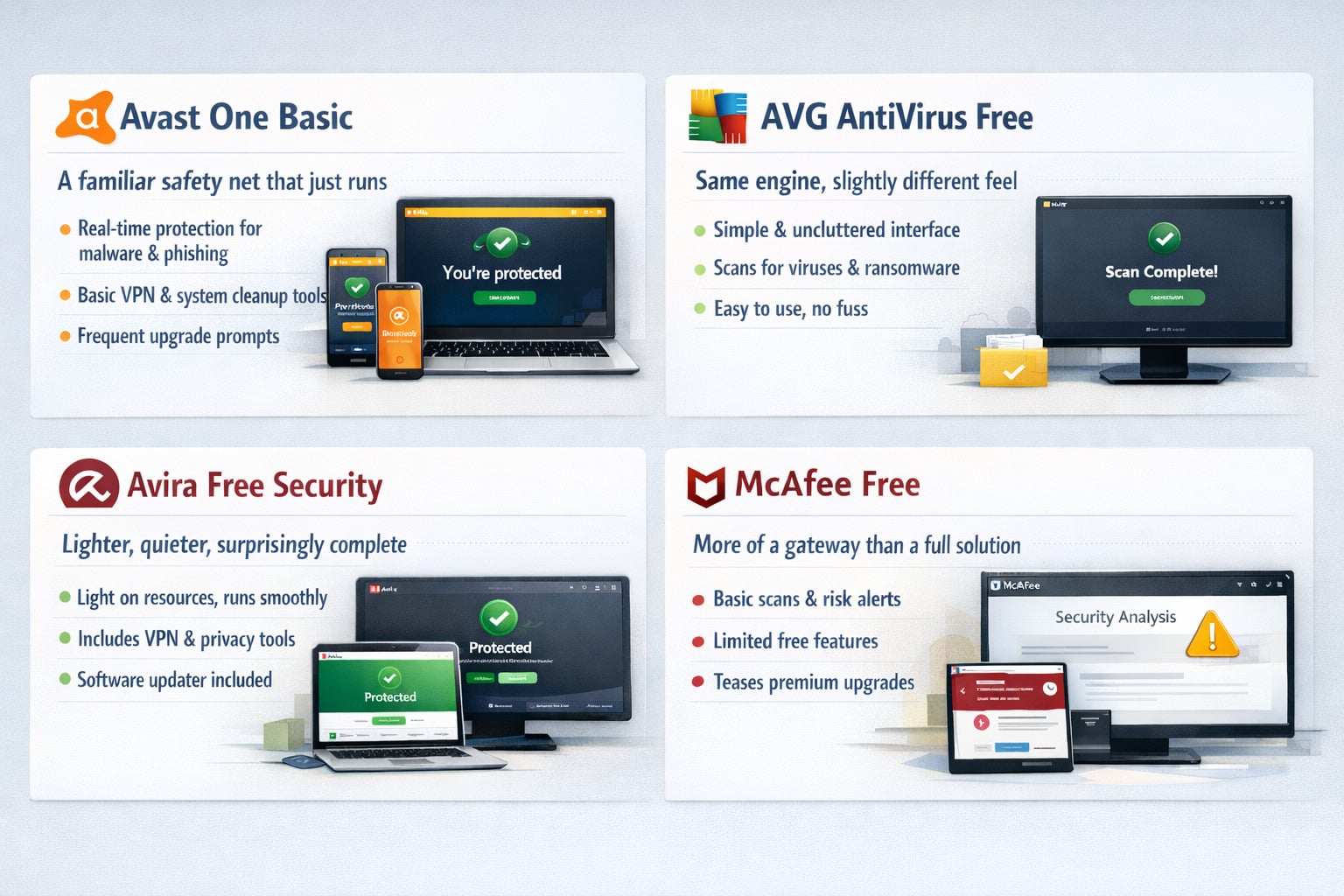
Avast One Basic, a familiar safety net that just runs
Avast’s free tier has been around long enough to feel almost built into the internet itself. Install it on a Windows laptop or an Android phone and it settles in quickly, scanning files in real time, flagging suspicious downloads, keeping an eye on the kind of threats that usually slip in through everyday browsing.
It’s not subtle about pushing premium features , you’ll see the upgrade prompts , but for basic protection, it holds up. The app covers malware, phishing attempts, and even throws in limited tools like a VPN and system cleanup. Nothing too deep, but enough to keep a device from drifting into trouble after one careless click.
> Download Avast One Free Antivirus
AVG AntiVirus Free, same engine, slightly different feel
AVG often gets compared to Avast, and not without reason. Under the hood, they share a lot. But the experience feels a bit more stripped back, less cluttered, easier to read at a glance.
On a regular computer , especially one that’s been around a few years , that simplicity matters. You run a scan, it checks for viruses, ransomware, suspicious files, and gives you a clear answer without much noise. It’s the kind of software that doesn’t try to impress, just to work.
For users who don’t want to dig through menus or think about security settings every day, AVG tends to fade into the background in a good way.
Avira Free Security, lighter, quieter, surprisingly complete
Avira takes a slightly different approach. It feels lighter from the start, both in performance and in design. On older systems or budget laptops, that difference shows almost immediately , fewer slowdowns, smoother scans, less friction overall.
Beyond standard antivirus protection, it adds a few extras that stand out: a basic VPN, a software updater, even tools to manage privacy settings. Not everything is fully unlocked, of course, but the package feels more rounded than expected for a free option.
It’s the kind of setup that doesn’t overwhelm, yet quietly covers more ground than you initially think.
> Download Avira Free Security
McAfee Free, more of a gateway than a full solution
McAfee’s free offering sits in a slightly different category. It’s less about delivering a complete standalone antivirus and more about introducing a broader security ecosystem.
You’ll get basic scans, some level of threat detection, and visibility into potential risks , especially around data exposure or unsafe websites. But it quickly becomes clear that the deeper protection, the kind that covers multiple devices or identity monitoring, lives behind the premium tier.
> Download McAfee Free Security Assessment
Still, for someone testing the waters or looking for a recognizable name to start with, it does the job. It shows what’s out there , and where the limits of “free” begin.
Why Are Free Antivirus Tools Still Popular in 2026?
Everyday protection has improved dramatically.
For many users, basic digital safety no longer feels like a luxury. Over the years, no-cost security tools have become more reliable, more discreet, and easier to live with. They now handle everyday threats without drama, whether on Windows, macOS, Android, or iOS. After a quick download, a simple click, and the system gets to work in the background. For home users, that level of protection feels enough. The computer stays responsive, the phone stays usable, and daily habits remain unchanged.
Simplicity still wins
Another reason explains their lasting appeal: ease of use. These solutions are designed for people who don’t want to read a long review or tweak endless features. Installation takes little time, updates run automatically, and the software stays mostly invisible. A basic scan runs quietly, watching for viruses, malware, or ransomware that could slip in through a file or an unsafe online action. For users who just want their device to feel secure, that simplicity is exactly the point.
Cost is still a major factor, especially for mobile users
On mobile and desktop alike, price remains a deciding factor. Many users are reluctant to pay ongoing fees, especially when a free option already covers common risks. On Android phones downloading apps from Google Play, or on laptops used for casual browsing, the value gap has narrowed. The idea of paying for premium tools only makes sense when sensitive data, remote business use, or advanced privacy needs come into play. Otherwise, sticking with a free solution feels practical, not reckless.
Cloud intelligence changed the game
Behind the scenes, cloud-based systems now do much of the heavy lifting. Instead of overloading local systems, suspicious activity is checked remotely, allowing fast reactions in real conditions. This keeps older hardware usable and modern devices efficient. Users rarely notice the process, but they feel the result: smoother performance, fewer slowdowns, and consistent scans that don’t interrupt daily tasks.
The limits are clearer than ever
Still, these tools are not built for everyone. Advanced privacy layers, full VPN coverage, and deep identity safeguards remain outside their scope. For high-risk profiles, constant travel, or professional use, paid options stay at the top. But for everyday users who simply want solid baseline antivirus security, the balance still makes sense,and explains why this model continues to hold its ground.
Which Key Criteria and Features Matter Most in a Free Antivirus?
Core protection comes first
The starting point is always basic security. A solid tool should stop a virus before it can cause damage, not after the fact. Modern solutions now rely on real-time monitoring that quietly watches what’s happening on your device. If a suspicious file behaves unexpectedly, the system reacts immediately. This matters on every platform, from Windows laptops to Android phones and Mac desktops.. Over the years, detection engines have improved enough to handle common malware and everyday threats without constant user input.
Defense against modern attacks
Modern threats don’t all look the same anymore. Beyond classic viruses, users now face phishing pages, fake online stores, and ransomware that locks personal data. Effective protection focuses on behavior, not just known signatures. If a program suddenly tries to encrypt files or redirect traffic, it should be stopped instantly. This layer is especially important for people who regularly click links, download content, or move between devices during the day.
Performance should stay invisible
Protection is useless if it slows everything down. One key criterion is how smoothly the software runs in the background. A good option respects your time and your hardware. It shouldn’t freeze your computer during a routine scan, drain battery life on mobile, or interrupt your work. Many modern tools rely on cloud processing to keep local systems light, which makes a real difference on older machines or entry-level phones.
Usability and trust matter more than ever
A clear interface isn’t a bonus it’s a requirement. Users should understand what’s happening without reading a long review or switching languages. Whether the dashboard is in english or another language, controls must be obvious. One button to run a check, clear alerts, and automatic updates that keep protection current. Just as important: transparency. No aggressive pop-ups, no hidden data collection, and no pressure to upgrade every few minutes to a premium plan.
Extra tools that add real value
Some editions now include helpful extras that go beyond basic defense. Limited VPN access can secure connections on public networks. Breach alerts warn if your email appears in leaked databases. Simple cleanup tools remove unused files to keep devices responsive. These features don’t replace full paid suites, but they raise the bar. For personal use, and even light business tasks, that balance often feels like the best compromise.
What Are the Main Limitations of Free Antivirus Software?
Protection that stops at the basics
At first glance, these tools feel comforting. They catch the usual viruses and deal with familiar malware, which is often enough for everyday use. But their limits appear quickly. Advanced protection is often limited. These tools mainly detect known threats rather than emerging ones. As a result, they’re less effective against modern ransomware, fake websites, or phishing emails, and a device can be left exposed when a new threat appears.
Intrusive behavior and distractions
Another frustration is what happens after installation. Constant alerts and upgrade prompts break your focus. One quick click can open a warning that sounds serious, only to end with a push toward a premium upgrade. On a computer or phone, all that noise quickly becomes more stressful than reassuring. Some software also runs heavier in the background, affecting performance on older systems or budget mobile devices.
Slower reactions to new risks
Speed matters when it comes to digital protection.. Paid options stay on their toes, updating constantly, while no-cost tools can be slower to react and catch up. That gap means a newly emerging attack can slip through before updates arrive. On Windows or macOS, this delay is rarely visible to users, but it can make a difference when a harmful file is circulating widely online. Over years of use, that slower response quietly increases risk.
Missing tools that matter in real life
Support is another weak spot. If something goes wrong, there’s no live help. Users are often left searching forums or troubleshooting on their own. Extra utilities are also limited. A built-in VPN may exist, but usage caps make it impractical. Coverage is often restricted to one device, which doesn’t help households juggling android, iOS, and desktop machines. Features like password management, parental controls, or identity monitoring are reserved for paid tiers.
Privacy trade-offs users don’t always see
When a product costs nothing, monetization happens elsewhere. In some cases, these tools keep an eye on user activity to support ads or analytics. Even when the data is anonymized, it still raises fair questions about how personal information is handled. For people who value privacy, especially when browsing online or using public networks, this compromise isn’t always obvious at installation.
When the balance no longer works
For light use, these tools still work. They offer a baseline layer of protection that feels adequate. But as soon as usage becomes more complex,remote work, sensitive files, or light business needs,the gaps become harder to ignore. The real question is simple: are you comfortable with basic coverage, or do you need something built to keep you truly secure?
Alternatives to free antivirus
The 5 Best Antivirus Software for 2026 Ranked
- Bitdefender – Best Overall Antivirus
- Surfshark One – Best for Privacy Protection
- Norton 360 – Best All-in-One Security Suite
- Avast Premium Security – Best for Phishing Protection
- Avira Prime – Best for Extra Privacy & Optimization Tools
At some point, free antivirus starts to feel… incomplete. Not broken, not useless , just limited in ways that only really show up after a few months. A suspicious file slips through, a scan takes longer than expected, or a feature looks promising until a “premium required” message pops up. That’s usually when the question shifts from “is free enough?” to something more practical.
Bitdefender , quiet, consistent, and hard to fault
Bitdefender has built a reputation on doing its job without getting in the way. Install it on a Windows PC or a Mac, and it mostly disappears. No constant prompts, no aggressive upsells , just real-time protection running in the background.
What stands out isn’t a single feature, but the balance. Malware detection is sharp, ransomware protection is reliable, and scans don’t freeze your system mid-task. Even on older machines, it tends to stay light.
There’s a VPN included, though limited unless you go higher-tier, and basic data breach alerts that quietly keep track of your online exposure. It’s the kind of software that doesn’t try to impress , it just keeps things clean.
Surfshark Antivirus – more than protection, a full ecosystem
Surfshark approaches antivirus differently. It’s not positioned as a standalone tool, but as part of a broader security setup. VPN, identity monitoring, alert systems , everything is bundled into one app.
In real use, that changes the experience. You’re not just running scans on your computer; you’re securing your connection, your data, your browsing habits, all at once. On a phone, especially Android, it feels natural. On a laptop, it adds an extra layer that free antivirus simply doesn’t touch.
There’s also something practical about managing multiple devices under one account. No limits, no juggling licenses. It’s less about reacting to threats and more about reducing exposure altogether.
Norton 360 – a broader safety net, with some weight
Norton has been around long enough that most people have at least heard the name. And with Norton 360, the idea is simple: cover as much ground as possible.
You get antivirus, yes, but also cloud backup, a VPN, password management, even dark web monitoring depending on the plan. It’s not subtle. The software does a lot, and sometimes you feel it , especially on older systems where it can be a bit heavier than others.
Still, for households or users managing several devices, that all-in-one approach makes sense. Install it once, let it run, and it handles most of the background work without needing constant attention.
Avast Premium Security , familiar, but far more proactive
If you’ve used Avast’s free antivirus before, the premium version feels immediately recognizable , just expanded in every direction.
The core protection is stronger, of course, but what stands out is everything around it. Scam detection, protection against fake websites, monitoring for suspicious network activity , it leans into prevention rather than just cleanup.
There’s also a VPN option, performance tools, even system optimization features. For some, that’s a lot. For others, it replaces multiple apps they were already using separately.
None of these alternatives are as minimal as free antivirus tools. That’s part of the trade-off. More features, more layers, sometimes more notifications too.
But after a while , especially if a real threat gets through once , that extra depth doesn’t feel excessive. It feels necessary.
Created by antivirus team via OpenIA | Premium antivirus alternatives that go beyond basic protection—offering stronger security, broader coverage, and smarter threat prevention across all your devices.
FAQ
Is free antivirus enough for everyday use?
For basic protection, yes — it can catch common viruses and handle simple scans.
But it often misses more advanced threats like ransomware or phishing attempts.
Over time, those gaps tend to matter more than expected.
What’s the main advantage of paid antivirus software?
It’s not just stronger malware detection — it’s everything around it.
You get real-time protection, secure VPN access, and better data monitoring.
In short, fewer blind spots while browsing, downloading, or working online.
Do premium antivirus tools slow down your computer?
That used to be true years ago, less so today.
Software like Bitdefender or even newer apps are designed to run quietly in the background.
You’ll notice it more when something gets blocked than during normal use.
Is it worth paying for antivirus if you already use safe browsing habits?
Careful behavior helps, but it’s not a guarantee.
One wrong click, one fake Google link, and things can escalate quickly.
Security software acts as a second layer — not a replacement, but a backup.
Can one antivirus protect multiple devices?
Most premium plans now cover more than just one computer.
Phones, tablets, even different operating systems like iOS or Android can be included.
It’s often easier than managing separate apps across each device.