AVG scores 4.2/5 in my tests. AVG AntiVirus Free is among the best free antivirus apps available and shares Avast’s detection engine, so the paid tiers need their extras to justify the price, and the upsells stop only when you splurge on AVG Ultimate.
Overall Rating: 4.2/5 ⭐
- Protection: 4.7 ⭐
- Performance: 4.3 ⭐
- Features: 4.3 ⭐
- Support: 3.5 ⭐
- Value: 4.3 ⭐
Free or from $59.88 for the first year. Pricing verified October 2026.
AVG Antivirus Review: Ratings, Pros and Cons
This AVG antivirus review covers the free tier, Internet Security, and Ultimate on Windows 11, plus the Android app on a Galaxy S26 Ultra. Every figure came from my own bench unless a lab is named.
👍 Where AVG Wins
- 99.77% detection on my sample set, with only 4 false alarms.
- Free tier keeps real-time protection and Ransomware Protection.
- Ultimate costs the same as Internet Security in year one.
- Boot delta of 5 seconds. Lighter than Avast, Bitdefender, and Norton.
- Enhanced Firewall has a full rule editor with port scan alerts.
- 24/7 phone support is available.
👎 Where It Falls Short
- Same engine as Avast, so it isn’t an alternative to it.
- Upsells after every Smart Scan, even on a paid plan.
- Secure VPN lost 22.5% of download speed on average.
- Ultimate renews at $149.99, a 150% jump.
- 3 data-sharing settings arrive switched on.
Buy it if you want a free antivirus with a clean lab record and don’t mind closing prompts. Look elsewhere if you need a VPN you’d rely on, or the least data collection possible. See where it ranks in my antivirus software reviews.
What Is AVG, and Who Owns It Now?
AVG is a 35-year-old antivirus brand from Brno, in the Czech Republic, owned by Gen Digital. Where the name came from matters to people who installed it 20 years ago. Who profits from it today changes how you should compare AVG with its rivals.
From Grisoft to AVG: The Name Long-Time Users Remember
Long-time users still call it Grisoft AVG. The lineage:
- 1991: Jan Gritzbach and Tomáš Hofer founded Grisoft in Brno
- 1992: Grisoft releases Anti-Virus Guard for DOS. AVG stands for Anti-Virus Guard, and the initials became the brand
- 1997 to 1998: first licenses sold in the UK and Germany, then the US, where the free edition built the reputation
- February 2008: Grisoft renames itself AVG Technologies after its own product
The Grisoft AVG antivirus of the 2000s continues as AVG AntiVirus Free from avg.com.
Who Owns AVG Today
Avast announced its purchase of AVG Technologies in July 2016 and closed the $1.3 billion deal that September. Avast then merged with NortonLifeLock in 2022, and the combined company became Gen Digital. So AVG, Avast, Norton and Avira share a parent. AVG and Avast share the same detection engine. AV-Comparatives’ March 2026 Malware Protection Test posted identical figures for both in all 4 columns.
My bench reproduced it: 99.77% for AVG against 99.78% for Avast, with 4 false alarms each. Comparing the two on protection tells you nothing. Compare the UI, free-tier features, prompts, and price instead.
What AVG Actually Does Today
AVG Technologies sells AVG security software across Windows, Mac, Android and iOS, plus an AVG Business range. The desktop suite includes File Shield, Behavior Shield, Web Shield and Email Shield, with an Enhanced Firewall and privacy shields on the paid tiers. Around it are 4 separate products.
AVG TuneUp, AVG Secure VPN, AVG AntiTrack, and the free AVG Secure Browser. Underneath is the Gen Digital engine that powers Avast and Norton.
AVG AntiVirus Free: What the Free Version Includes
Most people reading an AVG review want the free version, and it earned its popularity. AV-TEST’s June 2026 Windows 11 round gave AVG AntiVirus Free a perfect 6/6/6 and a Top Product award, matching the paid Norton 360 and Bitdefender suites.
What You Get in AVG AntiVirus Free
AVG free antivirus includes:
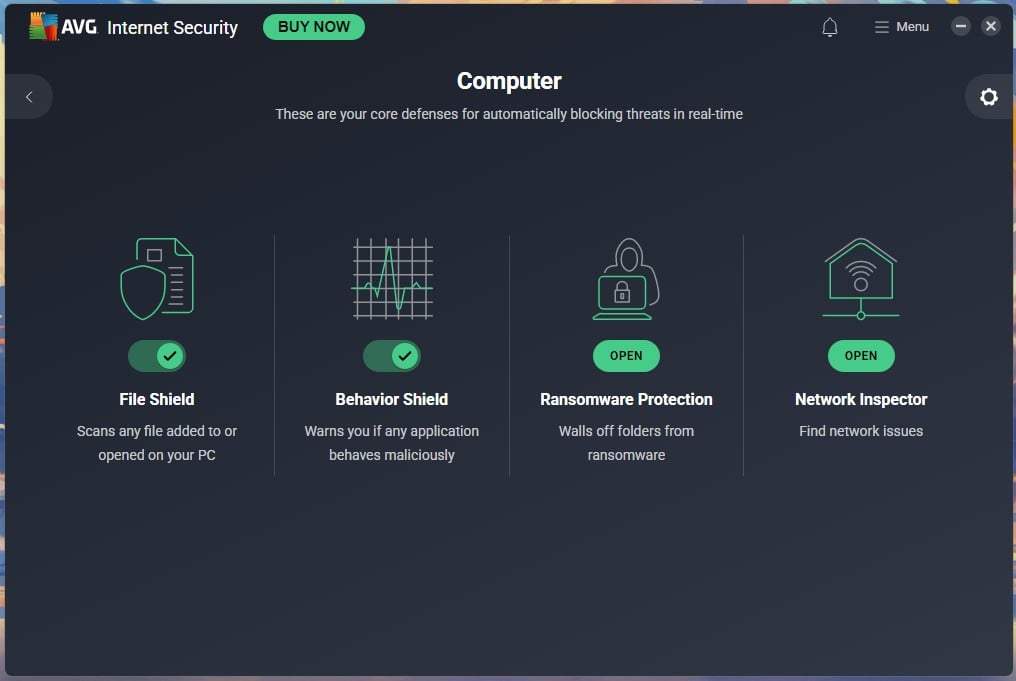
- File Shield: scans every file added to or opened on the PC in real time
- Behavior Shield: warns when an application starts behaving maliciously
- Web Shield: blocks web attacks and unsafe downloads
- Email Shield: scans inbound and outbound mail for infected attachments
- Ransomware Protection: walls off chosen folders from untrusted apps, with the user folders protected by default
- Smart Scan, Deep Scan, File or Folder Scan, Boot-Time Scan and USB/DVD Scan
- CyberCapture: sends unrecognized files to AVG’s Threat Labs
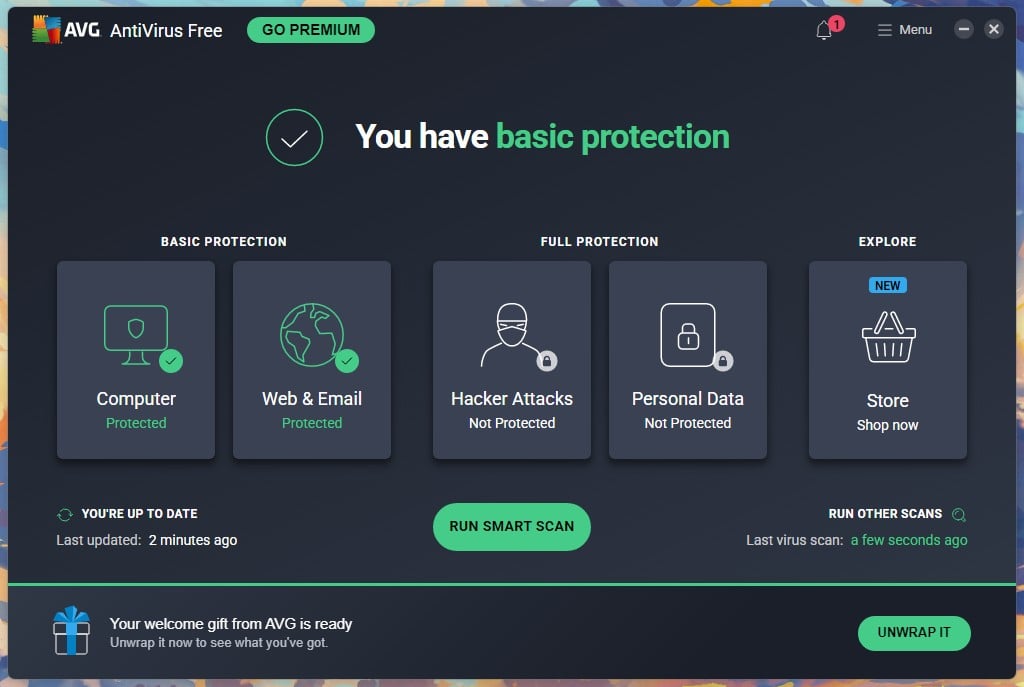
That’s a complete antivirus, covering spyware, adware, trojans, rootkits, keyloggers and infostealers under one engine. Real-time protection, a behavior monitor, and a ransomware layer are the 3 things free products often drop, and AVG keeps all. The scanner uses the same engine and definitions as the paid tiers.
So, AVG free virus protection detects what AVG Ultimate detects. There’s no device limit either: 1 device per install, unlimited installs.
What the Free Version Holds Back
AVG’s own comparison table marks 6 rows as paid-only:
- Enhanced Firewall: Per-app rules, port scan alerts, and ARP spoofing alerts
- Fake Website Shield: matters on public Wi-Fi. It blocks DNS hijacking to lookalike banking sites
- Phishing site protection: Free users rely on Web Shield and the browser’s own filter
- Wi-Fi network verification: marginal unless you move between networks
- Webcam Protection and Sensitive Data Shield: marketing rows for most people
- Remote Access Shield: matters only if Remote Desktop is enabled, which it isn’t by default
TuneUp, Secure VPN and AntiTrack are separate products on the Ultimate tier. Email and phone support is paid-only.
Is AVG Free Enough on Its Own?
For a careful Windows 11 user, yes. The comparison that decides it is AVG Free against Microsoft Defender, which you already own. Defender booted 1 second faster on my bench and finished its full scan sooner (12:24 against 15:13). AVG blocked more offline: AV-Comparatives March 2026 has AVG at 96.3% offline detection and Defender at 89.2%, so AVG catches more when the cloud lookup fails.
Paying makes sense if you bank on public Wi-Fi often enough for Fake Website Shield to earn its keep, you want per-app firewall control, or you’d buy TuneUp or a VPN anyway, and Ultimate bundles them for $0 extra in year one. Outside those, use AVG for free. For how Avast, Bitdefender, and Avira compared on the same bench, see my free antivirus comparison.
How AVG Free Makes Money
AVG Free is free because the app sells the paid tier from inside itself. What I hit on a fresh install, and it’s very interesting:
- Installer: 2 pre-ticked boxes, installing AVG Secure Browser and making it the default
- First launch: a 3-slide carousel comparing Free with Internet Security
- After every Smart Scan: “8 advanced issues found”, rated critical, with Resolve All opening the 60-day Internet Security trial
- Persistent: a Go Premium button, a notification badge, and a “welcome gift” banner offering 61% off, which cut the in-app price from $3.89 to $3.29 a month
- Performance Scan: 16 seconds, 10 issues, and Resolve All leads to TuneUp
No ads appear inside the Windows app. On data handling, AVG’s parent settled with the FTC in February 2024 over Avast’s sale of browsing data through its Jumpshot subsidiary, paying $16.5 million and accepting an order that bars selling browsing data for advertising.
How to Download AVG Antivirus Safely
Download AVG only from avg.com or the official app stores. Because so many people search for an AVG free download, fake download pages are a reliable way to put a fake installer, a browser hijacker, or worse on a machine. Malvertising does the rest: search for a free AVG antivirus download and ads appear above the organic results, not all of them AVG’s.
How to get AVG the safe way:
- Type avg.com into the address bar and check the spelling. Don’t click a search ad. Go to the original website.
- Choose AVG AntiVirus Free and use the Free download button. The installer is small and pulls the rest during setup.
- Right-click the installer, choose Properties, then Digital Signatures. The signer should read AVG Technologies or Gen Digital.
- Untick both AVG Secure Browser boxes unless you want it.
- Let the install finish. Mine took 1 minute 12 seconds, including the download, with no restart.
- Confirm “You are fully protected” on the home screen.
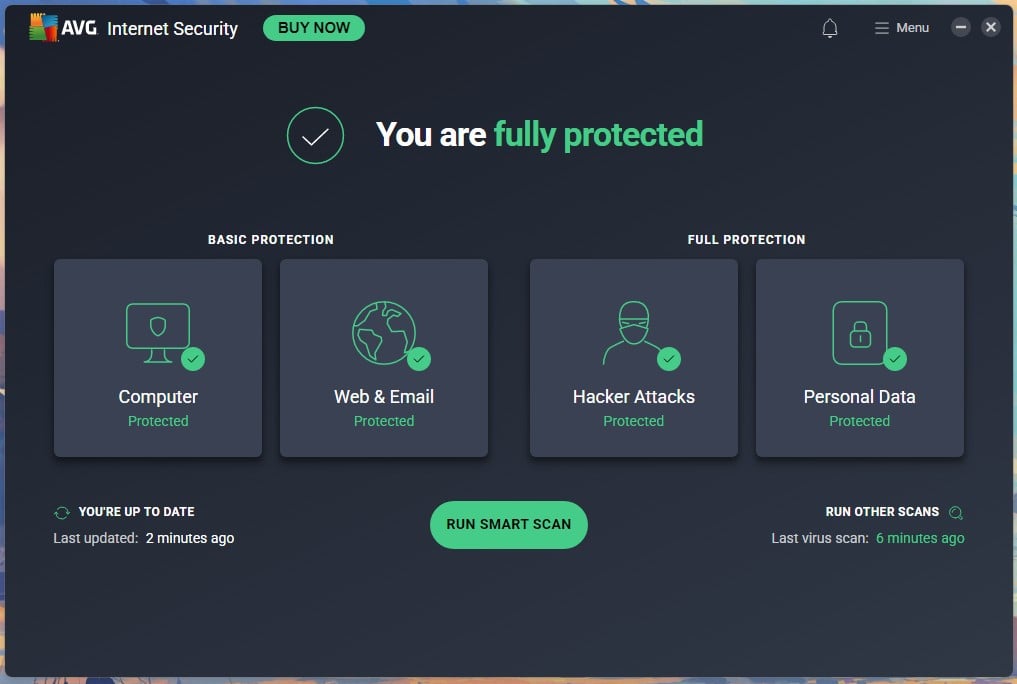
Skip any AVG download link that arrives by email, and any page offering the free version with a license key attached. The free product needs no key, so if a download page asks for one, close it.
How to Uninstall AVG Completely with AVG Clear
A standard uninstall through Windows Settings sometimes leaves drivers and services behind, which can block a reinstall or clash with the next antivirus. AVG Clear is the official removal tool.
- Download AVG Clear from avg.com’s support pages, sign in as an administrator, and close the AVG app.
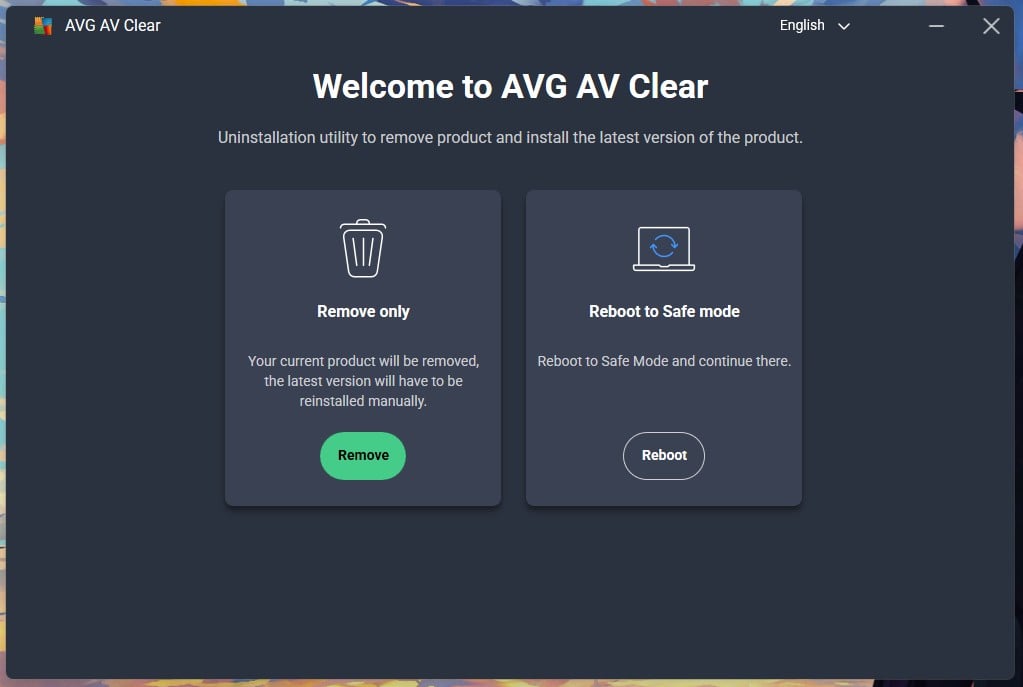
- Open AVG Clear. It offers Remove only, which strips the product, and Reboot to Safe mode, which restarts Windows and continues there.
- Remove only worked for me with no safe-mode detour. Use Safe Mode if the ordinary uninstall failed or the product won’t open.
- Restart, then check that Windows Security has re-enabled Defender.
AVG Clear removes AVG and nothing else. If the machine is infected and AVG can’t clean it, my malware removal guide covers that job.
Is AVG Antivirus Safe to Use?
Yes, AVG antivirus is safe to install and use, provided the installer came from avg.com. The doubt comes from the product’s habits and its ownership history.
Is AVG Safe? Where the Doubt Comes From
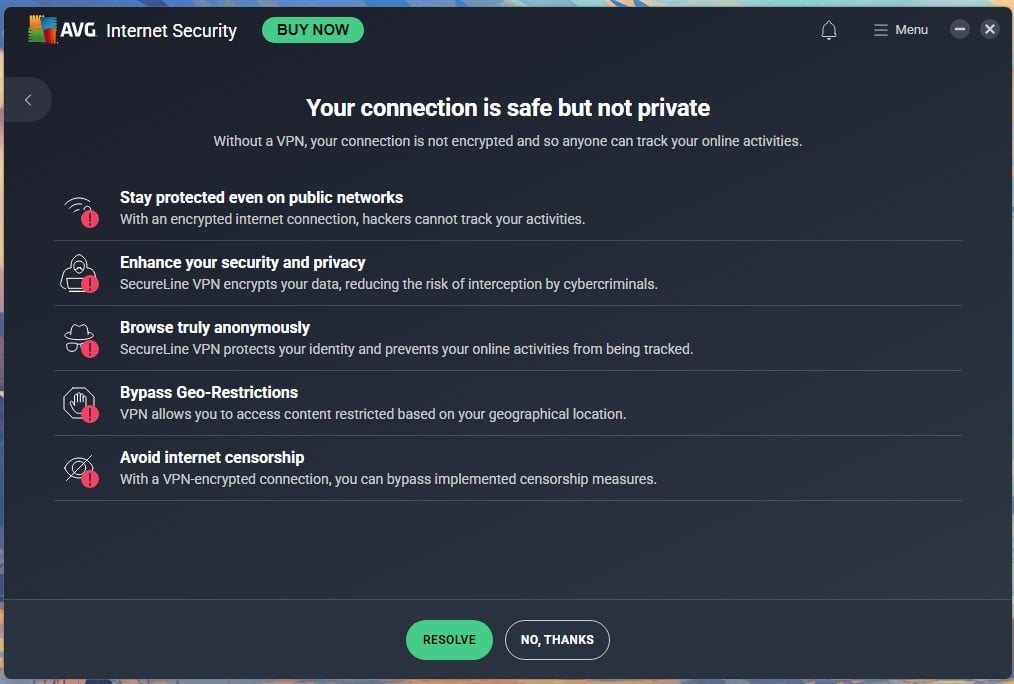
AVG’s reputation comes from 3 habits. Smart Scan rates a clean PC’s “advanced issues” as critical. The installer pre-ticks a browser. And Network Inspector ended a scan on my paid trial by pitching Secure VPN: “Your connection is safe but not private.” Aggressive selling looks like a threat to people who don’t know the difference, and that’s why AVG appears on forums next to the word “virus”.
What AVG Collects
AVG’s product privacy notice, updated August 17 2026, lists what the desktop antivirus processes:
- Suspicious file samples and detection metadata, kept for 36 months
- URLs and referrers of malicious pages, which may include search terms, kept for 36 months
- IP address, as part of an infection record, kept for 36 months
- Installed applications and other security software, 36 months
- Device and usage events, up to 50 months for “product and business improvement”
- Email Shield detections, including the sender and content of a flagged message, 1 month
Google Analytics is the named third-party tool. The VPN follows a separate policy: no originating IP, DNS queries, or browsing history, but connection events for 12 months and transfer totals for 18.
What to Switch Off After Install
AVG switches on 4 sharing settings by default. To turn them off, open Menu, then Settings:
- General, Privacy Preferences: untick “Share suspicious file samples“
- Same screen: untick “Help improve our products and business processes“
- Same screen: untick “Personalized discounts“, which lets AVG use data about you and your device to price offers
- Basic Protection, Detections: change CyberCapture from “Automatically send files to Threat Labs” to “Ask me“
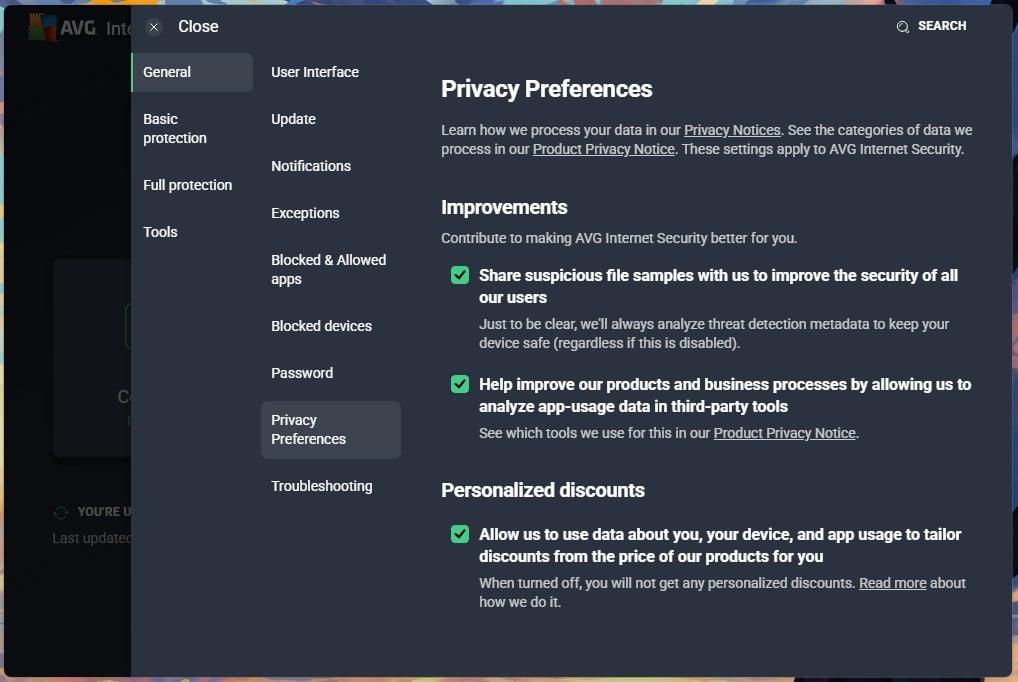
Detection metadata is still analyzed with all 4 off, which AVG states on the settings screen. If 36-month retention on a malware scanner is more than you’ll accept, Bitdefender is the independent option in my rankings.
AVG Protection Test Results: What It Blocks
AVG virus protection uses the same engine as Avast and Norton, so the results below describe all 3. That engine combines signature-based detection, heuristic analysis, behavior-based monitoring, and cloud-based scanning through CyberCapture, which is how it handles zero-day threats. Quarantine is automatic by default.
Independent Lab Scores: AV-TEST and AV-Comparatives
- AV-TEST, June 2026, Windows 11 home user: AVG Free 6/6/6, a perfect performance score alongside protection and usability, Top Product. Bitdefender, Norton, McAfee, Kaspersky, and Avast Free also scored 18. Microsoft Defender scored 6/5.5/6.
- AV-Comparatives, March 2026, Malware Protection Test: AVG 96.3% offline detection, 98.7% online detection, 99.97% online protection rate, 9 false alarms.
The 9 false alarms are the weak spot compared to Bitdefender’s 4. So is AVG antivirus good? On the lab evidence, as good as anything in the round, with more false alarms than the best.
Malware and Phishing Results on My Bench
I tested AVG on the same Windows 11 Pro machine as every other antivirus here: a Ryzen 7 5800X, 32 GB of DDR4-2666, and 2 M.2 SSDs. Same sample set, same URL list, real-time protection active. The EICAR test file only confirms a scanner is switched on, so it isn’t part of the set.
- Malware detection: 99.77% combined, 4 false alarms
- Phishing: 93% of phishing URLs blocked, 0 false positives
- URL blocking of known malicious pages: perfect, no false alarms
On the same rig, Avast scored 99.78% with 4 false alarms and 93% on phishing; Bitdefender 99.8% with 5 and 89%; Norton 99.8% with 3 and 95%. AVG’s 4 false alarms on my bench are fewer than its 9 in the lab, and my sample set is smaller, so the lab figure takes precedence. Is AVG good in practice?
It matched Avast to within a hundredth of a point, and it blocked a potentially unwanted app (PUA) on the same sensitivity setting Avast uses.
Scan Types and How Long They Take
The Run Other Scans menu lists Deep Scan, File or Folder Scan, Boot-Time Scan, USB/DVD Scan, and Performance Scan. Smart Scan is the home-screen button. Measured on the rig above:
- Smart Scan: 57 seconds
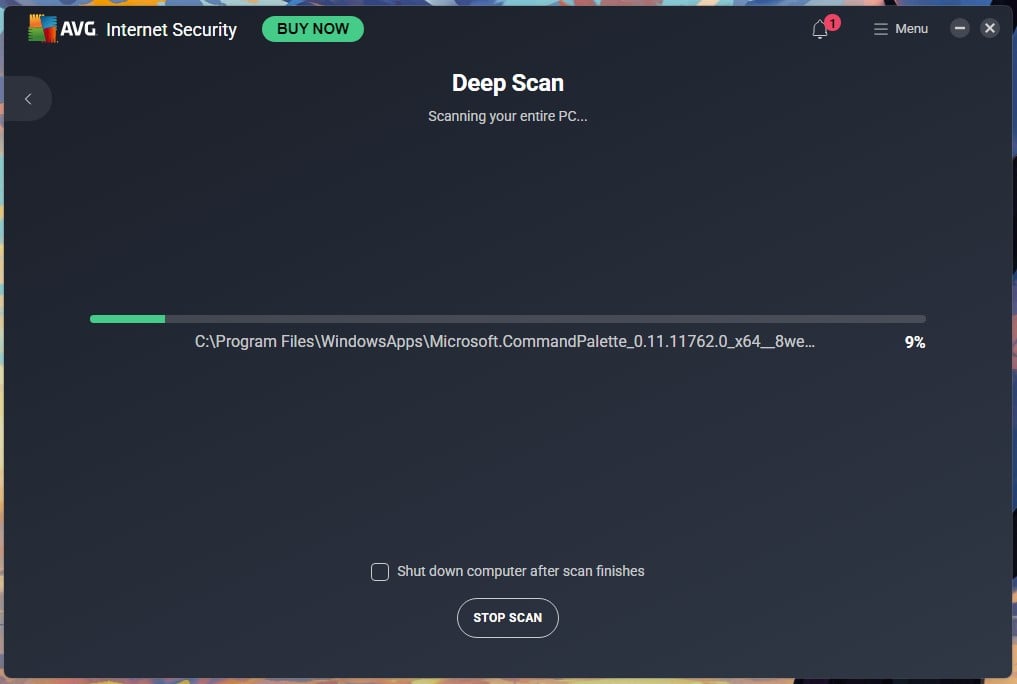
- Deep Scan (the full scan): 15 minutes 13 seconds
- Boot-Time Scan: 43 minutes 18 seconds
- Performance Scan: 16 seconds, 10 issues
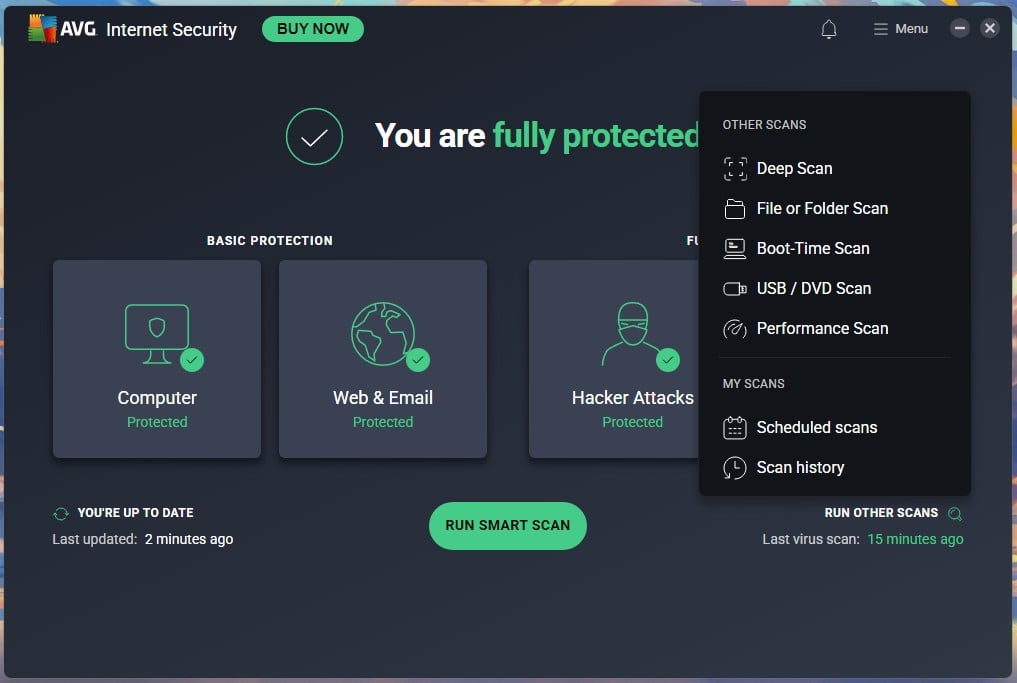
File or Folder Scan and USB/DVD Scan depend on what you point them at, so I didn’t time them. Smart Scan’s malware and operating system checks are genuine and finished with Looking good. Its third stage, “advanced issues”, is the upsell: browser-stored passwords and unprotected documents counted as issues, rated critical, with the paid trial offered as the fix.
System Impact: Light in the Background, Heavier During Scans
AVG was among the lighter suites I measured at idle and among the slower ones at full scan. CPU usage, RAM usage, boot time, and scan duration on the same rig, from a clean 18-second boot with Defender disabled:
- Idle: 161 MB of RAM, 0% CPU, 0.2 MB/s disk
- Deep Scan peak: 15% CPU, 220 MB RAM, 110 MB/s disk
- Boot: 23 seconds, a 5-second (28%) increase
- Install: 1 minute 12 seconds, no restart
Avast on the same rig added 9 seconds to boot and peaked at 12% CPU and about 200 MB during its 14:38 full scan. So AVG boots faster, scans slower, and draws slightly more during the scan, despite the identical engine. Bitdefender stayed the lightest suite I tested during scans, at 11% CPU and 183 MB. Background scanning between scheduled scans never registered.
AVG Plans and Pricing: Free, Internet Security and Ultimate
| Plan | Devices | Platforms | Key additions | Year 1 | Renewal |
|---|---|---|---|---|---|
| AVG AntiVirus Free | 1 per install, unlimited installs | Windows, Mac, Android, iOS | Real-time engine, shields, Ransomware Protection | $0 | $0 |
| AVG Internet Security | 10 | Windows, Mac, Android, iOS | Enhanced Firewall, Fake Website Shield, Webcam Protection, Remote Access Shield, Sensitive Data Shield, support | $59.88 ($4.99/mo) | $99.99 |
| AVG Ultimate | 10 | Windows, Mac, Android, iOS | Internet Security plus TuneUp, Secure VPN and AntiTrack | $59.88 ($4.99/mo) | $149.99 |
A 60-day trial of Internet Security is available inside the app. I signed up, pasted the activation code, and it activated at once.
AVG Internet Security
AVG Internet Security is the mid-tier. It adds Enhanced Firewall, Fake Website Shield, Webcam Protection, Sensitive Data Shield, Remote Access Shield, Browser Defense, Hack Alerts, and phishing-site protection across 10 devices. Does the difference over Free justify $59.88? For a single Windows PC, no.
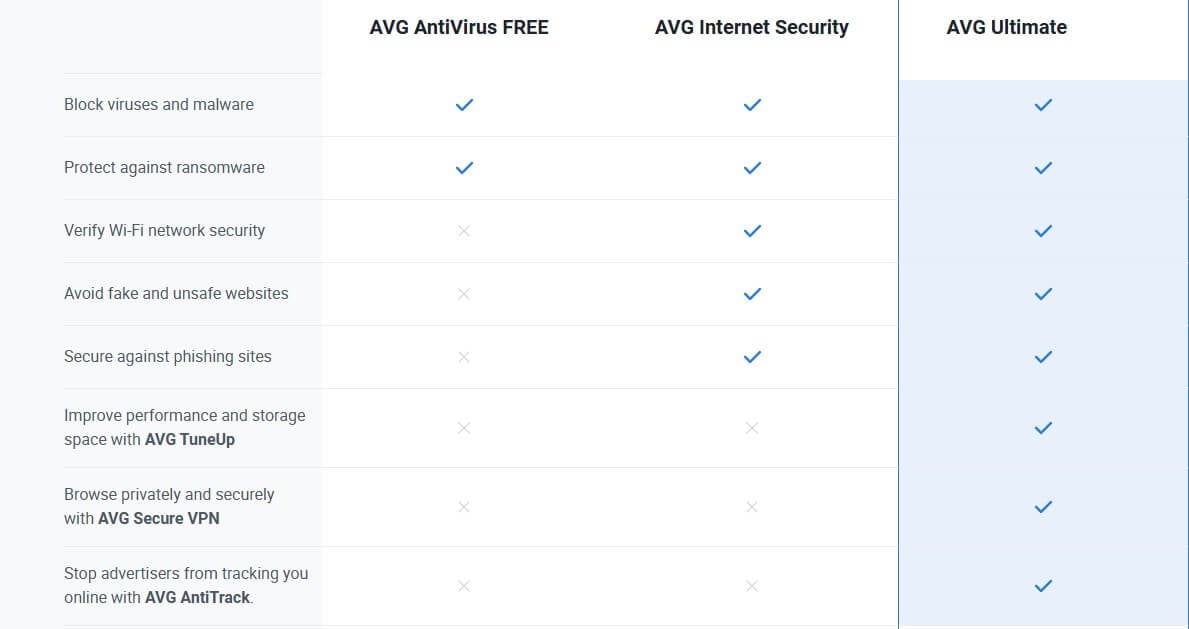
The firewall and Fake Website Shield change your protection and matter most on public networks. For a household with 10 devices, the per-device cost is $5.99 for a year of AVG Internet Security antivirus with support, cheap by suite standards. The renewal at $99.99 is a 67% increase.
AVG Ultimate
AVG Ultimate is the bundle: everything in Internet Security plus AVG TuneUp, AVG Secure VPN, and AVG AntiTrack, on 10 devices across 4 platforms. In year one, it costs $59.88, identical to Internet Security, because AVG discounts it 60% from a $149.99 list price vs 40% off a $99.99 list price.
So the first year of AVG Ultimate adds 3 products for $0. Does the bundle beat buying the parts? Yes, in both years:
- Parts, year one: Internet Security $59.88 + TuneUp $34.68 + Secure VPN $54.99 + AntiTrack $54.99 = $204.54
- Parts, renewal: $99.99 + $79.99 + $99.99 + $54.99 = $334.96
- AVG Ultimate: $59.88, then $149.99
Does AVG Ultimate beat a rival suite? On price, yes: Norton 360 Deluxe covers 5 devices for $49.99, then $124.99, and Bitdefender Total Security covers 5 for $59.99, then $109.99. On the quality of the extras, no. The VPN inside AVG Ultimate lost 22.5% of download speed in my tests and has no no-logs audit. Pick AVG Ultimate for TuneUp and a bundled VPN for occasional use.
Which AVG Plan Is Worth Buying
- One Windows PC, careful user: stay on AVG AntiVirus Free. Same engine, same lab score as the premium version.
- Laptop that travels and connects to hotel and café Wi-Fi: Internet Security, for the firewall and Fake Website Shield.
- Household with 5 to 10 devices: Ultimate in year one, since it costs the same as Internet Security. Decide at renewal whether TuneUp and the VPN justify the extra $50 a year.
- Anyone whose main want is a VPN: neither. Get AVG Free and install a separate VPN. I recommend NordVPN.
What AVG Costs After the First Year
Internet Security renews at $99.99, up from $59.88. Ultimate renews at $149.99, up 150% from the same $59.88. Across 2 years, Ultimate is $209.87 for 10 devices. AVG prices auto-renew by default. To stop, sign in at avg.com, open Subscriptions, and switch off auto-renewal; it keeps working until the term ends.
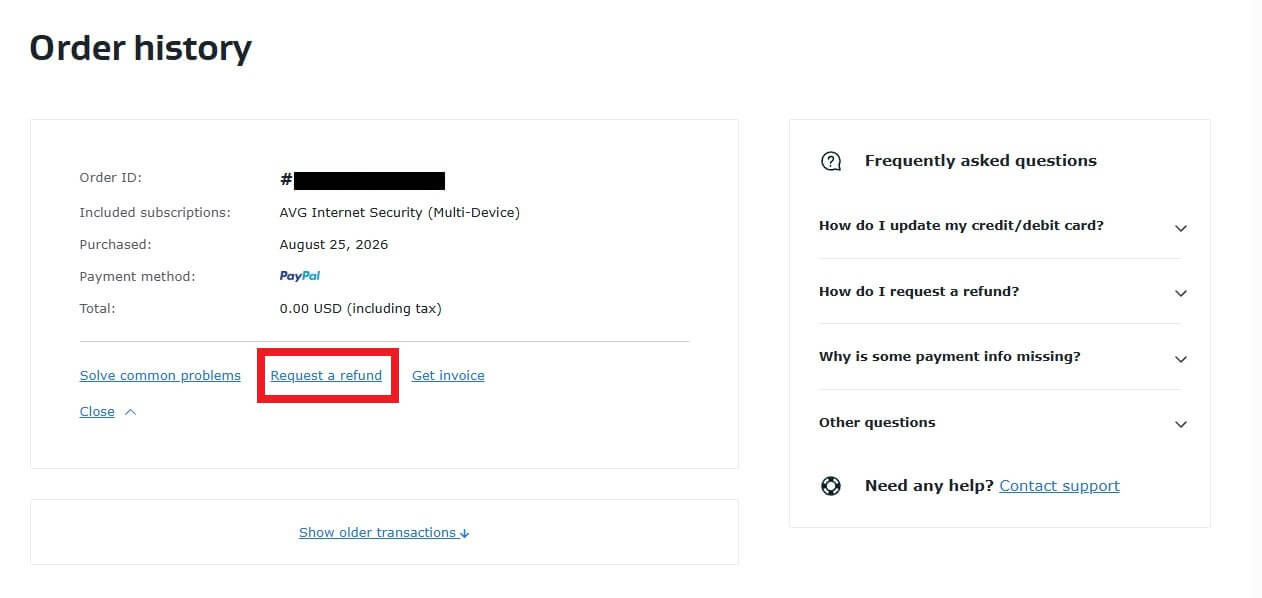
Refunds fall under a 30-day money-back guarantee, and inside that refund window the process is: open Order History, click Request a Refund, and confirm once.
Everything Bundled With AVG, Rated Tool by Tool
AVG Ultimate is 4 products in one license. Each one below ends with a verdict. Where my Internet Security trial excluded a tool, I say so.
AVG Secure VPN
This AVG VPN review is short because AVG Secure VPN is Avast SecureLine with a different logo: same 103 countries, same protocols, same settings. On my 190.36 Mbps connection in Serbia, it returned 186.68 Mbps to the UK at 47 ms, 157.30 Mbps to the US at 120 ms, and 98.74 Mbps to Japan at 282 ms. That’s a 22.5% average download loss. NordVPN lost 7.8% on the same tests.
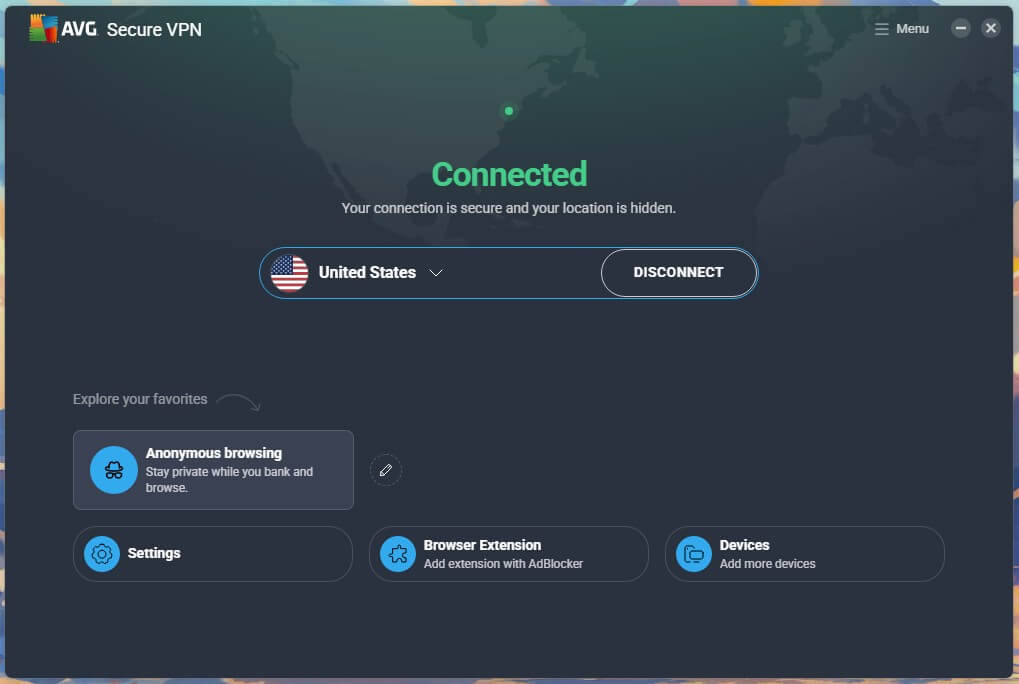
It opened Netflix, BBC iPlayer, and Prime Video, and has P2P servers, a kill switch, and a post-quantum toggle. Standalone, it costs $54.99 for the first year and renews at $99.99. The policy logs no originating IP, browsing history, or DNS queries, but keeps connection events for 12 months, and no no-logs audit exists. My Avast VPN review has the speed, streaming, and P2P results, and they apply here.
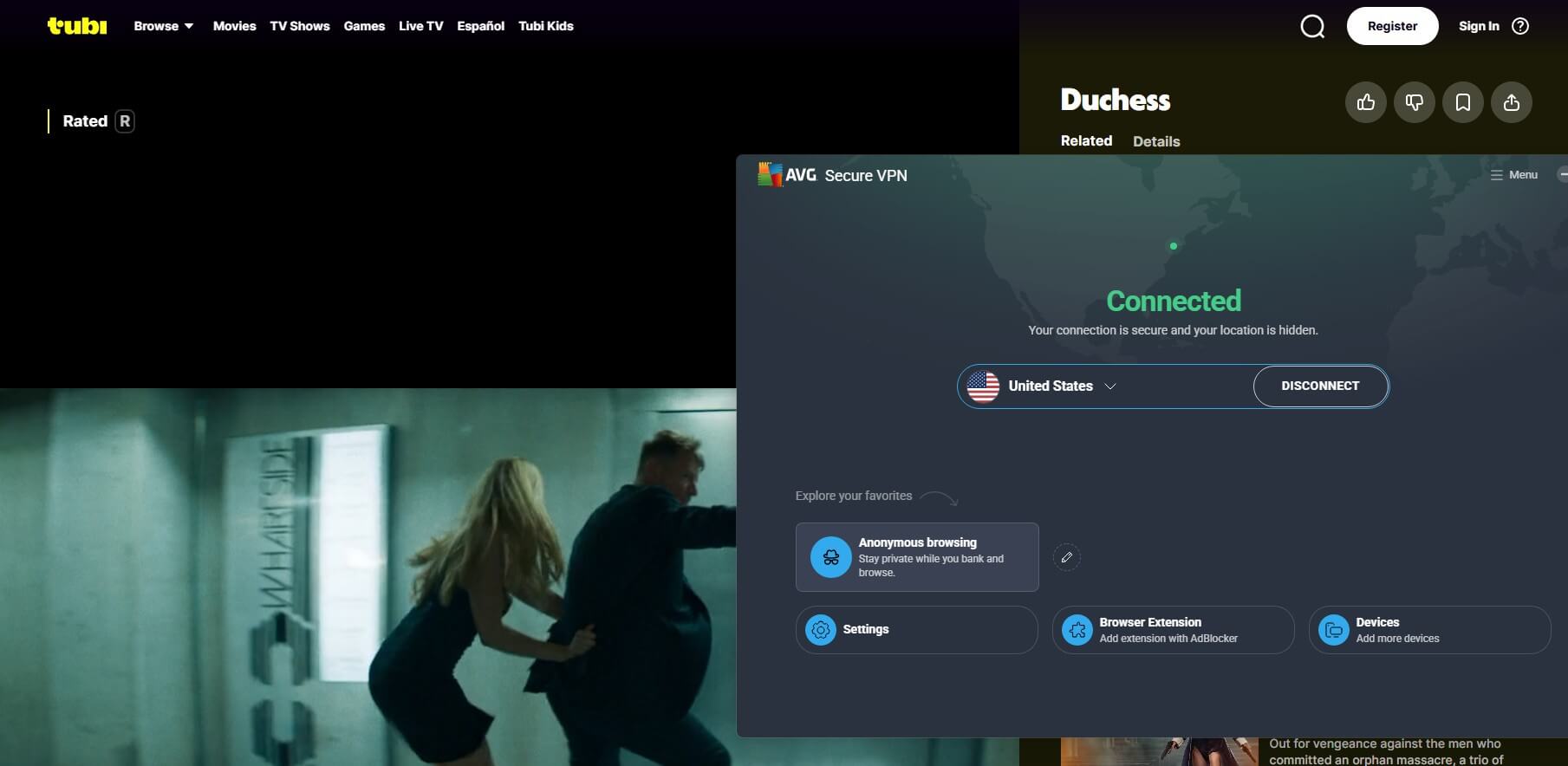
✅ Verdict: fine as a bundled extra for hotel Wi-Fi. It can’t replace a standalone VPN for speed or audited privacy. If you need a good VPN that you can pair with AVG, choose NordVPN, my #1 in the overall VPN ranking.
AVG TuneUp
TuneUp is AVG’s cleaner. On my PC, a scan found 13.9 GB of system junk, 1.1 GB of browser clutter, 336 broken registry items, 435 broken shortcuts, and 20 programs to put to sleep, in 16 seconds.
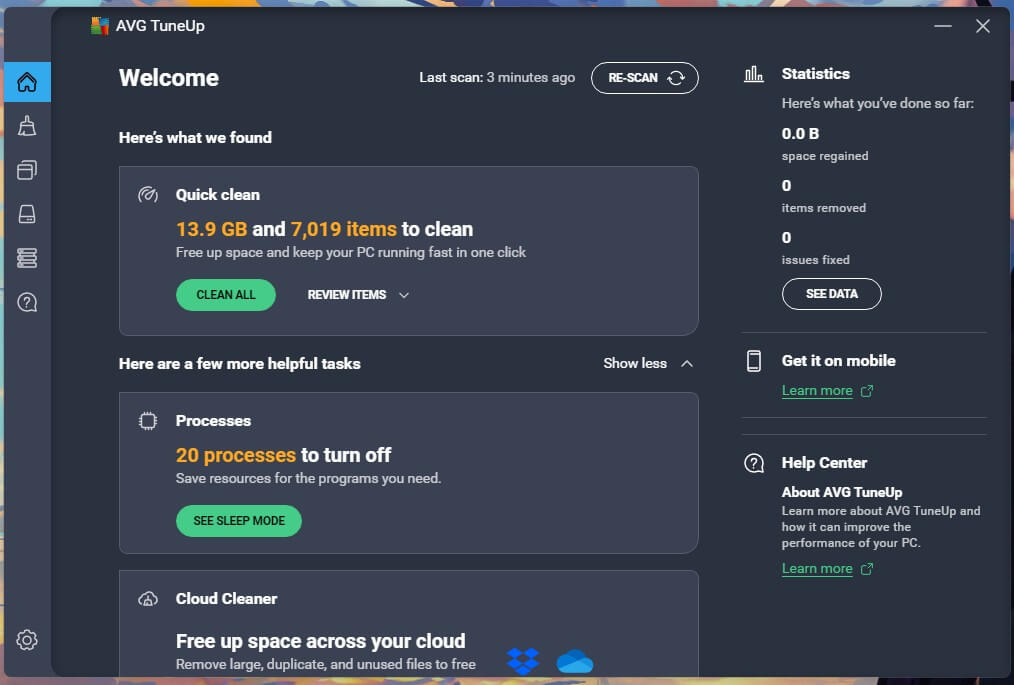
Every Resolve button leads to TuneUp, which I eventually tried and used to clean all of the “junk” on my computer.TuneUp includes a Software Updater and a Sleep Mode that suspends background apps. I tested its Software Updater, and it’s basically the same as Avast’s equivalent.
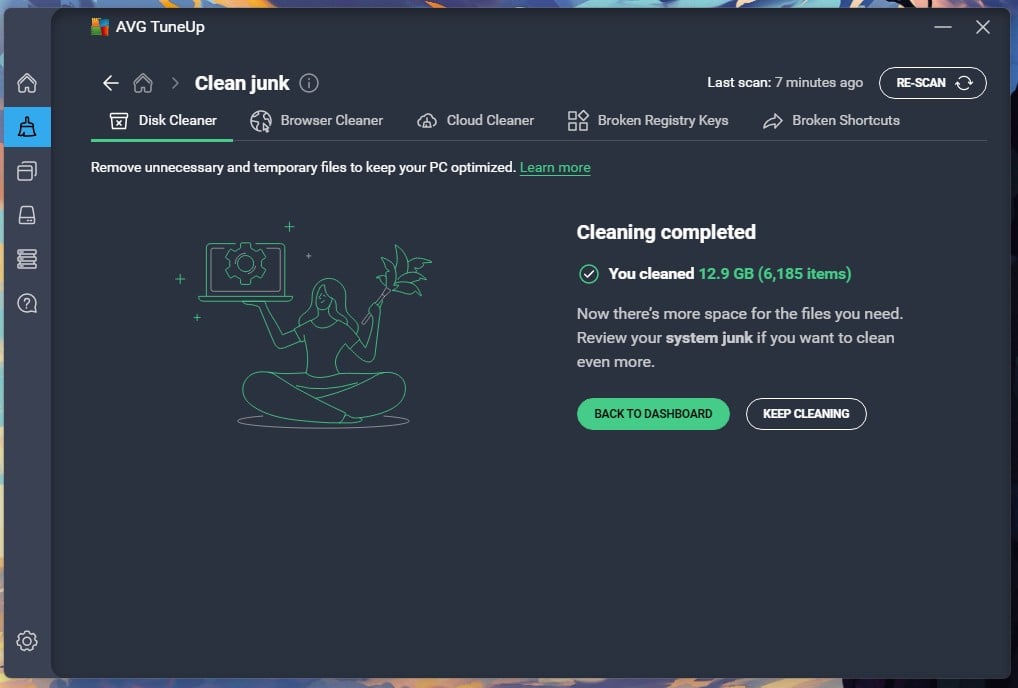
It updated my chipset and GPU drivers, which was a surprise. Standalone, it costs $34.68 for the first year, renewing at $79.99.
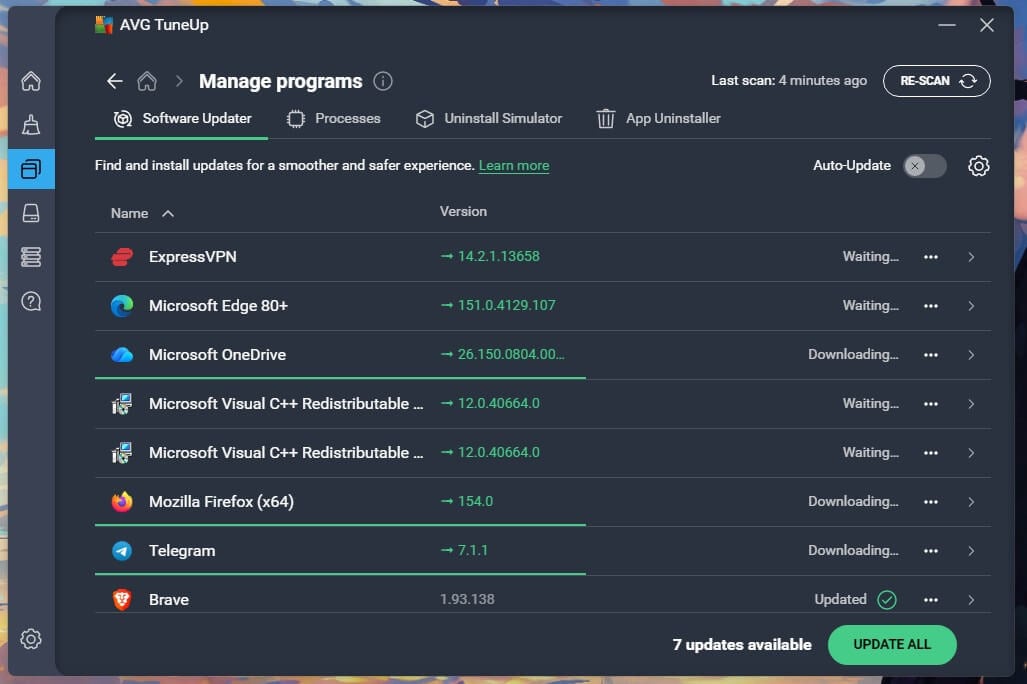
✅ Verdict: recommended if you want to keep your device clean of clutter. It works really well, but I’d think twice before taking it due to its higher price.
AVG Secure Browser and Web Shield
Web Shield, inside the antivirus, blocked malicious URLs with no false alarms, and it’s free. AVG Secure Browser is a separate free Chromium browser, the same build as Avast Secure Browser. It sets Bing as the default search engine, with Google and DuckDuckGo selectable. Bank Mode opens banking sites in a separate virtual desktop and blocks screen capture.
✅ Verdict: keep Web Shield on. Install the browser only for Bank Mode.
AVG AntiTrack
AntiTrack randomizes your browser fingerprint on a schedule, blocks tracking scripts, and clears cookies automatically, with an allowlist for sites that should keep you signed in. It’s $54.99 a year standalone, or included in Ultimate. Firefox and Brave already block fingerprinting for free, so AntiTrack’s case rests on doing the same in Chrome and Edge.
✅ Verdict: works as advertised, but in my opinion, not worth the price, as some browsers already block the same threats for free (Brave, for example).
Enhanced Firewall and Email Shield
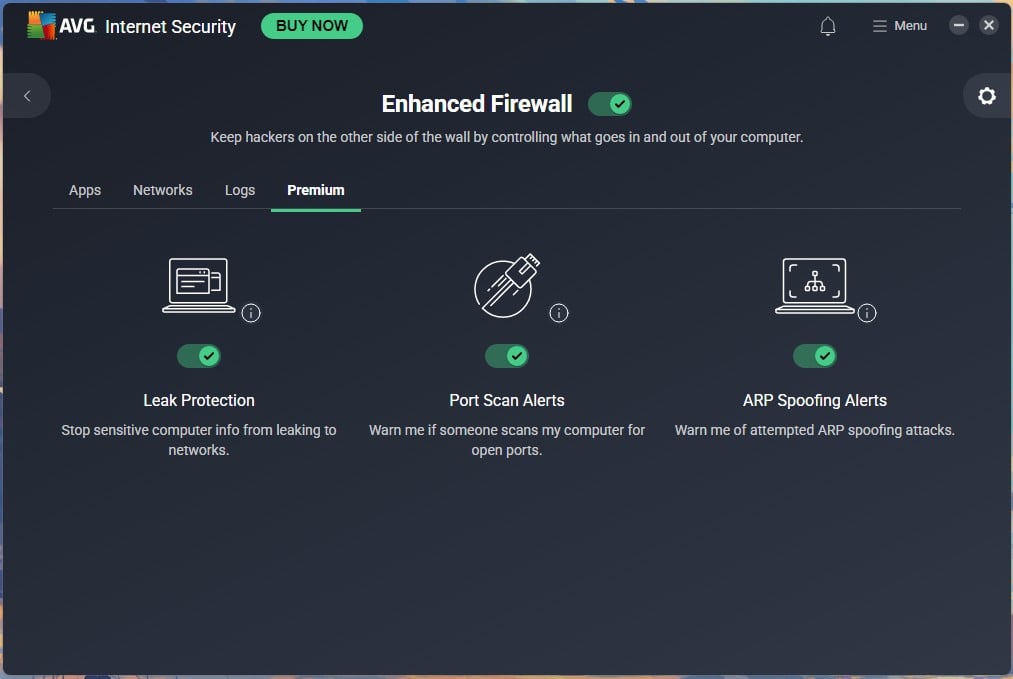
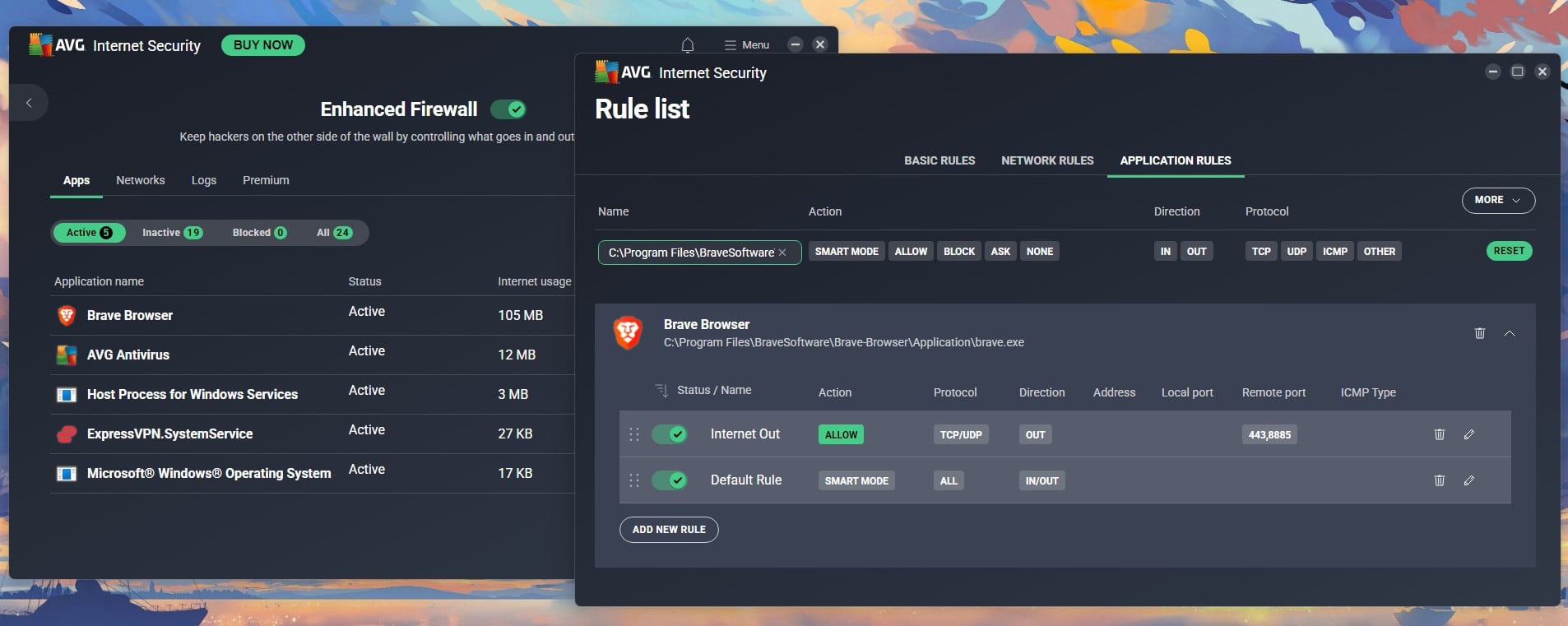
The Enhanced Firewall is the best of the paid extras. Its rule editor has Basic, Network and Application tabs: per-app Smart Mode, Allow, Block or Ask, plus direction, protocol and port. The Premium tab adds Leak Protection, Port Scan Alerts and ARP Spoofing Alerts, all on by default. On a network AVG can’t identify, it sets the profile to Trusted, allowing all incoming connections from other devices.
Email Shield scans inbound and outbound mail and tags infected subjects. It has “Add a signature to the end of sent emails” ticked by default, though a test message I sent arrived without one.
✅ Verdict: keep both on. They’re not resource-intensive and are very useful, especially the firewall that offers deep customization.
Webcam Protection and Sensitive Data Shield
Webcam Protection works as advertised, and when I plugged in my old webcam, it detected it and applied protection immediately. Sensitive Data Shield scanned my drives in about 3 minutes and automatically protected a handful of invoices and documents, restricting which apps can open them.
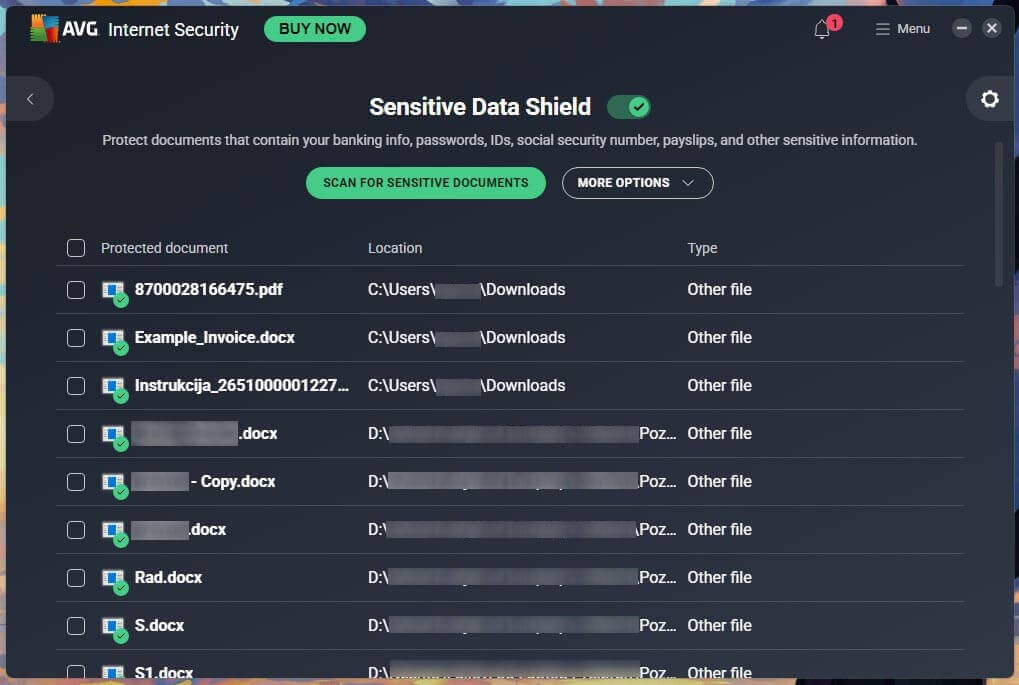
Remote Access Shield blocks RDP brute-force attempts, malicious IPs, and BlueKeep-style exploits, and logged no connection attempts during the review.
✅ Verdict: Remote Access Shield is useful if RDP is on. Webcam protection is useful only if you actually use one, and if your main device is a laptop.
AVG on Windows, Mac, Android and iPhone
The Windows build is the full product; the rest are cut-down.
Windows
Everything here was tested on Windows 11. Windows 10, 8.1, 8, and 7 are still listed as supported. Windows-only features: the Enhanced Firewall rule editor, Remote Access Shield, Sensitive Data Shield, Boot-Time Scan, Performance Scan, and Driver Updater. The AVG PC build is the reference point for the other platforms.
Android
AVG antivirus for Android was quick and unobtrusive on my Galaxy S26 Ultra. Setup asked for a battery optimization exemption, display over other apps, Accessibility, and notifications, each skippable. Smart Scan took 15 seconds and found nothing, then showed 6 recommendations to set up Call Guard, SMS Guard, and Wi-Fi alerts. Battery share over my sampled period was 3%.
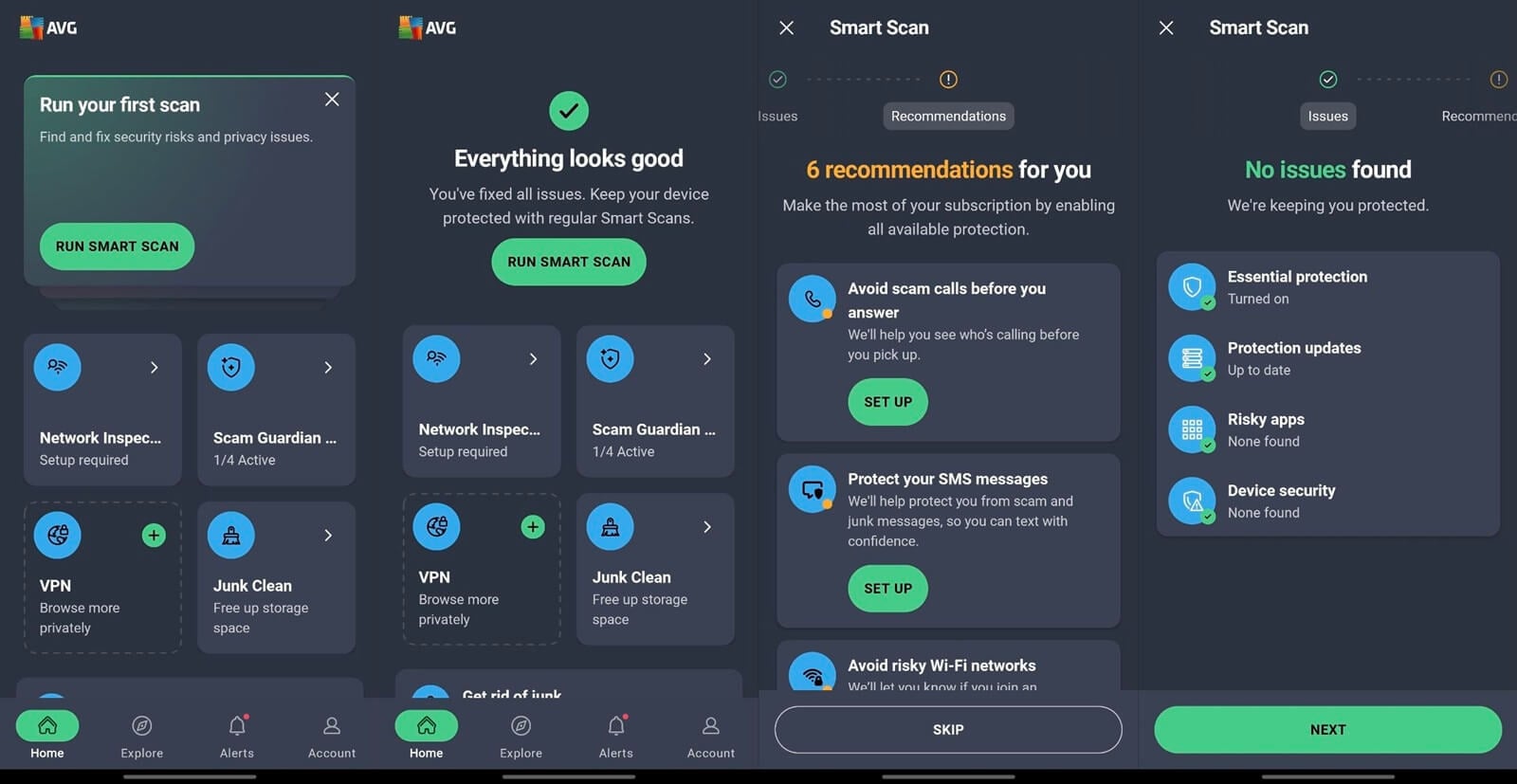
The AVG antivirus app showed no ads during my session, though the privacy notice names 8 ad partners for the free version. Photo Vault, App Lock, App Insights, and Hack Alerts are included; anti-theft isn’t a separate module. VPN and Cleaner are separate installs from the Play Store, and AVG Cleaner is ad-supported, with hidden caches and browser data locked behind a paid upgrade.
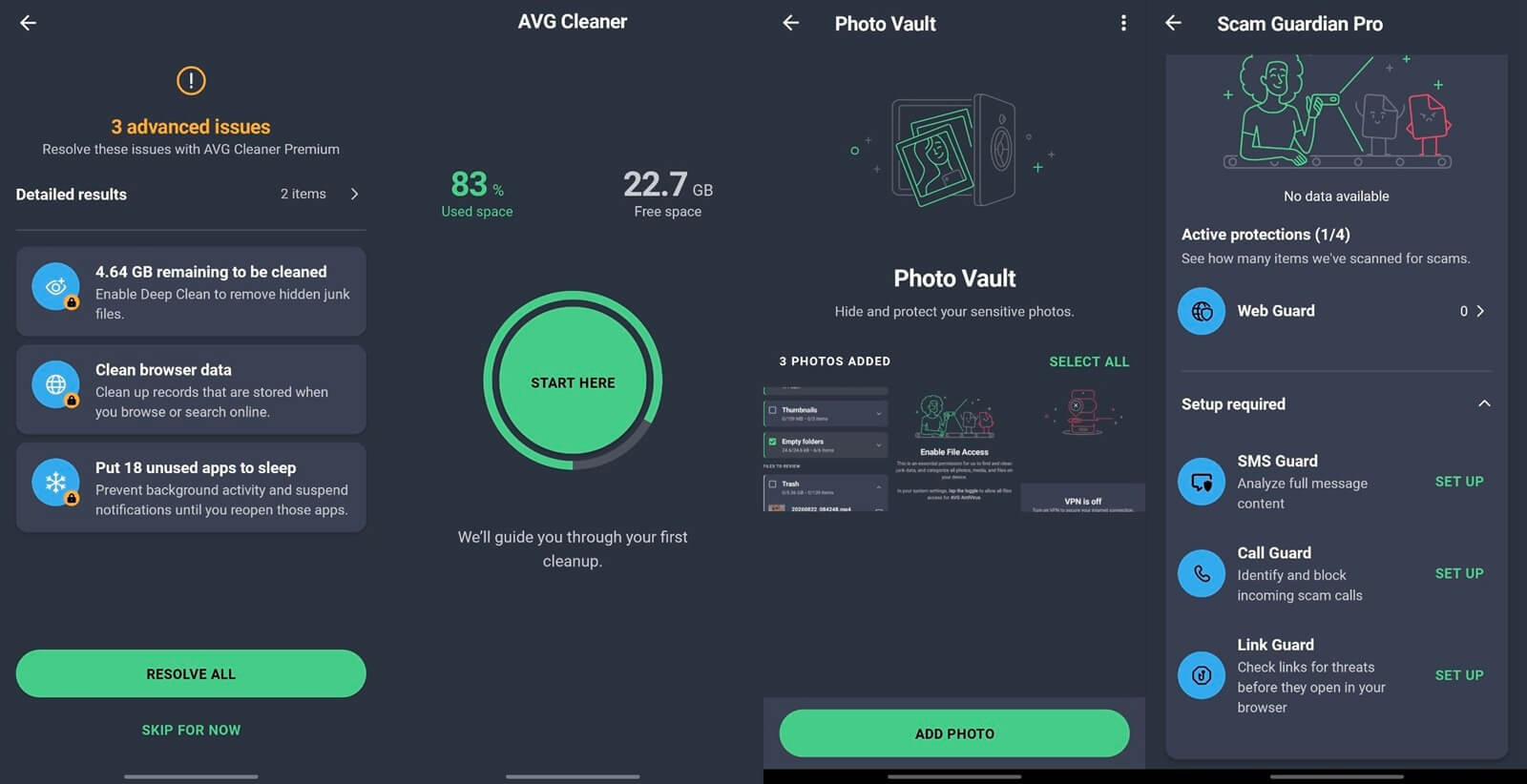
Call Guard and SMS Guard need call and SMS permissions. AV-TEST’s May 2026 mobile round scored AVG AntiVirus Free 6/6/6, and AV-Comparatives’ June 2026 test recorded 99.6% protection with 2 FP. Google Play Protect scored 5.5 on protection in the same AV-TEST round, so AVG antivirus software for Android earns its install. My Android antivirus tests put it against Bitdefender, Norton and McAfee on the same handset.
macOS and iOS
AV-Comparatives’ June 2026 Mac test recorded 99.9% Mac malware protection and 95% PUA protection, and AV-TEST’s March 2026 macOS round scored AVG 6/6/6. The Mac app has the scanner, Web Shield, and Email Shield; the firewall rule editor, Remote Access Shield, and Boot-Time Scan are Windows-only. For the products I tested on Mac, see my Mac antivirus roundup.
On iPhone, AVG Mobile Security can’t scan for malware because iOS sandboxes every app. Instead, the AVG mobile app offers Web Shield for malicious links, Photo Vault, Hack Alerts, and a VPN on the paid tier.
AVG Customer Support Put to the Test
Support starts from the AVG account. Choosing support opens a 4-step form: pick 1 of 5 issue categories, read the suggested articles, then Contact options, then Connect with us. For simple issues, the flow ends at the articles with no way to contact anyone. For harder ones, it offers phone and email. I chose email and asked about my free trial. A reply arrived in 1 hour and 18 minutes from a person.
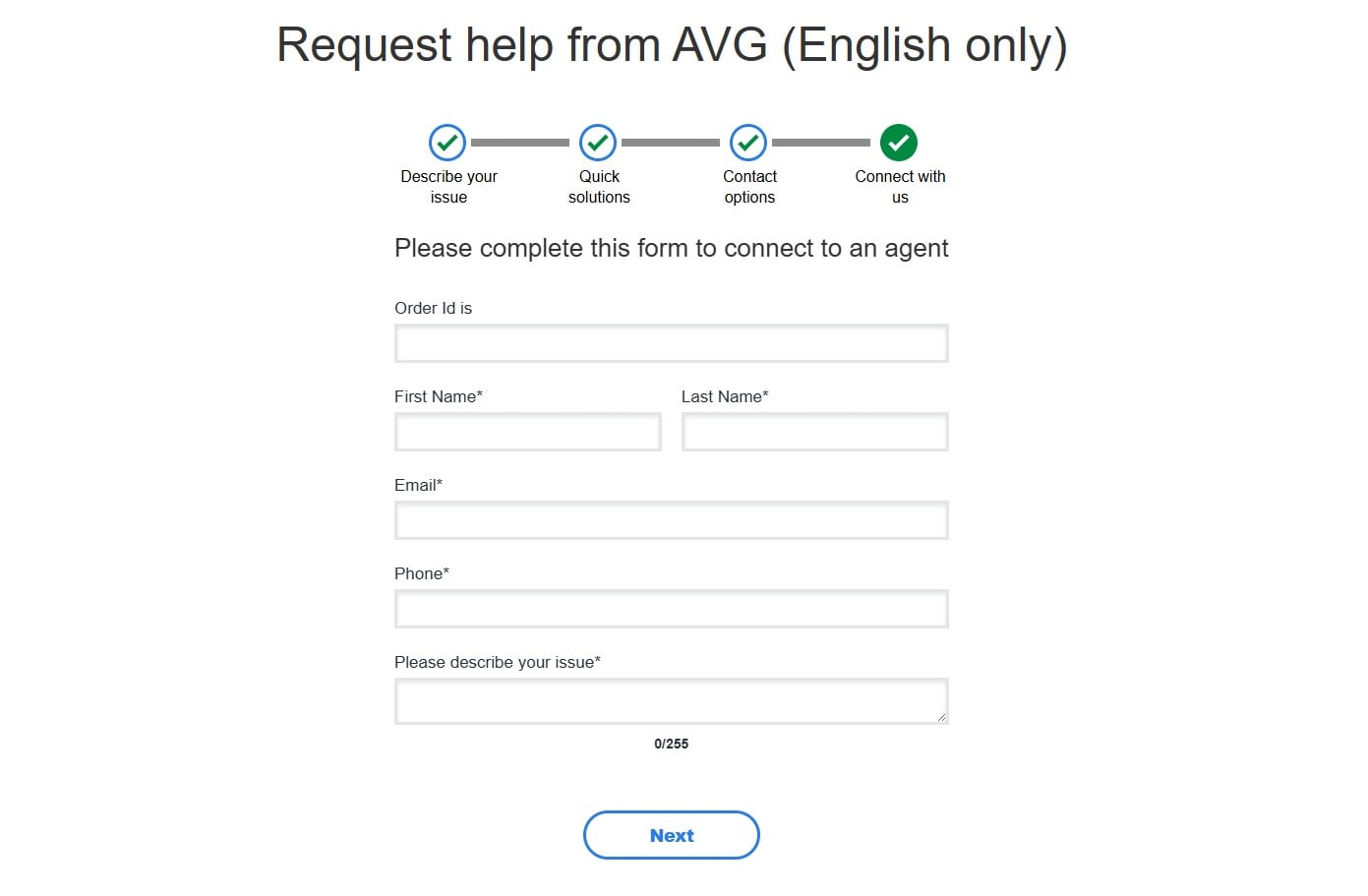
Phone support is listed as 24/7, with the number shown after a short form. I didn’t call. For scale, Avast’s email support on the same parent took about 6 hours. AVG’s turnaround is respectable; the mandatory article detour is the frustration. Cancellation and refund were painless: Order History, Request a Refund, one confirmation. Free users get a knowledge base and forum only.
AVG Compared With the Main Alternatives
🆚 AVG vs Avast: The Same Engine, Two Badges
Same owner, same engine, same lab rows, same 99.8% on my bench. AVG boots lighter (5 seconds vs Avast’s 9) and installs faster (1:12 against 2:35). Avast’s full scan finished faster (14:38 against 15:13) with lower CPU. Avast One’s free tier adds Wi-Fi scanning and a scam-detection assistant. Avast charges $49.99 for 1 PC plus 1 mobile, or $69.99 for 10 devices, so AVG Ultimate at $59.88 for 10 is cheaper.
✅ Decision: AVG for households paying for 10 devices, Avast for the richer free tier. My Avast One review has the full figures if you’re interested.
🆚 AVG vs Bitdefender
Bitdefender is the step up. It scored 99.8% on my bench with the lightest scan I measured (11% CPU, 183 MB), and AV-Comparatives gave it 4 false alarms vs AVG’s 9. AVG’s free tier covers 4 platforms. Bitdefender Free is Windows-only, and AVG’s $59.88 for 10 devices undercuts Bitdefender Total Security’s $59.99 for 5.
✅ Decision: Bitdefender if you’re paying and want the fewest false positives. AVG if you want free, or 10 devices. Details in my Bitdefender review.
🆚 AVG vs Norton
Same parent company, different products. Norton posted the same lab row as AVG, but it’s a suite: cloud backup, a password manager, dark web monitoring, and 24/7 chat, with Deluxe at $49.99, then $124.99 for 5 devices. AVG has the free tier and a lighter boot (+5 seconds against Norton’s +12).
✅ Decision: Norton if you want the extras and fast support, AVG if you want the engine without the suite. My Norton 360 review covers where each tier fits.
🆚 AVG vs Microsoft Defender
Defender is the comparison most people need, since it’s already installed. Its full scan peaked at 31% CPU on my bench against AVG’s 15%, and AV-Comparatives had it at 89.2% offline detection versus AVG’s 96.3%.
✅ Decision: Stay on Defender if you never leave your home network and don’t want prompts. Switch to AVG Free for stronger offline detection, a configurable ransomware folder list, and an email attachment scanner.
Alternatives Worth Considering Instead of AVG
- Bitdefender, for those who reject AVG on privacy grounds: independent ownership and the lowest false-alarm count in the March 2026 lab round.
- Avira Free Security, for the cleanest installer I’ve seen and a free VPN allowance, though it’s also Gen Digital. See my Avira review.
- Malwarebytes, as a second-opinion scanner alongside AVG Free. See my Malwarebytes review.
Who is AVG For and Who Should Look Elsewhere
🏆 AVG is best for:
- Windows users who want a strong free antivirus
- Households covering 10 devices on a budget
- Buyers who’d pay for TuneUp anyway
❌ AVG isn’t good for:
- Users who need the bundled VPN as their main VPN
- Privacy-first users, given the 36-month retention
- Users who want the fewest false positives
- Users annoyed by frequent upsells
- Mac-first users, due to many Windows-only features
My tier recommendation: stay on AVG AntiVirus Free. It has the same engine, the same definitions, and the same AV-TEST score as the paid tiers. Upgrade to Ultimate only if you’d use TuneUp or the firewall across several devices. Both paid tiers can be refunded within 30 days, long enough to compare the firewall against Windows Firewall on your own network.
Common Questions About AVG Antivirus
🛡️ Is AVG Antivirus Safe to Install?
Yes, when the installer comes from avg.com or an official app store. AVG has been an antivirus vendor since 1992 and is owned by Gen Digital, the company behind Norton and Avast. The risk is fake download pages that bundle malware with a copied installer, so check the domain and the file's digital signature.
💎 Is AVG Antivirus Good?
Yes. AV-TEST gave AVG AntiVirus Free 18/18 and a Top Product award in June 2026, and AV-Comparatives recorded a 99.97% online protection rate in March 2026. The weak spots are 9 false alarms in that lab round.
🎁 Is AVG Free Good Enough on Its Own?
Yes, for a single Windows PC used carefully. The free tier keeps real-time protection, a behavior monitor, and Ransomware Protection, and uses the same engine as the paid tiers. Internet Security is worth paying for on machines that use public Wi-Fi regularly or have Remote Desktop enabled.
❓ What Is AVG Antivirus?
A security suite from Gen Digital, sold as a free tier and 2 paid tiers for Windows, macOS, Android, and iOS. The name stands for Anti-Virus Guard, the first product of Grisoft, the Czech company that later renamed itself AVG Technologies. The paid tiers add a firewall, privacy shields, a VPN, and a cleaner.
💼 Who Owns AVG Now?
Gen Digital. The brand began as Grisoft in Brno in 1991, became AVG Technologies in 2008, was bought by Avast in 2016 for $1.3 billion, and joined Gen Digital when Avast merged with NortonLifeLock in 2022. AVG, Avast, Norton, and Avira share that parent.
⚖️ Is AVG the Same as Avast?
No, but they share an owner and a detection engine, and posted identical results in the March 2026 AV-Comparatives Malware Protection Test. Interface, free-tier features, pricing, and post-scan prompts differ. Choosing between them on protection makes no difference.
⌛ Does AVG Slow Down Your Computer?
Yes, but not enough to notice on a modern PC. In testing, it used about 160 MB of memory and no measurable CPU at idle, and added around 5 seconds to startup. A full scan is the exception: it took over 15 minutes, longer than most rivals, though the machine stayed responsive. Older or low-memory laptops will feel that scan more, so schedule scans overnight.
📱 Is AVG Good for Android?
Yes. AV-TEST scored AVG AntiVirus Free for Android 6/6/6 in May 2026, and AV-Comparatives recorded 99.6% protection with 2 false positives, against 98.9% for Google Play Protect.
⚔️ Is AVG Better Than Microsoft Defender?
Yes, on detection. AV-Comparatives measured AVG at 96.3% offline detection against Defender's 89.2% in March 2026, so AVG catches more when the cloud lookup fails. Defender scans faster, needs no installation, and shows no upgrade prompts since it's entirely free for Windows users.