We compared many web hosting services, but the Hostinger vs Bluehost vs SiteGround is one of the toughest. All three are famous managed WordPress hosting services. They’re inexpensive and feature-rich. Better yet, they offer an excellent hosting variety, from shared to VPS, cloud, and dedicated servers.
The question is: which one should you actually choose?
In this SiteGround vs Bluehost vs Hostinger battle, we ultimately sided with Hostinger. While it’s the best of the bunch, SiteGround is very close, with Bluehost slightly lagging. How did we get to this conclusion? By testing them in practice! We did that recently and described the process below, so keep reading.
Hostinger vs SiteGround vs Bluehost – Quick Comparison
| 🏆 Hostinger | SiteGround | Bluehost | |
| 🌐 Shared (WordPress) Hosting Price | $2.99 monthly | $3.99 monthly | $3.99 monthly |
| 💾 VPS Hosting Price | $4.99 monthly | / | $34.99 monthly |
| ☁️ Cloud Hosting Price | $7.99 monthly | $100 monthly | $75 monthly |
| 🆓 1-Year Free Domain | Yes | No | Yes |
| 🔐 WHOIS Domain Privacy | Yes | No | Yes (not in all plans) |
| 🌎 Data Centers | More than 10 locations | More than 10 locations | More than two locations |
| ✅ Uptime Guarantee | 99.9% | 99.9% | 99.9% |
| 🖥️ Free SSL Certificate | Yes (Let’s Encrypt) | Yes (Let’s Encrypt) | Yes (Let’s Encrypt) |
| ⏬ Automated Backups | Weekly and daily, with on-demand backups | Daily, with on-demand backups | Weekly |
| 💿 Storage | 20 GB to 100 GB NVMe | 10 GB to 40 GB SSD | 10 GB to 100 GB NVMe |
| #️⃣ Number of Hosted Websites | 3 to 100 | 1 to unlimited | 10 to 100 |
| 🤖 AI Website Builder | Yes, included in all plans | Yes, included in all plans | Yes, included in all plans |
| 💸 Money-Back Guarantee | 30 days (no free trial) | 30 days (no free trial) | 30 days (no free trial) |
Hosting Plans, Pricing & Features
We have a lot to unwrap in this comparison, so let’s immediately analyze their prices, hosting plans, and features. As explained, all three are flexible enough, but Hostinger and Bluehost actually come on top for their hosting variety. The table below explains everything, so let’s analyze it together.
| Hosting Types | Hostinger | Bluehost | SiteGround |
| Shared (WordPress) | ✅ | ✅ | ✅ |
| Cloud | ✅ | ✅ | ✅ |
| VPS | ✅ | ✅ | ❌ |
| Dedicated | ❌ | ✅ | ❌ |
| Reseller | ❌ | ❌ | ✅ |
Bluehost offers the most hosting types, lacking only reseller hosting. SiteGround has it, but it lacks dedicated and VPS hosting. Finally, Hostinger strikes a fine balance between the two, lacking only reseller and dedicated hosting, but offering extremely flexible and feature-rich cloud, VPS, and shared plans.
Noteworthy is that all three include managed WordPress in their shared hosting at no added cost. This is in stark contrast to Hosting.com, which charges you a lot more to manage WordPress for you. That’s why these three are some of the best-rated managed WordPress hosting services around.
Pricing Comparison
For the sake of simplicity, we’ll compare primarily their managed WordPress hosting plans and briefly mention the rest. Starting with Hostinger, the provider has two plans: Premium and Business. The former is $2.99 monthly, and the latter is $3.99 monthly for 48 months and with two free months.

It also includes the Cloud Startup plan, which is WordPress-ready cloud hosting at $7.99. Then, we have SiteGround at $3.99 for the StartUp plan, while its most popular, and our recommended deal, is GrowBig at $6.69 monthly. The GoGeek plan at $10.69 monthly is pricier even than many of Hostinger’s VPS plans.

Lastly, we have Bluehost and its Starter plan at $3.99, while the Business plan at $6.99 is the recommended plan. The eCommerce Essentials is $6.95 monthly, and includes, as the name implies, ecommerce tools in addition to hosting. So, which of the three amazing hosting services is the cheapest?
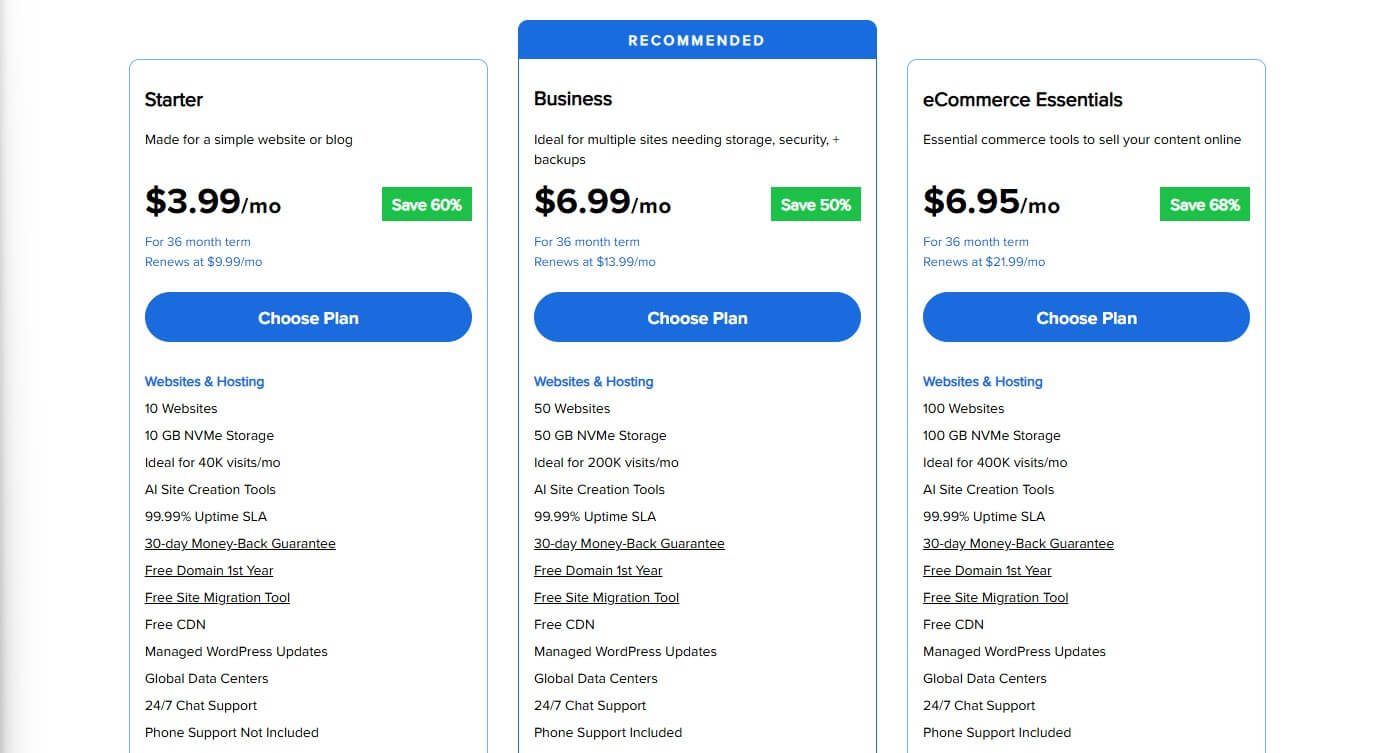
That title likely goes to Hostinger. It has the lowest prices and, more importantly, the lowest renewal costs. Meanwhile, SiteGround and Bluehost aren’t too expensive. However, they renew at a much higher rate. SiteGround’s GrowBig plan starts at under $7, but renews at a whopping $29.99 monthly.
Bluehost’s Business plan is nearly identical, but it renews at $13.99. Hostinger’s Business plan also renews at $13.99, but it costs $3.99 and not $6.99 like Bluehost. SiteGround’s lack of a free domain for the first year increases the cost dramatically. Meanwhile, Hostinger and Bluehost offer it in all plans.
So overall, SiteGround is the costliest option, with Bluehost costing considerably less, and Hostinger having the cheapest prices. The same goes for Hostinger’s VPS and cloud plans for a few dollars. Bluehost and SiteGround charge you dozens, if not hundreds monthly and don’t provide much better performance.
Hosting Features
During our Hostinger vs Bluehost vs SiteGround comparison, we analyzed and tested their features, discovering that all three were terrific. Now that we know their price differences, let’s see which provider justifies its price the best.
Hostinger’s standout features are:
- Up to 100 hosted websites
- Up to 10 free mailboxes per website
- 20 to 100 GB of NVMe storage
- Free domain
- Weekly and daily automated backups
- Email marketing
- Free migration
- Free SSL
- Cloudflare CDN
- AI website builder
- Multisite + Staging
- Unlimited bandwidth
SiteGround’s best features are:
- Up to unlimited hosted websites
- Unlimited email hosting
- 10 GB to 40 GB of SSD storage
- Daily automated backups
- Free SSL
- Cloudflare CDN
- NGINX web servers
- Drag-and-drop site builder
- Staging and Multisite
- Unmetered traffic
- Unlimited collaborators
Bluehost’s best features are:
- 10 to 100 hosted websites
- 10 GB to 100 GB of NVMe storage
- AI site builder
- Free domain with free site migration
- Free CDN
- 24/7 chat and phone support
- WordPress staging
- Free SSL
- Weekly website backups
- Free WordPress plugins (Yoast, Pro Email, Creative Mail)
This is where Hostinger and SiteGround take the lead. They offer unlimited (and unmetered) bandwidth, free email hosting, staging, Multisite, and competent website builders. While SiteGround excels at offering unlimited email hosting, Hostinger offers larger storage, a free domain, and unlimited bandwidth.
Bluehost has no specific advantages over the two, especially since it offers only weekly and not daily backups, and excludes many great features from its Starter plan. SiteGround, however, lacks a free domain, but compensates by including top-of-the-line features and security at no extra cost.
Winner: Hostinger
All things considered, Hostinger wins this round by offering the best balance of price and features. SiteGround is the most expensive, but with outstanding security, WordPress features, and a site builder. Bluehost’s Starter plan lacks advanced features, forcing you to pick the mid-tier Business plan.
We’d say you should pick Hostinger for its best value for money, or SiteGround if you don’t mind spending more and getting awesome extras like unlimited email hosting and fast NGINX web servers.
Bluehost vs SiteGround vs Hostinger Performance Comparison
We touched on the performance briefly, so let’s immediately analyze it on all three sides and determine the fastest host. Before we do, let’s briefly explain the testing procedure and examine their performance-oriented tools and features. Starting with web servers, Hostinger and Bluehost use LiteSpeed.
SiteGround goes a step ahead by using NGINX.
We then have server locations, where Hostinger and SiteGround excel, with over ten globally, unlike Bluehost’s limited server roster in the US and Europe. For this Bluehost vs Hostinger vs SiteGround battle, we hosted our three identical WordPress sites in the US, as all three offer servers on American soil.
We created our websites using Astra as our main theme, and uploaded some compressed images and videos, adding a few interactive elements to spice things up. We then monitored our websites’ loading speed, uptime, and response times using GTmetrix, UptimeRobot, and Loader. Here’s what we found.
GTmetrix Speed Test Results Comparison
Starting with GTmetrix, our preferred server was Canada (Vancouver). This free testing server is available to anyone, so we figured we should stick to it. In this test, we looked at the following five parameters:
- TTFB or Time to First Byte
- FCP or First Contentful Paint
- LCP or Largest Contentful Paint
- TTI or Time to Interactive
- FLT or Fully Loaded Time
Here are the results, along with the ideal (recommended )values of these parameters to give these results more context:
| Hostinger | SiteGround | Bluehost | Ideal Values | |
| TTFB | 291 ms | 40 ms | 463 ms | Under 800 ms |
| FCP | 435 ms | 281 ms | 1.1 s | Under 1.8 s |
| LCP | 533 ms | 321 ms | 1.2 s | Under 2.5 s |
| TTI | 733 ms | 710 ms | 987 ms | Under 2.5 s |
| FLT | 656 ms | 863 ms | 2.3 s | Under 3.0 s |
All three are within the upper limits, but Hostinger and SiteGround take the lead. Bluehost wasn’t particularly fast, as the home page took 2.3 seconds to load. It’s not a bad result, but far from the 656 ms or 863 ms we recorded in Hostinger and SiteGround. Bluehost’s server response also isn’t great.
This is reflected in the TTFB of 463 ms, where SiteGround wipes the floor with both, having 40 ms. Loading the first element on the page was also considerably slower in Bluehost, at just above a second. Meanwhile, Hostinger and SiteGround achieved 435 ms and 281 ms, respectively.
All things considered, Hostinger and SiteGround exchange nearly equal punches, but Hostinger was a bit quicker overall based on the Fully Loaded Time. Bluehost was by far the worst.
Measured Uptime & Response Times
Let’s now switch to UptimeRobot and examine our test results. We tested them for the past three months to see if they adhere to their 99.9% uptime promises. These are the results:
- Hostinger: 100% uptime
- SiteGround: 99.95% uptime
- Bluehost: 99.96% uptime
Hostinger again reigns supreme, with no outages in the three tested months. Bluehost and SiteGround were slightly worse, if we can put it like that. However, their results are more than incredible, with merely a few brief outages that haven’t affected our websites and their services in any way.
Most importantly, their 99.9% uptime promises are met and exceeded.
Lastly, let’s check out their average response times using Loader. We sent 100 virtual visitors to all three websites and measured the server response. These are pretty interesting results:
- Hostinger: 592 ms (low: 230 ms, high: 837 ms)
- SiteGround: 339 ms (low: 190 ms, high: 1.28 s)
- Bluehost: 489 ms (low: 280 ms, high: 700 ms)
Based on the average score, SiteGround beats both. However, it had a huge spike of 1.28 seconds, which ruined the overall impression. Bluehost’s 489 ms is better than Hostinger’s 230 ms, but its lowest score was higher. On the flip side, its highest score is lower than Hostinger’s.
For the sake of simplicity, we’ll say SiteGround is the most impressive based on the average response time.
Best Performance: Hostinger and SiteGround
Our results made the decision extremely difficult, but we’d choose Hostinger and SiteGround for more well-rounded performance than Bluehost. Bluehost’s load times were underwhelming, while SiteGround and Hostinger performed admirably, even having excellent response times.
The choice between the two isn’t that obvious because they’re very close. However, if we had a gun put to our heads, we’d likely pick Hostinger for its lower FLT, which is what mostly matters.
Which Hosting Provider is the Easiest to Use?
In our Bluehost review, we praised its straightforward setup, but in separate reviews of its two rivals, we were no different. So, can all three be equally simple to set up and use? They can, especially with their handholdy approach that beginners and managed WordPress fans will like.
Bluehost: Setup & Ease of Use
Since we first mentioned Bluehost, let’s kill that fly right away.
Its onboarding process couldn’t be simpler. When you subscribe, Bluehost will let you pick a domain name and build a site without hassle. You can pre-install WordPress or go with a blank site and work your way up using its website builder. Bluehost’s website builder is great, and we compared it to Wix for you.
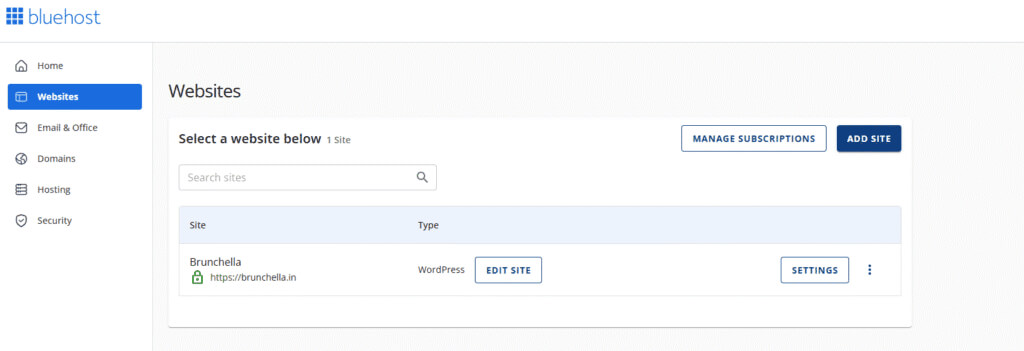
It’s not better than Wix, but website management is. You get a comprehensive dashboard where you can add new sites with a click and manage your domains, security, and emails effortlessly. Moreover, Bluehost’s free migrations allow you to transfer the existing site in virtually a day or two.
One of its highlights is cPanel adoption. This old-school website control panel is intuitive and includes a Softaculous installer for app deployment. More importantly, there’s a search bar, allowing you to find tools within seconds. Bluehost goes with the meat and potatoes approach, and that’s all you need to feel at home.
SiteGround: Setup & Ease of Use
SiteGround ditches cPanel in favor of its in-house sPanel or Site Tools
Before you get there, you’ll have to buy a domain name and subscribe. It’s easiest to get a domain name from SiteGround. After that, you’ll connect your domain name to the site, if you choose to make a new one with WordPress or WooCommerce, which SiteGround lets you install during the setup.

If not, you can migrate the website for free and call it a day. Afterwards, you’ll arrive at Site Tools, which screams simplicity. We particularly like the option to pin frequently used tools. Plus, sPanel “transpires” in a single window, so accessing tools and settings won’t have the annoying loading screen.
The home page provides information about your hosting and resources used. On the left, you can access your security, WordPress admin panel, emails, and much more. If you’re a cPanel user, sPanel may not feel at home right away. However, you’ll start to love it after a day or two, which speaks volumes.
Hostinger: Setup & Ease of Use
Finally, there’s hPanel, Hostinger’s proprietary solution.
We must say it looks really sleek and is pretty simple to use. Before that, you have onboarding, where Hostinger holds your hands by installing the selected apps for you and automatically setting up your SSL, CDN, and a free domain. The same goes for migration, which takes less than a day!

Hostinger’s home screen contains valuable information, from server resource usage to security, and even tips to improve your SEO and website performance. As always, you’ll find all the tools on the left side, with the option to manage your emails, security, domains, and more, so there’s nothing new.
It’s noteworthy that Hostinger also offers cPanel hosting plans if you explicitly want this famous control panel. However, as you’ll realize, hPanel may be even more intuitive and modern-looking, so it may not be worth spending extra on a cPanel licence.
Summary: All Three Are Easy to Use
There’s no clear winner here. Their onboarding processes and later ease of use are impeccable. It boils down to your preferences. Pick Bluehost if you love cPanel, or go for SiteGround or Hostinger for a different, but still smooth experience with sPanel or hPanel for website management.
Which Web Hosting Is Most Secure?
Security is next, and in this aspect, all three have something to offer. However, we’d give SiteGround and Hostinger a slight edge for the reasons we’ll soon explain. Let’s first discuss their similarities and see which features they offer:
- DDoS protection
- Malware protection
- Web application firewall
The holy trinity of website security is here. However, that’s not all, as SiteGround adds two more features: WordPress Security Optimizer and an AI Anti-bot system. The latter is particularly impressive because it adapts to new threats to detect and remove them more easily. It’s a fantastic system.

During our review of SiteGround, we noticed how swiftly it removes malware, likely as a result of website scanning every 0.5 seconds. It makes your website and the server itself so much more secure. You’ll notice that Hostinger also includes Domain Privacy and malware protection, which scans and removes malware.

Another noteworthy thing is that SiteGround and Hostinger provide daily website backups with on-demand copies. This ensures that, even if the website is compromised, you can go back to the previous version and restore it. Now, we come to Bluehost, whose security differs based on the plan. We don’t like that.

The Starter plan scans but doesn’t remove malware! It also doesn’t offer domain privacy, unless you opt for the Business plan. Worse yet, Bluehost is locked to weekly backups, but if you purchase its CodeGuard, you can unlock daily backups. For a price, that is. Compared to the two, Bluehost is somewhat disappointing.
Summary: Pick SiteGround or Hostinger for Security
We’d skip Bluehost if we wanted maximum security – and we do. Hostinger and SiteGround are more convincing, with malware removal, DDoS protection, and a WAF in all plans. Hostinger even includes domain privacy, while SiteGround offers a revolutionary AI anti-bot system.
Customer Support
We’ll top off our Bluehost vs Hostinger vs SiteGround comparison with their customer support teams. Having tested Hostinger and the other two, we can report some great findings. All three providers offer live chat and email support, with SiteGround and Bluehost also including phone support.
To be frank, we rarely used their phone support, but when we did, it was pretty helpful, and we didn’t wait for a long time. Live chat support is there 24/7 in any case, and it’s nice to be able to chat your way to a solution. Email support is slower on all three sides, but satisfying and usable enough if needed.
All three providers also have comprehensive knowledge bases if you’d rather dig for a fix by yourself. We recommend referring to their knowledge bases in most cases, as they hold all the answers you’ll likely need. If it’s a specific problem, it’s good to know someone has your back in all three cases.
Winner: Tie
We can’t complain about their customer service. They’re quick to respond, assertive, and persistent, which is all you need when you’re stuck. Most importantly, they offer live chat and phone support for quick and efficient problem-solving.
SiteGround vs Hostinger vs Bluehost: Final Thoughts
It’s time for the grand finale and our final recommendations. We hope you didn’t skip our entire Hostinger vs SiteGround vs Bluehost comparison because we went all in on details and our experience. Based purely on that, and our expertise, we would emphasize Hostinger and SiteGround over Bluehost.
Bluehost is a decent host for WordPress, but it doesn’t really excel at speed, performance, and value for money. On the other hand, we have SiteGround, which excels at pretty much everything, from ease of use and features to security, speed, and customer service. The issue may be the price.
As it lacks a free domain for the first year and renews at a much higher price, we can debate whether it’s worth the long-term investment. However, Hostinger is another story. This cheap web hosting for WordPress has the lowest starter and renewal prices, while simultaneously packing many advanced features.
It’s fast, dependable, secure, easy to use, and extremely flexible with its VPS and cloud hosting plans. Moreover, Hostinger held its own performance-wise and even beat Bluehost and SiteGround in a few scenarios. Given its price, features, and everything else, Hostinger appears to be the best of the three.
This is how we’d rank the trio based on our experiences:
- Hostinger 🥇 – the best option overall
- SiteGround 🥈 – best for speed and security
- Bluehost 🥉 – best for ease of use