How to Upgrade to Ultimate
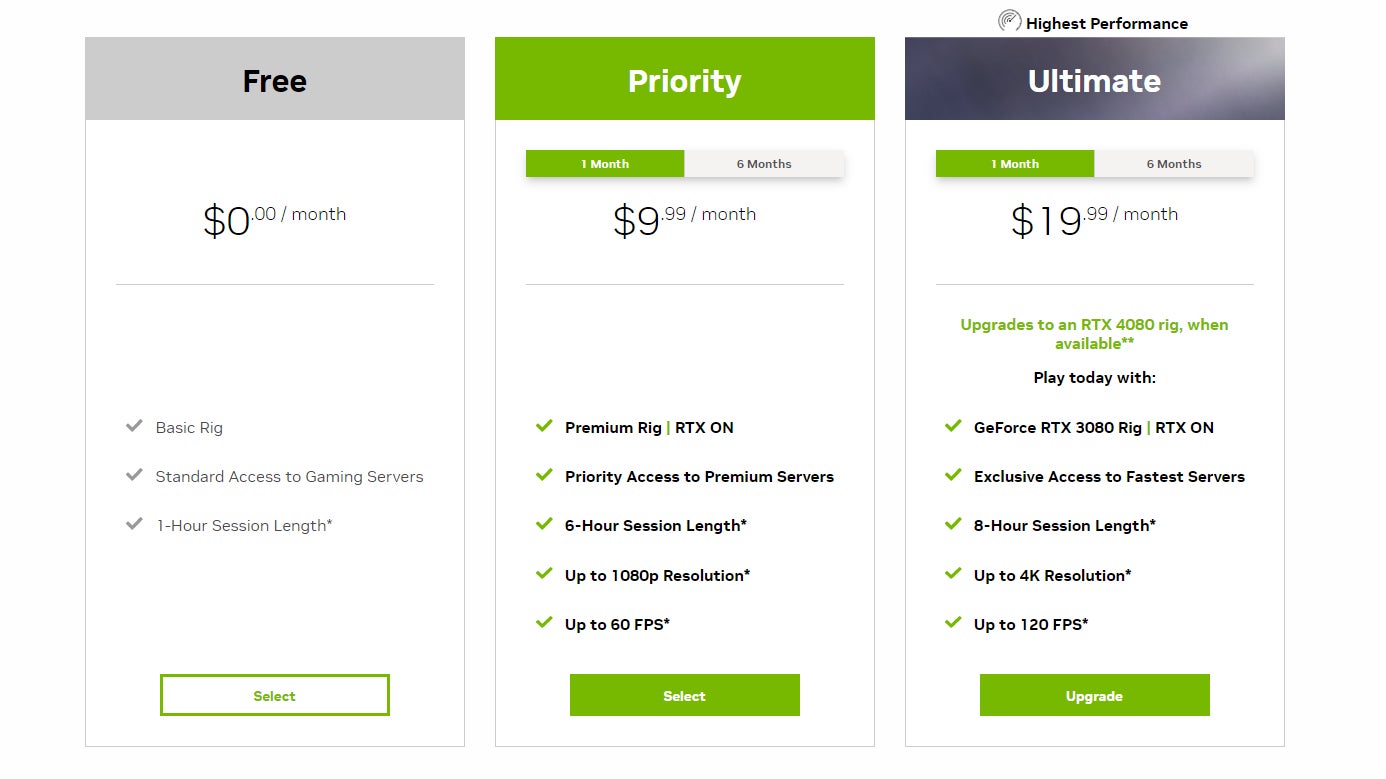
If you already have an account with Nvidia GeForce Now, you’ll notice a new stack of tiers is available now that Ultimate has arrived. The Free tier still offers a basic rig, standard access to Nvidia’s gaming services, and an hour of playtime, which is great if you want to try out a game and see if it’s worth paying for outright. There’s also a $10/month Priority package that offers ray tracing, up to six hours of playtime, and up to 1080p resolution, though it caps out at 60 fps. This is probably the tier I should use, since my external monitor is a max 75 Hz display. But we’re going with Ultimate.
The Ultimate tier is $20/month and upgrades you to a GeForce RTX 4080 rig, though only when it’s available for you (the RTX 4080 pods are rolling out to data centers in waves). You will also get first access to servers, up to eight hours of playtime, up to 4K resolution streaming at up to 120 fps, and up to 240 fps streaming at 1080p. You’ll need a monitor with a high resolution and/or refresh rate to handle those last stats. You’ll also need to consider the connection requirements. On the PC, Nvidia suggests at least 35 Mbps for 1080p at 240 fps and at least 45 Mbps for streaming up to 4K at 120 fps.