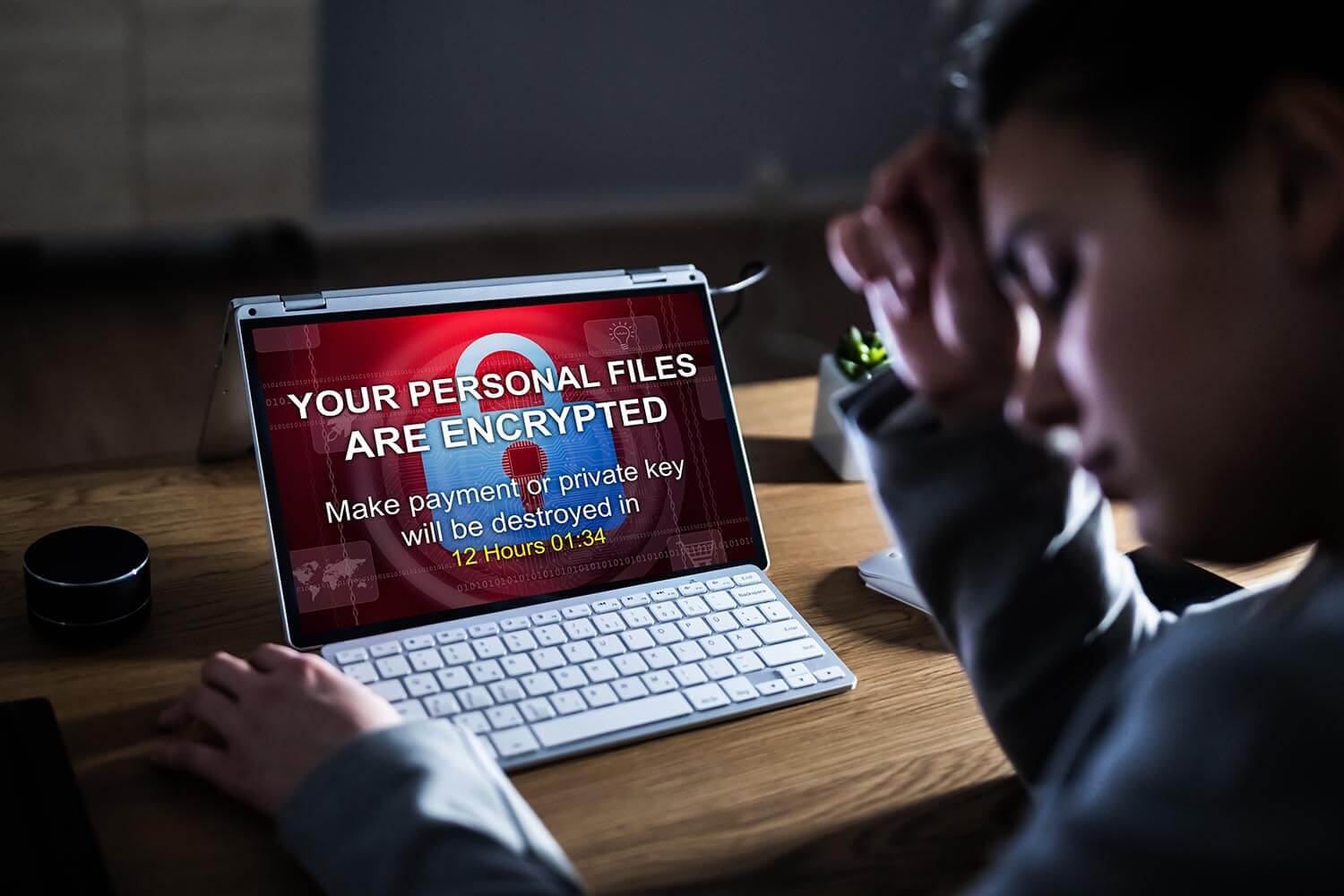
The ransom note usually follows one ordinary click: an invoice attachment, a cracked installer, a fake browser update. A few minutes later, the family photos, the tax folder, and the work files have a new extension and a text file asking for money. A standard scanner doesn’t always catch that, because ransomware uses the same encryption tools Windows itself relies on.
So the question is which ransomware protection stops the encryption, what to do if it starts anyway, and how much of this you already have on your PC for free. I tested five tools for what they do straight after install, since a feature that’s disabled protects nothing, and one of them surprised me on exactly that point. The shortlist comes first, then what each tool did.
Best Ransomware Protection 2026: The Shortlist
- Norton 360: Best Ransomware Protection Overall. Watches file behavior, locks your folders, and includes cloud backup, enabled from the first minute.
- Bitdefender: Best for File Rollback. Copies your files as an attack starts and puts them back once you’ve enabled the feature yourself.
- Avast One Free: Best Free Ransomware Protection. A dedicated ransomware shield on the free Windows version.
- NordVPN Next-Gen Antivirus: Best for Blocking the Download. Stops the malicious file before it reaches your PC, with no recovery layer of its own.
- McAfee: Best for Many Devices. Covers every device in the house on most plans, with ransomware defense built into the scanner and no switch to misconfigure.
How Ransomware Protection Differs From Standard Antivirus
A standard scanner tries to recognize a malicious file before it runs, and ransomware beats that in three ways: new variants with no signature yet, encryption libraries built into Windows, and attacks built from tools already on the system. Once encryption starts, the job is to stop the process and put the files back.
What you’d see is simple: files in Documents and Pictures renamed with a new extension, and a note with payment instructions. Many groups also copy your data out first, known as double extortion, so a backup returns your files but doesn’t stop the leak. Antivirus software for ransomware defense adds four layers a plain scanner lacks.
- Behavioral monitoring. The engine watches for mass file modification. A process that opens 400 documents in 10 seconds and rewrites each one is suspended, whether or not it’s a known sample.
- Protected folders. Documents, Pictures, and Desktop become write-restricted. Approved programs continue as normal, and unknown ones require permission.
- Automatic file rollback. The product copies files as an attack begins, then restores them from shadow copies or a protected cache.
- Backup. The layer that still works when the other three have failed.
Anti ransomware programs now watch what a process does to your files instead of checking what the file is called, and antivirus with ransomware protection is the normal configuration in 2026, since the main suites include these layers. The useful question is whether the feature is enabled: antivirus ransomware protection that’s disabled by default protects nothing.
Ransomware antivirus software also differs in recovery: some ransomware solutions rebuild your files, some only block the process. The best antivirus against ransomware can be a weaker scanner with better recovery, and my antivirus roundup covers these products across every threat type.
Ransomware Protection Tools Tested and Ranked
Anti ransomware software also has to be findable. Two of the five keep the feature in a settings menu, and one has no visible control, so every entry says where the anti ransomware tool is and whether it’s enabled from install. The best anti ransomware protection is the layer that’s already on when the attachment opens.
1. Norton 360: Best Ransomware Protection Overall
Norton pairs behavioral protection with cloud backup on one subscription, and backup is what returns your files after everything else has failed. My full Norton review covers the rest of the suite.
Rating: 4.8/5 ⭐ Best for households that want prevention and recovery on one subscription.
Norton Ransomware Features and Where to Find Them
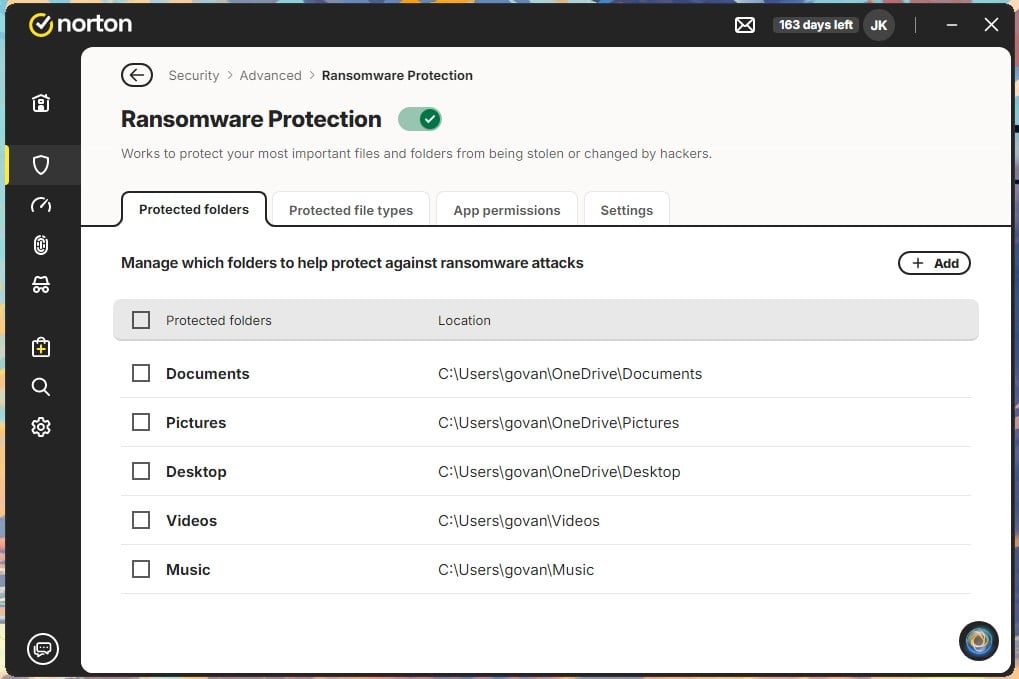
- Feature name: Ransomware Protection
- Location: Security > Advanced > Ransomware Protection
- Included in: every Norton 360 plan
- Default state: enabled, in Smart Mode
- Protected folders: Documents, Pictures, Desktop, Videos, Music
- Rollback: none; recovery comes from cloud backup
- Backup: 2 GB to 250 GB by tier, Windows only
- Guarantee: Virus Protection Promise, auto-renewal required
- Platforms: Windows, Mac, Android, iOS
Norton Default Protection and Test Results
The master toggle is enabled from installation, with every protected file type covered: archives, documents, pictures, video, audio, databases, and disk images. Norton pre-selects the OneDrive copies of Documents, Pictures, and Desktop, plus local Videos and Music.
In AV-TEST’s Advanced Threat Protection round for November and December 2025, Norton 360 stopped all 10 attack scenarios at the first step and scored a perfect 35 out of 35, which means nothing got far enough to touch a file.
Cloud backup is the part to check. It’s opt-in during setup, with the folder list pre-chosen, and choosing “maybe later” leaves you with prevention and no way back if prevention fails. I enabled it on the first screen, and I’d do the same on any PC that has the only copy of something.
False Positives and Daily Interruptions
Zero. No ordinary program was blocked from writing to a protected folder during a week of normal use. Smart Mode is the reason: trusted and approved programs continue normally, and only unknown ones prompt.
Strict Mode asks about every program, which suits a computer with a fixed set of software, like an office PC that runs the same five apps every day. I relied mostly on Smart Mode and never saw a prompt I had to think about.
Should You Rely on Norton 360 Against Ransomware?
Yes, with one condition: enable the cloud backup during setup. Without it, you have prevention and no recovery. On a Mac, the backup allowance goes unused, since it’s Windows only, so Mac households should pick a tier by device count and keep Time Machine running.
Pros
- Protection enabled from install
- Cloud backup on Deluxe and above
- Perfect advanced threat lab score
- Two alert modes
- No false alerts in testing
Cons
- Steep renewal increase
- Backup is Windows only
- No automatic file rollback
2. Bitdefender: Best File Rollback and Remediation
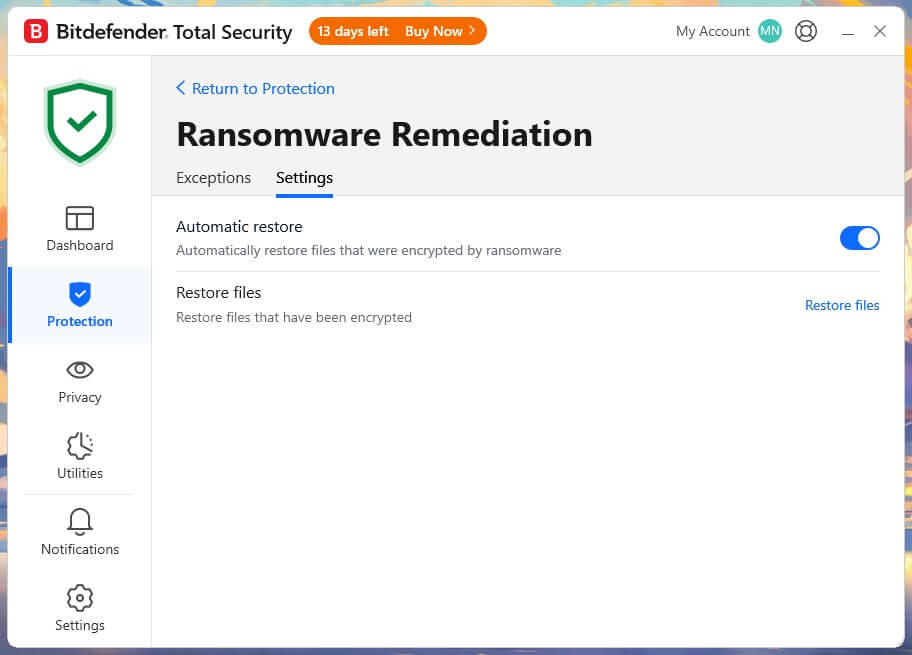
Ransomware Remediation copies your files the moment an attack starts, then puts them back. It restored everything in testing, and it has to be enabled by hand. That one detail decides its rating, and my Bitdefender review shows the same habit across other features.
Rating: 4.1/5 ⭐ Best for people who will open settings and check them.
Bitdefender Ransomware Features and Where to Find Them
- Feature names: Ransomware Remediation, Advanced Threat Defense, Safe Files
- Location: Protection > Ransomware Remediation
- Included in: Total Security and above
- Default state: Remediation disabled; Advanced Threat Defense enabled
- Protected folders: Safe Files, user folders by default
- Rollback: yes, the strongest of the five
- Recovery tool: Rescue Environment, boots outside Windows
- Platforms: Windows, Mac, Android, iOS
Bitdefender Default Protection and Test Results
Ransomware Remediation is disabled out of the box, and so is Cryptomining Protection, while Vulnerability, Firewall, and Antispam come enabled. The Android app repeats the habit with App Anomaly Detection and Scam Radar.
So the tool ranked best at recovering files does nothing for recovery until you open Protection and find the toggle, which is a strange choice for the layer that does the recovering.
Once enabled, it works. Test files came back in full after an encryption attempt, and none of the other four restored files that way. Bitdefender wasn’t in the consumer group of the lab round, so it has no consumer score to quote.
Its business product scored a perfect 35 in the corporate round, on a different product and a different test.
False Positives and Daily Interruptions
None. With Remediation enabled, no legitimate app was blocked over the week, and Safe Files never asked me about a program I use daily. The difficulty comes earlier, in finding the toggle: it’s a plain switch under Protection, then Ransomware Remediation, and it took me longer to locate than to enable. Enable it before you touch any other setting in the suite.
Should You Rely on Bitdefender Against Ransomware?
Yes, once Remediation is enabled and you’ve checked it stays that way after an update. No other product recovered files as completely in my testing, and the Rescue Environment offers a way to clean a PC that won’t start into Windows normally.
Pros
- Strongest automatic file rollback
- Restored every test file
- Rescue Environment for stubborn infections
- Minimal slowdown during scans
- Modest renewal increase
Cons
- Rollback disabled by default
- No consumer advanced threat score
- Rollback has file size limits
3. Avast One Free: Best Free Ransomware Protection
Avast is the one free product with a dedicated ransomware layer, and it took a perfect advanced threat score. Its history with user data belongs next to that, and my Avast review goes through the record and the product together.
Rating: 4.5/5 ⭐ Best for a second layer that costs nothing.
Avast Ransomware Features and Where to Find Them
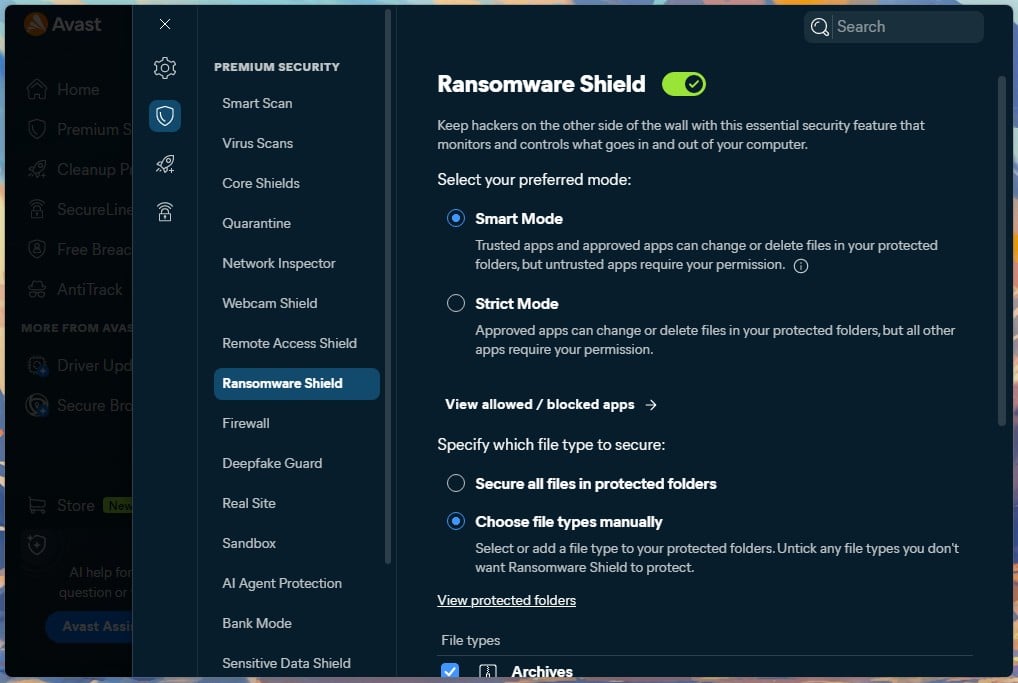
- Feature name: Ransomware Shield
- Location: Explore > Ransomware Shield
- Included in: free tier on Windows; paid Premium Security on Mac
- Default state: enabled, except in passive mode
- Protected folders: Documents, Pictures, Desktop, plus custom
- Rollback: none
- Platforms: Windows, Mac, Android, iOS
Avast Default Protection and Test Results
Ransomware Shield is enabled from install. Avast switches to passive mode when another security product is present, and the shield is off in that state, which is the case to watch if you’re adding Avast as a free second layer beside an existing suite. In the lab round, Avast Free Antivirus detected all 10 scenarios for a perfect score.
Nine were stopped at the first step. One got past that stage and was caught at execution, with full points still awarded, which is layered defense doing its job and a useful reminder that a missed first step isn’t a lost machine.
The trust question is separate. In February 2024, the FTC fined Avast $16.5 million over its Jumpshot subsidiary, which sold browsing data collected between 2014 and 2020. Jumpshot closed in 2020, and the settlement prohibits reselling browsing data for advertising.
Disable the data-sharing options after installation, and the free tier is a reasonable second layer.
False Positives and Daily Interruptions
None during the test week. Ransomware Shield allowed every ordinary program that wrote to a protected folder, so adding it costs you no interruptions. I’d use the custom folder list: it lets you protect a game saves folder or a work drive on top of the defaults, which Windows’ own Controlled Folder Access also does but with a less obvious menu.
Should You Rely on Avast One Free Against Ransomware?
Yes, on Windows, as prevention. There’s no rollback, so pair it with a backup drive, and check the shield is still enabled if you install it alongside another suite.
Pros
- Free on Windows, no trial
- Perfect advanced threat lab score
- Custom protected folders
- Light on system resources
Cons
- No file rollback
- Mac version requires a paid plan
- The 2024 FTC settlement
4. NordVPN Next-Gen Antivirus: Best for Blocking the Delivery Route
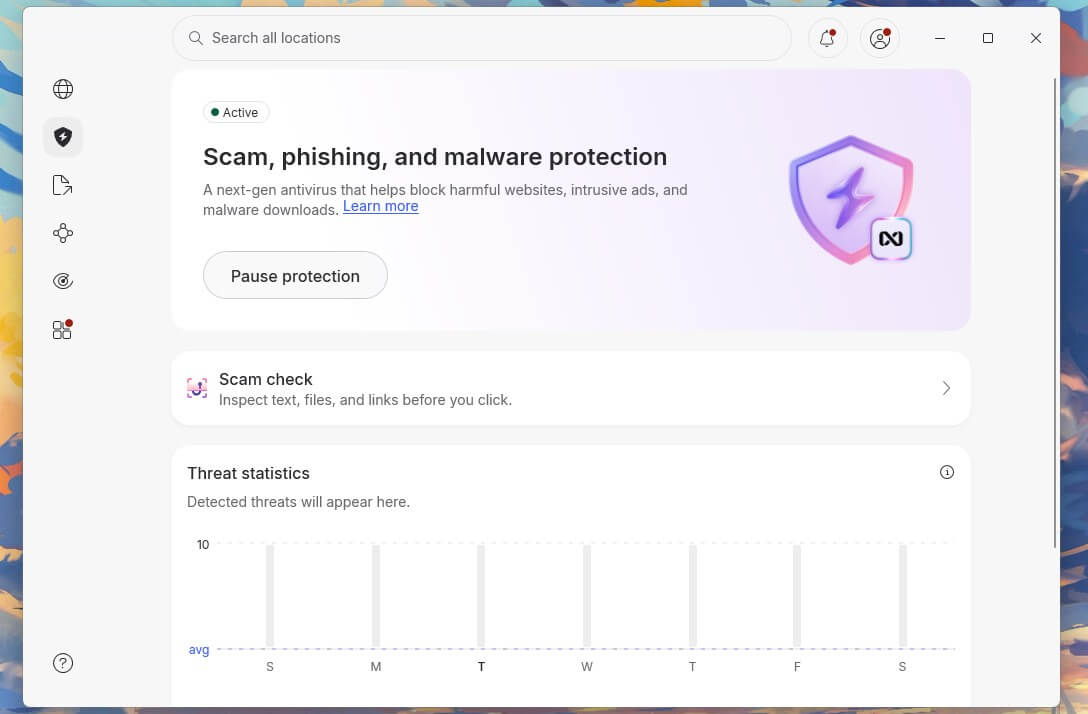
This one doesn’t stop encryption and can’t recover a file. It blocks the download that delivers ransomware in the first place, which is how most home infections start: pirated software, a bogus update prompt, a link in a phishing email. NordVPN calls the feature its next-gen antivirus, formerly Threat Protection Pro, and it’s built into the VPN app.
Rating: 3.7/5 ⭐ Best as a second layer for people who already pay for a VPN.
Get NordVPN Next-Gen Antivirus
NordVPN Ransomware Features and Where to Find Them
- Feature name: Next-gen antivirus, shown in the app as Scam, phishing, and malware protection
- Location: app sidebar, Scam, phishing, and malware protection
- Included in: the Complete plan and above, about $4.50 a month
- Default state: enabled once the plan includes it
- Protected folders: none
- Rollback: none
- Platforms: Windows, Mac, Linux; no Android coverage
NordVPN Default Protection and Test Results
It blocked 45 of 50 malware downloads in my test and warned on nearly every phishing page I opened, so most of the files that deliver ransomware never reach the disk. Scanning happens at download time only. There’s no scan of files already on the machine, so an infection that’s already there goes unnoticed.
AV-TEST doesn’t include it in advanced threat rounds, since a download blocker leaves an encryption scenario with nothing to test. Pair it with Norton, Bitdefender, or Avast, or with a VPN bundle that includes a full scanner, like Surfshark’s.
False Positives and Daily Interruptions
None on files. It blocked the EICAR test file with no false alerts, and it didn’t interfere with a single download I wanted. It couldn’t block YouTube ads, and it isn’t built for that, so don’t buy the Complete plan expecting an ad-free YouTube.
Should You Rely on NordVPN Against Ransomware?
No, not on its own. As a prevention layer beside a real suite, it closes the route most attacks use, and if you’re on the Complete plan, it’s already included, so there’s nothing extra to buy.
Pros
- Blocks most malicious downloads
- Strong phishing protection
- Works with the VPN disconnected
- Almost no system impact
Cons
- Can’t stop active encryption
- No rollback or backup
- No Android version
- High renewal price
5. McAfee: Best for Protecting Several Devices at Once
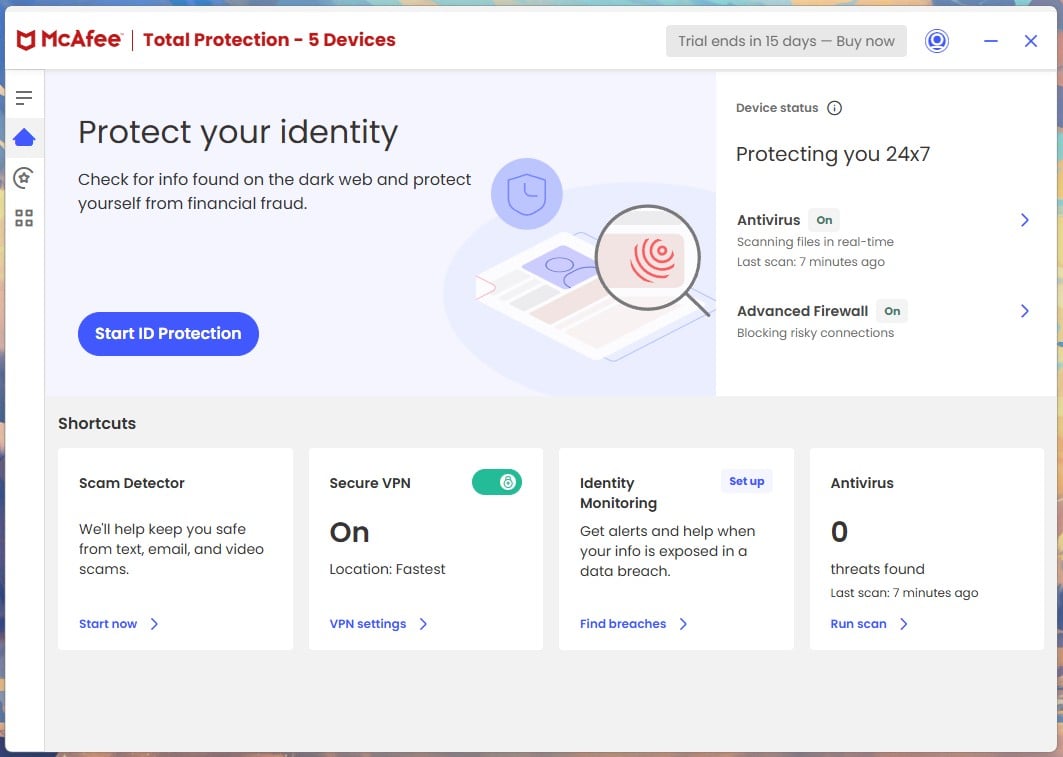
McAfee covers unlimited devices on most plans. Ransomware that reaches a shared drive spreads to every computer connected to it, so covering the whole house with one subscription is the point.
Rating: 4.3/5 ⭐ Best for families with a long device list.
McAfee Ransomware Features and Where to Find Them
- Feature name: none; folded into real-time scanning
- Location: no discrete control in the app
- Included in: every plan
- Default state: enabled and not adjustable
- Protected folders: not user-configurable
- Rollback: automatic backup and quarantine of flagged files
- Platforms: Windows, Mac, Android, iOS
McAfee Default Protection and Test Results
There’s no ransomware panel to find. The redesigned app folded that defense into the real-time engine, with no on or off switch, so it can’t be left disabled by mistake, and it can’t be tuned either. On detection, it backs up the dangerous file and quarantines it, with a manual restore and a flag-as-safe option for a wrong call.
WebAdvisor covers the browsing side and flags phishing links in the browser. In the lab round, McAfee Total Protection blocked every one of the 10 scenarios before execution, for a perfect score. The Advanced plan also includes ransomware coverage that reimburses losses and ransom fees up to $25,000, and no other product on the list has that.
False Positives and Daily Interruptions
None in ransomware testing. McAfee did produce 7 false alarms on the general malware bench, the most of the five, so expect the occasional legitimate installer to be flagged and use the restore option when it happens. Full scans are the longest and heaviest of the five, so schedule them for a time the PC is idle.
Should You Rely on McAfee Against Ransomware?
Yes, for a household. The lack of controls suits people who won’t open settings, the device count covers the whole house, and the ransomware coverage on the Advanced plan is a safety net the others don’t offer.
Pros
- Unlimited devices on most plans
- Perfect advanced threat lab score
- Can’t be disabled by accident
- Ransomware reimbursement on the Advanced plan
- Automatic backup of flagged files
Cons
- No protected folder controls
- Slow, heavy full scans
- Steep renewal increase
Ransomware Protection Compared: Detection, Rollback and Recovery
| Norton 360 | Bitdefender | Avast One Free | NordVPN NGAV | McAfee | |
| Best for | Overall | Rollback | Free | Delivery route | Many devices |
| Behavioral detection | Yes | Yes | Yes | No | Yes |
| Protected folders | Yes, 5 folders | Yes, Safe Files | Yes, custom | No | No |
| Automatic rollback | No | Yes | No | No | Partial |
| Backup | 2-250 GB | No | No | No | No |
| On by default | Yes | No | Yes* | Yes | Yes |
| ATP score | 35/35 | Not tested | 35/35 | Not tested | 35/35 |
| Price | About $50 a year (Deluxe) | About $60 a year | $0 | About $4.50 a month | About $40 a year |
| Rating | 4.8⭐ | 4.1⭐ | 4.5⭐ | 3.7⭐ | 4.3⭐ |
*Off when Avast is in passive mode alongside another product.
The rollback row splits the products into two groups: those that rebuild your files and those that only block the process, and only Bitdefender is in the first group. The default row shows why the rollback winner isn’t the overall winner.
Lab scores don’t split the field. Three products tied on a perfect 35, so the best ransomware protection software has to be judged on configuration and recovery. Anti ransomware software detects well now, so pay for the anti ransomware solutions that also put files back.
Backup: The Layer That Returns Your Files
Behavioral monitoring, protected folders, and rollback can each fail. Backup still works when they do, provided the copy was unplugged at the time.
The 3-2-1 Rule, Explained for Home Users
Three copies of your data, on two types of media, with one kept off-site. In practice: files on your computer, a copy on an external drive, and a copy in cloud storage. The drive is the part people misunderstand. Unplug it between backups, because a connected drive is just another folder as far as ransomware is concerned.
Why Cloud Sync Is Not a Backup
OneDrive, Google Drive, and Dropbox sync continuously. When ransomware encrypts the local copy, the client uploads the damage, and the cloud copy matches it. Version history saves you. OneDrive keeps 30 days of versions and offers a whole-folder restore to a point in time. Dropbox extends to 180 days on paid plans.
Immutable and Offline Backups
An immutable backup can’t be changed or deleted for a set retention period, even with valid credentials. Cloud services sell it as object lock, usually 30 days. The home version of an air-gapped copy is two external drives, rotated. One is connected while the backup happens. The other is in a drawer, unplugged, with last week’s copy on it.
Automatic File Rollback: What It Can and Can’t Restore
Rollback copies each file as a process begins rewriting it in bulk, then restores those copies once the process is stopped. Bitdefender has the strongest implementation. Ransomware protection tools with automated rollback have limits, however: very large files are skipped, the protected cache has a finite size, and rollback only covers what the product noticed. A real backup adds a separate copy, a separate location, and weeks of retention.
Free Ransomware Protection: What You Already Have
Most Windows users already own a capable ransomware layer and have never enabled it. Here’s how to make it work.
Windows Controlled Folder Access: Free and Already Installed
Controlled Folder Access blocks unapproved applications from modifying files in your user folders. It’s part of Windows Security and costs nothing.
- Open Settings, then Privacy & Security.
- Choose Windows Security, then Virus & Threat Protection.
- Under Ransomware Protection, select Manage Ransomware Protection.
- Enable Controlled Folder Access.
- Select Protected Folders to see the list and add your own.
- Use “Allow an app through Controlled Folder Access” to whitelist any program it blocks.
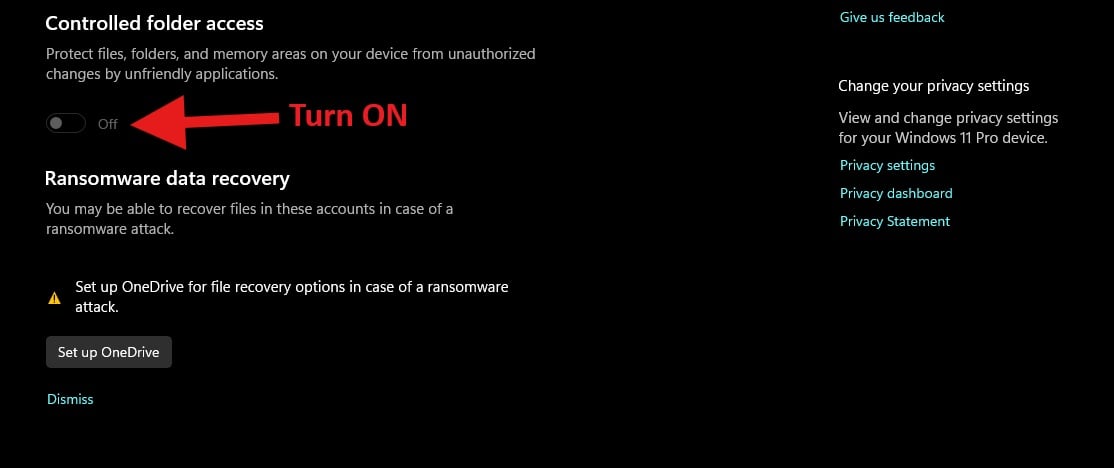
Documents, Pictures, Videos, Music, Desktop, and Favorites are covered by default. Add any folder with work files or game saves. The whitelist step takes ten seconds, and knowing where it is stops you from disabling the whole feature after one blocked program, which happens a lot.
Free Third-Party Ransomware Protection Worth Installing
Avast One Free adds behavioral monitoring that Controlled Folder Access doesn’t provide. AVG’s free tier uses the same engine. Avira took a perfect 35 on its Windows product in the same lab round, and it has a free tier too. Microsoft Defender got 31 of 35 there, catching 9 of 10 scenarios, so the built-in option is good without being complete.
Free ransomware protection software has one limit: no automatic rollback. That’s the feature you need once an attack has succeeded, and no free tier includes it.
What Free Protection Can’t Do
No rollback, no cloud backup, no support line, and no coverage for network drives. Free tools stop attacks. Undoing one costs money, because rollback is a paid feature. The trigger for paying is simple: if the machine has files with no second copy, buy the recovery layer. My free antivirus list covers what else the free tiers have.
Prevention: How Ransomware Reaches a Computer
Ransomware has to reach the machine before it can encrypt files. Five routes account for almost everything consumers and small offices see, and most attacks come from ransomware-as-a-service affiliates renting a toolkit and keeping a cut.
- Phishing email. A malicious attachment or a link to a credential harvesting page. Still the most common way in.
- Cracked software and fake installers. A pirated application or a fake browser update, downloaded voluntarily and given full permissions.
- Malvertising and drive-by downloads. Poisoned ad networks deliver a payload without a click.
- Exposed RDP and unpatched software. The route into small businesses, where an open remote desktop port with a weak password does the rest.
- Infected USB drives. Rarer now, and still effective in offices with shared hardware.
The countermeasures are short.
- Patch Windows and your browser
- Disable Office macros
- Install software only from official sources
- Enable multi-factor authentication for email and cloud accounts
- Disconnect backup drives when the backup finishes
Software to prevent ransomware is half of it; the other half is habits. Ransomware prevention software blocks the download and the site, but it can’t stop you from typing a password into a convincing copy of your bank’s login page. A ransomware prevention tool with web filtering, like WebAdvisor or NordVPN’s next-gen antivirus, blocks poisoned ads.
Behind prevention comes ransomware detection software, which watches process behavior instead of file names, so a new variant with no signature is still caught. Ransomware software changes weekly, and behavior is the only thing that keeps pace.
Already Hit by Ransomware? What to Do Next
Start with the first two steps, which are free, and decide what you keep.
- Disconnect the device. Pull the network cable, disable Wi-Fi, and unplug any backup drive. Ransomware spreads to mapped drives and shared folders.
- Don’t pay yet, and don’t reboot. Some strains complete encryption on restart. Payment is a last resort.
- Photograph the ransom note. The file name, the extension added to your files, and the contact details help identify the strain.
- Identify the strain. Upload up to two encrypted files under 1 MB each to Crypto Sheriff at nomoreransom.org/crypto-sheriff.php, along with any contact details from the note.
- Check for a free decryptor. No More Ransom publishes decryption tools for dozens of families at nomoreransom.org, free, as a non-commercial project with law enforcement. Avast publishes its own decryptors for specific strains as well.
- Restore from backup. Only after the machine is clean, and only from a copy that wasn’t connected during the attack.
Ransomware removal software removes ransomware. It doesn’t decrypt your files. Running the best ransomware removal tool leaves every encrypted document as it was, and my malware removal app list covers that cleanup step, which has to come before any restore.
Bitdefender’s Rescue Environment and Norton Rescue Disk start outside Windows for that reason. Ransomware removal experts are the right call if business data is involved, no usable backup exists, or the data is regulated. An anti ransomware service, sold as incident response, covers containment, forensics, and negotiation, and a home PC with a backup doesn’t need that expense.
On paying: law enforcement advises against it. Payment doesn’t guarantee a working decryptor, and it funds the next campaign. Some organizations pay when the alternative is closure, and that call belongs to whoever absorbs the loss.
Ransomware Protection for Business and Enterprise
The five tools reviewed are consumer products. The search for the best ransomware protection for business ends with a different kind of product, because none of the five meets what an IT team has to satisfy:
- Central management across every endpoint
- Per-device policy and enforcement
- Log retention for compliance
- An audit trail after an incident
The best enterprise ransomware protection isn’t one purchase. It’s four or five products bought separately and run by a person whose job it is.
- Endpoint detection and response (EDR). Records process behavior across every endpoint, so an analyst can trace an attack backward from the moment files started changing.
- Managed detection and response (MDR). The same telemetry with a staffed team watching it. Most mid-sized companies have no one reading alerts at 3 a.m., and that’s when encryption jobs get scheduled.
- Immutable backup. Ransomware protection for servers starts with immutable backup. Backups written once and locked for a retention period can’t be encrypted or deleted, even by an attacker with domain credentials.
- Network segmentation. Segmentation and least privilege limit lateral movement, so one infected laptop can’t reach the file server or the hypervisor.
- Email security gateway. Attachments and links still deliver most business infections, and a gateway filters them before they reach an inbox.
What the Lab Results Say About Business Products
AV-TEST tested a separate corporate group in the same November and December 2025 Advanced Threat Protection round. Nine endpoint products faced the same 10 attack chains with these scores.
| Product | Detected attacks (max. 10) | Protection score (max. 35) | |
| Acronis | Cyber Protect | 10 | 35.0 |
| Avast | Ultimate Business Security | 10 | 35.0 |
| Bitdefender | Business Security Enterprise | 10 | 35.0 |
| ESET | PROTECT Advanced | 10 | 35.0 |
| Kaspersky | Endpoint Security | 10 | 35.0 |
| Kaspersky | Small Office Security | 10 | 35.0 |
| Microworld | eScan Enterprise EDR | 10 | 35.0 |
| Trellix | Endpoint Security | 10 | 35.0 |
| Qualys | Endpoint Protection | 10 | 33.0 |
Eight of the nine took a perfect 35, and the ninth detected all 10 attacks. The result repeats what the consumer round showed: detection doesn’t separate them. Management, retention, and recovery do. Bitdefender Business Security Enterprise scored 35, and Kaspersky Small Office Security is the only small-business tool there, also at 35.
What a Five-Person Company Should Buy Instead
A realistic stack at that size has three parts. Microsoft 365 Business Premium covers identity, multi-factor authentication, and Defender for Business. A backup service with 30-day immutable retention covers recovery. A business tier of one of the five suites covers the endpoints.
Most ransomware protection companies sell a packaged version of that, priced per seat. Buy the ransomware protection solutions that bundle the backup. An incident then costs a day instead of a quarter.
Ransomware Protection on Mac, Android and iPhone
- macOS. Ransomware exists on Mac, but it remains far rarer than on Windows. The five products include a ransomware layer in their Mac builds. One condition applies: Avast’s shield requires the paid Premium Security tier there, while it’s free on Windows. Time Machine works well for recovery, as long as the drive isn’t left mounted between backups.
- Android. Screen-locker malware from sideloaded APKs is the realistic threat, and it demands payment to unlock the interface without touching your files. A factory reset removes it. Four of the five cover Android; NordVPN’s next-gen antivirus is the exception.
- iPhone. Sandboxing means no file-encrypting ransomware in practice. The threat is an iCloud account takeover, where an attacker locks the device remotely and demands payment. Two-factor authentication and a stored recovery key close that route.
How the Ransomware Protection Tools Were Tested
Testing took place on a Windows 11 Pro desktop: Ryzen 7 5800X, 32 GB of DDR4-2666, two M.2 SSDs, and an 18-second clean boot baseline. Each product went onto a fresh image. Three things were tested for this page.
- Default state. Every ransomware feature was checked immediately after install, before any setting was touched. That produced the central finding: four of five come enabled, and Bitdefender’s rollback layer does not.
- False positives. Across seven days of ordinary use, I counted every legitimate program that a protected folder stopped from saving a file. The total was zero on all five. The zero is the important part, because fear of blocked programs is why people disable these features.
- Recovery behavior. Where a product intervened during an encryption attempt, I recorded what came back. Bitdefender restored its test files in full, and Avast’s shield blocked the writes.
Lab figures come from the AV-TEST Advanced Threat Protection results covering November and December 2025, published in January. That round is the right reference because it uses 10 full attack chains, five of them ransomware, instead of scanning a malware library. Scoring goes to 35 points.
Conclusion: Best Ransomware Protection 2026
So, which protection stops the encryption, and what happens if it starts anyway? For most people, Norton 360 answers both: prevention and backup on one subscription, protection enabled before you touch a setting, and a perfect lab score. Bitdefender restores files better than any of them, and it’s rated lower only because the layer that does the work is disabled until you find it.
Avast is the best free ransomware protection on Windows, McAfee suits a house full of devices, and NordVPN’s next-gen antivirus belongs beside one of them, since it can’t undo an encryption on its own. If you want a tool that recovers files with nothing to configure, that doesn’t exist yet at consumer prices, and Norton with backup enabled is the closest thing.
And honestly, the cheapest step I’ve recommended is the one I’d take first: enable Controlled Folder Access tonight, then buy the recovery layer for the files you can’t replace.
Common Questions About Ransomware Protection
What Is the Best Ransomware Protection?
Norton 360 is the best ransomware protection for most people, with behavioral detection, protected folders, and cloud backup enabled from installation. Avast One Free is the best free option on Windows.
What Is the Best Protection Against Ransomware?
The best protection against ransomware is a set of layers: behavioral detection to stop the encryption, protected folders to block unknown programs, rollback to restore files, and a disconnected backup.
Does Antivirus Software Stop Ransomware?
Yes, partly. Signature scanning catches known samples, and behavioral monitoring stops an attack in progress. New variants can still slip past, since the encryption uses legitimate Windows components.
Is Free Ransomware Protection Good Enough?
Yes, for prevention on a carefully used Windows PC. Controlled Folder Access comes with Windows Security, and Avast One Free adds behavioral detection. Rollback and cloud backup require a paid tier.
Can Encrypted Files Be Recovered Without Paying?
Yes, in three situations: a clean backup, a rollback feature that saved copies before encryption finished, or a free decryptor on No More Ransom for an older strain. Otherwise, recovery is unlikely.
Does Removing Ransomware Decrypt My Files?
No. Ransomware removal software deletes the malicious process and stops further encryption, but encrypted files remain encrypted. Decryption requires the attacker's key, a backup, or a published decryptor.
Should You Ever Pay the Ransom?
No, as a default. A purchased decryptor often restores files only partially, and paying marks the victim as reliable, which invites repeat demands. Involve the police before deciding.
Does Windows Have Built-In Ransomware Protection?
Yes. Controlled Folder Access is part of Windows Security on Windows 10 and 11. Approved programs can write to protected folders and unknown ones are blocked. It's disabled by default.
Will a Backup Protect Against Ransomware?
Yes, provided the backup isn't connected during the attack. A plugged-in drive or a synced cloud folder is encrypted with everything else, while disconnected drives and immutable cloud retention survive.
Can Ransomware Encrypt Cloud Storage Like OneDrive?
Yes, because sync isn't a backup. The desktop client uploads encrypted files within minutes. Recovery comes from version history, which OneDrive, Google Drive, and Dropbox keep for a set window.
Do Macs Get Ransomware?
Yes, but samples are rare and most arrive with pirated software. Gatekeeper and app sandboxing block most attempts. The bigger macOS risk is a backup volume left mounted during an attack.
What Is the Best Ransomware Protection for a Small Business?
Identity and backup first, then endpoints. Multi-factor authentication closes the most common entry, immutable retention limits the damage, and a business tier from Norton, Bitdefender, or Avast covers the endpoints.
Can Ransomware Protection Be Left On With Another Security Product?
Yes, with one check. A product installed second often switches to passive mode to avoid conflicts, which can leave its ransomware layer inactive. Confirm the feature is enabled after installation.