In this Hostinger vs Kinsta comparison, we’ll dive deep and see which provider is really better. Both services are known for WordPress hosting. This makes them highly popular among people looking to build a WordPress website or even sell online with WooCommerce. There’s one major difference: the price.
As you’ll soon see, Kinsta costs a lot more than Hostinger. On the other hand, we have Hostinger’s affordable prices for an all-in-one WordPress hosting solution. No doubt, both options have their merits. However, you’re here to find out which option is better, Kinsta or Hostinger.
To put it better, we want to see if it’s worth splurging more on Kinsta, or if it’s enough to pick Hostinger, save plenty of money, and still get what you want. Well, this comparison answers that, and many other questions, so let’s get right into it.
Hostinger vs Kinsta – Quick Comparison
| 🏆 Hostinger | Kinsta | |
| 🌐 Shared (WordPress) Hosting Price | $2.99 monthly | $30 monthly |
| 💾 VPS Hosting Price | $4.99 monthly | / |
| ☁️ Cloud Hosting Price | $7.99 monthly | / |
| 🆓 1-Year Free Domain | Yes | No |
| 🔐 WHOIS Domain Privacy | Yes | No |
| 🌎 Data Centers | More than 10 locations | More than 37 locations |
| ✅ Uptime Guarantee | 99.9% | 99.9% |
| 🖥️ Free SSL Certificate | Yes (Let’s Encrypt) | Yes (Wildcard) |
| ⏬ Automated Backups | Weekly and daily, with on-demand backups | Daily, with on-demand backups |
| 💿 Storage | 20 GB to 100 GB NVMe | 10 GB to 100+ GB |
| #️⃣ Number of Hosted Websites | 3 to 100 | 1 to 200 |
| 🤖 AI Website Builder | Yes, included in all plans | No |
| 💸 Money-Back Guarantee | 30 days (no free trial) | 30 days (free for the first month) |
Hosting Plans, Pricing & Features
Let’s begin with their hosting plans, their prices, and features.
Hostinger and Kinsta are managed WordPress services, but their offers differ tremendously. Kinsta is, in a way, a WordPress-only host, which means it excludes other types of hosting. Meanwhile, Hostinger is far more versatile.
| Hosting Type | Hostinger | Kinsta |
| WordPress | ✅ | ✅ |
| WooCommerce | ✅ | ✅ |
| Cloud | ✅ | ❌ |
| VPS | ✅ | ❌ |
| Dedicated | ❌ | ✅ |
Kinsta offers primarily shared hosting, with the option to get a dedicated server for your WordPress website. Meanwhile, Hostinger lacks this option, but includes versatile VPS and cloud hosting plans with some of the lowest prices, yet outstanding performance. We discussed them in our Hostinger review.
So, in terms of variety, Hostinger takes the lead. But nothing’s over yet.
Pricing Comparison
As promised, this Kinsta vs Hostinger comparison will review their prices, so let’s start with Kinsta and work our way up.
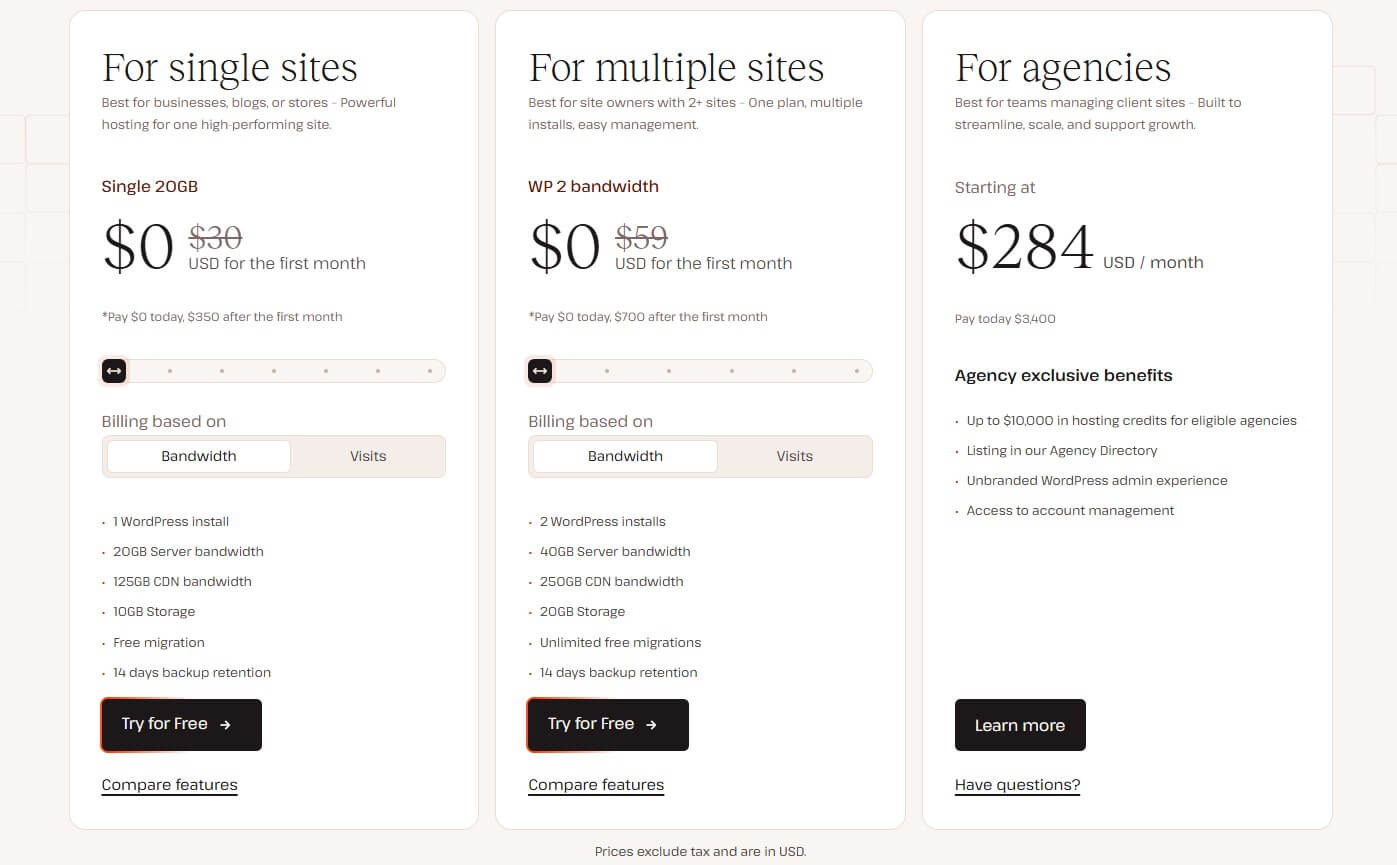
Kinsta appears to be free, but that’s only for the first month. After that, the price for a single website is $30 monthly, while a multi-site plan is $59 monthly for two WordPress websites. As Kinsta’s plans are annual, you spend either $350 or $700 upfront for a year. Bear in mind, these are minimal prices.
As you move the slider to the right, you get more bandwidth, storage, and CDN bandwidth. Each slider move also accustoms you to more site visitors and longer backup retention, which starts at 14 days and goes up to 30 days.

Let’s examine Hostinger’s equivalents. The Premium plan at $2.99 monthly lets you create three websites on 20 GB of SSD storage. It also includes a free domain and all managed WordPress features, including updates, security optimization, and others. By far the best option is the Business plan.
Get the Best Price on Hostinger
At $3.99 monthly, it allows for 50 websites, 50 GB of NVMe storage, and much more. Even the Cloud Startup plan at $7.49 monthly, which is cloud hosting, is way less expensive than Kinsta’s single-site plan. This plan supports 100 websites and offers a gargantuan 100 GB of NVMe storage.
Examine Hostinger’s prices again, and you’ll notice that the Cloud Startup plan costs $360 for 48 months, with two free months on top. Meanwhile, you’ll spend that much on Kinsta’s single-site plan for a year. Let that sink in.
What About Their Features?
We’ve established that Kinsta costs more, but this begs another question:
Is Kinsta worth the extra dough? Here are its standout features:
- 20 GB to 100 GB SSD storage
- Free migration
- Managed WordPress hosting
- 20 GB to 500 GB bandwidth
- Free CDN
- Free SSL
- Multisite support
- Advanced security (WAF, DDoS protection, malware removal, etc.)
- MySQL database optimization
Now, let’s see what Hostinger offers:
- 20 GB to 100 GB NVMe storage
- Free email marketing
- 2 to 10 mailboxes per website
- Free domain for a year
- Managed WordPress hosting
- Unmetered bandwidth
- Free CDN
- WordPress Multisite
- AI website builder
- Weekly or Daily & on-demand backups
- Up to 100 PHP workers
- Dedicated IP
- Advanced security (DDoS protection, WAF, malware removal, and more)
- Free website migration
As you can see, Hostinger’s lower price doesn’t make it inferior to Kinsta. In fact, we’d argue that it offers more features for less money. Don’t forget that even its cheapest Premium plan hosts 20 websites. Meanwhile, Kinsta hosts only one. Let’s chime in a free domain for the first year; that’s another punch to Kinsta’s belly.
On top of everything, the renowned WordPress host offers unmetered bandwidth; Kinsta is limited in every plan. As we’ll later see, Hostinger matches Kinsta’s security, as well, so at this price, things are pretty clear.
Winner: Hostinger
Hostinger is way less expensive, and because it doesn’t lack pretty much anything compared to Kinsta, it’s this round’s clear winner. Try Hostinger risk-free or take advantage of the fresh Hostinger coupon for additional savings.
Kinsta vs Hostinger Performance Comparison
During our Hostinger vs Kinsta evaluation, we tested their performance by creating two identical WordPress websites. To ensure no margin of error, we used the Astra theme on both sides and opted for their most similar plans.
For Hostinger, we picked the Business plan, while in Kinsta, we chose the single-site plan called Single 65 GB (it’s sort of a mid-tier offer). Before we proceed, it’s worth mentioning that Hostinger relies on LiteSpeed servers and their caching. Meanwhile, Kinsta uses NGINX servers and their arguably faster caching.
As for data centers, we picked the US ones on both sides to, again, reduce the margin of error. Finally, we used GTmetrix, UptimeRobot, and Loader to test their page-loading speeds, uptime, and average response times.
GTmetrix Speed Test Results Comparison
We’ll start with GTmetrix tests. We opted for GTmetrix’s free Canadian server (Vancouver). This was because everyone can use it with an account. Most other GTmetrix test servers are paid additionally. Here’s what we observed:
- Time to First Byte or TTFB.
- First Contentful Paint or FCP.
- Largest Contentful Paint or LCP.
- Time to Interactive or TTI.
- Fully Loaded Time or FLT.
Now, let’s look at the table with these parameters’ upper limit recommendations and the values we achieved during our Kinsta vs Hostinger speed test comparison:
| Hostinger | Kinsta | Ideal Values | |
| TTFB | 291 ms | 131 ms | Under 800 ms |
| FCP | 435 ms | 249 ms | Under 1.8 s |
| LCP | 533 ms | 587 ms | Under 2.5 s |
| FLT | 733 ms | 433 ms | Under 2.5 s |
| TTI | 656 ms | 702 ms | Under 3.0 s |
Based on these results, we must say these are some of the quickest web hosting services we tested in 2026. Kinsta excels at fast server response, which is reflected in its TTFB and FCP. In our tests, Kinsta also loaded the website considerably faster, at 433 ms, versus 733 ms that we observed in Hostinger.
Meanwhile, Hostinger loaded the largest element on the site more quickly, and the time it took for the website to become interactive was slightly shorter. On average, Kinsta’s performance is a bit more convincing, particularly because it’s faster where it matters the most, particularly in the Fully Loaded Time.
Kinsta lets you purchase Redis caching for added speed, but even in this ‘vanilla’ form, it performs unbelievably well. Although we wouldn’t say Hostinger was slow by any stretch, especially considering its low price.
Measured Uptime & Response Times
During our assessment, we relied on UptimeRobot to test how reliable Hostinger and Kinsta were. After testing them for the past three months, we observed these results:
- Kinsta: 99.97% uptime (99.9% promised)
- Hostinger: 100% uptime (99.9% promised)
Whether it’s a coincidence, we don’t know, but Hostinger had zero outages during the testing period. Kinsta had a few prompt ones, but collectively, they haven’t lasted more than ten minutes. We confirmed that in this Kinsta test.
Moving on to Loader, we tested both providers with 100 virtual users, and the average response time results were:
- Kinsta: 89 ms (low: 61 ms, high: 176 ms)
- Hostinger: 592 ms (low: 230 ms, high: 837 ms)
Hostinger performed noticeably worse in our response time test. While its result is far from the worst we achieved, it’s not jaw-dropping. Meanwhile, Kinsta’s average response time rivals some of the best VPS hosting providers. Kinsta advertises extreme performance, and in the end, that appears to be more than true.
Winner: Kinsta
If you want terrific site-load speeds, reliable uptime, and record-low response times, Kinsta is an amazing option. Hostinger’s performance isn’t industry-leading, but it’s more than stellar for the price. Sadly, it couldn’t match Kinsta when it comes to delivering speedy WordPress sites.
Which Hosting Provider is Easier to Use?
We had no issues with Hostinger and Kinsta, and everything, from onboarding to managing our websites, was buttery-smooth. Wondering how that looks like in practice? Let’s examine their ease of use in depth.
Kinsta: Setup & Ease of Use
Once you subscribe, which takes merely a few minutes, Kinsta will transfer you to its beautiful dashboard. You can create a site from scratch and immediately install WordPress. However, there’s the option to migrate a website for free. In both cases, when you make a website, Kinsta will allow you to choose the data center.
We opted for the US one, as explained above.

After the initial five-minute setup, the dashboard appeared, where we could install applications, manage our databases, and explore our WordPress sites. The latter were accessible with a click, and the dashboard contained vital website analytics like resource usage, bandwidth, CDN usage, and visits.
One of its best features is automatic CDN connection. Kinsta pre-installs your CDN, so you can immediately enjoy faster speeds and loading times. Kinsta’s dashboard is simultaneously simple and comprehensive, allowing even beginners to find their way and manage their websites like experts.
Hostinger: Setup & Ease of Use
Hostinger’s onboarding experience is outstanding. Once you sign up for a plan, you can make a website and use your free domain. Hostinger’s managed Hosting service does everything for you, including SSL application, CDN connection, and DNS propagation for your new website.
The provider uses an in-house hPanel control panel displayed below:

You can notice that it looks sleek, modern, and intuitive. Like Kinsta, the home screen houses vital information about PageSpeed Insights, website security, and resource usage. We like Hostinger’s improvement strategy that provides actionable tips to improve various aspects of your websites.
On the left, you can access security, domains, files, and your WordPress dashboard. It’s also where you can install applications with a single click, thanks to Hostinger’s intuitive installer.
Winner: Tie
The two managed WordPress hosting services performed on par. It’s a matter of preference, but both control panels are intuitive and easy to get around. Paired with straightforward onboarding and easy registration, newcomers will enjoy a premium experience on both sides.
Which Web Hosting Is More Secure?
Website security is often neglected in favor of raw performance and load times. However, our experience shows that security vulnerabilities can wreak havoc upon a website. The question is: are Hostinger and Kinsta safe and secure?
We’d say yes. Here’s what Kinsta uses to secure your website:
- Managed Web Application Firewall
- DDoS protection
- Malware removal
- Free Wildcard SSL
- Automatic website backups
Now, here’s what to expect from Hostinger:
- Managed Web Application Firewall
- DDoS protection
- Malware removal
- Daily and on-demand backups
- WordPress vulnerability scanner
- Free Let’s Encrypt SSL
- WHOIS privacy with a free domain
Hostinger’s list is a bit longer, but essentially, its features are pretty much identical. However, we’d give an advantage to this provider due to its WHOIS protection, which is included for free in all plans. Plus, it offers enterprise-level DDoS protection, which is as effective as the one we tested in Kinsta.
Hostinger’s WordPress vulnerability scanner is excellent, as it detects and mitigates typical vulnerabilities and potential problems. In our practical tests, Hostinger and Kinsta performed without a single hitch. Arguably, they’re some of the most secure web hosting options, but with a caveat.
Kinsta is multiple times more expensive!
Winner: Hostinger
We’d give this one to Hostinger simply because it costs less and offers the same. In fact, it offers WHOIS privacy for your free domain, which you’d have to buy if you pick Kinsta, as it doesn’t offer a free domain registration. So, it ultimately boils down to more security for your money.
Customer Support
Let’s finally address their customer support offers.
Kinsta relies on three support channels:
- Live chat support, Monday through Friday, from 5 am to 10 pm UTC.
- Email support
- Phone support
You’ll mostly rely on the former two, as phone support is for sales inquiries. When the support team is there, it’s responsive and helpful, although not the fastest we observed. You can, however, use its extensive knowledge base and dig out the solution for your problem. Is Kinsta’s support the best around? Hardly.

Then, we have Hostinger with:
- 24/7 live chat support
- Email support
Hostinger’s support is excellent, especially its AI chatbot called Kodee. Kodee has improved a lot, although it still fails to understand some basic questions. On the flip side, human support is really good, particularly in the Cloud Startup plan with 24/7 priority support, where you’ll usually get help in a few minutes.

Like Kinsta, Hostinger provides an extensive knowledge base with a search function to help you find solutions more easily. You’ll notice that Hostinger lacks phone support, but we didn’t feel it, as its live chat and email support were efficient.
Winner: Tie
Customer support won’t bother you, whichever hosting you choose. As some of the most impressive web hosts, both provide extensive support and timely help to keep your websites intact and always reachable.
Hostinger vs Kinsta: Final Recommendations
Our Kinsta vs Hostinger comparison for 2026 is finished, and now, we have to pick the winner. To be frank, that’s a difficult proposition, considering their glaring differences. Simply put, Hostinger and Kinsta are two different philosophies. Two different approaches to WordPress hosting.
Our overall winner is Hostinger, and we’d pick it over Kinsta or any other managed WordPress service in 2026.
The main reason is its versatility, ease of use, great performance, top-notch security, and above everything, budget-friendly price. Hostinger starts at $2.99 monthly, and even if you skip this plan, you and pick the Business one at $3.99 monthly, you’ll still get unbelievable value for money with all the features.
Kinsta is a performance powerhouse, with range-topping page-load speeds and immaculate WordPress features. However, it’s too expensive and costs roughly ten times more than Hostinger in its cheapest plan. It’s hard to recommend Kinsta based solely on its superior performance.
However, if you need that extra squeeze, by all means, pick Kinsta. For most people, including ambitious business owners, Hostinger ticks all the right boxes, and for the price, performs like a champ.