Apple Books—which many people still know by its former name, iBooks—is the reading app developed by Apple. It brings e-books and audiobooks together in a digital library accessible from your phone or tablet. It’s designed for a broad audience, from casual readers who enjoy a novel during their commute to those who read every night before bed. Its interface remains simple and easy to use, even if you’ve never used a reading app before.
Apple Books functions both as a bookstore and as a personal library. You can browse a catalog of millions of titles, including bestseller lists, new releases, and selections curated by Apple’s editorial team. You can also manage your reading list and pick up a book exactly where you left off. No subscription is required for everyday use, which appeals to readers who prefer to buy books individually.
Why Should I Download Apple Books?
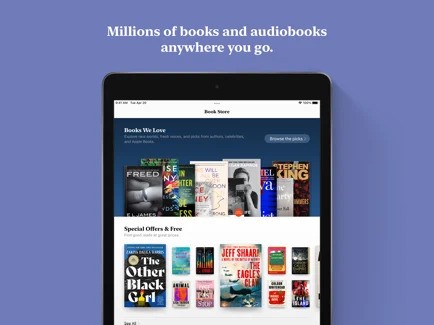
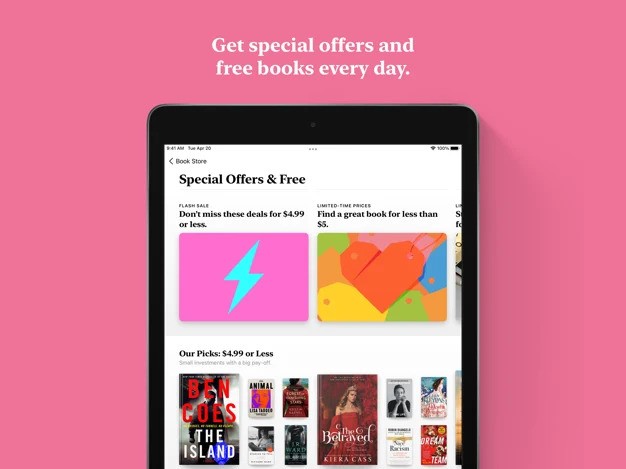
Downloading Apple Books gives you access to two main sections within the same app. The first is the store, divided into sections for e-books and audiobooks. There, you’ll find current bestsellers, free books, special offers, and recommendations tailored to your reading habits. The Apple Books team also curates collections by genre, ranging from crime and romance to history, self-help, and young adult fiction.
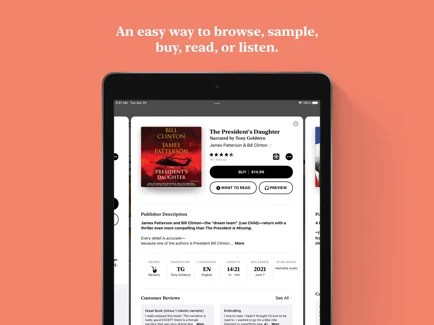
Before buying a book, you can read an excerpt or listen to a preview of an audiobook. These samples let you get a feel for the writing style or narration before making a decision. Titles that interest you can be added to a list called “To Read,” where you can save books you’d like to explore later.
The second section is dedicated to reading, and this is where Apple Books offers plenty of flexibility. Several themes are available, each with its own fonts and background colors. You can adjust line spacing and letter spacing to make reading more comfortable. An automatic mode adapts the display as daylight fades, and you can adjust the brightness directly from the reading screen. If you prefer to scroll continuously rather than turn pages, you can enable vertical scrolling in just a few seconds.
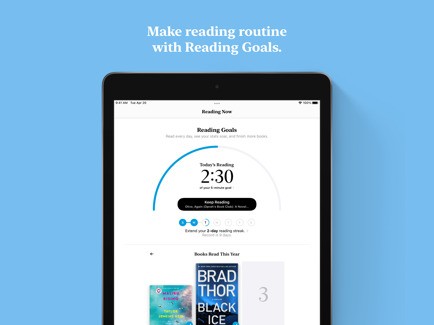
The app also includes reading goals designed to help you maintain a regular habit. You can set a daily reading target, track your reading streaks, and see how many books you’ve finished since the start of the year. Weekly reminders can also help you stay on track. Family Sharing lets you share eligible book purchases with family members, so everyone can access supported titles without having to buy them separately.
Audiobook lovers have two additional features at their disposal. When driving, audiobook playback is available through Apple CarPlay, with large controls for starting playback, rewinding, and fast-forwarding. On Apple Watch, you can access recent audiobooks and listen to titles transferred from your iPhone.
Is Apple Books Free?
Apple Books is a free app that you can download, install, and use without paying anything. Reading goals, display themes, Family Sharing, and access across compatible devices are among its features.
The books themselves may cost money. E-books and audiobooks in the catalog can be purchased individually, and you’re free to buy none at all. The store regularly highlights free titles and special offers for readers of all ages, while previews let you explore a book before spending anything. Family Sharing can also help reduce costs by making eligible purchases available to other members of your family group.
What Operating Systems Are Compatible with Apple Books?
Apple Books is designed for the Apple ecosystem and is available on iPhone and iPad. It also supports the iPod touch and Apple Vision Pro. Audiobook playback is available on Apple Watch, provided the device meets the relevant software requirements.
On Mac, Apple Books is built into macOS and opens without requiring a separate download and installation. You can access the app through our direct download links where available. The app supports multiple languages, including French, and its interface follows the language settings on your device.
What Are the Alternatives to Apple Books?
Google Play Books is a strong alternative to Apple Books, particularly for Android users. The app is free, available on Android and iOS, and also lets you access your library through a web browser on your computer. It supports e-books and audiobooks, and you can upload your own PDF and EPUB files. Some purchased books can also be downloaded in EPUB or PDF format and transferred to a compatible e-reader, provided the publisher allows it. As with Apple Books, the app is free, but books must be purchased separately.
Amazon Kindle is another popular alternative to Apple Books, offering access to millions of e-books, along with magazines, comics, and selected audiobooks. The free app is available on iPhone, iPad, Android, Windows, and Mac, and you can also read your books through a web browser. You can customize the reading experience by adjusting fonts, text size, margins, and background colors. The app also lets you highlight passages, add notes, look up word definitions, and synchronize your reading progress across devices. Kindle books are purchased separately through Amazon, although some titles are available for free and subscription services provide access to additional catalogs.
OpenAudible serves a different purpose and is primarily aimed at audiobook listeners. It’s a desktop application compatible with Windows, macOS, and Linux that connects to your Audible account to download and manage your library locally. You can convert compatible titles to MP3 or M4B, split or merge chapters, edit book metadata, and export your collection to a spreadsheet. The software includes a built-in player and offers keyboard and screen-reader-friendly controls for navigating the library. It provides a free trial, but conversion and splitting require a paid license. The license is a one-time purchase, although continued access to software updates may require a renewal.