Over the weekend I engaged in one of my occasional bouts of getting the computer in order. Yes, this is going to be a story, alright. Gather around.
The first order of business was freeing up some space by moving my music library onto a flash drive. That involved a couple of hours spent mournfully paring down 135GB of music, so it’d fit onto a 128GB flash drive—yes, I still have a bunch of actual music files, and no, I’m not getting rid of them in favor of streaming. Apple has long been decidedly frugal with the amount of storage and RAM its computers include. If you use a MacBook Pro as your main computer, by the time you factor in, say, a couple of Adobe applications, Microsoft Office, a couple of browsers, stuff like Zoom and Slack, maybe a couple of games, and, um, 130GB of music, you’ll find that 512GB fills up pretty quickly—and since the days when you could just swap out the hard drive for a bigger one yourself are long gone—that 512GB is all you’re getting as far as internal storage goes.
Second up was a long-overdue OS update. So imagine my delight when finding that going from macOS Tahoe to macOS Golden Gate had a) turned my computer’s aesthetic into Windows Vista 2.0 and b) resulted in a bunch of my painstakingly reclaimed storage space just… disappearing. Before the update, I had something like 35GB free. (If you’re wondering, I installed a bunch of games important software into the space I freed up.) After the update, I had barely 20GB.
So, um, what the hell?
Well, it turns out a decent chunk of that is devoted to Apple’s AI tools, referred to collectively as Apple Intelligence and—judging how quickly Apple toed the line on Lake Ontario—presumably soon to be known instead as Apple Super Intelligence. The thing is, even if I wanted to turbo-charge Siri or something, which I don’t, I simply could not stand for this indefensible piece of discrimination:

Discrimination, I say! Principles are principles! But sadly, as soon as I opened up my newly-Vistafied laptop, it became clear that discrimination or otherwise, avoiding Apple Intelligence was going to be a whole lot more difficult with this OS.

Curses. It appeared I was stuck with Apple Intelligence in all its hard drive-hogging glory. As Ars Technica’s Andrew Cunningham wrote in his review of the OS—which I clearly should have read before updating—“Generative AI is unavoidable if you install macOS 27 Golden Gate. I’m being very literal: There used to be a toggle you could hit if you wanted to turn off Apple Intelligence and delete the gigabytes’ worth of AI models it would download to your disk, and now there isn’t.”
But wait! Life comes at you fast, and just as I was starting to think about figuring out how to downgrade back to macOS Tahoe, along came my knight in shining armor. The knight in question is something of a man(?) of mystery—he goes by the name Om Lahore, appears to be based in Mumbai, and has a GitHub profile photo that finds him wearing a mask that’s one part lucha libre and one part vintage-era Doctor Who prop. This mysterious figure literally just released RemoveMacAi, which is… an open-source tool for turning off Apple Intelligence on macOS 27. The tool claims to “Turn off Apple Intelligence on macOS 27 and get its disk space back,” promising that it’s fully reversible and requires only one command to do its work. Hurrah!

Now look, should I be installing something from some random dude’s GitHub? No, probably not. Do I recommend that you, dear reader, do this? No. But! Did my desire to recover my lost disk space and thumb my nose at Apple Intelligence outweigh my good sense in this case? Well… yeah. And I’m happy to report that one Homebrew installation and one simple Terminal command later, the tool worked just as advertised. It can be used to report how much disk space Apple Intelligence is hogging, which seems to vary from computer to computer, and it can also turn off various aspects of Apple’s AI implementation.
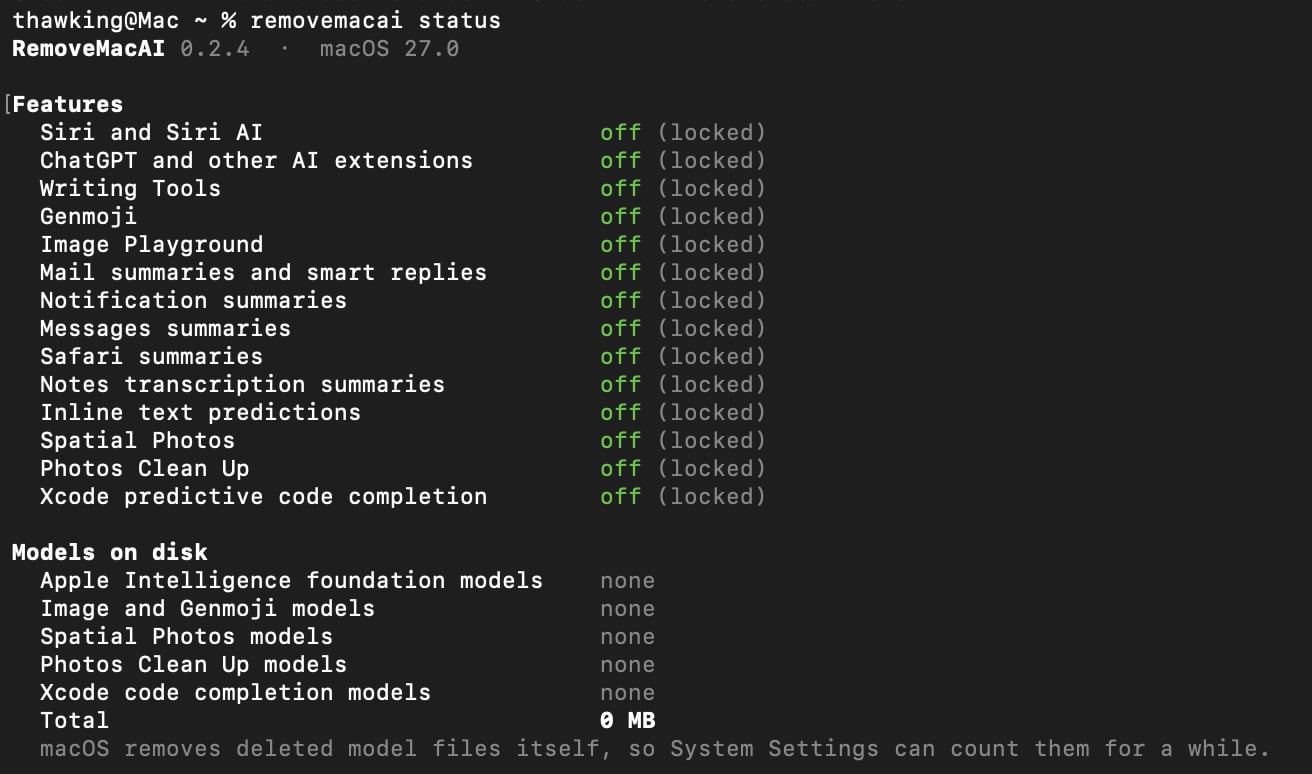
Me, I just wanted to nuke the lot—and just look at that lovely “0 MB” there! I have my disk space back, Apple Intelligence is banished to outer darkness, and we’ll all live happily ever after. (Or until the next version of macOS comes along, anyway.)