Norton 360 for Mobile is the best antivirus app for Android in 2026. I installed five on a Galaxy S26 Ultra and measured detection, battery drain, scan speed, and permissions. Most people need none, and I explain when that changes.
Best Antivirus for Android at a Glance
- Norton 360 for Mobile: Best overall. Notifies only on unknown or suspicious networks. Free of ads.
- Bitdefender Mobile Security: Best for features. 100% detection, 0.5% battery, and it stays out of the way.
- Avast Mobile Security: Best free version. Same engine as Norton, funded by frequent in-app ads.
- McAfee Mobile Security: Best for scam calls and texts. Heaviest on battery.
- NordVPN Threat Protection: Best for web and Wi-Fi. Fewest permissions of any app here.
Every figure below came from one phone in October 2026, cross-checked against AV-TEST’s May 2026 mobile round and AV-Comparatives’ June 2026 results.
Do You Actually Need an Antivirus App for Android?
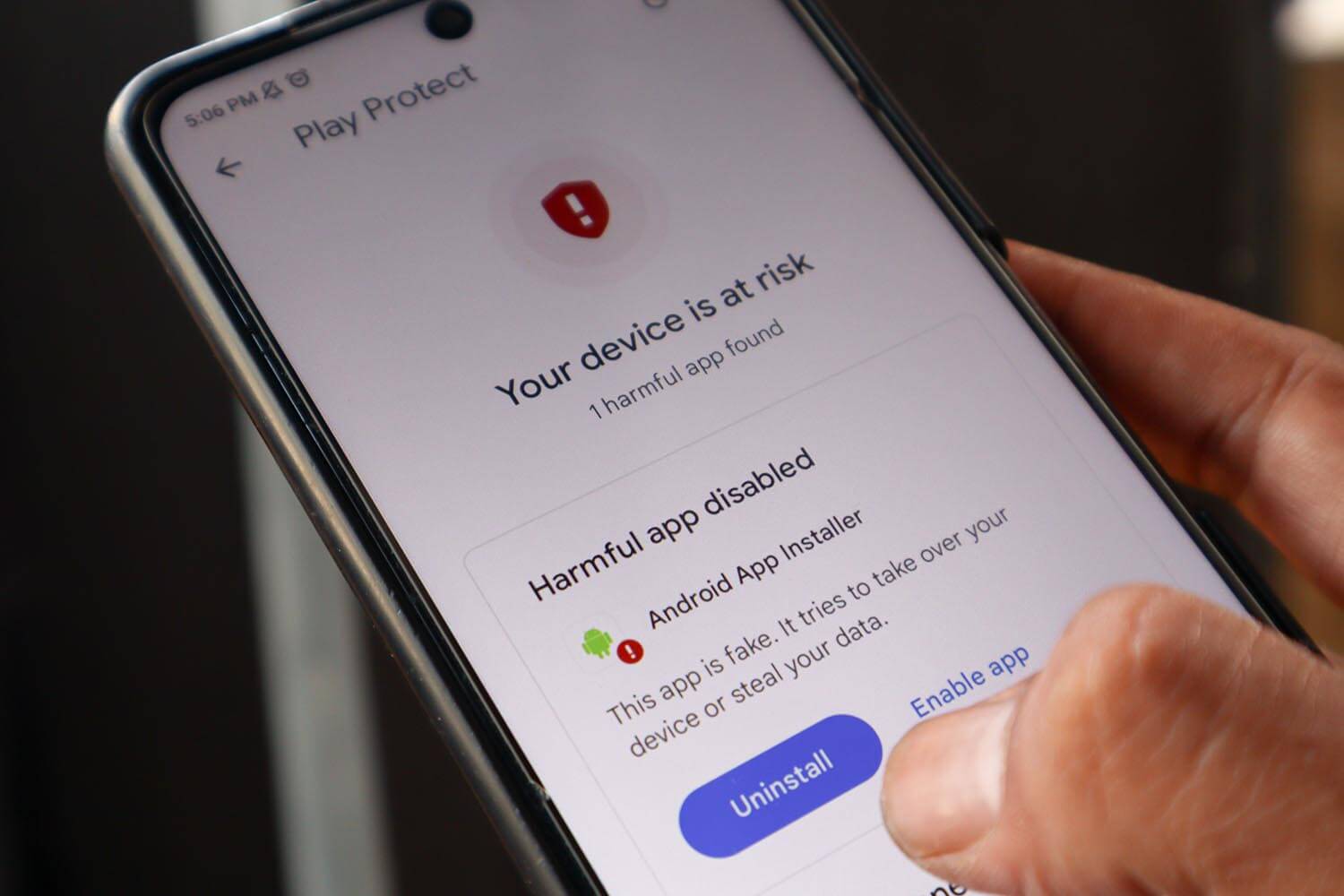
Likely not, and I’d rather show you the evidence than sell you something. Antivirus Android searches start here, so take the built-in layer first. Google Play Protect scans every app on your device automatically. It is already switched on, it costs nothing, and it works. Android also sandboxes apps so one can’t read another’s data.
Permissions are granular enough that you approve each capability individually. If you install only from Google Play, keep the system updated, and think before tapping links, your exposure is genuinely low.
Is Android Antivirus Necessary, and Where Play Protect Falls Short
In AV-TEST’s May 2026 mobile round, Play Protect scored 5.5 for protection and 5 for usability. Every commercial app here scored a perfect 6 across all three categories. AV-Comparatives reported Play Protect at 98.9% detection with 8 false positives in June 2026, compared to Bitdefender at 100% with 2.
Those numbers are close in absolute terms. The difference shows up in specific situations: sideloaded APKs from outside the Play Store, phishing links via SMS and messaging apps, and scam calls, none of which Play Protect was built to handle.
When Installing One Makes Sense
Five situations make sense:
- You sideload apps. APKs from outside Google Play skip most of Play Protect’s security checks.
- You get scam texts and calls. This is where mobile security truly earns its place in 2026.
- A relative needs help. Scam filtering matters most for people who would otherwise tap the link.
- You bank and shop on the phone. Web protection catches spoofed sites before the login page loads.
- You use public Wi-Fi often. A bundled VPN covers the gap, within its data cap.
If none of those describe you, keep Play Protect and spend the money elsewhere. That is a legitimate answer, and it applies to most readers.
Best Android Antivirus Apps, Tested and Ranked
Here are my top five in detail.
1. Norton 360 for Mobile: Best Android Antivirus Overall
Rating: 4.7/5 ⭐
Norton is the app I expected to complain about and didn’t. Its notifications turned out to be the least intrusive of any app here.
Pros
- Fastest scan here at 24 seconds
- Quietest notifications
- App Advisor screens apps pre-install
- 60-day money-back guarantee
- Included with Norton 360 Deluxe
Cons
- 0.9% battery drain, second heaviest
- Mobile plan covers 1 device
- Identity features are US-only
What You Get With Norton on Android
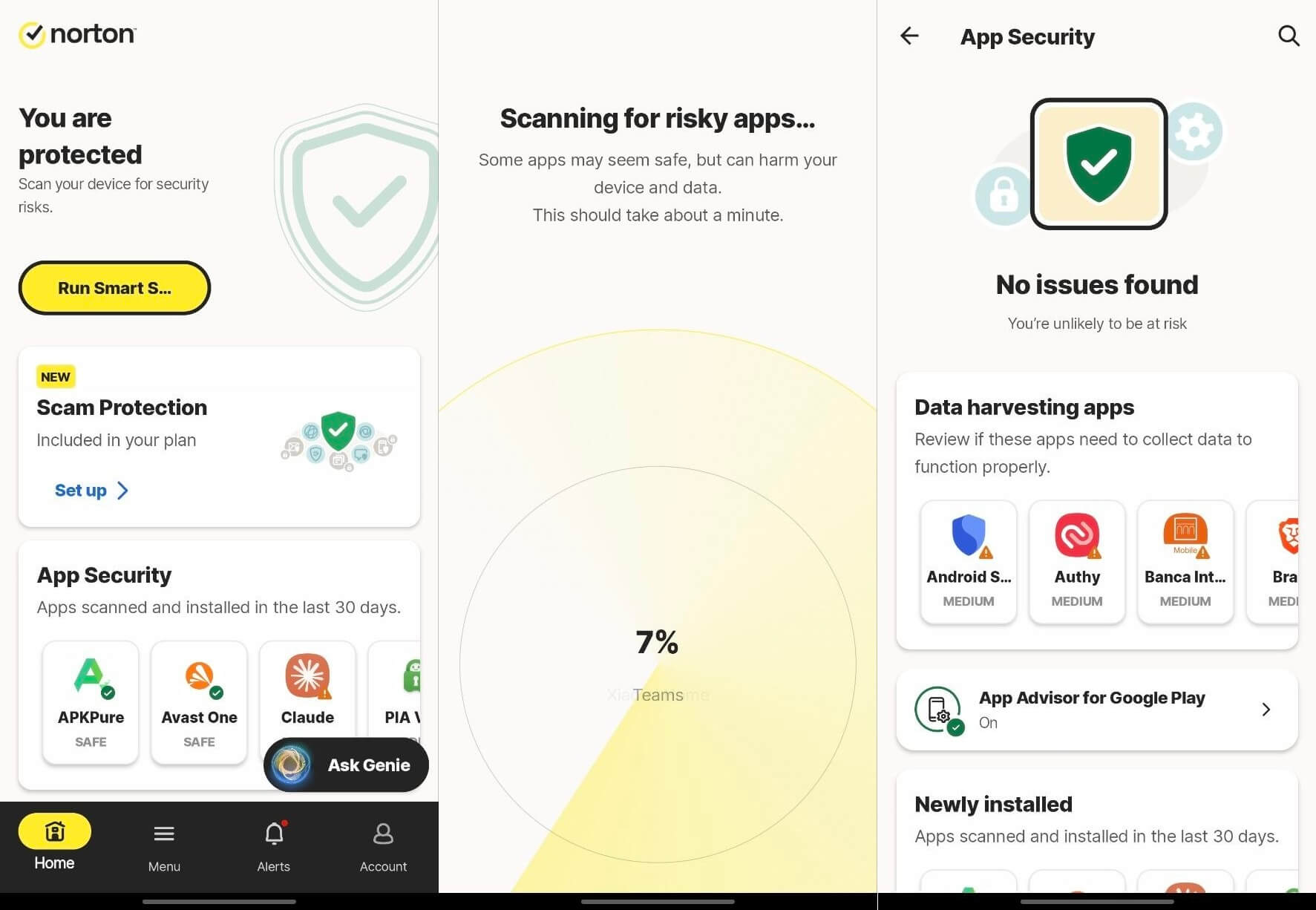
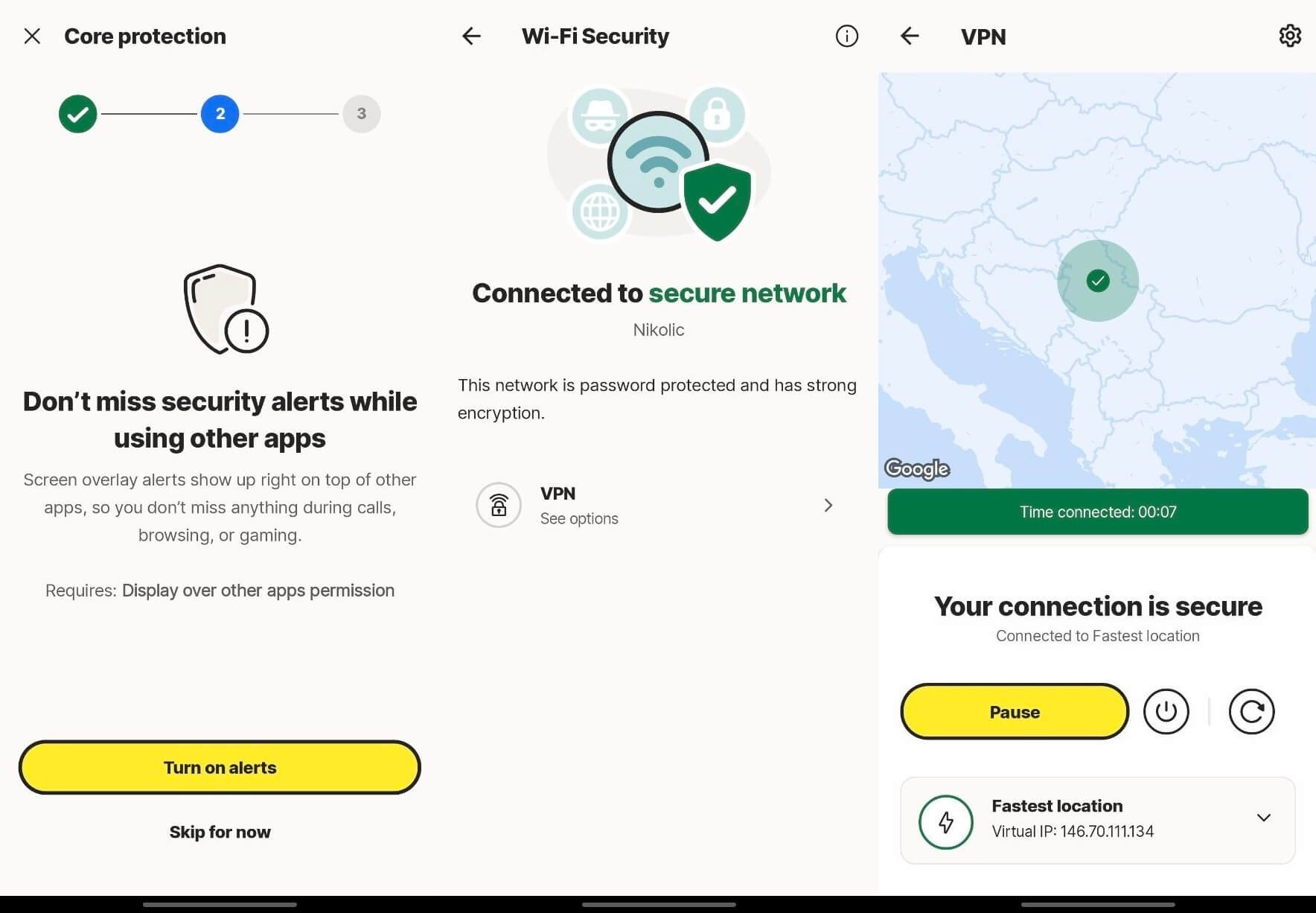
Malware scanning, Web Protection, Wi-Fi Security, Scam Protection, App Advisor, a VPN, and dark web monitoring. App Advisor is useful: it screens apps on Play Store listing before you install them; prevention instead of cleanup.
Norton Malware Detection Results on Android
Detection reached 99.9% with a single false positive, and AV-Comparatives recorded the same 99.6% figure for Norton, Avast and AVG together in June 2026, since all three share Gen Digital’s engine. AV-TEST gave Norton 360 26.6 a perfect 6/6/6 in May 2026. Scanning took 24 seconds, the fastest here.
Norton Battery Drain, Permissions, and Everyday Use
Norton used 0.9% of the battery, second heaviest of the five picks here. It asks for all files, accessibility, display over other applications, location, SMS and notification access, and VPN connection.
Living With Norton Day to Day
This is where Norton wins. I was notified when I joined an unknown or suspicious network, and otherwise left alone. No permanent banner, no upgrade prompts interrupting a scan. For an app that people install and then forget about, that restraint is worth more than another feature.
What Norton Costs on Android
Norton Mobile Security for Android costs $19.99 for the first year, renewing at $29.99, covering one mobile device. A 60-day money-back guarantee applies, longer than anyone else offers. Norton 360 Deluxe and Norton 360 with LifeLock both include it, so buying the mobile plan alongside a desktop suite means paying twice for the same thing. My Norton review covers those tiers. The trial is 7 days with a card.
⚖️ Should You Install Norton on Your Phone?
Yes, if you want the deepest feature set and the least interruption. App Advisor screening apps before installation is the standout, and the quiet notifications make it the easiest of the five to live with.
2. Bitdefender Mobile Security: Best for Features
Rating: 4.6/5 ⭐
Bitdefender blocked every malicious APK I threw at it, with no false positives, and spent 0.5% of the battery doing it. This is why it takes the #2 spot.
Pros
- 100% detection, zero false positives
- Only 0.5% battery over the test period
- Web protection across 7 browsers
- Contextual VPN prompts
- Long 14-day free trial
Cons
- Permanent notification in the shade
- VPN capped at 200 MB a day
- Mobile plan covers 1 device
What You Get With Bitdefender on Android
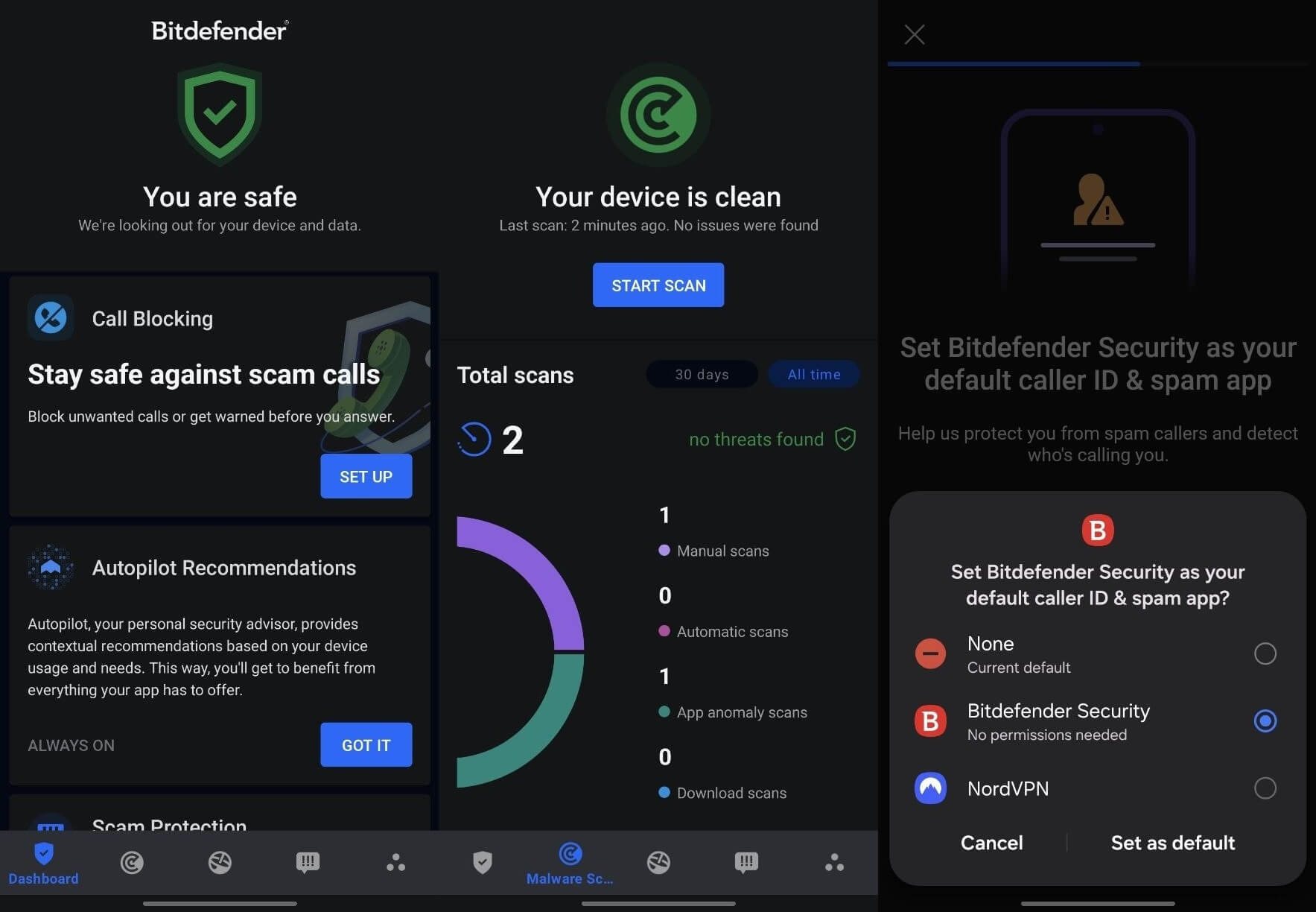
Malware Scanner, Web Protection across seven browsers, Scam Protection split into Chat Protection and Scam Radar, Call Blocking, App Anomaly Detection and a VPN. Chrome, Firefox, Samsung Internet, Brave, Dolphin, DuckDuckGo and Edge are all covered by web filtering, which is a wider list than rivals manage.
Bitdefender Malware Detection Results on Android
Detection was 100% with zero false positives on my sample of malicious APKs, matching AV-Comparatives, which recorded 100% with 2 false positives in June 2026. AV-TEST certified Mobile Security 3.3 at a perfect 6/6/6 in May 2026. A full scan finished in 31 seconds, one of the fastest in my tests.
Bitdefender Battery Drain, Permissions, and Everyday Use
Battery use came to 0.5% over my sampling period. For scale, YouTube used 3.5% and Instagram 2.0% on the same screen. Permissions are the widest: storage, location, camera, phone, SMS, internet access, and accessibility. Each attaches to a feature you can decline.
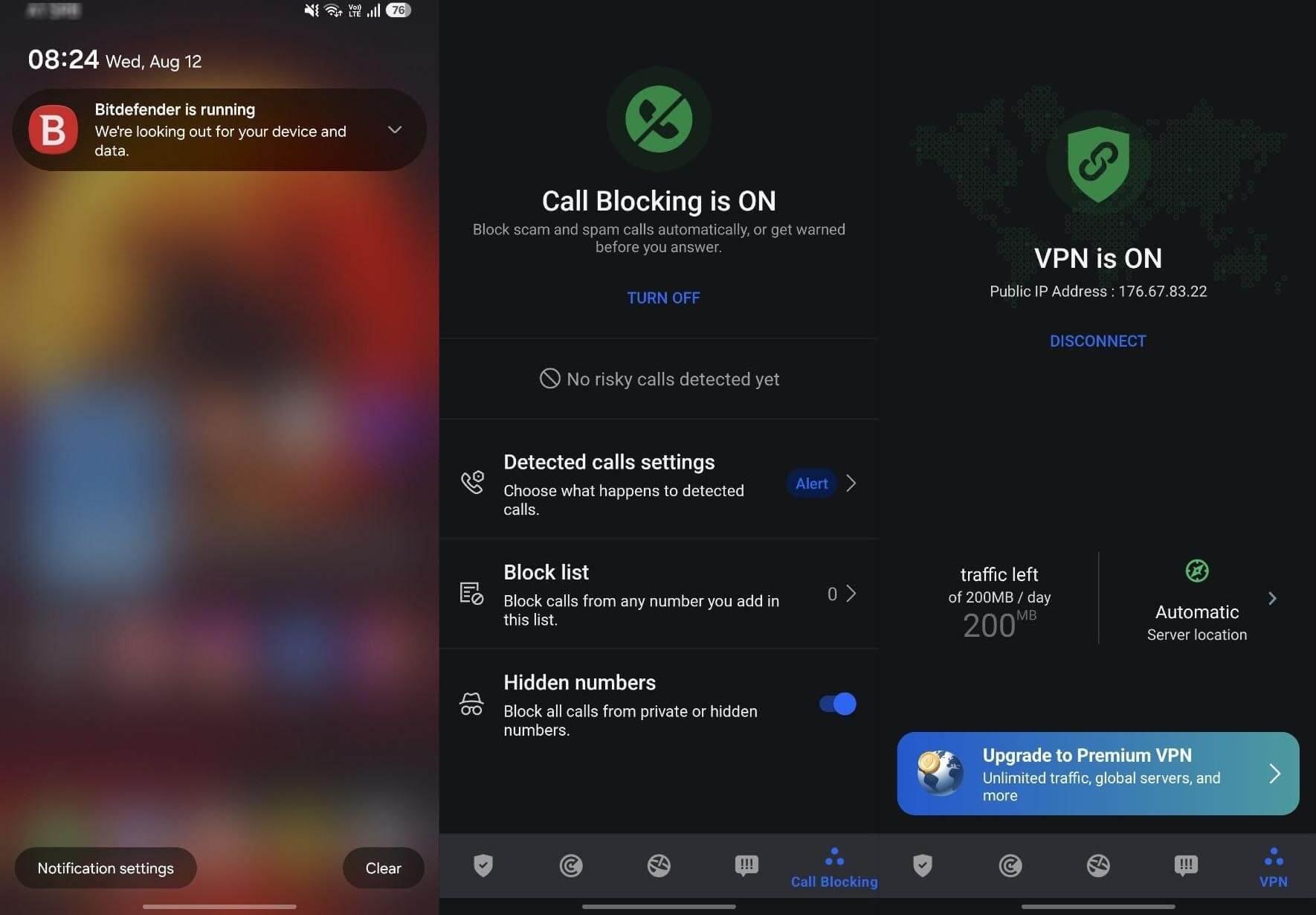
Accessibility powers Web Protection, which reads URLs in browsers. Contacts access exists so Call Blocking doesn’t block people you know. Storage lets the Malware Scanner reach files. Skip a permission, and you lose the feature.
Living With Bitdefender Day to Day
One annoyance. A Bitdefender is running notification sits in the shade permanently. It is the price of a foreground service, and Norton manages the same job with far fewer interruptions. Otherwise, it behaves well. When I opened a trading site, it offered to turn on the VPN to secure the transaction.
The VPN itself is capped at 200 MB per day with no location choice, and it was fast and reliable inside that limit. I reviewed Bitdefender’s premium VPN, and it offers unlimited data if you’re interested.
What Bitdefender Costs on Android
Mobile Security costs $17.99 for the first year, renewing at $29.99, for one device. Read that carefully: it protects the phone and nothing else. Covering a laptop as well means one of the all-in-one plans covered in my Bitdefender Antivirus review. The trial lasts 14 days and needs a card.
⚖️ Should You Install Bitdefender on Your Phone?
Yes, for almost anyone. It caught everything, cost the least battery of any full scanner, and covers more browsers than its rivals. Best suited to readers who want protection they can install and forget.
3. Avast Mobile Security: Best Free Android Antivirus
Rating: 4.5/5 ⭐
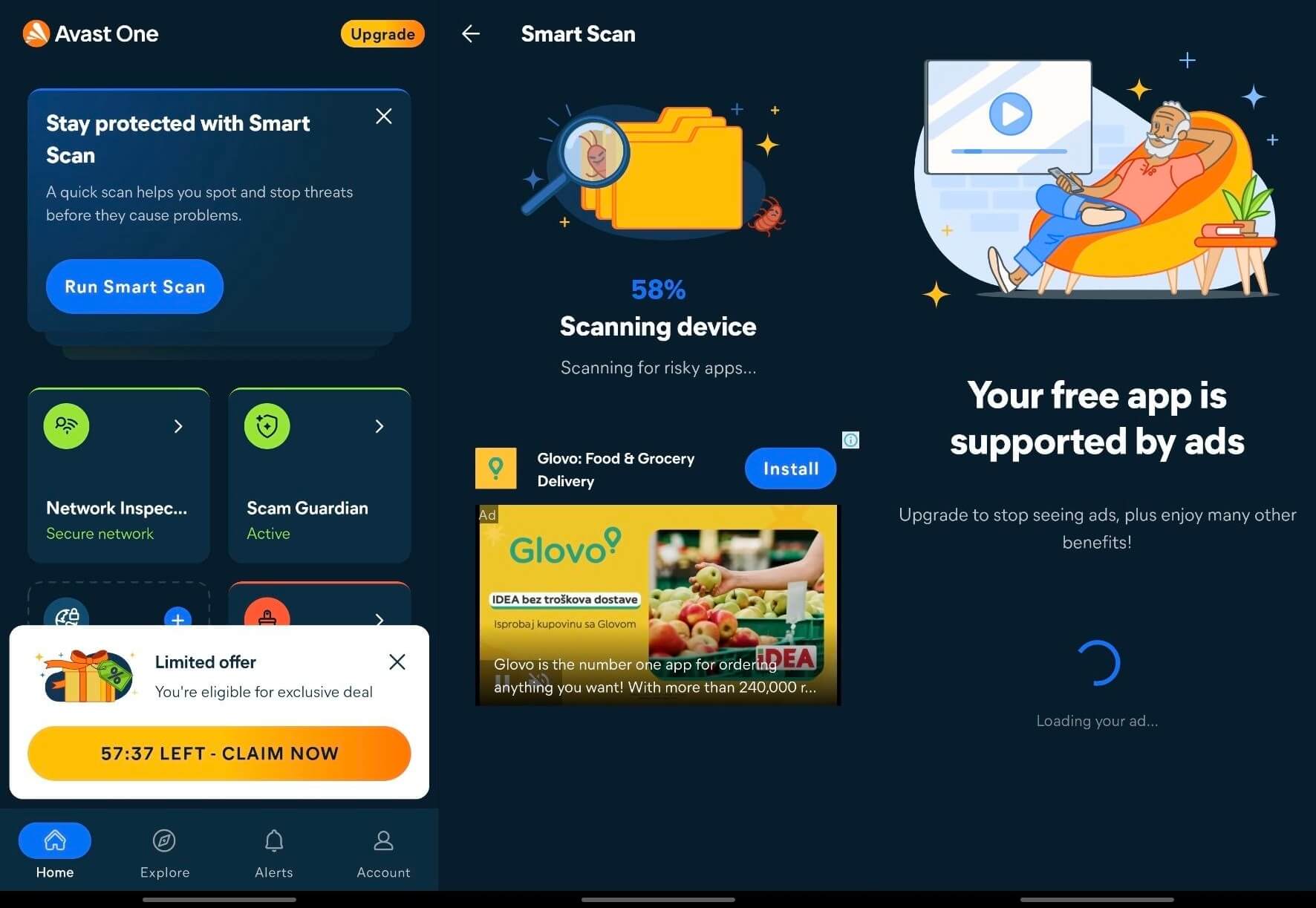
Avast gives away more than any rival on Android. It also shows you ads, a trade-off the other free tiers here don’t ask you to make.
Pros
- Strongest free tier on Android
- No mobile-only plan to buy twice
- 99.9% detection, one false positive
- Every paid plan covers several devices
Cons
- Ad-supported, with in-scan banners
- Six paid fixes after a clean scan
- SecureLine VPN could be faster
- Long permission list
What You Get With Avast on Android
The free tier covers malware scanning, Web Shield, Scam Guardian, Network Inspector, and Junk Clean. Paid tiers add scam call and SMS filtering, and the unlimited VPN is on Ultimate. Mobile plans are Basic, Premium, and Ultimate, which don’t line up neatly with the desktop names.
Avast Malware Detection Results on Android
Detection came to 99.9% with one false positive, identical to Norton because it is the same engine. AV-Comparatives lists Avast, AVG, and Norton on one shared row at 99.6% with 2 false positives. AV-TEST scored Antivirus & Security 26.6 at 6/6/6 in May 2026. A scan took 26 seconds.
Avast Battery Drain, Permissions, and Everyday Use
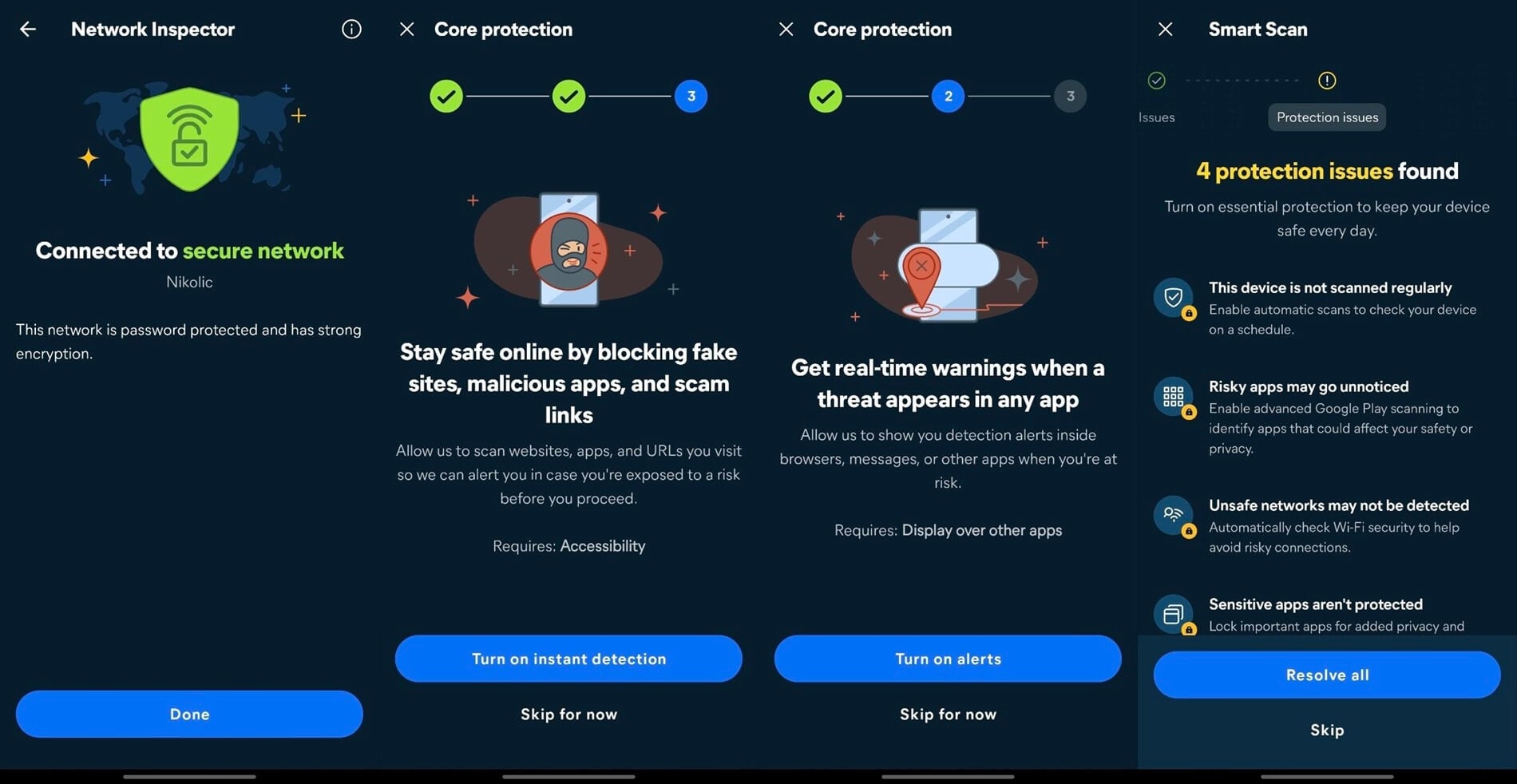
Avast used 0.7% of the battery. Permissions match Norton’s list: all files, accessibility, display over other apps, location, SMS and notifications, and VPN connection. Real-time detection needs the accessibility permission granted separately, and the app is upfront about asking.
Living With Avast Day to Day
The free version is ad-supported, and Avast says so: a full-screen card reading “Your free app is supported by ads. Upgrade to stop seeing ads.” A Glovo banner loaded mid-scan while it was checking for risky apps. A countdown timer also appeared on the home screen, offering an exclusive deal
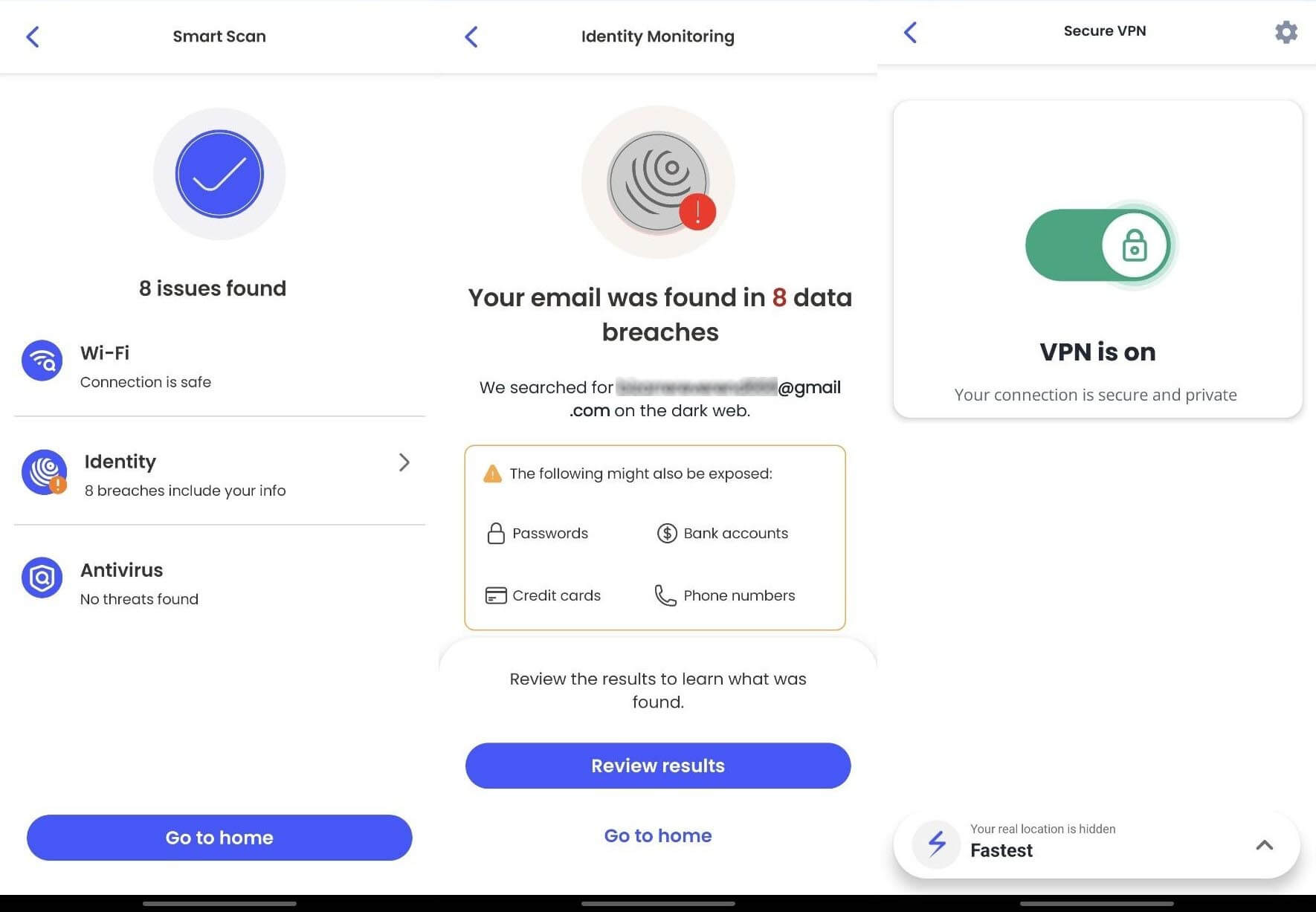
A Smart Scan on my clean phone reported no issues and presented six recommendations, all pointing at paid features. Junk Clean freed 9.63 GB, though 9.53 GB of that was emptying my own Trash folder, not clearing system junk.
What Avast Costs on Android
There is no mobile-only plan. Every paid Avast tier covers multiple devices, so the phone comes bundled with everything else. That makes Avast better value than Bitdefender or Norton if you want more than one device covered, and worse if you only want the phone. My Avast review has the full ladder.
The SecureLine VPN review covers the bundled VPN, which is a full port of the desktop client. The trial is 7 days with a card, an industry standard.
⚖️ Should You Install Avast on Your Phone?
Yes, if you want free protection that works. The free tier is the most generous on Android, and you pay for it with persistent in-app advertising.
4. McAfee Mobile Security: Best for Scam Calls and Texts
Rating: 4.2/5 ⭐
McAfee is the heaviest app and the one with the most interesting distribution story, since many Samsung owners are running its engine without knowing.
Pros
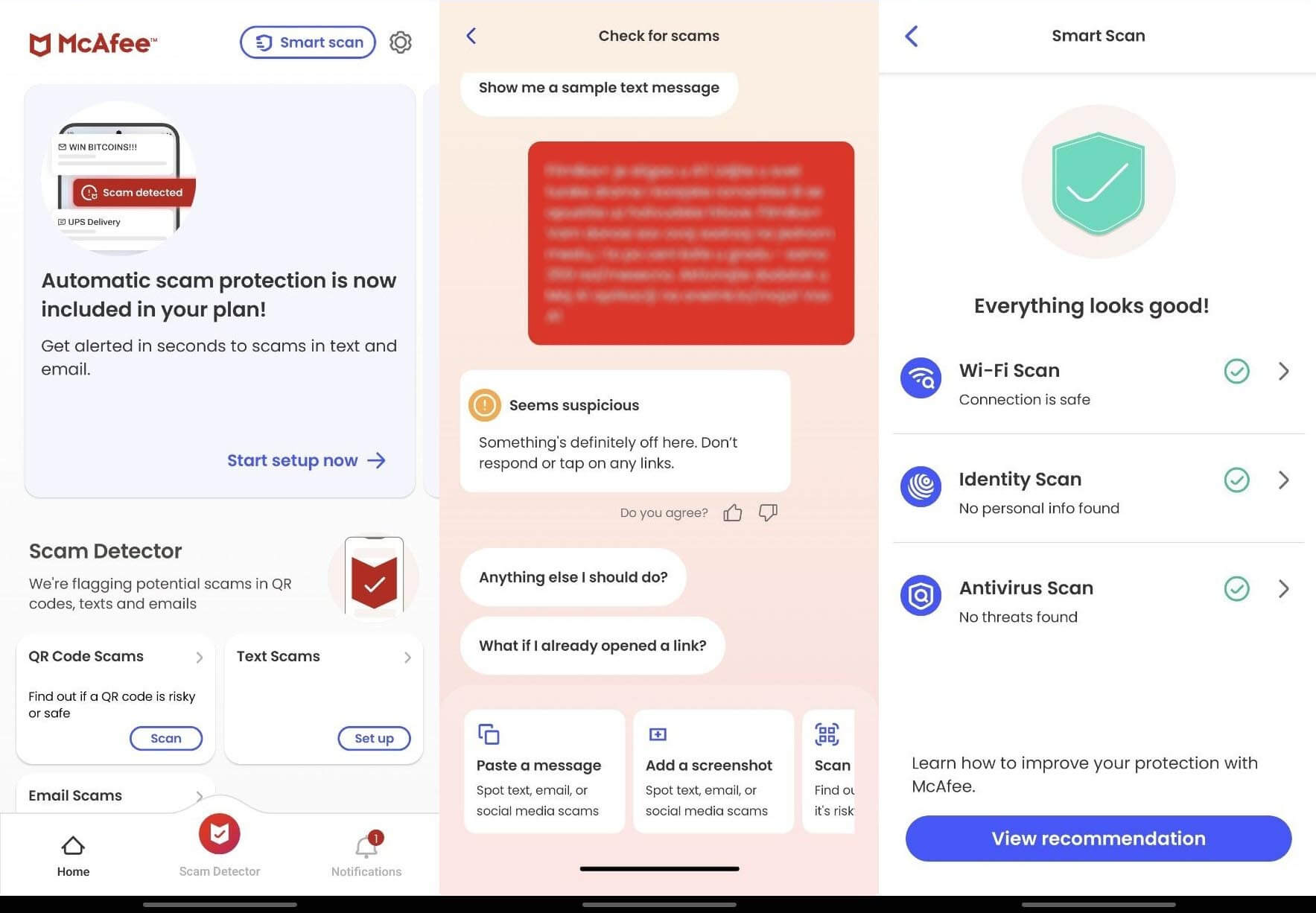
- Best scam call and text filtering
- Perfect 6/6/6 at AV-TEST, May 2026
- Every plan covers unlimited devices
- Strong value for a large household
Cons
- Heaviest battery draw at 1.0%
- Slowest scan at 34 seconds
- 99.78% detection, weakest result here
- No AV-Comparatives mobile results
What You Get With McAfee on Android
Malware scanning, Web Protection, Wi-Fi scanning, a VPN, identity monitoring, and the scam call and text filtering that is its strongest suit. Text Scam Detector reads incoming messages for scam patterns.
McAfee Malware Detection Results on Android
Detection reached 99.78% with 3 false positives, the weakest of the four scanners. AV-TEST scored Mobile Security 10.4 at 6/6/6 in May 2026, though McAfee doesn’t appear in the AV-Comparatives mobile table at all, so it has one lab result instead of two. Scanning took 34 seconds, the slowest here.
McAfee Battery Drain, Permissions and Everyday Use
McAfee used 1.0% of the battery, twice Bitdefender’s draw and five times NordVPN’s. It asks for accessibility, display over other apps, VPN connection, background battery usage, notifications, phone state, and optionally the microphone.
Living With McAfee Day to Day
Samsung’s own App Protection is powered by McAfee, and there is no McAfee app to show for it. So if you own a Galaxy, McAfee’s engine is already scanning your apps through One UI. Installing Mobile Security on top adds the scam filtering and the VPN, not a second layer of protection
What McAfee Costs on Android
There is no mobile-only plan, and every McAfee+ tier covers unlimited devices. Premium Individual costs $49.99 for the first term against a $149.99 list price, Advanced $89.99, and Ultimate $199.99. For a household with many devices that is strong value, and for a single phone, it is poor. The trial lasts 7 days.
⚖️ Should You Install McAfee on Your Phone?
Yes, if scam calls and texts are your problem, and no otherwise. Text Scam Detector is the best of its kind here, but the battery cost and slowest scan make it hard to recommend for malware alone.
5. NordVPN Threat Protection: Best for Web and Wi-Fi
Rating: 4.0/5 ⭐
Threat Protection isn’t an antivirus app, and I am ranking it anyway because on a phone the threats it stops are the ones people actually meet.
Pros
- Lightest on battery at 0.2%
- Fewest permissions of any app here
- Scam checker works outside English
- Tapjacking and Wi-Fi alerts on by default
Cons
- No file scanner at all
- 5 false positives, most of any app tested
- Adult filter misses gambling/betting sites
- Needs a Complete plan or above
What You Get With NordVPN on Android
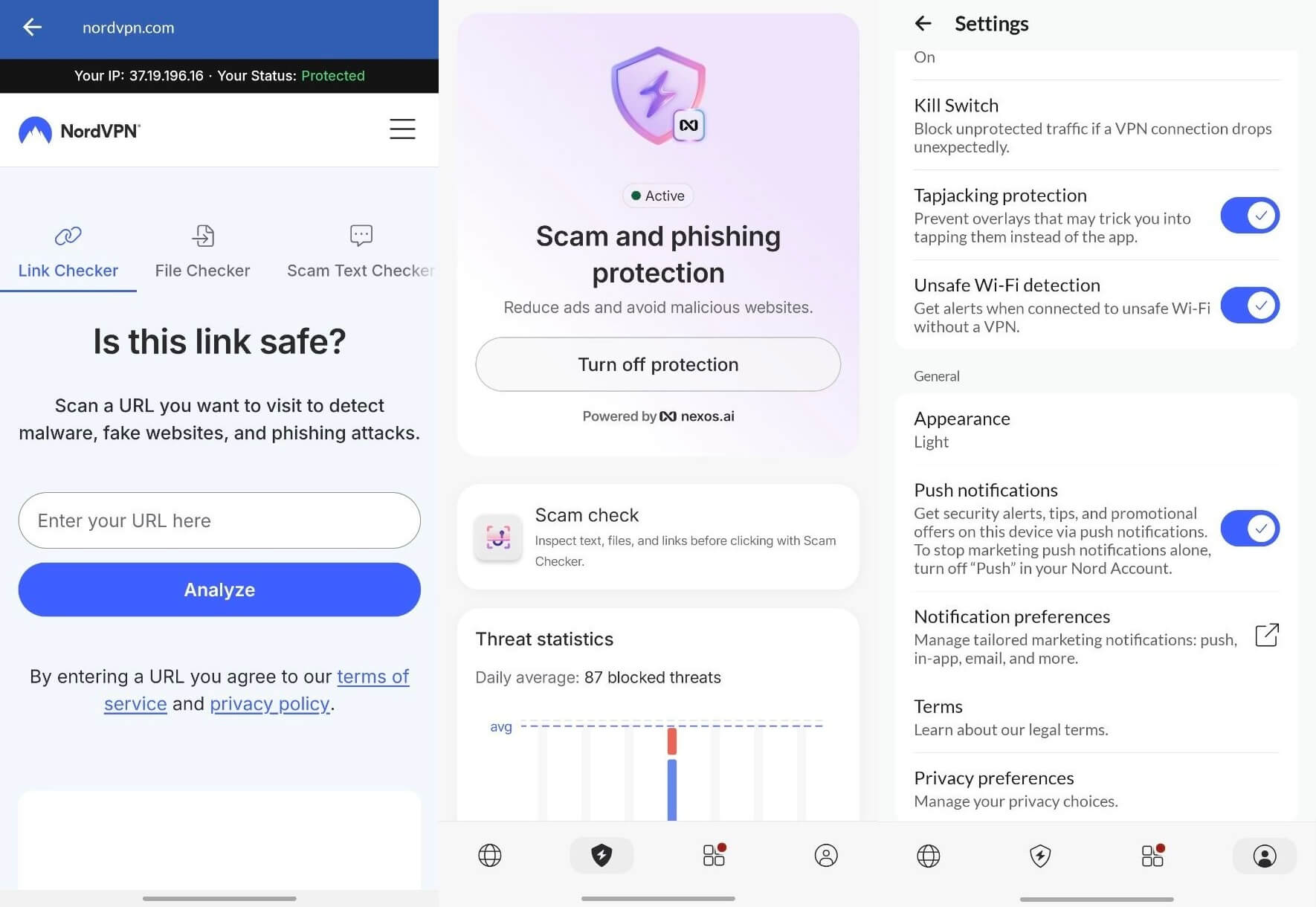
Malicious site blocking, tracker and ad filtering, Wi-Fi Security, Identity Monitoring, and web-based Link, file, and Scam Text checkers. There is no on-device file scanner, so it never scans an APK in your downloads folder.
Get NordVPN Threat Protection Here
NordVPN Malware Detection Results on Android
It blocked 95.60% of the malicious sites I tested, with 5 false positives, including one legitimate site it should have allowed. Those figures sit apart from the four scanners above, since blocking a URL and scanning a file are different jobs measured in different ways. No lab tests it as mobile antivirus.
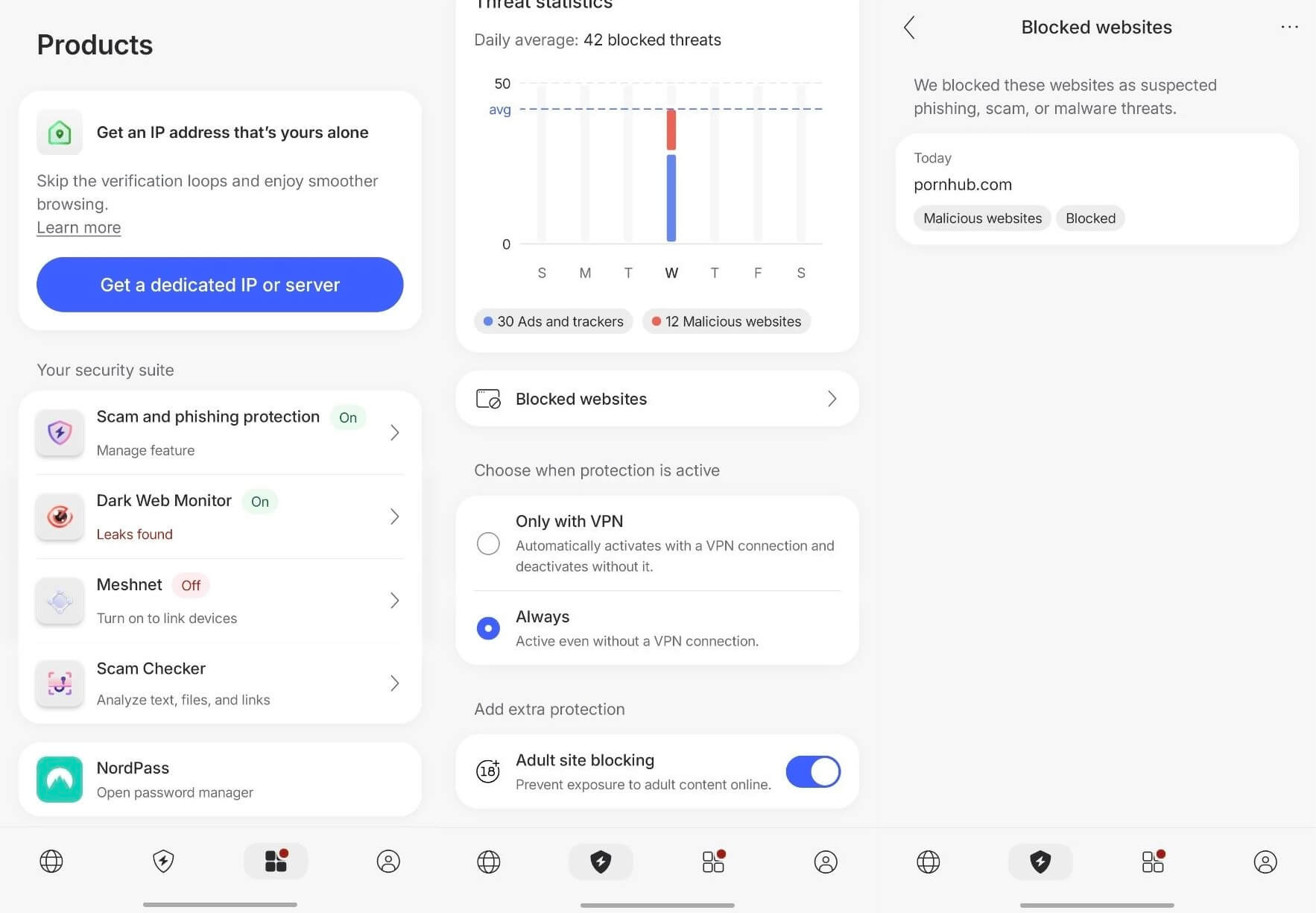
The Block adult sites filter covers pornography only. Gambling and betting sites pass through, a strange omission for a filter aimed at families.
NordVPN Battery Drain, Permissions and Everyday Use
NordVPN used 0.2% of the battery, the lightest of the five, and asks for a few permissions: caller ID, phone calls, and SMS, all for Call and Message Protection. No storage access, no accessibility, no location. The app doing the least invasive work asks for the least, and I sort of expected that.
Living With NordVPN Day to Day
Tapjacking protection and Unsafe Wi-Fi detection both arrive switched on, which is the correct default. Push notifications also arrive on, and that single toggle bundles security alerts with promotional offers, with the marketing opt-out in your Nord Account. The scam checker impressed me.
I fed it a promotional SMS in Serbian, and it flagged it as suspicious with an explanation, which most scam filters can’t do outside English.
What NordVPN Costs on Android
Threat Protection Pro requires the Complete plan at $4.49 per month for the initial term or above, so there is no mobile-only option and no standalone purchase. The trial is 3 days, the shortest here, and requires a credit card.
⚖️ Should You Install NordVPN Threat Protection on Your Phone?
Yes, you should, as you should install NordVPN if you need more online privacy. It stops the web threats people encounter on a phone while never touching a file, so pair it with a scanner instead of replacing one.
Android Antivirus Compared: Detection, Battery and Permissions
One phone, one week, October 2026. Results at a glance.
| My detection | AV-TEST May 2026 | Battery | Scan time | Permissions | Rating | |
| Norton | 99.9%, 1 FP | 6/6/6 | 0.9% | 24 sec | 6 | 4.7⭐ |
| Bitdefender | 100%, 0 FP | 6/6/6 | 0.5% | 31 sec | 7 | 4.6⭐ |
| Avast | 99.9%, 1 FP | 6/6/6 | 0.7% | 26 sec | 6 | 4.5⭐ |
| McAfee | 99.78%, 3 FP | 6/6/6 | 1.0% | 34 sec | 7 | 4.2⭐ |
| NordVPN | 95.60% web, 5 FP | Not tested | 0.2% | No file scanner | 3 | 4.0⭐ |
| Play Protect | 98.9% (AV-C) | 5.5/6/5 | Built in | Automatic | Built in | Free |
Detection is close enough across the four scanners that it shouldn’t decide your choice. Battery separates them more, with McAfee drawing five times NordVPN’s power, though every app is inside AV-Comparatives’ best band of under 3%. And the permission counts vary by more than double.
Battery Drain and Permissions: What These Apps Cost You
This is the section I wanted most when I started testing these applications on my Galaxy S26 Ultra, because the marketing never mentions it.
What the Battery Numbers Mean
Every figure came from Android’s own usage-by-app screen. In my tests, NordVPN used 0.2%, Bitdefender 0.5%, Avast 0.7%, Norton 0.9%, and McAfee 1.0%. On the same screen, YouTube used 3.5% and Instagram 2.0%. Your antivirus isn’t what is draining your phone. Not necessarily.
AV-Comparatives reached the same conclusion in June 2026, placing every product it tested in the best band, under 3% additional drain across a simulated day of social media, calls, browsing, and video. McAfee costing twice what Bitdefender costs means a rounding error next to one video app.
The Permissions Question: What Antivirus for Phone Use Really Needs
Permissions matter more than battery, and here the spread is wide.
- Bitdefender: storage, location, camera, phone, SMS, internet, accessibility.
- Norton: all files, accessibility, display over other apps, location, SMS and notifications, VPN.
- Avast: the same list as Norton.
- McAfee: accessibility, display over other apps, VPN, background battery, notifications, phone state, microphone (optional).
- NordVPN: caller ID, phone calls, SMS.
Each permission maps to a feature. Accessibility lets the app read URLs in your browser, which is how web protection works. SMS access is for scam text filtering. Contacts access exists so call blocking skips people you know. None is sinister in a product from a named vendor with lab certification. The point is that you can decline any of them and keep the app.
Skip accessibility, and you lose web filtering, not malware scanning. Skip SMS, and you lose scam text detection. Grant what you will use and refuse the rest. You should worry about the same permission list on an app you have never heard of.
How to Spot a Fake or Fraudulent Android Antivirus App
Fake security apps work because they ask for exactly what a real one asks for. Telling them apart is about the provider, not the permission list.
Why an Android Antivirus Free Download Search Ends Badly
Cloned branding borrows a real vendor’s colors and icon. Some apps run a fake scan animation and detect nothing. Others bundle adware SDKs that serve ads from outside the app, or open a subscription trap where a trial converts to a recurring charge through Play Store billing.
The worst request accessibility services they have no use for, which grants them the ability to read every screen. Google removes these in batches, and a fresh crop appears because the incentive never changes.
Six Checks Before Installing Any Security App
- Developer name matches the vendor’s site. Open bitdefender.com or norton.com and follow their own download link.
- Install count and review history. Hundreds of five-star reviews posted in one week, in one voice, is a signal.
- Last update date. A security app untouched for a year isn’t maintaining signatures.
- Lab participation. AV-TEST and AV-Comparatives publish full lists. A reputable mobile security app appears on one of them.
- The permission list. Read it before installing.
- Linked from the vendor’s own domain. The most reliable check of the six.
Run those, and the question of what the most recommended antivirus for Android is answers itself: the ones with a decade of lab results behind them.
Permissions a Legitimate Antivirus App Should Never Need
Here it gets subtle, because a reputable antivirus app for Android asks for several things that sound alarming.
- Accessibility services let an app read everything on screen. Legitimate apps use it for web protection. In the wrong hands, it captures passwords and banking sessions, and it is the single most abused permission on Android.
- SMS access is used for scam text filtering, and enables premium SMS fraud when abused.
- Contacts and call logs exist for call blocking, and are worth harvesting on their own.
- Device administrator rights are the exception that needs no nuance. Very few security apps need them, and an app holding them is difficult to uninstall, which is precisely the attraction from the attacker’s side.
The test isn’t whether these appear. It is whether an unverifiable developer with no lab history is asking for them.
What to Do If a Fake Security App Is Already Installed
Revoke device admin rights under Settings, Security, Device admin apps, or the uninstall will fail. Then boot into Safe Mode, uninstall, and restart. One step people miss: open the Play Store, tap your profile, then Payments and subscriptions, and cancel anything the app started. Removing the app doesn’t cancel the billing.
Best Free Antivirus for Android in 2026
Free tiers on Android are more generous than on desktop, and they are funded in ways you can see once you know where to look.
What a Free Antivirus App for Android Actually Includes
The detection engine is identical to the paid version. That most useful fact about free antivirus for Android, and it means a free antivirus app from a named vendor catches the same malware its paid sibling does. The same holds on desktop, which my best free antivirus software guide covers in full.
What gets withheld is the layer around it: scam call and SMS filtering, unlimited VPN data, anti-theft and remote wipe, app lock and photo vaults, identity monitoring, and human support. Free virus protection for Android buys you the scanner and very little else, so don’t expect miracles.
How Free Mobile Antivirus Apps Make Money
Three ways, and each is visible in use.
➡️ Upgrade prompts. Avast’s Smart Scan finished on my clean phone and immediately presented six paid setup recommendations. Bitdefender’s free trial ends with a purchase screen.
➡️ Advertising. Common across free antivirus apps on Android, though notably absent from Avast, which is why it wins this category.
➡️ Bundled subscriptions. A free antivirus for Android phone often exists to sell you a VPN, and the capped VPN allowance is the hook.
Is Free Android Antivirus Safe to Install?
Yes, from a known vendor through the Play Store. Every app here has current certification from AV-TEST, publishes under a verifiable developer name, and does what it claims. Free antivirus for mobile phone Android searches turn up dozens of impersonators with cloned branding and no lab history, and those are the listings that cause harm. Here are my top 3 options.
The Best Free Antivirus App for Android Right Now
🆓 Avast Mobile Security is the best free Android antivirus by a distance: real-time scanning, Web Shield, Scam Guardian, and Network Inspector. The trade-off is ads, which Avast states in the app.
🆓 AVG AntiVirus for Android is the same product. Avast owns AVG, and the two share one detection engine, which is why AV-Comparatives lists them on a single row with Norton at 99.6%. Choose between them on interface preference, since AVG antivirus software for Android and Avast will catch identical threats.
🆓 Google Play Protect remains the zero-install baseline, already running, already free, and adequate for most people.
Android Virus Scan: How to Scan Android for Viruses and Clean It Up
If something already feels wrong, stop shopping and start here. This is a virus scan Android owners can run in ten minutes, in the order that works.
Signs an Android Phone Is Infected
- Battery draining faster with no change in how you use the phone.
- Data climbing while you are on Wi-Fi.
- Pop-ups appearing outside apps, on the home screen or lock screen.
- Apps you didn’t install, or an icon that vanished but still runs.
- Browser redirects to pages you didn’t request.
- The handset running warm while idle, or apps crashing repeatedly.
- Premium SMS charges on your bill.
Running a Scan With Google Play Protect
Start free and start with what is already installed. Open the Play Store, tap your profile picture, then Play Protect, then Scan. It checks every installed app and reports anything harmful. While you are there, tap the settings gear and confirm both “Scan apps with Play Protect” and “Improve harmful app detection” are on.
The second sends unknown apps to Google for analysis, which is what catches sideloaded APKs that no signature covers yet.
Running a Deeper Scan With an Android Malware Scanner
When Play Protect comes back clean and the symptoms persist, a second opinion helps, because a different vendor uses different signatures. Any anti-malware app Android users install from the Play Store will do the job, and all four scanners on this page finished a full scan in under 35 seconds.
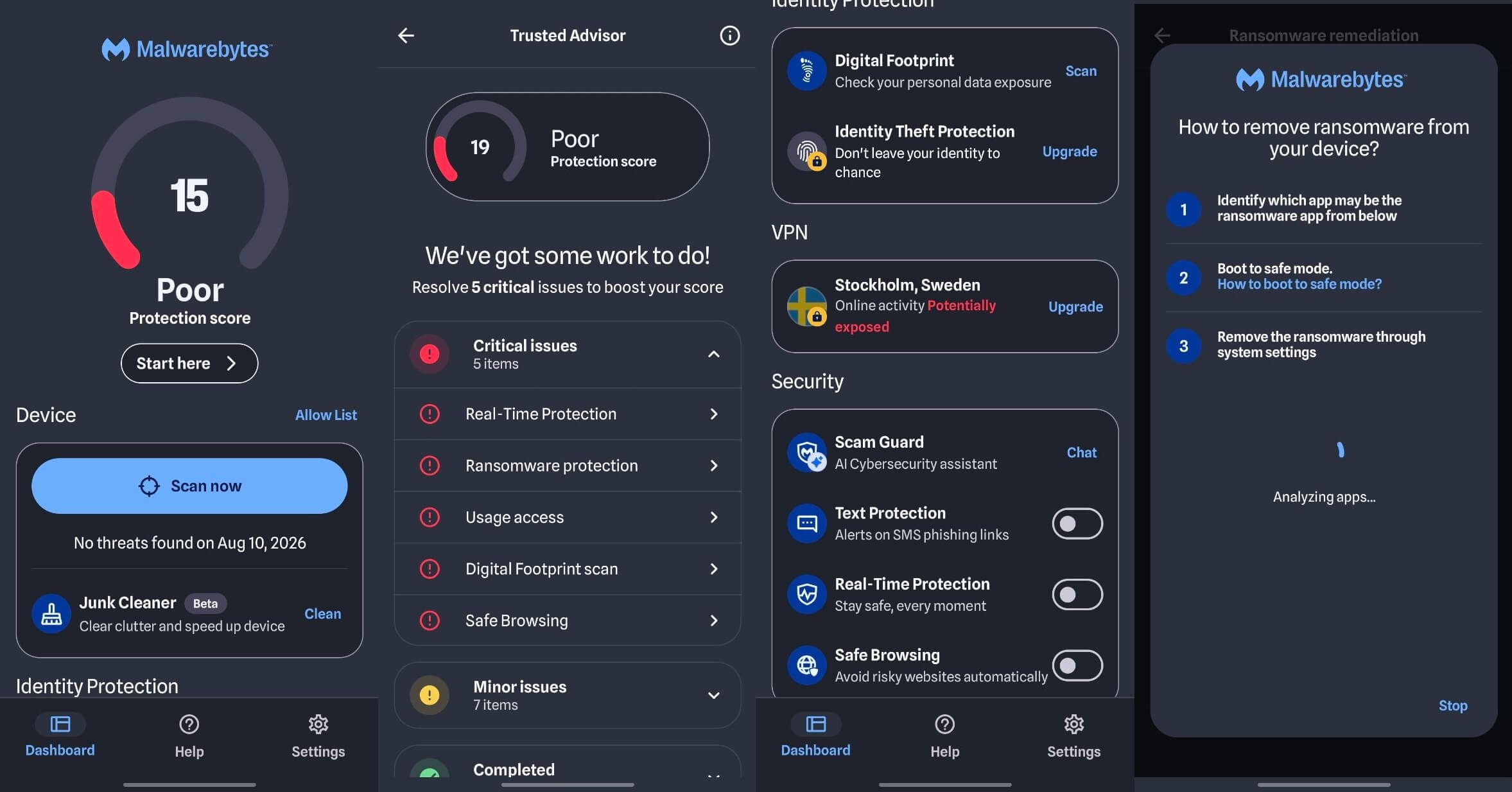
Grant storage access when prompted. Without it, a virus scanner for Android reaches installed apps but not files sitting in your downloads folder, which is where a malicious APK waits. Run the scan once, read the result, and uninstall the app afterwards if you don’t want a subscription.
How to Remove Malware From Android in Safe Mode
Uninstall through Settings, then Apps, instead of dragging the icon, since some malware hides its launcher. If the uninstall button is greyed out, the app holds device administrator rights. Revoke them under Settings, Security, Device admin apps, then uninstall. If it still resists, boot into Safe Mode: hold the power button, then press and hold Power Off until Safe Mode appears.
Android loads without third-party software, so nothing can defend itself. Uninstall, then restart normally. Clear your browser cache, and open Settings>Accessibility to see which apps hold accessibility permission. Anything you don’t recognize with that permission should go.
When a Factory Reset Is the Only Answer
Reset when the same detection returns after removal, when Safe Mode won’t let you uninstall, or when the phone came to you second-hand with unknown history. Back up photos, documents, and contacts first, and restore apps individually afterwards instead of from a full backup.
What to Do After the Phone Is Clean
A phone virus cleaner removes the app. It can’t undo what the app saw. Change the Google account password first, from another device if you can, then email and banking. Open your Google account and sign out of sessions you don’t recognize. Review your subscriptions in the Play Store, since subscription traps outlive the app that sold them. Check Google account activity for logins from places you haven’t been, and turn Play Protect notifications back on.
What the Best Paid Antivirus for Android Really Costs
A plan sold for one device covers one device. Antivirus for tablet use means a second licence or a multi-device plan, and Android tablets have the same apps as phones. Bitdefender Mobile Security costs $17.99 for the first year and Norton Mobile Security $19.99, both renewing at $29.99. Both cover one mobile device. The other three work very differently, as you can see. Avast has no mobile-only plan, so every paid tier covers several devices.
Neither does NordVPN, where Threat Protection Pro arrives with the Complete plan. McAfee+ covers unlimited devices on every tier. So the cheapest option depends on how many devices you own. One phone: Bitdefender at $17.99. A household: an all-in-one plan, where McAfee’s unlimited tiers and Avast’s multi-device pricing both beat buying phone licences one at a time.
| Mobile-only price | Covers | Trial | |
| Norton | $19.99 first yr, then $29.99 | 1 device | 7 days, card required |
| Bitdefender | $17.99 first yr, then $29.99 | 1 device | 14 days, card required |
| Avast | No mobile-only plan | Multi-device | 7 days, card required |
| McAfee | No mobile-only plan | Unlimited devices | 7 days |
| NordVPN | No mobile-only plan | Multi-device | 3 days, card required |
Norton’s 60-day money-back guarantee is the longest safety net. One thing to check before paying. If you own a desktop security subscription, the mobile app may be included. Norton 360 Deluxe covers it. So does Avast on every paid tier. Paying for the phone is buying the same thing twice, and my best antivirus guide lays out which desktop plans include mobile.
What the Best Security App for Android Does
On a phone, the file scanner is no longer the important part. Almost nobody loses money to an APK in 2026. They lose it to a text message.
What to Judge a Mobile Security App On
That is why a mobile security app for Android is worth judging on its scam layer first, and why McAfee earns a place on this list despite the weakest detection figure of the four best scanners here.
- Scam call and text filtering is the most valuable thing mobile security software does now. Smishing works because a text arrives with no sender reputation attached, and a filter that flags it before you tap is worth more than another percentage point of malware detection.
- Phishing and malicious link blocking come next, since a spoofed banking page on a small screen with a truncated address bar is far harder to spot than the same page on a desktop.
- App permission auditing tells you which apps hold accessibility, SMS, and location, which is the check almost nobody performs voluntarily.
- Anti-theft and remote wipe matter more than malware for most people, because a lost phone is a more likely event than an infected one.
- Public Wi-Fi checks warn when a network has weak or absent encryption. Norton flags these, and so does Bitdefender.
- Breach and dark web monitoring tells you when an address of yours turns up in a leak. NordVPN’s Identity Monitoring found mine in eight.
- App lock and photo vaults protect specific apps behind a second credential, which is genuinely useful on a shared handset.
- VPN access closes the public Wi-Fi gap, though every bundled allowance here is capped unless you upgrade.
Judged that way, the ranking on this page barely changes, but the reason for it does. Mobile protection software earns its price on the scam and phishing layer, and the malware scanner is the part you already had for free.
iPhone Security Apps: Why There Is No iPhone Antivirus
Apple won’t let one app inspect another, so a scanner has nothing to look at. That rules out antivirus on iOS, whatever the App Store listing promises. What those apps sell instead is a phishing filter, unsafe Wi-Fi warnings, breach alerts and a VPN. All useful, none of it virus scanning.
Norton, Bitdefender and Avast publish iOS versions on that basis, and the scam-link filtering justifies the download if your messages attract them. Apple’s defences do more. Update iOS when prompted, since exploited flaws get patched fast, and switch on Lockdown Mode if someone might target you.
How I Tested These Android Antivirus Apps
Everything came from one phone, a Galaxy S26 Ultra running the current version of One UI, over one week in October 2026. Each app was installed on its own, tested, then removed before the next went on.
- Detection. I installed malicious APKs sourced from third-party sites, opened phishing links, and received scam SMS messages, then recorded what each app blocked and what it wrongly flagged.
- Battery. Figures come from Android’s usage-by-app screen, not each app’s own reporting, so they are measured by the operating system and not by the vendor.
- Scan speed. Full scans, timed from tap to completion, on the same device with the same installed app set.
- Permissions. Every request logged during setup, then checked against the app’s entry in Android settings afterwards.
One handset means these results describe a current flagship, and a mid-range phone with a smaller battery would show larger percentages, though the ranking between apps should hold. And the phishing percentages quoted for these brands come from Windows testing instead of the phone, which is how AV-Comparatives reports its own phishing figures too.
Lab results are cited from AV-TEST’s mobile round of May 2026 and AV-Comparatives’ mobile results of June 2026. Nobody paid for coverage, and no vendor saw this page before it went live.
Summary
Norton 360 for Mobile is the best Android antivirus app you can install in 2026. It caught everything, cost 0.9% of battery, and covers all major browsers. The permanent notification is the only thing I would change. Bitdefender Mobile Security finishes a close second and is the one to pick if you want to install something and not think about it. Avast Mobile Security is the best free option by a distance.
McAfee earns its place on scam call and text filtering. NordVPN Threat Protection is the lightest thing and the best at web threats, provided you understand it never scans a file. And Play Protect remains the right answer for a lot of people. If you install from Google Play, keep Android updated, and treat unexpected links with suspicion, you are covered for the threats you are likely to meet.
Common Questions About Android Antivirus
🤖 Do Android Phones Need Antivirus?
No, not most of them. Play Protect scans every installed app automatically, and Android's sandboxing limits what any app can reach. The exceptions are sideloading APKs from outside Google Play, heavy exposure to scam texts and calls, and shared devices used by people who might tap a phishing link.
🥇 What Is the Best Mobile Antivirus You Can Get Free?
Avast Mobile Security. Its free tier has malware scanning, web protection, scam detection, and network scanning, with detection identical to the paid version, since both use one engine. It is ad-supported, so banners appear during scans, and a full-screen card offers to remove them for a fee.
▶️ Is Google Play Protect Enough on Its Own?
Yes, for most users. AV-TEST scored it 5.5 for protection in May 2026 against a perfect 6 for every commercial app tested, so the gap is small. It matters for sideloaded apps, phishing links, and scam calls, none of which Play Protect intercepts.
🪫 Do Antivirus Apps Drain an Android Battery?
Yes, but less than most people expect. Measured on Android's own usage screen, the five apps tested used between 0.2% and 1.0% over a sampling period where YouTube used 3.5%. AV-Comparatives placed every product it tested in its best band, with under 3% additional drain.
🛠️ Which Permissions Should an Android Antivirus App Have?
Accessibility for reading browser URLs, SMS for scam text filtering, storage for file scanning, and contacts for call blocking are all legitimate. Each maps to a specific feature, and each can be declined without losing the rest of the app. Device administrator rights deserve more caution, since they make an app difficult to remove.
🎭 How Do You Spot a Fake Antivirus App?
Check the developer name against the company's real website, look for certification from AV-TEST or AV-Comparatives, and treat claims about speeding up a phone or cleaning RAM as a warning. Permission requests alone prove nothing, since genuine apps ask for the same things.
👾 Can an Android Phone Get a Virus?
Not in the traditional sense, since Android's sandboxing prevents apps from infecting one another. The realistic threats are malicious apps installed deliberately, phishing pages, scam messages, and adware bundled into sideloaded software.
🦠 How Do You Remove Malware From an Android Phone?
Uninstall through Settings and Apps. If uninstall is unavailable, revoke device administrator rights under Settings, Security, Device admin apps. Safe Mode disables third-party apps and allows removal when one resists. A factory reset is the certain fix and the last resort if all else fails.
💎 Is Paid Android Antivirus Worth the Money?
Yes, if scam call and text filtering matter, since that is the strongest reason to pay and no free tier includes it. Detection is identical between free and paid versions from the same vendor, so the upgrade buys only features.
🛡️ Is McAfee Preinstalled on Samsung Phones?
Not as an app. Samsung's built-in App Protection is powered by McAfee's engine, so Galaxy owners are running its detection through One UI. Installing McAfee Mobile Security adds scam filtering and a VPN.
🏆 What Is the Best Android Antivirus for Older Phones?
NordVPN Threat Protection, given its low battery use (under 0.3%). Bitdefender is also good for its low battery usage (under 0.6%) and fast scans.
🔀 Should You Run Two Android Security Apps at Once?
No. Two apps holding accessibility permission and scanning simultaneously will conflict and drain more battery for no additional protection. The exception is pairing a file scanner with a network-layer tool like Threat Protection, since those cover different threats and don't compete for the same job.