Avast Premium VPN was a thin product just a few years ago. 34 countries, no torrenting, and a streaming record that collapsed every few months. The 2026 version covers 103 countries, opened every streaming platform we pointed it at, and came through our leak checks without a mark. It’s still not in the Top 3 of our VPN rankings (yet), and this Avast VPN review covers both halves of that.
Pros of Avast Premium VPN
- 103 countries and 140+ locations
- Clean DNS, IPv6 and WebRTC tests
- Works with main Netflix libraries
- 60 free days + 30-day guarantee
- Renews at $99.99 a year
- Very fast on local servers
- Post-quantum encryption
Cons of Avast Premium VPN
- No independent no-logs audit, ever
- Slower on Japanese servers
- No dedicated VPN for Linux
- Still lacks RAM-based servers
✅ The short version: Avast Premium VPN is now a competent VPN with a good price after the first term. It does the two things most people buy a VPN for.
Avast VPN at a Glance
| ⭐ Starting price | $3.99/month on the two-year plan ($95.76 up front) |
| 🔄 Renewal price | $99.99/year |
| 🆕 Free trial | 60 days, $0 at checkout, payment details required |
| 💰 Money-back guarantee | 30 days, starting from the first charge |
| 🌐 Countries | 103, across 140+ locations |
| 🗺️ Specialty servers | P2P, Double VPN, IP Rotation |
| 🛡️ Protocols | WireGuard, Mimic, OpenVPN, IPSec (macOS only) |
| 🔐 Post-quantum encryption | Yes, as a toggle. Default on Mimic |
| 📝 Logging | Connection and server metadata, not tied to individual users |
| 🏛️ Jurisdiction | Czechia, under Gen Digital (United States) |
| 🤝 Independent audits | None of the no-logs policy |
| 📱 Simultaneous connections | 10 |
| 📟 Platforms | Windows, macOS, Android, iOS |
| 🧲 Torrenting | Yes, on dedicated P2P servers |
What a Year of Rebuilding Changed
Avast went from 34 countries to 103, spread across more than 140 locations. That closed the gaps that used to make it useless across Africa, South Asia, and most of Latin America. P2P came back with it. Avast now has dedicated P2P servers after years of blocking the traffic, and the client picks one automatically if the Smart Mode torrenting trigger is switched on. Two other categories arrived at the same time.
Double VPN passes traffic through two servers in separate countries. IP Rotation changes the exit address on a timer while the tunnel stays up. Protocols: WireGuard joined Mimic and OpenVPN, and macOS picked up IPSec. Post-quantum encryption is a toggle in Settings, aimed at harvest-now-decrypt-later collection where an attacker stores encrypted traffic today and waits for hardware that can open it.
Split tunneling arrived on the same platforms. So did an option to keep the VPN active alongside a second VPN. Few people need that one, and almost nobody else offers it. Avast also redesigned the desktop client in 2026. What has not moved: there is still no Linux client. Avast expects its TV apps around the end of September. Neither existed when we started testing this version, and neither exists now.
Avast VPN Speed: Excellent Next Door, Painful Across Asia
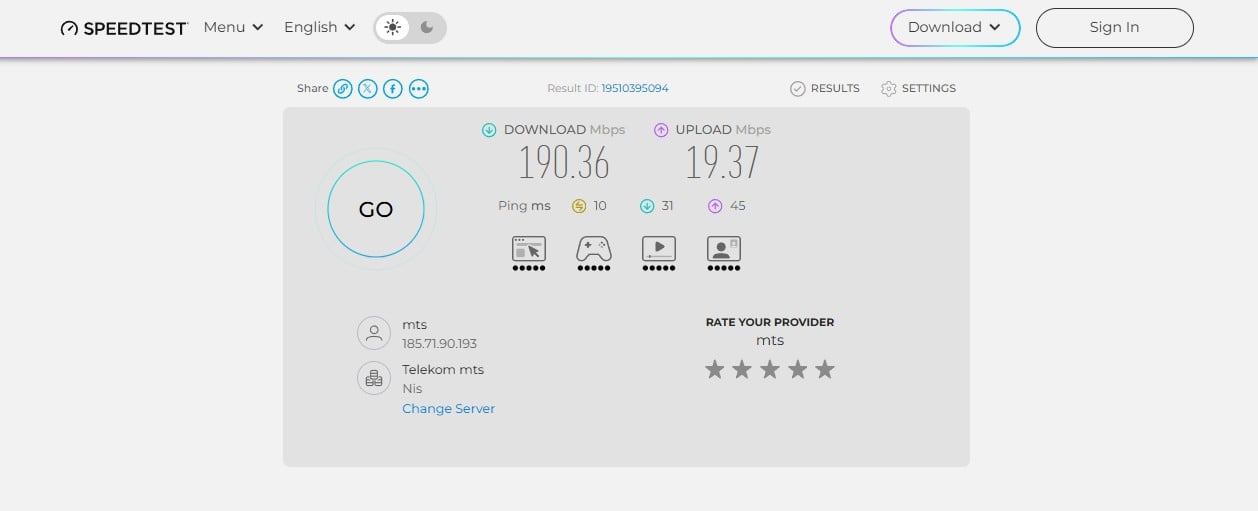
We took nine measurements per server over three days from our test line in Belgrade, with the protocol setting left on Automatic, which is how the client arrives. The unprotected line measured 190.36 Mbps down and 19.37 Mbps up.
Connections completed in about two seconds throughout.
| Download | Upload | DL Loss (%) | UL Loss (%) | |
| UK, London | 186.68 Mbps | 18.80 Mbps | 1.9% | 2.9% |
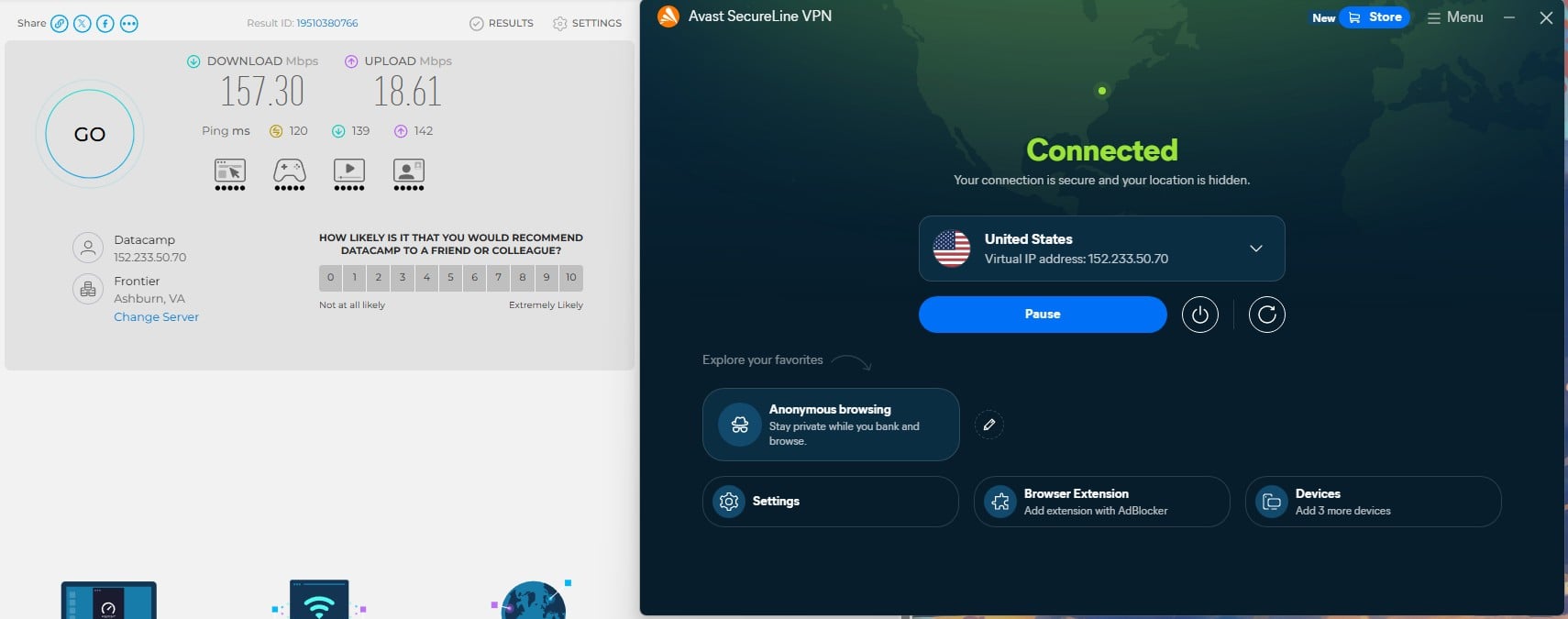
| US, Ashburn | 157.30 Mbps | 18.61 Mbps | 17.4% | 3.9% |
| Japan, Tokyo | 98.74 Mbps | 8.77 Mbps | 48.1% | 54.7% |
| Average Loss | 22.5% 📉 | 20.5% 📉 |
London is the number that matters for most readers, because a nearby server is what most people connect to. Losing 1.9% of a 190 Mbps line is close to nothing, and the 47 ms ping was low enough for gaming and video calls.
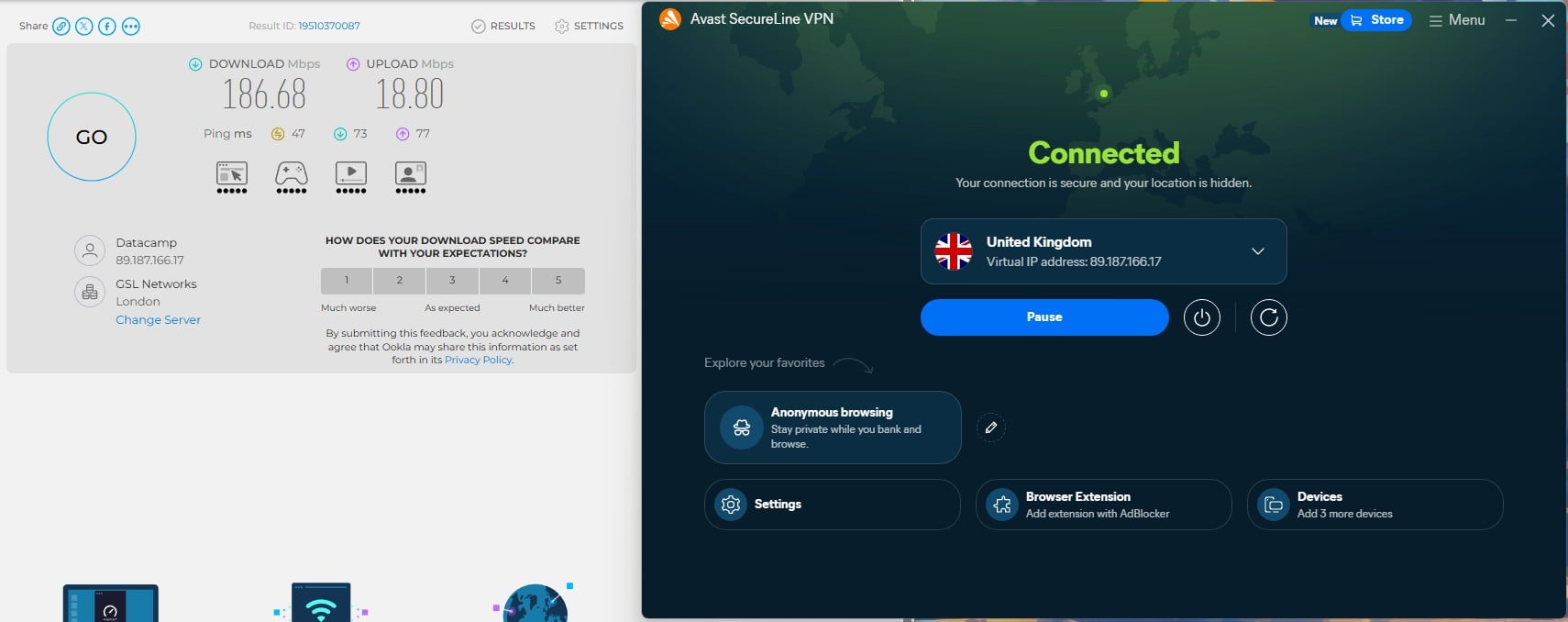
Encryption cost almost nothing at that distance. Ashburn held up too, at 17.4% off the line speed, which still leaves enough headroom for two 4K streams at once. Tokyo is where it falls apart.
Download dropped to 98.74 Mbps. Upload took the harder hit. 8.77 Mbps against a 19.37 Mbps baseline works out to a 54.7% loss. That beats the 48.1% on the download side. Anyone who connects to Asian servers regularly should treat that as the deciding number on this page.
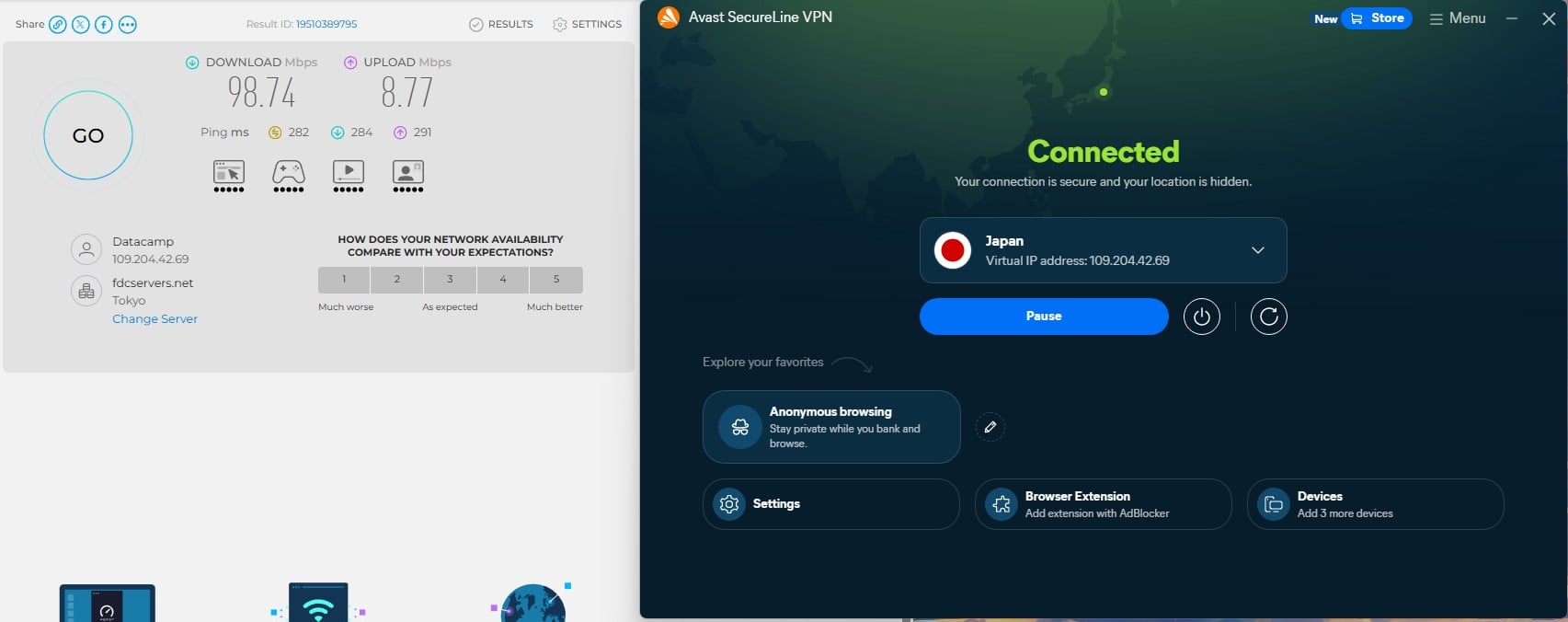
Averaged across all three tests, Avast’s VPN costs 22.5% of download speed and 20.5% of upload. That average flatters the Japanese result and understates the British one, which is why we broke it out.
Streaming: Eight Netflix Regions and No Special Servers
Avast dropped its streaming server category during the rebuild, and the client now points you at the ordinary location list. The Streaming tile on the home screen looks like a shortcut to something tuned, but it opens the same list of countries. There is no streaming-optimized infrastructure behind it.
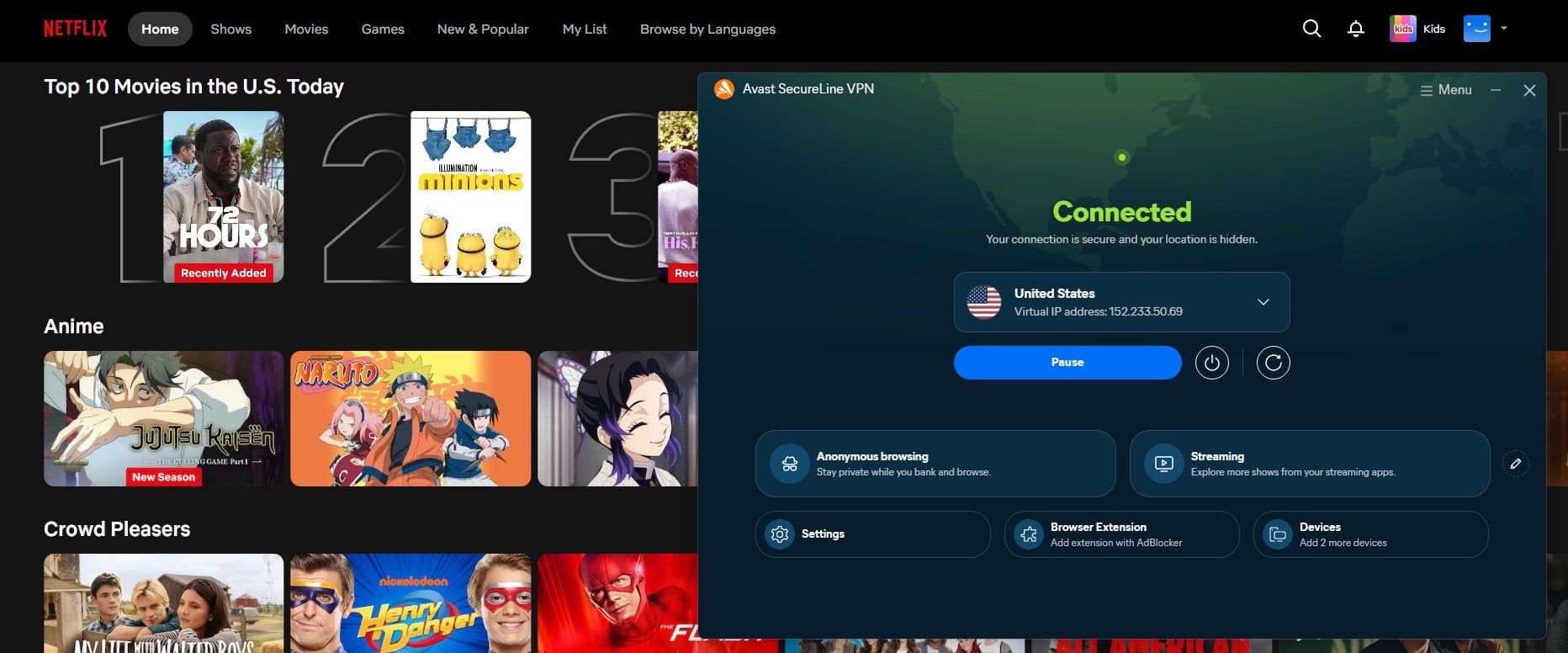
That turned out not to matter. Netflix opened on standard servers in the United States, the United Kingdom, Australia, Japan, Canada, Germany, Italy and France. Every region loaded its own catalog, with no proxy error and no fallback to the global library. Beyond Netflix, BBC iPlayer, HBO Max, Pluto TV, Channel 4, Tubi and Hotstar played without a single problem.
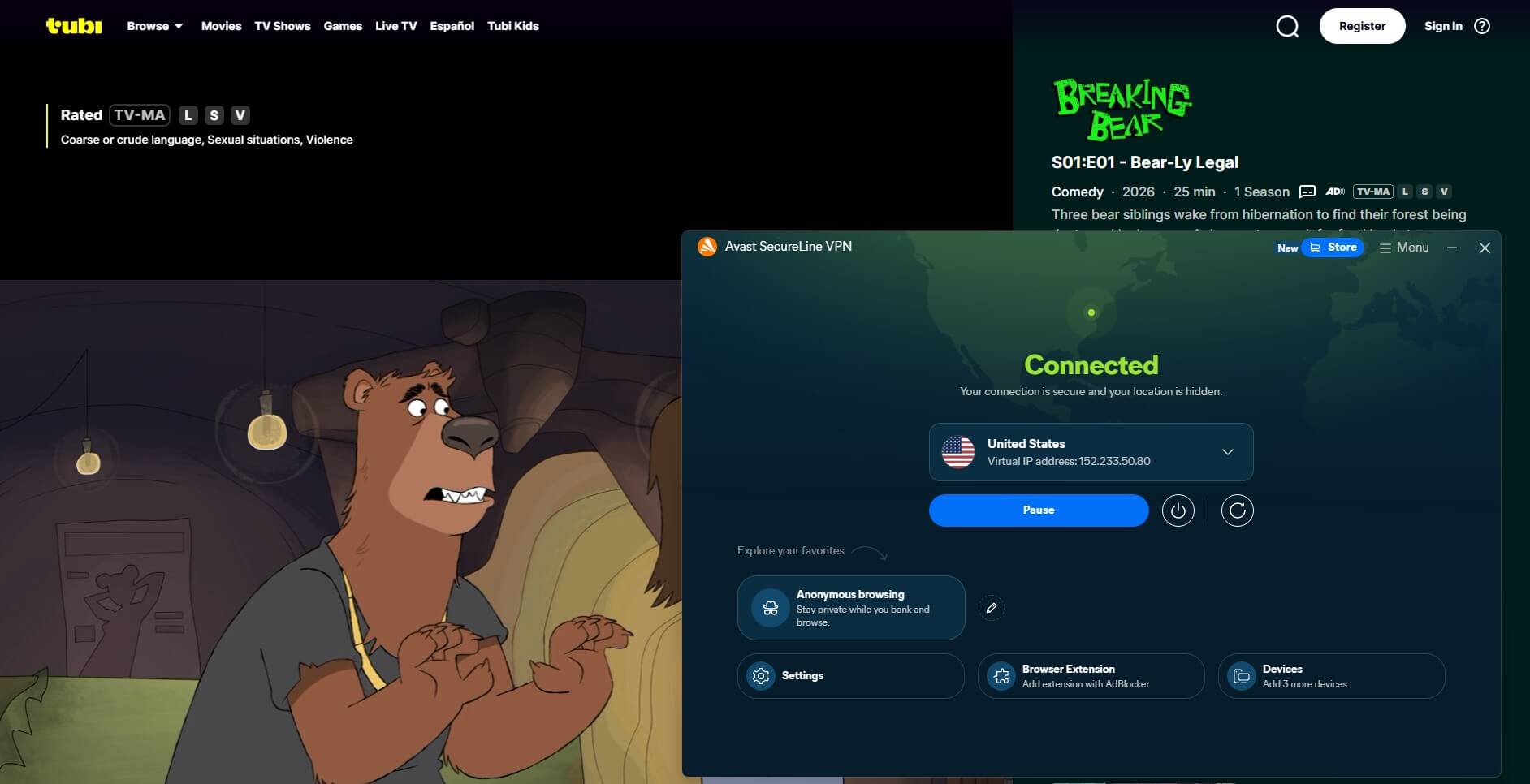
One practical note on Japan. Netflix Japan opened fine. 98.74 Mbps is still four times what a 4K stream needs. The speed problem there does not stop the streaming. It shows up in file transfers and uploads instead. The gap here is hardware, not software. With no TV apps until September, watching any of this on a television means a router setup or casting from a phone.
Our streaming VPN guide covers providers with native TV clients if that is the priority. All of them also work on Fire TV Stick and Apple TV.
Avast VPN Torrenting Works, Within Limits
Avast keeps a dedicated P2P category. The Smart Mode torrenting trigger brings the tunnel up on its own when a torrent client opens. That trigger has to be switched on first. We downloaded through a US P2P server and measured the same speed as our standard US speed test, so the specialty servers are not throttled. The kill switch held during the transfer pretty well.
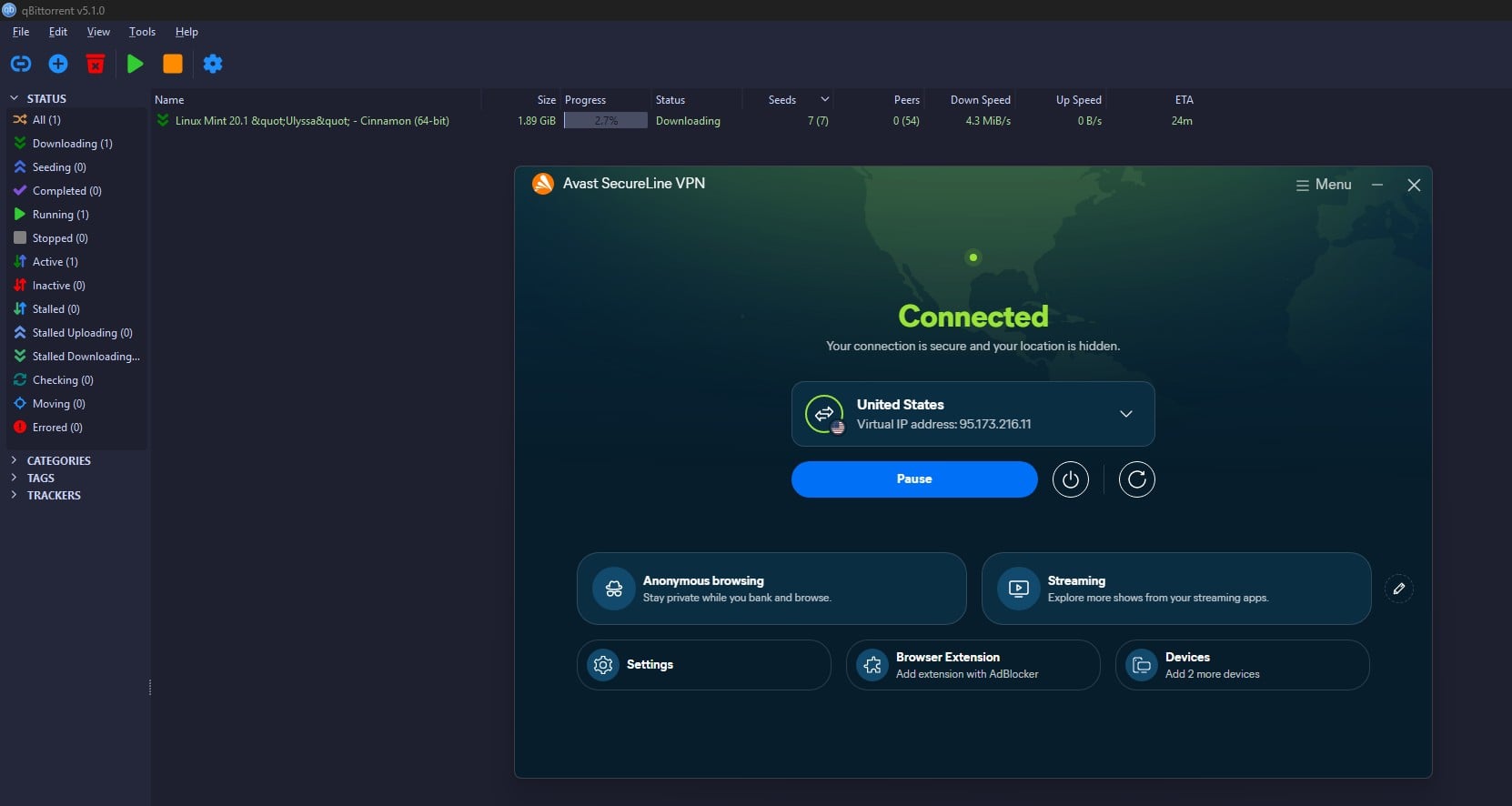
We tested it on Windows 11 and on a Galaxy S26 Ultra by killing the connection mid-download, and traffic stopped both times. There is no app-level kill switch, so it is all or nothing: you cannot tell the VPN to cut a single torrent client and leave the browser online. Port forwarding is the limitation. Avast does not offer it, and there is no dedicated IP option.
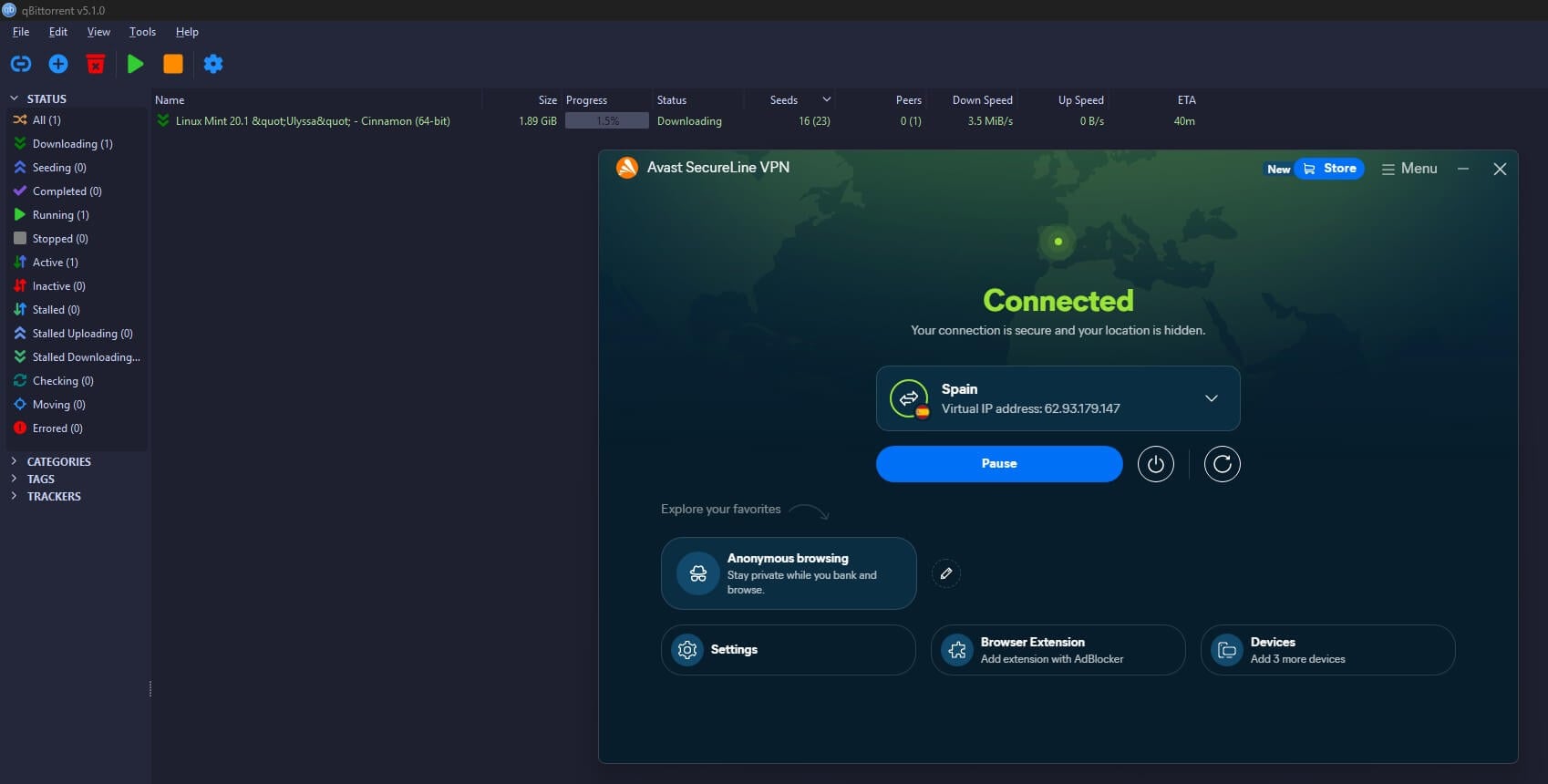
Heavy seeders will notice the difference. Incoming connections stay limited, which hurts a private tracker ratio. Downloading is fine. Long-term seeding is not what this is for. Our guide to torrenting safely explains why port forwarding matters, and the best VPNs for torrenting covers providers that support it.
Security and Features: Smart VPN, Mimic, Encryption
Let’s deepen this discussion. Here’s what I found.
Protocols and Encryption
Windows offers four choices: Automatic, WireGuard, Mimic, and OpenVPN. Automatic comes selected out of the box as recommended. It picks WireGuard for most connections. macOS adds IPSec. Encryption is AES-256 across all of them. Mimic is Avast’s own protocol, built to disguise VPN traffic on networks that block it.
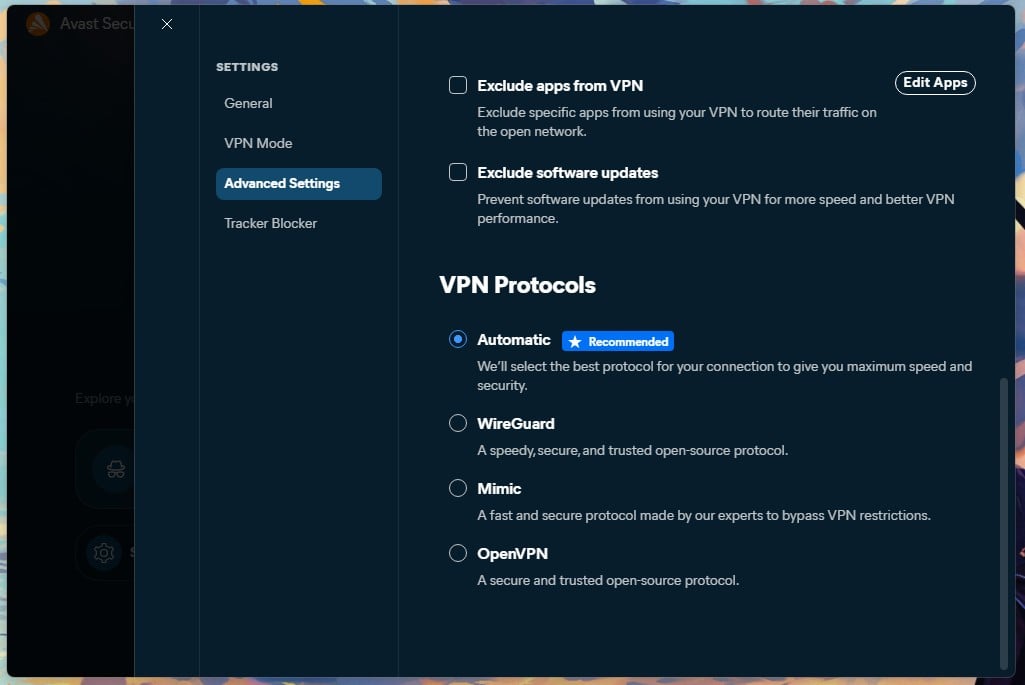
Post-quantum encryption switches on by default with Mimic. WireGuard gets it as a manual toggle. That toggle sits unchecked on a fresh install, which is a pattern we return to below in the review.
Avast Premium VPN Leak Tests: Perfect Results
We checked two servers with BrowserLeaks: a US endpoint in Piscataway, New Jersey, and a Canadian one in Montreal. Both came back clean. Neither exposed an IPv6 address. WebRTC returned the tunnel address as the public IP with no local address leaking. The DNS test found one server, one ISP, and one location, and the resolver IP was identical to the exit IP.
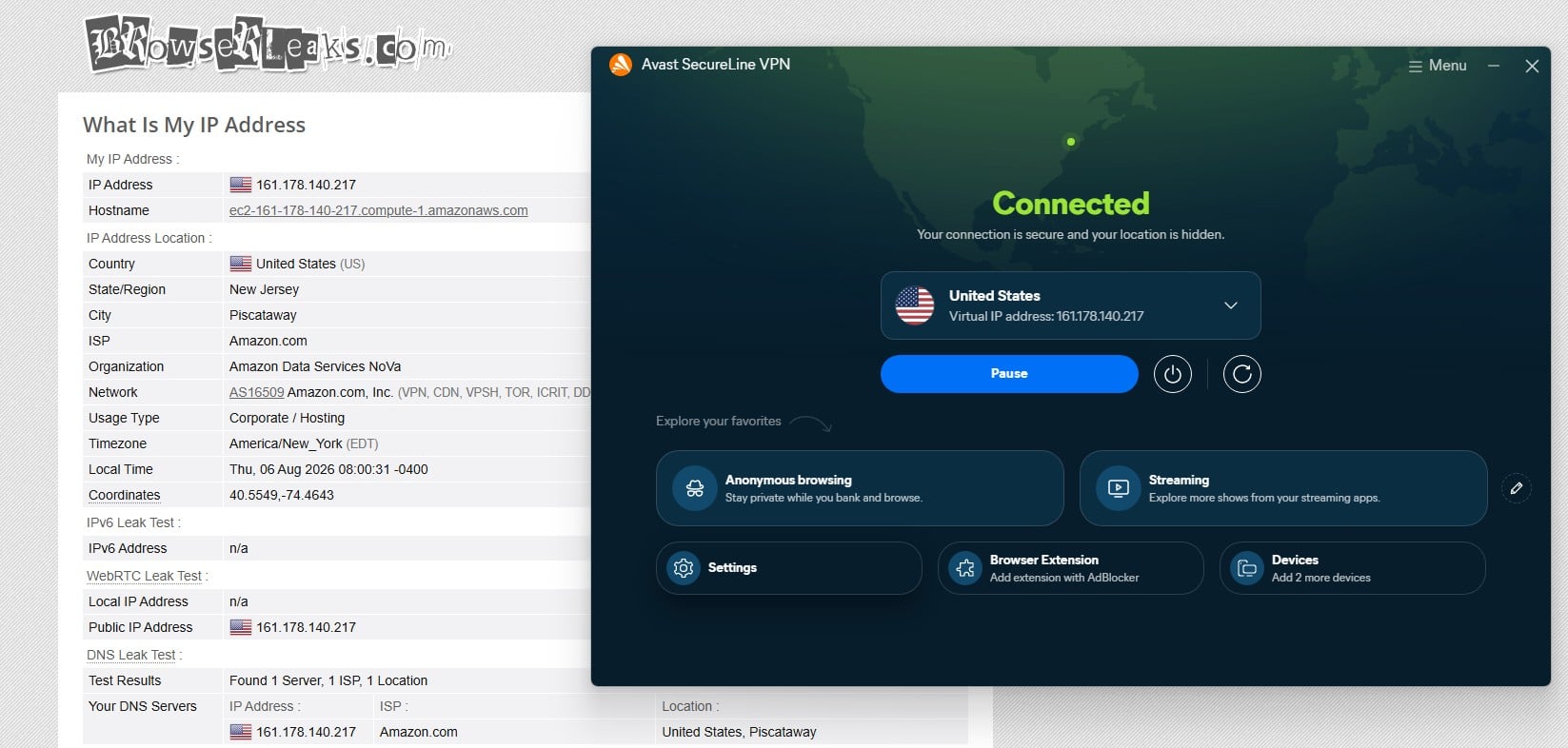
That last detail matches Avast’s policy, which states the company operates its own DNS servers. Queries stayed inside the tunnel and never reached a third-party resolver. The same test exposed something Avast does not advertise. Both endpoints resolved to Amazon EC2 instances, flagged as corporate hosting. Avast rents cloud capacity for at least part of its network.
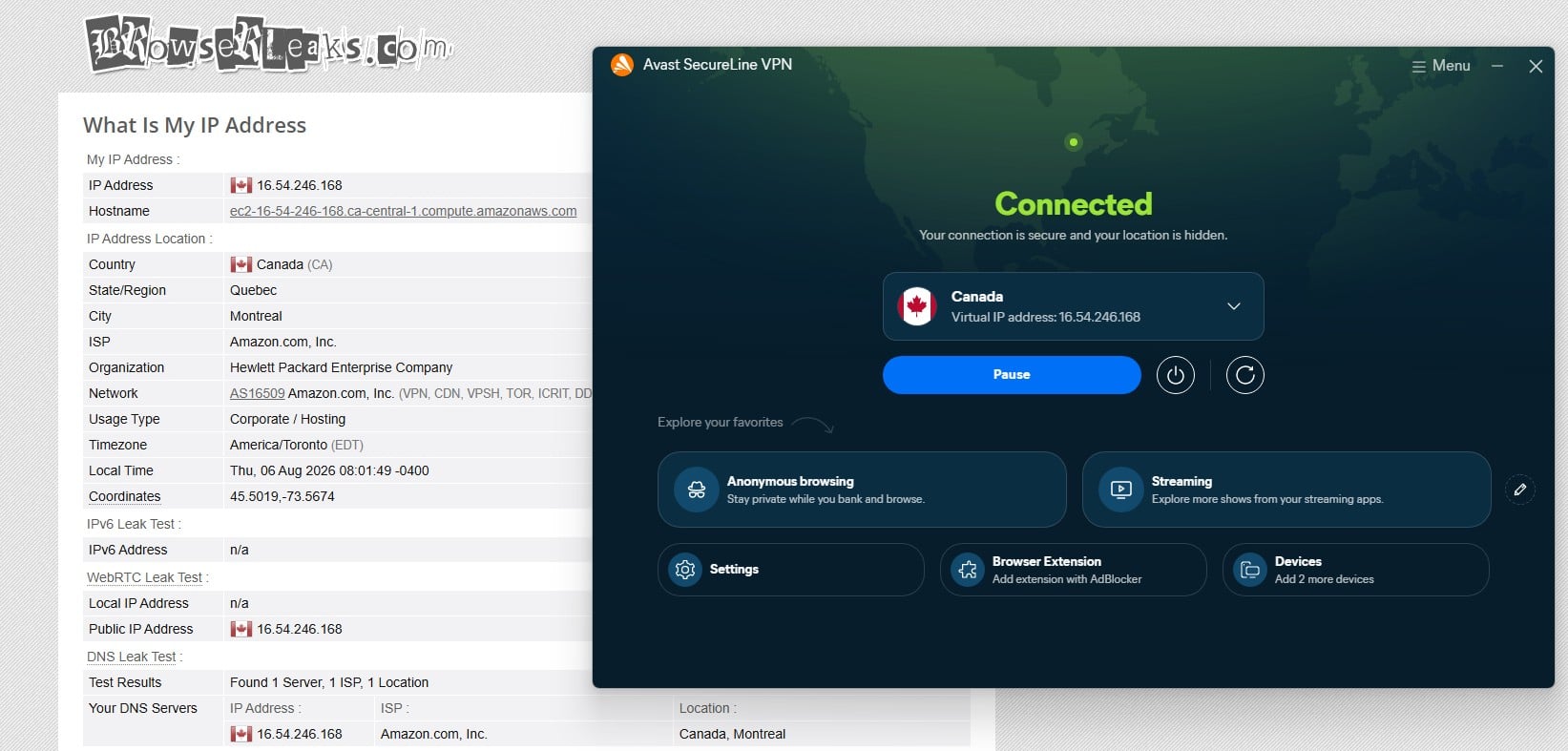
Those servers write to disk. NordVPN, ExpressVPN and several others moved to memory-only hardware years ago. This is one place where Avast’s infrastructure is a generation behind its feature list.
Smart Mode Arrives Doing Nothing
Avast leads its marketing with Smart Mode, which turns the VPN on automatically in specific situations. Five triggers are there: public Wi-Fi, banking sites, shopping, sensitive content, and torrenting. Individual websites can be added as well, and the same panel can switch the tunnel off automatically on domains you nominate, which is handy for banks that block VPN logins. Smart Mode is also the mode the client selects on a fresh install.
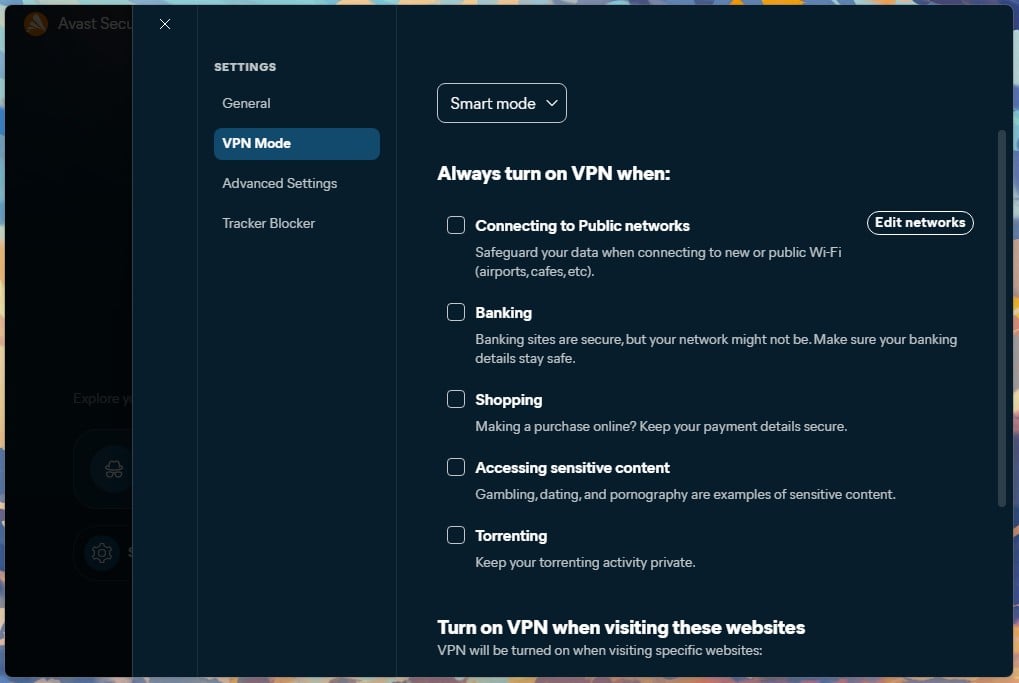
All five triggers arrive unchecked. So the default state of a newly installed Avast VPN is a mode that does nothing until the user opens Settings and ticks boxes. The other option in that dropdown, Always on, is the one that protects a new install, and it is not the default. Post-quantum encryption and Reconnect After Restarting arrive switched off. None of these are hidden, and all three take one click to enable.
Split Tunneling, IP Rotation and the Tracker Blocker
Split tunneling on Avast works by exclusion. Two checkboxes cover it: Exclude apps from VPN, with an app picker attached, and Exclude software updates. You can’t invert it and send only chosen apps through the tunnel, which is how several rivals handle the same feature. IP Rotation is more interesting. With it, the client cycles the exit IP while the connection stays up.
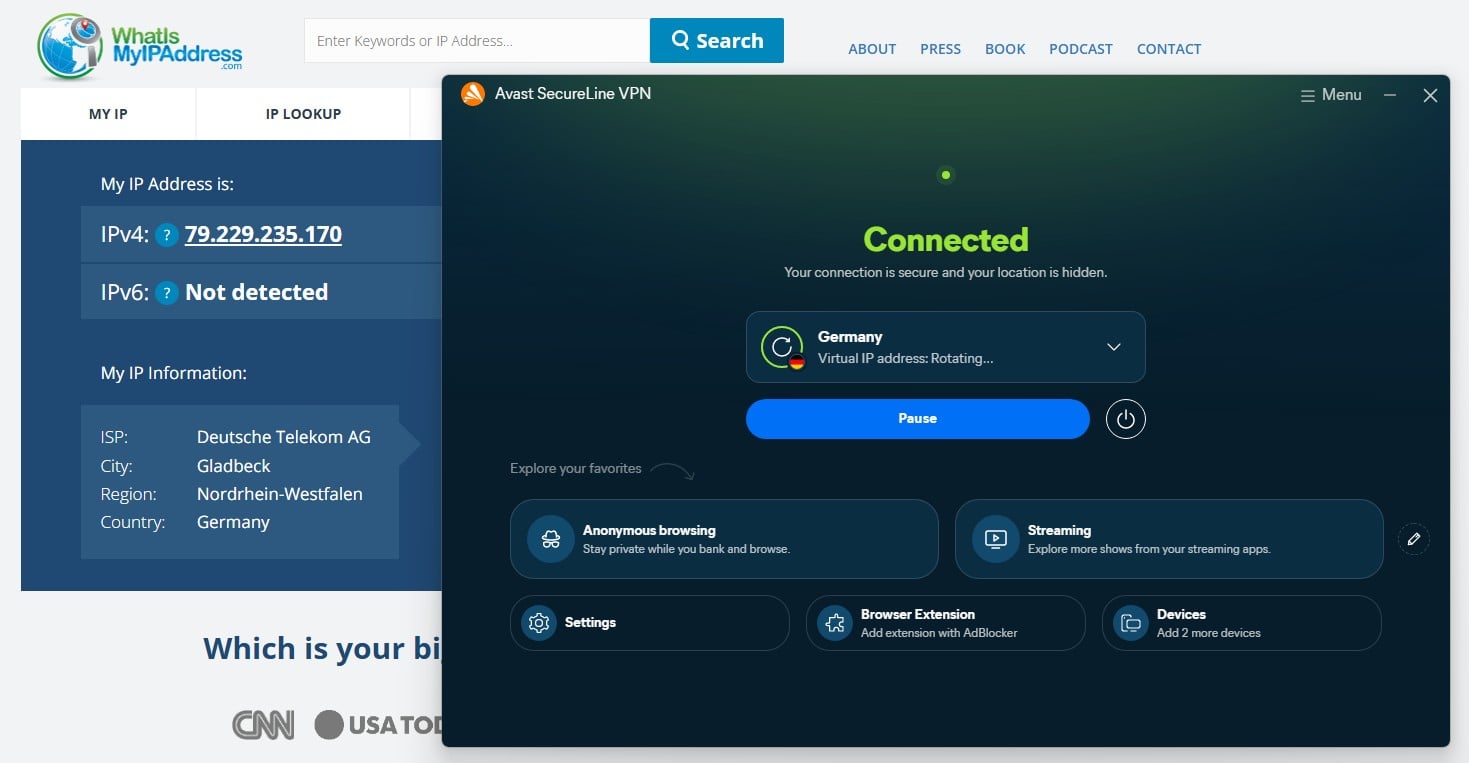
Tracking, blocklists, and dynamic pricing all get harder to apply to a single address. Our German session moved from an address geolocating to Gladbeck to one in Berlin inside three minutes, and nothing dropped during the change. There’s no way to change the IP rotation interval, and it may differ for you. The rotating addresses also reported Deutsche Telekom as the ISP.
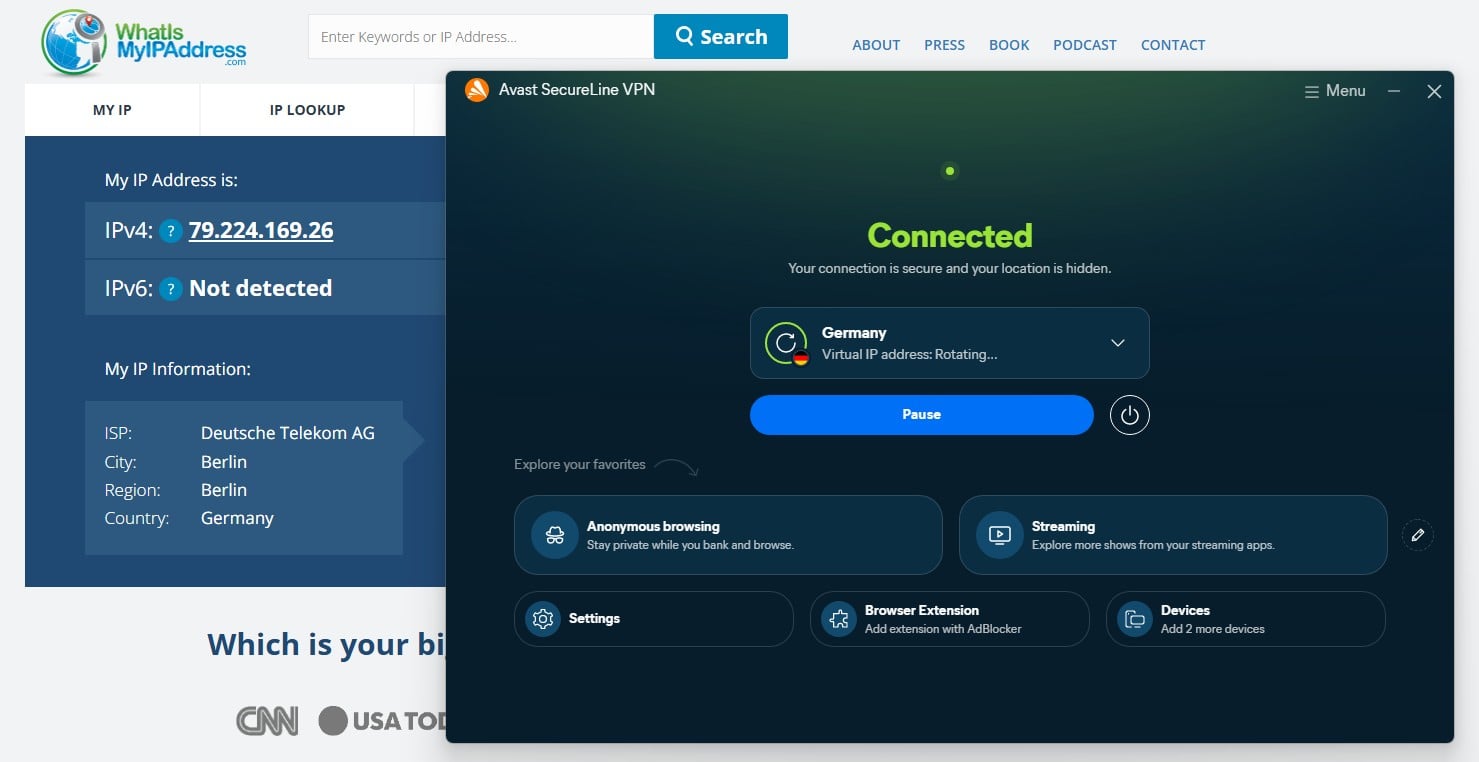
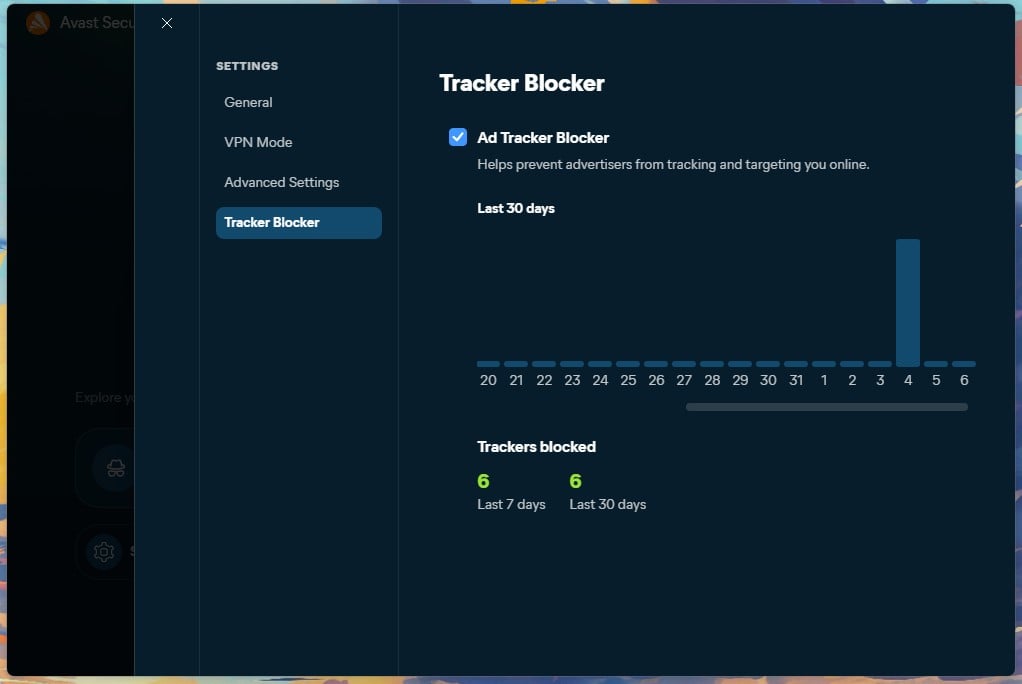
That is different infrastructure from the AWS ranges the standard servers use. The Ad Tracker Blocker is the one feature that I really liked, though I rarely used it. But a few times I did, it actually blocked pretty much every tracker, and while the screenshot below shows 6 in 30 days, the graph on it shows that I’ve had it ON very briefly.
Censorship and Restricted Networks
Mimic is what Avast built for this, and it connected us from China during testing (Shenzhen, to be precise, and it was back in July 2026). That puts the VPN in a small group of VPNs that still work there. School and office firewalls are trivial by comparison, and Mimic handles those without configuration. Our China VPN guide has the wider picture on which VPNs are holding up.
Is Avast VPN Safe? What the Logging Policy Says
Avast last updated its VPN policy in May 2026. Four things never reach Avast’s servers: your originating IP address, DNS queries, browsing history, and transferred data such as emails, pictures, and downloads. On the questions that decide whether a VPN is doing its job, that is the right answer. What Avast does keep is metadata, and the retention windows differ by type:
- Server and network metadata (assigned location, protocol, server IP): 18 months.
- Connection events (connection attempts, disconnections, errors): 12 months.
- Application events (auto-connection, uninstall): 18 months.
- Crash reports: 90 days.
- Cumulative data transferred in MB, for capacity planning and abuse prevention.
None of this attaches to an individual user, and the policy is consistent about that everywhere except one clause. Crash reports may carry an email address, app version, and internal identifiers. Send one with personal data in it and, per the policy, Avast “could add this information to the service data and might be able to connect it with you.” It’s the only linkage the document admits, and it applies to reports users choose to send.
An account is mandatory to use the service. Avast stores the email address, activation code, and renewal date for the lifetime of the product plus two years, so there is no anonymous signup path here. On mobile, four third-party SDKs appear in the policy: Firebase Analytics and Crashlytics for stability data, plus Singular and AppsFlyer for marketing attribution. Firebase and AppsFlyer can be switched off in the app’s settings, though they are opt-out and not opt-in.
The Audit Gap
Everything above comes from a document Avast wrote about itself. No independent firm has ever examined the servers to confirm the policy describes what the infrastructure actually does. Providers at the top of our no-logs VPN rankings have been audited repeatedly, some of them six times over. Avast has not been audited, the largest reason this Avast VPN review doesn’t place it higher.
Avast publishes transparency reports, last updated in mid-2025. It logged 4,941 privacy requests for the Avast brand, at an average of 19 days to resolution. The policy covers customer requests: data deletion, do-not-sell, marketing opt-outs. It doesn’t report law enforcement demands, warrants, or gag orders, which is what a transparency report usually means for a VPN.
Ownership and the Jumpshot Settlement
Jurisdiction is split. Avast operates from Czechia, outside the Five Eyes alliance. It belongs to Gen Digital, a US company. The history counts for more here than it would at most brands. In February 2024, the FTC fined Avast $16.5 million over its Jumpshot subsidiary. Jumpshot sold granular browsing data to more than 100 clients between 2014 and 2020.
Buyers included Google, Pepsi, and Home Depot. Jumpshot closed in 2020. The resulting order bars Avast from reselling browsing data for advertising and requires an annual compliance audit.
Apps and Platform Coverage
Installation is one click and finishes in under a minute, with no extras pushed during setup. The redesigned desktop client opens on a dark map with a single Connect button beneath a card showing the selected country and the virtual IP address assigned to you. A chevron on that card opens a searchable location list.
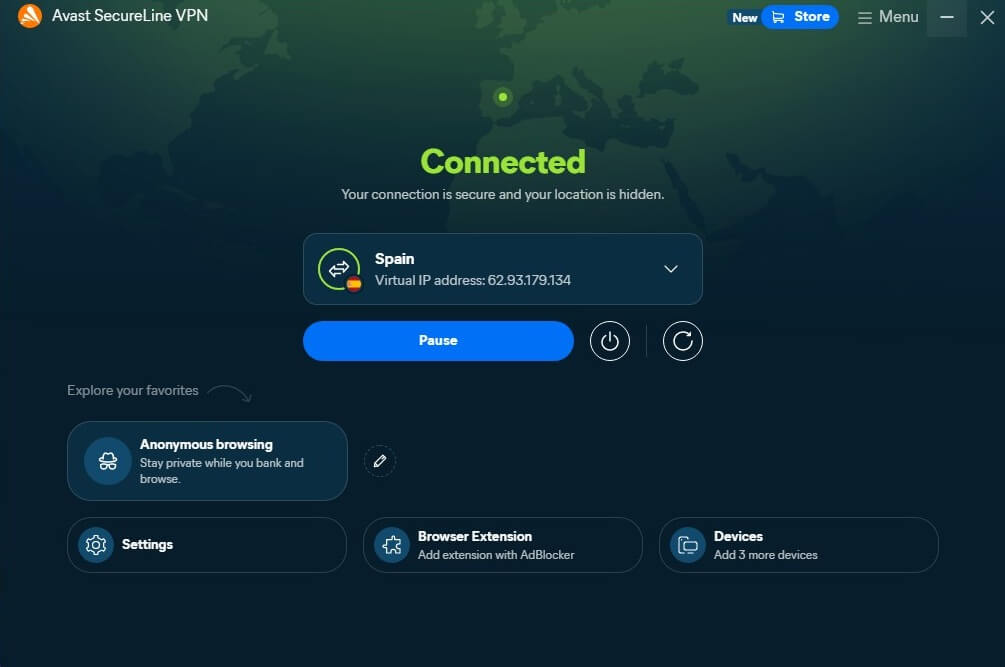
Settings splits into 4 panels: General, VPN Mode, Advanced Settings, and Tracker Blocker, a shallower menu tree than the old client had. The Windows app is the most complete of the four. Platform reach is where Avast’s VPN lags. macOS, Android, and iOS are covered; the whole list. There’s no Linux VPN client, so a Linux desktop means a router configuration or nothing.
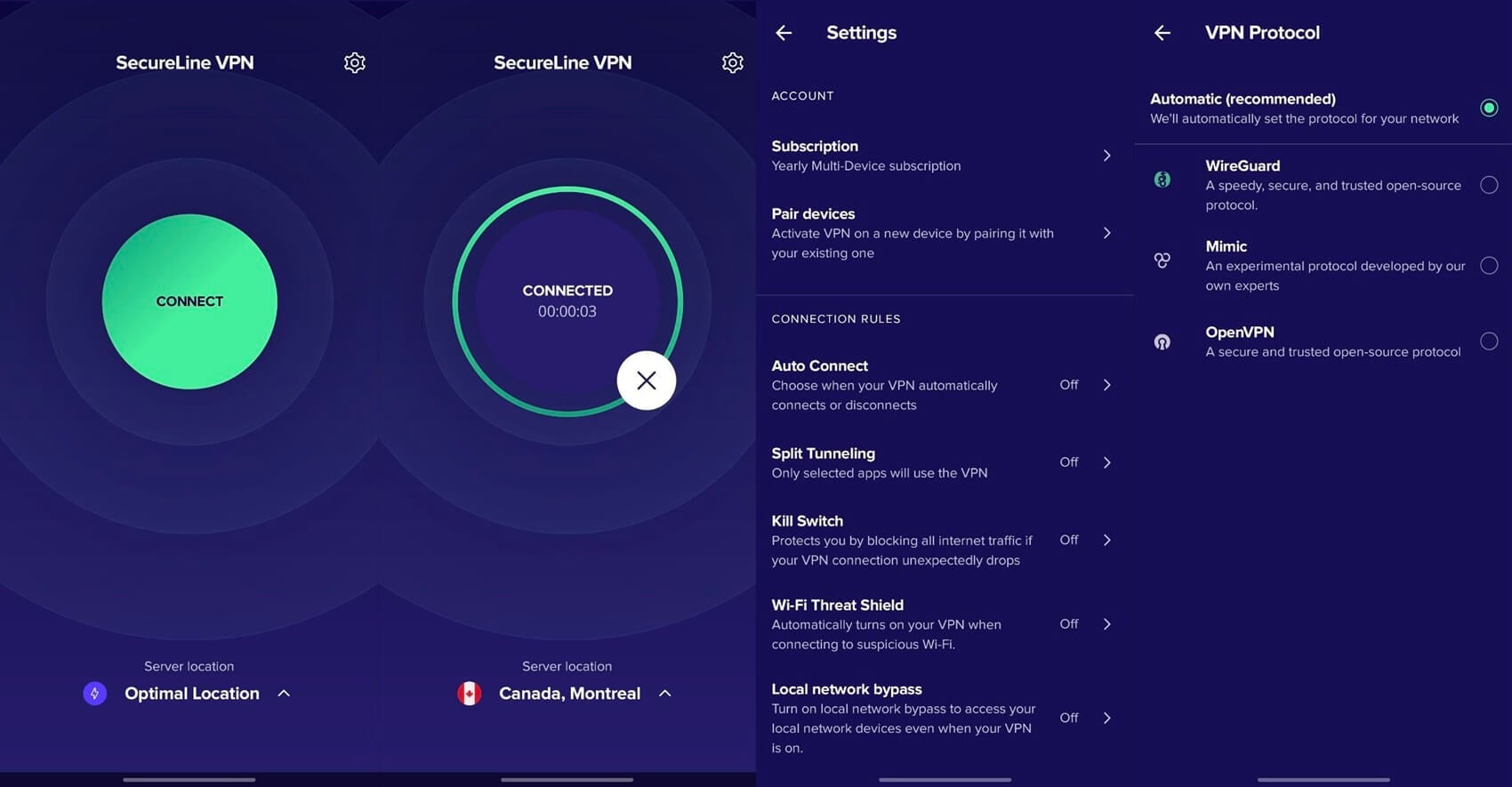
TV apps are expected around the end of September, which currently leaves Fire TV Stick and Smart TV owners without a native option. 10 simultaneous connections is generous, and matches what the premium tier of the market offers. The browser extension works on Chrome and Firefox only. It controls the installed desktop app and tunnels nothing on its own.
Avast VPN Price and Plans
Avast sells the VPN on three terms and nothing shorter. There is no monthly option at all, so the smallest commitment available is a full year.
| List price | First term | Per month | Renewal | |
| 1 year | $99.99 | $59.88 | $4.99 | $99.99/year |
| 2 years | $194.99 | $95.76 | $3.99 | $99.99/year |
| 3 years | $294.99 | $143.64 | $3.99 | $99.99/year |
The two-year plan is the only one worth buying. It saves a dollar a month against the annual term. The 3-year plan charges the same monthly rate for a longer lock-in. That extra year buys nothing. Renewal is where the arithmetic turns. A one-year buyer pays $59.88, then $99.99, a 67% increase. A 2-year or 3-year buyer averages $47.88 a year during the first term and then meets the same $99.99, which is a 109% jump.
Every VPN does some version of this. The destination is what counts. At $99.99 for 10 devices, Avast’s VPN costs $10 per device per year at full price. A good standing rate for the premium tier, where even higher renewals are normal. Our VPN pricing breakdown puts that in context.
Avast VPN Free Trial: 60 Days, Card Required
This is a genuine free trial and not a refund window dressed up as one. Checkout charges $0, covers the Multi-Device product across all four platforms, and Avast sends a reminder 7 days before the trial ends. Card details or a PayPal account are required; the subscription converts to annual billing on day 61 unless canceled.
The 30-day money-back guarantee starts from that first charge, so the full evaluation runway is 60 free days plus 30 refundable ones.
Premium VPN Alone or Avast Ultimate: Which One to Get?
Avast’s Premium VPN also comes inside Avast Ultimate, alongside Premium Security, Cleanup Premium, and AntiTrack. On 10 devices, Ultimate costs $69.99 for the first year against $59.88 for the VPN alone. The whole suite is $10.11 more to start. At renewal, the gap widens to $40, because Ultimate returns to $139.99 a year against Avast’s VPN $99.99. $10 buys a year of one of the best antivirus, a cleanup tool and an anti-tracking utility.
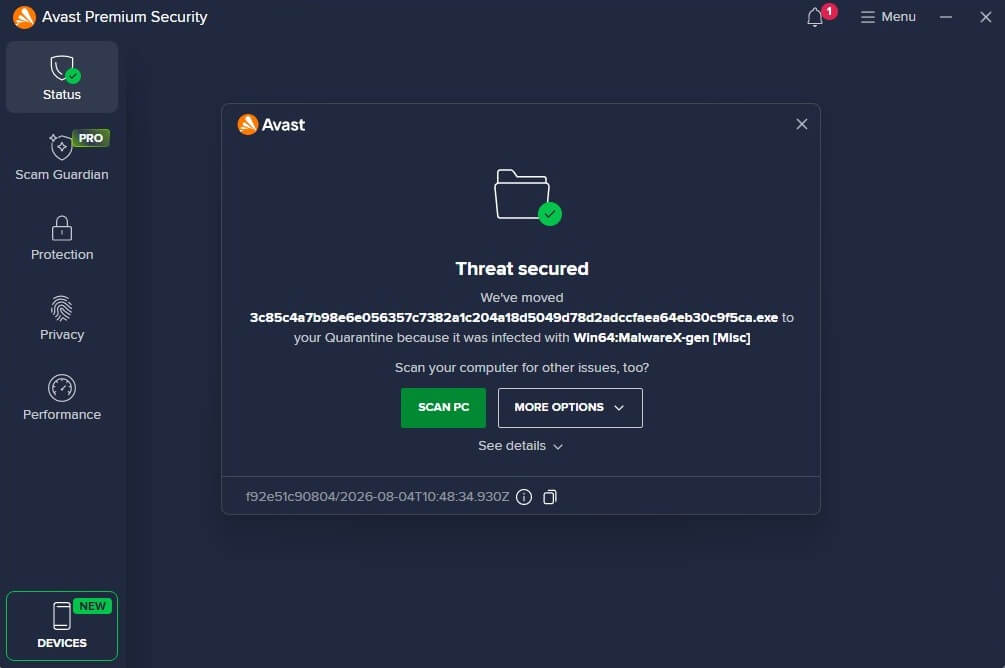
That is easy value if any of those are on your list. If the VPN is the only thing you want, the standalone plan is the cheaper long-term hold by a margin.
Support and Cancellation
Avast offers live chat and a community forum. The help page funnels every request through 4 steps. It opens with a description of the issue and a set of suggested articles. Contact options come last. That adds a minute or two before a human is reachable. We tested chat. After filling in the required details, an agent replied in 90 seconds, answered precisely, and made no attempt to sell anything.
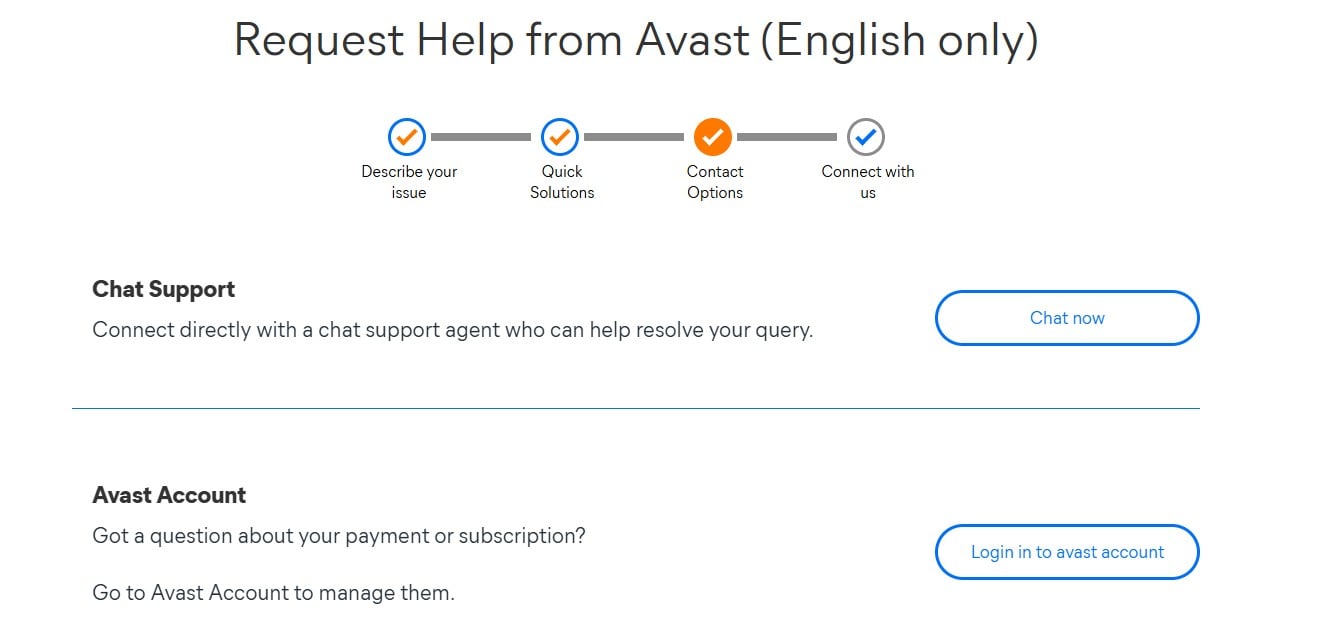
A human handled it, with no bot in the way. Cancellation is straightforward. Sign in to the Avast account, open Manage Subscriptions, and click Unsubscribe. Doing that inside the first 30 days triggers a refund under the guarantee. After 30 days, it stops the renewal and leaves access in place until the paid term expires.
Is Avast VPN Worth It?
🤝 Get Avast VPN if you:
- Want a VPN that opens streaming platforms (including Netflix) without any fiddling and costs $99.99 a year forever.
- Connect mostly to nearby servers, where the speed cost is under 2%.
- Need a good VPN for traveling abroad, especially in censored regions, where Avast VPN works well.
- Appreciate easy-to-use, one-click interfaces across all devices, with some of the shortest connection times (under 2 seconds).
⛔ Avoid Avast VPN if you:
- Connect to Asian servers regularly, because Asian servers showed the weakest results in my speed tests.
- Seed torrents because there is no port forwarding
- Use Linux or want a VPN installed on your Smart TV.
- Are a security and privacy perfectionist who expects top levels of transparency and at least a single third-party security audit.
Three Alternatives Worth a Look
NordVPN. Our #1 VPN, and the direct upgrade from Avast VPN. It lost 7.8% of download speed across the same three servers where Avast lost 22.5%. NordVPN reaches 149 countries, and Deloitte has examined its no-logs policy six times. It costs more to keep: $139.08 a year at renewal against Avast’s $99.99. The full Avast VPN vs NordVPN comparison goes through it round by round.
Proton VPN. The one to pick if the audit gap is what stopped you here. Swiss jurisdiction, open-source apps, independently audited, and a free tier that does not sell anything on the side. The apps feel less polished than Avast’s redesigned client, and streaming support is narrower.
Surfshark. Worth checking if the device limit is the sticking point. Connections are unlimited instead of capped at 10, the price is lower than either of the above, and it handles streaming about as well as Avast does. Speeds sit between Avast and NordVPN. Our full VPN rankings cover the rest, and the privacy-first VPN shortlist is the place to start if that is the priority.
Frequently Asked Questions
📺 Does Avast VPN work on a Firestick or smart TV?
No. Avast has no TV app yet, and releases are expected around the end of September. A router-level configuration is the only current route, and it covers every device on the network at once. Screen mirroring from a phone that already has the tunnel active works for casual viewing.
🔴 Does Avast VPN work with Netflix?
Yes, across 8 regional catalogs during testing, on ordinary servers. Netflix blocks addresses in batches, so any result is a snapshot. A server that fails usually works again after switching to a different city in the same country.
📜 Does Avast SecureLine VPN keep logs?
No, not of anything that identifies activity. Browsing history, DNS queries, originating IP addresses, and transferred files all stay off Avast's servers. Metadata is a different question. Connection events last 12 months and server-side records 18, with Avast stating that none of it attaches to a named user. Strict zero-retention VPNs keep less.
📅 How much does Avast SecureLine VPN cost per month?
There is no monthly plan. The cheapest effective rate is $3.99 a month on the two-year term, paid as $95.76 up front.
🧧 Does Avast VPN work in China?
Yes. Mimic, Avast's obfuscation protocol, connected from mainland China in recent testing. Chinese filtering changes without notice, so travelers should install and activate the subscription before arrival. The Avast website itself may be unreachable inside the country, though.
🐧 Does Avast VPN work on Linux?
No. Windows, macOS, Android, and iOS are the only supported systems. Linux users need to configure the connection on a compatible router, which covers every device on the network but removes per-device control.
⚠️ How do you cancel an Avast VPN?
Sign in to the Avast account, open Manage Subscriptions, select Unsubscribe. Canceling within 30 days of the charge qualifies for a refund. After that window, the subscription stops renewing, and access continues to the end of the paid period.
🟢 Is the VPN in Avast Ultimate the same as SecureLine?
Yes. It is the same product, with the same server network and settings. Ultimate bundles it with Premium Security, Cleanup Premium, and AntiTrack for $69.99 in the first year on 10 devices, then $139.99 annually.
📥 Does Avast VPN slow down your connection?
Yes, and distance decides how much. A nearby server costs under 2% of speed in testing. A server on the other side of the world costs nearly half.
⚙️ How many devices does Avast VPN support?
10 at once, on every plan, with no cheaper tier that caps the number lower. The home screen shows how many slots are left, and devices can be removed from the account to free a slot up.
🆓 Is there a free version of Avast SecureLine VPN?
No. There is no permanently free tier. The 60-day trial is the only no-cost route. It requires payment details at signup and converts to a yearly subscription automatically unless canceled beforehand.