
Managed WordPress hosting is one of the simplest ways to make and host a WordPress site. The Kinsta vs SiteGround comparison is always brought forward in the managed WordPress space. Both are known to be highly reliable. Both are fast, secure, and excellent for beginners who want terrific performance.
However, Kinsta is way pricier than SiteGround, which begs the question of whether it’s worth spending more on it. On the flip side, we have SiteGround, a formidable competitor with down-to-earth prices and surprisingly feature-rich plans. During our testing, we found SiteGround to be better, despite Kinsta’s premium price.
So, in short, we don’t think it’s worth spending much more on Kinsta. To explain our thoughts, we tested their features, speeds, ease of use, customer support, and more. Read our SiteGround vs Kinsta comparison for 2026 and learn which web hosting for WordPress is right for you!
SiteGround vs Kinsta – Quick Comparison
| 🏆 SiteGround | Kinsta | |
| 🌐 Shared (WordPress) Hosting Price | $3.99 monthly | $30 monthly |
| 💾 VPS Hosting Price | / | / |
| ☁️ Cloud Hosting Price | $100 monthly | / |
| 🆓 1-Year Free Domain | No | No |
| 🔐 WHOIS Domain Privacy | No | No |
| 🌎 Data Centers | More than 10 locations | More than 37 locations |
| ✅ Uptime Guarantee | 99.9% | 99.9% |
| 🖥️ Free SSL Certificate | Yes (Let’s Encrypt) | Yes (Wildcard) |
| ⏬ Automated Backups | Daily, with on-demand backups | Daily, with on-demand backups |
| 💿 Storage | 10 GB to 40 GB SSD | 10 GB to 100+ GB |
| #️⃣ Number of Hosted Websites | 1 to unlimited | 1 to 200 |
| 🤖 AI Website Builder | Yes, included in all plans | No |
| 💸 Money-Back Guarantee | 30 days (no free trial) | 30 days (free for the first month) |
Hosting Plans, Pricing & Features
Neither SiteGround nor Kinsta is particularly varied regarding hosting types. They’re primarily managed WordPress hosts. However, SiteGround also includes cloud hosting plans, both pre-configured and customizable. Meanwhile, Kinsta allows you to buy a dedicated server for $300, while SiteGround’s cheapest offer is $100.
During our Kinsta vs SiteGround comparison, we noticed that they don’t offer VPS hosting, but SiteGround offers reseller hosting plans for more variety. This allows you to sell this provider’s hosting resources and develop your hosting business. If you need more variety, go with Hostinger. If not, stay here.
Pricing Comparison
Okay, so let’s discuss their prices. We’ll start with Kinsta this time:
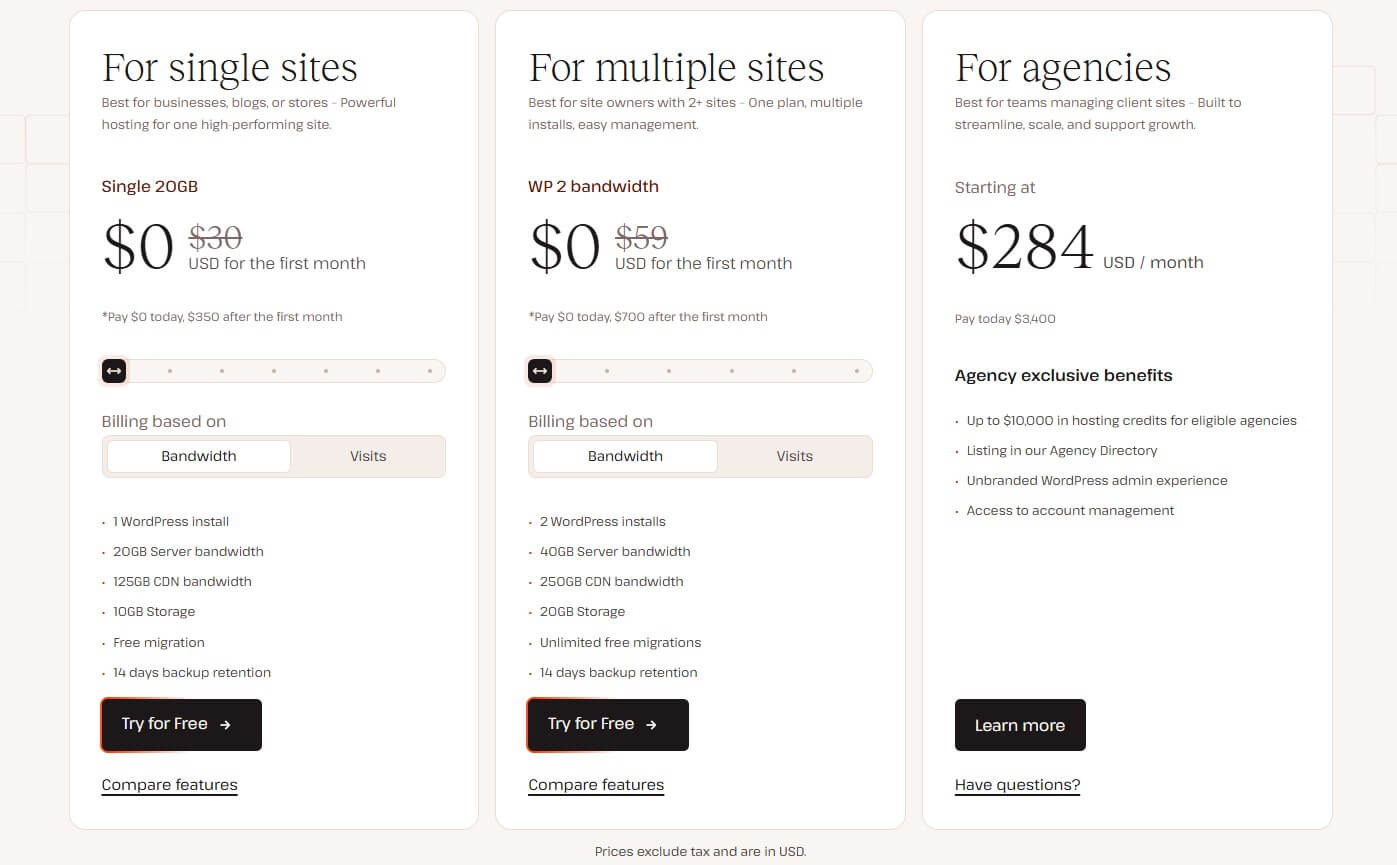
As explained in our in-depth Kinsta review, this provider costs at least $30 monthly for the single-site plan or $59 monthly for two sites. Both are free for the first month and charged annually after that. The slider for these two moves to the right if you need more sites, server bandwidth, CDN bandwidth, or storage.
Meanwhile, you can also scale up backup retention duration from 14 to 30 days. Kinsta’s features remain the same, except in the Agency plan at $284 monthly, with some bespoke features. However, at this price, very few people will actually consider that one, plus, not every user has an agency.

SiteGround starts at $3.99 monthly for the StartUp plan, but we’d skip that one and opt for the GrowBig plan at $6.69 instead. It hosts unlimited sites, offers 20 GB of storage, unmetered traffic, and all managed WordPress features. This plan doesn’t skimp on staging, daily backups, MultiSite, and more.
Neither provider includes a free domain, so expect additional domain + WHOIS privacy costs down the line. Also, SiteGround’s renewal costs are a lot higher than the introductory ones, so keep an eye on that. Both providers have a 30-day money-back guarantee facilitated differently. Kinsta has a 30-day free trial.
Meanwhile, you have to spend on SiteGround to use it, and then, if unsatisfied, get a full refund from the website. We’ll discuss their features in the next sub-section, but before we do, read our SiteGround review for a more comprehensive look.
What About Their Features?
We’ve established that Kinsta costs a lot more than SiteGround, which, even with its renewal prices, is still less expensive than Kinsta. But now, we have to examine some of their key features to see if Kinsta justifies its price tag.
Here are some standouts from Kinsta:
- 20 GB to 100 GB SSD storage
- 20 GB to 500 GB CDN bandwidth
- Fully-managed WordPress hosting (updates, security, etc.)
- Free SSL
- Free website migration
- Excellent security
- WordPress Staging + MultiSite
Now, here’s what SiteGround offers:
- 10 GB to 40 GB storage
- Unmetered traffic
- Speed + Security Optimizer WP Plugin
- Fully-managed WordPress hosting
- Free email
- On-demand backups
- Free SSL
- Top-tier security features
- Collaborators
Kinsta and SiteGround offer more or less the same features. However, we’d like to put a spotlight on SiteGround’s unmetered versus Kinsta’s limited server bandwidth. Another plus is SiteGround’s free email for your domain, which Kinsta excludes. If you opt for Kinsta, add the cost of that to the equation.
In our SiteGround vs Kinsta assessment, we noticed that SiteGround lacked virtually nothing; even security is on point, and you can add unlimited collaborators.
One thing worth mentioning is that SiteGround is typical shared hosting, while Kinsta has additional isolation, which puts each site into its own container, and you don’t share services and resources with other users. This explains the higher price and why Kinsta outperforms its shared WordPress hosting rivals.
Winner: SiteGround 🏆
With everything said, SiteGround offers better value for money, as it not only costs less but also provides similar, if not more, features, functionalities, and bandwidth than Kinsta. As you’ll soon see, the performance difference doesn’t justify spending much more on Kinsta, either.
Kinsta vs SiteGround Performance Comparison
It’s time to check how they perform.
SiteGround is among the faster web hosting services we tested, but recent Kinsta tests blew us away. As explained, its isolated resources mean you share nothing with no one, allowing your website to breathe fully. However, SiteGround’s shared hosting is also extremely reliable and hard to beat.
Both providers use NGINX web servers. They’re the fastest, most capable options, even better than LiteSpeed, typically used. Both have built-in caching and performance technologies like faster PHP and a CDN, which helps deliver content faster to people worldwide. So, how did we approach our tests?
We used GTmetrix, UptimeRobot, and Loader to test them. Since they’re managed WordPress hosts, we made two identical WordPress sites, added the Astra theme, and uploaded the same compressed images and videos. Bear in mind, we also hosted them on American servers to ensure nearly identical conditions.
GTmetrix Speed Test Results Comparison
And that’s where GTmetrix came in.
We didn’t want the best-case scenario for tests, so we set GTmetrix’s server to Canada. The server in Vancouver was free, so we picked that one. We performed three tests for each website and noted the best results. In particular, we focused our attention on these five essential metrics:
- TTFB or Time to First Byte
- FCP or First Contentful Paint
- LCP or Largest Contentful Paint
- TTI or Time to Interactive
- FLT or Fully Loaded Time
The table below displays our achieved results and recommended values for the examined parameters. Let’s check out the outcome of this Kinsta vs SiteGround speed test:
| Kinsta | SiteGround | Ideal Values | |
| TTFB | 131 ms | 40 ms | Under 800 ms |
| FCP | 249 ms | 281 ms | Under 1.8 s |
| LCP | 587 ms | 321 ms | Under 2.5 s |
| TTI | 702 ms | 710 ms | Under 2.5 s |
| FLT | 433 ms | 863 ms | Under 3 s |
Interesting results. We’ll admit we were shocked at how close SiteGround was, even beating Kinsta in TTFB, which was already low at 131 ms. SiteGround’s superb 40 ms was notably better. However, Kinsta fired back on many occasions, such as in FCP, where it loaded the smallest page elements first.
While TTI was nearly identical, Kinsta ultimately loaded the entire page more quickly than SiteGround. Actually, SiteGround was nearly two times slower. To clarify, despite being slower, SiteGround’s performance was impressive, even if we compared it to some cloud or even VPS hosting solutions.
As strange as this sounds, as a whole, our GTmetrix speed comparison is sort of a tie when considering the real-world performance. If you focus primarily on numbers or the outcome, which is Fully Loaded Time, we could declare Kinsta the winner, with a much more convincing result. You be the judge.
Measured Uptime & Response Times
During our Kinsta vs SiteGround performance tests, we measured their uptime and response times are quintessential aspects. For uptime tests, we used UptimeRobot and tested them for the past three months. The results are below:
- Kinsta: 99.7% uptime (99.99% promised)
- SiteGround: 99.95% uptime (99.9% promised)
Admirable results on both sides, but Kinsta is just a smidge ahead. As both are way over the famous 99.9% uptime gold standard, we won’t complain about a few minor outages that collectively haven’t lasted more than two, three minutes in the tested period.
Let’s switch over to Loader and our response time with 100 virtual users:
- Kinsta: 89 ms (low: 61 ms, high: 176 ms)
- SiteGround: 339 ms (low: 190 ms, high: 1.28 s)
SiteGround’s response time is perfectly justifiable for shared hosting, where everything under 600 ms is great. However, its sudden spike of 1.28s at one point is noteworthy because it ruins SiteGround’s overall score. Meanwhile, Kinsta maintained its composure and recorded an average of 89 ms.
Its apex was 176 ms, while the lowest recorded value was 61 ms. It appears that Kinsta’s server isolation does its job really well. It proves that shared hosting is always inferior, especially if you seek the highest performance level. Still, SiteGround performs like a champ even for shared hosting, so it isn’t that far behind.
Winner: Kinsta 🏆
The overall winner is Kinsta, which managed to edge out SiteGround in just about every test. Kinsta loaded the website faster, had a slightly better uptime score, and displayed noticeably shorter average, low, and high response times.
Which Hosting Provider is Easier to Use?
Managed WordPress hosting bears all the conveniences a beginner would appreciate. The one-click setup, automatic updates, security and speed optimization, and more. In our SiteGround vs Kinsta testing, we found both exceptionally easy to set up and use. However, let’s take a closer look.
Kinsta: Setup & Ease of Use
Kinsta wastes no time introducing you to its splendid web hosting interface. However, as soon as you subscribe, you’ll have to pick the way to proceed. If you want to make a new website, you can automatically install WordPress. Meanwhile, you can migrate your existing website by following the simple steps.
After that, Kinsta lets you pick one of 37 server locations for hosting your site. Bonus tip: Pick the location close to your target audience.

We chose to make a new website, and Kinsta installed and prepared WordPress for us in less than five minutes. From there, we could sign in to our WordPress admin panel and work on our website. To manage our website, we relied on Kinsta’s built-in dashboard with plenty of useful information on the home screen.
We learned more about bandwidth consumption, number of visits, resource usage, CDN usage, and more. The left side was reserved for our applications, databases, and DNS, where we could manage all with a few clicks. The black Add Service button allowed us to install apps and services swiftly.
As a managed WordPress host, Kinsta does most things automatically. We noticed that it installed its WildCard SSL and connected its CDN without our interaction. That’s a huge plus for beginners who want a swift start. Although Kinsta has many intricate customization options that beginners may have to explore a bit.
SiteGround: Setup & Ease of Use
SiteGround uses sPanel, also called Site Tools, for hosting management.
Before you arrive there, you’ll need to subscribe and pick how you want to proceed. Instead of migrating our site, we chose to make a new one, and SiteGround asked us to install WordPress or go with WordPress + WooCommerce in case we wanted to sell online. We picked the former option.
After a brief setup, SiteGround allowed us to sign in to WordPress and proceed.

However, we focused more on its sPanel, which was extremely simple. Everything happens in one window, making it incredibly smooth. The left side holds all the menus, while the middle screen portion contains pinned tools, which you can further rearrange to have the most frequently used ones.
SiteGround also offers comprehensive information on your server resource usage, while additional menus on the left allow you to manage your security, domains, speed, and more. In most cases, we let SiteGround’s experts manage WordPress for us, while we sit back and work only on the website.
However, we experimented with its on-demand backups and procured a few copies from the home screen. After years of using SiteGround, we couldn’t find any downside to its simple, yet highly functional control panel.
Winner: Tie 🟰
Both providers have shown incredible simplicity and functionality in their control panel designs. They’re beginner-friendly and provide a better experience than cPanel, a more traditional solution offered in cheaper web hosts.
Which Web Hosting Is More Secure?
Security-wise, both Kinsta and SiteGround pack sufficient power.
During our lengthy tests, we haven’t detected a single issue, as all security measures fortified our websites and prevented malware and virus intrusions. Best of all, SiteGround and Kinsta have built-in security, so you don’t have to spluge more on a bonus security suite, as is the case with Cloudways and its malware protection.
So, here’s what Kinsta offers in all plans:
- DDoS protection
- 24/7 malware scanning and removal
- Wildcard SSL
- Managed Web Application Firewall
- Daily automated backups + on-demand copies
- Uptime monitoring

SiteGround is equally impressive and offers:
- Malware scanning and removal
- Automated daily + on-demand backups
- AI anti-bot system for all-around protection
- DDoS protection
- Free Let’s Encrypt SSL
- WordPress Security Optimizer

On paper, they’re virtually the same. However, we spotted some tiny differences while testing them. For instance, Kinsta’s SSL certificate is from Wildcard, while SiteGround uses one from Let’s Encrypt. Wildcard is often used for securing multiple sites or online stores with a single SSL certificate.
However, they’re both incredibly secure. SiteGround’s innovation is the AI anti-bot system, which scans your website every 0.5 seconds to quickly and effortlessly detect and remove all threats. You won’t even notice it working in the background, which is impressive, considering it scans your website 120 times in a minute!
SiteGround’s AI anti-bot is self-learning, which means it adapts to new threats to combat them more effectively. On Kinsta’s side, we have uptime monitoring, which is essential for preserving the website’s availability and performance. No doubt, both hosts are highly secure, with virtually no downsides.
Winner: Tie 🟰
This round ends up in a tie, although SiteGround’s security may be slightly more impressive because of its AI anti-bot and generally cheaper prices. If we neglect all the other aspects and focus primarily on security, then it’s safe to say that both perform like well-oiled machines.
Customer Support
Although we rarely had to get in touch, we enjoyed SiteGround’s customer support through live chat, email, and phone. The problem is reaching it, as SiteGround loves pointing you towards its knowledge base and FAQs, rather than helping right there on the spot. If it’s a complex or urgent issue, it will gladly jump in.

You can also use phone support to talk your way through the issue and solve it. Meanwhile, for general questions, its knowledge base is more than sufficient, with ample tutorials and guides that’ll get you back on your feet in no time.
Kinsta’s support revolves around live chat, email, and phone support, but the latter is only for sales inquiries. This leaves us with its live chat support, operable Monday through Friday from 5 am to 10 pm UTC, or email support, which is helpful if you’re not in a rush and don’t mind waiting for a response.

Kinsta’s customer support is stellar, with relatively fast responses and a helpful, rather friendly customer service team. Like SiteGround, it offers a comprehensive knowledge base, where you can search for specific terms to find a solution to your problem or a simple answer to your question.
Winner: Tie 🟰
Ultimately, they both provide an exceptional customer service experience worthy of some of the top web hosting services. Small complaints go towards SiteGround’s emphasis on using the knowledge base and Kinsta’s live chat availability, exclusive to business days.
SiteGround vs Kinsta: Final Thoughts
Having completed this Kinsta vs SiteGround battle, it’s time to draw some conclusions, as if we haven’t done it at the beginning. Why do we prefer SiteGround, you may ask?
For its cheaper price, still absolutely groundbreaking performance, and its features. SiteGround is a jack of all trades, and at under a few quid monthly, you’ll get everything you need to host, maintain, and scale your WordPress website. Its flaws include higher renewal costs and the lack of a free domain.
Kinsta shares similar flaws, or perhaps more. It’s way pricier, and if you want to host more than two sites, you must spend hundreds monthly. It also lacks a free domain for the first year, but it is noticeably faster than SiteGround, which is its only bigger advantage. And that’s exactly its core problem.
Most people won’t find spending that much on Kinsta only to get better performance. If you think you need it, by all means go for it. However, most people will get along fine, and more than that, with SiteGround, and its budget-friendly GrowBig plan at $6.69 that hosts unlimited sites, and is our definitive recommendation.