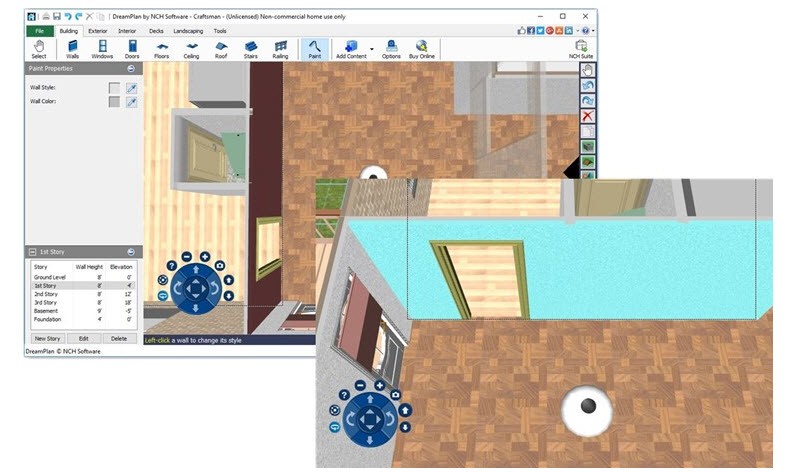
DreamPlan Home Design is a 3-dimensional house design software that allows a user to design, visualize, and edit architectural concepts easily and naturally. You can use this tool to design a new home, remodel an already existing home, or even make some plans for landscaping their property. It is designed to serve average homeowners, students, and small contractors, who require something straightforward but efficient enough to make an idea a reality.
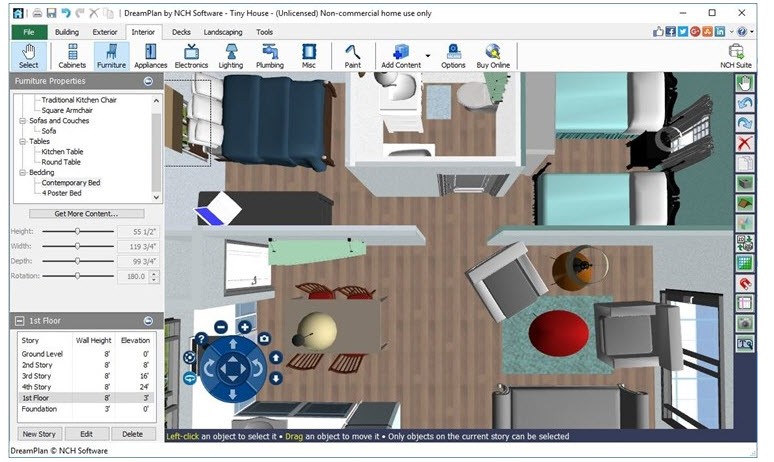
The software will enable you to make elaborate floor plans, adjust the wall structure, and experiment with interior and exterior features such as windows, doors, furniture, and lighting. You can toggle view modes 2D blueprint, 2D rendered, and 3D, which will assist you in developing the visual perception of how the completed space will appear and feel.
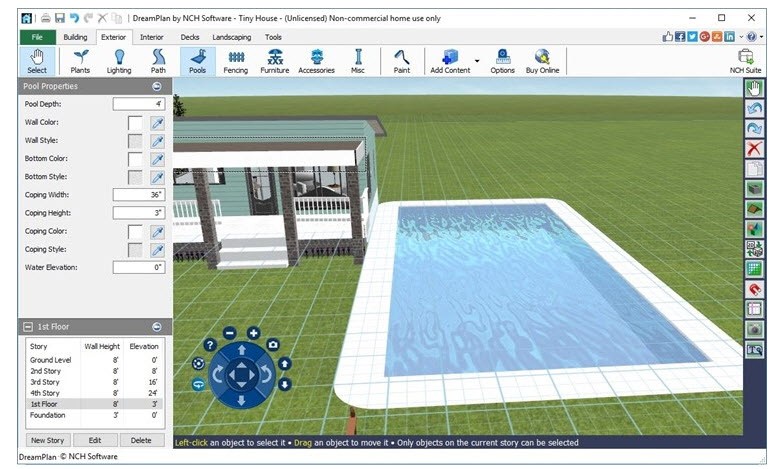
DreamPlan does not just deal with indoor decor, but there are also outdoor decoration tools like garden, pool, patio, and deck. It is adaptable and easy to the point that you can create one yourself or bring an existing floor plan picture, trace over it, and transfer it into a 3D one. The outcome is a lifelike and interactive depiction of your project that can be edited, modified, and rethought infinitely.
Why Should I Download DreamPlan Home Design?
DreamPlan is unique since it does not make the design process complicated. There are numerous tools on the market that are designed to assist professionals in home design, whereas DreamPlan is designed on the premise of simplicity: the software itself is instinctive even to novices. One does not require an architectural background to grasp its tools and draft a plan that is detailed plan.
The interface is clean, and the majority of actions are performed with the help of simple drag-and-drop actions. You describe the layout of your home, add rooms, move the walls, and add a door or a window. After that is completed, the software provides the creative possibilities, you can adorn interiors, explore various textures and materials, or redesign furnishings to understand how the space will flow. The 3D preview mode allows you to walk through your design and make any decisions with the confidence that you can actually take any real-life steps.
The other attraction is the outdoor design mode and landscape. You form gardens, trees, and even landscapes to observe how your house would fit in the surroundings. It also enables deck and pool design so that it is possible to plan entire property layouts and not just the inside.
The trace mode of DreamPlan is particularly useful to remodelers' ability to import existing floor plans or blueprints and convert them into editable 3D objects. Then you can adjust the design, switch materials, or model renovations.
The software has the advantage of not tying you to its default library, as you can import 3D models (OBJ or STL files). You are able to introduce personal elements or even get models online to suit the vision.
Is DreamPlan Home Design Free?
Yes. DreamPlan has a non-commercial free variant you can download. The software is available to use at home and downloaded and used without paying or creating an account. The free version has all the necessary tools, such as 3D design, furniture installation, and landscape design.
In case you are interested in it as a business, commercial design, or work, a paid version is offered. It contains other features, the right to license, and support.
What Operating Systems Are Compatible with DreamPlan Home Design?
DreamPlan Home Design is compatible with Windows and macOS. It supports versions of Windows 7 to Windows 11; on Mac, it supports macOS 10.5 and above.
In the case of a Windows user, it is very simple; one just has to download the setup file from the official site of NCH Software and apply the installer. DreamPlan has sample projects to start with and tooltips that describe important features once it has been launched. It is also compatible with moderate systems because it does not need hundreds of megabytes of disk space and an ordinary graphics card.
It provides the same experience on macOS, where all features and design options are available without requiring the use of high processing power. Both sites permit the import and export of models, screenshots, or project files in mainstream formats such as JPG, PNG, OBJ, STL, and web-based 3D viewers.
Cloud integration is also another handy feature since DreamPlan can save and share your design directly through Google Drive, OneDrive, or Flickr. This simplifies the process of collaborating in case you are working with a contractor with friends, or clients who need to see some of your visual ideas.
What Are the Alternatives to DreamPlan Home Design?
MagicPlan is an online floor plan and design software that is available on mobile devices and can ease the process of measuring rooms and creating 3D models. Contractors, interior designers, and homeowners tend to use it when they need to create a layout quickly using only a smartphone or a tablet. You take a scan of a room using your camera, and the app would make a floor plan automatically, including measurements. It is also possible to add objects and furniture, as well as notes, to your layouts using MagicPlan. It is cloud-based and, therefore, you can share and sync projects with ease. Nevertheless, MagicPlan is being more utilized in floor planning than the entire 3D view or landscape design than DreamPlan.
The free, open-source Sweet Home 3D provides strong interior design abilities. Just like DreamPlan, users are able to draw floor plans, furnish rooms, and watch their creations in 3D. It runs on Windows, macOS, and Linux, and can be used to load models and textures stored in external libraries. Although it is more technical and less aesthetically polished than DreamPlan, it lets the user have a fair deal of control over dimensions and structure. It is particularly useful for DIYers who require a free and easily customizable design environment, together with an opportunity to export their work flexibly.
Home Design 3D is a cross-platform house designing application liked by iOS and Android users. It is about fast, visual editing, allowing you to draw rooms, edit the thickness of the walls, and play around with furniture placement in an easy drag-and-drop interface. It has a 3D preview mode, which is identical to DreamPlan in real time, and interior and exterior design are available. The free version is limited only to saving and exporting, whereas the paid upgrade provides the full functionality. It can be used anywhere and is easy to handle; hence making it an excellent option for those who would rather design using mobile devices and tablets instead of using desktops.