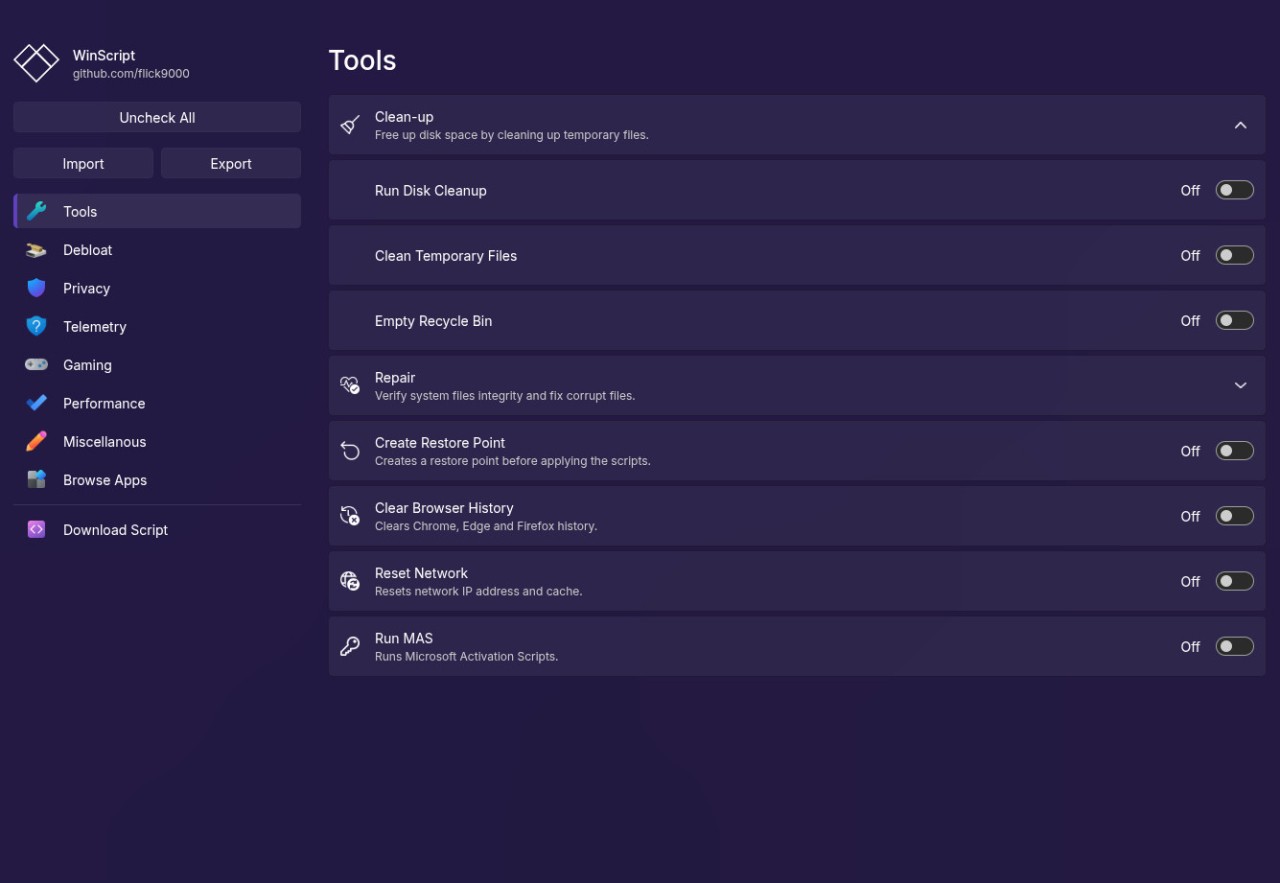
WinScript is a free Windows tool that provides one with control over their operating system. It does not create one-click optimizers or locked-up boost tools; rather, it generates custom scripts. WinScript generates a script in which the user selects the type of changes he or she wishes and then executes the script, and these changes are directly applied to Windows.
The tool majors on four distinct aspects, namely, eliminating unnecessary Windows components, reducing telemetry, tracking, enhancing performance by capping background services, and installing common applications in bulk. These tasks are already being done manually by many advanced users using PowerShell, registry modifications, or group policy modifications. WinScript collects such actions into a cleaner, more organized working process.
WinScript is well articulated. All the modifications, deletions, or changes are presented in a clear, visible format and do not run in the background with ambiguous labeling or without any preset options. This allows users to view the precise upgrades on Windows and the impact of services or features on the system.
All the features of WinScript are absolutely free and publicly available on GitHub as GPL-3.0. The code can be inspected by anyone, improved, or changed to suit his or her use. Due to this transparency, it is common among power users, developers, and privacy-conscious users because it allows them to have an amount of finesse without writing scripts themselves.
WinScript is a platform that can be used to customize Windows to suit the requirements of the user instead of blindly modifying Windows.
Why Should I Download WinScript?
It is downloaded by the majority of users who are frustrated by the default Windows behavior. Background applications, telemetry, and pre-installed and persistent functionality, such as widgets or cloud syncing, use resources or increase privacy risk but provide minimal value to some users.
WinScript is a compromise between hand-tuning and automated debloaters. Instead of executing a large-scale script, which removes dozens of elements simultaneously, users select the changes to implement. This is flexible and can fit a situation that is privacy-oriented, performance-oriented, or a cleaner system.
One of the frequent applications is privacy control. WinScript allows one to turn off Windows, Office, updates, search, and feedback telemetry. It also restricts the data gathering of third-party programs like development utilities, graphics utilities, or services that are attached to a cloud. This degree of control is also a significant motivator to use the tool by users who want to use local-only systems or do not need much tracking.
Another advantage is performance tuning. WinScript can customize the startup behavior of background services, turn off features such as indexing or hibernation, and make power-related adjustments. On less high-spec or older hardware, the changes cause a noticeable decrease in background load. On more modern systems, they are used to decrease clutter, not increase the raw speed.
In configuring a new PC, the app installer of WinScript allows the user to create a script to install popular software through Chocolatey or Winget. This is time-saving in cases of reinstalling Windows or installing many systems sharing the same structures.
WinScript is not an automated optimizer with zero risk. It must be run by an administrator, and certain options could have an impact on system features when selected without prior knowledge. It is suitable for people who desire to be in control and are ready to make informed decisions.
Is WinScript Free?
Yes, it is completely free. The software is released under the GPL 3.0 license, and thus, there is neither a paid version nor a subscription nor a limitation on features. GitHub is an open-source platform that can be accessed to obtain all updates, scripts, and features. The developers are free to take up voluntary contributions to assist in the development process, though they need not actually use the software. There are no advertisements or premium accounts in the application.
What Operating Systems Are Compatible with WinScript?
WinScript is only compatible with Windows, Windows 10, and Windows 11. The tool is very much based on PowerShell and the native Windows commands and therefore needs to be run on a regular Windows installation as an administrator. It is also not officially supported on older systems (Windows 7 or Windows 8), as some of the services it uses may be absent or vary.
WinScript does not run on macOS or Linux and is not designed to be executed under compatibility layers like Wine, as it interacts directly with Windows services, policies, and the registry. The program is also lightweight and does not consume highly required memory and CPU resources; hence, it works on both modern and older hardware. The given options should not be overlooked by the users, particularly when it comes to the machines that depend on such features as enterprise sync, biometric authentication, or cloud integration. Concisely, any system that is running Windows 10 or Windows 11 in a native mode can support WinScript.
What Are the Alternatives to WinScript?
Bloatynosy Nue is a Windows debloating utility targeted at Windows 11. It has a user-friendly, visual, and scriptless interface to uninstall apps, customize privacy settings, and clean up user interface elements. It is more beginner-friendly than WinScript and less transparent and low-level friendly. It applies to the user who will not need to go through all the changes one by one to get the desired outcome. Users usually download Bloatynosy Nue when they want a quick cleanup experience without dealing with scripts or advanced settings.
Win11Debloat is a debloating project based on scripts that targets Windows 11. It eliminates telemetry, built-in applications, and background services with scripted programs. It is less flexible, more aggressive, and faster than WinScript. The script is run as-is by the user and therefore is suitable for advanced users who have a complete understanding of what is being removed. Most people download Win11Debloat to apply fast, predefined changes on a fresh Windows 11 installation.
NTLite is a commercial Windows customization and deployment server. It enables the user to customize Windows images before installation, eliminate components, combine drivers, and configure unattended deployments. NTLite has added more control, which is more complex compared to WinScript. It offers many advanced features that are paid and are not aimed at casual and home users but at system administrators and enterprise users. System administrators usually download NTLite as part of a larger workflow for managing and deploying Windows systems.