Smart glasses might be an increasingly popular category, but there’s still a lot that needs to be figured out. Privacy—specifically whether we should really be walking around with cameras on our faces at all—is a major issue that’s pretty far from being solved. Or what about apps? If we’re wearing recording devices with screens on our faces, what should they do for us, exactly?
There are more basic and practical problems than those, too, like how the hell do you even use something without a touchscreen or traditional controller in the first place? So far, we’ve seen quite a few possible answers to that question—wristbands, touchpads, rings, voice prompts—but it’s taken until now to see what could be the Holy Grail of inputs: eye tracking.
Thanks to a company called Everysight, we now have the first smart glasses capable of tracking your eyes, and I got a chance to try them out. Based on my experience, the future of smart glasses inputs appears to be as interesting as it is unpolished.
Eye didn’t know smart glasses could do that
First, let’s backtrack. Eye tracking is a method of input used in adjacent XR devices like the Apple Vision Pro, which has internal cameras that can follow your eye movements, letting you navigate menus and apps using your gaze. It’s arguably one of the top things that makes the Apple Vision Pro feel substantially different from its peers—it’s not new, but it is new to the smart glasses form factor.
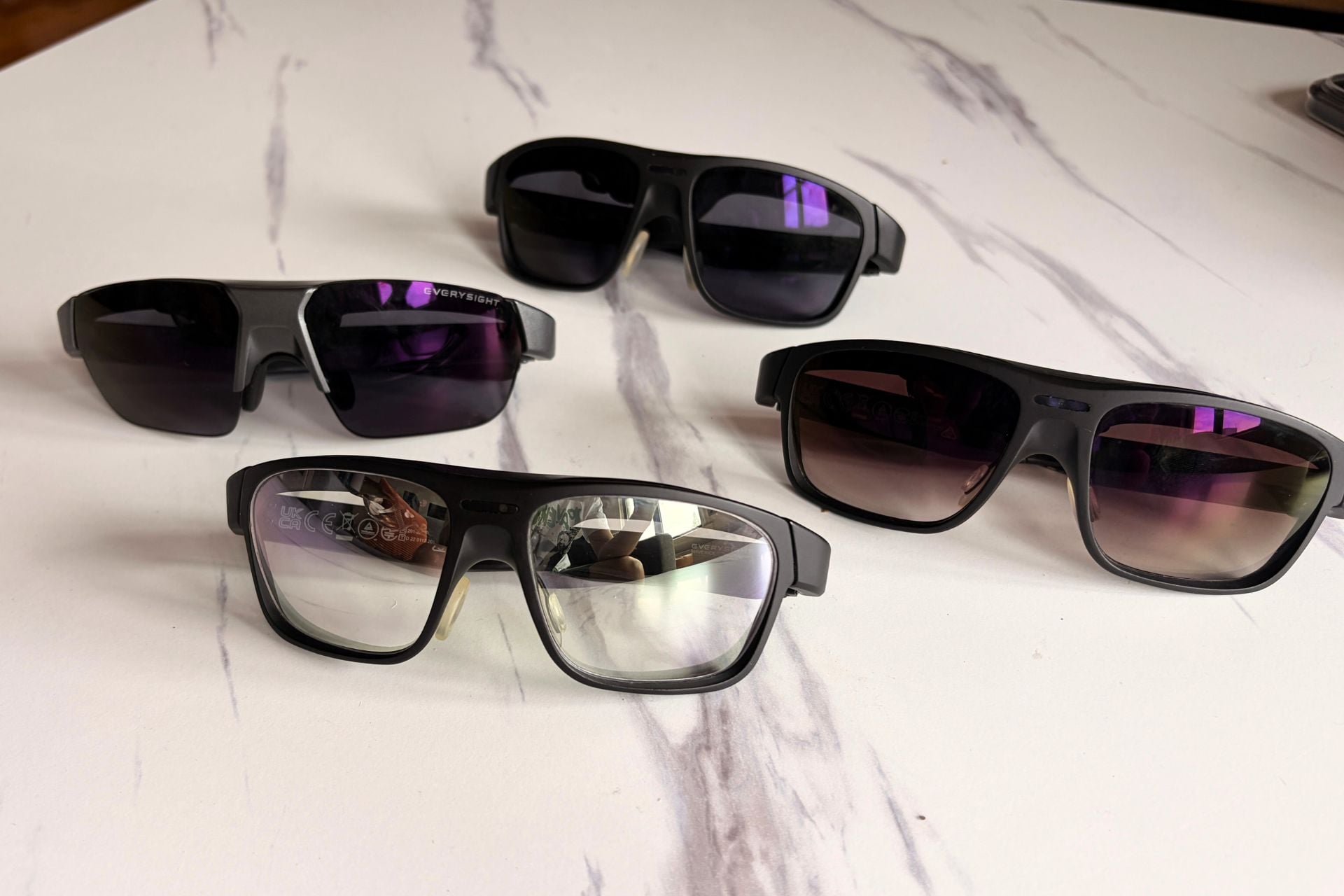
Everysight’s $599 Maverick AI Pro smart glasses have an eye-tracking module embedded in the frames that weighs less than 1g, so while you might think a gadget that mimics the 650g Apple Vision Pro would be hefty, the Maverick AI Pro actually only weigh 47g. For context, that’s a full 22g lighter than the Meta Ray-Ban Display, Meta’s only smart glasses with a screen.
Setting up eye tracking is simple in practice, but it’s also temperamental. To activate the Maverick AI Pro’s eye tracking, all you have to do is look at a circle and then a square that appears on the smart glasses’ display. After a quick calibration that takes five to eight seconds, you should be able to use your eyes as a cursor.
Once I was fitted with the correct-sized smart glasses (the distance between your eyes is a major factor that dictates whether you can even see the screen, so sizing is crucial), eye tracking worked fairly well for me. I was able to breeze through a demo of looking at apps, anchoring my gaze until they disappeared from the screen. This is how “select” works in the Maverick AI Pro, unlike the Vision Pro, which also tracks your fingers in addition to your eyes.
Other demos were more hit and miss, like a stock-tracking app that showed me a stock’s price fluctuation over time when I hovered my eyes over the chart. Though the eye tracking worked okay, a lag made scanning the chart feel less than seamless. Using my eyes to flip between menu screens, however, was more fluid, accurately assessing my gaze to slide left or right between different windows carousel-style.
There’s also the issue of placement. Eye tracking requires a specific fit on your face to work properly—the calibration won’t work if you can’t see the screen right—and it’s also thrown off by small adjustments of the smart glasses on your face. After calibrating the eye tracking, I adjusted the smart glasses to sit on a different part of my nose, and the whole thing was thrown off. I was told by Everysight’s CEO and CFO, David McLauchlan and Jeff Freedman, my slight readjustment was the reason for the suddenly wonky tracking.
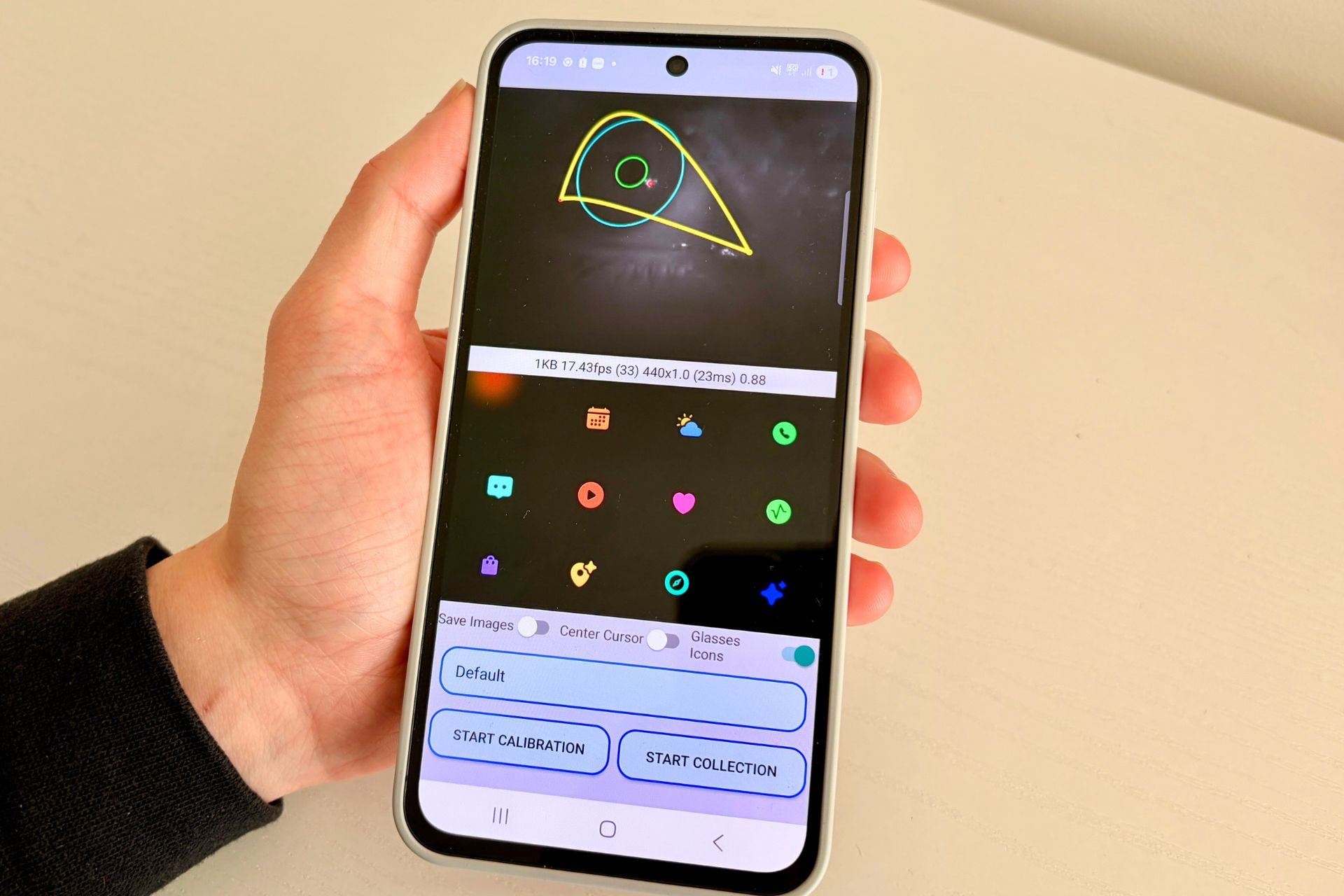
Needless to say, that’s not an ideal UX, but Everysight says they’re working to get calibration to be as fluid as possible and hopefully cut down on calibration time in the future. Whether they can actually do that is anyone’s guess, but for now, this is the experience that’s available, which is to say, there are bumps to smooth out.
While I wasn’t able to use eye tracking outside of the demos provided for me, I would also imagine a major hurdle will be balancing when eye tracking even comes into play. Sure, sometimes you want to use your eyes to navigate a menu, but other times you’re just looking at stuff. Finding the right ratio between engaging eye tracking and knowing when to shelve it will be a difficult one, though even if Everysight doesn’t nail that aspect, it hopes that another company using its technology might.
Everysight for everyone?
While Everysight is making the Maverick AI Pro as a standalone gadget, it also envisions its smart glasses as more of a template for what it can offer other manufacturers, technology-wise. Outside of the novel eye-tracking module, the next splashiest part of the Maverick AI Pro is its display technology. Unlike other smart glasses, which use waveguides—a piece of glass that carries light from a projector to your eye—Everysight’s smart glasses are projected straight onto the lens and then reflected. Since the Maverick AI Pro don’t have to force light through layers of glass, its smart glasses require a lot less power and use far less energy to light up a display.
Everysight’s projection tech has a lot of benefits. Not only does it optimize battery efficiency (the Maverick AI Pro get about nine hours of battery life, according to Everysight, compared to the Meta Ray-Ban Display, which get about six), but it also cuts down on weight since the lenses don’t require thick, layered glass. Those things are a big factor in how light the Maverick AI Pro are and a compelling pitch to other smart glasses makers who might be looking to ditch waveguides for something lighter with a longer battery life. There’s just one issue with Everysight’s technology stack: you can see it inside the glasses.
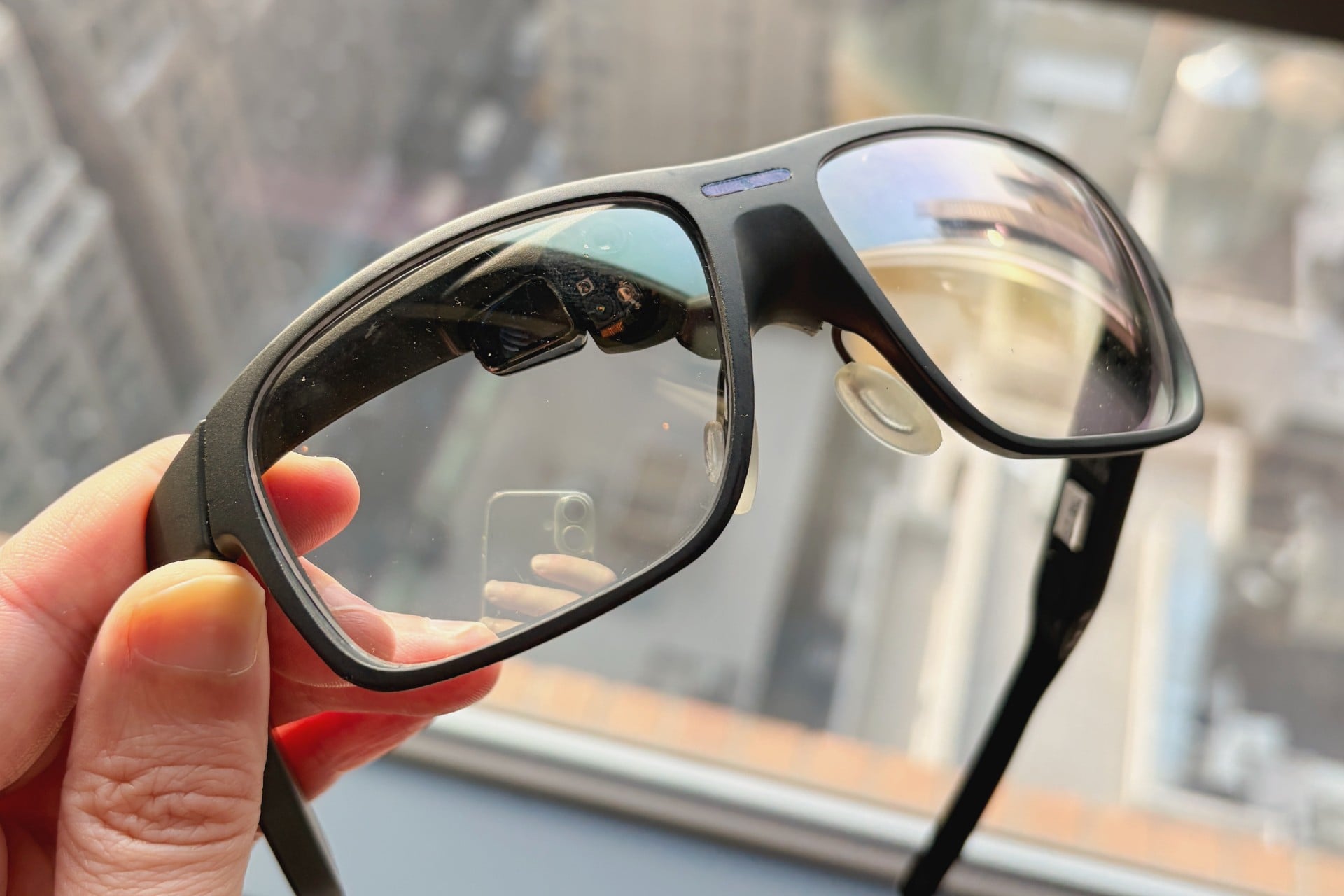
While it’s not Google Glass levels of obviousness, if you’re using clear lenses, their eye-tracking and projection modules are noticeable from the outside, which might be undesirable for people who want a pair of smart glasses that just look like glasses. Everysight says it’s working to solve for that by experimenting with how far they can move both modules up out of sight on the frames without affecting performance, but for now, you’re stuck with a pair of smart glasses that clearly have tech in them.
The good news is the projection tech inside the Maverick AI Pro does work. I was able to see the display inside Gizmodo’s sunny office even while using a clear, untinted pair. With transition lenses (something Everysight is apparently planning down the line), I’m going to assume it would look even sharper. The Maverick AI Pro have 5,000 nits of peak brightness, which is the same as the Meta Ray-Ban Display, but with a much higher resolution. Everysight says its projection tech can output at 1,280 x 720, as opposed to the Meta Ray-Ban Display, which has a display resolution of 600 x 600. Since the display is being projected, you can also move its location a bit across the lens, too, instead of being fixed into a corner like the Meta Ray-Ban Display.
In my experience, the Maverick AI Pro’s screen is impressive and can hang with competitors made by RayNeo and Inmo, which is notable given the fact that the Maverick AI Pro are much less chunky than those smart glasses. It might not be Vision Pro levels of fidelity, but for a pair of very lightweight smart glasses, projection feels promising.
A step towards… something
There’s a lot I’d need to know before declaring that the Maverick AI Pro are a pair of smart glasses you should actually spend money on—I’d need to test them outside of the demos provided to me in a real-world setting—but there’s some promise.
My gut tells me that they’re a good first draft, but that Everysight’s stack of technology (eye tracking and projection) has a long way to go before it’s perfected. On the surface, there are clear benefits, especially considering the fact that Meta’s Neural Band, while interesting, doesn’t feel like something you’d want to use long-term.
For now, eye tracking feels like it’s mostly an enticing concept that smart glasses can leverage, and whether we’ll ever get to a point of refinement is anyone’s guess. As popular as smart glasses have become as of late, they’re also the subject of backlash because of their ability to record discreetly and Meta’s mishandling of its users’ data. If the category actually has a future at this point is debatable.
If it does have legs, though, it doesn’t take a high-tech eye-tracking module to see that Everysight is onto something.