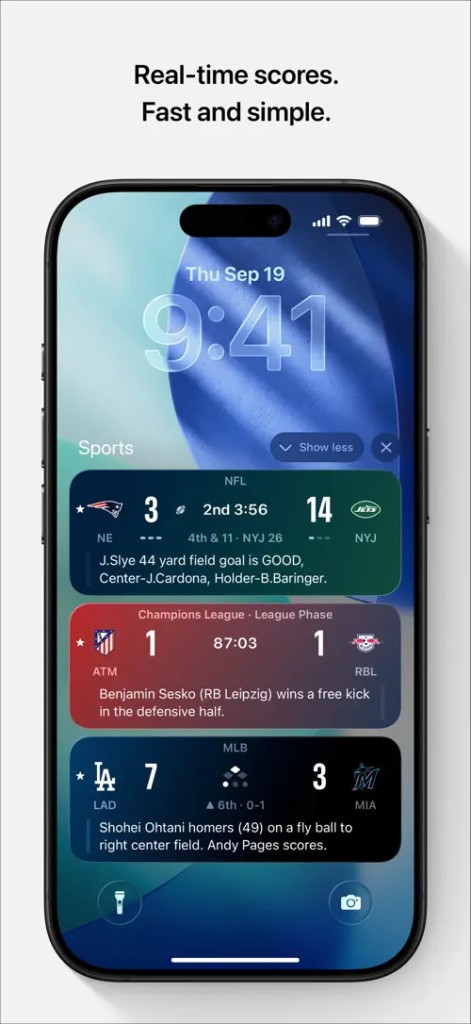
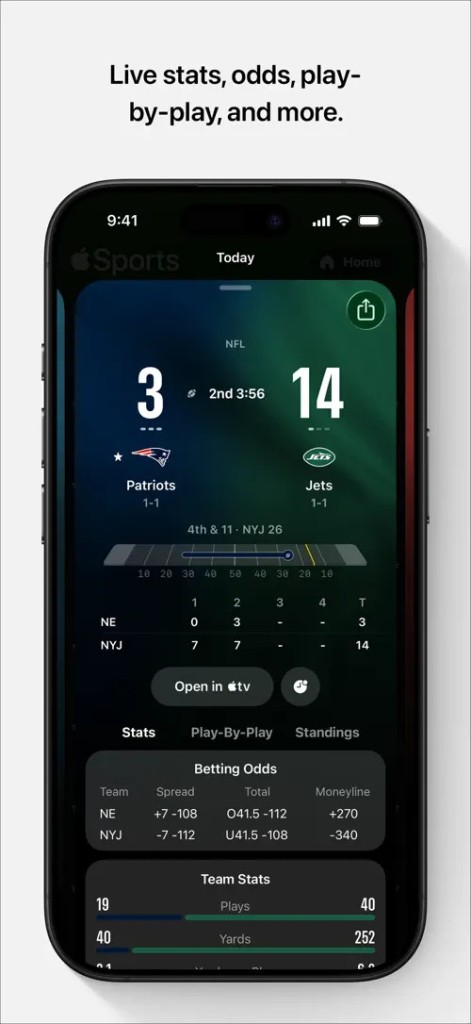
Apple Sports is a real-time scores and stats app built to be fast and straightforward. You can follow favorite teams, leagues, and tournaments, set a home view that mirrors your interests, and open game pages that show score, clock, play-by-play, box score, team stats, lineups, and odds. Turn on Live Activities to keep a game on your Lock Screen during play, allowing you to glance at updates without unlocking your phone.
You can tap from a game card to watch in the Apple TV app or continue into connected streaming apps where available, with the understanding that viewing depends on services and rights. Sync what you follow with My Sports so the same teams and leagues appear in the Apple TV app and Apple News when you sign in with the same Apple Account.
The app offers a clean layout that prioritizes speed over clutter, provides quick search when you need a specific matchup, and features schedule views for recent, live, and upcoming games. Apple Sports keeps the core data close and the deeper context one taps away, which makes the path from a notification to a box score short and predictable. It is designed for repeat checks across a busy day and for those moments when you just need the number right now.
Why Should I Download Apple Sports?
You should download it if you want live scores that update fast and an interface that gets out of the way. You can set your scoreboard once, follow the leagues that matter, and let the view surface today’s action without sorting through unrelated matches.
Swipe the schedule to jump between yesterday, today, and the next few days, which helps when you only have a minute and need to find a kickoff or first pitch. Open a game for context instead of just a number, then back out with one gesture to the board. You can rely on Live Activities on iOS 18 to keep a game fixed on your Lock Screen so you do not miss a turn, drive, or power play.
Apple Sports allows you to add a widget to your Home Screen to keep quick access to scores and schedules within reach. You can keep teams and leagues synced across Apple Sports, Apple TV app, and Apple News through My Sports, so you set preferences once and see them in more than one place. The value is simple: fast data, predictable navigation, and a small jump from score to watch options when rights and services allow.
Of course, you can use a mobile data connection or Wi-Fi for updates and keep background refresh enabled so numbers stay current when you return to the board. You can add a widget to your iPhone Home Screen to jump back into scores, and you can keep notifications enabled for games you track closely. If you travel, you can expect coverage and some features to reflect the region you are in. The intent is to meet you where you already are with your phone and watch, not to add another device or workflow, and to keep your preferences tied to your account rather than a single device.
Is Apple Sports Free?
Apple Sports is free to install and free to use. You can open it, follow teams and leagues, check live scores and stats, and get useful value on day one without paying. You can tap to open live games in the Apple TV app and explore viewing options in connected streaming apps, but any live video depends on your subscriptions, your region, and current broadcast rights.
The app requires a data connection or Wi-Fi for real-time updates, which is normal for live sports. You can expect availability and some features to vary by country or region over time, since league coverage and integrations change. You can choose to keep notifications light or turn on more alerts for closer tracking, and you can adjust them later if they become too noisy during busy slates.
Nothing here forces a paywall for the basic score experience, so you can keep up with your teams, check lines and box scores, and watch the clock without adding another monthly bill. The model is straightforward, and the day-to-day use stays focused on speed.
What Operating Systems Are Compatible with Apple Sports?
Apple Sports is compatible with an iPhone running iOS 17.2 or later. You can turn on Live Activities for Lock Screen updates when your iPhone uses iOS 18 or later, and you can see glanceable progress on Apple Watch with watchOS 11 or later. You can sign in with your Apple Account so the teams and leagues you follow carry into the Apple TV app and Apple News through My Sports, where supported, which saves time across services.
What Are the Alternatives to Apple Sports?
Bleacher Report: Sports News may be considered as an alternative in case you want to receive a mixture of scores and breaking news, and a stream of highlights on the same web resource. It lets you monitor teams and leagues, lets you send an alert and leave a live score to resume in an article, clips, or shows without having to switch. It is also skewed towards the media, personalities, and event reporting that ride the wave with the big moments, which is popular among those fans who want game discussion and not the numbers on the board. This alternative is appropriate when you prefer to get a combination of updates and analysis, and video in a feed.
The next alternative, provided there is speed and alerts on the first page of your list, is theScore: Sports News and Scores. You can follow the league, personalize notifications to a great extent, and rely on speedy and readily readable game pages that can retrieve the pertinent statistics and game crews. It has a signal-first approach in which pushes are fast and the app is simplified and more focused on the scoreboard rather than on the long stories, which is helpful because you read hundreds of games a day and do not have to make an extra effort. This practice works in case you are in a hurry and you need to be on point.
Alternatively, you can choose the Athletic: All Sports News because you may find that deep reporting and analysis are the most valuable to add. You can watch a game live, then get into long reads, tactics, and coverage of a team that goes far beyond the recap. It is built in a way that fits the reader who wants professional writers to provide context to what transpired and why, the reader who wants context to be created, and the reader who is interested in creating trends over the course of a season. This is a good choice when you are accustomed to looking at the score and reading something important.