Dark themes can make working at night more comfortable, but not every Windows program includes one. Older applications, in particular, may only offer a traditional light interface. Dark Mode Any App provides a simple workaround by applying a dark filter to individual applications, including those that do not natively support dark mode.
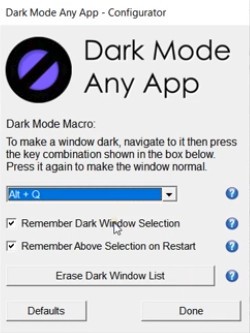
The utility is designed to be quick to use. Once installed, you can press Alt + Q while using an application to switch its appearance to dark mode. Press the same shortcut again to restore the normal display. You don't need to navigate through menus every time you want to change an application's appearance.
Dark Mode Any App also remembers which applications you've set to dark mode by default. This means you can keep your preferred programs dark without manually applying the filter each time. It is aimed at Windows users who want a straightforward way to change the appearance of older or unsupported software, rather than a full desktop customization suite.
Why Should I Download Dark Mode Any App?
Dark Mode Any App is useful if you regularly work with Windows software that doesn't offer a dark theme. Instead of changing your entire desktop's appearance, it lets you apply a dark filter to individual application windows. This makes it a practical option for older programs that have limited appearance settings or no dark mode at all.
The main appeal is its keyboard shortcut. Press Alt + Q while an application is active to apply the dark filter, then press it again to return to the normal appearance. You can also change the shortcut in the program's settings. The utility runs in the background, so you don't have to open its interface every time you want to switch an application. Dark Mode Any App can remember which applications you prefer to keep dark, saving you from repeating the process whenever you reopen them.
Is Dark Mode Any App Free?
Dark Mode Any App offers a free 30-day trial with full functionality, but it is not permanently free. After the trial, you need a lifetime license to continue using it. The developer also offers free updates with that license.
What Operating Systems Are Compatible with Dark Mode Any App?
Dark Mode Any App is designed for Windows. It supports Windows Vista, Windows 7, Windows 8, Windows 10, and Windows 11, with installers for both 32-bit and 64-bit systems. The developer has not tested compatibility with other Windows versions. This wider range of support makes it an option for people still using older PCs or legacy software.
What Are the Alternatives to Dark Mode Any App?
Auto Dark Mode is a free, open-source utility for Windows 10 and 11 that automatically switches your system between light and dark themes. You can schedule the change around sunrise and sunset, set specific times, or use keyboard shortcuts to switch manually. It also supports changes to your wallpaper, mouse cursor, and accent colors. Unlike Dark Mode Any App, it primarily manages Windows' system and app themes rather than applying a dark filter to individual windows that lack native support.
Easy Dark Mode offers a simpler way to switch between Windows' built-in light and dark display modes. You can change themes with one click or use a keyboard shortcut and assign different desktop wallpapers to each mode. It also includes a wallpaper creator and manager. The software is free to use and supports Windows 10 and 11. It's a good fit if you want to change the appearance of your Windows desktop quickly, but it doesn't provide the same window-by-window filtering approach as Dark Mode Any App.
WindowTop is another Windows utility with a dark mode feature that can force individual windows into a darker appearance, including applications without native dark themes. It works by inverting window colors and can detect when a window is already dark to avoid applying the effect unnecessarily. It also includes an image-filtering option designed to prevent photos from being inverted, although this can affect rendering performance. WindowTop is a broader window-management tool, with additional features such as transparency controls, picture-in-picture, and always-on-top settings. Its dark mode is reported as stable on Windows 11, while Windows 10 support may be less reliable.