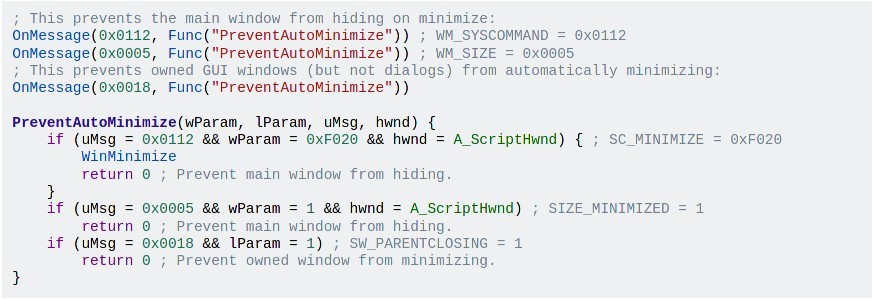
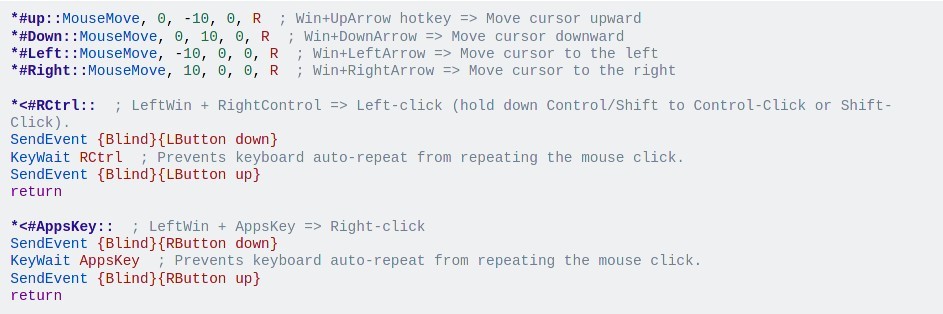
AutoHotkey is a scripting language and automation tool built specifically for Windows. It lets you create custom keyboard shortcuts, remap keys, build macros, automate form filling, simulate mouse movements, and write scripts that handle just about any repetitive task you can think of. At its simplest, AutoHotkey lets you set up a hotkey that opens a website by pressing a simple key combination. At its most advanced, it lets you build full GUI applications, interact with the Windows API, parse data, and automate complex multi-step workflows across different programs.
What makes AutoHotkey unusual compared to other automation tools is that it's a full scripting language rather than just a macro recorder. Scripts are plain text files with an .ahk extension, and the syntax is designed to be approachable even if you've never programmed before. A basic hotkey definition takes just a couple of lines. But the language also supports object-oriented programming, loops, conditionals, regular expressions, COM integration, and DLL calls, allowing experienced developers to build genuinely sophisticated tools. The community around AutoHotkey is large and active, with forums full of shared scripts, tutorials, and troubleshooting help that make it easier to get started and keep building.
AutoHotkey v2 became the primary version in early 2023, bringing a cleaner syntax and improved architecture, while the legacy v1 branch reached end of life in 2024. The project is licensed under the GNU GPLv2 and remains actively maintained with regular updates.
Why Should I Download AutoHotkey?
The biggest reason to download AutoHotkey is its ability to eliminate repetitive work. For example, if you find yourself typing the same phrases over and over, clicking through the same menu sequences, or performing the same file operations daily, AutoHotkey can turn those tasks into a single keystroke or an automated background process. Hotstrings let you type a short abbreviation and have it automatically expand into a full sentence, email signature, or block of code. Hotkeys let you bind any action to a key combination, from launching applications to resizing windows to running complex multi-step scripts.
Key remapping is another popular use case. You can reassign any key on your keyboard, disable keys you accidentally hit, or remap your entire layout from QWERTY to Dvorak. CapsLock can become a useful modifier key instead of an annoyance. Gaming is another area where AutoHotkey sees heavy use, since you can create macros that execute multiple actions simultaneously or remap controller inputs to keyboard commands.
Beyond simple shortcuts, AutoHotkey handles window management, clipboard manipulation, file system monitoring, registry editing, image and pixel searching, HTTP requests, and process automation. You can write scripts that watch a folder for new files and automatically process them, fill out web forms with stored data, or control media playback with custom gestures. The scripting language gives you access to the full Windows API through DllCall, meaning there's very little on a Windows system that AutoHotkey can't interact with.
Scripts can also be compiled into standalone .exe files that run on any Windows machine without requiring AutoHotkey to be installed. That makes it practical to share your automation tools with coworkers or deploy them across multiple computers. The resource footprint is minimal, so scripts run in the background without any noticeable impact on system performance.
Is AutoHotkey Free?
AutoHotkey is completely free and open-source under the GNU GPLv2 license. There are no paid tiers, no feature restrictions, and no ads. Every capability of the language is available from the moment you download it.
The project is community-maintained with source code hosted on GitHub. There's no company behind it pushing upgrades or subscriptions. You get a full-featured scripting environment at no cost, which is part of why AutoHotkey has maintained such a loyal and active user base over the years.
What Operating Systems Are Compatible with AutoHotkey?
AutoHotkey is designed exclusively for Windows. It runs on Windows XP through Windows 11 and works with both 32-bit and 64-bit systems. The current v2 branch requires Windows 7 or later for full compatibility.
There is no native macOS or Linux version. AutoHotkey is deeply integrated with the Windows operating system at a level that doesn't translate directly to other platforms. Mac and Linux users looking for similar automation capabilities would need to explore platform-specific alternatives. On Windows, AutoHotkey runs with a very small footprint, requiring less than 100 MB of disk space and minimal RAM for most scripts.
What Are the Alternatives to AutoHotkey?
TinyTask is a minimalist macro recorder that takes the opposite approach from AutoHotkey. Instead of writing scripts, TinyTask lets you simply press record, perform your actions, and press stop. TinyTask captures your mouse movements and keystrokes and plays them back exactly as recorded. At just 36 KB, it might be the smallest automation tool existing, and it's fully portable with no installation required. TinyTask can even compile recorded macros into standalone .exe files. TinyTask is free for personal use and ideal for anyone who wants quick, no-code automation without learning a scripting language. The trade-off is that TinyTask has none of the conditional logic, variables, or advanced control that AutoHotkey provides.
RoboTask is a no-code automation platform aimed at users wanting serious power without writing scripts. ToboTask includes over 300 built-in actions covering file handling, FTP transfers, email automation, SQL databases, web form filling, Excel manipulation, image processing, and more. A visual task builder lets you create complex workflows with conditional logic, loops, and variables through a graphical interface. RoboTask can run as a Windows service for 24/7 automation on servers and supports triggers based on schedules, hotkeys, file changes, window events, and system conditions. It also integrates with Python, JavaScript, and PowerShell for additional flexibility. RoboTask offers a free 30-day trial, after which a paid license is required. RoboTask is a strong option for IT professionals and business users who need enterprise-grade automation.
FastKeys is an all-in-one Windows automation tool that bundles text expansion, a customizable start menu, keyboard shortcuts, mouse gestures, macro recording, and clipboard management into a single lightweight application. FastKeys includes over 500 ready-to-use commands and supports AutoHotkey scripting for advanced users who want to go deeper. FastKeys is designed to be accessible to non-technical users while still offering enough depth for power users. A free trial is available, and perpetual licenses start at an affordable one-time payment with no recurring subscription. If you want AutoHotkey-level control wrapped in a more visual, user-friendly interface, FastKeys bridges that gap nicely.