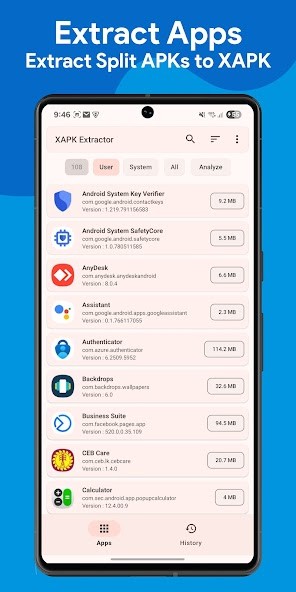
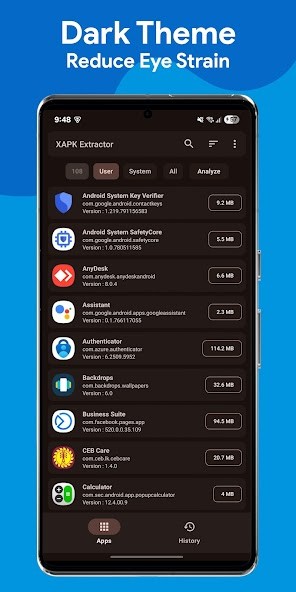
XAPK Extractor & App Analyzer is an Android utility trusted by over a million users that handles something most people don't think about until they need it: getting apps off your phone in a format you can actually keep. Modern Android apps are increasingly distributed as App Bundles, meaning the Play Store delivers split APKs tailored to your specific device rather than a single universal file. That's efficient for Google, but it makes backing up, sharing, or transferring your apps much harder. XAPK Extractor & App Analyzer solves this problem by letting you extract installed apps as either standard APK files or complete XAPK bundles, giving you portable copies that work on other devices.
Beyond extraction, the app includes an analyzer that digs into the technical details of every app on your phone, covering permissions, services, activities, SDK targets, and installation sources. If you've ever wanted to know exactly what an app is doing under the hood, or you're trying to track down a suspicious process, this is the tool that surfaces that information in an organized and visual way. The whole thing runs without root access, comes in at just over 5 MB, and works on Android 7.0 and up.
Why Should I Download XAPK Extractor & App Analyzer?
The main reason to download XAPK Extractor & App Analyzer is to control your apps. When you buy a new phone, do a factory reset, or simply want to share an app with someone, having a backup file on hand makes the process painless. The app offers three extraction modes: Smart Mode automatically picks the best format for each app (APK for single-file apps, XAPK for split ones), APK Mode extracts everything as traditional APK files for maximum compatibility, and XAPK Mode creates complete bundles with all split components included. That flexibility matters because modern apps and games often won't install correctly from a simple APK alone.
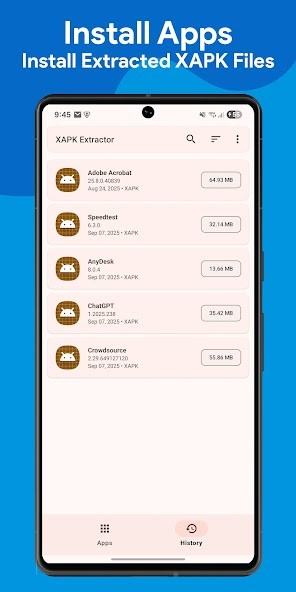
Backup management is well thought out. You can choose where to save extracted files, whether that's internal storage, an SD card, or a custom folder. Backups survive app uninstalls and factory resets, and there's an organized list where you can view, install, or delete your saved files. You can also install both APK and XAPK files directly from within the app, which eliminates the need for a separate installer tool.
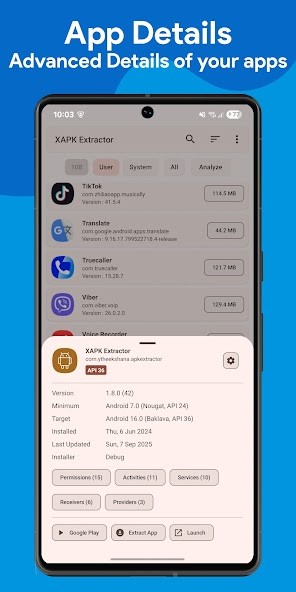
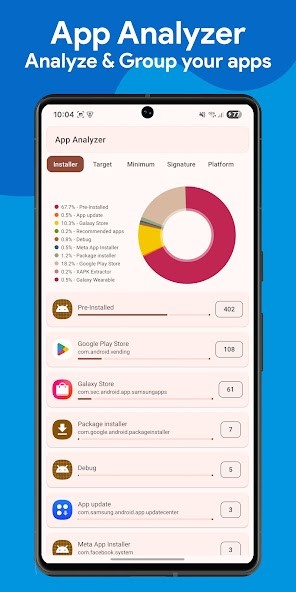
The app analyzer is the other half of the equation, and it's surprisingly detailed. You can inspect any installed app and see its permissions, services, activities, SDK information, and system status. Advanced graphs let you group apps by target SDK, minimum SDK, install location, platform, installer source, and signature. This kind of visibility is useful for developers, security-conscious users, and anyone curious about what's actually running on their device. One user credited the analyzer with helping them locate a malicious app masquerading as a system process, something that mainstream security apps had missed.
The interface is clean and supports dark mode. There are no ads in the core experience, though premium options are available for additional quality of life features. Searching for a specific app is fast, and you can jump straight to the Play Store listing or system app info page with a single tap.
Is XAPK Extractor & App Analyzer Free?
XAPK Extractor & App Analyzer is free to download and use. The core features, including extraction in all three modes, backup management, direct installation, and the full app analyzer, are available without paying anything.
The app does include ads in the free version, and there are optional in-app purchases that remove ads and add convenience features. The fundamental functionality isn't gated behind a paywall, so casual users and anyone who just needs to extract or back up a few apps can do so without upgrading.
What Operating Systems Are Compatible with XAPK Extractor & App Analyzer?
XAPK Extractor & App Analyzer is an Android-only app. It requires Android 7.0 (Nougat) or higher and works on both phones and tablets. The app is lightweight at around 5 MB and runs without root access, so it works on virtually any Android device that meets the version requirement. It's available on the Google Play Store.
What Are the Alternatives to XAPK Extractor & App Analyzer?
If you're looking for something with a different focus or feature set, three alternatives worth considering are Install Buddy, XAPK Installer by TarrySoft, and XAPK Installer APK Downloader by Smartago.
Install Buddy is a clean, focused installer that handles APK, XAPK, APKM, and APKS files with a one-tap workflow. It also includes app backup and restore features, an advanced mode for selecting specific components from an archive before installing, and customizable backup folder locations. The interface uses a modern dark theme and keeps things simple without cluttering the screen. Install Buddy is a good fit if your primary need is installing package files from outside the Play Store and keeping backup copies of your apps, rather than deep analysis or technical inspection.
XAPK Installer by TarrySoft takes a minimal approach. It scans your device for XAPK files and installs them with minimal input, automatically handling the extraction of OBB data and placing files in the correct paths. There's no app analyzer, no backup history, and limited configuration, but that simplicity is the point. If you just need to install a downloaded XAPK file quickly without any extra features getting in the way, this is one of the most stripped-down options available.
XAPK Installer APK Downloader by Smartago is the most feature-rich alternative on this list. It supports APK, XAPK, APKS, APKM, AAB, ZIP, and OBB formats, and it includes a standout feature for Android TV users: Web-to-TV remote installation, which lets you sideload apps onto a Fire TV, Android TV box, or Xiaomi Mi Box from a browser on another device. It also offers app management, storage cleanup for leftover OBB files, and VirusTotal-based malware scanning before installation. The app works on Android 5.0 and up, including devices without Google Mobile Services. If you need broad format support, TV sideloading, or pre-install security checks, this is the most versatile installer of the bunch.