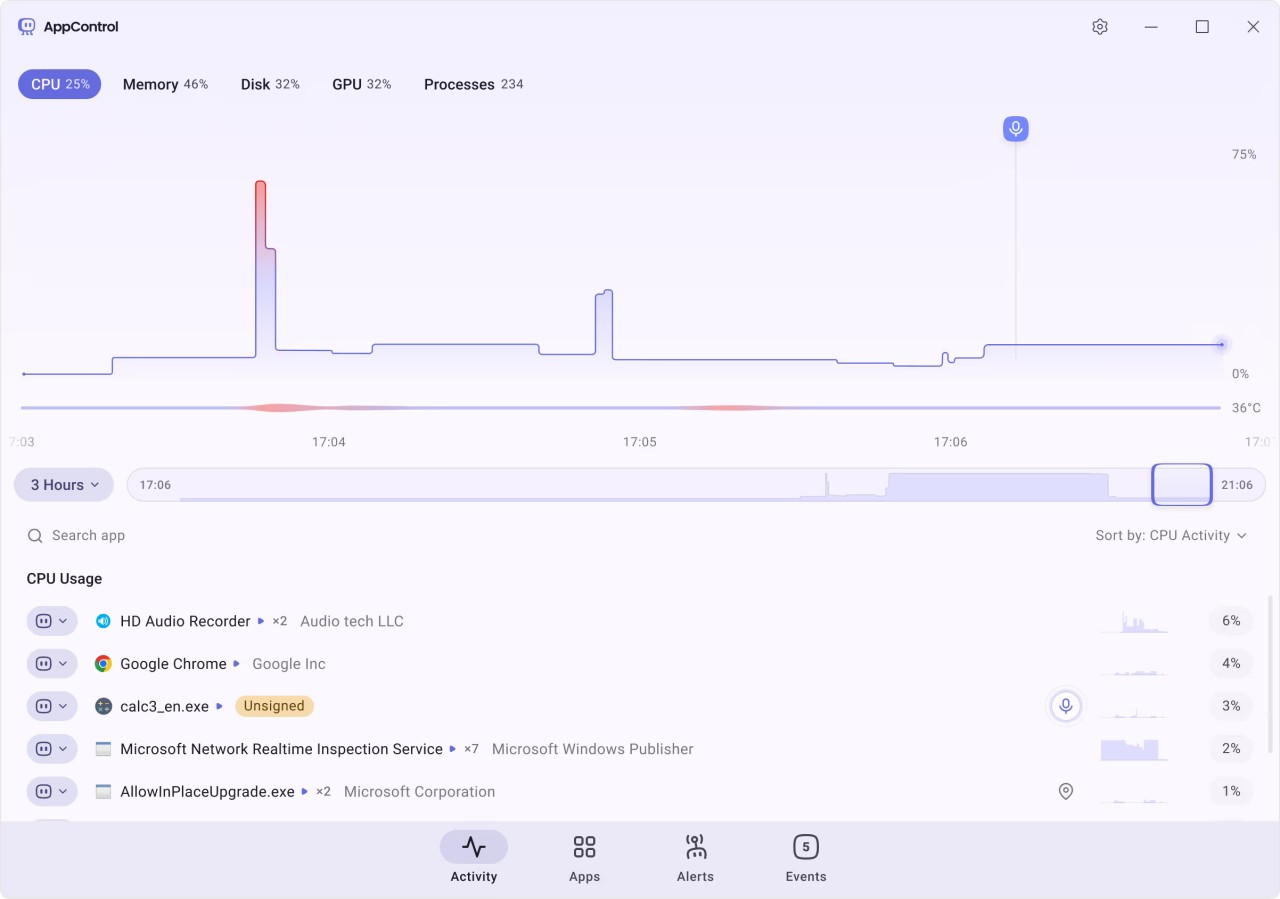
If you are looking for a modern tool to replace Windows Task Manager, you are in the right place. AppControl is an application for your Windows PC that gives you control over your computer’s health. It focuses on identifying apps that drain your computer’s resources, as well as specifying which resources are being drained. Those include GPU, CPU, disk usage, and memory. You can view the program’s history to see which apps created issues for your computer in the past. Instead of simple data analysis, AppControl gives you the option to end resource drainage forever by removing and blocking especially harmful applications.
AppControl keeps track of the security of your computer system. You can get notified when your hardware, like your microphone or camera, is in use. All suspicious applications and programs will be met with the same fate, as AppControl tries to keep your computer free of malware.
The program boasts a friendly user interface with very simple controls. You don’t need to be a skilled IT professional to use it.
Why Should I Download AppControl?
Windows computer owners can benefit from AppControl for many reasons. As a traditional task manager, it keeps track of the health of your computer and its individual parts. The main objective of the app is to show you which apps use your computer resources the most and which resources have been compromised. It gives you an overview of the health of your GPU, RAM, CPU, disk, and temperature. Instead of showing you which part of your system is running at the moment, it will show you data accumulated over the past couple of days. Use the app’s history to go back in time and see what has been the problem in the past. That allows you to find the exact apps responsible for draining your computer’s resources at a certain time.
Once you’ve found the applications that are especially harmful to your computer, you can stop using them once and for all. AppControl allows you to block them with ease. It will also keep you in the loop by explaining the processes behind the ways these applications run, and the reasons why they are so harmful to your PC. The entire platform is geared towards regular users with no background in IT, so anyone can benefit from it. The platform is quick and light.
Another focus area of AppControl is security. The tool can let you know when your computer’s hardware is being accessed by another application. It will send an alert if a suspicious or unknown application is running, making sure your PC stays malware-free. All the apps that are running in the background when you’re using your computer will be displayed, so you can have a clear overview at all times.
Is AppControl Free?
AppControl is a free application for Windows computers. You do not need to register to use it.
What Operating Systems Are Compatible with AppControl?
AppControl is an application for Windows computers. It is not available on computers with other operating systems.
What Are the Alternatives to AppControl?
If you’re looking for a more advanced task manager, you will appreciate Process Explorer. Process Explorer is more than a simple task manager; it is an analytics tool for diagnosing issues. This tool is only suitable for developers and experienced IT professionals, as opposed to AppControl, which is user-friendly and suitable for all. It provides more detailed analytics and explanations, leading the user to the core of the problem. If you don’t know what to do with that information, then this tool is not for you. You can also use it to debug systems and scan processes for viruses and malware.
Those who wish to take it one step further should try System Informer. It is an even more in-depth task management tool that gives you insight into your computer’s systems. The tool can be used to monitor resource usage, flag bugs and viruses, and see which local files are being used by which applications. Unlike AppControl, this application does not require installation, making it an even lighter task manager. The program is free and open-source.
Another alternative is the task manager TaskExplorer. The program is very advanced, despite the fact that it is free. TaskExplorer will work for people who want to have a better overview of the processes taking place in their Windows computer. A person with no background in IT will not be able to interpret the data provided by the app, so make sure you will find it useful before committing to this option. The platform also gives an overview of resource usage via graphs, enabling better comprehension.