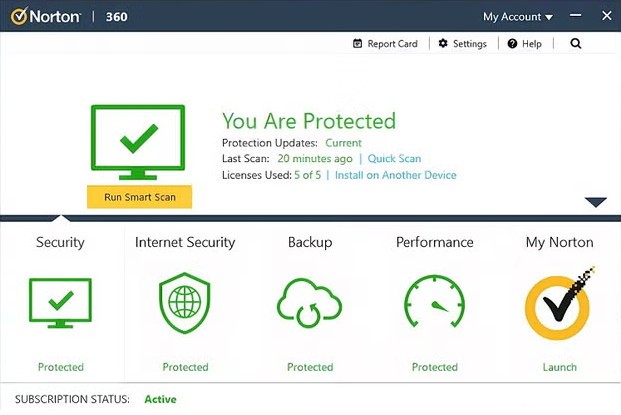
Norton 360 is a security suite that covers more ground than a standard antivirus program. It runs quietly in the background, monitoring threats, blocking viruses, and keeping your browsing, online shopping, and general internet activity protected without requiring constant attention. The goal is security that works without getting in your way.
The package bundles several protection tools into one subscription: antivirus, firewall, VPN, password manager, dark web monitoring, and identity protection features, with availability varying by plan tier. At first glance, Norton 360 might look like another bloated security suite trying to do too much, but in practice, it manages to stay out of sight while handling a significant amount of work behind the scenes. It scans, updates, checks network connections, and resolves issues automatically around the clock. Once installed, the core protections stay active and running without needing you to babysit them. Norton 360 earns its reputation through quiet, dependable operation rather than flashy notifications.
Why Should I Download Norton 360?
Norton 360 gives you the peace of mind that comes from knowing your security is being handled in the background. It takes care of the tasks most people don't want to think about: malware scanning, Wi-Fi security checks, device protection, and software updates. Online threats grow more sophisticated every year, and having something running constantly to catch them means one less thing to worry about.
What sets Norton 360 apart from simpler antivirus programs is how cleanly it integrates multiple services into a single dashboard. Antivirus, VPN, password management, and monitoring tools all live in one place, which saves you from installing and managing separate applications for each function. Updates are handled efficiently, and alerts only appear when they actually need your attention. Norton 360 doesn't bombard you with unnecessary notifications or congratulate itself for doing its job. It just works.
Under the surface, Norton 360 runs some genuinely intelligent protection systems. Beyond basic virus scanning, it includes behavior-based monitoring that watches for suspicious activity patterns, cloud backup for important files, and a smart firewall that adapts to your network environment. These systems continuously learn and improve, adding layers of protection that go deeper than a simple signature-based scanner.
Parental controls are available in certain plan tiers, giving parents the ability to set online boundaries and guidelines for younger users. Combined with the VPN, password manager, and dark web monitoring, the full feature set operates as a unified protection system rather than a collection of disconnected tools.
The core appeal of Norton 360 comes down to automation. You install it, it runs, and you get on with your life. Digital security shouldn't feel like a second job, and Norton 360 keeps it that way. The clean interface and genuine protection capabilities behind it make a strong case for the download.
Is Norton 360 Free?
Norton 360 is not free. It requires a paid subscription, though a free trial may be available depending on current promotions. Several plan tiers exist with different feature sets and device limits.
The subscription cost reflects the breadth of what's included. Between the antivirus engine, VPN, password manager, cloud backup, dark web monitoring, and identity protection features, the value is solid for users who want an all-in-one security solution rather than piecing together separate tools.
Is Norton 360 Free?
Norton 360 is not free. Users must subscribe to Norton 360 through a payment system, although they might access a free trial period depending on some circumstances. The complete set of security features that come standard with this price creates excellent value for users worldwide.
What Operating Systems Are Compatible with Norton 360?
Norton 360 runs on Windows, macOS, Android, and iOS. The software adapts to each platform automatically while maintaining its core feature set across all devices.
Key protections like antivirus scanning, VPN access, and real-time threat detection work the same regardless of whether you're on a laptop or a phone. For anyone who regularly switches between devices throughout the day, Norton 360 keeps protection consistent without requiring separate configurations for each platform.
What Are the Alternatives to Norton 360?
Norton 360 covers a lot of ground, but a few competing suites offer similar protection with different approaches to pricing, performance, or interface design.
Avast One matches Norton's scope by bundling antivirus protection, a built-in VPN, and system cleanup utilities into one package. The interface is clean and beginner-friendly, making it easy to get set up and start using without much configuration. Avast also includes data breach alerts and a firewall component. If you want a security suite that presents its options clearly from the start and doesn't require much digging to find what you need, Avast One is a solid pick.
Avira Prime is known for running light and fast. It covers antivirus, VPN, system cleanup, a software updater, and a password manager while keeping its footprint small enough that you're unlikely to notice it running. Avira prioritizes quiet efficiency, which makes it a strong choice for users who don't want their security software slowing down their system. The interface is streamlined and minimal, and the overall performance impact is consistently low.
AVG Ultimate combines antivirus protection, system tuning utilities, VPN access, and tracking prevention in one package. It's aimed at users who want solid security paired with performance optimization tools. The dashboard gives you a clear, real-time view of your protection status, and the built-in performance optimizer can help speed up devices that have gotten sluggish over time. For users who want their security suite to pull double duty as a system maintenance tool, AVG Ultimate covers both roles.