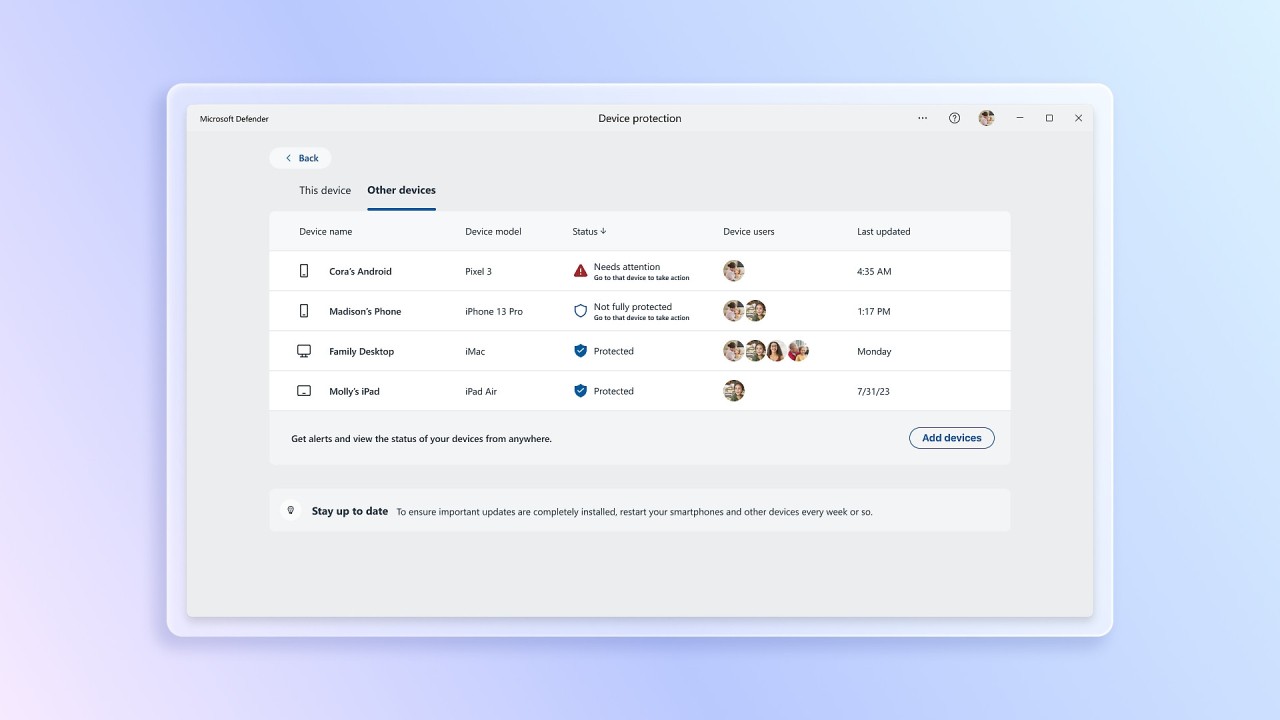
Microsoft developed Defender as an integrated antivirus program that protects Windows computers from malware, ransomware, viruses, and other online threats. The solution runs as part of the Windows operating system to watch system actions while executing file checks and providing continuous protection from multiple security vulnerabilities. The automatic enablement on Windows devices for Microsoft Defender makes this security solution immediately active during initial system setup, since users do not need to install it manually.
Through real-time scanning, Microsoft Defender runs an active check for threats that stop dangerous system operations before they cause damage. The immediate blocking of emerging threats happens through its cloud-based defense system. Microsoft Defender runs an automated update system for its malware threat database so it can protect against current malware variations effectively.
Microsoft Defender supplies users with protection features that extend past basic antivirus functions, which include firewall control in addition to phishing and ransomware security features. Users can access all their security management settings through Windows Security Center since Microsoft Defender provides integrated functionality. Users who value background-running performance in their antivirus solution should consider this security program because it offers lightweight protection for their system.
Why Should I Download Microsoft Defender?
Users who want basic computer security on Windows devices should consider Microsoft Defender built-in protection, since it requires no third-party antivirus software at all. The main benefit is its inclusion with Windows operating systems because users avoid both installation and configuration work for additional antivirus products. The system begins its real-time protection as soon as users turn it on because it needs no extra setup functions.
The strong security delivered by Microsoft Defender does not impact system resources to an unacceptable degree. Most third-party antivirus tools affect computer performance because of their intensive background framework activities. The Windows ecosystem represents the natural environment where Microsoft Defender operates safely without impacting system performance. Defender actively scans for security threats while users perform their normal tasks because it operates in the background to protect against online threats.
Microsoft Defender tackles digital world privacy and security issues through its compiled features, which include both ransomware defense and phishing protection capabilities. The built-in system automatically identifies and blocks harmful links, together with dangerous downloads that threaten user information. The controlled folder access tool from Microsoft Defender protects essential files from being encrypted by ransomware attacks specifically designed for users maintaining critical data on their system. Additionally, Microsoft Defender offers anomaly detection using machine learning to identify and block previously unknown malware based on unusual behavior patterns.
Windows features Microsoft Defender in a way that makes it effortlessly accessible for users. Defender updates automatically through Windows Update because it works side-by-side with the operating system, while other third-party antivirus programs need users to maintain separate dashboards and manually update security definitions. Users gain improved security by having Defender integrate with their Windows Firewall platform. Microsoft Defender also includes SmartScreen protection, which warns users about potentially malicious websites and downloads, helping to prevent phishing and malware attacks.
Microsoft Defender provides users with parental control functions alongside application tracking capabilities for enhancing their security management. Defender provides parents and businesses with different solution options, which include parental content restrictions through Defender and the endpoint security solution Defender for Endpoint for corporate environments. Furthermore, Microsoft Defender offers device performance and health monitoring tools, providing insights into device performance and health, allowing users to optimize their system's efficiency.
Microsoft Defender stands as an excellent security system because it protects users effectively while needing no additional setup or maintenance work. Customers receive complete protection from antivirus capabilities and firewalls, and additional security components through one unified solution suited for those who are new to security, along with those who are experienced with security systems. The Windows-using community can depend on Microsoft Defender for free security services, which stand among the best Windows-based solutions without forcing extra software installations.
Is Microsoft Defender Free?
The Windows operating system provides Microsoft Defender free of charge to all its users. Users of Windows operating systems receive Microsoft Defender at no additional cost since it integrates with their system update process. Microsoft Defender delivers complete security protection while remaining totally free from charges that are common in other free antivirus solutions without premium upgrades. The Windows Security suite automatically updates its components, including Microsoft Defender, and makes it available for free to all users.
What Operating Systems Are Compatible with Microsoft Defender?
Users can run Microsoft Defender on Windows 10 and Windows 11 through their current operating system installations. The software installation process requires users to activate built-in capabilities from the operating system versions without any external requirements. The security features of Microsoft Defender now include Windows Server editions, which protect the enterprise network systems.
Microsoft released Microsoft Defender for macOS devices and Android, as well as iOS, through the business-focused Microsoft Defender for Endpoint platform. Only Windows users receive full access to the consumer version, while enterprise customers of Microsoft can access security solutions across diverse platforms. At present, Microsoft Defender operates exclusively on Windows-based platforms, so it serves most home users as their antivirus solution.
What Are the Alternatives to Microsoft Defender?
Bitdefender Antivirus Free Edition stands out as one of the most sought-after replacement solutions because of its popularity. The malware detection capabilities of Bitdefender excel while keeping a lightweight system profile. Bitdefender operates silently in the background as it provides robust real-time protection, unlike other antivirus programs that create system performance issues. Users who need more protection than what Microsoft Defender provides can choose Bitdefender Antivirus Free Edition because it features advanced threat defense along with anti-phishing security and ransomware remediation capabilities.
Avast Free Antivirus functions as another potent antivirus option for users. The protection suite from Avast offers full security through its real-time checks and protection for email and wireless network evaluation. This powerful virus scanner detects and removes existing threats, helping to prevent future infections. Behavior-based detection technology stands out in this security solution since it detects abnormal user behaviors that could signal malware presence. Users have raised privacy issues about past data collection by Avast Free Antivirus, but the engine behind its protection offers advanced capabilities as one of the best free solutions in the market. Users demanding extra functionality beyond what free plans offer can choose from Avast’s paid plans to access features such as VPN services and enhanced firewalls.
Those seeking the combination of security and privacy will find Kaspersky AntiVirus Standard to be an excellent solution. Kaspersky Antivirus presents malware-detecting expertise through a suite of security features that includes password management and data leak prevention, and automatic cloud-based update services. Kaspersky Standard offers advanced security with anti-phishing and firewall included, clean-up and app management tools to optimize performance, and a Safe Money feature to protect online payments and transactions. Users can access platform compatibility from Kaspersky beyond Windows systems, as the solution provides coverage for both macOS and Android devices, whereas Microsoft Defender solely supports Windows systems. The security tools of this solution surpass basic antivirus functions, making it an optimal selection for people who seek both security solutions and features to enhance privacy.