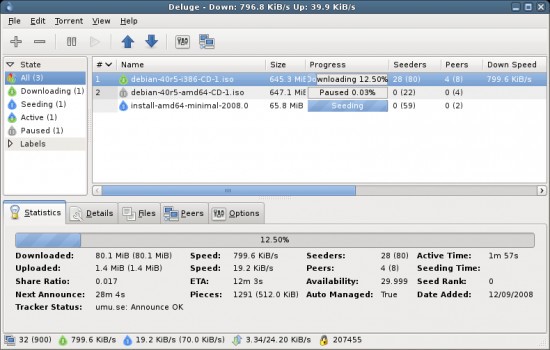
Deluge is an open-source, lightweight BitTorrent client for downloading and sharing files over peer-to-peer networks. It does not try to impress you with a flashy interface or pile on unnecessary features. Instead, it focuses on being fast, efficient, and easy on system resources while giving you reliable torrent management through a clean, minimalist design.
What sets Deluge apart from most other torrent clients is its modular approach. Out of the box, the interface is simple and uncluttered, but a plugin system lets you add exactly the features you need and skip the ones you do not. Whether you are grabbing a single document or managing a large video collection, Deluge handles it without complaint. Some users keep things basic, while others build out a highly customized setup using the available plugins. The client can operate in a traditional standalone mode or as a client-server system for more advanced remote management.
Why Should I Download Deluge?
If you have spent any time with torrent clients that bundle adware, push premium upgrades, or clutter the screen with pop-ups, Deluge feels like a breath of fresh air. There are no ads, no upsells, and no distractions. The app runs quietly, does its job, and stays out of your way. For a lot of users, that simplicity alone is reason enough to make the switch. Deluge is also genuinely lightweight, so you will not notice any performance hit even when running multiple downloads at the same time.
The app works well for both casual and experienced users. Getting started is as simple as dragging a torrent file into the window. From there, advanced users can tap into plugins that add scheduling, bandwidth throttling, detailed file management, and the ability to control downloads remotely from another device. Deluge starts lean and lets you layer on capabilities as your needs grow, rather than forcing everything on you from the beginning.
Desktop integration is another area where Deluge gets things right. It sits naturally on Windows, macOS, and Linux without trying to override your system's look and feel. The interface stays consistent across all three platforms, and the app blends into your desktop environment without drawing unnecessary attention to itself. That kind of restraint is something a lot of users quietly appreciate.
Stability is a genuine strength. Where some torrent clients become unreliable during heavy use, Deluge holds up well even during high-speed, high-volume downloading sessions. The project has been actively maintained by its open-source community for years, with bugs addressed quickly and the codebase kept clean. That track record of steady, dependable performance is a big reason the software has kept a loyal user base over time.
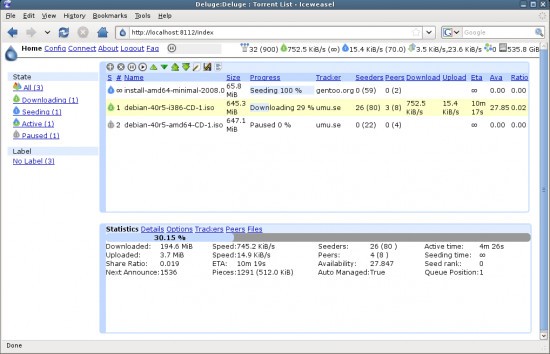
Deluge also supports headless operation, which means you can run it on a remote server and manage your downloads from any device through a web interface. That makes it a natural fit for seedbox setups, home media servers, or any situation where you want to keep torrent activity off your main machine. Whether you are running it on a laptop, a desktop, or a dedicated server, the experience stays consistent and unobtrusive, letting you focus on getting your files downloaded safely and efficiently.
As your needs evolve, Deluge grows with you. New plugins and configuration options let you refine the download experience over time, and the interface never becomes harder to navigate as you add more features. It is a tool that stays useful whether you are just getting started with torrents or have been managing them for years.
Is Deluge Free?
Deluge is completely free to download and use. It is open-source software with no hidden costs, no trial periods, and no premium tiers that gate off features behind a paywall. There are no ads anywhere in the application. Every feature is available to everyone from the moment you install it, and users with programming knowledge can modify and customize the source code to suit their own needs.
What Operating Systems Are Compatible with Deluge?
Deluge runs on Windows, macOS, and Linux. It is compact enough to work well on older hardware and flexible enough to deploy on server environments. Since Deluge is built on Python, having the correct Python runtime installed is necessary for it to function, whether you are running it locally or on a remote machine.
One of the advantages of Deluge is that it behaves the same way regardless of which operating system you use. The interface, features, and overall experience are consistent across platforms, which is a real convenience for anyone who works across multiple systems.
What Are the Alternatives to Deluge?
The official BitTorrent client is one of the most widely recognized alternatives, and it carries the name of the protocol itself. The interface is easy enough to navigate, and it performs adequately for basic tasks. However, BitTorrent has drawn criticism over the years for bundling promotional ads and pushing users toward paid premium editions. It still works, but users who want a clean, ad-free experience without subscription prompts will find it a step down from what Deluge offers.
µTorrent (uTorrent) built its reputation on being tiny and fast, and for a long time it was the default choice for millions of torrent users. In recent years, though, it has lost some of that goodwill. The installer has been known to bundle unwanted software, and ads within the app itself can be intrusive. Some users have also reported that newer versions feel less stable than the older builds. With careful configuration and some manual cleanup, uTorrent still gets the job done, but it requires more effort to keep the experience clean compared to Deluge.
qBittorrent has become one of the most popular torrent clients in recent years, and for good reason. It is free, open source, ad-free, and comes with a solid set of built-in features right from the first launch, including a torrent search engine, category organization, and IP filtering. The key difference between Deluge and qBittorrent comes down to philosophy: qBittorrent ships with most features already enabled, while Deluge starts minimal and lets you build up through plugins. qBittorrent uses slightly more resources than Deluge, but for users who want a capable, modern client that works well without any configuration, it is an excellent alternative to download.