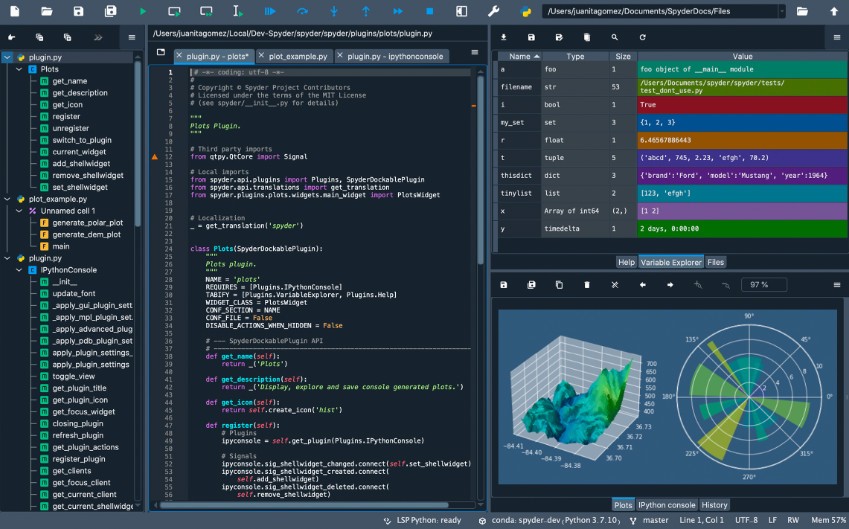
Spyder (an open-source integrated development environment, or IDE) was designed expressly with scientific computing and data analysis in Python. As the name Scientific Python Development Environment implies, it is designed to serve data scientists, engineers, and researchers, who mainly deal with numbers, plots, and big data sets. It turns out that unlike more general-purpose editors, Spyder offers a streamlined, code-centric interface tailored for technical users.
It is an integrated, powerful code editor that is designed with features such as variable explorers, interactive consoles, and integrated debugging tools. The entire design is modular, meaning you can move panels and windows according to your preferred way of working. Spyder is under the hood IPython, so you are actually experiencing Jupyter Notebook but within a more organized interface. This makes it a good choice when one desires to have code executed and inspected in the same environment.
The other aspect of Spyder that is very likable is its integration with the greater scientific Python ecosystem. It gets along with libraries such as NumPy, SciPy, pandas and Matplotlib. Be it cleaning up the data, drawing graphs, or developing machine learning models, you get all of it under one roof. And since it is open-source, it remains free and gets updated and modified by a community of developers and users.
Why should I download Spyder?
Spyder is most useful when you are working with data. The interface minimizes distractions and allows one to remain in the analysis. You have your code editor, console, variable viewer, and plot windows—all visible at once. That in itself is significant when you are testing data transformations or attempting to locate mistakes in huge arrays. Previously, to perform all the actions, you would have to switch between several tools or even scripts. With Spyder, you can do all that within a single screen.
One can distinguish the Variable Explorer. It also allows you to see and examine all the variables you declare when you are typing your program. You do not have to print arrays, dataframes, or even plots to check their contents. This is useful when doing data cleaning or debugging values that appear to be inconsistent. It is not so much like coding in the dark, but rather like dealing with live, visual feedback.
There is also the IPython integration. You obtain a super command line prompt that has memory of all the commands you have typed and which allows you to experiment with small pieces of code without having to re-execute the whole script. This feature in itself allows you to iterate more quickly and not spend time on reloading files or libraries, again and again. It becomes worth it when you have a large dataset to operate on or when training a machine learning model and tweaking it to perfection.
Spyder is also nice when going from GUI tools to the real code. It does not overwhelm you with configuration settings. The majority of the features come out of the box-ready to use. You will not have to install a dozen or so plugins to get started. The user interface is neat yet accommodating, and even a Python newbie can easily start coding.
Another strength of it is its plotting system. Plots are displayed in special windows, in which you can zoom, export, and examine data visualizations. You will not feel constrained whether you are doing a scatter plot or a heat map. This makes it excellent when presenting results, performing exploratory data analysis, or even when preparing figures to go into reports and papers.
Spyder is not demanding on the system resources either. It will not devour your RAM and make things slow, as some heavier IDEs have a tendency to do. You may install it as part of the Anaconda distribution that also provides you with immediate access to a complete set of data science tools. Combined with doing your studies or research projects, it is hard to beat that combination in an academic environment.
Built-in help and documentation tools are also available to you. Just hovering over a function will show a brief description, and it is possible to open complete documentation panels on any module or method. When you are trying out new libraries or refreshing your syntax knowledge, these reference sheets save you immensely during the work process.
And the least understood aspect, perhaps? It’s quiet. Spyder does not annoy you with popups, suggestions, and smart tips unless you request them. It honours your concentration. One simply sits down, codes, checks variables, and ensures the logic works and continues. That helps when timelines are tight or when you have to have extended periods of intense concentration.
Is Spyder free?
Indeed, Spyder is entirely free and open-source. It will not cost you anything to download, install, and use it. It is kept up by a group of developers and funded (and volunteered) by donations. No subscriptions, no backdoor upgrades, just have it all immediately available.
What operating systems are compatible with Spyder?
Spyder is operated on Windows, macOS, and Linux. One can download it separately or find it in bigger distributions, such as Anaconda, which is used by many data scientists. This gives it a very high degree of portability- it can be installed in relatively any system that has Python. Spyder is simple to install and is compatible across the key platforms, whether you work with a desktop PC or a lightweight notebook.
What are the Alternatives to Spyder?
Another fine alternative (or that of professional developers) is Wing Python IDE. It possesses powerful debugging tools, a good auto-completion engine, and remote development. Although it is more oriented toward conventional software engineering processes, it contains support for scientific packages and may be set up for data analysis tasks. The disadvantage lies in the fact that it is not completely free - some of its versions cannot operate without a paid license.
Theia IDE is more up-to-date and modular. It is cloud-hosted and can be executed in a browser, which is appealing to groups or team undertakings. It has support for several languages and extensions, thus making it a good general-purpose IDE. However, when it comes to data-oriented operations, such as plotting or variable examination, one might find it too generic and might need to adjust it more than Spyder does.
Thonny specializes in beginners. It is light, very easy, and it assists novice Python users to learn the ropes of variables, loops, and function calls. Its interface is simplistic, and the editor is more educational than powerful in terms of development. It is a fine beginning when you are new to Python and also may not have the analytical tools and depth requisite to undertake intense data science or machine learning applications.