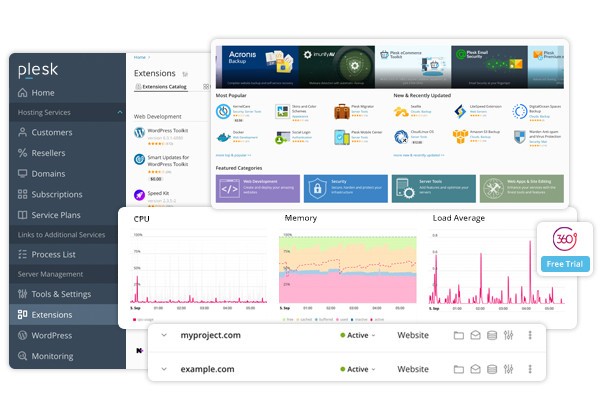
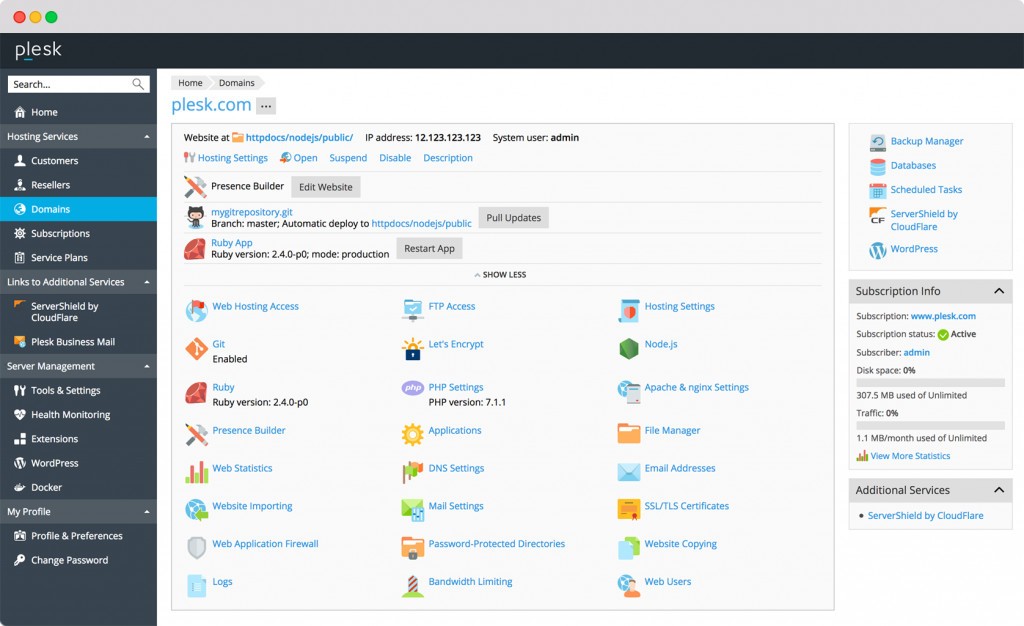
Plesk Control Panel is a panel for all things web, especially if you’re someone managing websites, domains, hosting settings, or applications. The interface is straightforward and crammed with tools that put you in control without forcing you to comb through lines of code step by step. Log in, and you get a clear idea of what’s going on, whether a site is down, how your domains are performing, what needs updating, or whether security is up-to-date.
Plesk is a sort of lifesaver to those who manage servers or have a diverse number of projects to play with. It does all of this in one place instead of running through terminal commands or various service panels. It is possible to manage mail servers, databases, backups, SSL certificates, firewalls, as well as DNS settings, all in a single location.
Plesk is not only aimed at specialists; beginners in server administration frequently find that it makes the learning curve easier. It does not conceal the complexity, but it is dealt with in a manner that seems accessible. You are not shut out of advanced features, but you’re not buried in them either.
Why Should I Download Plesk?
The thing is that Plesk is not exactly something you download and install like an app; it is a system that is integrated into your server or host environment. However, when you are running websites or web hosting services, it is one of the systems that is worth its weight in saved worry.
Consider the situation when you have to install a new WordPress installation, create email boxes, set protection settings, install add-ons, work with firewalls, and perform updates regularly. When it comes to Plesk, there is no need to have six different tools to handle it or spend hours fiddling. It is right in front of you; everything is clickable, manageable, and rather smooth. And you are not forced to go looking around for error logs in one location and SSL certificates in another. It creates the entire cohesion.
The thing that makes Plesk especially handy is that it seems to be scalable. It does not make a lot of difference whether you are hosting a single site or half a hundred sites. The interface is responsive, yet it does not overdo it. It is possible to create user roles, custom packages for clients, isolate environments, and control the resource restrictions. It allows you to become the chief of your system even without being a systems engineer.
The extension ecosystem is another thing that remains in the minds of users. When it comes to Git integration, Docker, Node.js, and, yes, security tools, such as ImunifyAV, the platform can be extended to support as broad a tech stack as you need. It is not just a control panel; now it is a development and deployment platform. Such flexibility is not easy to find among admin panels.
It is intelligent with security, also. It not only provides SSL but also gives you integration with Let's Encrypt SSL, brute force protection, and email security tools that require no manual configuration. A couple of boxes are checked, and everything powers up. Such reliability (not to mention small teams or freelancers) can mean a world of difference.
Now, Plesk is not so much a convenience tool, but a silent workhorse, especially for someone managing websites or working in hosting.
Is Plesk Free?
Plesk is not free altogether; however, a small free trial is provided. Depending on the requirements and purposes they have, most users are likely to opt for a paid license sooner or later. There are various versions of the license according to the number of domains or features to be used. It is not freeware, though it is flexible.
What Operating Systems Are Compatible with Plesk?
Plesk can be used on both Linux and Windows servers. It is compatible with large distributions such as CentOS, Ubuntu, Debian, and Windows Server versions. The system requirements are not that demanding; however, it can be utilized most efficiently when installed on clean dedicated environments. In addition, you can simply deploy it on various cloud providers as well, such as DigitalOcean, AWS, and Google Cloud, so it's no longer limited to traditional server setups. It is cloud-swift and compatible with most general platforms.
What Are the Alternatives to Plesk?
When you begin comparing Plesk with its substitutes, it helps to consider how operational you would like to be. Others are more technically oriented, others are less flexible, and some feel more suited towards particular use cases.
One of these alternatives is LiteSpeed Web Server, which places a lot of emphasis on performance. It is not a control panel but a web server, and many people choose LiteSpeed for its high performance and efficient handling of traffic. On raw horsepower and tuning of performance, LiteSpeed will prove it has what you care about. It is optimized with the use of the PHP apps and can be utilized with such control panels as cPanel. However, alone, it is more of a part of your stack than an entire management package such as Plesk.
There is Apache Tomcat. It is not a direct one-to-one comparison with Plesk; it is rather a Java servlet container and web server. Tomcat is normally used as the heart component of Java web app developers. It provides micro control, reasonable documentation, and is open source. Again, you don’t get a user interface like Plesk’s. It is more of the back end and not a friendly administration, and it needs more technical knowledge to be effective in its use.
WildFly goes further into the enterprise. It is an application server developed to handle heavy-duty Java EE applications under its previous name, JBoss. It is not intended to be used when managing the site in general. It is about deployment, modularity, and management of large backend services. WildFly is not weak, although it is intended to be used by the developers building sophisticated, layered web applications. The only reason why it will ever make sense to use it instead of Plesk is when your entire architecture is integrated with the Java ecosystem.