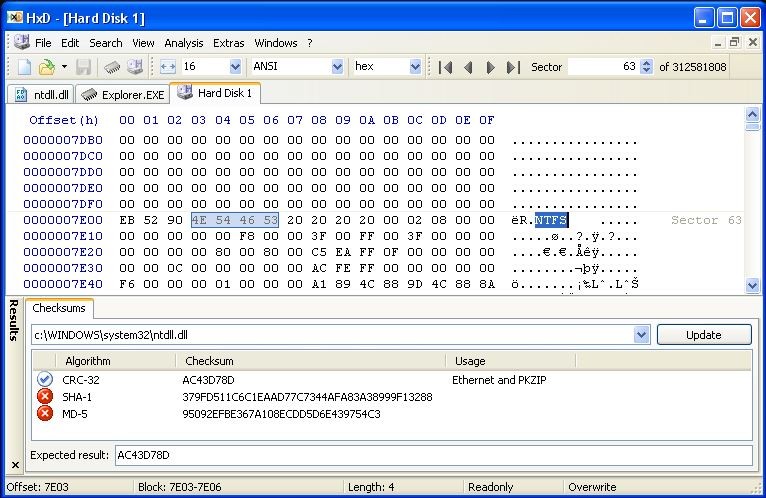
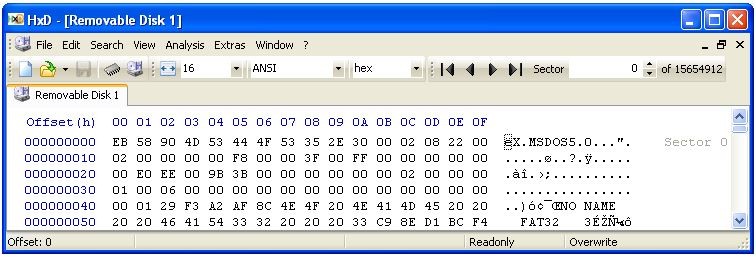
HxD Hex Editor is a hex and disk editor that allows you to view and change raw bytes of any file, disk drive, or process memory. It displays information in two panels, where you can see hexadecimal data on the left and the character representation on the right side.
Targeted at developers, system administrators, and engineers, HxD Hex Editor allows you to use its search and replace feature for hex and text patterns with wildcards or regular expressions. Apart from that, you get to run advanced analysis tools like checksums and or compare data byte by byte. The tool allows you to work with files of any size, even those of 10+ GB in size, and you can also edit the RAM memory of active processes, as well as access low-level disk data.
If you need a reliable and fast tool that doesn't slow down when working with large binaries, HxD Hex Editor is a great solution. It also supports file shredding for secure data removal. The utility only works on Windows computers, and you can either install it or use its portable version.
Why should I download HxD Hex Editor?
A lot of users choose HxD Hex Editor because it's a fast, reliable, and robust solution for editing binary data on Windows computers. It lets you work with hex data, raw file structures, and memory dumps without slowdown, crashes, or other performance issues.
When you download HxD Hex Editor, you can use it to edit and open files of any size, and that operation won't overload your RAM resources. Whether you need to access large ISOs, system images, or disk files, this utility will load them instantly, and you can then edit them in a secure environment. In order to work with multi-gigabyte documents, navigate them quickly, and edit them in real time, HxD Hex Editor uses memory mapping.
After launching HxD Hex Editor, you'll see two panels, where one shows you the hexadecimal format and the right panel displays information in ASCII or other encodings. Because of that, you can quickly identify string structures in the binaries, but you can also quickly jump to offsets, bookmarks, and previous positions, which is useful when you need to debug or inspect repetitive structures.
With HxD Hex Editor, you can use raw disk editing for both physical and logical disks and inspect boot records, partition tables, or firmware blocks. In order to edit, you need to be the system administrator, and the tool has built-in safeguards to protect your system integrity and prevent any unintended changes. These features make HxD Hex Editor especially useful if you're a digital forensic professional, system restorer, or low-level OS developer.
HxD Hex Editor can also support you when you need to debug software, patch in-memory instructions, or perform reverse-engineering of an app, as the tool allows live memory editing for active processes. It will list all running processes, so that you are able to select any one, and browse or edit their memory space.
You can also use HxD Hex Editor's search and replace features with strings, integer values, floating-point numbers, and raw hex patterns, with wildcards and regular expressions. You can apply your operations to multiple files, browse your search history, and replace data inline or between different selections. HxD Hex Editor also has a tool for comparing files byte by byte to examine changes in compiled documents, check for any file corruption, and verify firmware revisions.
If you need to check data integrity, with HxD Hex Editor, you get access to checksum and hashing tools, including CRC-16, CRC-32, SHA-1, and SHA-256. There's also a built-in file shredder so you can overwrite and permanently delete sensitive files while following standards for secure file removal. When you download HxD Hex Editor, you get all its features for free, and there are no background services or hidden trackers.
Is HxD Hex Editor free?
Yes, you can download HxD Hex Editor and use it without any cost. The tool is distributed as freeware, so there are no paid or expanded versions. You also get access to all the features and future updates without charge.
What operating systems are compatible with HxD Hex Editor?
Since HxD Hex Editor is a Windows utility, it supports a wide range of versions, such as Windows XP, Vista, 7, 8/8.1, 10, and 11, in both 32-bit and 64-bit architectures. It can work on legacy machines as well as more modern computers.
You can install HxD Hex Editor to integrate it with your desktop, but it also comes in a portable version that works as soon as you open the program.
What are the alternatives to HxD Hex Editor?
WinHex is a comprehensive tool with advanced features that allow you to create and work with extensive disk images, use file recovery modules, and script different tasks. It can be used both as an enterprise solution and a personal tool, but it's paid software for Windows computers. With it, you can edit RAM and raw disks, perform forensic imaging or data carving for different file systems, and it's the perfect option if you're working in cybersecurity and data recovery.
With Resource Hacker, you can view and modify Windows executables and DLLs for free, so you are able to edit menus, dialogs, icons, and version information within PE files. It's a great tool if you want to apply custom interface tweaks to various apps or reverse engineer them, but the tool doesn't support other operating systems.
UltraEdit is a text and binary editor you can use to program and configure systems and edit data files. With multi-tabbed editing, syntax highlighting, macro scripting, and built-in FTP, it's an excellent solution for Windows, macOS, and Linux systems. You can use it to work with large files and compare data in both binary and hex modes, but UltraEdit is a paid software with a 30-day free trial.