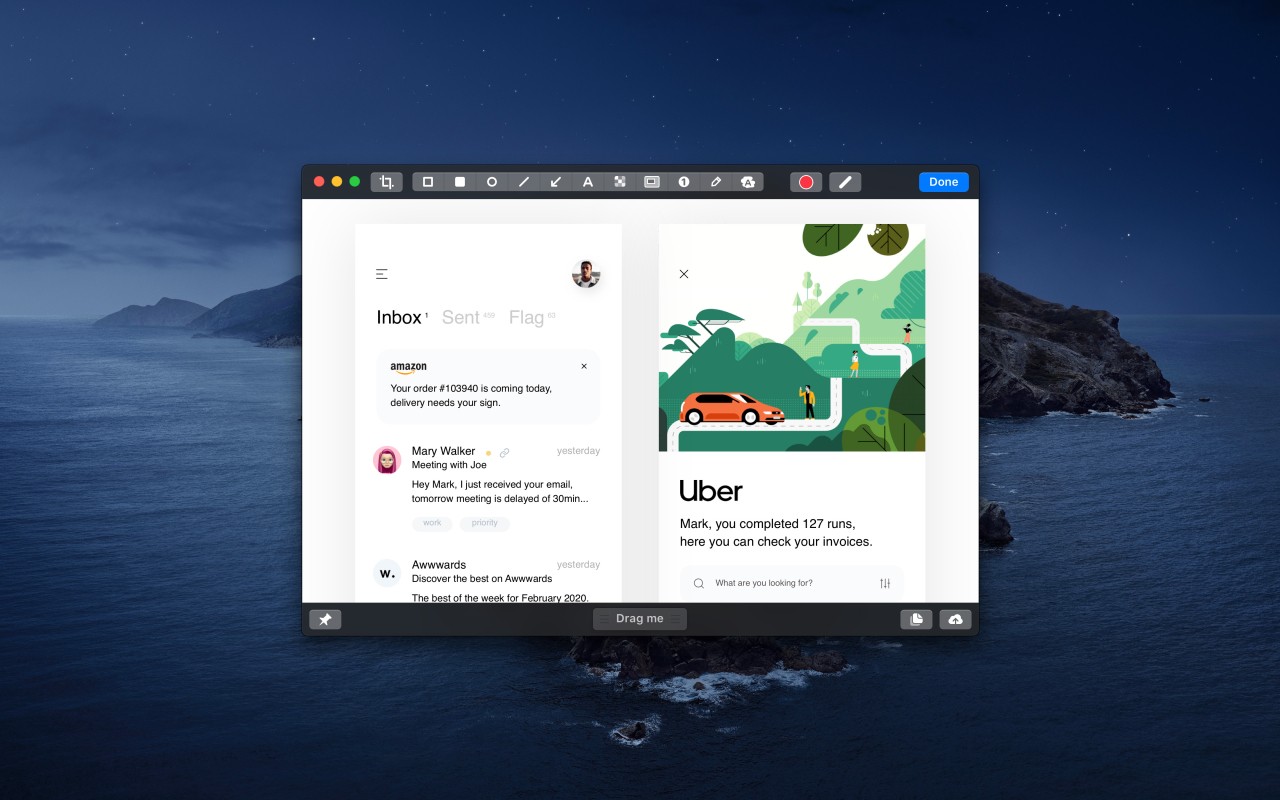
CleanShot X is an application for macOS that gives a good looking finish to the mundane job of taking a screenshot or recording your screen, refining it into something smooth, wide-ranging and surprisingly capable. It is not taking what is on display and snapping it as if following a script. It is about controlling what that snap looks, feels and spreads like.
If you have to go for the scrolling screenshot of a webpage, if you have to catch a video recording of an app that’s running, if you have to record a quick GIF to explain something then CleanShot X provides an unencumbered path for doing all of this without the burden or friction that’s often associated with more normal tools.
It is the quiet control that it offers you that really makes it stand out. You can hide desktop icons, annotate easily, record audio with your screen, or quickly blur sensitive information with just a click, without using five different apps. Every element has a sense of it being purposive. There’s no noise, no overthinking. Just an improved set of tools for those who work visually, or want to explain things in a simple way, or those who want to grab their screen in the blink of an eye.
It’s all for creators, educators, developers, marketers — anyone who winds up, for whatever reason, having to say, here’s how it looks, here’s how it works, here’s what you need to know.
Why Should I Download CleanShot X?
Since sometimes the little things can bog one down, you take a screenshot, and then you open another app to annotate your screenshot. You want to record a little walkthrough, but now you are stuck fiddling around with a complicated screen recorder. You would need to send something to a client or some team members, and you end up dragging images around, saving them, uploading them somewhere else, and creating a new link just to share. CleanShot X cuts through all of that stuff. You press a button, shoot, edit a couple of things, and send. It’s fast. It’s smooth. And it respects your time.
Flow is one of the important characteristics of CleanShot X. There is an in-built overlay feature that enables one to have a preview of his or her screen before saving the screenshot or dragging it elsewhere. Want to blur something? Done. Need to highlight a particular piece of text, make a note, or stitch several screenshots together? Also done. You can now pin a screenshot to your workspace, while you are working, or save a screenshot right to the cloud, with an instant, shareable link. That is fewer switching between tools, fewer manual uploading and more sweet moments when things just work as you like them to work.
The video recording is smooth. You can take a screen capture, add audio recordings, use the click highlight, and even add your camera in the corner if you are talking to someone in a face-to-face way about something. It can be a short demo, a tutorial, or simply a clean cap for feedback; the results bring a professional feel without the need for high-end editing software. And that is the magic of it. You don’t need to be an expert to come up with expert-looking results.
CleanShot X also runs quietly. It does not bog down your machine and fight with other apps. It simply sits there until the moment when you require it and then slots just right into your workflow. Regardless of whether you’re just creating training materials, detailing bugs, or sending a quick update to your client, the experience should feel like that natural offshoot of whatever thoughts you are putting into your current activities, not some “distraction” to what you’re doing. Those kinds of simplicity are difficult to find, and even harder to leave once you’ve had the taste of it.
Is CleanShot X Free?
CleanShot X isn't free, but it comes with a single purchase with the possibility of upgrades. There is no recurring monthly fee except if you’d want to make use of its CleanShot Cloud storage which makes things easy for you but which by the way is not necessary to access its core features. The users can try it for free in order to see how it works before purchasing.
What Operating Systems Are Compatible with CleanShot X?
CleanShot X is available only for the macOS at this moment. It is compatible with recent Mac systems and works well with macOS Catalina and above, with optimization for Apple Silicon devices. It goes along with such macOS functionality as keyboard shortcuts, system permissions, and native file operations. The app is lightweight and stable and is frequently updated in order to support the newest macOS versions. Currently, there are no Windows or Linux versions, thus it is a Mac-only tool for the time being.
What Are the Alternatives to CleanShot X?
If you are interested in other tools that deal with screen recording and capture, a couple of good alternatives provide alternative styles of workflow.
ScreenPal, for example, is designed for convenience and performs well on different platforms. It is more oriented toward recording and video creation rather than screenshots, and it is very popular among educators and remote teams, who need to visually describe processes. With the help of editing tools and screen overlay, it is well-suited for step-by-step video content or the explainer sessions, especially with a webcam narration aid. Although it lacks elegance, it offers integration for macOS, Windows, iOS, and Android. It turns out to be broad and relatively simple for non-technical users.
OBS Studio is a higher-end, open-source product that is designed for broadcasting with long-form recordings. It is powerful, and it is heavier to set up. What you won’t get is the snappy screenshot markup tools and gentle flourishes that CleanShot X provides, but you’ll get more power when it comes to resolution, scenes, sources, and syncing audio. OBS is ideal for live streamers, video producers, and people who have to blend a number of sources. It is free, it is flexible and it can be highly customised but it is not designed around simplicity. If you are mostly doing short clips or still photography, OBS may feel bloated.
Another comparison that is not bad is Wondershare DemoCreator. It is more oriented toward content creators who intend to combine tutorials, voiceovers, and on-screen walkthroughs, with light editing. It has templates, transitions, and annotations that are meant for training or e-learning videos. It’s more movie-like and show-oriented than CleanShot X, which is still deeply in the real-time practicality and speed. DemoCreator can be found both in Windows and macOS so it is more widespread but also more massive in form. It is a strong contender for creators who work in the fields that are in education or promotion.