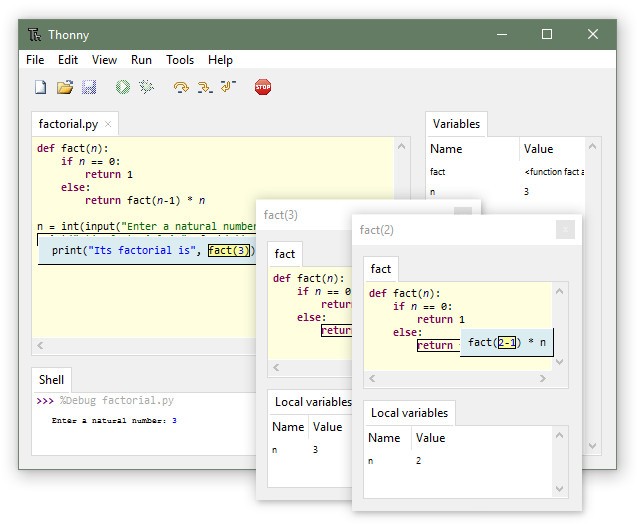
Thonny is a lightweight and beginner-friendly integrated development environment (IDE) to learn how to code and write Python programs in an easy and accessible manner. It was created in a simple way where a newcomer in the world of programming or Python would not be bombarded by complicated interfaces or extra functionality.
The interface is uncluttered and simple to use, having a basic editor where one can enter the code to be run, a run button to execute it, and a shell that gives the output of the code.
The uniqueness of Thonny is that it is clear and educational. To give an example, it offers simple error messages, displays variable values, as well as a built-in debugger, which is convenient to use. The debugger allows you to execute your program line by line and observe its execution. Thus, you get to understand how Python executes instructions.
Python is also included in Thonny, so you do not have to install it and set up your system manually. It is ready-to-go, so it is perfect in classrooms, workshops, or studying at home, depending on requirements.
Why Should I Download Thonny - Python IDE for Beginners?
Thonny allows Python to be taught in a very simple way. The fact that it eliminates common obstacles that usually confuse beginners is one of the primary reasons to download it. There is no need to be concerned about creating paths, installing interpreters, and facing complicated toolbars. Thonny takes care of those details so that you can concentrate on writing code and see how it works.
The interface is clean and has only the essential tools you need to begin coding. Thonny shows you feedback that is clear and easy to understand when you make mistakes, as every person makes when learning. Instead of hidden error messages, the app provides clear, useful hints to help you fix issues.
One more reason why Thonny is worth trying is due to its ability to instill confidence with its simple but powerful features. A fine example is the debugger. It allows you to execute your code line by line and see the state of your program evolve with each of your lines. You will be able to observe variables at work, follow the execution of loops and conditionals, and understand the programming logics much better.
This visual, practical way of learning helps to memorize some concepts, which would otherwise be difficult to grasp. The scope of variables is also emphasized by Thonny; therefore, you could easily observe where your variables are and where they cease to be available. This is extremely useful to beginners who want to understand how functions and modules can be used. Thonny can also do more complex operations, such as installing third-party packages, so the IDE will grow with you as you learn more about Python.
Another reason why you might want to download Thonny is that it is extremely compact and fast on virtually any system. You also do not need to install it on a computer to use it (there is a portable version), and it does not occupy much space on your hard disk. This renders it ideal for outdated computers, in classrooms, or even when used by pupils on cheap laptops.
Installing Thonny is quick, and most importantly, starting is even quicker. It means that you do not spend time learning how to use an IDE, but Python instead. Being a student, teacher, or self-learner, it offers you a trustworthy and welcoming space to take your first steps into code.
Is Thonny - Python IDE for Beginners Free?
Yes, Thonny is open-source, and it does not cost anything. You can download, install, and make use of all its infrastructure without having to pay anything. As an open-source project, Thonny also translates to a community of developers and educators who will contribute towards its amelioration and maintenance to benefit novice programmers. It has no paid upgrades or additional paying features and costs; all in all, it is an affordable option for individuals, schools, and education programs.
What Operating Systems Are Compatible with Thonny - Python IDE for Beginners?
Thonny can be used on Windows, macOS, and Linux. It will operate and function well on various platforms, and thus, no matter the type of computer you are using, the installation and running of Thonny should not be a problem. The software will be packaged with an installer that includes Python, so you do not have to take another step of downloading and installing Python. This further eases the process of installing the system, particularly for the beginner who may not feel comfortable working around the system settings.
What Are the Alternatives to Thonny - Python IDE for Beginners?
One of the most famous ones is PyCharm. It provides a fully featured IDE well adopted by industry developers. PyCharm is provided with Code completion tools, refactoring tools, version control integration tools, and testing. Although PyCharm is quite strong, it can be difficult to learn and even daunting for learners. Nonetheless, PyCharm is an excellent choice to follow Thonny in case the learner wishes to go further than the basics and pursue bigger projects.
The other option is Wing Python IDE, which provides simple features and advanced ones. It comes with an integrated, proper editor, an efficient debugger, and convenient functions such as auto-completion and interactive shells. Wing offers both a simple version for beginners and a professional version for advanced users. It is a good choice among the learners who seek something simple at first but with room to grow.
Anaconda, on the other hand, is more of an end-to-end data science and machine learning distribution that comes with an IDE (Spyder or Jupyter Notebook) and a broad collection of scientific libraries and tools. Unlike any individual IDE, such as Thonny, the Anaconda package provides its users with access to Python as well as the additional tools they may require in case they desire to pursue data analysis, scientific computing, or machine learning. It weighs more than Thonny and may be more complicated to configure, but it is optimal when it comes to users working on scientific or data-oriented Python applications.