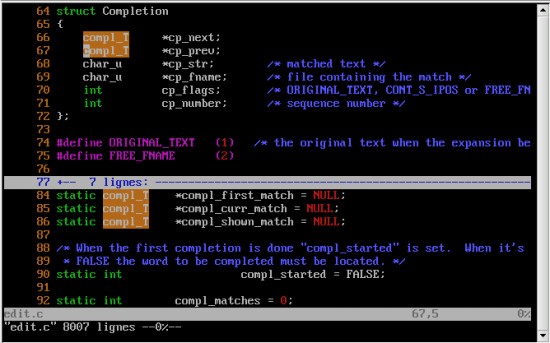
Vim doesn’t try to be modern or imitate other text editors, and that’s exactly what makes it powerful. It aims to do what others can’t. To newcomers, it might feel like something from the dawn of computing, and to a large extent, it is. Vim is a powerful and accurate text editor that is not designed aesthetically. It does not depend on menus and buttons.
Everything is done using keyboard shortcuts, commands, and muscle memory. It is an offspring of an older editor known as vi, and Vim is unique because it is an expansion of that, but it does not sacrifice the essence of easy and quick manipulation. You won’t be clicking around in Vim. To type, you go to insert mode; to move or edit, you go to command mode. It may feel unusual at first, especially if you’ve never used it before, but when you manage to grasp the rhythm, it becomes a part of you.
Vim puts you in full control. The interface does not hamper you with what you can do. You can navigate around text more accurately, manipulate big documents in a flash, and you are also able to chain commands to make effective changes quickly just by using a few keys. It is not something that would appeal to everybody, and it does not claim to. However, to the people who master its language, you’ll never want to work without it.
Why Should I Download Vim?
The primary reason to download Vim, apart from its free and open source model, is workflow. It does not bog you down. Actually, after you have mastered the rudiments, it becomes one of the essentials of editing text. No mousing around, no mucking about with menus, all using keys and direction.
Vim is not merely for typing texts. It is edited cleverly. It is possible to delete, move, copy, as well as paste blocks of text with the help of specific commands. Want to have a replacement for a word? It takes a couple of keystrokes. Want to jump to a certain section or repeat the previous modification between lines? Done. Unlike most text editors, the editing model does not expect you to take your hands off the keyboard to manipulate the contents using the mouse.
A second reason is that Vim is ubiquitous. When it becomes familiar, it will be on most servers, Linux distributions, and even remote systems. When all else fails to solve a problem, Vim tends to be the only one left in a technical environment, or even one that likes to feel and work near the machine. Once learned, its value lasts for years. It is also very flexible. If you want to mold Vim to be whatever you want it to be, you can write your own macros, alter the behavior of keys, or use plugins. Some setups are light and fast. The choice is yours. It lacks the imposed design and fixed style. You form it as per how you want to work.
Vim is also gentle on your system. It runs in a flash even on older machines. It takes up very minimal memory, and it is also fast, even on huge files. When it is about performance over polish, then Vim is an excellent choice. And above all, it makes you learn. When you use Vim, it makes you think of text editing in different ways. You enter the realm of patterns, logic, and efficiency. It’s like switching from a paintbrush to a precise and deliberate scalpel. You don’t just type what you think. It will not be easy, it is not trying to become easy, and it is not designed to become easy. However, it is attempting to be effective. And when many people survive the first learning curve, it becomes difficult to touch anything other than it.
Is Vim Free?
Indeed, Vim is absolutely free. It is OSS (Open Source Software), very much maintained, and it’s free for anyone to download or contribute to. It’s free for personal, professional, educational, and lifelong use.
What Operating Systems Are Compatible with Vim?
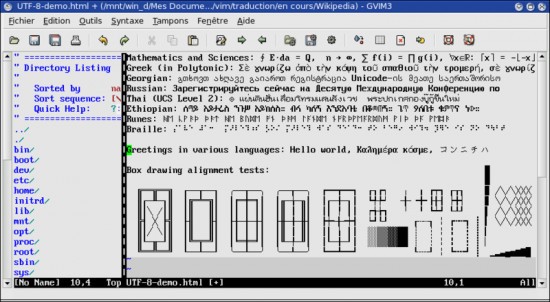
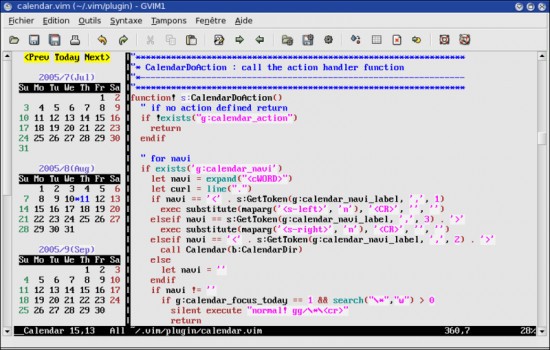
Vim is used in almost all operating systems. Vim exists in all versions of Windows, macOS, and any variant of Linux. You may install it using package managers, download standalone versions, or even compile it yourself in case you prefer it. It runs in the terminal too. If you prefer a graphical interface not that you can add Gvim to Vim (only for Linux).
A good strength of Vim is that it is almost identical to running anywhere. When you get the hang of the commands, they are remembered. You feel right at home, whether you are sitting at your laptop or SSHed into a server on the other side of the world. It is designed as a portable and fast machine, and it performs accordingly.
What Are the Alternatives to Vim?
When you look at Vim and wonder whether it is too steep a hill to climb, then you need to know that other editors out there offer different styles, features, and levels of efficiency.
Sublime Text is a very popular and fashionable text editor. It is streamlined, and it is quick, and it provides a great deal of the same keyboard-type control in a more palatable form. It has multi-cursor editing, strong find-and-replace, and an extensive plugin system. It is also minimal in design, a fact that is liked by many users. Sublime is more up-to-date than Vim, yet does not venture too far into the command-line mode of editing.
The other option is UltraEdit, particularly for those who work with massive files or column mode editing. It is a paid instrument, though, it is admired because of its efficiency and working under mass projects. It provides syntax highlighting, file comparison, FTP integration, and others. It is more developer-oriented, and system administrators who require additional brawn in their editor.
Mark Text is a more dedicated alternative to writing in Markdown. It is simple, stripped-down, and clean. It may not be close to that in terms of text manipulation or scripting, but it is very useful to a writer who wants to preview as he/she type. It is also open source, with the implication that it is free to use and community-based.