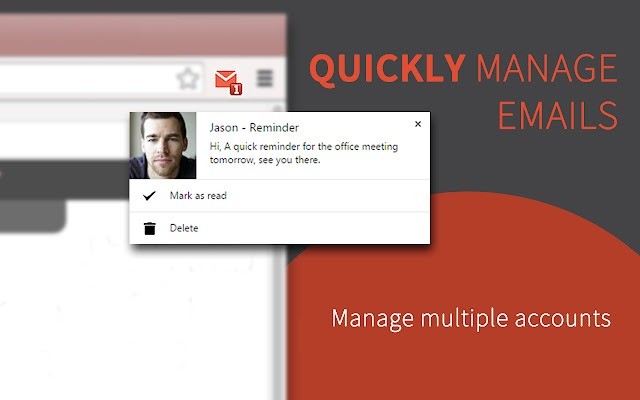
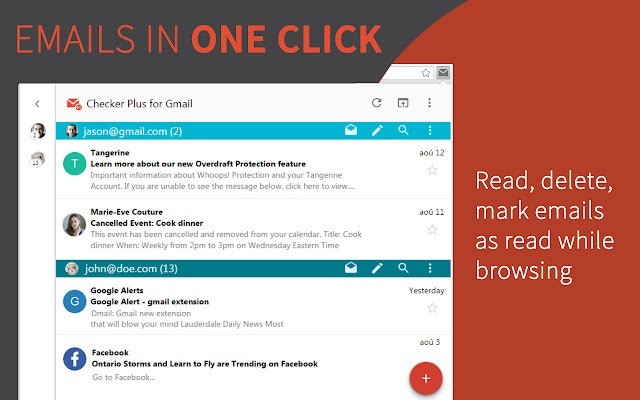
Checker Plus for Gmail is basically an add-on for Chrome that makes checking email a lot less of a chore. Instead of leaving Gmail open in one tab all the time and clicking back and forth, you just install this, and it does the watching for you. Whenever something new lands in your inbox, you get a notice right away. That notice can be a small pop-up, or even a voice that reads it out. You don’t have to open Gmail unless you really want to dive in.
It works even if you close your browser, which feels strange at first but comes in handy. The tool sits in the background and still keeps track of things. People like it because it’s quick and doesn’t try to overwhelm you with too many steps. You just get the basics that matter: who wrote to you, what the subject says, and a short look at the message. From there, you can choose to delete, mark it as read, or file it away.
The developer has been doing Chrome extensions for years, and the trust shows. This one has been reviewed by a lot of users and mentioned on big sites, so it’s not something shady. It’s just a straight, useful way to keep control of your Gmail without burning time.
Why Should I Download Checker Plus for Gmail?
The simple answer is that it saves time. Most of us have the habit of clicking into Gmail too often. One minute you’re reading something important, the next minute you’re distracted because you want to check if a reply came in. Checker Plus cuts that cycle. Instead of living inside your inbox, you get small, direct notifications when something happens. That helps you keep focus on whatever else you’re doing.
It’s flexible too. Maybe you only want a quiet icon change, or maybe you prefer a sound so you don’t miss it. There’s also the voice option, which speaks out the sender’s name and subject. Imagine you’re cooking or working on something else—you don’t have to drop everything just to peek at Gmail. You hear the key info and decide if it matters. It also makes the extension very friendly for people who have sight issues, since hearing the email can be easier than reading.
Another part people point out is safety. Lots of extensions ask for too much access, which can make you uneasy. This one is designed to only touch Gmail, nothing beyond what’s needed. That makes it feel lighter and safer to run all the time. The developer also keeps updating it, and he actually listens to what users want. Many features in there came from requests, and fixes come fast when there’s a problem. That kind of support is rare with free tools.
If you’re someone who hates messy inboxes, Checker Plus is good for keeping things clean. You can remove junk right as it comes in. A couple of clicks, and it’s gone before it piles up. That’s how many users reach what’s called “inbox zero,” where nothing’s left sitting around. It’s not about being perfect—it’s about not letting email waste your time. For anyone who wants less hassle and more control, this extension gives a simple way to do that.
Is Checker Plus for Gmail Free?
Yes, it’s free. You add it to Chrome, and it works right away. All the important parts are included without requiring payment. If you'd like, you can offer some support to the developer. That’s optional and open—you give what you like, not a set fee. When you do that, you unlock a few extras, but honestly, the free version is strong enough for most people. Nothing critical is blocked off.
What Operating Systems Are Compatible with Checker Plus for Gmail?
Checker Plus isn’t a big program you download to your computer. It’s just a Chrome extension, which means it runs anywhere Chrome runs. That covers Windows, macOS, Linux, and even Chrome OS. If the browser works on your system, then this extension works too. You don’t need to think about system requirements or special setups.
Because it’s tied to Chrome, updates also happen automatically. Whenever the developer releases something new, it comes through the Chrome Web Store, and you get it without effort. You don’t have to install patches or check versions. Just keep Chrome up to date, and the extension stays in line. That’s one of the reasons people prefer it over heavy email apps. It doesn’t care what machine you’re using. It just does the job in the browser, quietly, the same everywhere.
What Are the Alternatives to Checker Plus for Gmail?
Some other tools sit in the same space but with a different angle. Mailtrack for Gmail is one of them. It doesn’t focus on alerts; it focuses on tracking. You send someone an email, and it shows you if they opened it. For people in sales or business who need to know if their message was read, it works. But if you’re only after quick inbox control, Mailtrack won’t cover that.
Another option is Active Inbox. This one reshapes Gmail into more of a to-do system. Emails turn into tasks, and you can line them up with projects and deadlines. It’s a different mindset—less about quick notices, more about using Gmail like a planner. If you’re someone who likes structure and turning mail into actions, Active Inbox has value, though it feels heavier.
Boomerang is also worth mentioning. Its big strength is timing. You can write an email now and schedule it to send later. You can also set reminders so older emails pop back up after a while. People who deal with lots of communication schedules find it handy. But again, it’s not really about notifications.